
| Tested on | Red Hat Enterprise Linux 10.2 (Coughlan) |
|---|---|
| Package | quay.io/keycloak/keycloak:26.7.3 |
| Applies to | Any Keycloak 26.x deployment — realm groups, nested hierarchy, and role/attribute inheritance |
| Privilege | Keycloak admin access in the target realm — bootstrap admin on the lab container is enough |
| Lab environment | Keycloak 26.7.3 on http://127.0.0.1:8080/ with golinuxcloud realm — Install Keycloak with Podman |
| Scope | Realm groups — create nested groups, add users, inherit roles and attributes, groups vs roles, and multiple memberships. Does not cover default-group onboarding, LDAP group mapper setup, or Organization groups. |
| Related guides | Keycloak default roles and default groups Keycloak user attributes and User Profile Create and manage Keycloak users |
Keycloak groups let you organize users and assign common roles and attributes to many accounts at once. Groups can be nested, so a user in /Engineering/Backend can inherit attributes and role mappings defined on both Backend and its parent Engineering.
In this article we will create Engineering with Backend and Frontend subgroups in the golinuxcloud realm, add devuser to Backend, and verify the roles and attributes inherited from the parent group.
What is a group in Keycloak?
A realm group is a named collection of users inside one realm. You attach roles and attributes at the group level instead of repeating the same mappings on every account.
| You assign on a group | What members get |
|---|---|
| Realm roles | Realm roles that apply to the user, including roles mapped on parent groups |
| Client roles | Client roles that apply to the user for that client, including parent mappings |
| Attributes | Group attributes from this group and its parents. Values stay stored on the group; they are not copied into each user's profile attributes |
Users receive roles and attributes from the groups they belong to, including parent groups. Keycloak calls the final result effective roles or attributes. That is everything that applies to the user after direct and inherited mappings are combined. These inherited values are not copied into the user's own stored attributes.
Groups are not permissions by themselves. They are containers for membership, role grants, and shared attributes.
This example builds:
  Realm: golinuxcloud
  └── Engineering                    ← app-developer role + department attribute
        ├── Backend                  ← devuser is a member
        └── Frontend
Group path for Backend: /Engineering/Backend. Create devuser first with Create and manage Keycloak users if your realm is empty.
How to create groups in Keycloak
Switch the Admin Console to golinuxcloud (top-left realm selector → Manage realms → golinuxcloud), then open Groups.
Create a parent group
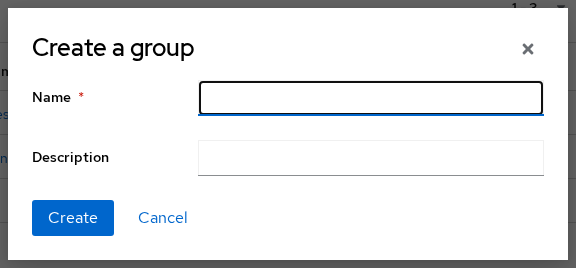
- Click Create group.
- Set Name to
Engineeringand save.
Create nested groups
- Select
Engineering. - Click Create group again and add child
Backend. - Repeat to add child
FrontendunderEngineering.
Open Engineering → Child groups and confirm both subgroups:

Add a user to a group
- Open Users →
devuser→ Groups tab. - Click Join group, select
Backend, and confirm.

devuser is a direct member of Backend only, so the Groups tab shows only /Engineering/Backend. Because Backend is a child of Engineering, roles and attributes assigned to Engineering still apply to devuser. Keycloak does not need to add the user separately to the parent group.
How Keycloak nested groups and inheritance work
Group hierarchy and paths
Nested groups form a parent-child hierarchy. In this example, Engineering is the parent and Backend and Frontend are its children. Keycloak represents each group's location with a group path, similar to a filesystem path.
| Group | Path |
|---|---|
Engineering |
/Engineering |
Backend |
/Engineering/Backend |
Frontend |
/Engineering/Frontend |
Use the path when automation, LDAP mappers, or logs need an unambiguous group reference. The local name alone (Backend) can repeat at different levels.
A group can contain multiple child groups, but each child group has only one parent.
/ separates hierarchy levels in a group path, names that include a slash can look like nested groups when they are not. Keycloak can escape these slashes with ~ when the group JPA provider option --spi-group--jpa--escape-slashes-in-group-path=true is enabled. Prefer group names without / unless you specifically need that character.
Inherit roles from a parent group
Create a realm role and assign it to Engineering, not to Backend:
- Open Realm roles → Create role → name
app-developer→ save. - Open Groups →
Engineering→ Role mapping tab. - Click Assign role, pick
app-developer, and confirm.
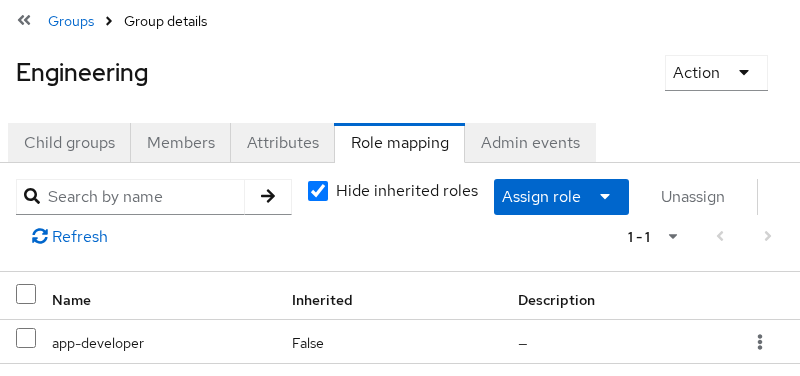
On the group, Inherited=False means app-developer is mapped directly to Engineering.
On Users → devuser → Role mapping, leave Hide inherited roles unchecked. app-developer should appear with Inherited set to True, even though you mapped it only on Engineering and placed devuser in Backend.
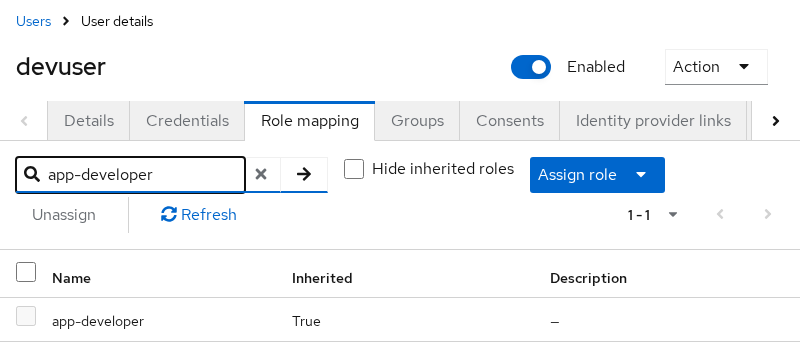
That pair of screenshots is the inheritance proof:
  Engineering ── app-developer
       │
       └── Backend
              │
              └── devuser ── app-developer (Inherited=True)
The same inheritance works for client roles. If you assign a client role to Engineering, a user who belongs only to /Engineering/Backend receives that client role as an effective mapping too. See Keycloak realm roles vs client roles when the permission belongs to one application client.
Inherit attributes from a parent group
Group attributes are inherited too, but they are not copied into the user's stored profile attributes.
- Open Groups →
Engineering→ Attributes. - Add key
departmentwith valueengineering, and save.
Members of Engineering and its subgroups (including devuser in Backend) inherit that group attribute through the hierarchy. The value remains associated with the Engineering group record.
Unlike inherited roles, Keycloak does not show the inherited group attribute by copying it into the user's Details page. Open Users → devuser → Details and you should not see department=engineering written into the user's own attributes. That does not mean inheritance failed. Applications normally consume such attributes through protocol mappers, which is covered separately.
Group attributes are not automatically added to tokens. When an application needs them as claims, configure an appropriate protocol mapper; for example, a User Attribute mapper with Aggregate attributes can combine matching attributes from the user and their groups. See Keycloak protocol mappers and Keycloak user attributes and User Profile when you need that claim.
Keycloak groups vs roles
Use groups to organize users; use roles to represent permissions. For example, Engineering and Backend make sense as groups, while app-developer and billing-admin make sense as roles. Assigning a role to a group gives that role to the group's members.
| Groups | Roles | |
|---|---|---|
| Primary purpose | Organize users (team, department, LDAP mirror) | Model permissions and application access |
| Typical name | Engineering, Backend |
app-developer, billing-admin |
| Token representation | Group membership can be added with a group membership mapper | Realm and client roles are normally exposed through role claims depending on client scopes and mappers |
| Good fit | Hierarchy, bulk membership, LDAP group sync | Fine-grained authorization, composite roles |
Assigning app-developer to Engineering gives members the role app-developer. It does not automatically put /Engineering into the token as a group-membership claim. Add a group membership mapper when applications need the path or group name itself.
For example, can-edit-invoices describes a permission, so it fits better as a role. A group can represent the people who need that permission, such as Billing, with can-edit-invoices assigned to that group.
Should you assign roles to users or groups?
| Approach | When to use it |
|---|---|
| Role assigned directly to a user | Only that user needs the permission |
| Role assigned to a group | Everyone in that group should receive the permission |
| Role assigned to a parent group | Members of all its child groups should receive the permission |
Map a role to the highest group level where every descendant should receive that permission. If only one team needs it, map the role to that subgroup instead.
  Engineering group  ──maps──►  app-developer role
        │
        └── Backend  ──member──►  devuser  ──effective──►  app-developer
One role change on Engineering updates every descendant member. Mapping only on Backend leaves Frontend members without that role, which is correct when the permission is team-specific.
Can a user belong to multiple groups?
Yes. A user can belong to multiple groups. Keycloak combines the roles the user receives from all of those groups, including roles inherited from their parent groups.
Example: keep devuser in Backend (which inherits app-developer from Engineering), create a top-level group Ops, map realm role ops-viewer to Ops, and join devuser to Ops as well. Effective application roles then include both app-developer and ops-viewer.
Roles from one group do not replace roles from another group. If Backend grants app-developer and Ops grants ops-viewer, devuser receives both. If the same role is mapped through two paths, it still appears once.
What are default groups?
Normal group membership is assigned manually or through integrations. If new users should automatically join a particular group, Keycloak supports default groups under Realm settings → User registration → Default groups.
Default groups only handle the join step. Roles still come from mappings on the group or its parents, using the same inheritance model as this article. For the full configuration and how default groups interact with default roles, see Keycloak default roles and default groups.
Keycloak groups with LDAP
If your groups originate in LDAP or Active Directory rather than being created locally, use Keycloak's LDAP group mapper on the user federation provider. When Preserve Group Inheritance is enabled, Keycloak can keep the LDAP hierarchy rather than flattening mapped groups.
After LDAP groups are synchronized into Keycloak, the same inheritance rules described above apply. Users can receive roles and attributes from their mapped group and its parent groups.
Common Keycloak group problems
| Symptom | Likely cause | Fix |
|---|---|---|
| Parent role not inherited by child member | User is not in the expected child hierarchy, role was mapped to a different group, or inherited roles are hidden in the UI | Confirm membership path; map the role on the intended ancestor; leave Hide inherited roles unchecked on the user Role mapping tab |
| Nested LDAP groups become flat in Keycloak | Preserve Group Inheritance off, or group mapper hierarchy options misconfigured | Enable Preserve Group Inheritance and review the LDAP group mapper |
| Inherited group attribute not visible on user Details | Expecting Keycloak to copy the attribute onto the user record | Inheritance does not copy attributes into Details; use a protocol mapper when applications need the value in a token |
Summary
Realm groups organize users inside one Keycloak realm. Nested groups expose a clear path such as /Engineering/Backend, and members of child groups inherit realm roles, client roles, and group attributes from ancestors. Those values stay associated with the group; they are not copied into each user's stored profile attributes.
Use groups to organize users and roles to represent permissions. Assign a role to a parent group when every child group should inherit it, or assign it to a specific subgroup when only that team needs access. A user who belongs to multiple groups receives the combined roles from those memberships.
For automatic joins on new accounts, use default groups. For directory-backed membership, map LDAP or AD groups into these same realm groups with the LDAP group mapper.
References
- Keycloak Server Administration Guide — Managing groups
- Keycloak Server Administration Guide — Groups compared to roles
- Keycloak Server Administration Guide — Using default groups
- Keycloak Server Administration Guide — Managing Organization groups
- Keycloak provider configuration — group JPA
Frequently Asked Questions
Do nested groups inherit roles from parent groups?
Yes. Realm and client roles mapped on a parent group apply to members of child groups. Mapping app-developer on Engineering makes it available to devuser in Backend.
Are inherited group attributes copied to the user's attributes?
No. Members inherit group attributes through the hierarchy, but Keycloak does not copy them into the user's stored profile attributes. Exposing them in tokens requires the appropriate protocol mapper.
Can a user belong to multiple groups?
Yes. Keycloak combines the roles from every group the user belongs to, including roles inherited from each group's parents.
Should I assign roles to users or to groups?
Assign to a group when a shared team or hierarchy should receive the same permission. Assign directly to a user for an exception. Map on a parent group when every descendant should inherit the role.
What is the difference between a group path and a group name?
The name is the local label (Backend). The path is the full hierarchy (/Engineering/Backend). Automation and LDAP integration should use the path when names repeat at different levels.
