
| Tested on | Red Hat Enterprise Linux 10.2 (Coughlan) |
|---|---|
| Package | podman-5.8.2-5.el10_2.x86_64quay.io/keycloak/keycloak:26.7.4curl-8.12.1-4.el10_2.4.x86_64jq-1.7.1-11.el10_2.2.x86_64 |
| Applies to | Any Linux host with Podman or Docker |
| Privilege | Normal user (rootless Podman). Realm setup uses the Keycloak bootstrap admin |
| Scope | Enable the native Keycloak SCIM 2.0 API, turn it on for a realm, authenticate with a client-credentials token, set the SCIM audience, and verify a read with curl. User and group provisioning, and Microsoft Entra, are separate tasks. |
| Related guides | Keycloak OpenID Connect tutorial Keycloak client scopes Realm role vs client role Keycloak bootstrap admin Keycloak container persistence |
Keycloak 26.7.4 includes a native SCIM 2.0 API for realm users and groups. The API is a Preview feature and stays off until you start the server with --features=scim-api and turn SCIM on for the realm.
This guide uses a confidential service-account client with the OAuth client credentials grant. Its access token must include the realm's SCIM base URL in the aud claim. The curl checks below show the 404, Bearer token required, and Invalid token audience responses that appear when one of those steps is missing.
Does Keycloak Support SCIM?
Yes. Keycloak 26.7.4 includes a SCIM 2.0 API. Before enabling SCIM, there are four things you need to know:
- The feature is Preview and disabled in the default server profile. Pass
--features=scim-api. Do not enable the whole preview set. - Keycloak is the SCIM service provider. An external system is the client and sends requests in. This release does not push Keycloak users out to another SCIM server.
- The feature flag does not authorize callers. Each realm has its own SCIM switch, and every request needs an OAuth bearer token whose
audclaim is that realm's SCIM base URL. - The Admin REST API (
/admin/realms/.../users) is a different interface. A client that can call the Admin API is not automatically speaking SCIM.
How Keycloak SCIM Works
Keycloak is the SCIM service provider
SCIM (System for Cross-domain Identity Management) is a standard API protocol for managing identities between systems. A SCIM client can use it to read, create, update, or remove users and groups without relying on a product-specific user-management API.
In SCIM, the service provider exposes the API and the user or group resources being managed. The SCIM client calls that API. RFC 7644 is the protocol.
SCIM's term service provider is unrelated to a SAML Service Provider. Here it simply means the system exposing the SCIM API.
External SCIM client
Entra / IGA / HR / curl
        |
        | SCIM request
        | Authorization: Bearer <token>
        v
┌────────────────────────────┐
│ Keycloak                   │
│ SCIM service provider      │
│ /realms/<realm>/scim/v2    │
└────────────┬───────────────┘
             |
             v
      Realm users/groups
Keycloak is the service provider, so it exposes the API being called. The external system is the SCIM client. In Keycloak 26.7.x that direction is inbound: another system manages users and groups in Keycloak through SCIM. Products such as Microsoft Entra can be that client. Configuring Entra itself is a separate task.
For the vocabulary behind service provider and identity provider, see IdP vs service provider.
SCIM provisioning vs authentication
SCIM manages the account. It does not log the user in. User authentication still happens separately through whatever login method Keycloak is configured to use, such as OIDC or SAML federation, passwords, or WebAuthn. LDAP vs SAML vs OIDC vs SCIM separates those jobs.
Enable the Keycloak SCIM API
Two switches have to be on before a SCIM URL exists. The server feature exposes the routes. The realm switch publishes them for that realm. Think of the server flag as enabling SCIM support in this Keycloak process, while scimApiEnabled decides which individual realms are allowed to expose that API.
When this section is done you will have:
- Container
keycloak-scim-apion127.0.0.1:8080, image26.7.4, with onlyscim-apiadded - Realm
golinuxcloudwith the SCIM API switch on - A live SCIM URL that answers 401 until you send a bearer token
scim-api on a lab realm before a provisioning connector depends on it.
Container commands use the podman command. If Podman is not installed yet, follow Install Keycloak with Podman and then come back. Pin 26.7.4. Do not use the latest tag. This container uses start-dev, so realm data lives inside the container filesystem. Removing the container drops the realm.
Enable the scim-api server feature
First, make one request with SCIM disabled. This gives you the exact 404 response to compare against later if SCIM does not come up correctly. Start without the feature:
podman run -d --name keycloak-scim-api \
  -p 127.0.0.1:8080:8080 \
  -e KC_BOOTSTRAP_ADMIN_USERNAME=admin \
  -e KC_BOOTSTRAP_ADMIN_PASSWORD='ChangeMe!2026' \
quay.io/keycloak/keycloak:26.7.4 start-dev0289a3b57693ada1fdbedf612ca0c1f7ff88ccadb7abdd2d4075564774f50630podman run -d prints the container id and returns. First boot often takes 30–90 seconds. Wait until the log shows that Keycloak is listening, and check that the preview feature line is absent. Filter with the grep command:
podman logs keycloak-scim-api 2>&1 | grep -E 'Preview features enabled|Listening on'2026-10-02 16:23:54,377 INFO [io.quarkus] (main) Keycloak 26.7.4 on JVM (powered by Quarkus 3.33.3.2) started in 25.398s. Listening on: http://0.0.0.0:8080There is no Preview features enabled: scim-api line. Listening on: http://0.0.0.0:8080 is the address inside the container. The -p 127.0.0.1:8080:8080 publish still limits the host to loopback.
Ask for the SCIM service-provider document on the master realm. Use the built-in master realm only for this first server-level test, because golinuxcloud has not been created yet. All remaining SCIM configuration is done in golinuxcloud. Use the curl command and keep the status code in the transcript:
curl -sS -w '\nHTTP %{http_code}\n' -H 'Accept: application/scim+json' \
http://127.0.0.1:8080/realms/master/scim/v2/ServiceProviderConfig{"error":"HTTP 404 Not Found"}
HTTP 404That body is Keycloak's generic not-found page, not a SCIM error document. The route was never registered.
keycloak-scim-api. This first container has no realm yet. The same command later also deletes realm golinuxcloud, because start-dev stores data inside the container.
Remove this container:
podman rm -f keycloak-scim-apikeycloak-scim-apipodman rm -f prints the name it removed. Start the replacement with the feature flag after the image name and the start-dev command:
podman run -d --name keycloak-scim-api \
  -p 127.0.0.1:8080:8080 \
  -e KC_BOOTSTRAP_ADMIN_USERNAME=admin \
  -e KC_BOOTSTRAP_ADMIN_PASSWORD='ChangeMe!2026' \
quay.io/keycloak/keycloak:26.7.4 start-dev --features=scim-apiaa09f88320ceb00ba9b27dc9845d63312904ac50f7ca505a2d9bac612cea084cWait for listen again. This time the preview line should be present:
podman logs keycloak-scim-api 2>&1 | grep -E 'Preview features enabled|Listening on'2026-10-02 16:53:56,863 INFO [org.keycloak.common.Profile] (build-4) Preview features enabled: scim-api:v1
2026-10-02 16:54:13,001 INFO [org.keycloak.common.Profile] (main) Preview features enabled: scim-api:v1
2026-10-02 16:54:25,364 INFO [io.quarkus] (main) Keycloak 26.7.4 on JVM (powered by Quarkus 3.33.3.2) started in 20.331s. Listening on: http://0.0.0.0:8080scim-api:v1 is loaded. Keycloak prints it once at build and once at start. Confirm HTTP on the host before you create a realm:
curl -sS -o /dev/null -w '%{http_code}\n' http://127.0.0.1:8080/realms/master200HTTP 200 means the master realm document is being served. The SCIM feature is on, but each realm still defaults to off.
Enable SCIM for the realm
Log kcadm.sh into the container. It stores that session under /opt/keycloak/.keycloak/ inside the container, so later kcadm.sh commands reuse it:
podman exec keycloak-scim-api /opt/keycloak/bin/kcadm.sh config credentials \
  --server http://127.0.0.1:8080 --realm master --user admin \
--password 'ChangeMe!2026'Logging into http://127.0.0.1:8080 as user admin of realm masterThat line is the bootstrap admin on the master realm, from inside the container.
Create a realm named golinuxcloud with SCIM still off, so the second 404 is visible:
podman exec keycloak-scim-api /opt/keycloak/bin/kcadm.sh create realms \
-s realm=golinuxcloud -s enabled=true -s scimApiEnabled=falseCreated new realm with id 'golinuxcloud'Read the flag back:
podman exec keycloak-scim-api /opt/keycloak/bin/kcadm.sh get realms/golinuxcloud \
--fields realm,scimApiEnabled{
"realm" : "golinuxcloud",
"scimApiEnabled" : false
}The realm exists and SCIM is still off. Call its SCIM URL:
curl -sS -w '\nHTTP %{http_code}\n' -H 'Accept: application/scim+json' \
http://127.0.0.1:8080/realms/golinuxcloud/scim/v2/ServiceProviderConfig{"error":"HTTP 404 Not Found"}
HTTP 404Same generic 404 as before. The feature flag alone did not publish the realm.
Turn the realm switch on in the Admin Console at http://127.0.0.1:8080/admin/:
- Sign in as
adminand pickgolinuxcloudin the realm selector. - Open Realm settings and stay on the General tab.
- Scroll to SCIM API, switch it to On, and click Save.
In Keycloak 26.7.4, the SCIM API toggle appears near the bottom of Realm settings → General. It only appears when the server started with --features=scim-api:
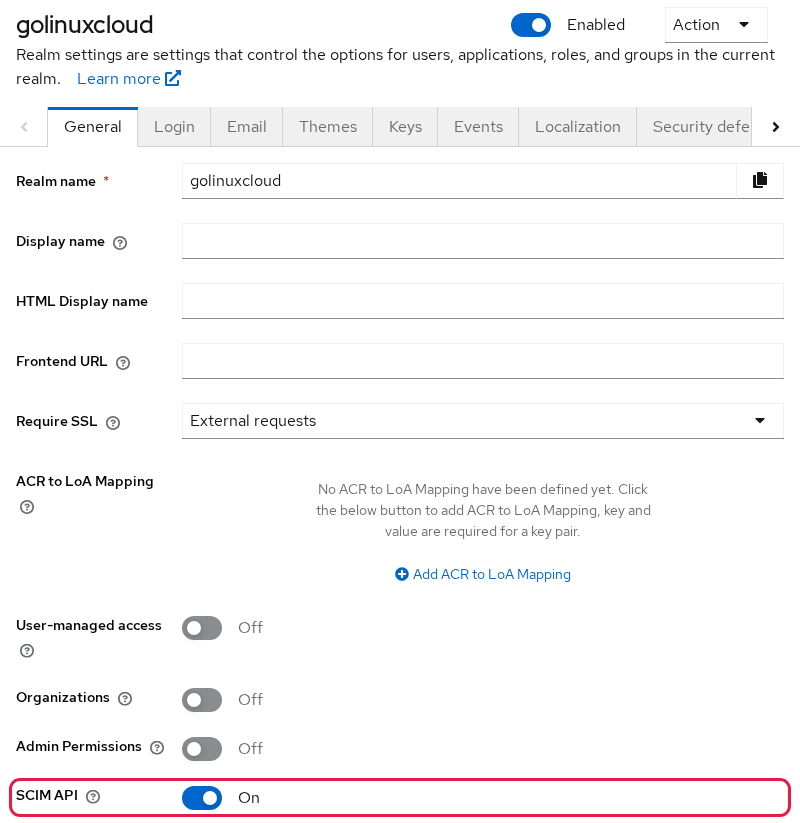
After Save, Keycloak reports that the realm was updated. Nothing else on the page changes.
The same switch from the shell is one kcadm.sh update. It prints nothing when the write succeeds:
podman exec keycloak-scim-api /opt/keycloak/bin/kcadm.sh update realms/golinuxcloud \
  -s scimApiEnabled=true
Read the flag again:
podman exec keycloak-scim-api /opt/keycloak/bin/kcadm.sh get realms/golinuxcloud \
--fields realm,scimApiEnabled{
"realm" : "golinuxcloud",
"scimApiEnabled" : true
}scimApiEnabled is true. Both switches are on.
Why Keycloak SCIM Returns 404
In this 26.7.4 test, the generic {"error":"HTTP 404 Not Found"} response meant the SCIM route had not been exposed yet. Both the server feature and the realm-level SCIM switch had to be enabled before the same URL moved to a SCIM-formatted 401.
I hit both failure states before the route existed:
- Feature off, on the master realm: HTTP 404 and
{"error":"HTTP 404 Not Found"}. - Feature on, realm
golinuxcloudstill atscimApiEnabled=false: the same generic 404. - Both on: the next call, with no token, is HTTP 401 and a SCIM error document.
Verify the SCIM route
Repeat the same URL with no token:
curl -sS -w '\nHTTP %{http_code}\n' -H 'Accept: application/scim+json' \
http://127.0.0.1:8080/realms/golinuxcloud/scim/v2/ServiceProviderConfig{"schemas":["urn:ietf:params:scim:api:messages:2.0:Error"],"status":"401","detail":"Bearer token required"}
HTTP 401HTTP 401 and a SCIM error schema mean the route is live and wants a bearer token. detail is Bearer token required.
Find the Keycloak SCIM Base URL
This realm uses two URLs. Replace the host, port, and realm name when yours differ.
SCIM API:
http://127.0.0.1:8080/realms/golinuxcloud/scim/v2

Token endpoint:
http://127.0.0.1:8080/realms/golinuxcloud/protocol/openid-connect/token
The client sends its ID and secret to the token endpoint. It sends the resulting bearer token to the SCIM endpoint. These URLs have different jobs: the token endpoint authenticates the client, and the SCIM endpoint receives the API request. The SCIM path is /realms/{realm}/scim/v2, with no /auth prefix and no /admin.
Keycloak publishes these paths under that base:
| Path | Role |
|---|---|
/ServiceProviderConfig |
Capability flags: patch, filter, bulk, sort, password change, etag |
/ResourceTypes |
Which resources exist. On this server, User and Group |
/Schemas |
Attribute schemas for those resource types |
/Users |
User resources |
/Groups |
Group resources |
None of these paths are anonymous. The 401 above was /ServiceProviderConfig with both switches already on.
Do not look for the base URL under Endpoints. In 26.7.4, Realm settings → General → Endpoints lists only OpenID Endpoint Configuration and SAML 2.0 Identity Provider Metadata. There is no SCIM link, so build the URL from the realm name yourself.
The audience must use the same SCIM base URL that Keycloak expects for the request, including scheme, host, port, and path. In this local lab, localhost and 127.0.0.1 are therefore different audience values.
If Keycloak sits behind a reverse proxy, use the SCIM base URL corresponding to the frontend URL seen by the client. For example, if users reach Keycloak at https://sso.example.com, do not blindly use an internal address such as http://keycloak:8080 as the audience.
Authenticate to the Keycloak SCIM API
This guide uses the OAuth client credentials grant, so scim-client must be a confidential client with client authentication and service accounts enabled.
Getting a Keycloak access token is not enough by itself. The token must also identify the realm's SCIM API as an intended audience.
Client ID + client secret
         |
         v
Keycloak token endpoint
         |
         | OAuth access token
         v
Access token contains
the SCIM base URL in aud
         |
         v
Keycloak SCIM API
         |
         +-- wrong or missing aud --> 401 Invalid token audience
         |
         +-- correct aud -----------> request is evaluated
Create a confidential service-account client
A confidential client can authenticate itself to Keycloak using a credential such as a client secret. That is why enabling Client authentication creates the Credentials tab used in the next step.
Create the client in the Admin Console, still in realm golinuxcloud:
- Open Clients and click Create client.
- Leave Client type as OpenID Connect, set Client ID to
scim-client, and click Next. - On Capability config, switch Client authentication to On.
- Under Authentication flow, clear Standard flow and check Service account roles. Leave Direct access grants cleared.
- Click Next, leave the login settings empty, and click Save.
The capability page should look like this before you click Next. This client uses the OAuth client credentials grant, so it does not need browser-based login flows. Leave Service account roles enabled and the interactive authentication flows disabled for this setup:
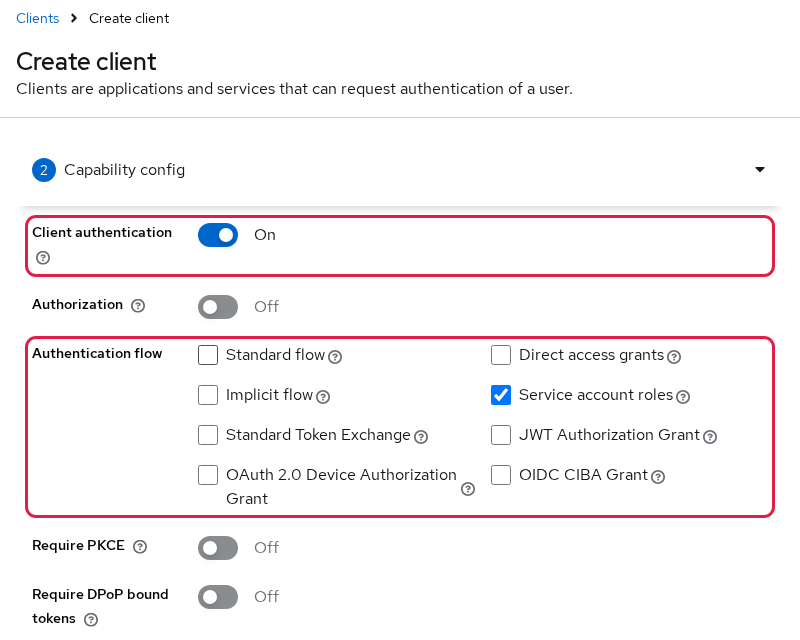
Keycloak opens the new client's details page and reports that the client was created.
Open the Credentials tab. Keycloak generated a secret for the client. The eye icon reveals it, and the copy icon copies it:
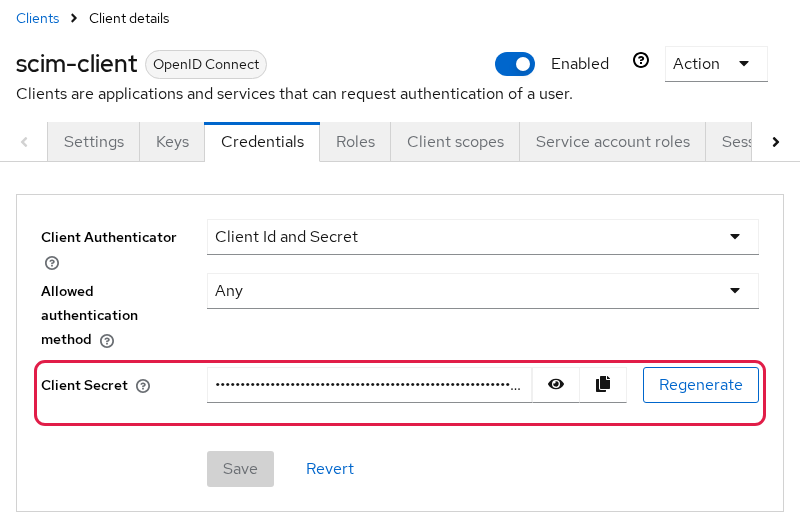
The secret stays masked until you click the eye icon. Treat the secret like a password. Anyone who obtains the client ID and secret can authenticate as this service account and request tokens carrying its assigned permissions.
The curl commands below read the secret from CLIENT_SECRET. If the console generated the secret, paste that value. The shell command in the next paragraph sets a fixed lab secret for the CLI path.
If you would rather script the client, kcadm.sh builds the same thing and sets the secret to scim-lab-secret-2026:
podman exec keycloak-scim-api /opt/keycloak/bin/kcadm.sh create clients -r golinuxcloud \
  -s clientId=scim-client \
  -s enabled=true \
  -s publicClient=false \
  -s secret=scim-lab-secret-2026 \
  -s serviceAccountsEnabled=true \
  -s standardFlowEnabled=false \
  -s directAccessGrantsEnabled=false \
-s implicitFlowEnabled=falseCreated new client with id 'da72d07c-66a9-4717-bbc9-b699ab6ba3ff'Store the secret for the token requests. Replace the value if you copied a generated secret from the Credentials tab:
CLIENT_SECRET='scim-lab-secret-2026'The assignment prints nothing.
Assign SCIM read permissions
A Keycloak service account represents the client as a non-human identity. When scim-client uses the client credentials grant, Keycloak evaluates the roles assigned to this service-account user when deciding what the token can do. Keycloak created this user automatically as service-account-scim-client.
The Keycloak 26.7 documentation separates SCIM permissions by operation:
| Need | Role |
|---|---|
| Discovery endpoints | query-users or query-groups |
| Search or list users | query-users |
| Read a user's details | view-users |
| Create, update, or delete users and groups | manage-users |
This guide assigns view-users because the later read retrieves a full user resource. view-users is composite, so the token also receives the query roles needed for discovery calls. With only query-users, the list returned a total and an empty Resources array, and GET by id returned 403.
view-realm for discovery endpoints. In this tested 26.7.4 setup, view-realm alone returned 403, while query-users and query-groups matched the 26.7 server administration permission model.
Assign view-users in the Admin Console:
- On the client, open the Service account roles tab.
- Click Assign role and choose Client roles.
- Search for
view-users, check the row whose Client ID isrealm-management, and click Assign.
The tab then lists the new mapping next to the default realm role:
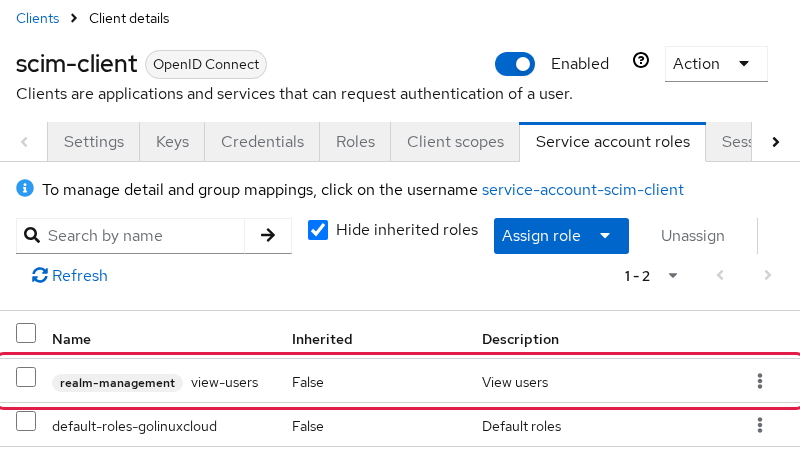
Inherited reads False because you assigned the role directly. view-users is a composite role. Its included query-* roles are hidden here because Hide inherited roles is selected.
From the shell, grant the same role. add-roles prints nothing when the mapping is stored:
podman exec keycloak-scim-api /opt/keycloak/bin/kcadm.sh add-roles -r golinuxcloud \
  --uusername service-account-scim-client \
  --cclientid realm-management \
  --rolename view-users
Get an access token with client credentials
Request a client-credentials token and keep the raw access token out of the transcript. This first token has no SCIM audience yet:
curl -sS -X POST http://127.0.0.1:8080/realms/golinuxcloud/protocol/openid-connect/token \
  -d 'grant_type=client_credentials' \
  -d 'client_id=scim-client' \
  -d "client_secret=$CLIENT_SECRET" \
| jq '{token_type, expires_in, scope}'{
"token_type": "Bearer",
"expires_in": 300,
"scope": "profile email"
}The client authenticated. The access token lives 300 seconds. aud means audience. It identifies which API or service is intended to accept the token. Decode the payload and print only aud and the realm-management roles:
curl -sS -X POST http://127.0.0.1:8080/realms/golinuxcloud/protocol/openid-connect/token \
  -d 'grant_type=client_credentials' \
  -d 'client_id=scim-client' \
  -d "client_secret=$CLIENT_SECRET" \
| jq -r '.access_token | split(".")[1] | gsub("-";"+") | gsub("_";"/") | . + "==" | @base64d | fromjson | {azp, aud, roles: .resource_access["realm-management"].roles}'{
"azp": "scim-client",
"aud": [
"realm-management",
"account"
],
"roles": [
"view-users",
"query-groups",
"query-users"
]
}view-users is on the token, along with query-users and query-groups. aud lists realm-management and account. It does not list the SCIM base URL.
Fix 401 Invalid token audience in Keycloak SCIM
Keycloak issued the token successfully. SCIM still rejects it, because the token does not identify the SCIM API as an intended recipient.
The current aud is:
realm-managementaccount
The required aud also includes:
http://127.0.0.1:8080/realms/golinuxcloud/scim/v2
Store a token and call ServiceProviderConfig with it:
ACCESS_TOKEN=$(curl -sS -X POST http://127.0.0.1:8080/realms/golinuxcloud/protocol/openid-connect/token \
  -d 'grant_type=client_credentials' \
  -d 'client_id=scim-client' \
  -d "client_secret=$CLIENT_SECRET" \
  | jq -r '.access_token')
The assignment prints nothing. Send that value as a bearer token:
curl -sS -w '\nHTTP %{http_code}\n' \
  -H "Authorization: Bearer $ACCESS_TOKEN" \
  -H 'Accept: application/scim+json' \
http://127.0.0.1:8080/realms/golinuxcloud/scim/v2/ServiceProviderConfig{"schemas":["urn:ietf:params:scim:api:messages:2.0:Error"],"status":"401","detail":"Invalid token audience"}
HTTP 401Invalid token audience means the secret and the role were fine. The aud claim did not contain the SCIM base URL.
Here, the audience identifies the API that should accept the token, not the client that requested it. scim-client asks Keycloak for the token, while the realm's SCIM base URL identifies the API that the token will be sent to. That is why the SCIM URL must appear in aud.
Add the SCIM audience to the token
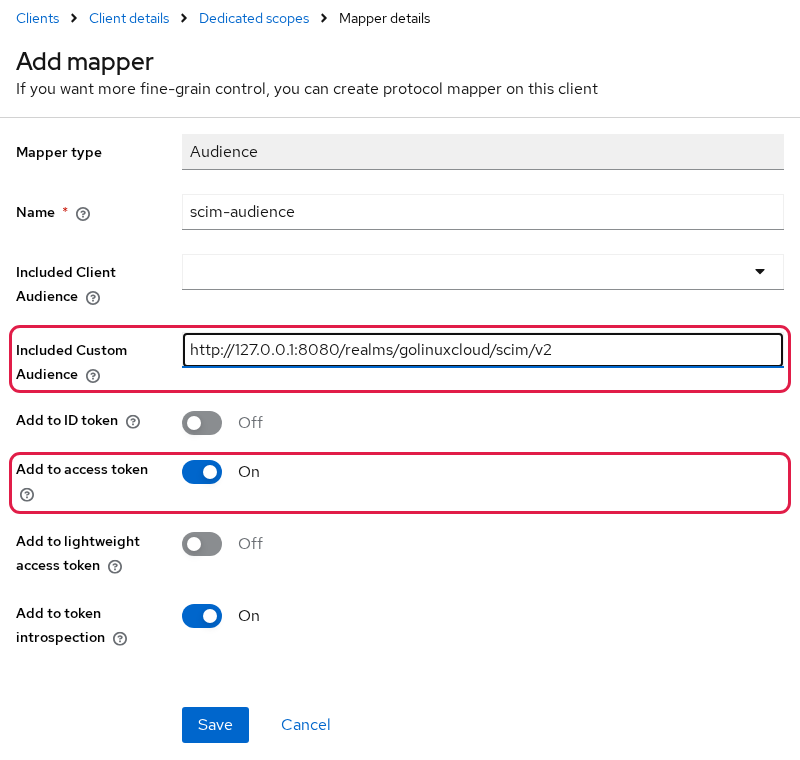
Add an Audience protocol mapper on the client's dedicated scope:
- On
scim-client, open the Client scopes tab and clickscim-client-dedicated. - Click Configure a new mapper and pick Audience from the list.
- Set Name to
scim-audience. - Leave Included Client Audience empty. Set Included Custom Audience to
http://127.0.0.1:8080/realms/golinuxcloud/scim/v2. - Keep Add to access token on. Add to ID token can stay off, because SCIM only reads the access token.
- Click Save.
Two fields matter here:
- Included Custom Audience must be the full SCIM base URL.
- Add to access token must remain On.
After Save, the dedicated scope lists scim-audience with type Audience under Mappers.
On the CLI, the mapper goes on the client by its internal id. Read the id first. Yours will differ from the sample:
podman exec keycloak-scim-api /opt/keycloak/bin/kcadm.sh get clients -r golinuxcloud \
-q clientId=scim-client --fields id --format csv --noquotesda72d07c-66a9-4717-bbc9-b699ab6ba3ffThat single line is the id. Capture it for the mapper create. The command prints nothing:
CLIENT_UUID=$(podman exec keycloak-scim-api /opt/keycloak/bin/kcadm.sh get clients -r golinuxcloud -q clientId=scim-client --fields id --format csv --noquotes)Create the mapper. included.custom.audience is the SCIM base URL, and the claim is added to the access token:
podman exec keycloak-scim-api /opt/keycloak/bin/kcadm.sh create \
  "clients/${CLIENT_UUID}/protocol-mappers/models" -r golinuxcloud \
  -s name=scim-audience \
  -s protocol=openid-connect \
  -s protocolMapper=oidc-audience-mapper \
  -s 'config."included.custom.audience"=http://127.0.0.1:8080/realms/golinuxcloud/scim/v2' \
  -s 'config."access.token.claim"=true' \
-s 'config."id.token.claim"=false'Created new model with id '2c5f3542-2c69-4e14-a97b-d3c28928dde2'Request another token and read aud again. Access tokens are already-signed documents. Changing a mapper does not rewrite tokens that were issued earlier. Request a new token so the new aud claim is included:
curl -sS -X POST http://127.0.0.1:8080/realms/golinuxcloud/protocol/openid-connect/token \
  -d 'grant_type=client_credentials' \
  -d 'client_id=scim-client' \
  -d "client_secret=$CLIENT_SECRET" \
| jq -r '.access_token | split(".")[1] | gsub("-";"+") | gsub("_";"/") | . + "==" | @base64d | fromjson | {azp, aud}'{
"azp": "scim-client",
"aud": [
"http://127.0.0.1:8080/realms/golinuxcloud/scim/v2",
"realm-management",
"account"
]
}The first aud value is the SCIM base URL. The next section sends a token like this.
Test the Keycloak SCIM API with curl
The realm has no ordinary user yet. The service-account user does not show up in a SCIM user list. Add one local account named ada so the read has a row to return. Passwords and required actions are covered in Keycloak users. From the shell:
podman exec keycloak-scim-api /opt/keycloak/bin/kcadm.sh create users -r golinuxcloud \
  -s username=ada -s enabled=true -s firstName=Ada -s lastName=Lovelace \
-s email=ada@example.com -s emailVerified=trueCreated new user with id 'f4ce7596-5fee-4708-bdae-668cea31c62d'ada exists in the realm. That create was the Admin API, not SCIM. Create the user this way only to give the read-only SCIM client something safe to retrieve. SCIM user creation belongs in a separate provisioning tutorial. Take a fresh access token in this shell so this section does not depend on an earlier one:
ACCESS_TOKEN=$(curl -sS -X POST http://127.0.0.1:8080/realms/golinuxcloud/protocol/openid-connect/token \
  -d 'grant_type=client_credentials' \
  -d 'client_id=scim-client' \
  -d "client_secret=$CLIENT_SECRET" \
  | jq -r '.access_token')
The assignment prints nothing on success.
Test ServiceProviderConfig
ServiceProviderConfig is a SCIM metadata endpoint. It tells a client which optional SCIM capabilities this server supports. Read the capability flags:
curl -sS -H "Authorization: Bearer $ACCESS_TOKEN" -H 'Accept: application/scim+json' \
  http://127.0.0.1:8080/realms/golinuxcloud/scim/v2/ServiceProviderConfig \
| jq '{patch, bulk, filter, changePassword, sort, etag, auth: [.authenticationSchemes[].type]}'{
"patch": {
"supported": true
},
"bulk": {
"supported": false,
"maxOperations": 0,
"maxPayloadSize": 0
},
"filter": {
"supported": true,
"maxResults": 100
},
"changePassword": {
"supported": false
},
"sort": {
"supported": false
},
"etag": {
"supported": false
},
"auth": [
"oauthbearertoken"
]
}The token was accepted. Patch and filter are supported. Bulk, password change, sort, and etag are not. The only authentication scheme is an OAuth bearer token.
Test GET /Users
Read users and ask for up to 10 rows:
curl -sS -H "Authorization: Bearer $ACCESS_TOKEN" -H 'Accept: application/scim+json' \
  'http://127.0.0.1:8080/realms/golinuxcloud/scim/v2/Users?count=10' \
| jq '{totalResults, startIndex, itemsPerPage, Resources: [.Resources[] | {id, userName, active, name, emails}]}'{
"totalResults": 1,
"startIndex": 1,
"itemsPerPage": 1,
"Resources": [
{
"id": "f4ce7596-5fee-4708-bdae-668cea31c62d",
"userName": "ada",
"active": true,
"name": {
"formatted": "Ada Lovelace",
"familyName": "Lovelace",
"givenName": "Ada"
},
"emails": [
{
"value": "ada@example.com",
"type": "work",
"primary": true
}
]
}
]
}userName is ada, and the id matches the id from kcadm.sh. active: true reflects that the Keycloak user is enabled. The Keycloak email is represented as a primary work entry in SCIM's emails array. That is a successful authenticated read.
The SCIM endpoint is enabled and the token was accepted. view-users is enough for this read. Write operations need additional permissions, such as manage-users. If the next job is provisioning or Microsoft Entra, treat that as its own configuration. A missing SCIM audience still fails with Invalid token audience after a role change, so keep the mapper.
Keycloak SCIM 404, 401 and 403 Errors
Read the status on GET /scim/v2/ServiceProviderConfig before changing roles or mappers. Each response helps narrow down which stage of the setup still needs attention:
GET /scim/v2/ServiceProviderConfig
              |
              v
             404
              |
              +-- feature or realm SCIM is off
              |
              v
   401 Bearer token required
              |
              +-- token missing
              |
              v
  401 Invalid token audience
              |
              +-- fix the audience
              |
              v
        token accepted
         /            \
insufficient role   sufficient role
       |                  |
403 200| Symptom | Likely cause | Fix |
|---|---|---|
HTTP 404 and {"error":"HTTP 404 Not Found"} |
scim-api is off, or the realm switch is off |
Start with --features=scim-api and set scimApiEnabled=true. In this 26.7.4 test, the same URL then returned a SCIM 401. |
HTTP 401 Bearer token required |
No Authorization header |
Send a client-credentials token as Authorization: Bearer. |
HTTP 401 Invalid token audience |
aud lacks the realm SCIM base URL |
Set the Audience mapper to http://<host>:<port>/realms/<realm>/scim/v2 and request a new token. |
HTTP 403 on ServiceProviderConfig |
The token lacks query-users or query-groups. view-realm alone was insufficient in this 26.7.4 test |
Assign view-users. It includes both query roles. |
totalResults is set but Resources is empty, or GET by id is 403 |
Only query-users is granted |
Assign view-users. |
| HTTP 403 on a write | The token can read | Assign manage-users for create, update, patch, and delete. |
Keycloak SCIM Limitations in 26.7.4
These are the limits that matter before you point another system at the API. Preview behavior can change in a later minor release.
- Users and Groups are the resource types.
ServiceProviderConfigis read-only. You cannot PATCH it to turn bulk on. - PATCH and filter are supported.
filter.maxResultsis 100. - Bulk, SCIM password change, sort, and ETag are not supported. Set passwords in Keycloak.
- Users and groups who hold administrative roles are only partly visible over SCIM, and SCIM writes against them are refused. Change those accounts in the Admin Console or the Admin API.
- Keycloak 26.7.4 acts as the SCIM service provider in this flow. External clients call Keycloak. It does not act as an outbound SCIM client that provisions its users into another provider.
POST /admin/realms/golinuxcloud/usersis the Admin REST API. Similar JSON does not make that call SCIM.
Summary
Keycloak 26.7.4 exposes SCIM 2.0 only after two settings are enabled. The server must start with --features=scim-api, and the target realm must have scimApiEnabled=true.
For the read-only client used here, enable client authentication and service accounts, assign view-users, and obtain a token through the client credentials grant. The token's aud claim must contain the complete SCIM base URL, or Keycloak returns 401 Invalid token audience.
Once those pieces are in place, ServiceProviderConfig and GET /Users are simple checks that the SCIM endpoint, authentication, audience, and read permission are working. Other systems call Keycloak. This release does not push users out to an external SCIM server.
References
- Keycloak 26.7.4 Server Administration Guide: Managing users and groups through SCIM
- Keycloak 26.7.4 Release Notes
- RFC 7643: System for Cross-domain Identity Management: Core Schema
- RFC 7644: System for Cross-domain Identity Management: Protocol
- quay.io/keycloak/keycloak image tags
Frequently Asked Questions
Does Keycloak support SCIM 2.0?
Yes, in Keycloak 26.7.4, as a Preview feature. Start the server with --features=scim-api, and turn the realm's SCIM API switch on. Keycloak then exposes SCIM 2.0 under /realms/{realm}/scim/v2.
Why does the Keycloak SCIM URL return 404?
The route is not registered. Either the server was started without --features=scim-api, or scimApiEnabled is still false on that realm. Both have to be on. In this 26.7.4 test, that generic 404 meant the SCIM route was not available, and the same URL moved to a SCIM-formatted 401 once both switches were enabled.
Why does Keycloak SCIM return Invalid token audience?
The client-credentials token is valid, but aud does not contain the realm SCIM base URL (http://<host>:<port>/realms/<realm>/scim/v2). Add an Audience mapper with that exact custom audience on the access token, then request a new token. Tokens already issued do not pick up the mapper.
What role does a Keycloak SCIM client need?
For the read-only flow in this guide, assign view-users. It includes the query-users and query-groups permissions needed for discovery endpoints, while allowing individual user resources to be read. view-realm alone does not provide SCIM discovery access in the tested 26.7.4 setup.
What is the Keycloak SCIM base URL?
http://<host>:<port>/realms/<realm-name>/scim/v2. For the container in this guide that is http://127.0.0.1:8080/realms/golinuxcloud/scim/v2. The access token audience must match that URL exactly. Realm settings does not list a SCIM link under Endpoints in 26.7.4.
