
| Tested on | Red Hat Enterprise Linux 10.2 (Coughlan) |
|---|---|
| Package | quay.io/keycloak/keycloak:26.7.3 |
| Applies to | Any Keycloak 26.x deployment — realm roles, client roles, composite roles, and access-token role claims |
| Privilege | Keycloak admin access in the target realm — bootstrap admin on the lab container is enough |
| Lab environment | Keycloak 26.7.3 on http://127.0.0.1:8080/ with golinuxcloud realm — Install Keycloak with Podman |
| Scope | Realm roles vs client roles, composite role inheritance, realm_access vs resource_access, and a short troubleshooting pass for roles missing from tokens. Deep client-scope configuration belongs in the client scopes guide. |
| Related guides | Keycloak realms explained Keycloak client scopes Keycloak groups and nested groups |
In this article we will create realm and client roles in the golinuxcloud realm on Keycloak 26.7.3, assign them to test users, and decode access tokens so you can see where each role lands in realm_access and resource_access.
A realm role belongs to the whole realm and is useful when several applications share the same role, such as employee.
A client role belongs to a specific client, such as orders-api / order-reader.
A composite role is a role that groups other realm or client roles so you can assign them together.
A user may have several roles, but a client does not always receive all of them in its token. Keycloak includes only roles the user has and that the client is allowed to receive.
Realm roles vs client roles
Keycloak separates roles according to where they are defined. Realm roles belong to the realm, while client roles are defined under a specific client. You can think of each client as having its own role namespace.
| Realm role | Client role | |
|---|---|---|
| Where it is defined | Realm-wide (employee, developer) |
Under one client (orders-api → order-reader) |
| Typical use | Cross-application business role, admin tiers | Permission inside one API or SPA |
| Token claim (default) | realm_access.roles |
resource_access.<clientId>.roles |
| Admin Console path | Realm roles | Clients → client → Roles |
Think of a realm role as a role that can be reused across the whole realm, while a client role belongs to one particular application or API.
Suppose your company has employee users who use several applications. employee makes sense as a realm role. If only the Orders API has a permission called order-reader, make that a client role under orders-api. If developers need both, create a composite role such as developer that contains both roles. That is exactly what the lab builds next.
A realm role does not automatically grant access in every application. Each service still reads the token (or queries Keycloak) and enforces authorization with its own rules. Keycloak only issues claims; your API decides what employee means. Other clients can still receive a client role in their tokens when role scope mappings allow it. Defining a role under one client is not the same as limiting which clients can ever see it.
  ┌──────────────┐     realm_access.roles      ┌─────────────────┐
  │ Realm roles  │ ──────────────────────────► │ Access token    │
  │ employee     │                             │ (JWT)           │
  └──────────────┘                             └────────┬────────┘
  ┌──────────────┐  resource_access.orders-api         │
  │ Client role  │ ─────────────────────────────────────┘
  │ order-reader │
  └──────────────┘
Create a realm role
Switch the Admin Console to golinuxcloud (top-left realm selector → Manage realms → golinuxcloud), then open Realm roles.
Create the role:
- Click Create role.
- Set Role name to
employee. - Leave Composite roles off for this role and save.
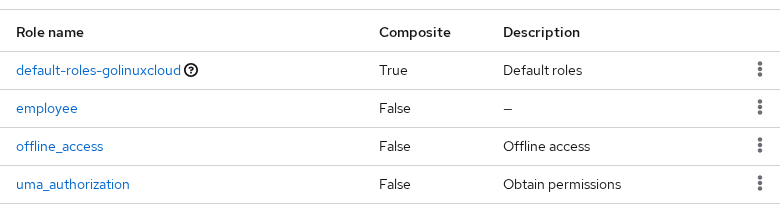
employee should appear alongside the built-in roles (default-roles-golinuxcloud, offline_access, uma_authorization). The composite developer comes later in this article.
Create a client role
Client roles live under their owning client. The lab uses client id orders-api and role name order-reader.
Create the client if it is missing:
- Open Clients → Create client.
- Set Client ID to
orders-api, leave Client authentication off (public client for the lab), and save. - On Settings, enable Direct access grants so the password grant works in curl tests.
- Set Valid redirect URIs to
http://127.0.0.1:8080/*for local testing.
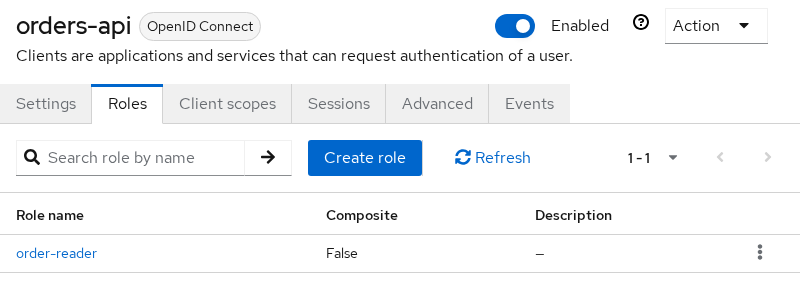
Add the client role:
- Open Clients →
orders-api→ Roles tab. - Click Create role, name it
order-reader, and save.
Assign realm and client roles to a user
Assign both roles to tokenuser so one account holds a realm role and a client role at the same time.
- Open Users →
tokenuser→ Role mapping. - Click Assign role, filter to realm roles, select
employee, and confirm. - Click Assign role again, filter by clients, pick
orders-api/order-reader, and confirm.
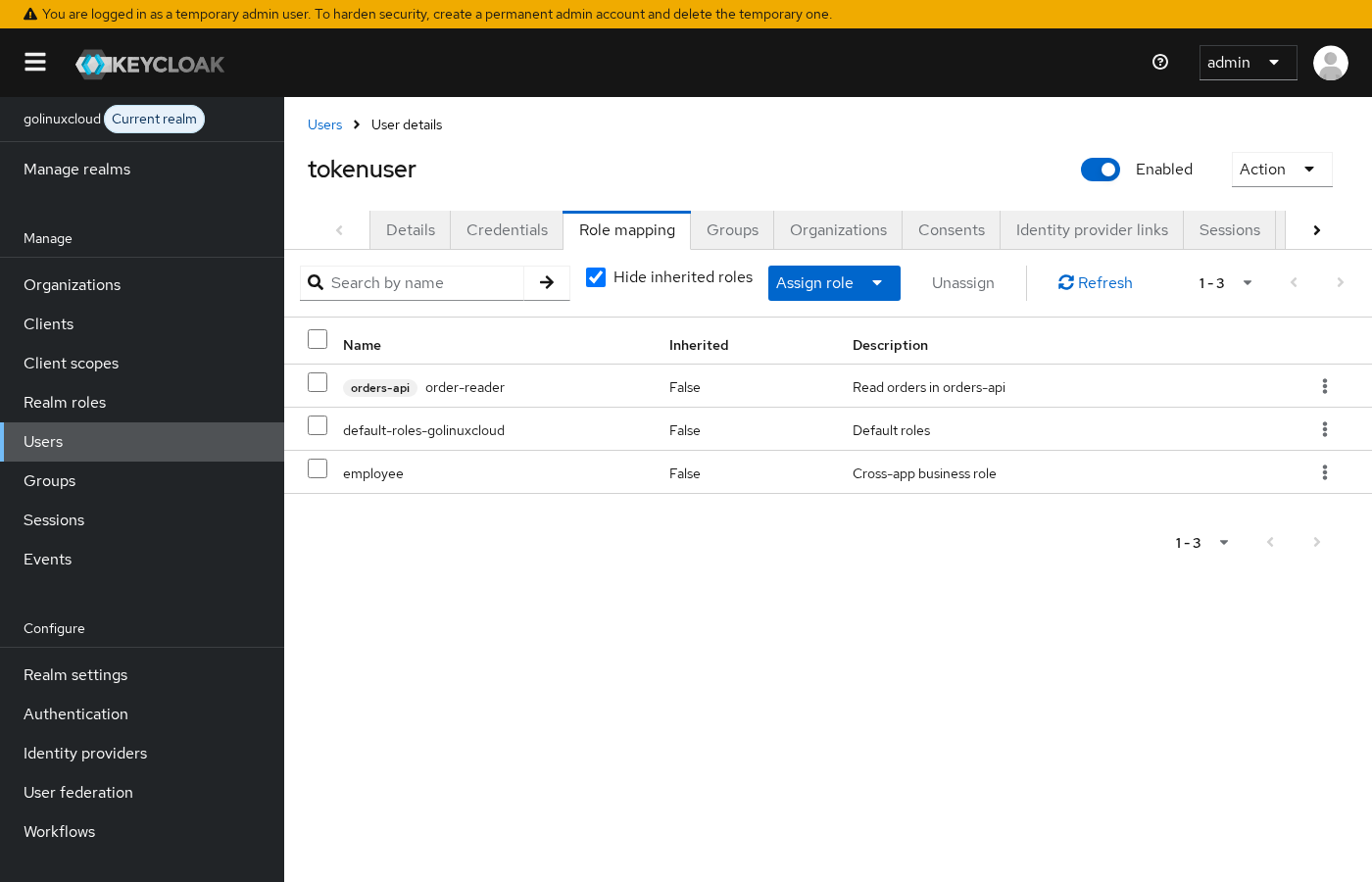
The Admin Console shows client roles with their client prefix (orders-api / order-reader). That prefix matches the resource_access key in the token.
If tokenuser does not exist yet, create the account with inline credentials in Create and manage Keycloak users — users created without a password in the same request may fail the password grant until credentials are set correctly.
Check realm and client roles in an access token
Request an access token for tokenuser against client orders-api with the curl command and the resource-owner password grant:
curl -s -X POST 'http://127.0.0.1:8080/realms/golinuxcloud/protocol/openid-connect/token' \
  -H 'Content-Type: application/x-www-form-urlencoded' \
  -d 'username=tokenuser' -d 'password=TokenUser!2026' -d 'grant_type=password' -d 'client_id=orders-api'
Keycloak puts realm roles and client roles in different places inside the JWT. Realm roles normally appear under realm_access.roles; client roles appear under resource_access.<client-id>.roles.
Copy the access_token value from the JSON response, then decode the payload (middle segment) to inspect those claims:
curl -s -X POST 'http://127.0.0.1:8080/realms/golinuxcloud/protocol/openid-connect/token' \
  -H 'Content-Type: application/x-www-form-urlencoded' \
  -d 'username=tokenuser' -d 'password=TokenUser!2026' -d 'grant_type=password' -d 'client_id=orders-api' \
  | python3 -c "import sys,json,base64; t=json.load(sys.stdin)['access_token']; p=t.split('.')[1]; p+='='*(-len(p)%4); c=json.loads(base64.urlsafe_b64decode(p)); print(json.dumps({k:c.get(k) for k in ('realm_access','resource_access','azp')}, indent=2))"
Sample output with default client scopes and Full scope allowed on (trimmed to role claims):
{
  "realm_access": {
    "roles": [
      "default-roles-golinuxcloud",
      "offline_access",
      "uma_authorization",
      "employee"
    ]
  },
  "resource_access": {
    "orders-api": {
      "roles": [
        "order-reader"
      ]
    },
    "account": {
      "roles": [
        "manage-account",
        "manage-account-links",
        "view-profile"
      ]
    }
  },
  "azp": "orders-api"
}
Read the two role buckets together:
realm_access.roleslists realm roles —employeeappears here.resource_access.orders-api.roleslists client roles for that client id —order-readerappears here.azp(authorized party) isorders-api, the client that requested the token.
Default realm roles (default-roles-golinuxcloud, offline_access, uma_authorization) ship with new realms. Filter them out in application code when you check business roles.
What is a composite role?
A composite role is a role that includes other realm or client roles. Assign the parent once; members inherit every child role in effective role mappings and, when scope allows, in the token.
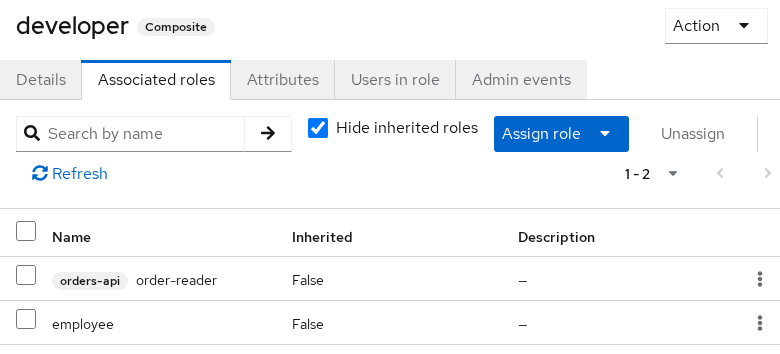
Create composite role developer:
- Realm roles → Create role → name
developer. - Enable Composite roles before save (or toggle it on the role details page).
- Open the
developerrole → Associated roles tab → Assign role. - Add realm role
employeeand client roleorders-api/order-reader.
Assign only developer to user devonly — do not assign employee or order-reader directly on that account.
Request a token for devonly with the same curl pattern:
curl -s -X POST 'http://127.0.0.1:8080/realms/golinuxcloud/protocol/openid-connect/token' \
  -H 'Content-Type: application/x-www-form-urlencoded' \
  -d 'username=devonly' -d 'password=DevOnly!2026' -d 'grant_type=password' -d 'client_id=orders-api' \
  | python3 -c "import sys,json,base64; t=json.load(sys.stdin)['access_token']; p=t.split('.')[1]; p+='='*(-len(p)%4); c=json.loads(base64.urlsafe_b64decode(p)); print(json.dumps({k:c.get(k) for k in ('realm_access','resource_access')}, indent=2))"
Sample output:
{
  "realm_access": {
    "roles": [
      "default-roles-golinuxcloud",
      "offline_access",
      "developer",
      "uma_authorization",
      "employee"
    ]
  },
  "resource_access": {
    "orders-api": {
      "roles": [
        "order-reader"
      ]
    },
    "account": {
      "roles": [
        "manage-account",
        "manage-account-links",
        "view-profile"
      ]
    }
  }
}
devonly holds only developer in Admin Console, but the token includes both developer and inherited employee under realm_access, plus order-reader under resource_access.orders-api.
Composite roles can contain other composite roles. Keycloak follows those nested relationships and gives the user the roles contained at every level. Inherited roles flatten into realm_access / resource_access when scope mappings allow. Keep nesting shallow. Deep trees are hard to audit and painful to debug when one leaf is missing from a token.
Do not confuse groups with composite roles. A group organizes users, while a composite role bundles permissions. You can assign a composite role to a group so every member receives the same permissions.
Why an assigned role may be missing from the token
Three layers often confuse troubleshooting:
- Assigned role — the user (or group) holds the role in Role mapping.
- Effective role — composites and group membership expanded in Admin Console or the Admin API.
- Token role — what this client's access token actually emits.
Token roles are the intersection of the user's effective roles and the role scope mappings available to the client. A user can have employee assigned while a specific client's JWT omits it because that client is not permitted to receive it.
Open Clients → orders-api → Client scopes. You should see orders-api-dedicated plus default and optional client scopes.
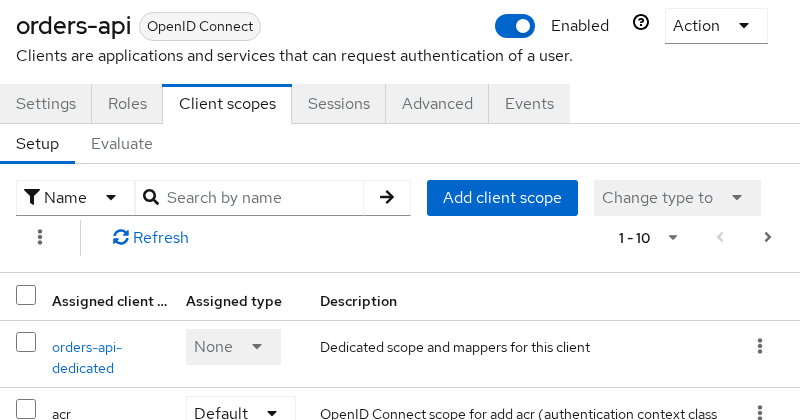
Then open Clients → orders-api → Client scopes → orders-api-dedicated → Scope. That dedicated scope holds this client's own role scope mappings and the Full scope allowed switch.
With Full scope allowed enabled, the client can receive all of the user's effective roles. With it disabled, only roles allowed by the client's role scope mappings are eligible for the token. Leave it on for the early lab tokens; turn it off when you want to see the filter in action.
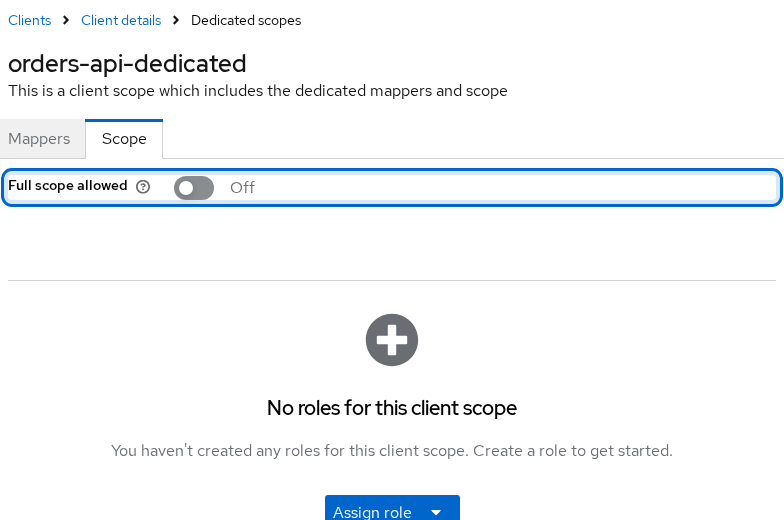
With Full scope allowed off, the dedicated scope shows its own role scope mappings (empty by default in this lab until you click Assign role). Request a fresh token for tokenuser and decode the payload again:
curl -s -X POST 'http://127.0.0.1:8080/realms/golinuxcloud/protocol/openid-connect/token' \
  -H 'Content-Type: application/x-www-form-urlencoded' \
  -d 'username=tokenuser' -d 'password=TokenUser!2026' -d 'grant_type=password' -d 'client_id=orders-api' \
  | python3 -c "import sys,json,base64; t=json.load(sys.stdin)['access_token']; p=t.split('.')[1]; p+='='*(-len(p)%4); c=json.loads(base64.urlsafe_b64decode(p)); print(json.dumps({k:c.get(k) for k in ('realm_access','resource_access')}, indent=2))"
Sample output from this lab with Full scope allowed off:
{
  "realm_access": null,
  "resource_access": {
    "orders-api": {
      "roles": [
        "order-reader"
      ]
    }
  }
}
employee is still assigned to tokenuser, but realm_access is empty because this client's role-scope mappings no longer permit that realm role. In this lab, order-reader remains in scope for orders-api, while employee is no longer permitted. Turn Full scope allowed back on if you want both claim types in one token for the rest of the walkthrough.
For shared scopes, optional scopes, and the Evaluate tab, see Keycloak client scopes.
| Symptom | Likely cause | Fix |
|---|---|---|
| Role on user, absent from token | Full scope allowed off and no role-scope mapping for that role | Add the role on the dedicated Scope tab (or a linked client scope), or narrow the API to roles that are already in scope |
| Composite parent assigned, child missing | Child is a client role for a different client than azp, or not in scope |
Request a token from the owning client, or map the child through role scope mappings |
Role in master realm token |
Wrong realm or wrong client id in the grant | Issue the token from golinuxcloud and the application client (orders-api) |
realm_access has role, API checks resource_access |
Looking in the wrong claim | Read realm_access.roles for realm roles; read resource_access.<clientId>.roles for client roles |
| Stale claim after assignment | Old access token still cached | Request a new token; access tokens are short-lived |
User grant returns Account is not fully set up |
Password not set at create time or required action pending | Recreate the user with inline credentials or clear required actions |
Always decode the access token from the same client your application uses (azp must match). An ID token or a token from the account client carries a different scope shape than orders-api.
Which type of Keycloak role should you use?
| Pattern | When to use it |
|---|---|
| Realm role for cross-cutting business identity | employee, manager — referenced by several clients |
| Client role for one API's permissions | order-reader, order-writer on orders-api |
| Composite for reusable bundles | developer = employee + API roles — assign one role instead of many |
| Groups for org structure | Department membership — map composites to groups instead of assigning roles per user |
Document which claim (realm_access vs resource_access) each service enforces so token troubleshooting stays predictable. Keep composite depth shallow. For clients that should receive only a limited set of roles, disable Full scope allowed and configure explicit role-scope mappings.
Summary
Realm roles and client roles differ by where they are defined: employee lives in realm_access.roles, while orders-api / order-reader lives in resource_access.orders-api.roles. The lab assigned both directly to tokenuser, then built composite developer so devonly inherited employee and order-reader from a single assignment.
Composite roles flatten into effective mappings and into tokens when client scopes allow. The gap between "user has role" and "client token contains role" comes from role scope mappings and Full scope allowed on the client's dedicated Scope tab, not from the role definition itself.
For next steps, tighten shared client scopes per API in Keycloak client scopes, or map role bundles through groups before shipping beyond the lab.
References
- Keycloak Server Administration Guide — Roles
- Keycloak Server Administration Guide — Composite roles
- Keycloak Server Administration Guide — Role scope mappings
- Keycloak Server Administration Guide — Token role mappings
- Keycloak Server Administration Guide — Client scopes
- OpenID Connect Core — Standard Claims
Frequently Asked Questions
Should I use a realm role or a client role?
Use a realm role when the same identity applies across several applications (employee, auditor). Use a client role when the permission belongs to one client's namespace (orders-api / order-reader). Applications still enforce meaning — Keycloak only places names in the token.
Where do composite child roles appear in the JWT?
Inherited realm roles appear under realm_access.roles. Inherited client roles appear under resource_access.<clientId>.roles for each owning client. The parent composite name also appears in realm_access when the composite itself is a realm role.
Why does my realm role disappear when Full scope allowed is off?
With Full scope allowed disabled, the client receives only roles allowed by its role scope mappings. Realm roles need an explicit mapping on a scope attached to that client. In this lab, turning full scope off removed employee from realm_access while order-reader stayed in scope for orders-api — your mappings may differ.
Does assigning a realm role grant access in every client?
No. Assignment records the role on the user; each client decides which roles to accept through role scope mappings, and each service decides what those claims mean. A service that only checks resource_access.my-api.roles never sees a realm-only role unless mappers add it or the API reads realm_access.
Can a composite role include both realm and client roles?
Yes. The developer composite in this lab includes realm role employee and client role orders-api / order-reader. Effective role APIs and tokens resolve both types when scope allows.
