
| Tested on | Red Hat Enterprise Linux 10.2 (Coughlan) |
|---|---|
| Package | podman-5.8.2-5.el10_2.x86_64quay.io/keycloak/keycloak:26.7.3 |
| Applies to | Any Linux host with Podman or Docker |
| Privilege | Normal user for rootless Podman; Keycloak admin access in the lab realm |
| Lab environment | Keycloak 26.7.3 on http://127.0.0.1:8080/ — Install Keycloak with Podman |
| Scope | PKCE threat model, verifier and S256 challenge generation, public client configuration, Authorization Code exchange with curl, wrong-verifier and method-enforcement failures. Does not cover full OIDC discovery, token validation at an API, or framework-specific SPA libraries. |
| Related guides | Keycloak OpenID Connect tutorial Keycloak public vs confidential clients Keycloak clients explained Create and manage Keycloak users |
Proof Key for Code Exchange (PKCE) protects the Authorization Code flow by binding each authorization code to a random code_verifier created for that login attempt. The browser sends only a derived code_challenge when login starts; the original verifier is revealed later when the client exchanges the authorization code for tokens. If someone steals only the authorization code, they still cannot exchange it without the matching verifier.
You configure a public Keycloak client — an application that cannot safely keep a permanent client secret, such as browser-side JavaScript or many mobile applications — generate a standards-compliant verifier and S256 challenge, complete the code exchange, and deliberately fail the exchange with the wrong verifier so you can see what PKCE actually blocks.
This lab uses Keycloak 26.7.3 on 127.0.0.1:8080, realm golinuxcloud, client pkce-lab-spa, and test user tokenuser. You run the flow with curl and a browser redirect — the same mechanics an SPA or mobile app uses through an OIDC library. For the wider OIDC path including discovery, audience mappers, and API validation, continue with the Keycloak OpenID Connect tutorial.
What this PKCE lab creates
When you finish, three pieces work together:
- Public client
pkce-lab-spawith S256 PKCE enforced - Shell-generated
code_verifierandcode_challengevalues per login attempt - Evidence that an intercepted authorization code cannot be exchanged without the matching verifier
  code_verifier
       |
       | SHA-256 + Base64URL
       v
  code_challenge
       |
       | sent when login starts
       v
  Keycloak
       |
       | authorization code
       v
  Application
       |
       | authorization code + original code_verifier
       v
  Keycloak
       |
       | verifier matches challenge?
       v
     Tokens
The verifier never appears in the authorization redirect. Only the derived challenge is sent when the login begins.
Now compare that successful flow with an attacker who obtains the authorization code but not the verifier:
  Attacker                         Keycloak                    Your SPA
      |                                |                           |
      |  steals authorization code     |                           |
      |  from browser redirect         |                           |
      |                                |                           |
      |  POST /token (no verifier)     |                           |
      +------------------------------->|                           |
      |<------ invalid_grant ----------|                           |
      |                                |                           |
      |                                |  POST /token + verifier   |
      |                                |<--------------------------+
      |                                |------ tokens ------------>|
The authorization code travels through the browser redirect. The code_verifier stays with the application until it calls Keycloak's token endpoint. An attacker who obtains only the authorization code does not have the verifier required to complete the exchange.
How PKCE works in Keycloak
Authorization Code flow sends a short-lived code back to the application through the browser. The authorization code passes through the browser front channel, where certain attack scenarios can expose or inject authorization codes. Without PKCE, an attacker who obtains a usable code may be able to redeem it at the token endpoint.
PKCE closes that gap by requiring a code_verifier that was never present in the redirect.
Each login attempt works like this:
- The application generates a high-entropy
code_verifierand keeps it until the token exchange. - It sends only
code_challenge = BASE64URL(SHA256(verifier))on the authorization request.S256means the challenge is derived by applying SHA-256 to the verifier and Base64URL-encoding the result. - Keycloak stores the challenge with the pending authorization code.
- On token exchange, the application sends the original verifier. Keycloak computes
BASE64URL(SHA256(verifier))and compares the result to the stored challenge.
If the verifier does not match, Keycloak rejects the exchange even when the authorization code itself is valid.
PKCE vs state, nonce, and client secrets
PKCE solves a different problem than state, nonce, or a client secret. Use all of them where they apply, but do not treat them as interchangeable.
| Mechanism | Main purpose | Sent on auth redirect? | Sent on token exchange? |
|---|---|---|---|
PKCE (code_verifier / code_challenge) |
Binds the authorization code to the client that started the flow | Challenge only | Verifier |
state |
Correlates the authorization response with the original request and can provide CSRF protection | Yes | No |
nonce |
Binds an ID token to the authentication request and helps prevent replay/code-injection scenarios | Yes | No (checked in ID token) |
| Client authentication | Proves the identity of a confidential client to the token endpoint | No | Yes (confidential clients) |
A public SPA cannot store a client secret safely. PKCE proves that the party exchanging the authorization code possesses the same code_verifier associated with the authorization request. For when to pick a public versus confidential client, see Keycloak public vs confidential clients — this article stays focused on the PKCE mechanics.
This lab includes both state and nonce because it uses OpenID Connect, but the security test below focuses specifically on PKCE: whether someone who has the authorization code can exchange it without the matching verifier.
Configure a public Keycloak client
In Keycloak, a client represents an application that uses Keycloak for authentication or authorization. Here, pkce-lab-spa represents our browser application, even though we perform the application's work manually with the browser and curl.
Create client pkce-lab-spa in realm golinuxcloud. If you need realm or user setup first, use Create and manage Keycloak users and Keycloak clients explained.
In the Admin Console, open Clients → Create client.
General settings
- Client type: OpenID Connect
- Client ID:
pkce-lab-spa
Capability config
- Client authentication: OFF (public client)
- Standard flow: ON
- Direct access grants: OFF
Login settings
- Valid redirect URIs:
http://127.0.0.1:8765/callback
On Settings, scroll to Advanced settings, turn Require PKCE ON, and set PKCE Method to S256. Keycloak then rejects plain challenges and requires PKCE parameters on authorization requests for this client.
Verify the client settings shown below. The upper part shows the capability settings, while the lower part shows the PKCE settings under Advanced settings:
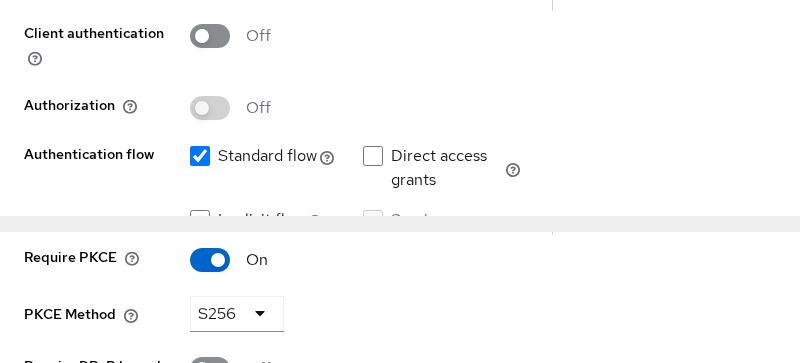
Confirm Client authentication is OFF, Standard flow is ON, Direct access grants is OFF, Require PKCE is ON, and PKCE Method is S256.
Confirm Keycloak is listening before you continue:
curl -s -o /dev/null -w '%{http_code}\n' http://127.0.0.1:8080/Sample output:
302HTTP 302 means the server is up and redirecting to the welcome page.
Generate a PKCE code verifier and S256 code challenge
The verifier is the value the application keeps. The challenge is the value it is safe to send when login starts:
  code_verifier     stays with application
        |
        +---- BASE64URL(SHA256(...)) ----> code_challenge
                                            sent to Keycloak
RFC 7636 requires the verifier to be 43–128 characters from the unreserved URL-safe set. The commands below use 32 random bytes encoded as Base64URL, which produces a 43-character verifier with strong entropy.
Generate one verifier and its S256 challenge per login attempt:
CODE_VERIFIER=$(python3 -c "import secrets,base64; print(base64.urlsafe_b64encode(secrets.token_bytes(32)).rstrip(b'=').decode())")This command stores the verifier in the CODE_VERIFIER shell variable. Next, derive the S256 challenge from it. PKCE uses Base64URL encoding without = padding, which is why the command removes trailing = characters:
CODE_CHALLENGE=$(python3 -c "import base64,hashlib,sys; v=sys.argv[1]; print(base64.urlsafe_b64encode(hashlib.sha256(v.encode()).digest()).rstrip(b'=').decode())" "$CODE_VERIFIER")Confirm the verifier length falls in the RFC range:
echo "verifier length: ${#CODE_VERIFIER}"Sample output:
verifier length: 43Encoding 32 random bytes this way produces a 43-character verifier, which satisfies PKCE's 43–128 character requirement. Never reuse a verifier across login attempts, and never log it to the browser console in production.
Send the authorization request
Build the authorization URL with the PKCE challenge, state, and nonce. state lets the client correlate the response with the login request and can provide CSRF protection, while nonce binds the resulting ID token to the authentication request.
Generate state and nonce for this attempt:
STATE=$(python3 -c "import secrets; print(secrets.token_urlsafe(16))")
NONCE=$(python3 -c "import secrets; print(secrets.token_urlsafe(16))")
Print the URL and open it in a browser:
printf '%s\n' "http://127.0.0.1:8080/realms/golinuxcloud/protocol/openid-connect/auth?client_id=pkce-lab-spa&response_type=code&scope=openid&redirect_uri=http%3A%2F%2F127.0.0.1%3A8765%2Fcallback&state=${STATE}&nonce=${NONCE}&code_challenge=${CODE_CHALLENGE}&code_challenge_method=S256"The PKCE and OIDC parameters in that URL:
| Parameter | Purpose |
|---|---|
response_type=code |
Requests Authorization Code flow |
client_id |
Identifies pkce-lab-spa |
redirect_uri |
Where Keycloak sends the browser after login |
code_challenge |
Derived from the verifier |
code_challenge_method=S256 |
Tells Keycloak SHA-256 was used |
state |
Correlates the response with this login request |
nonce |
Binds the ID token to this authentication request |
Sign in as tokenuser with password TokenUser!2026. Keycloak 26.7.3 uses a two-step login form. After success, the browser redirects to an address like:
http://127.0.0.1:8765/callback?state=...&session_state=...&iss=...&code=...Copy the code query parameter. Nothing must listen on port 8765 for this lab — you only need the code value for the token request.
If you omit PKCE parameters entirely, Keycloak redirects with an error instead of a code. This request leaves out code_challenge and code_challenge_method:
curl -s -D - -o /dev/null "http://127.0.0.1:8080/realms/golinuxcloud/protocol/openid-connect/auth?client_id=pkce-lab-spa&response_type=code&scope=openid&redirect_uri=http%3A%2F%2F127.0.0.1%3A8765%2Fcallback&state=demostate"Sample output (trimmed to the Location header):
Location: http://127.0.0.1:8765/callback?error=invalid_request&error_description=Missing+parameter%3A+code_challenge_method&state=demostate&iss=http%3A%2F%2F127.0.0.1%3A8080%2Frealms%2FgolinuxcloudMissing parameter: code_challenge_method confirms S256 enforcement is active on pkce-lab-spa.
Exchange the code with the verifier
The relationship Keycloak checks at the token endpoint:
  Authorization request:
      code_challenge =
          BASE64URL(SHA256(code_verifier))

  Token request:
      authorization code + original code_verifier

  Keycloak:
      BASE64URL(SHA256(received code_verifier))
                    ==
            stored code_challenge
Only if those values match does Keycloak issue tokens.
Paste the authorization code from the callback URL, then post to the token endpoint. Public clients omit client_secret. An authorization code can be exchanged only once, so save the response immediately.
AUTH_CODE='paste-code-from-callback-url'

curl -s -X POST 'http://127.0.0.1:8080/realms/golinuxcloud/protocol/openid-connect/token' \
  -H 'Content-Type: application/x-www-form-urlencoded' \
  -d "grant_type=authorization_code" \
  -d "client_id=pkce-lab-spa" \
  -d "code=${AUTH_CODE}" \
  -d "redirect_uri=http://127.0.0.1:8765/callback" \
  -d "code_verifier=${CODE_VERIFIER}" \
  > /tmp/pkce-tokens.json
Display the saved response:
python3 -m json.tool /tmp/pkce-tokens.jsonSample output (trimmed):
{
    "access_token": "eyJhbGciOiJSUzI1NiIsInR5cCIgOiAiSldUI...",
    "expires_in": 300,
    "refresh_expires_in": 1800,
    "refresh_token": "eyJhbGciOiJIUzUxMiIsInR5cCIgOiAiSldUI...",
    "token_type": "Bearer",
    "id_token": "eyJhbGciOiJSUzI1NiIsInR5cCIgOiAiSldUI...",
    "scope": "openid"
}
A JSON object with access_token, id_token, and refresh_token means Keycloak accepted the verifier and issued tokens. No client secret appeared in the browser or in these curl commands.
Prove the wrong verifier fails
Start a fresh login with a new verifier and challenge pair. Keep the new verifier aside and obtain a fresh authorization code using its challenge. At the token endpoint, deliberately send a different verifier. This simulates an attacker who obtained the authorization code but not the verifier that belongs to that login.
| Step | Value |
|---|---|
| Authorization request | GOOD_CHALLENGE derived from GOOD_VERIFIER |
| Token request | WRONG_VERIFIER |
| Expected result | PKCE verification failed: Code mismatch |
  GOOD_VERIFIER
        |
        | SHA-256 + Base64URL
        v
  GOOD_CHALLENGE  -----> authorization request
                              |
                              v
                      authorization code
                              |
                              | + WRONG_VERIFIER
                              v
                           Keycloak
                              |
                         values differ
                              |
                              v
                       invalid_grant
Generate a fresh verifier and S256 challenge for this login attempt:
GOOD_VERIFIER=$(python3 -c "import secrets,base64; print(base64.urlsafe_b64encode(secrets.token_bytes(32)).rstrip(b'=').decode())")Derive the challenge from GOOD_VERIFIER:
GOOD_CHALLENGE=$(python3 -c "import base64,hashlib,sys; v=sys.argv[1]; print(base64.urlsafe_b64encode(hashlib.sha256(v.encode()).digest()).rstrip(b'=').decode())" "$GOOD_VERIFIER")Generate fresh state and nonce values for this browser login:
STATE=$(python3 -c "import secrets; print(secrets.token_urlsafe(16))")
NONCE=$(python3 -c "import secrets; print(secrets.token_urlsafe(16))")
Print the authorization URL with GOOD_CHALLENGE and open it in a browser:
printf '%s\n' "http://127.0.0.1:8080/realms/golinuxcloud/protocol/openid-connect/auth?client_id=pkce-lab-spa&response_type=code&scope=openid&redirect_uri=http%3A%2F%2F127.0.0.1%3A8765%2Fcallback&state=${STATE}&nonce=${NONCE}&code_challenge=${GOOD_CHALLENGE}&code_challenge_method=S256"Sign in as tokenuser and copy the fresh code from the callback URL. Do not exchange this code with GOOD_VERIFIER.
Generate a different verifier to simulate an attacker who lacks the original:
WRONG_VERIFIER=$(python3 -c "import secrets,base64; print(base64.urlsafe_b64encode(secrets.token_bytes(32)).rstrip(b'=').decode())")Post the stolen code with WRONG_VERIFIER (paste the fresh code from this login):
FRESH_AUTH_CODE='paste-code-from-callback-url'

curl -s -X POST 'http://127.0.0.1:8080/realms/golinuxcloud/protocol/openid-connect/token' \
  -H 'Content-Type: application/x-www-form-urlencoded' \
  -d "grant_type=authorization_code" \
  -d "client_id=pkce-lab-spa" \
  -d "code=${FRESH_AUTH_CODE}" \
  -d "redirect_uri=http://127.0.0.1:8765/callback" \
  -d "code_verifier=${WRONG_VERIFIER}"
Sample output:
{"error":"invalid_grant","error_description":"PKCE verification failed: Code mismatch"}That is the outcome you want. Keycloak rejected the exchange because WRONG_VERIFIER did not produce the GOOD_CHALLENGE from this login's authorization request. Possessing the stolen authorization code alone is not enough.
If you try plain as the challenge method while the client requires S256, Keycloak fails earlier on the authorization request:
curl -s -D - -o /dev/null "http://127.0.0.1:8080/realms/golinuxcloud/protocol/openid-connect/auth?client_id=pkce-lab-spa&response_type=code&scope=openid&redirect_uri=http%3A%2F%2F127.0.0.1%3A8765%2Fcallback&state=plaindemo&code_challenge=abcdefghijklmnopqrstuvwxyz0123456789ABCDEFG&code_challenge_method=plain"Sample output (trimmed):
Location: http://127.0.0.1:8765/callback?error=invalid_request&error_description=Invalid+parameter%3A+code+challenge+method+is+not+matching+the+configured+one&state=plaindemo&iss=http%3A%2F%2F127.0.0.1%3A8080%2Frealms%2Fgolinuxcloudplain sends the verifier itself as the challenge. S256 hashes the verifier so the challenge reveals nothing useful if intercepted. Always configure and request S256 for browser and mobile clients.
SPA and mobile security guidance
PKCE is necessary for public clients, but it is not the whole security story. Keep these practices alongside S256 PKCE:
- Register exact redirect URIs — no open wildcards in production. Keycloak compares the
redirect_uriparameter character-for-character. - Keep the
code_verifierconfidential to the current login transaction and do not place it in URLs or logs. Let your OIDC library manage its temporary storage rather than building your own PKCE storage mechanism. - Keep access and refresh tokens out of callback URLs. Authorization Code flow returns the short-lived authorization code along with protocol parameters such as
stateandiss, rather than returning access tokens in the URL. - Use the Authorization Code flow with PKCE — not Implicit flow, which puts tokens directly in the browser fragment.
- Let a maintained OIDC library handle verifier generation,
state/noncevalidation, and token storage. This article uses manual curl steps so you can read the protocol; production SPAs should delegate that work.
Mobile apps follow the same pattern with a custom URL scheme or App Link as the redirect target. The verifier still never travels in the redirect — only the challenge does.
Troubleshooting PKCE errors
| Symptom | Likely cause | Fix |
|---|---|---|
Missing parameter: code_challenge_method |
PKCE enforced but challenge omitted | Send code_challenge and code_challenge_method=S256 on the auth request |
code challenge method is not matching the configured one |
plain sent while client requires S256 |
Set client PKCE method to S256 and request S256 in the auth URL |
PKCE verification failed: Code mismatch |
Wrong code_verifier for this code |
Use the verifier that produced the code_challenge for this login |
invalid_grant / Code not valid |
Code reused, expired, or already exchanged | Run a fresh browser login and exchange immediately |
Invalid parameter: redirect_uri |
Requested callback does not match a registered redirect URI | Add the exact URI under Valid redirect URIs |
Summary
You configured PKCE on a public Keycloak client, generated a standards-compliant verifier and S256 challenge, completed Authorization Code exchange without a client secret, and proved that an intercepted code fails when the verifier is missing or wrong.
PKCE protects the authorization-code exchange; it is not a replacement for the other security checks in an OAuth or OIDC login. The failed-verifier test shows PKCE's purpose directly: possessing the authorization code alone is not enough. The token request must also include the verifier that produced the original challenge.
When you need the full OIDC journey — discovery document, audience mappers, UserInfo, and API bearer validation — continue with the Keycloak OpenID Connect tutorial. Production SPAs should still use an OIDC library rather than hand-built redirects.
References
- RFC 7636 — Proof Key for Code Exchange (PKCE)
- RFC 9700 — Best Current Practice for OAuth 2.0 Security
- RFC 10017 — OAuth 2.0 for Browser-Based Applications
- OpenID Connect Core 1.0
- Keycloak Securing Applications and Services — OpenID Connect
- Keycloak Server Administration Guide
Frequently Asked Questions
Does PKCE replace a client secret?
No. PKCE and client authentication serve different purposes.
PKCE binds an authorization code to the client instance that started the login. Client authentication proves the identity of a confidential client when it calls the token endpoint.
Public clients such as browser and mobile applications cannot safely keep a client secret, so they use PKCE without client authentication. Confidential clients can use both client authentication and PKCE.
Should confidential clients use PKCE?
Yes, they generally should. Client authentication and PKCE protect against different problems.
A confidential client still authenticates to Keycloak using its client credentials. PKCE additionally binds the authorization code to the login transaction that created it, protecting against authorization-code injection and misuse.
Current OAuth security guidance requires PKCE for public clients and recommends it for confidential clients as well.
Why must S256 be used?
With the plain method, the code_challenge is the verifier itself. An attacker who can observe the authorization request therefore learns the value that will later be accepted as the code_verifier. With S256, the authorization request contains only BASE64URL(SHA256(verifier)), so observing the challenge does not reveal the original verifier. Current OAuth security guidance recommends challenge methods that do not expose the verifier; S256 is the method used for that purpose. Keycloak lets you require S256 per client under Settings → Advanced settings → PKCE Method.
How long is the verifier?
RFC 7636 allows 43–128 characters. A 32-byte random value encoded as Base64URL produces 43 characters and is the common choice. The lab echo check confirms your verifier length before you build the authorization URL.
Why is Keycloak returning invalid_grant?
Several failures map to invalid_grant. PKCE verification failed: Code mismatch means the verifier does not match the challenge from the authorization request. Code not valid usually means the code expired, was already exchanged, or does not match the redirect_uri. Run a fresh login and exchange the code exactly once with the same verifier that created the challenge.
