
| Tested on | Red Hat Enterprise Linux 10.2 (Coughlan) |
|---|---|
| Package | podman-5.8.2-5.el10_2.x86_64quay.io/keycloak/keycloak:26.7.3PyJWT with cryptography (API validation lab) |
| Applies to | Any Linux host with Podman or Docker |
| Privilege | Normal user for rootless Podman; Keycloak admin access in the lab realm |
| Lab environment | Keycloak 26.7.3 on http://127.0.0.1:8080/ — Install Keycloak with Podman |
| Scope | OIDC actors, discovery-driven endpoints, public client registration with PKCE, audience mapper for API access, Authorization Code flow, token and UserInfo inspection, and bearer-token validation at a resource API. Does not cover other grant types, refresh-token rotation, or full logout design. |
| Related guides | OAuth vs OIDC vs SAML Keycloak clients explained Access token vs ID token vs refresh token Keycloak public vs confidential clients Create and manage Keycloak users |
Keycloak can act as an OpenID Connect (OIDC) provider: it authenticates users and issues ID, access, and refresh tokens to applications. In this tutorial, you configure a public Keycloak client, test Authorization Code flow with PKCE from login through API token validation, and see what each OIDC endpoint returns.
We'll use Keycloak 26.7.3 running locally at 127.0.0.1:8080. The realm is golinuxcloud, the login client is oidc-lab-app, and orders-api represents the API we want to protect. You perform redirects and token exchange manually so you can read every request and response — a real application would delegate that work to an OIDC library.
How OpenID Connect works with Keycloak
Imagine an application that shows a user's orders. Instead of storing usernames and passwords itself, the application sends the user to Keycloak to sign in. After Keycloak confirms the user's identity, it returns an authorization code. The application exchanges that code for tokens, then sends the access token to the Orders API to prove the request is authorized.
User
  |
  | opens application
  v
Application
  |
  | "Please log this user in"
  v
Keycloak
  |
  | login succeeds
  | returns authorization code
  v
Application
  |
  | exchanges code for tokens
  v
Access token
  |
  | Authorization: Bearer ...
  v
Orders API
Authentication answers: who is the user? Authorization answers: what is the user or application allowed to do?
OAuth 2.0 primarily provides authorization. OpenID Connect adds an identity layer on top of OAuth 2.0, allowing the application to learn who signed in. For the wider protocol picture, see OAuth 2.0 versus OpenID Connect and authentication versus authorization.
The formal names map to this lab as follows:
| OIDC/OAuth term | In plain English | This tutorial |
|---|---|---|
| Resource owner | The person signing in | tokenuser |
| Client | The application asking Keycloak to authenticate the user | oidc-lab-app |
| Authorization server / OpenID Provider | The system that logs the user in and issues tokens | Keycloak (golinuxcloud realm) |
| Resource server | The API protected by the access token | orders-api on port 3001 |
You will see these formal names frequently in OAuth and OpenID Connect documentation, so it is worth learning them now.
We'll use Authorization Code flow with PKCE because this is the normal choice for an application that signs a user in without storing a client secret. Other grant types — client credentials, device authorization, token exchange — are separate topics with their own guides.
A browser or mobile application cannot safely store a permanent client secret because users can inspect the application's code or files. PKCE solves this by creating a temporary secret-like value for each login attempt. The application keeps the code_verifier and sends only its derived code_challenge when login begins. PKCE then binds the authorization code to that verifier so a stolen code cannot be exchanged without the original client.
  ┌─────────┐          ┌─────────────────┐          ┌──────────┐
  │  User   │          │ oidc-lab-app    │          │ Keycloak │
  │ Browser │          │ (OIDC client)   │          │          │
  └────┬────┘          └────────┬────────┘          └────┬─────┘
       │                        │                         │
       │ opens app              │                         │
       ├───────────────────────►│                         │
       │                        │ redirect to login       │
       │◄───────────────────────┤                         │
       │                                                  │
       │ login + PKCE challenge                           │
       ├─────────────────────────────────────────────────►│
       │                                                  │
       │◄──────────── authorization code ─────────────────┤
       │                        │                         │
       │                        │ code + PKCE verifier    │
       │                        ├────────────────────────►│
       │                        │◄──── tokens ────────────┤
       │                        │
       │                        │  Authorization: Bearer
       │                        ▼
       │                 ┌──────────────┐     JWKS      ┌──────────┐
       │                 │  orders-api  │ ◄──────────── │ Keycloak │
       │                 └──────────────┘   public keys   └──────────┘
The flow works in this order:
-
The user opens the application.
The browser accessesoidc-lab-app, which needs the user to sign in before it can continue. -
The application redirects the browser to Keycloak.
The authorization request includes the client ID, redirect URI, requested scopes,state,nonce, and the PKCEcode_challenge. -
The user signs in to Keycloak.
Keycloak authenticates the user. If authentication succeeds, Keycloak redirects the browser back to the application's registered redirect URI with a short-lived authorization code. -
The application exchanges the authorization code for tokens.
oidc-lab-appsends the authorization code and the original PKCEcode_verifierto Keycloak's token endpoint. Keycloak verifies that the verifier matches the earlier challenge before issuing tokens. -
Keycloak returns the tokens.
The response includes an access token, ID token, and refresh token. The ID token contains information about the authenticated user, while the access token is intended for API access. -
The application calls the protected API.
It sends the access token toorders-apiin the HTTP header:Authorization: Bearer <access_token> -
The API validates the access token.
orders-apichecks the token's signature, issuer (iss), audience (aud), and expiry (exp). It obtains Keycloak's public signing keys from the realm'sjwks_uri. -
The API returns the protected response.
Only after token validation succeeds doesorders-apitrust the token claims and return the requested data.
In this lab there is no real application running on port 8765. You manually perform the application's work — building URLs, copying the authorization code, exchanging tokens — so you can see the protocol. The API downloads Keycloak's public signing keys from jwks_uri to verify JWT signatures; it does not send the access token back to Keycloak on each request.
What this OIDC lab creates
When you finish, four pieces work together on loopback:
- Browser completes Authorization Code + PKCE against Keycloak
- Keycloak issues ID, access, and refresh tokens for client
oidc-lab-app - Access token carries audience
orders-apifor the sample API - Python resource server on
127.0.0.1:3001accepts only valid bearer access tokens
This lab adds the following configuration to your realm:
- OIDC client
oidc-lab-appwith redirecthttp://127.0.0.1:8765/callbackand PKCE S256 - Client
orders-apias the API audience identifier - Audience mapper on
oidc-lab-appso access tokens includeorders-apiinaud - User
tokenuser(create the account first if your realm is empty)
No PostgreSQL or reverse proxy — start-dev only.
Prerequisites
Start from a running Keycloak container. If you do not have one yet, follow Install Keycloak with Podman through the Admin Console login step.
Confirm Keycloak answers on loopback:
curl -s -o /dev/null -w '%{http_code}\n' http://127.0.0.1:8080/Sample output:
302HTTP 302 means the server is up and redirecting to the welcome page.
Sign in to the Admin Console at http://127.0.0.1:8080/admin/ with your bootstrap administrator. Switch to realm golinuxcloud, or create a dedicated realm first — see Keycloak realms explained.
Lab constants used below:
| Item | Value |
|---|---|
| Realm | golinuxcloud |
| Login client | oidc-lab-app (public) |
| API audience client | orders-api |
| Redirect URI | http://127.0.0.1:8765/callback |
| Test user | tokenuser / TokenUser!2026 |
Create tokenuser under Users if the account is missing. User registration steps live in Create and manage Keycloak users.
Install Python JWT support for the API validation section:
pip install --user PyJWT cryptographypip exits quietly on success when the packages are already installed.
Discover Keycloak OIDC endpoints
An OIDC application needs several Keycloak URLs: one for login, another for exchanging codes for tokens, another for retrieving signing keys, and so on. Instead of configuring each URL manually, OpenID Connect provides a discovery document containing these endpoints.
Keycloak exposes one discovery document for each realm. Fetch it with:
curl -s http://127.0.0.1:8080/realms/golinuxcloud/.well-known/openid-configuration | python3 -m json.toolSample output (trimmed):
{
    "issuer": "http://127.0.0.1:8080/realms/golinuxcloud",
    "authorization_endpoint": "http://127.0.0.1:8080/realms/golinuxcloud/protocol/openid-connect/auth",
    "token_endpoint": "http://127.0.0.1:8080/realms/golinuxcloud/protocol/openid-connect/token",
    "userinfo_endpoint": "http://127.0.0.1:8080/realms/golinuxcloud/protocol/openid-connect/userinfo",
    "jwks_uri": "http://127.0.0.1:8080/realms/golinuxcloud/protocol/openid-connect/certs",
    "end_session_endpoint": "http://127.0.0.1:8080/realms/golinuxcloud/protocol/openid-connect/logout",
    "grant_types_supported": [
        "authorization_code",
        "refresh_token",
        ...
    ],
    "code_challenge_methods_supported": [
        "plain",
        "S256"
    ]
}
issuer identifies the Keycloak realm that issued the token. When an API validates a JWT, it checks this value so that it does not accidentally trust a token issued by a different realm or identity provider.
jwks_uri points to Keycloak's public signing keys. The API uses these keys to verify that a JWT was genuinely signed by Keycloak and was not modified after it was issued.
userinfo_endpoint returns profile claims when called with a valid access token. code_challenge_methods_supported includes S256, which this lab uses for PKCE.
Discovery URL pattern for any realm:
https://<keycloak-host>/realms/<realm-name>/.well-known/openid-configurationReplace the host and realm name; the /.well-known/openid-configuration suffix stays the same.
Configure an OpenID Connect client in Keycloak
Realm and user
Use realm golinuxcloud and user tokenuser as in the table above. Realm isolation and the master realm are covered in Keycloak realms explained.
What a Keycloak client is
In Keycloak, a client represents an application or service that uses Keycloak. It does not mean the user's browser or computer. A React frontend, Spring Boot web application, mobile app, or backend service can each be represented by a Keycloak client.
We create oidc-lab-app to represent the application that asks Keycloak to log the user in. For deeper client concepts, see Keycloak clients explained.
Register public client oidc-lab-app
Our sample application is a public client. A public client cannot safely keep a permanent client secret, which is typical for browser and mobile applications. Keycloak's Client authentication option stays OFF, and PKCE protects the authorization-code exchange instead.
In the Admin Console, open Clients → Create client.
General settings
- Client type: OpenID Connect
- Client ID:
oidc-lab-app
Capability config
- Client authentication: OFF
- Standard flow: ON
- Direct access grants: OFF
Leave Authorization OFF. Keycloak Authorization Services are a separate feature for fine-grained resource policies and require a confidential client. They are not required for OAuth/OIDC Authorization Code flow.
Login settings
- Valid redirect URIs:
http://127.0.0.1:8765/callback(exact match — no trailing wildcard for this lab) - Valid post logout redirect URIs:
http://127.0.0.1:8765/ - Web origins:
http://127.0.0.1:8765or+to mirror redirect origins
On Advanced → Advanced settings, set Proof Key for Code Exchange Code Challenge Method to S256 so Keycloak enforces PKCE.
More on public versus confidential clients: Keycloak public vs confidential clients.
Configure the API audience
The Python API later checks that the access token aud claim includes orders-api. Without that claim, API validation fails even when login succeeds.
Keycloak uses clients not only for applications that perform login but also to identify services that tokens are intended for. Here, orders-api gives our protected API an identifier that we can place in the token's audience claim.
The JWT aud (audience) claim means the intended recipient of the token. When the Orders API receives a bearer token, it checks aud contains orders-api before trusting the request.
Create client orders-api
- Open Clients → Create client.
- Set Client ID to
orders-apiand Client type to OpenID Connect. - On Capability config, turn Client authentication OFF and disable login flows you do not need:
- Standard flow: OFF
- Direct access grants: OFF
- Implicit flow: OFF
This client exists so its client ID can appear in the aud claim. It does not need redirect URIs for this tutorial.
Add an audience mapper on oidc-lab-app
A protocol mapper tells Keycloak to add or modify information in a token. In this case, the Audience mapper adds orders-api to the access token's aud claim.
- Open Clients →
oidc-lab-app→ Client scopes. - Click oidc-lab-app-dedicated → Mappers tab → Configure a new mapper.
- Choose Audience.
- Set:
- Name:
orders-api-audience - Included Client Audience:
orders-api - Add to access token: ON
- Add to ID token: OFF
- Name:
- Click Save.
On the oidc-lab-app-dedicated scope, the Audience mapper form should match these values:
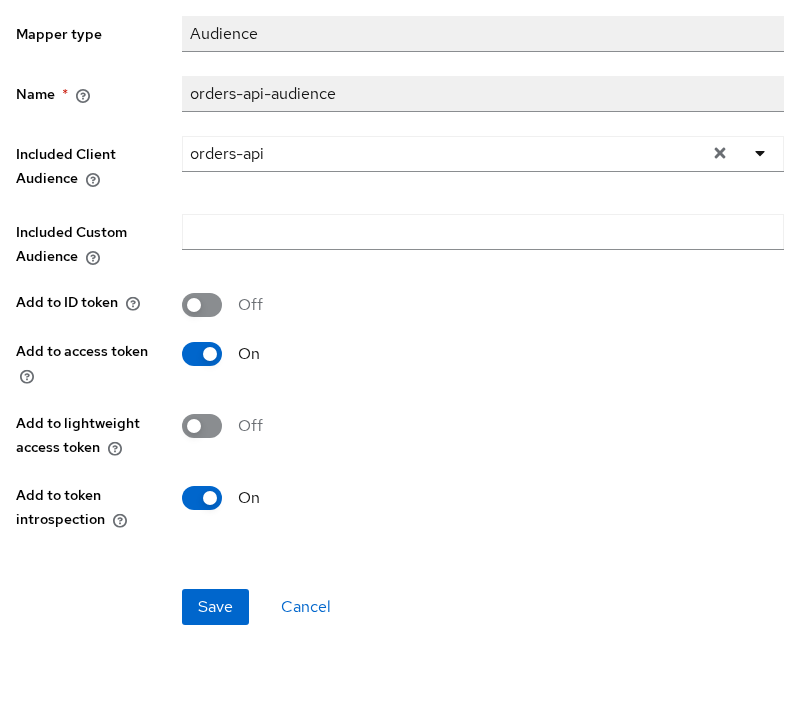
Make sure Add to access token is ON and Add to ID token is OFF. The other toggles are not required for this lab.
If orders-api is not added to the access token, the Python API later returns invalid_audience even though the user successfully logged in.
After this mapper is configured, new access tokens issued to oidc-lab-app contain orders-api in the aud claim. Existing tokens are not changed, so perform a new login and token exchange after modifying the mapper. The audience belongs in the access token, not the ID token.
Test Keycloak Authorization Code flow with PKCE
PKCE adds code_verifier and code_challenge to the authorization request. After login, the client exchanges the authorization code at the token endpoint and must send the same verifier.
In a real application, an OIDC library performs these redirects, validates state and nonce, exchanges the code, and stores tokens. You run the steps manually here so you can see exactly what Keycloak receives and returns.
Generate PKCE values, state, and nonce
Set the verifier, challenge, state, and nonce once per login attempt:
CODE_VERIFIER=$(python3 -c "import secrets,base64; print(base64.urlsafe_b64encode(secrets.token_bytes(32)).rstrip(b'=').decode())")
CODE_CHALLENGE=$(python3 -c "import base64,hashlib,sys; v=sys.argv[1]; print(base64.urlsafe_b64encode(hashlib.sha256(v.encode()).digest()).rstrip(b'=').decode())" "$CODE_VERIFIER")
STATE=$(python3 -c "import secrets; print(secrets.token_urlsafe(16))")
NONCE=$(python3 -c "import secrets; print(secrets.token_urlsafe(16))")
echo "verifier length: ${#CODE_VERIFIER}"
Sample output:
verifier length: 43Forty-three characters is typical for a URL-safe random verifier. state correlates the authorization response with your original request and helps protect against CSRF-style attacks. nonce binds the ID token to this login request; the OIDC client should verify it matches when validating the ID token.
Build the authorization URL
Open this URL in a browser:
printf '%s\n' "http://127.0.0.1:8080/realms/golinuxcloud/protocol/openid-connect/auth?client_id=oidc-lab-app&response_type=code&scope=openid%20profile%20email&redirect_uri=http%3A%2F%2F127.0.0.1%3A8765%2Fcallback&state=${STATE}&nonce=${NONCE}&code_challenge=${CODE_CHALLENGE}&code_challenge_method=S256"The URL looks complicated, but each parameter answers one question in the login request:
| Parameter | Why it is sent |
|---|---|
client_id |
Identifies the Keycloak client |
response_type=code |
Requests an authorization code |
scope=openid |
Makes the request OpenID Connect rather than plain OAuth |
redirect_uri |
Where Keycloak returns the browser after login |
state |
Correlates and protects the authorization request |
nonce |
Binds the resulting ID token to this login |
code_challenge |
PKCE challenge derived from the verifier |
code_challenge_method=S256 |
Uses SHA-256 PKCE |
Sign in as tokenuser with password TokenUser!2026. Keycloak 26.7.3 uses a two-step login form (username, then password). After success, the browser redirects to:
http://127.0.0.1:8765/callback?state=...&session_state=...&iss=...&code=...Copy the code query parameter from the address bar. Nothing must listen on port 8765 — you only need the code value for the token exchange.
Exchange the code for tokens
Paste the authorization code into AUTH_CODE, then post to the token endpoint from discovery. Public clients omit client_secret. An authorization code can be exchanged only once. We save the first token response to a file because trying to reuse the same code returns invalid_grant.
AUTH_CODE='paste-code-from-callback-url'

curl -s -X POST 'http://127.0.0.1:8080/realms/golinuxcloud/protocol/openid-connect/token' \
  -H 'Content-Type: application/x-www-form-urlencoded' \
  -d "grant_type=authorization_code" \
  -d "client_id=oidc-lab-app" \
  -d "code=${AUTH_CODE}" \
  -d "redirect_uri=http://127.0.0.1:8765/callback" \
  -d "code_verifier=${CODE_VERIFIER}" \
  > /tmp/oidc-tokens.json
Display what you saved:
python3 -m json.tool /tmp/oidc-tokens.jsonSample output (trimmed):
{
    "access_token": "eyJhbGciOiJSUzI1NiIsInR5cCIgOiAiSldUI...",
    "expires_in": 300,
    "refresh_expires_in": 1800,
    "refresh_token": "eyJhbGciOiJIUzUxMiIsInR5cCIgOiAiSldUI...",
    "token_type": "Bearer",
    "id_token": "eyJhbGciOiJSUzI1NiIsInR5cCIgOiAiSldUI...",
    "scope": "openid profile email"
}
Because the request includes the openid scope, Keycloak returns an ID token along with the access and refresh tokens.
Inspect ID, access, and refresh tokens
Keycloak returns several tokens, but they serve different purposes. A simple way to distinguish them is to look at where each token is supposed to go:
| Token | Validated by | Used for |
|---|---|---|
| ID token | OIDC client | Information about the authenticated user |
| Access token | Resource server / API | Authorizing API requests |
| Refresh token | Token endpoint | Obtaining new tokens |
Sending the wrong token to an API is a common integration bug — see access token vs ID token vs refresh token for the full comparison.
Keycloak commonly returns tokens as JSON Web Tokens (JWTs). A JWT contains three Base64URL-encoded parts separated by dots:
header.payload.signatureA token looks like eyJhbGci... . eyJhbGci... . SflKxwRJ... — signing metadata in the header, claims such as iss, aud, and exp in the payload, and a signature proving integrity.
Decoding a JWT only lets you read its contents. It does not prove that the token is genuine. Verification happens later when the API checks the signature.
Decode the payload (middle segment) without verifying the signature yet:
python3 << 'EOF'
import json, base64, pathlib
data = json.loads(pathlib.Path("/tmp/oidc-tokens.json").read_text())
for label, key in [("access", "access_token"), ("id", "id_token")]:
    payload = data[key].split(".")[1]
    payload += "=" * (-len(payload) % 4)
    claims = json.loads(base64.urlsafe_b64decode(payload))
    print(f"=== {label}_token ===")
    print(json.dumps({k: claims[k] for k in (
        "typ", "iss", "sub", "aud", "azp", "scope", "preferred_username", "exp", "iat"
    ) if k in claims}, indent=2))
EOF
Sample output:
=== access_token ===
{
  "typ": "Bearer",
  "iss": "http://127.0.0.1:8080/realms/golinuxcloud",
  "sub": "3c650623-fa6d-4252-9886-b5d5c093e7f5",
  "aud": [
    "orders-api",
    "account"
  ],
  "azp": "oidc-lab-app",
  "scope": "openid profile email",
  "preferred_username": "tokenuser",
  "exp": 1790247156,
  "iat": 1790246856
}
=== id_token ===
{
  "typ": "ID",
  "iss": "http://127.0.0.1:8080/realms/golinuxcloud",
  "sub": "3c650623-fa6d-4252-9886-b5d5c093e7f5",
  "aud": "oidc-lab-app",
  "azp": "oidc-lab-app",
  "preferred_username": "tokenuser",
  "exp": 1790247156,
  "iat": 1790246857
}
Common claims in the sample above:
| Claim | Meaning |
|---|---|
iss |
Who issued the token |
sub |
Unique identifier for the authenticated user |
aud |
Who the token is intended for |
azp |
Client that requested the token |
scope |
Permissions/scopes granted |
iat |
When Keycloak issued the token |
exp |
When the token expires |
The access token aud includes orders-api because of the audience mapper you configured. The ID token aud is the client ID oidc-lab-app, not the API.
The refresh token is often opaque or a nested JWT. A refresh token is a sensitive credential because it can be used to obtain new access tokens. Applications must protect it carefully and should follow the storage and rotation guidance appropriate to their architecture.
Call the Keycloak UserInfo endpoint
The UserInfo endpoint is another standard OIDC endpoint for obtaining claims about the authenticated user. The client calls it with the access token. Depending on the requested scopes and Keycloak configuration, the response can include claims such as username, name, and email.
Load the access token from the saved response:
ACCESS=$(python3 -c "import json; print(json.load(open('/tmp/oidc-tokens.json'))['access_token'])")Request UserInfo with the curl command:
curl -s \
  -H "Authorization: Bearer ${ACCESS}" \
  http://127.0.0.1:8080/realms/golinuxcloud/protocol/openid-connect/userinfo \
  | python3 -m json.tool
Sample output:
{
    "sub": "3c650623-fa6d-4252-9886-b5d5c093e7f5",
    "email_verified": true,
    "name": "Token User",
    "preferred_username": "tokenuser",
    "given_name": "Token",
    "family_name": "User",
    "email": "tokenuser@golinuxcloud.lab"
}
The important point here is that UserInfo expects the access token, not the ID token.
Validate the access token in an API
Receiving a token is not enough. Anyone could send your API a random string or a JWT created by another system. Before trusting the claims inside an access token, the API needs to answer four questions:
- Was this token signed by Keycloak? → verify the signature
- Did it come from the expected realm? → check
iss - Was it issued for this API? → check
aud - Is it still valid? → check
exp
  Application                orders-api                 Keycloak
      |                          |                         |
      | Authorization:           |                         |
      | Bearer <access_token>    |                         |
      +─────────────────────────►|                         |
                                 |                         |
                                 | GET jwks_uri            |
                                 +────────────────────────►|
                                 |                         |
                                 |◄──── public keys -------|
                                 |                         |
                                 | verify JWT signature    |
                                 | check iss, aud, exp     |
                                 v
                            Request accepted
Keycloak keeps the private signing key. The API only needs the corresponding public key, which Keycloak publishes through the JWKS endpoint.
To make the validation steps visible, we'll use a small Python API instead of hiding them inside a framework or OIDC library.
Save the validator as orders-api-server.py:
#!/usr/bin/env python3
import json
from http.server import BaseHTTPRequestHandler, HTTPServer
import jwt
from jwt import PyJWKClient

ISSUER = "http://127.0.0.1:8080/realms/golinuxcloud"
JWKS_URL = f"{ISSUER}/protocol/openid-connect/certs"
EXPECTED_AUD = "orders-api"
jwks_client = PyJWKClient(JWKS_URL)

class Handler(BaseHTTPRequestHandler):
    def do_GET(self):
        if self.path != "/orders":
            self.send_response(404); self.end_headers(); return
        auth = self.headers.get("Authorization", "")
        if not auth.startswith("Bearer "):
            self.send_response(401); self.end_headers()
            self.wfile.write(b'{"error":"missing_bearer_token"}'); return
        token = auth.split(" ", 1)[1]
        try:
            key = jwks_client.get_signing_key_from_jwt(token)
            claims = jwt.decode(
                token, key.key, algorithms=["RS256"],
                issuer=ISSUER, audience=EXPECTED_AUD,
                options={"require": ["exp", "iss", "aud"]},
            )
        except jwt.InvalidAudienceError:
            self.send_response(403); self.end_headers()
            self.wfile.write(b'{"error":"invalid_audience"}'); return
        except jwt.PyJWTError:
            self.send_response(401); self.end_headers()
            self.wfile.write(b'{"error":"invalid_token"}'); return
        body = json.dumps({
            "message": "order list",
            "subject": claims.get("sub"),
            "username": claims.get("preferred_username"),
        }).encode()
        self.send_response(200)
        self.send_header("Content-Type", "application/json")
        self.end_headers()
        self.wfile.write(body)

if __name__ == "__main__":
HTTPServer(("127.0.0.1", 3001), Handler).serve_forever()Start the API in the background:
python3 orders-api-server.py >/tmp/orders-api.log 2>&1 &The process binds 127.0.0.1:3001 and loads signing keys from jwks_uri on first request.
Call the API with the access token:
curl -s -H "Authorization: Bearer ${ACCESS}" http://127.0.0.1:3001/ordersSample output:
{"message": "order list", "subject": "3c650623-fa6d-4252-9886-b5d5c093e7f5", "username": "tokenuser"}HTTP 200 with order list confirms issuer, audience, signature, and expiry all passed.
Send the ID token instead to reproduce an audience failure:
IDTOKEN=$(python3 -c "import json; print(json.load(open('/tmp/oidc-tokens.json'))['id_token'])")
curl -s -w '\nhttp=%{http_code}\n' -H "Authorization: Bearer ${IDTOKEN}" http://127.0.0.1:3001/orders
Sample output:
{"error":"invalid_audience"}
http=403
The API rejects the ID token because aud is oidc-lab-app, not orders-api.
Stop the lab server when finished:
pkill -f orders-api-server.pyRefresh the access token
Access tokens are deliberately short-lived. When one expires, forcing the user to enter their password again every few minutes would provide a poor experience. A refresh token lets the client request a new access token without repeating the interactive login.
Use the refresh token at the same token endpoint. Public clients still omit client_secret:
REFRESH=$(python3 -c "import json; print(json.load(open('/tmp/oidc-tokens.json'))['refresh_token'])")
curl -s -X POST 'http://127.0.0.1:8080/realms/golinuxcloud/protocol/openid-connect/token' \
  -H 'Content-Type: application/x-www-form-urlencoded' \
  -d 'grant_type=refresh_token' \
  -d 'client_id=oidc-lab-app' \
  -d "refresh_token=${REFRESH}" | python3 -m json.tool
Sample output (trimmed):
{
    "access_token": "eyJhbGciOiJSUzI1NiIsInR5cCIgOiAiSldUI...",
    "expires_in": 300,
    "refresh_token": "eyJhbGciOiJIUzUxMiIsInR5cCIgOiAiSldUI...",
    "token_type": "Bearer",
    "id_token": "eyJhbGciOiJSUzI1NiIsInR5cCIgOiAiSldUI..."
}
Keycloak returns a new access token and may rotate the refresh token depending on realm policy.
Log out of Keycloak
Logging out of only your application does not necessarily end the user's Keycloak login session. OIDC defines an end-session endpoint that the client can use to ask the identity provider to terminate the session.
Pass the ID token as id_token_hint and a post-logout redirect URI registered on oidc-lab-app:
IDTOKEN=$(python3 -c "import json; print(json.load(open('/tmp/oidc-tokens.json'))['id_token'])")
curl -s -o /dev/null -w 'logout_http=%{http_code}\n' \
  "http://127.0.0.1:8080/realms/golinuxcloud/protocol/openid-connect/logout?id_token_hint=${IDTOKEN}&post_logout_redirect_uri=http%3A%2F%2F127.0.0.1%3A8765%2F"
Sample output:
logout_http=302HTTP 302 ends the Keycloak browser session when post_logout_redirect_uri matches a Valid post logout redirect URIs entry on the client.
Common Keycloak OIDC errors
| Symptom | Likely cause | Fix |
|---|---|---|
Invalid parameter: redirect_uri |
Callback URL not listed on the client | Add the exact redirect URI under Valid redirect URIs |
Missing parameter: code_challenge_method |
PKCE enforced but challenge omitted | Send code_challenge and code_challenge_method=S256 on the auth request |
invalid_grant / Code not valid |
Code reused, wrong verifier, or expired | Run a fresh login; pass the same code_verifier used to build code_challenge |
API returns invalid_audience |
Bearer token is an ID token or lacks API audience | Send access token; add the Audience mapper so aud includes orders-api |
API returns invalid_token / 401 |
Expired token or wrong realm keys | Refresh the access token; confirm iss matches the API validator |
UserInfo returns 401 |
ID token sent instead of access token | Call UserInfo with the access token from the token response |
Reproduce the redirect error by changing the callback path in the authorization URL while the client only allows /callback:
curl -s -o /tmp/bad-redirect.html -w 'http=%{http_code}\n' \
  "http://127.0.0.1:8080/realms/golinuxcloud/protocol/openid-connect/auth?client_id=oidc-lab-app&response_type=code&scope=openid&redirect_uri=http%3A%2F%2F127.0.0.1%3A8765%2Fwrong&state=bad&code_challenge=${CODE_CHALLENGE}&code_challenge_method=S256"
grep -o 'Invalid parameter: redirect_uri' /tmp/bad-redirect.html
Sample output:
http=400
Invalid parameter: redirect_uri
Security checklist
Before you promote an OIDC integration beyond start-dev:
- Use Authorization Code + PKCE for browser and mobile clients; keep Direct access grants disabled on public clients
- Register exact redirect URIs — no open wildcards in production
- Load endpoints from
/.well-known/openid-configurationand pin the expectedissuer - For JWT access tokens, validate the signature and expected
iss,aud, andexpclaims. Alternatively, applications that use token introspection can ask Keycloak whether a token is active — introspection requires a confidential client at the token endpoint - Protect refresh tokens carefully; never treat ID tokens as API credentials
- Move from
start-devtostartwith PostgreSQL and TLS for production — see Keycloak start vs start-dev and Configure Keycloak with PostgreSQL
Summary
You configured and tested OpenID Connect on Keycloak 26.7.3 end to end: discovery document, public client with PKCE, audience mapper for orders-api, Authorization Code exchange, UserInfo, and bearer validation at a resource API.
If you remember only one thing from this lab, remember where the tokens go: the application uses the ID token to understand who signed in, the API receives the access token, and the refresh token is used to obtain new tokens. The lab API returned 403 when fed an ID token — the failure mode you want instead of silently accepting the wrong credential.
When you move beyond start-dev, use Keycloak's production mode with persistent storage and HTTPS, then point your application's OIDC library at the same discovery URL. Other grant types have their own guides so this page stays focused on the login-to-API path.
References
- OpenID Connect Core 1.0
- OAuth 2.0 Authorization Framework (RFC 6749)
- OAuth 2.0 for Browser-Based Apps (BCP)
- Keycloak Securing Applications and Services — OpenID Connect
- Keycloak Server Administration Guide
Frequently Asked Questions
Is Keycloak OAuth or OIDC?
Keycloak implements both. OAuth 2.0 covers delegated authorization and access tokens. OpenID Connect adds standardized login, the ID token, and the discovery document on top of OAuth. Keycloak realms expose OIDC endpoints under /protocol/openid-connect/.
Which token should my API accept?
The access token in the Authorization: Bearer header. For JWT access tokens, validate the signature and iss, aud, and exp claims against JWKS. Do not accept ID tokens at resource servers — their audience is the client application, not your API.
Where is the discovery URL?
https://<host>/realms/<realm>/.well-known/openid-configuration. It lists authorization_endpoint, token_endpoint, jwks_uri, and other metadata. Point OIDC client libraries at this URL instead of hard-coding individual paths.
Why is the redirect URI invalid?
Keycloak compares the redirect_uri query parameter character-for-character against Valid redirect URIs on the client. A typo, wrong port, or http versus https mismatch triggers Invalid parameter: redirect_uri. Register every callback URL you use, including local dev hosts.
Do I need a client secret?
Not for public browser or mobile clients using Authorization Code + PKCE. Server-side applications that can store credentials confidentially should use a confidential client with Client authentication ON and a client secret or private-key JWT.
