
| Tested on | Red Hat Enterprise Linux 10.2 (Coughlan) |
|---|---|
| Package | podman-5.8.2-5.el10_2.x86_64quay.io/keycloak/keycloak:26.8.0curl-8.12.1-4.el10_2.4.x86_64libxml2-2.12.5-10.el10_2.2.x86_64openssl-3.5.5-6.el10_2.x86_64 |
| Applies to | Any Linux host with Podman or Docker |
| Privilege | Normal user (rootless Podman). Realm setup uses the Keycloak bootstrap admin |
| Scope | Where Keycloak publishes SAML metadata, how to read the IdP entity ID, SSO and logout endpoints, and signing certificate, and how to import that descriptor into a second realm. Also shows the broker SP descriptor that carries the ACS URL. Does not cover a full SP-initiated login. |
| Related guides | What is Keycloak? IdP vs service provider What is single sign-on? OAuth vs OIDC vs SAML Keycloak OpenID Connect tutorial |
Download the SAML metadata for a Keycloak realm, then import that XML into a second realm that will broker logins. The first file describes the identity provider. The second file, published only after the broker exists, describes the service provider.
Both servers in this walkthrough are Keycloak 26.8.0 on loopback. The company realm is the IdP. The apps realm imports the company descriptor and then publishes its own SP descriptor. A finished login that uses these values is covered in Keycloak SAML SSO.
Quick Answer
| Keycloak role | Metadata URL | XML role |
|---|---|---|
| Keycloak as SAML IdP | /realms/<realm>/protocol/saml/descriptor |
IDPSSODescriptor |
| Keycloak as SAML SP/broker | /realms/<realm>/broker/<alias>/endpoint/descriptor |
SPSSODescriptor |
Use the first URL when another application treats Keycloak as its IdP. Use the second when Keycloak brokers an upstream SAML IdP and that IdP needs Keycloak's SP entity ID, ACS URL, or SP metadata.
In SAML terminology, a descriptor is the section of the metadata XML that describes what role the system plays and which endpoints and certificates it exposes.
IDPSSODescriptoris the IdP role.SPSSODescriptoris the SP role.
What SAML Metadata Does
SAML metadata is an XML document that lets SAML peers exchange identifiers, endpoints, supported bindings, and public certificates without entering each value manually. Depending on the role and configuration, those certificates can be used for signature verification or encryption. It is not the OpenID Connect discovery document at /.well-known/openid-configuration.
Keycloak publishes a different document for each role:
- IdP metadata uses an
IDPSSODescriptor. It carries the entity ID, single sign-on and logout endpoints, and the signing certificate. Every realm exposes this file, even before you create a SAML client. - SP metadata uses an
SPSSODescriptor. For a broker, Keycloak publishes it per identity-provider alias. That descriptor publishes the Assertion Consumer Service (ACS) endpoint where the IdP sends SAML responses.
┌──────────────────────────────┐      ┌──────────────────────────────┐
│ company realm                │      │ apps realm                   │
│ IDPSSODescriptor             │ ───► │ imports entity ID, SSO URL,  │
│ /protocol/saml/descriptor    │      │ and the signing certificate  │
└──────────────────────────────┘      └──────────────┬───────────────┘
                                                      │
                                                      ▼
                                       ┌──────────────────────────────┐
                                       │ SPSSODescriptor              │
                                       │ /broker/company-idp/endpoint │
                                       │ /descriptor                  │
                                       └──────────────────────────────┘
The apps broker reads the company metadata and uses those values to configure its connection to the upstream IdP. The browser does not download this metadata during each login.
Build the Two-Keycloak Metadata Lab
Start the company server first. Keycloak uses its configured frontend URL when generating the realm entity ID and SAML endpoint URLs, so the hostname and published port need to match the URLs your browser and SAML peer will use.
Install Keycloak with Podman if podman is not on the host yet. Then start the IdP:
podman run -d --name keycloak-meta-idp -p 127.0.0.1:18085:8080 \
  -e KC_BOOTSTRAP_ADMIN_USERNAME=admin -e KC_BOOTSTRAP_ADMIN_PASSWORD='ChangeMe!2026' \
  quay.io/keycloak/keycloak:26.8.0 start-dev --hostname=http://127.0.0.1:18085
podman run -d prints a container id and returns before Keycloak accepts HTTP. First boot takes 30 to 90 seconds. The log line Listening on: http://0.0.0.0:8080 is the port inside the container. The -p 127.0.0.1:18085:8080 mapping is what you open on the host. Check that the server is responding with curl:
curl -sI http://127.0.0.1:18085/HTTP/1.1 302 Found
Location: http://127.0.0.1:18085/admin/HTTP 302 to /admin/ means the server is up. Start the second server the same way, on port 18086, with hostname http://127.0.0.1:18086:
podman run -d --name keycloak-meta-sp -p 127.0.0.1:18086:8080 \
  -e KC_BOOTSTRAP_ADMIN_USERNAME=admin -e KC_BOOTSTRAP_ADMIN_PASSWORD='ChangeMe!2026' \
  quay.io/keycloak/keycloak:26.8.0 start-dev --hostname=http://127.0.0.1:18086
That command also prints a container id. Wait until port 18086 answers the same way:
curl -sI http://127.0.0.1:18086/The response should be HTTP 302 to http://127.0.0.1:18086/admin/, the same result as the company server.
The publish address is loopback. From another machine, forward 18085 and 18086 with SSH local port forwarding, then open the same URLs on your side.
start-dev keeps realms in the container. podman rm deletes them. Create a realm named company on the IdP. kcadm.sh runs inside the container, so its server URL is port 8080, not the host port 18085:
podman exec keycloak-meta-idp /opt/keycloak/bin/kcadm.sh config credentials \
--server http://127.0.0.1:8080 --realm master --user admin --password 'ChangeMe!2026'Logging into http://127.0.0.1:8080 as user admin of realm masterThat login is stored in the container. Create the realm:
podman exec keycloak-meta-idp /opt/keycloak/bin/kcadm.sh create realms \
-s realm=company -s enabled=true -s displayName=CompanyCreated new realm with id 'company'Repeat the login and create on the apps server:
podman exec keycloak-meta-sp /opt/keycloak/bin/kcadm.sh config credentials \
  --server http://127.0.0.1:8080 --realm master --user admin --password 'ChangeMe!2026'
The login line matches the company server, and it is stored in the apps container. Create the apps realm:
podman exec keycloak-meta-sp /opt/keycloak/bin/kcadm.sh create realms \
-s realm=apps -s enabled=true -s displayName=AppsCreated new realm with id 'apps'The IdP metadata URL for realm company is:
http://127.0.0.1:18085/realms/company/protocol/saml/descriptorSave it on the host. You will import this file into apps, because the apps container cannot open the host's 127.0.0.1:18085.
curl -fsS http://127.0.0.1:18085/realms/company/protocol/saml/descriptor -o company-idp-metadata.xmlcurl -fsS with -o prints nothing when the download succeeds. The file is about 3 KB and is one EntityDescriptor.
Read the Entity ID and SSO/SLO Endpoints
Read entityID first. It is the name the IdP puts in the assertion Issuer. It is often shaped like a URL, and it is not a page you open to finish login.
xmllint --xpath 'string(//*[local-name()="EntityDescriptor"]/@entityID)' company-idp-metadata.xmlhttp://127.0.0.1:18085/realms/companyThat value is the company realm on the published frontend URL. If Keycloak's configured frontend URL does not match the URL your SAML peer uses, the metadata can advertise the wrong host or port, causing issuer or endpoint mismatches.
The same file lists single sign-on and single logout several times. A SAML binding defines how a protocol message is transported. HTTP-Redirect carries it in a browser redirect, while HTTP-POST submits it through an HTML form. HTTP-POST and HTTP-Redirect in this file share one Location:
xmllint --xpath \
  'string(//*[local-name()="SingleSignOnService"][@Binding="urn:oasis:names:tc:SAML:2.0:bindings:HTTP-POST"]/@Location)' \
company-idp-metadata.xmlhttp://127.0.0.1:18085/realms/company/protocol/samlThe HTTP-POST logout endpoint is that same URL. Artifact resolution is the exception. Its Location ends in /protocol/saml/resolve.
This is the descriptor with the certificate body and the repeated bindings removed:
<md:EntityDescriptor entityID="http://127.0.0.1:18085/realms/company">
  <md:IDPSSODescriptor WantAuthnRequestsSigned="true">
    <md:KeyDescriptor use="signing">
      <ds:KeyName>N0EZqVMmfRP_i3jEuQHkVRVRwYI1ca97IUJeChwiPZY</ds:KeyName>
      <ds:X509Certificate>...</ds:X509Certificate>
    </md:KeyDescriptor>
    <md:SingleLogoutService
        Binding="urn:oasis:names:tc:SAML:2.0:bindings:HTTP-POST"
        Location="http://127.0.0.1:18085/realms/company/protocol/saml"/>
    <md:NameIDFormat>urn:oasis:names:tc:SAML:2.0:nameid-format:persistent</md:NameIDFormat>
    <md:SingleSignOnService
        Binding="urn:oasis:names:tc:SAML:2.0:bindings:HTTP-POST"
        Location="http://127.0.0.1:18085/realms/company/protocol/saml"/>
  </md:IDPSSODescriptor>
</md:EntityDescriptor>
WantAuthnRequestsSigned="true" is an IdP requirement on the SP. Company is advertising that requests sent to it should be signed. It says nothing about whether the IdP signs the SAML response or the assertion. Those are separate settings.
apps realm (SP)                         company realm (IdP)
      │
      │ signed AuthnRequest
      ├────────────────────────────────►
The first NameIDFormat in this file is persistent. The file also lists transient, unspecified, and emailAddress. Those are formats the IdP allows, not the format one client will emit. There is no ACS URL here. The ACS belongs to the service provider.
Read Signing and Encryption Certificates
In this descriptor, Keycloak advertises one KeyDescriptor, and it is marked for signing. KeyName is the realm signing key id. The X509Certificate value is the public certificate peers use to check signatures. It is not the private key.
Wrap that value as PEM and ask OpenSSL who it belongs to. See the OpenSSL cheat sheet if you want the rest of the x509 flags:
xmllint --xpath 'string(//*[local-name()="X509Certificate"])' company-idp-metadata.xml \
  | fold -w 64 \
  | sed '1i -----BEGIN CERTIFICATE-----' \
  | sed '$a -----END CERTIFICATE-----' > company-signing.pem
This command writes the certificate to company-signing.pem, so it produces no terminal output. Read the certificate:
openssl x509 -in company-signing.pem -noout -subject -dates -fingerprint -sha256subject=CN=company
notBefore=Oct 3 10:05:36 2026 GMT
notAfter=Oct 3 10:07:16 2036 GMT
sha256 Fingerprint=60:47:3E:BD:EE:46:1C:43:57:DB:46:A9:82:2A:80:25:B1:38:27:80:29:9C:DE:89:29:FB:64:19:47:F3:DF:44CN=company identifies the realm in this Keycloak-generated certificate. The fingerprint is what you compare later with the certificate the broker stored.
This particular IdP descriptor advertises only a signing certificate. Do not assume a signing certificate is also the certificate a peer expects for assertion encryption. Check the metadata and the peer configuration for the intended key use.
Import an IdP Metadata Descriptor into Keycloak
On the apps server, open http://127.0.0.1:18086/admin/, sign in as admin / ChangeMe!2026, and select the apps realm.
- Open Identity providers and choose SAML v2.0.
- Set Alias to
company-idpand Display name toCompany IdP. - Leave Service provider entity ID as
http://127.0.0.1:18086/realms/apps. That value is the apps realm URL. Import does not replace it. - Turn Use entity descriptor off. That switch makes the apps server fetch a URL.
127.0.0.1:18085inside the apps container is the apps container, not the company server on the host. - Choose Import config from file, then Browse, and select
company-idp-metadata.xml.
Importing IdP metadata does not turn realm apps into an IdP for this relationship. It populates the settings that apps, acting as the SAML SP/broker, needs to communicate with the upstream company IdP.
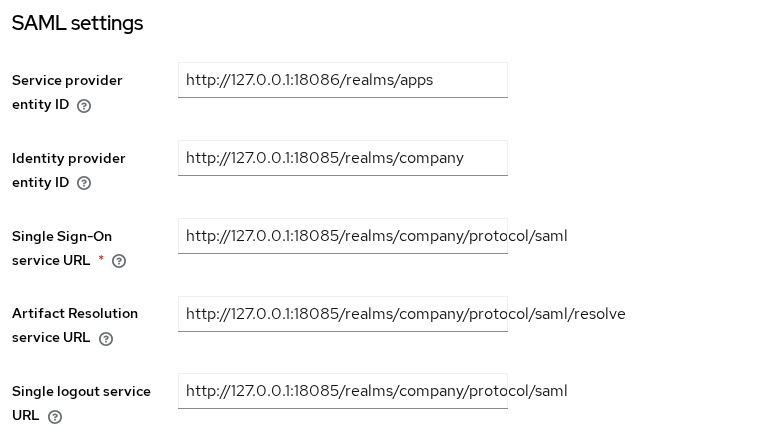
Check these against the XML before you save:
- Identity provider entity ID is
http://127.0.0.1:18085/realms/company. - Single sign-on service URL and single logout service URL are both
http://127.0.0.1:18085/realms/company/protocol/saml. - Artifact resolution service URL ends in
/protocol/saml/resolve. - In this Keycloak 26.8.0 import, the NameID policy format became
persistent, which was the firstNameIDFormatadvertised in this descriptor. If your SP expects another format, verify this field after import rather than assuming the imported value is appropriate. - Validating X.509 certificates holds the signing certificate from the file. The SHA-256 fingerprint matches
60:47:3E:BD:…:F3:DF:44.
The imported metadata advertises signed AuthnRequests, but it does not require the IdP's assertion itself to be signed. In this test, Want Assertions signed remained enabled after import, so turn it off to match the IdP configuration used in the SAML login lab, then click Add.
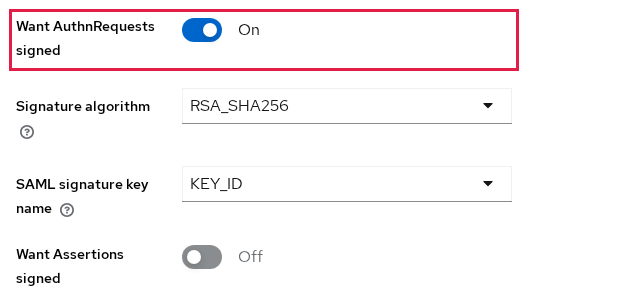
Keep Validate Signatures enabled in this lab so realm apps verifies the signed SAML messages it receives from company.
File import does not store a metadata descriptor URL, and Use metadata descriptor URL stays off. The broker keeps the certificate copy from this import.
Keycloak as SP: Entity ID and Broker Endpoint
The broker SP descriptor is tied to the saved identity-provider alias, so create and save company-idp before expecting this URL to exist. After that save, the same settings page links to the SP descriptor.
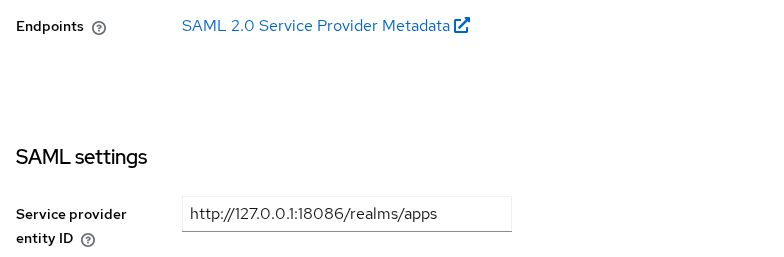
That link is the public URL:
http://127.0.0.1:18086/realms/apps/broker/company-idp/endpoint/descriptorDo not send an upstream IdP the apps realm descriptor at /realms/apps/protocol/saml/descriptor. That document is another IDPSSODescriptor. It describes apps as an identity provider, which is a different relationship. Confirm the role on the broker URL:
curl -fsS http://127.0.0.1:18086/realms/apps/broker/company-idp/endpoint/descriptor -o apps-sp-metadata.xmlAfter downloading the file, confirm that it actually describes an SP:
xmllint --xpath \
  'local-name(//*[local-name()="IDPSSODescriptor" or local-name()="SPSSODescriptor"])' \
apps-sp-metadata.xmlSPSSODescriptorRead the SP entity ID from the same file:
xmllint --xpath \
  'string(//*[local-name()="EntityDescriptor"]/@entityID)' \
apps-sp-metadata.xmlhttp://127.0.0.1:18086/realms/appsThat is the SP entity ID, the apps realm URL. The ACS URL is the HTTP-POST AssertionConsumerService. Notice that the IdP metadata does not contain an ACS endpoint. The ACS belongs to the service provider.
xmllint --xpath \
  'string(//*[local-name()="AssertionConsumerService"][@Binding="urn:oasis:names:tc:SAML:2.0:bindings:HTTP-POST"]/@Location)' \
apps-sp-metadata.xmlhttp://127.0.0.1:18086/realms/apps/broker/company-idp/endpointThe shortened SP document, with its signing certificate omitted:
<md:EntityDescriptor entityID="http://127.0.0.1:18086/realms/apps">
  <md:SPSSODescriptor AuthnRequestsSigned="true" WantAssertionsSigned="false">
    <md:AssertionConsumerService
        Binding="urn:oasis:names:tc:SAML:2.0:bindings:HTTP-POST"
        Location="http://127.0.0.1:18086/realms/apps/broker/company-idp/endpoint"
        isDefault="true" index="1"/>
  </md:SPSSODescriptor>
</md:EntityDescriptor>
These are the two values most external IdPs need when they cannot import the SP metadata directly: the SP entity ID and the ACS URL. AuthnRequestsSigned="true" is present because Want AuthnRequests signed was left on. WantAssertionsSigned="false" matches the switch you turned off.
Do not confuse signed metadata with signed SAML messages. Sign Service Provider Metadata signs the metadata XML itself. Want AuthnRequests signed controls whether the broker signs authentication requests. Response and assertion signing are separate settings again.
Metadata Refresh and Certificate Rotation
A file import copies the signing certificate into Validating X509 certificates and leaves Use metadata descriptor URL off. Signature checks then use that stored copy. They do not go back to the company descriptor on the next login.
If company starts signing with a key whose certificate is not among the certificates stored by the broker, signature validation can fail. With file import and Use metadata descriptor URL disabled, Keycloak does not automatically refresh that stored certificate.
Turn Use metadata descriptor URL on only after Metadata descriptor URL points at a descriptor the apps server can fetch. With Use metadata descriptor URL enabled, Keycloak downloads and caches validation certificates from that metadata URL and refreshes them according to its metadata cache behavior. The default cache TTL is 24 hours unless the metadata or cache configuration specifies otherwise.
| Setting | Purpose |
|---|---|
| Use entity descriptor, during provider creation | Fetch and import the IdP configuration the first time |
| Metadata descriptor URL | Stores the remote metadata URL |
| Use metadata descriptor URL | Lets Keycloak refresh and cache validation certificates from that URL |
Check the Metadata XML and Descriptor Type
xmllint --noout checks that the file is well-formed XML. It does not check the file against the SAML metadata schema, and it does not prove which role the file describes.
xmllint --noout company-idp-metadata.xmlNo output means the XML syntax is well-formed. Then confirm the role element before you import. An IdP file contains IDPSSODescriptor. A broker SP file contains SPSSODescriptor. Importing the SP file into Import config from file returns no SSO URL, because there is no IdP descriptor to read.
Metadata Mistakes That Cause Login Failures
| Symptom | Likely cause | Fix |
|---|---|---|
Entity ID or SSO URL uses port 8080 |
--hostname was omitted, so metadata advertises the port inside the container |
Recreate the server with --hostname set to the published URL, then download the descriptor again |
| Use entity descriptor fails or the form stays empty | The apps server cannot fetch 127.0.0.1 on the host |
Turn the switch off and import company-idp-metadata.xml from the host |
| SSO URL stays empty after import | The file is SP metadata, or it is the wrong realm | Import /realms/{idp-realm}/protocol/saml/descriptor, not the broker descriptor |
invalid_signature on the broker |
Want Assertions signed is on while the IdP signed the response only, or the stored certificate is from an older key | Turn Want Assertions signed off unless the assertion itself is signed, and compare the certificate fingerprint with the current descriptor |
| Upstream IdP cannot find a valid ACS or SP configuration | You supplied /realms/apps/protocol/saml/descriptor, which describes apps as an IdP |
Use /realms/apps/broker/company-idp/endpoint/descriptor, or register the SP entity ID and ACS URL by hand |
Summary
The IdP metadata URL, /realms/company/protocol/saml/descriptor, is an IDPSSODescriptor. It carries the entity ID, the SSO and logout endpoints, and the signing certificate. The broker SP metadata URL, /realms/apps/broker/company-idp/endpoint/descriptor, is an SPSSODescriptor. It carries the SP entity ID and the ACS URL. The apps realm path /realms/apps/protocol/saml/descriptor is a second IdP document, and it is the wrong file to give an upstream IdP.
File import stores that signing certificate and leaves Use metadata descriptor URL off, so Keycloak does not refresh the stored copy on its own. Point Metadata descriptor URL at a descriptor the apps server can fetch, and turn Use metadata descriptor URL on, when you want later certificate updates to come from the IdP metadata.
References
- Keycloak 26.8.0 Server Administration: SAML v2.0 identity providers
- Keycloak 26.8.0 Server Administration: SAML SP descriptor
- SAML V2.0 Metadata specification
Frequently Asked Questions
What is the Keycloak SAML metadata URL?
For a realm acting as an IdP it is /realms/{realm}/protocol/saml/descriptor on that server's public hostname. The company URL is http://127.0.0.1:18085/realms/company/protocol/saml/descriptor.
Does Keycloak expose IdP metadata?
Yes. Each realm publishes an IDPSSODescriptor at that path. You do not create a SAML client before the file exists.
Where is the ACS URL in SAML metadata?
It is not in the IdP descriptor. For a Keycloak broker it is the AssertionConsumerService location in /realms/{realm}/broker/{alias}/endpoint/descriptor. Here that location is http://127.0.0.1:18086/realms/apps/broker/company-idp/endpoint.
Can Keycloak import IdP metadata?
Yes. On a new SAML v2.0 identity provider, either turn Use entity descriptor on and supply a URL the Keycloak server can fetch, or turn it off and use Import config from file. The file import copies the entity ID, SSO URL, logout URL, and signing certificate.
What happens when the SAML signing certificate rotates?
If Use metadata descriptor URL is off, the broker keeps the certificate saved at import time. If company later signs with a certificate that is not in that stored set, signature validation can fail until you replace the certificate or point Metadata descriptor URL at a descriptor the server can refetch.
