
| Tested on | Red Hat Enterprise Linux 10.2 (Coughlan) |
|---|---|
| Package | podman-5.8.2-5.el10_2.x86_64quay.io/keycloak/keycloak:26.8.0libxml2-2.12.5-10.el10_2.2.x86_64 |
| Applies to | Any Linux host with Podman or Docker |
| Privilege | Normal user (rootless Podman). Realm setup uses the Keycloak bootstrap admin |
| Scope | How a Keycloak realm acting as the SAML IdP copies a custom user attribute and the email property into the outgoing assertion AttributeStatement. Does not cover identity-provider mappers that import an upstream assertion, role or group list mappers, NameID, or assertion signing. |
| Related guides | What is Keycloak? Keycloak realms Keycloak users Keycloak SAML metadata What is single sign-on? |
A SAML attribute mapper on the identity-provider realm writes a user value into the assertion Keycloak sends to a service provider. The value the SP reads is the Attribute element in that response. It is not a field you type on the broker.
Realm company is the IdP. Realm apps receives the response so you can read the XML. The mapper work below starts from that login.
Quick Answer
To add a custom Keycloak user attribute to an outgoing SAML assertion:
- Create the attribute in the realm User Profile
- Set a value on the user
- Add a User Attribute SAML protocol mapper on the client's dedicated scope, or on a reusable SAML client scope
- Set SAML Attribute Name to the name the service provider expects
On the next login, Keycloak writes the value inside the assertion's AttributeStatement.
SAML Protocol Mapper vs Identity Provider Mapper
The two mapper families run in opposite directions:
- SAML protocol mapper — runs while Keycloak builds an outgoing SAML assertion. A user-attribute mapper reads
departmentfrom the Keycloak user and writes anAttributeinto theAttributeStatement. - Identity provider mapper — runs the other way. An Attribute Importer under Identity providers reads an assertion from an upstream IdP and copies values onto the local user.
Where each one lives:
- The importer lives on the broker
- The protocol mapper lives on the SAML client in the IdP realm
This page does not configure the importer.
       OUTBOUND                     INBOUND
     Keycloak user          External SAML assertion
           ↓                           ↓
 SAML protocol mapper      Identity provider mapper
           ↓                           ↓
Outgoing SAML assertion       Local Keycloak user
           ↓
   Service provider
Keycloak also ships outbound SAML mappers with other sources:
- Roles
- Groups
- Session notes
- Audience
Those are the same kind of outbound mapper. The login below still contains Role attributes because the built-in role_list scope stays assigned. This page does not change that scope.
Prerequisite SAML Login
This guide assumes the two-Keycloak SAML login from Keycloak SAML SSO is already working:
- Realm
companyis the IdP - Realm
appsis the SP/broker - The SAML client in
companyuses the apps entity ID and ACS URL
The assertion excerpts below use this pair:
| Setting | Value in this test |
|---|---|
| IdP | Realm company on http://127.0.0.1:18087, container keycloak-attr-idp |
| SP/broker | Realm apps on http://127.0.0.1:18088 |
| SAML client ID | http://127.0.0.1:18088/realms/apps |
| ACS URL | http://127.0.0.1:18088/realms/apps/broker/company-idp/endpoint |
| User | alice / Alice!2026 |
| Attribute | department = engineering |
Create a Test User Attribute
In this realm, the User Profile configuration defines the custom attributes Keycloak accepts and exposes for users.
First, this test shows why defining the User Profile attribute matters. I deliberately send department before creating it in the profile, then fix the setup.
Create alice in realm company. In this Keycloak 26.8.0 test, sending department before defining it in the realm User Profile did not persist the attribute:
podman exec -i keycloak-attr-idp /opt/keycloak/bin/kcadm.sh create users -r company -f - <<'EOF'
{
  "username": "alice",
  "email": "alice@example.com",
  "firstName": "Alice",
  "lastName": "Nguyen",
  "enabled": true,
  "emailVerified": true,
  "attributes": { "department": ["engineering"] }
}
EOFCreated new user with id 'de1daf70-c967-412b-9d67-cc0aa17c41cf'The user exists. What was stored versus dropped:
- Stored: username, email, first name, last name
- Not stored:
department
Define custom attributes in Realm settings, then User profile, before relying on them in SAML mappers. Set a permanent password:
podman exec keycloak-attr-idp /opt/keycloak/bin/kcadm.sh set-password -r company --username alice --new-password 'Alice!2026'The command prints nothing when the password is stored. Temporary stays off, so the next login does not ask Alice to change it.
In the company Admin Console, open Realm settings, then User profile. Create an attribute with these settings:
- Name:
department - Display name:
Department - Multivalued: On (so a second value can be added later)
- Permissions: admin-only for edit is enough for this test
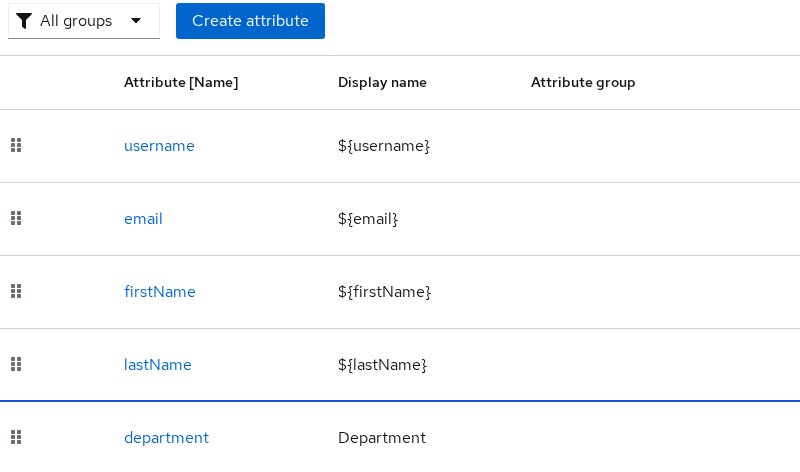
department is now a real attribute name. Open Users, select alice, and set Department to engineering.
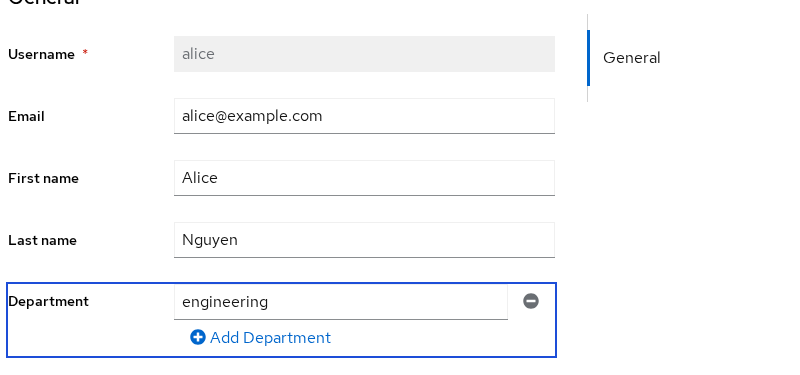
That row is the source the mapper reads. Two kinds of fields sit on the same user:
- Built-in properties: email, first name, last name
- Custom user-profile attribute: Department (
department)
Add a User Attribute SAML Mapper
Choose the scope before you add the mapper:
- A dedicated client scope belongs only to one client
- A normal client scope such as
staff-attributescan be attached to multiple SAML clients - Put reusable mappers on a shared client scope
- Keep client-specific mappers on the dedicated scope
- For SAML, use a Default client scope when you want its mappers applied to that client's assertions
In realm company, open Client scopes and create staff-attributes with protocol SAML. Open that scope, choose Mappers, then Configure a new mapper, then User Attribute.
Set the fields as follows:
- Name:
department - User Attribute:
department - Friendly Name:
Department - SAML Attribute Name:
department - SAML Attribute NameFormat:
Basic - Aggregate attribute values: Off
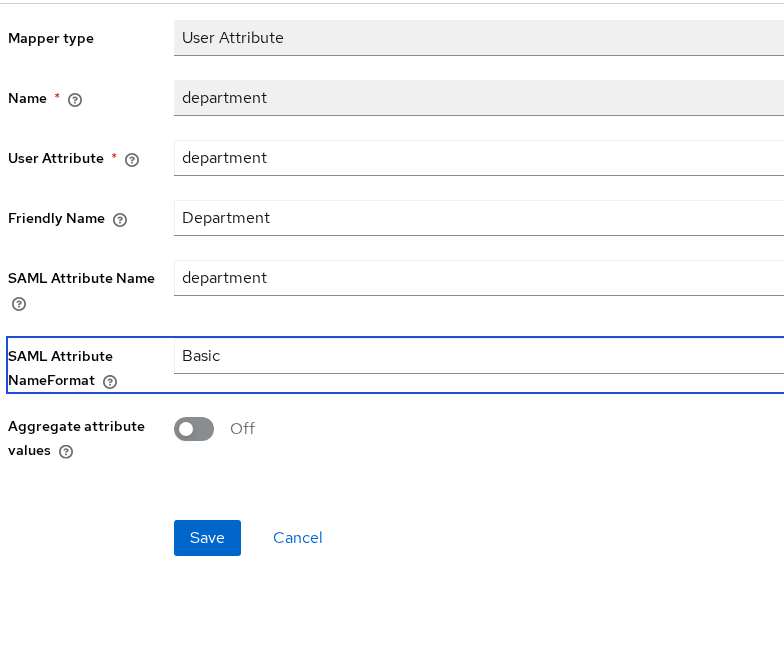
   Keycloak user field
 department = engineering
            ↓
  User Attribute mapper
            ↓
           SAML
    Name="department"
FriendlyName="Department"
   Value="engineering"
Those form fields are three different strings, and they can differ:
- Name — the mapper's label in Keycloak
- User Attribute — the name on the user record
- SAML Attribute Name — the
Namethe service provider sees
Here the first and the third are both department, and the friendly name uses a capital D.
Assign staff-attributes to the SAML client http://127.0.0.1:18088/realms/apps as a default client scope.
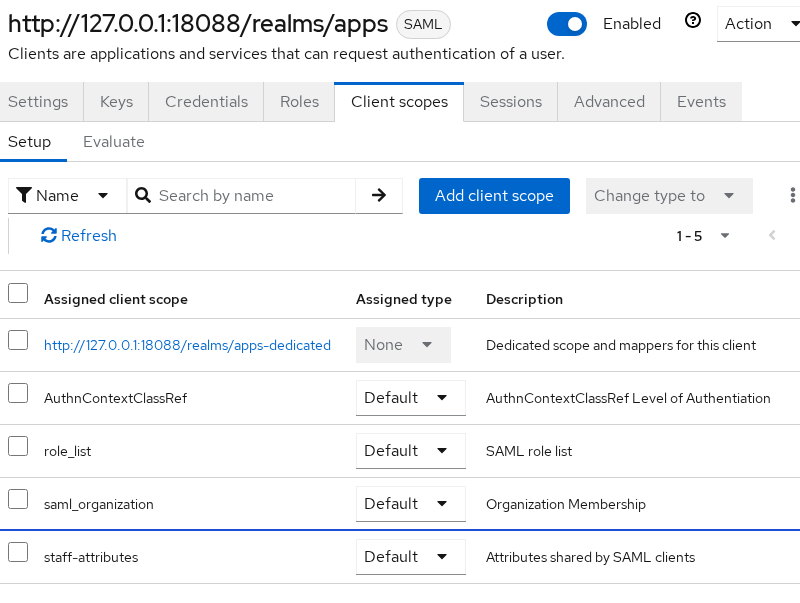
Read the client scopes list like this:
role_listis still Default, which is why the response later containsRole- The dedicated scope shows Assigned type None because it is intrinsic to this client rather than attached as Default or Optional. Its mappers still apply to that client
staff-attributesis the shared scope. Default means every assertion for this client includes it
Attribute Name, Friendly Name and Name Format
The assertion uses three different strings from this form:
Namecomes from SAML Attribute Name. The service provider normally identifies the SAML attribute by this value.FriendlyNamecomes from Friendly Name. It is a human-readable label. Do not treat it as the primary identifier unless that service provider explicitly documents otherwise.NameFormatcomes from SAML Attribute NameFormat. It describes how the name is categorized. It does not rewriteNameinto a URL.
The dropdown values write these NameFormat URNs:
- Basic —
urn:oasis:names:tc:SAML:2.0:attrname-format:basic - URI Reference —
urn:oasis:names:tc:SAML:2.0:attrname-format:uri - Unspecified — also listed; this page does not use it
The first login uses Basic, then URI Reference. Only NameFormat changes. Name stays department.
User Property vs User Attribute Mapper
Email is not a custom attribute on this user. It is a built-in property. Pick the mapper that matches the source:
- User Property — reads a built-in field such as
email - User Attribute — reads a name you added to the user profile, such as
department
| User Property | User Attribute | |
|---|---|---|
| Source | email, firstName, or lastName |
A user-profile attribute such as department |
| Where to add it in this lab | The SAML client's dedicated scope | Client scope staff-attributes |
| SAML name in this lab | email |
department |
On the SAML client in realm company whose client ID is the apps SP entity ID, add a User Property mapper. Set the fields as follows:
- Property:
email - SAML Attribute Name:
email - Friendly Name:
email - SAML Attribute NameFormat:
Basic
Use User Property for built-in fields (email, firstName, lastName). Use User Attribute for custom values such as department. The property mapper is the one that produced alice@example.com in the assertion below.
Verify the Attribute in the SAML Assertion
Open the apps account console while you are signed out of both realms:
http://127.0.0.1:18088/realms/apps/account
Choose Sign in with Company IdP. Sign in as alice / Alice!2026 on port 18087. The browser POSTs a field named SAMLResponse to the ACS on port 18088.
Capture that POST in browser DevTools, or with a SAML tracing extension. How you copy the value matters:
- Parsed form parameters — already the base64 text
- Raw request body — URL-decode it first
Put the base64 text in SAML_RESPONSE and decode it:
printf '%s' "$SAML_RESPONSE" | base64 -d | xmllint --format - > saml-response.xmlThe command writes saml-response.xml and prints nothing when the value is valid base64.
The broker then stops on Update Account Information. Treat that screen as follows:
- It is the apps realm asking for a local profile
- It is not proof that the attribute was missing from the assertion
- The POST already happened
- This page does not fill that form in
Read the attributes:
xmllint --xpath '//*[local-name()="Attribute"][@Name="department" or @Name="email"]' saml-response.xml<saml:Attribute FriendlyName="email" Name="email" NameFormat="urn:oasis:names:tc:SAML:2.0:attrname-format:basic"><saml:AttributeValue xmlns:xs="http://www.w3.org/2001/XMLSchema" xmlns:xsi="http://www.w3.org/2001/XMLSchema-instance" xsi:type="xs:string">alice@example.com</saml:AttributeValue></saml:Attribute>
<saml:Attribute FriendlyName="Department" Name="department" NameFormat="urn:oasis:names:tc:SAML:2.0:attrname-format:basic"><saml:AttributeValue xmlns:xs="http://www.w3.org/2001/XMLSchema" xmlns:xsi="http://www.w3.org/2001/XMLSchema-instance" xsi:type="xs:string">engineering</saml:AttributeValue></saml:Attribute>Read those two Attribute elements like this:
FriendlyName="Department"— the friendly nameName="department"— the SAML attribute name the SP should matchengineering— the user value- Extra
Attributeelements namedRole— fromrole_list, not from the department mapper
Change SAML Attribute NameFormat on the department mapper from Basic to URI Reference. Sign in again, decode the new POST over saml-response.xml, and select the department attribute:
xmllint --xpath '//*[local-name()="Attribute"][@Name="department"]' saml-response.xml<saml:Attribute FriendlyName="Department" Name="department" NameFormat="urn:oasis:names:tc:SAML:2.0:attrname-format:uri"><saml:AttributeValue xmlns:xs="http://www.w3.org/2001/XMLSchema" xmlns:xsi="http://www.w3.org/2001/XMLSchema-instance" xsi:type="xs:string">engineering</saml:AttributeValue></saml:Attribute>What changed and what did not:
NameandFriendlyNamestayed the sameNameFormatis now the URI reference formNameFormat=URI Referencedoes not turnName="department"into a URL- Email stays on Basic because that mapper was not edited
Use the attribute name and format your service provider requires.
Send Multiple Values in One SAML Attribute
Add a second Department value, platform, on Alice. Leave Aggregate attribute values off. The next assertion keeps one Attribute and puts each value in its own AttributeValue:
<saml:Attribute FriendlyName="Department" Name="department" NameFormat="urn:oasis:names:tc:SAML:2.0:attrname-format:uri">
  <saml:AttributeValue>engineering</saml:AttributeValue>
  <saml:AttributeValue>platform</saml:AttributeValue>
</saml:Attribute>
A few notes on that XML:
- The live element also carries the XML Schema type attributes on each
AttributeValue - This is the order observed in this test
- Do not build service-provider logic that depends on the order of multiple values
- A service provider that reads only the first
AttributeValuewill seeengineeringand missplatform
Aggregate attribute values does not join those two strings into one value. With aggregation enabled:
- Keycloak can combine matching group attribute values with the user's own values
- Duplicate values are removed
- The order is not guaranteed
With that switch on, and with Alice in a group named contract-staff whose department was contractors, the department attribute contained both contractors and engineering. Turn the switch off unless you intend group values to ride along with the user's own values. This page does not map group membership itself.
Client Scope Reuse Across SAML Clients
The department mapper is on staff-attributes, not copied into each client. The SAML client in realm company uses that scope as Default, which is why the logins above emitted department.
Reuse versus one-off:
- Assign
staff-attributesas Default on another SAML client such asreports, and that client uses the same department mapper - This article verifies the assertion only through the apps client
- The email mapper sits on the dedicated scope of the apps client, so another client does not get
emailfrom that mapper unless you add the User Property mapper there too, or move it ontostaff-attributes
What the service provider should match:
- Expect
Name="department" - Treat
FriendlyName="Department"as optional descriptive metadata. It matters only when that service provider explicitly uses it
Why the Attribute Is Missing
Clear department on Alice and sign in again. What the next response contains:
emailis still present- There is no
AttributewhoseNameisdepartment - The mapper skips an empty value
- It does not emit an empty element
| Symptom | Likely cause | Fix |
|---|---|---|
| User details never offered Department | The user profile does not list department |
Create the attribute under Realm settings, User profile, then set the value |
The create call sent department and the user has no such attribute |
In this 26.8.0 test the profile did not list the name yet, so the attribute was not stored | Add the profile attribute, then set the value again |
The response has email and no department |
The user value is empty, or the scope is not Default on this client | Set the value and confirm staff-attributes is a default scope |
| Mapper exists but the attribute is absent only for one SAML client | The client scope is not assigned to that SAML client as Default | Assign staff-attributes to that SAML client as a Default client scope |
The SP expected department and found Department |
The SP matched FriendlyName, or the SAML attribute name was capitalized |
Match on Name, which this mapper sets from SAML Attribute Name |
The SP saw only engineering |
A second value is another AttributeValue in the same element |
Read every AttributeValue, not only the first |
| Extra values appear that are not on the user | Aggregate attribute values is on and a group has the same attribute | Turn the switch off, or expect the group values |
Summary
A Keycloak User Attribute SAML mapper reads a custom user-profile attribute such as department and writes it into the outgoing assertion's AttributeStatement. A User Property mapper is used instead for built-in fields such as email, first name, and last name.
The service provider normally identifies the value by the SAML Name, while FriendlyName is descriptive and NameFormat describes the naming format. Reusable mappers belong on a shared SAML client scope assigned as Default to each SAML client that should receive them.
Several values for one attribute stay in that same element as separate AttributeValue children. With aggregation enabled, matching group attribute values can be combined with the user's values. Duplicates are removed, and the order is not guaranteed.
References
- Keycloak 26.8.0 Server Administration: protocol mappers
- Keycloak 26.8.0 Server Administration: client scopes
- SAML V2.0 Core: AttributeStatement
Frequently Asked Questions
How do I add custom attributes to a Keycloak SAML assertion?
- Create the attribute in the realm user profile
- Set it on the user
- Add a User Attribute protocol mapper on a SAML client scope
- Set SAML Attribute Name to the name the service provider expects
The value shows up as an Attribute element in the SAML response after the next login.
What is a SAML protocol mapper?
It is Keycloak configuration that runs while Keycloak builds an outgoing SAML assertion.
- A user-attribute mapper copies one user value into an Attribute element
- It does not read an assertion that some other IdP already sent
User Property vs User Attribute mapper?
- User Property reads a built-in field such as email, first name, or last name
- User Attribute reads a custom attribute you added to the user profile, such as department
- Email in this lab came from the property mapper
- Department came from the attribute mapper
Why is my SAML attribute missing?
Usual causes:
- The user profile never defined the name
- The user has no value
- The client scope that holds the mapper is not a default scope on that SAML client
An empty value is omitted. The response does not contain an empty Attribute for it.
Can one mapper be reused by multiple SAML clients?
Yes.
- Put the mapper on a client scope
- Assign that scope to each SAML client as Default
- In this test
staff-attributesheld the department mapper and was a default scope on the apps client - Assign that same scope to another SAML client when you want the same attribute
- A mapper on one client's dedicated scope applies only to that client
