
| Tested on | Red Hat Enterprise Linux 10.2 (Coughlan) Windows Server 2025 AD DC — WIN-8S0K67EP5EO.lab.example (192.168.56.128) |
|---|---|
| Package | quay.io/keycloak/keycloak:26.7.3 |
| Applies to | Keycloak 26.x with Microsoft Active Directory user federation (lab-ad provider) |
| Privilege | Keycloak realm admin; AD bind account for LDAP searches |
| Lab environment | Keycloak on http://127.0.0.1:8080/ — Install Keycloak with PodmanPrerequisite — Integrate Keycloak with Active Directory |
| Scope | Why an Active Directory user can appear in Keycloak after Sync all users but still fail sign-in: end-user password vs Bind credentials, LDAP bind extended data such as 52e, userAccountControl (disabled account), pwdLastSet, computed lockout/password-expired state, and username format (sAMAccountName vs UPN). Does not cover users missing from sync — see Keycloak AD users not syncing. Vendor-neutral LDAP login failures (non-AD directories) are covered in a separate LDAP login troubleshooting lesson. |
| Related guides | Integrate Keycloak with Active Directory Keycloak AD users not syncing Keycloak sAMAccountName vs userPrincipalName Map Active Directory groups to Keycloak roles Keycloak tutorial |
Sync all users can finish with a healthy import count while sign-in still fails for the same account. A successful sync proves the bind account can search Active Directory; it does not prove the user's own password works.
The goal is to determine whether AD rejected the password, blocked the account, or Keycloak is using a different username than you expect. This guide uses realm golinuxcloud, provider lab-ad, and federated user jane from the Active Directory integration walkthrough.
If Test connection fails, fix connection URL, bind DN, or truststore before you treat the problem as login-only.
Before you troubleshoot
This guide assumes:
- the
lab-adprovider already connects and Sync all users works - the affected AD user is already imported into Keycloak
- StartTLS trust is already configured on the Keycloak server
ldapsearchcommands run on the RHEL Keycloak host, not on the Windows DC or inside the containeropenldap-clientsis installed on that host (sudo dnf install -y openldap-clients)- you have the test user's current AD password for verification binds
- the Active Directory vendor preset created the MSAD User Account Mapper on
lab-ad - the jboss-logging event listener is enabled under Realm settings → Events → Event listeners if you want
LOGIN_ERRORlines inpodman logs(otherwise use saved events in the Admin Console when event storage is on)
Keycloak AD Users Sync but Cannot Log In: Quick Fix
Work through these checks in order:
- Confirm the user exists under Users with Federation link
lab-ad(sync succeeded). - Sign in with the username format that matches Username LDAP attribute (
janewhen the attribute issAMAccountName, orjane@lab.examplewhen it isuserPrincipalName). - Test whether AD accepts the user's credential pair with
ldapsearchon the Keycloak host (not the bind account). - Read
userAccountControl,pwdLastSet,lockoutTime, andmsDS-User-Account-Control-Computedwhen the password is correct but login still fails. - Inspect Keycloak for
LOGIN_ERROR(invalid_user_credentialsvsuser_disabled) in server logs or Events.
| Symptom in Keycloak | Check first on AD / LDAP |
|---|---|
Invalid user credentials on the login form or token endpoint |
Wrong password, wrong username format, or LDAP 52e on user bind |
| User shows Enabled off after sync | userAccountControl includes ACCOUNTDISABLE (MSAD User Account Mapper) |
| Bind tests fail in Admin Console | Bind credentials on lab-ad, not the end-user password |
| Account works on Windows but not Keycloak | UPN vs sAMAccountName mismatch, or pwdLastSet / computed password-expired state |
Why Keycloak AD Sync Works but Login Fails
User sync and password login share the same lab-ad connection settings, but they do different work:
           Sync all users (bind account)
                     ↓
        Search Users DN + import attributes
                     ↓
        Federated user appears in Keycloak
                     ↓
      User submits username + password at login
                     ↓
     Keycloak resolves username to LDAP user entry
                     ↓
Password validated against that AD account (LDAP bind)| Step | LDAP identity | Credential |
|---|---|---|
| Test connection / Sync all users | Bind account | Provider bind credentials |
| User login | Resolved AD user entry | Password typed by the user |
The login name controls which user Keycloak resolves; the password is then validated against that AD user's LDAP entry (typically using the resolved DN). A healthy Sync all users count does not validate the end-user password.
Confirm the federated user imported from Active Directory
Open realm golinuxcloud → Users and search for jane. A synced AD account shows Federation link lab-ad, plus LDAP attributes such as LDAP_ID and LDAP_ENTRY_DN.
If the user is missing, fix sync first in Keycloak AD users not syncing. This page assumes the account is already in Keycloak.
Check Bind Credentials vs the AD User Password
Do not use the LDAP bind-account password to test an end-user login. Bind credentials on lab-ad authenticate only the service account (keycloak-bind), not jane.
Point OpenLDAP clients at the DC certificate Keycloak trusts:
export LDAPTLS_CACERT=~/keycloak-ad-lab/trust/lab-dc.pemVerify the bind account can still search for the user (enter the bind password when prompted):
ldapsearch -x -ZZ -H ldap://win-8s0k67ep5eo.lab.example:389 \
  -D "keycloak-bind@lab.example" -W \
  -b "DC=lab,DC=example" -s sub "(sAMAccountName=jane)" sAMAccountName
Sample output:
dn: CN=Jane Admin,CN=Users,DC=lab,DC=example
sAMAccountName: jane
If the bind-account search succeeds, the provider can reach and search AD; test the user's own credentials next.
Test the AD User Password with ldapsearch
Test whether AD accepts Jane's credential pair directly. Active Directory accepts UPN as a bind principal; this is a useful check even though Keycloak resolves the user entry and validates the password against that LDAP account internally.
Use the same StartTLS URL and trust file as above, and enter the password you believe is correct:
ldapsearch -x -ZZ -H ldap://win-8s0k67ep5eo.lab.example:389 \
  -D "jane@lab.example" -W \
  -b "DC=lab,DC=example" -s base "(objectclass=*)" dn
If AD returns Invalid credentials (49) with extended data 52e, it rejected that bind identity and password pair. In the lab, a deliberate wrong-password test produced:
ldap_bind: Invalid credentials (49)
	additional info: 80090308: LdapErr: DSID-0C090549, comment: AcceptSecurityContext error, data 52e, v65f4
Keycloak surfaces the same underlying failure as Invalid user credentials on the login form.
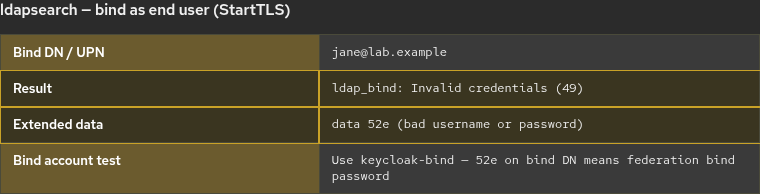
If the command completes without ldap_bind: Invalid credentials, Active Directory accepted Jane's bind credentials. The search result itself is only used to confirm that the authenticated LDAP session can perform a request. If Keycloak still fails after a successful user bind, check username format and account state before you change provider settings.
Check the Keycloak Login Error
Direct Access Grants are useful here only for reproducing a simple success or failure response. They cannot complete interactive required actions such as UPDATE_PASSWORD, so use browser login when AD requires the user to change a password.
The integration lab client ad-login-test allows the password grant as a short diagnostic only (not a production pattern). In the lab, a wrong password returned invalid_grant:
curl -s -X POST 'http://127.0.0.1:8080/realms/golinuxcloud/protocol/openid-connect/token' \
  -d 'client_id=ad-login-test' \
  -d 'grant_type=password' \
  -d 'username=jane' \
  -d 'password=NotTheRightPassword'
Sample output:
{"error":"invalid_grant","error_description":"Invalid user credentials"}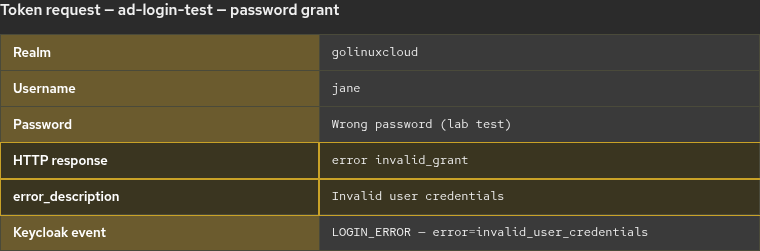
Do not assume every invalid_grant means the password itself is wrong; must-change-password and other required actions need the Account Console or another interactive flow.
To inspect LOGIN_ERROR in container output, enable the jboss-logging event listener on the realm, then tail the log:
podman logs keycloak-podman 2>&1 | tail -20Look for error="invalid_user_credentials" when AD rejected the password.
MSAD User Account Mapper in Keycloak
When the LDAP provider uses the Active Directory vendor preset, Keycloak creates an MSAD User Account Mapper on lab-ad. That mapper reads AD-specific fields including userAccountControl and pwdLastSet and translates account state into Keycloak behavior.
Documented mapper behavior includes:
userAccountControl514 (ACCOUNTDISABLE) — Keycloak user Enabled off after syncpwdLastSet0 — can add theUPDATE_PASSWORDrequired action on the user
That is why disabling Jane in AD can flip Enabled off in Keycloak even though the username still appears under Users.
Check userAccountControl, Password Expiry, and Lockout in AD
userAccountControl stores persistent account flags such as ACCOUNTDISABLE. Password expiry and effective lockout are not always visible as a simple numeric userAccountControl combination; modern AD exposes computed state in msDS-User-Account-Control-Computed (for example UF_LOCKOUT 0x10 and UF_PASSWORD_EXPIRED 0x800000).
Query the affected user with the bind account:
ldapsearch -x -ZZ -H ldap://win-8s0k67ep5eo.lab.example:389 \
  -D "keycloak-bind@lab.example" -W \
  -b "DC=lab,DC=example" -s sub "(sAMAccountName=jane)" \
  userAccountControl pwdLastSet accountExpires lockoutTime \
  msDS-User-Account-Control-Computed
Sample output (enabled lab account):
dn: CN=Jane Admin,CN=Users,DC=lab,DC=example
userAccountControl: 66048
pwdLastSet: 134365038444463158
accountExpires: 9223372036854775807
lockoutTime: 0
msDS-User-Account-Control-Computed: 0
Common userAccountControl values for login troubleshooting:
| Value | Meaning | Keycloak relevance |
|---|---|---|
512 |
Normal enabled account | User can authenticate if other conditions allow |
66048 |
512 + 65536 (DONT_EXPIRE_PASSWORD) |
Enabled; password configured not to expire in the lab |
514 |
512 + 2 (ACCOUNTDISABLE) |
MSAD mapper can set Enabled off after sync |
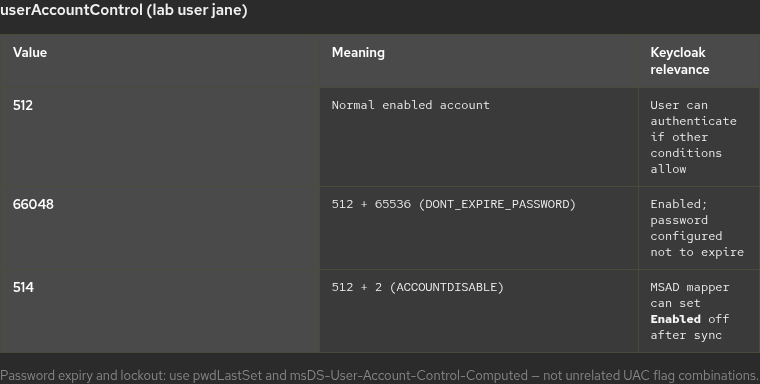
When you set userAccountControl to 514 in AD and run Sync changed users, Keycloak can show Enabled off for jane.
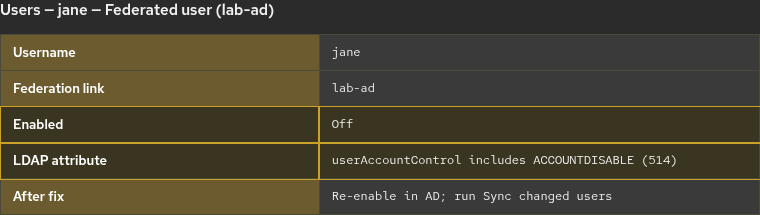
After the disabled state has synchronized into Keycloak, login can fail as user_disabled before password validation becomes relevant:
podman logs keycloak-podman 2>&1 | grep 'user_disabled' | tail -1Sample output (with jboss-logging enabled):
type="LOGIN_ERROR", realmName="golinuxcloud", clientId="ad-login-test", username="jane", error="user_disabled"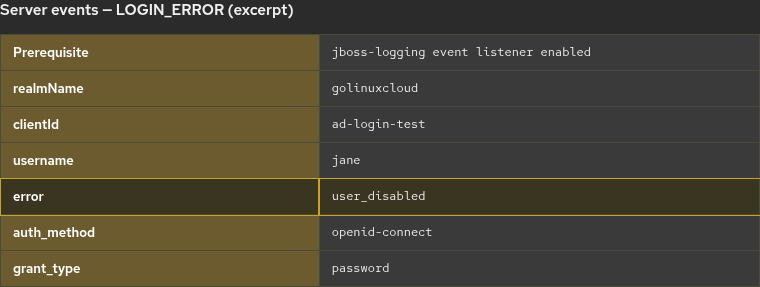
Re-enable the account in AD, run Sync changed users, and confirm Enabled is on before you test the password again.
pwdLastSet, password expiry, and must-change-password
pwdLastSet tells you whether AD expects a password change:
- A large non-zero value — password was set at that time; domain policy and
msDS-User-Account-Control-Computedshow whether AD currently treats the password as expired. 0— AD requires a password change at next logon. The MSAD User Account Mapper can translate this into anUPDATE_PASSWORDrequired action in Keycloak.accountExpiresat9223372036854775807— no account expiry in the sample above.
LDAP extended data can include 773 when a password change is required. Fix the account in AD (reset password, clear User must change password at next logon, or satisfy policy), then retry login in the browser so required actions can complete.
A non-zero lockoutTime indicates AD recorded a lockout event. For the effective current state, inspect msDS-User-Account-Control-Computed for the lockout bit or check the account in AD administration tools—not lockoutTime alone.
Match the username format Keycloak expects
Username LDAP attribute on lab-ad decides what users type. With sAMAccountName, sign in as jane. With userPrincipalName, use jane@lab.example.
Using the wrong login format can prevent Keycloak from resolving the intended LDAP user, which often appears to the user as a generic invalid-credentials error. See Keycloak sAMAccountName vs userPrincipalName for mapper checks and login examples.
Troubleshoot Keycloak AD login after sync
| Symptom | Likely cause | Fix |
|---|---|---|
Invalid user credentials |
Wrong password or 52e on user LDAP bind |
Verify with ldapsearch -D user@domain -W; reset password in AD if needed |
52e when testing bind DN |
Wrong Bind credentials | Update bind password on lab-ad; sync does not use the user's password |
| Enabled off in Keycloak | ACCOUNTDISABLE in userAccountControl |
Enable account in AD; Sync changed users |
user_disabled in logs |
Disabled account synced into Keycloak | Re-enable account; confirm mapper imported state |
Works in ldapsearch, fails in Keycloak |
Username format (sAMAccountName vs UPN) |
Align login name with Username LDAP attribute |
| Password is correct but login still fails | pwdLastSet / computed expiry / lockout |
Read pwdLastSet, msDS-User-Account-Control-Computed, and AD tools |
| User not in Users list | Sync/search issue, not login | Fix Users DN and scope — users not syncing guide |
Summary
When Active Directory users sync into Keycloak but cannot sign in, treat sync and login as two LDAP operations. Sync uses the bind account to search and import users; login resolves the submitted username to an AD entry and validates the password against that account. A healthy Sync all users count does not validate the end-user password.
Use ldapsearch on the Keycloak host with StartTLS and -W to separate bind failures from user failures (52e). Read userAccountControl for persistent flags such as ACCOUNTDISABLE, and pwdLastSet plus msDS-User-Account-Control-Computed for must-change-password, expiry, and lockout. The MSAD User Account Mapper maps those signals into Keycloak Enabled and required actions. With jboss-logging enabled, server logs distinguish invalid_user_credentials from user_disabled.
After login works, map groups with Map Active Directory groups to Keycloak roles. For TLS-only connection errors, see Connect Keycloak to Active Directory with LDAPS.
References
- Keycloak Server Administration Guide — LDAP user federation
- Keycloak Server Administration Guide — MSAD User Account Mapper
- Keycloak Server Administration Guide — Event listeners (jboss-logging)
- Microsoft Learn — LDAP error codes (bind error 49 / extended data)
- Microsoft Learn — userAccountControl attribute
- Microsoft Learn — msDS-User-Account-Control-Computed attribute
Frequently Asked Questions
Why does Keycloak import my AD user but reject the same password?
Sync authenticates with the LDAP bind account and imports attributes. Login resolves the user and validates the password against that AD account. Keycloak does not store AD password hashes.
What is the difference between LDAP error 52e and testing the bind account?
Error 52e means the credentials for that specific bind failed. If you see 52e while binding as keycloak-bind, fix Bind credentials on lab-ad. If bind as keycloak-bind works but bind as jane@lab.example returns 52e, the user's password or username form is wrong.
Why is my federated user disabled in Keycloak when AD looks fine?
Check userAccountControl for ACCOUNTDISABLE. The MSAD User Account Mapper sets Keycloak Enabled from AD. Run Sync changed users after you enable the account in AD.
Does a successful Sync all users prove the password works?
No. Sync only proves the bind account can search the directory and import users. Test the password with a user ldapsearch bind or a controlled login attempt.
Is this the same as generic Keycloak LDAP login failures?
This page focuses on Microsoft Active Directory fields (userAccountControl, pwdLastSet, computed account control, UPN vs sAMAccountName, and AD bind extended data). OpenLDAP and other vendors use different account attributes and error patterns.
