
| Tested on | Red Hat Enterprise Linux 10.2 (Coughlan) Windows Server 2025 AD DC — WIN-8S0K67EP5EO.lab.example (192.168.56.128) |
|---|---|
| Package | quay.io/keycloak/keycloak:26.7.3 |
| Applies to | Keycloak 26.x with Microsoft Active Directory user federation (lab-ad provider) |
| Privilege | Keycloak realm admin; AD permissions to create security groups and membership |
| Lab environment | Keycloak on http://127.0.0.1:8080/ — Install Keycloak with PodmanPrerequisite — Integrate Keycloak with Active Directory |
| Scope | AD security groups → Keycloak group → realm role → token: LDAP group mapper, memberOf, nested group hierarchy (not transitive membership unless you configure recursive retrieval), and role verification. Does not cover Kerberos/SPNEGO, generic OpenLDAP-only mapper reference, or SAML/OIDC claim mappers. |
| Related guides | Integrate Keycloak with Active Directory Keycloak groups and nested groups Keycloak LDAP group mapper Map LDAP groups to Keycloak roles Keycloak tutorial |
Active Directory groups are often used to represent application access or organizational membership. After Keycloak is federated with Active Directory, those groups can be imported into Keycloak and mapped to realm or client roles.
This guide extends realm golinuxcloud and provider lab-ad: add a group LDAP mapper, sync groups, map KC-App-Admins to realm role app-admin, and confirm app-admin appears in an access token for a member user.
How AD groups become Keycloak roles
Authentication and authorization are separate here: AD validates the password, while group membership determines which Keycloak roles the user receives.
+------------------+
| Active Directory |
| security group   |
+--------+---------+
         |
         | LDAP group mapper
         v
   +-----------+
   | Keycloak  |
   | group     | /KC-App-Admins
   +-----+-----+
         |
         | role mapping
         v
   +-----------+
   | Keycloak  |
   | realm role| app-admin
   +-----+-----+
         |
         | included at login
         v
   OIDC access token
   (realm_access.roles)
         |
         v
   Application
Keycloak does not create AD membership on its own; it reads the membership information exposed by Active Directory through the same lab-ad connection you configured for user federation. The group LDAP mapper defines where groups live in AD and how membership is resolved. Assigning realm or client roles to imported groups is a separate Keycloak step.
AD group vs Keycloak group vs Keycloak role
An AD group does not automatically become a Keycloak role. The LDAP group mapper first creates or synchronizes a corresponding Keycloak group. You then assign a realm role or client role to that Keycloak group. Users inherit the role because they belong to the group—the same model described in the Keycloak administration guide for managing groups.
For generic (non-AD) mapper fields, see Keycloak LDAP group mapper. For the LDAP-to-role pattern without AD specifics, see Map LDAP groups to Keycloak roles.
Direct membership, nested groups, and memberOf
Active Directory stores direct membership in two complementary places:
- A group's
memberattribute lists its direct members (users or other groups). - A user's
memberOfattribute lists the groups that directly contain that user.
If one group contains another group, the user's memberOf attribute does not automatically list every parent group in the nesting chain. Keycloak can preserve the LDAP group hierarchy as nested Keycloak groups, but recursive membership resolution is a separate mapper behavior.
In this guide, KC-App-Users contains KC-App-Developers, so Keycloak can represent KC-App-Developers as a child group when Preserve group inheritance is enabled. Do not confuse that group-tree structure with transitive AD membership.
Keycloak's User roles retrieve strategy controls how user membership is resolved—for example reading memberOf on the user, searching group member attributes, or using an AD-specific recursive strategy (LDAP_MATCHING_RULE_IN_CHAIN). This lab reads only the groups listed directly in the user's memberOf attribute. It does not calculate membership through nested parent groups.
Starting point
| Item | Lab value |
|---|---|
| Realm | golinuxcloud |
| User federation provider | lab-ad (Active Directory, StartTLS) |
| LDAP Groups OU | OU=Keycloak,DC=lab,DC=example |
| Sample realm role | app-admin |
| AD groups | KC-App-Admins, KC-App-Users, KC-App-Developers |
| Test user | kc-roleuser (direct member of KC-App-Admins) |
User federation, bind account, and DC certificate trust must already work. If users cannot sign in yet, complete Integrate Keycloak with Active Directory first.
The ldapsearch examples in this guide are run from the Keycloak host (RHEL 10.2 in this lab), not from the Windows domain controller.
That host must:
- resolve
win-8s0k67ep5eo.lab.example - reach the domain controller on LDAP port
389 - have the LDAP command-line tools installed
- trust the AD certificate used for StartTLS
On RHEL, install ldapsearch with:
dnf install -y openldap-clientsPrepare the Active Directory groups
Place application groups in a dedicated OU so LDAP Groups DN stays narrow and sync does not pull every built-in group in the domain.
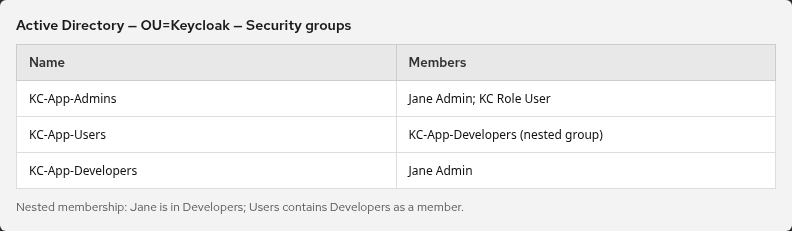
This guide assumes three AD security groups already exist under OU=Keycloak,DC=lab,DC=example:
KC-App-Admins— includes test userkc-roleuser(used for theapp-adminrole mapping).KC-App-Users— contains theKC-App-Developersgroup as a nested member (group nesting in AD, not the same as every user inheriting the parent).KC-App-Developers— holds developer accounts when you extend the lab.
Create the OU and groups with RSAT, PowerShell, or your usual AD tooling. With the mapper strategy used in this guide, Keycloak determines the user's group membership from the direct groups listed in memberOf. Nested parent membership requires a recursive retrieval strategy.
Optional check from the Keycloak host: confirm the bind account can read memberOf for your test user.
export LDAP_BIND_PW='KeycloakBind!2026'
export LDAPTLS_CACERT=~/keycloak-ad-lab/trust/lab-dc.pem
ldapsearch -x -ZZ -H ldap://win-8s0k67ep5eo.lab.example:389 \
  -D "keycloak-bind@lab.example" -w "$LDAP_BIND_PW" \
  -b "DC=lab,DC=example" -s sub "(sAMAccountName=kc-roleuser)" memberOf
Sample output:
dn: CN=KC Role User,OU=Keycloak,DC=lab,DC=example
memberOf: CN=KC-App-Admins,OU=Keycloak,DC=lab,DC=example
If memberOf lists the groups you expect, Keycloak can resolve the same direct memberships with the mapper settings below.
Configure the LDAP group mapper
In realm golinuxcloud, open User federation → lab-ad → Mappers → Create mapper → group-ldap-mapper.
LDAP Groups DN and membership attributes
| Setting | Lab value |
|---|---|
| Name | ad-groups |
| LDAP Groups DN | OU=Keycloak,DC=lab,DC=example |
| Group name LDAP attribute | cn |
| Group object classes | group |
| Membership LDAP attribute | member |
| Membership attribute type | DN |
| Member-of LDAP attribute | memberOf |
| Mode | READ_ONLY |
| Groups path | / |
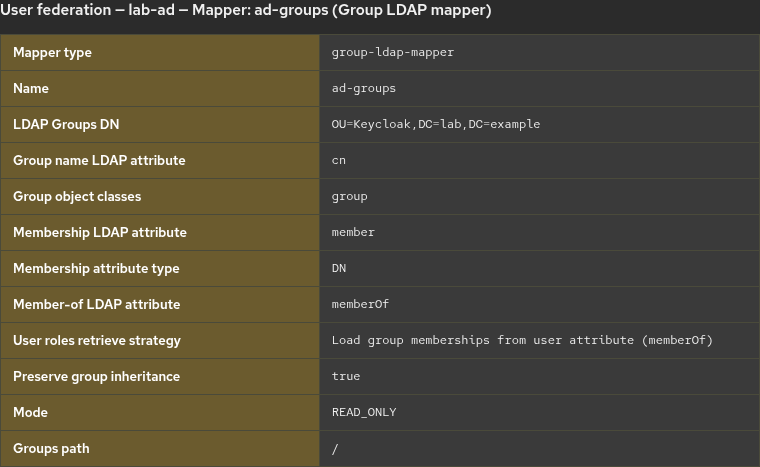
LDAP Groups DN limits which AD group objects Keycloak imports. Member-of LDAP attribute set to memberOf is the usual Active Directory choice so user membership follows the attribute AD maintains on each user account.
Group hierarchy and membership retrieval
| Setting | Lab value |
|---|---|
| Preserve group inheritance | On |
| User roles retrieve strategy | Load group memberships from user attribute (memberOf) |
Preserve group inheritance controls the Keycloak group hierarchy. It does not by itself mean that a user assigned only to KC-App-Developers appears as a direct member of every parent AD group. With inheritance enabled, KC-App-Developers can appear under /KC-App-Users/KC-App-Developers in the Keycloak group tree while users keep only the groups listed on their memberOf attribute.
User roles retrieve strategy is separate from hierarchy. This lab reads direct memberOf values. If you need transitive nested membership in Keycloak (for example a user in a child group to receive parent-group mappings), choose the AD-aware recursive strategy documented for your Keycloak version and verify effective membership on the user record in the Admin Console.
Click Save.
Sync AD groups into Keycloak
Open the ad-groups mapper and run Sync LDAP groups to Keycloak.
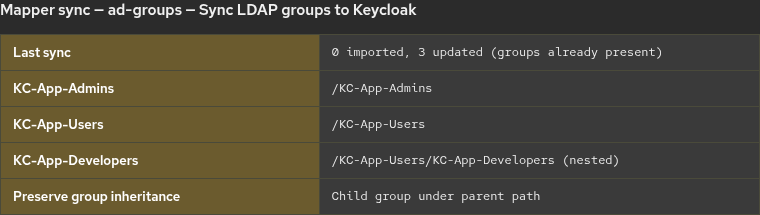
The screenshot shows the three groups present after synchronization. In this run they already existed in Keycloak, so the mapper reported them as updated rather than newly imported:
0 imported groups, 3 updated groups, 0 removed groupsAfter synchronization, Keycloak should list the groups found under the configured AD OU. You should see KC-App-Admins and a parent KC-App-Users with child KC-App-Developers. Open federated user kc-roleuser and confirm Groups lists KC-App-Admins.
Group sync imports the group structure; it does not replace user synchronization. If the test user has not yet been imported into Keycloak, run Sync all users on the lab-ad LDAP provider.
Map the imported group to a Keycloak role
AD provides the group membership, but the app-admin role itself exists in Keycloak. You assign roles to imported groups in the Admin Console.
Create a realm role:
- Realm roles → Create role
- Name:
app-admin - Save
Map the role to the LDAP-backed group:
- Groups →
KC-App-Admins - Role mapping → Assign role → choose
app-admin
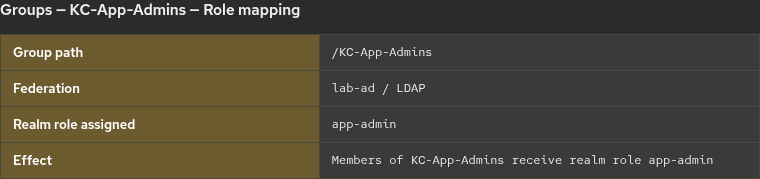
Any user who is a member of the Keycloak group KC-App-Admins inherits the app-admin role because that role is assigned to the group. With the retrieval strategy used in this guide, membership comes from the user's AD memberOf attribute through the group mapper.
Realm role vs client role
A realm role belongs to the realm and can be used by multiple clients, while a client role belongs to one specific client. This guide uses a realm role only to keep the example simple. For access that belongs to one application, a client role is often the better choice.
Verify the role in an access token
Realm roles normally appear in realm_access.roles when the client is permitted to receive them through role scope mappings and client scopes. Client roles typically appear under resource_access.<client-id>.roles.
The usual production path is browser login (Authorization Code flow), then inspect the access token your application receives. To inspect a token without building a sample application, this lab uses Direct Access Grants as a short-lived test method only—not as the standard integration pattern.
Request a token for a user in KC-App-Admins (the lab uses kc-roleuser):
export KC_TEST_PASSWORD='your-ad-password-here'
curl -s -X POST 'http://127.0.0.1:8080/realms/golinuxcloud/protocol/openid-connect/token' \
  -d 'client_id=ad-login-test' \
  -d 'grant_type=password' \
  -d 'username=kc-roleuser' \
  -d "password=$KC_TEST_PASSWORD"
Decode the JWT payload (middle segment). The role list should include app-admin when the client allows it:
{
  "realm_access": {
    "roles": [
      "default-roles-golinuxcloud",
      "offline_access",
      "app-admin",
      "uma_authorization"
    ]
  },
  "preferred_username": "kc-roleuser"
}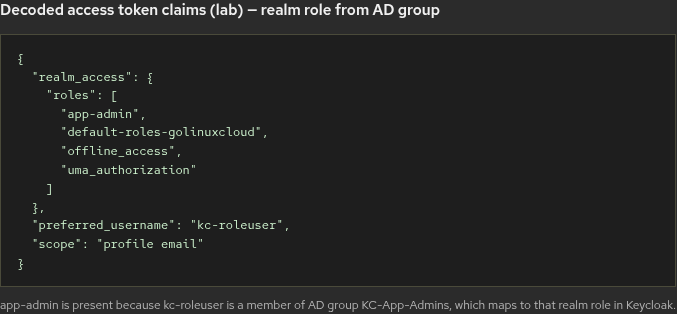
app-admin in realm_access.roles confirms the chain from AD group membership through Keycloak group sync and group role mapping. If app-admin is missing from the token, first check whether the user belongs to the imported Keycloak group and whether that group has the role assigned.
If Direct Access Grants are blocked by required actions, sign in through the normal browser flow and inspect a fresh access token instead.
Troubleshooting
| Symptom | Likely cause | Fix |
|---|---|---|
| No groups after sync | Wrong LDAP Groups DN or filter | Run ldapsearch under the OU with the bind account; fix DN scope — see Keycloak Active Directory groups not syncing for AD Builtin vs OU and memberOf strategy |
| User has no Keycloak groups | User not imported or memberOf empty |
Sync users; confirm AD group membership and bind read access |
| Nested group flat in Keycloak | Preserve group inheritance off | Enable Preserve group inheritance, save the mapper, and run group sync again |
| Token lacks realm role | Role mapped to wrong group or user not in group | Check Groups on the user and Role mapping on KC-App-Admins |
memberOf does not show a nested parent |
AD memberOf records direct membership |
Expected. For transitive nested membership, use an AD-aware recursive membership strategy and verify effective Keycloak group membership |
| Group sync count zero | Mapper points at empty OU | Create groups in the OU or widen DN intentionally |
Summary
You added a group-ldap-mapper on lab-ad with memberOf, synced AD groups into Keycloak, and mapped KC-App-Admins to realm role app-admin. A member user's access token listed app-admin under realm_access.roles when the client was allowed to receive that role.
Keep LDAP Groups DN tight so you do not import hundreds of built-in groups. Use Preserve group inheritance when AD nesting should appear in the Keycloak group tree. Group hierarchy and recursive membership are separate concerns.
When sync counts or membership look wrong, verify the user's direct memberOf values with ldapsearch before changing mapper settings. For user sign-in problems, return to Integrate Keycloak with Active Directory.
References
- Keycloak Server Administration Guide — LDAP
- Keycloak Server Administration Guide — LDAP mappers and sync
- Keycloak Server Administration Guide — Groups
- Keycloak Admin REST API — component representations (LDAP mappers)
- Microsoft Learn — Active Directory security groups
Frequently Asked Questions
Does Keycloak read AD group membership from memberOf?
Yes. With the group LDAP mapper and Member-of LDAP attribute set to memberOf, Keycloak can resolve user membership from the values AD stores on each user account, while group objects are imported from LDAP Groups DN. Choose User roles retrieve strategy based on whether you need direct memberOf membership or recursive nested membership.
Do nested AD groups appear in Keycloak?
They can. Preserve group inheritance lets Keycloak keep LDAP group hierarchy, so a child AD group can appear beneath its parent in the Keycloak group tree (for example /KC-App-Users/KC-App-Developers). That does not automatically mean a user's memberOf attribute contains every parent group; transitive membership is a separate retrieval behavior.
Where do I map an AD group to a Keycloak role?
Sync the group first, then open the imported Keycloak group under Groups and use Role mapping to assign realm or client roles. AD has no native Keycloak role object; mapping is done in Keycloak on top of LDAP-backed groups.
Why is app-admin missing from the token?
Confirm the user is in the mapped Keycloak group, that the group has the realm role assigned, and that the client requests a scope that includes roles (the default roles client scope in this lab). Re-login after group or role changes so a fresh token is issued.
