
| Tested on | Red Hat Enterprise Linux 10.2 (Coughlan) Windows Server 2025 AD DC — WIN-8S0K67EP5EO.lab.example (192.168.56.128) |
|---|---|
| Package | quay.io/keycloak/keycloak:26.7.3 |
| Applies to | Keycloak 26.x with Microsoft Active Directory user federation (lab-ad provider) |
| Privilege | Keycloak realm admin |
| Lab environment | Keycloak on http://127.0.0.1:8080/ — Install Keycloak with PodmanPrerequisite — Integrate Keycloak with Active Directory |
| Scope | Which AD attribute becomes the canonical Keycloak username (sAMAccountName vs userPrincipalName), how that differs from realm Login settings, changing Username LDAP attribute on the provider (and verifying the built-in username mapper), and safe changes on an existing federation. Does not cover generic LDAP attribute mappers, group mapping, or Kerberos/SPNEGO. |
| Related guides | Integrate Keycloak with Active Directory Map Active Directory groups to Keycloak roles Keycloak user attributes and User Profile Keycloak realms Keycloak tutorial |
Active Directory gives each user several names. In Keycloak LDAP federation, Username LDAP attribute decides which AD attribute becomes the user's canonical Keycloak username.
For Microsoft AD, the common choices are:
sAMAccountName→janeuserPrincipalName→jane@lab.example
This guide compares both choices on a Windows Server 2025 lab domain, shows the provider setting you change, how to verify the built-in username mapper after you save, and what changes for users and existing federated accounts when you switch between them.
sAMAccountName vs userPrincipalName: Quick Answer
Use sAMAccountName when users should have short Keycloak usernames such as jane.
Use userPrincipalName when users should have UPN-style usernames such as jane@lab.example, especially when UPN is already the organization's standard sign-in identifier.
Neither choice changes where the password is validated—Active Directory still authenticates the password. The setting changes which AD value becomes the canonical Keycloak username.
How Keycloak Maps sAMAccountName and userPrincipalName
sAMAccountName vs userPrincipalName
Microsoft Active Directory stores both attributes on the same account. Both identify the same AD user, but they use different login-name formats:
| AD attribute | Lab example (jane) | Canonical Keycloak username when selected |
|---|---|---|
sAMAccountName |
jane |
Short logon name (legacy Windows style) |
userPrincipalName |
jane@lab.example |
UPN, often email-shaped |
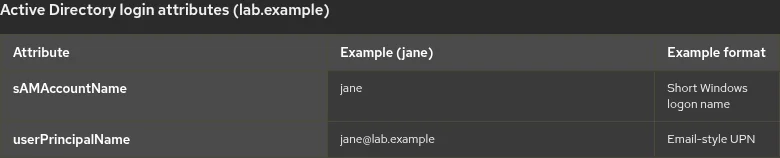
A UPN looks like an email address, but it is an AD sign-in identifier. It does not have to match the user's mail attribute or actual mailbox address.
Keycloak does not use both attributes at once for the canonical username. Username LDAP attribute on the Active Directory provider selects one LDAP attribute. That value is what Keycloak stores in the built-in username field when the account is imported or updated from LDAP.
              Active Directory user
                        |
         +--------------+--------------+
         |                             |
   sAMAccountName                 userPrincipalName
        jane                      jane@lab.example
         |                             |
         +--------------+--------------+
                        |
            Username LDAP attribute (pick one)
                        v
           Canonical Keycloak username field
sAMAccountName must be unique within its AD domain. UPNs are intended to be unique across the forest—Microsoft documents UPN as unique among security principals in the directory forest.
When multiple domains exist in one organization, the UPN suffix helps distinguish users across domains: sAMAccountName is only domain-unique, while a UPN includes a suffix (user@suffix) meant to stay distinct forest-wide.
Username LDAP attribute vs realm login settings
Username LDAP attribute controls which Active Directory attribute becomes the Keycloak username.
That is separate from realm-level login options such as Login with email or Email as username under Realm settings → Login. Keycloak applies special handling to username and email based on those realm settings.
For example:
- If
sAMAccountNamemaps tousername, the canonical Keycloak username may bejane. - If the realm also allows Login with email, the user's mapped email address may be accepted as another login identifier—even though the LDAP username attribute is still
sAMAccountName. - If
userPrincipalNamemaps tousername, the canonical Keycloak username itself becomes a value such asjane@lab.example.
This guide compares the LDAP username mapping itself. Keep realm Login settings unchanged while you test so you can see the effect of switching between sAMAccountName and userPrincipalName.
Starting point
| Item | Lab value |
|---|---|
| Realm | golinuxcloud |
| Provider | lab-ad (Active Directory vendor preset) |
| Default in integration guide | Username LDAP attribute = sAMAccountName |
| Sample user | jane — sAMAccountName jane, userPrincipalName jane@lab.example |
| Login verification user | kc-roleuser (known AD password in lab) |
The lab-ad provider, bind account, and StartTLS trust must already work. Complete Integrate Keycloak with Active Directory before you change username settings.
Where to run the LDAP command
The ldapsearch command in this guide runs on the RHEL host where Keycloak is running, not on the Windows domain controller and not inside the Keycloak container.
That host must:
- resolve
win-8s0k67ep5eo.lab.example - reach the domain controller on port
389 - have the trusted AD certificate used for StartTLS
- have
ldapsearchinstalled
On RHEL, ldapsearch is provided by openldap-clients:
sudo dnf install -y openldap-clientsThe package installs the LDAP client tools on the Keycloak host so the verification command below can run locally.
Read both values from Active Directory
Confirm what AD stores for an account before you change Keycloak. Export the bind password and trust store path, then query jane:
export LDAP_BIND_PW='KeycloakBind!2026'
export LDAPTLS_CACERT=~/keycloak-ad-lab/trust/lab-dc.pem
Sample output is not shown for the exports; they only set environment variables for the next command.
The search below returns both naming attributes for the same directory object:
ldapsearch -x -ZZ -H ldap://win-8s0k67ep5eo.lab.example:389 \
  -D "keycloak-bind@lab.example" -w "$LDAP_BIND_PW" \
  -b "DC=lab,DC=example" -s sub "(sAMAccountName=jane)" sAMAccountName userPrincipalName
Sample output:
dn: CN=Jane Admin,CN=Users,DC=lab,DC=example
sAMAccountName: jane
userPrincipalName: jane@lab.example
The same person carries both attributes. Keycloak uses whichever one you configure as Username LDAP attribute for the canonical username.
Use sAMAccountName for short AD usernames
Choose sAMAccountName when the canonical Keycloak username should be a short Windows-style name such as jane.
Provider setting
In User federation → lab-ad → Settings, set Username LDAP attribute to sAMAccountName (the Active Directory preset default).
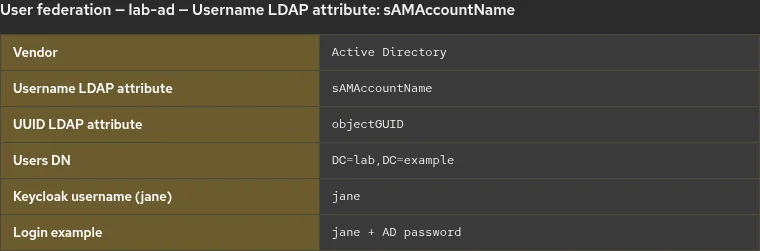
The provider setting tells Keycloak which LDAP attribute identifies the user as a username when it talks to AD.
Verify the username mapper
The Active Directory preset creates a built-in username user-attribute mapper. On current Keycloak releases, when you change Username LDAP attribute on the provider and save, Keycloak propagates that value to the mapper named username—you normally verify the mapper rather than edit it separately.
After you save the provider with sAMAccountName, open User federation → lab-ad → Mappers → username and confirm:
| Setting | Expected value |
|---|---|
| LDAP attribute | sAMAccountName |
| User model attribute | username |
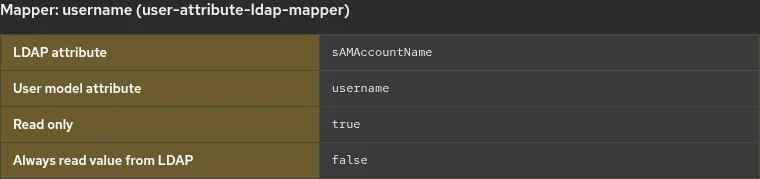
The mapper maps the selected LDAP attribute into Keycloak's built-in username field.
Login experience
Users are expected to enter the short name (jane, kc-roleuser) when that value is the canonical username. That matches what many on-premises AD users expect on legacy applications and matches the integration guide Account Console walkthrough.
In the lab, with Username LDAP attribute set to sAMAccountName, federated user kc-roleuser signed in with username kc-roleuser and AD password through the ad-login-test client.
Use userPrincipalName for UPN-style usernames
Choose userPrincipalName when the canonical Keycloak username should look like jane@lab.example—for example to match an organizational UPN sign-in convention or in multi-domain forests where the UPN suffix helps distinguish users across domains.
Provider setting
In User federation → lab-ad → Settings, set Username LDAP attribute to userPrincipalName and click Save.
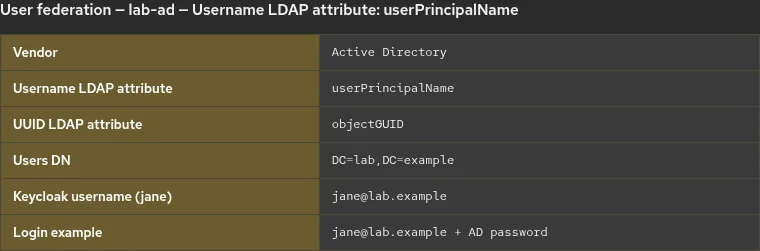
Verify the username mapper
When you change Username LDAP attribute on the LDAP provider and save, Keycloak propagates that change to the built-in username mapper automatically.
For example, after changing the provider from Username LDAP attribute = sAMAccountName to userPrincipalName, open User federation → lab-ad → Mappers → username and verify:
| Setting | Expected value |
|---|---|
| LDAP attribute | userPrincipalName |
| User model attribute | username |
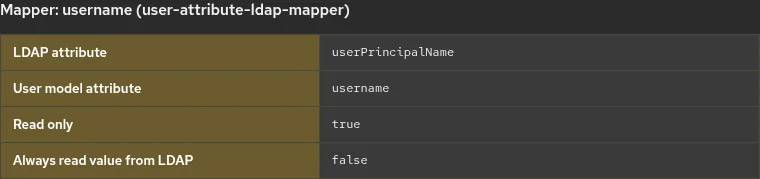
The provider names which LDAP attribute represents the username; the mapper copies that LDAP value into Keycloak's built-in username field. If the mapper still shows the old attribute, check that the preset username mapper exists and was not replaced by a custom mapper before you edit anything manually.
Login experience
Users are expected to enter the full UPN (jane@lab.example). Update your login instructions and help-desk documentation so users know to enter the full UPN.
After switching the lab provider to userPrincipalName, kc-roleuser@lab.example authenticated successfully with the same AD password.
sAMAccountName vs userPrincipalName: Which Should You Use in Keycloak?
Prefer sAMAccountName |
Prefer userPrincipalName |
|---|---|
| Existing applications and help-desk processes already use short AD usernames | Users already use UPN as their primary organizational sign-in |
| Your environment is mainly a single AD domain | You want a namespace that remains unambiguous across multiple AD domains |
| Short usernames are part of the existing login experience | You want the Keycloak username to match the organization's UPN convention |
There is no security advantage to either attribute by itself. Pick the format your users already understand, then document it on the login page and in client applications.
Whichever format you choose, make sure the attribute is populated consistently for the users Keycloak will import. Empty or duplicate UPN values in AD will surface as import or login problems after you select userPrincipalName.
Change the Keycloak LDAP username attribute safely
Changing Username LDAP attribute after users have already been imported affects an identity field, not just a display attribute.
Test the change with a small number of users before applying it to a production realm. After you change Username LDAP attribute, save the provider, and verify that Keycloak updated the built-in username mapper:
- Run Sync all users.
- Verify that an existing federated user still has the expected Keycloak account and federation link.
- Test login with the new username format.
- Verify application tokens and any systems that depend on the Keycloak
preferred_usernameclaim.
Do not delete and re-import users as a routine migration step. Recreating a federated user can affect Keycloak-local metadata associated with that account.
Verify login after a change
Use the Account Console or an OIDC client you control. Do not assume the old canonical username still works after you switch attributes.
http://127.0.0.1:8080/realms/golinuxcloud/account/Sign in with the username format that matches your Username LDAP attribute (kc-roleuser or kc-roleuser@lab.example in the lab).
To inspect a token without building an application, the integration lab client ad-login-test can request a token with Direct Access Grants as a short-lived test only (not a production pattern). Use the same canonical username string you document for users.
Troubleshoot Keycloak AD username login
| Symptom | Likely cause | Fix |
|---|---|---|
jane works but jane@lab.example does not |
Provider still uses sAMAccountName, or realm email-login behavior is being confused with UPN |
Check Username LDAP attribute and realm Login settings |
| User still has old username after provider change | Existing imported account has not yet been refreshed | Run Sync all users, then inspect the federated account |
| Username mapper still shows old LDAP attribute | Built-in mapper is missing, customized, or provider change did not propagate as expected | Verify the username mapper before manually changing it |
| UPN is empty for some users | userPrincipalName is not populated consistently in AD |
Check the value with ldapsearch before selecting UPN as the username |
| Existing user's username did not change after switching | Imported user has not been refreshed or migration behavior differs | Sync users and verify one existing account before rollout |
Login works with email even though username is sAMAccountName |
Login with email is enabled | This is realm login behavior, not evidence that UPN is the LDAP username |
Summary
Active Directory exposes both sAMAccountName and userPrincipalName on the same account. You change Username LDAP attribute on the Active Directory provider; Keycloak propagates that choice to the built-in username mapper and uses it to populate the canonical realm username on import and sync.
That LDAP choice is not the whole login story. Realm Login settings such as Login with email can accept additional identifiers even when the canonical username stays on sAMAccountName. When you test a switch between attributes, hold those realm settings steady so you are comparing LDAP mapping behavior, not mixed login rules.
The integration guide defaults to sAMAccountName for short Windows-style names. Choose userPrincipalName when UPN-shaped usernames fit your organization. Save the provider, verify the username mapper, test on a few federated users before a wide rollout, and verify sign-in and tokens after Sync all users.
For federation setup, return to Integrate Keycloak with Active Directory. For group-based authorization after users sign in, see Map Active Directory groups to Keycloak roles.
References
- Keycloak Server Administration Guide — LDAP
- Keycloak — LDAP storage provider (
LDAPStorageProvider.java) - Microsoft Learn — userPrincipalName attribute
- Microsoft Learn — sAMAccountName attribute
- Microsoft Learn — User Principal Name (UPN) suffixes and uniqueness
Frequently Asked Questions
Which attribute should I use for the canonical Keycloak username?
Use sAMAccountName when the canonical username should be a short logon name (jane). Use userPrincipalName when it should be a UPN such as jane@lab.example. Set Username LDAP attribute on the AD provider, save, and verify the built-in username mapper shows the same LDAP attribute.
Do I need to edit the username mapper separately?
Usually not on current Keycloak releases. Change Username LDAP attribute on the provider and save; Keycloak propagates the value to the preset username mapper. Open the mapper to verify. Edit it manually only if the built-in mapper is missing, customized, or did not update as expected.
Will existing users keep their old username after I switch?
Not automatically. Changing the LDAP username attribute on a live federation needs a controlled test: sync users, inspect one existing federated account, and verify login and tokens before you announce a new format.
Is userPrincipalName the same as email?
Not always. UPN is an AD sign-in identifier and does not have to match the mail attribute. Keycloak stores whatever string is in userPrincipalName as the username when you select that attribute—it does not validate that it is a working mailbox.
Why can users sign in with email when the LDAP username is sAMAccountName?
Realm Login settings can treat email as an alternate login identifier. That behavior is separate from which LDAP attribute maps to the canonical username.
