
| Tested on | Red Hat Enterprise Linux 10.2 (Coughlan) Windows Server 2025 AD DC — WIN-8S0K67EP5EO.lab.example (192.168.56.128) |
|---|---|
| Package | quay.io/keycloak/keycloak:26.7.3 |
| Applies to | Keycloak 26.x with Microsoft Active Directory user federation (lab-ad provider) |
| Privilege | Keycloak realm admin; AD bind account for LDAP searches |
| Lab environment | Keycloak on http://127.0.0.1:8080/ — Install Keycloak with PodmanPrerequisite — Integrate Keycloak with Active Directory |
| Scope | Active Directory–specific reasons Sync all users imports zero accounts or misses expected users: Users DN, Search scope (especially CN=Users vs OUs at the domain root), Custom user LDAP filter, and bind failures (ldap_bind: Invalid credentials (49) / data 52e). Does not cover OpenLDAP-only tuning or connection-only failures with no sync attempt — see Keycloak LDAP users not syncing for vendor-neutral LDAP sync. |
| Related guides | Integrate Keycloak with Active Directory Keycloak sAMAccountName vs userPrincipalName Map Active Directory groups to Keycloak roles Keycloak LDAP users not syncing Keycloak tutorial |
Test connection can succeed while Sync all users still reports 0 imported users. On Microsoft Active Directory, that usually means the bind account can reach the domain but the user search Keycloak runs does not return the accounts you expect.
Use ldapsearch on the RHEL host where Keycloak runs with the same base DN, scope, and filter to see whether Active Directory returns the user. Then adjust the lab-ad provider and sync again. This guide assumes the lab-ad provider from the Active Directory integration walkthrough already exists. If Test connection cannot reach the domain controller because of DNS, firewall, or StartTLS trust, fix that federation setup before you tune Users DN.
Keycloak AD Users Not Syncing or 0 Imported Users: Quick Fix
If Test connection succeeds but Sync all users returns 0 imported users, check these in order:
- Users DN — does it actually contain the AD accounts you want?
- Search scope — use Subtree when users sit under child containers or OUs below the base DN.
- Custom user LDAP filter — temporarily clear it and sync again.
- Import users — turn it on when you expect LDAP users to be imported into Keycloak’s local database.
- Bind account — if LDAP returns error
49/data 52e, fix bind credentials before you change the search base.
Use ldapsearch from the Keycloak host with the same bind DN, StartTLS trust, base DN, scope, and custom filter. If LDAP cannot return the user, Keycloak cannot import that user.
| Symptom | Check first on AD federation |
|---|---|
0 imported users, 0 updated users after Sync all users |
Users DN + Search scope — accounts under OU=Keycloak are outside CN=Users when Users DN stops at the built-in Users container |
| Expected lab user missing from Keycloak | Same base DN and scope with ldapsearch as the bind account; if LDAP returns no entries, Keycloak cannot import them |
| Test connection fails or bind errors in logs | Bind DN, password, and StartTLS trust — Invalid credentials (49) with data 52e means AD rejected the bind |
| Fewer users than in AD Users and Computers | Custom user LDAP filter, or Import users off when you expect bulk import into the local database |
Password login and bulk sync share the same LDAP connection settings, but Sync all users only imports objects your configured search returns.
How Keycloak searches Active Directory users
Keycloak’s Active Directory preset searches from Users DN using Search scope and an optional Custom user LDAP filter. Sync all users imports directory users that search returns when Import users is enabled and mappers allow it.
        Keycloak lab-ad provider
                 |
     Users DN + Search scope
     + optional LDAP filter
                 v
        LDAP search on AD DC
                 v
Sync all users → imported count| Setting | Lab working value | Common AD mistake |
|---|---|---|
| Users DN | DC=lab,DC=example |
CN=Users,DC=lab,DC=example only |
| Search scope | Subtree | One level when the base DN is too narrow |
| Custom user LDAP filter | (empty) | Filter that matches no real sAMAccountName |
| Import users | On | Off — users are not imported into Keycloak’s local database, so bulk import/sync is not the expected storage mode |
This guide assumes realm golinuxcloud and provider lab-ad from the integration chapter.
Diagnose Why Keycloak Imports 0 AD Users
Start with the settings that control which Active Directory objects Keycloak can see:
- Check Users DN.
- Check Search scope.
- Check Custom user LDAP filter.
- Verify the bind account with the same LDAP search from the Keycloak host.
If Test connection succeeds but Sync all users returns 0 imported users, the LDAP connection is usually fine. The next question is whether your configured search returns the users you expect.
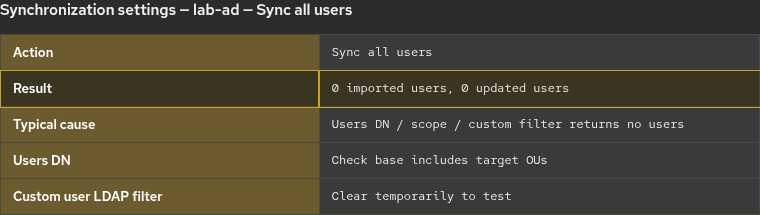
If the search returns no matching users, Sync all users can finish with zero imported accounts even though bind and TLS succeed.
Starting point (lab)
| Item | Lab value |
|---|---|
| Realm | golinuxcloud |
| Provider | lab-ad (Active Directory) |
| Bind account | keycloak-bind@lab.example / CN=Keycloak Bind,CN=Users,DC=lab,DC=example |
Example user outside CN=Users |
kc-roleuser → CN=KC Role User,OU=Keycloak,DC=lab,DC=example |
Where to run LDAP commands
Run ldapsearch on the RHEL host where Keycloak runs, not on the domain controller and not inside the Keycloak container. Install clients if needed:
sudo dnf install -y openldap-clientsThe Keycloak host must resolve win-8s0k67ep5eo.lab.example, reach port 389, and trust the DC certificate used for StartTLS (same trust as the integration guide). Set the trust file once per shell session:
export LDAPTLS_CACERT=~/keycloak-ad-lab/trust/lab-dc.pemCheck Keycloak Users DN and Search Scope
Many domains keep built-in accounts under CN=Users, but application accounts often live in organizational units such as OU=Keycloak,DC=lab,DC=example. Keycloak only imports users its search can see.
The built-in AD Users container uses CN=Users, not OU=Users; custom organizational units use OU=.... Do not swap CN and OU when you copy a Users DN from documentation.
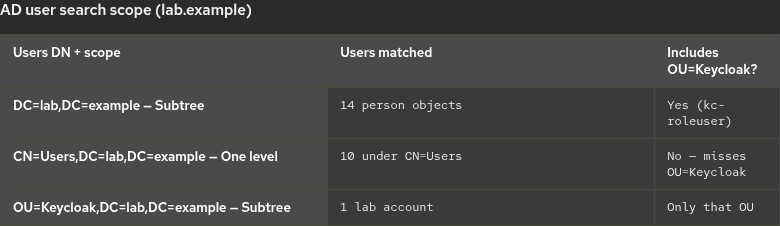
One level vs Subtree LDAP search
One level searches only objects directly below Users DN.
Subtree searches the configured Users DN and all child containers and OUs beneath it.
DC=lab,DC=example
├── CN=Users
└── OU=Keycloak
    └── kc-roleuser
If Users DN is CN=Users,DC=lab,DC=example, Keycloak never searches the sibling OU=Keycloak, even with Subtree. Subtree only walks children under CN=Users, not other branches at the domain root.
If Users DN is DC=lab,DC=example with Subtree, both CN=Users and OU=Keycloak are included.
Narrow base: CN=Users with One level
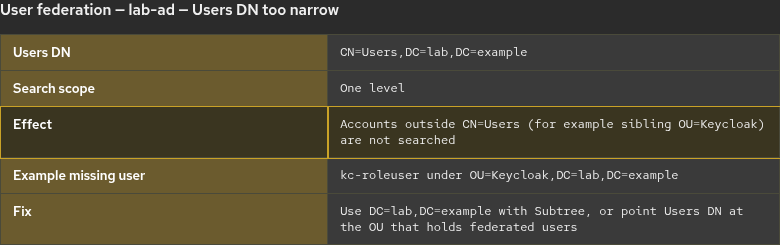
A frequent misconfiguration sets Users DN to CN=Users,DC=lab,DC=example and Search scope to One level. That finds users placed directly under CN=Users but not accounts under OU=Keycloak, which is a sibling of CN=Users at the domain root—not a child of CN=Users.
Test Users DN with ldapsearch
On the lab host, confirm with the bind account. This search uses the same base and one-level scope Keycloak would use (-W prompts for the bind password):
ldapsearch -x -ZZ -H ldap://win-8s0k67ep5eo.lab.example:389 \
  -D "keycloak-bind@lab.example" -W \
  -b "CN=Users,DC=lab,DC=example" -s one \
  "(sAMAccountName=kc-roleuser)" dn
Sample output:
# search result
search: 3
result: 0 Success

# numResponses: 1
No dn: line appears — kc-roleuser is not under CN=Users at one level. A subtree search from the domain root finds the account:
ldapsearch -x -ZZ -H ldap://win-8s0k67ep5eo.lab.example:389 \
  -D "keycloak-bind@lab.example" -W \
  -b "DC=lab,DC=example" -s sub "(sAMAccountName=kc-roleuser)" dn
Sample output:
dn: CN=KC Role User,OU=Keycloak,DC=lab,DC=exampleFix: set Users DN to DC=lab,DC=example with Subtree, or set Users DN to OU=Keycloak,DC=lab,DC=example if all federated users live in that OU.
Check the Custom User LDAP Filter
A Custom user LDAP filter is added to Keycloak’s normal user search. If it matches no AD users, Sync all users can complete without importing the accounts you expect.
Example filter that matches no real lab user:
(&(objectClass=user)(sAMAccountName=__none__))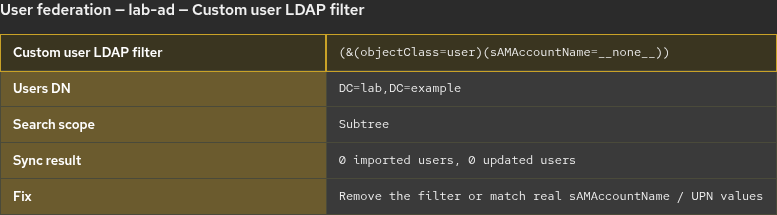
For troubleshooting, temporarily clear Custom user LDAP filter, save the provider, and run Sync all users again. If users appear, fix the filter before you re-enable it.
Test your custom LDAP filter with ldapsearch
Reproduce the relevant base DN, scope, and custom-filter conditions with ldapsearch. You do not need to recreate every internal Keycloak filter; the goal is to confirm that the AD search criteria you configured can return the expected account.
When you use a custom filter, include it in the command:
ldapsearch -x -ZZ -H ldap://win-8s0k67ep5eo.lab.example:389 \
  -D "keycloak-bind@lab.example" -W \
  -b "DC=lab,DC=example" -s sub \
  "(&(objectClass=user)(objectCategory=person)(sAMAccountName=kc-roleuser))" dn sAMAccountName
If ldapsearch returns the user but Keycloak still skips them, check Import users, mapper errors, and the server log.
Fix LDAP error 49 / data 52e bind failures
If the bind password or principal is wrong, LDAP returns ldap_bind: Invalid credentials (49) with Active Directory extended error data 52e. data 52e indicates that AD rejected the credentials supplied for the bind—check both the bind principal and password.
Test the same bind Keycloak uses before you spend time on Users DN:
ldapsearch -x -ZZ -H ldap://win-8s0k67ep5eo.lab.example:389 \
  -D "keycloak-bind@lab.example" -W \
  -b "DC=lab,DC=example" -s base ""
If this returns Invalid credentials (49) / data 52e, correct the bind account or password in Keycloak before you troubleshoot Users DN. A successful bind returns the root DSE. In the Admin Console, fix Bind DN (DN form or user@domain UPN style), Bind credentials, and StartTLS trust, then run Test connection.
Sample bind failure:
ldap_bind: Invalid credentials (49)
	additional info: 80090308: LdapErr: DSID-0C090549, comment: AcceptSecurityContext error, data 52e, v65f4
Verify Active Directory user sync after the fix
- Set Users DN, Search scope, and Custom user LDAP filter to values that
ldapsearchconfirms. - Ensure Import users is On when you expect users in Keycloak’s local database.
- Run Test connection, then Sync all users. A healthy sync after you fix Users DN shows updated counts (not only
0 imported users, 0 updated userswhen accounts already exist from an earlier import).
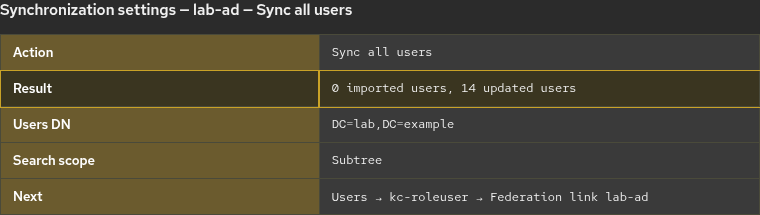
- Under Users, search for a known account (for example
kc-roleuser) and confirm Federation link showslab-ad.
On a realm that already imported users during integration, Sync all users often reports 0 imported users with a non-zero updated users count. That still means Keycloak refreshed LDAP-backed accounts from your corrected search base.
Troubleshoot Keycloak AD user sync
| Symptom | Likely cause | Fix |
|---|---|---|
0 imported users after sync |
Users DN or filter returns no user objects | Set Users DN to a container that holds accounts; confirm with ldapsearch |
| Some AD users never appear | Users DN does not include the OU where they live, or scope is too narrow | Use a base DN that contains those accounts—domain root with Subtree, or Users DN on the target OU |
| Sync finds nobody after a filter change | Custom user LDAP filter too restrictive | Temporarily clear the filter and sync again; if users appear, the filter is the problem |
Invalid credentials (49) / data 52e |
AD rejected bind credentials | Update Bind credentials; verify with ldapsearch -D … -W |
| Test connection OK, sync still empty | Search base or filter returns zero users | Debug Users DN, scope, and filter—not TLS |
| Generic LDAP vendor or non-AD directory | Different defaults and filters | Open the vendor-neutral Keycloak LDAP sync troubleshooting page for OpenLDAP and other non-AD directories |
Summary
When Keycloak Active Directory sync imports no users, the bind account often reaches the domain while the configured user search does not. On AD, the usual gaps are Users DN that stops at CN=Users while accounts live in sibling OUs such as OU=Keycloak, Search scope that does not include the containers where those users are stored, and Custom user LDAP filter values that match nobody.
Use ldapsearch on the Keycloak host with the same bind DN, StartTLS trust, base DN, scope, and filter you configured. If the bind itself fails with error 49 / 52e, fix credentials before you change the search base. After Users DN and filters are correct, run Sync all users and confirm federated users under Users.
For username attribute choice after users import, see Keycloak sAMAccountName vs userPrincipalName. After accounts appear in Keycloak, map AD groups with Map Active Directory groups to Keycloak roles.
References
- Keycloak Server Administration Guide — LDAP user federation
- Microsoft Learn — LDAP error codes (bind error 49 / extended data such as 52e)
- Microsoft Learn — Active Directory naming contexts
Frequently Asked Questions
Why does Keycloak say Test connection succeeded but sync imports zero users?
Test connection checks that Keycloak can bind and reach the directory. Sync runs a separate user search from Users DN with Search scope and your filter. An empty search result imports zero users even when bind succeeds.
Should Users DN be CN=Users or the domain root?
It depends where accounts live. CN=Users,DC=lab,DC=example does not include sibling OUs such as OU=Keycloak at the domain root—even with Subtree. Accounts in OU=Keycloak need Users DN at DC=lab,DC=example with Subtree, or Users DN aimed at that OU.
What does LDAP error 49 data 52e mean for the bind account?
Active Directory rejected the bind credentials. Update the password in Bind credentials, confirm the Bind DN or UPN form, and verify with ldapsearch -W before you change Users DN.
Is this article the same as Keycloak LDAP users not syncing?
No. This page focuses on Microsoft Active Directory layouts (CN=Users, OUs at the domain root, AD bind error 52e). The generic LDAP troubleshooting guide covers vendor-neutral connection and filter issues.
