
| Tested on | Red Hat Enterprise Linux 10.2 (Coughlan) |
|---|---|
| Package | podman-5.8.2-5.el10_2.x86_64quay.io/keycloak/keycloak:26.7.3 |
| Applies to | Any Linux host with Podman or Docker |
| Privilege | Normal user for rootless Podman; Keycloak admin access for session-revocation demos |
| Lab environment | Keycloak 26.7.3 on http://127.0.0.1:8080/ — Install Keycloak with Podman |
| Scope | RFC 7009 revocation with curl on Keycloak 26.7.3, separate refresh-token and access-token revoke flows, introspection vs local JWT verification after revoke, privacy-preserving HTTP 200 responses, and comparison of endpoint revoke, OIDC logout, admin session termination, and client secret rotation after compromise. Does not cover refresh-token rotation settings, full OIDC logout topology, or JWKS signature verification code. |
| Related guides | Keycloak token introspection Keycloak refresh tokens Keycloak sessions explained Access token vs ID token vs refresh token Keycloak public vs confidential clients |
To revoke a Keycloak access or refresh token, POST the token to:
/realms/{realm}/protocol/openid-connect/revoke
using OAuth 2.0 token revocation (RFC 7009).
A mobile banking app stores a refresh token so it can renew access without asking for the password on every launch. When the user taps Sign out everywhere, or when fraud detection flags the device, you need to stop that refresh token from working — and you may also need to cut off access tokens that are still within their five-minute lifetime.
POST the token to Keycloak's revocation endpoint and Keycloak invalidates it according to the token type:
- Access token — marks that token inactive on Keycloak-side checks
- Refresh token — can also remove related client/session state
- Self-contained JWT at the API — not automatically invalidated when the API only checks signature and
explocally
This lab revokes refresh and access tokens separately, compares introspection before and after, and contrasts endpoint revocation with logout and admin session termination.
The walkthrough uses:
- Realm
golinuxcloud - Confidential client
refresh-lab-app - Introspection client
introspect-lab-api - User
tokenuseron Keycloak26.7.3
For how introspection reports active: false after session changes, see Keycloak token introspection.
What token revocation changes in Keycloak
Token revocation affects Keycloak's server-side view of a token, but the effect depends on the token type and on how your API validates access tokens.
- Revoking an access token marks it inactive for introspection, UserInfo, and other Keycloak-backed checks
- Revoking a refresh token stops future refresh grants and can remove related client/session state and user consent for that client
- Resource servers that only verify JWT signature and
explocally are not notified; they may keep accepting the token untilexp
  refresh-lab-app                         introspect-lab-api
  (owns the tokens)                       (checks active state)
        |                                        |
        |  POST /revoke                          |  POST /token/introspect
        v                                        v
  Keycloak 26.7.3  ── session + token state ──►  active: true / false
        |
        |  APIs that verify JWT locally only
        v
  May still accept token until exp (no server call)
Side effects in the lab realm:
- Tokens issued during the curl steps are revoked; run a fresh login before other labs if needed
- Client secret for
refresh-lab-appstaysRefreshLabSecret!2026unless you keep a rotated value
What OAuth token revocation does
RFC 7009 defines a single revocation endpoint where a client can ask the authorization server to invalidate a token. The request is intentionally simple:
token— the access or refresh token to revoketoken_type_hint— optional;access_tokenorrefresh_tokenhelps Keycloak find the right record faster- Client authentication — required for confidential clients
Revocation changes whether Keycloak still considers the token valid:
- Refresh token — future refresh requests fail
- Access token — introspection, UserInfo, and other Keycloak-backed checks recognize the revocation
- Resource server with a cached JWT — not notified automatically
| Token type | What revocation typically stops |
|---|---|
| Refresh token | Future refresh grants; related client/session state and user consent for that client |
| Access token | Introspection and UserInfo reject the token; APIs that introspect see active: false |
| Access token at a JWT-only API | Often still accepted until exp unless the API calls introspection or uses very short lifetimes |
Revocation changes server-side state. It does not erase the JWT string from every copy the client already handed to an API.
Keycloak revocation endpoint
Keycloak publishes the URL in OpenID Provider metadata:
curl -s 'http://127.0.0.1:8080/realms/golinuxcloud/.well-known/openid-configuration' | python3 -c 'import sys,json; print(json.load(sys.stdin)["revocation_endpoint"])'http://127.0.0.1:8080/realms/golinuxcloud/protocol/openid-connect/revokeThe revocation endpoint can be used by the client that owns the token:
- Confidential clients authenticate with their client credentials
- Public clients cannot use a client secret; their revocation request follows the client-authentication rules for that client type
- This lab uses confidential client
refresh-lab-appwith HTTP Basic authentication — the same client that obtained the tokens
Set base variables once:
export KC_BASE='http://127.0.0.1:8080/realms/golinuxcloud/protocol/openid-connect'
export TOKEN_CLIENT='refresh-lab-app'
export TOKEN_SECRET='RefreshLabSecret!2026'
export INTROSPECT_CLIENT='introspect-lab-api'
export INTROSPECT_SECRET='paste-introspect-lab-api-secret'
Copy INTROSPECT_SECRET from Clients → introspect-lab-api → Credentials → Client secret. If introspect-lab-api or the audience mapper on refresh-lab-app is missing, follow the setup in Keycloak token introspection first.
This lab uses Direct Access Grant (grant_type=password) only to obtain test tokens quickly. Do not use that grant in production applications; use Authorization Code + PKCE or another appropriate flow instead.
Obtain a token pair for tokenuser:
TOKEN_RESP=$(curl -s -X POST "${KC_BASE}/token" \
  -u "${TOKEN_CLIENT}:${TOKEN_SECRET}" \
  -d 'grant_type=password' \
  -d 'username=tokenuser' \
  -d 'password=TokenUser!2026' \
  -d 'scope=openid profile')
Store the tokens in shell variables:
ACCESS_TOKEN=$(printf '%s' "$TOKEN_RESP" | python3 -c 'import sys,json; print(json.load(sys.stdin)["access_token"])')
REFRESH_TOKEN=$(printf '%s' "$TOKEN_RESP" | python3 -c 'import sys,json; print(json.load(sys.stdin)["refresh_token"])')
The response includes expires_in for the access token and refresh_expires_in for the refresh token. Revocation can end usability before those counters reach zero.
Revoke a refresh token
When a device is lost or a refresh token is exfiltrated, revoke the refresh token so the client cannot silently mint new access tokens.
In Keycloak, revoking a refresh token is broader than simply invalidating that one string:
- Keycloak revokes the user's consent for the client
- Keycloak may remove the associated client-session state
Post the refresh token to /revoke with a hint:
curl -s -w "\nHTTP status: %{http_code}\n" -X POST "${KC_BASE}/revoke" \
  -u "${TOKEN_CLIENT}:${TOKEN_SECRET}" \
  -H 'Content-Type: application/x-www-form-urlencoded' \
  --data-urlencode "token=${REFRESH_TOKEN}" \
  --data-urlencode 'token_type_hint=refresh_token'
Keycloak returns an empty body with HTTP 200 when the request is accepted. That success does not prove the token existed; RFC 7009 allows the server to respond uniformly so callers cannot probe which tokens are valid.
Try to refresh with the same refresh token:
curl -s -X POST "${KC_BASE}/token" \
  -u "${TOKEN_CLIENT}:${TOKEN_SECRET}" \
  -d 'grant_type=refresh_token' \
--data-urlencode "refresh_token=${REFRESH_TOKEN}"{"error":"invalid_grant","error_description":"Session not active"}The refresh JWT may still decode, but Keycloak rejects it because the backing session or refresh record is no longer active. That is the same class of failure you see after Keycloak refresh token rotation with Revoke Refresh Token enabled or after admin session termination.
token_type_hint is optional. Keycloak can often infer the token type, but supplying refresh_token or access_token avoids ambiguity when a deployment stores both in similar formats.
Revoke an access token
Obtain a fresh token pair before this section so the refresh token from the previous step is not needed:
TOKEN_RESP=$(curl -s -X POST "${KC_BASE}/token" \
  -u "${TOKEN_CLIENT}:${TOKEN_SECRET}" \
  -d 'grant_type=password' \
  -d 'username=tokenuser' \
  -d 'password=TokenUser!2026' \
  -d 'scope=openid profile')
ACCESS_TOKEN=$(printf '%s' "$TOKEN_RESP" | python3 -c 'import sys,json; print(json.load(sys.stdin)["access_token"])')
Confirm introspection still reports the access token as active:
curl -s -X POST "${KC_BASE}/token/introspect" \
  -u "${INTROSPECT_CLIENT}:${INTROSPECT_SECRET}" \
--data-urlencode "token=${ACCESS_TOKEN}"{
"exp": 1790267866,
"iat": 1790267566,
"iss": "http://127.0.0.1:8080/realms/golinuxcloud",
"aud": ["introspect-lab-api", "orders-api", "account"],
"preferred_username": "tokenuser",
"client_id": "refresh-lab-app",
"active": true
}The active: true line is what your API should read first.
Revoke the access token:
curl -s -w "\nHTTP status: %{http_code}\n" -X POST "${KC_BASE}/revoke" \
  -u "${TOKEN_CLIENT}:${TOKEN_SECRET}" \
  -H 'Content-Type: application/x-www-form-urlencoded' \
  --data-urlencode "token=${ACCESS_TOKEN}" \
  --data-urlencode 'token_type_hint=access_token'
Post the same access token to introspection again:
curl -s -X POST "${KC_BASE}/token/introspect" \
  -u "${INTROSPECT_CLIENT}:${INTROSPECT_SECRET}" \
--data-urlencode "token=${ACCESS_TOKEN}"{"active":false}Keycloak-side checks now treat the token as inactive even though its exp claim may still be in the future. UserInfo agrees:
curl -s -w "\nHTTP status: %{http_code}\n" -H "Authorization: Bearer ${ACCESS_TOKEN}" "${KC_BASE}/userinfo"HTTP status: 401What changes after access-token revocation:
- Introspection / UserInfo — pick up the revocation immediately
- JWT-only API — may still accept the token until
exp; the next section shows why
Why a JWT may still validate locally
Does revoking a Keycloak token invalidate the JWT immediately?
- Keycloak-backed check — introspection returns
active: falseimmediately - Local JWT validation only — the API may continue accepting the token until
exp
A locally validated JWT is self-contained:
- The API checks signature and claims using Keycloak's public key
- It does not ask Keycloak whether the token was revoked after issuance
- After revocation, the unchanged string in memory still has a valid signature and a future
exp
Decode the payload without calling Keycloak:
python3 << 'PY'
import json, base64, time
import os
token = os.environ["ACCESS_TOKEN"]
payload = token.split(".")[1]
payload += "=" * (-len(payload) % 4)
claims = json.loads(base64.urlsafe_b64decode(payload))
print("preferred_username:", claims.get("preferred_username"))
print("exp still in future:", claims.get("exp", 0) > int(time.time()))
PYpreferred_username: tokenuser
exp still in future: True Revoke at Keycloak Resource server (JWT only)
| |
| marks token inactive | reads exp + signature
v v
introspect -> active: false may still return 200 OKThat gap trips up many production rollouts: revocation does not rewrite JWTs already issued. Mitigations include:
- Short access-token lifetimes plus refresh
- Token introspection at the API for high-risk routes
- Session logout or admin session termination when you need all tokens from a login to fail Keycloak-backed checks at once
For token-type basics and what each credential is for, see access token vs ID token vs refresh token.
Revocation vs logout vs session termination
These controls overlap but target different layers.
| Action | What it affects |
|---|---|
/revoke access token |
The submitted access token's server-side validity |
/revoke refresh token |
The refresh token plus related client grant/session state; Keycloak also revokes the user's consent for that client |
| OIDC logout | The login/session behind the sign-out flow |
| Admin logout | Broader user-session termination |
OIDC logout endpoint
Obtain a new token pair, then call logout with the refresh token:
TOKEN_RESP=$(curl -s -X POST "${KC_BASE}/token" \
  -u "${TOKEN_CLIENT}:${TOKEN_SECRET}" \
  -d 'grant_type=password' \
  -d 'username=tokenuser' \
  -d 'password=TokenUser!2026' \
  -d 'scope=openid profile')
REFRESH_TOKEN=$(printf '%s' "$TOKEN_RESP" | python3 -c 'import sys,json; print(json.load(sys.stdin)["refresh_token"])')
ACCESS_TOKEN=$(printf '%s' "$TOKEN_RESP" | python3 -c 'import sys,json; print(json.load(sys.stdin)["access_token"])')
Post the refresh token to the logout endpoint to end the backing session:
curl -s -w "\nHTTP status: %{http_code}\n" -X POST "${KC_BASE}/logout" \
  -u "${TOKEN_CLIENT}:${TOKEN_SECRET}" \
  -H 'Content-Type: application/x-www-form-urlencoded' \
--data-urlencode "refresh_token=${REFRESH_TOKEN}"HTTP status: 204Refresh and introspection after logout match refresh-token revocation:
- Refresh returns
invalid_grant - Introspection on the still-unexpired access token returns
active: false
Logout is the user-facing sign-out path. /revoke is the protocol endpoint for revoking a specific token value, but the effects can be broader for refresh tokens because Keycloak may also invalidate related client/session state.
Admin session termination
Operators can end every session for a user in the Admin Console:
- Users → tokenuser → Sessions — use Log out all sessions
- Sessions under the realm menu — review active logins across clients
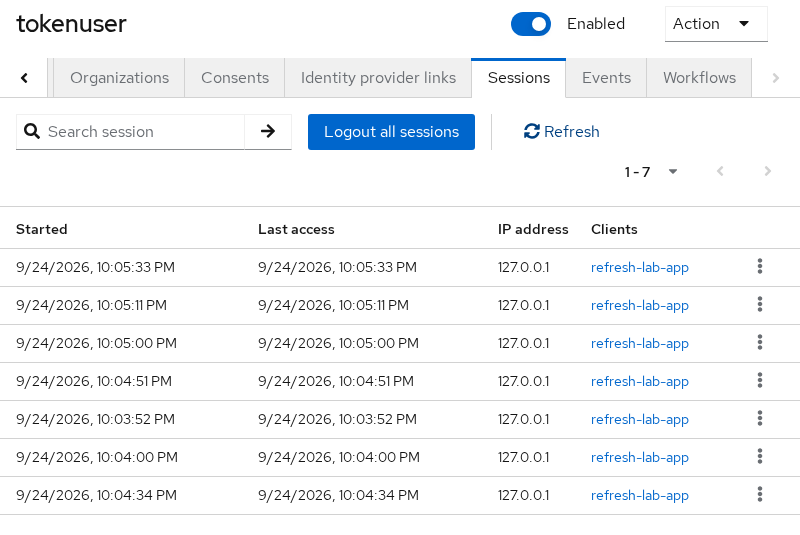
The realm Sessions screen shows the same records from an administrator's view across clients.
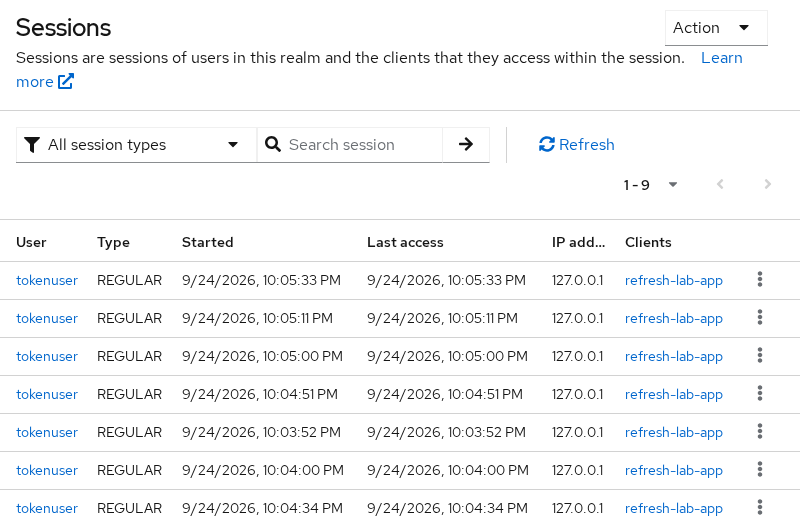
The realm Sessions page lists active user sessions across clients. Multiple rows here came from repeated lab logins; these rows represent sessions, not individual access tokens.
The Admin REST API performs the same work programmatically. List sessions, then log the user out entirely:
ADMIN_TOKEN=$(curl -s -X POST 'http://127.0.0.1:8080/realms/master/protocol/openid-connect/token' \
  -d 'grant_type=password' -d 'client_id=admin-cli' \
  -d 'username=admin' -d 'password=YOUR_ADMIN_PASSWORD' | \
  python3 -c 'import sys,json; print(json.load(sys.stdin)["access_token"])')

TOKENUSER_ID=$(curl -s \
  'http://127.0.0.1:8080/admin/realms/golinuxcloud/users?username=tokenuser&exact=true' \
  -H "Authorization: Bearer ${ADMIN_TOKEN}" \
  | python3 -c 'import sys,json; print(json.load(sys.stdin)[0]["id"])')

curl -s -w "\nHTTP status: %{http_code}\n" -X POST \
  -H "Authorization: Bearer ${ADMIN_TOKEN}" \
"http://127.0.0.1:8080/admin/realms/golinuxcloud/users/${TOKENUSER_ID}/logout"HTTP status: 204After admin logout:
- Introspection and other Keycloak-backed checks report affected access tokens as inactive
- Refresh grants return
Session not active - A resource server that only validates JWT signature and
explocally can still accept an already-issued token until it expires
For how user, client, and SSO sessions relate to those tokens, see Keycloak sessions explained.
Compromise response patterns
Use the smallest control that matches what was leaked.
| Scenario | First response | Also consider |
|---|---|---|
| Refresh token copied from one device | POST /revoke with token_type_hint=refresh_token |
Review the user's sessions and investigate how the token was exposed |
| Access token intercepted on the wire | Revoke it if APIs honor revocation, and contain the incident; otherwise the practical protection is short token lifetime plus session/account controls | Introspection on sensitive APIs; TLS everywhere |
| Confidential client secret exposed | Regenerate client secret in Credentials | Invalidate outstanding tokens; audit redirect URIs |
| Account takeover suspected | Admin Log out all sessions for the user | Disable user; rotate passwords; revoke refresh tokens per client |
| API still honors revoked JWTs | Not a Keycloak-only fix | Add introspection or reduce access-token TTL |
Regenerating the client secret:
- Stops future token requests that use the old secret
- Does not itself revoke access tokens already issued
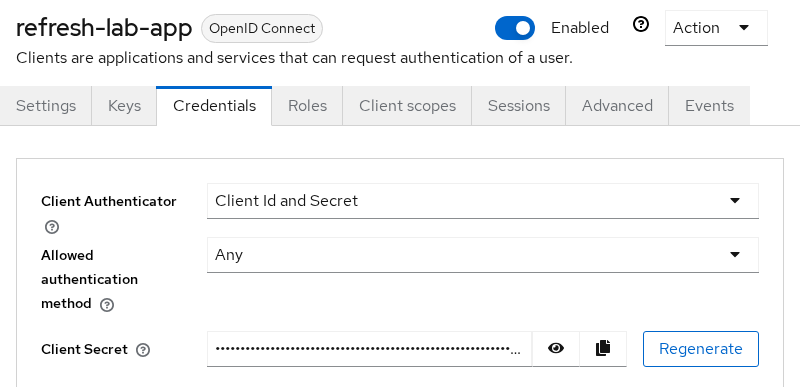
Pair secret rotation with session logout or per-token revocation when you need immediate effect on outstanding credentials.
Rotate through the Admin API when automating incident response:
curl -s -X POST \
  -H "Authorization: Bearer ${ADMIN_TOKEN}" \
  "http://127.0.0.1:8080/admin/realms/golinuxcloud/clients/CLIENT_UUID/client-secret"
The response body includes the new value. Update your deployment secret store before deleting the old one.
Troubleshoot revocation expectations
| Symptom | Likely cause | Fix |
|---|---|---|
API still accepts token after /revoke |
Resource server verifies JWT locally only | Add introspection or shorten access-token TTL |
/revoke returns 200 but token still works at Keycloak |
Wrong token string or wrong client credentials | Revoke with the owning client; copy the full token |
Refresh fails with Session not active after revoke |
Expected — refresh or session was ended | Obtain a new login; do not retry the old refresh token |
Introspection active: false but JWT exp valid |
Expected — server state trumps local exp |
Teach API owners the difference |
/revoke body shows invalid_token with HTTP 200 |
Malformed or unrecognized token string (Keycloak 26.7.3 behavior) | RFC 7009 still uses 200; verify effect with introspection or refresh |
Invalid client at /revoke |
Client authentication or client identification is incorrect | Check the client ID and use the authentication method configured for that client |
Privacy-preserving HTTP 200
- RFC 7009 — HTTP
200for both a successfully revoked token and an invalid/unknown token; the response body is ignored - Keycloak 26.7.3 lab — a malformed token also returned an
invalid_tokenJSON body while keeping HTTP status200; do not build client logic around that JSON body - Already-revoked token — HTTP
200with an empty body
curl -s -w "\nHTTP status: %{http_code}\n" -X POST "${KC_BASE}/revoke" \
  -u "${TOKEN_CLIENT}:${TOKEN_SECRET}" \
  -H 'Content-Type: application/x-www-form-urlencoded' \
  --data-urlencode 'token=not-a-real-token' \
--data-urlencode 'token_type_hint=access_token'{"error":"invalid_token","error_description":"Invalid token"}
HTTP status: 200Do not treat HTTP 200 alone as proof that a live token was present. Confirm effect with a refresh attempt or introspection instead.
Summary
You used Keycloak's RFC 7009 revocation endpoint to invalidate refresh and access tokens separately:
- Refresh token revoked — next
grant_type=refresh_tokencall returnsinvalid_grant - Access token revoked — introspection returns
active: falseand UserInfo returns HTTP401 - Same JWT decoded locally —
expcan still look valid until expiry
The operational lesson: revocation updates Keycloak's server-side token and session state. It does not reach APIs that trust self-contained JWTs until expiry unless they call introspection or you keep access tokens very short.
Wider controls when one token is not enough:
- Logout / admin session termination — cast a wider net than revoking a single token string
- Client secret rotation — stops new token requests with the old secret; does not by itself invalidate access tokens already in circulation
For the next step in enforcement, wire Keycloak token introspection on APIs that must honor logout and revoke immediately.
References
- RFC 7009 — OAuth 2.0 Token Revocation
- RFC 7662 — OAuth 2.0 Token Introspection
- Keycloak Server Administration Guide — OpenID Connect
- Keycloak Authorization Services Guide — OAuth 2.0 endpoints
Frequently Asked Questions
Does revocation immediately kill a JWT?
Not at every API:
- Keycloak marks the token inactive on the server, so introspection and UserInfo fail immediately
- A resource server that only checks signature and
explocally may keep accepting the JWT untilexp
Add introspection or very short access-token lifetimes when APIs must honor revocation immediately.
What happens when a refresh token is revoked?
- The refresh grant returns
invalid_grant, often withSession not active - Keycloak revokes the user's consent for that client
- The client must send the user through a new login
Should I use token_type_hint?
It is optional. Passing refresh_token or access_token can help Keycloak look up the token efficiently, but the hint does not determine whether the token can be revoked. If the hint is incorrect, RFC 7009 says the authorization server should ignore it rather than treat the token as a different credential.
Revocation vs logout?
/revoke— invalidates the specific token you post- OIDC
/logoutwith a refresh token — ends the user session behind that login and typically invalidates related refresh and access tokens for Keycloak-backed checks
Choose revoke for one credential; choose logout for sign-out UX.
Why does the endpoint return 200 for an invalid token?
RFC 7009 uses a uniform success response so callers cannot probe which tokens ever existed. Verify effect with introspection or a refresh attempt instead of relying on the response body alone.
