
| Tested on | Red Hat Enterprise Linux 10.2 (Coughlan) |
|---|---|
| Package | podman-5.8.2-5.el10_2.x86_64quay.io/keycloak/keycloak:26.7.3 |
| Applies to | Any Linux host with Podman or Docker |
| Privilege | Normal user for rootless Podman; Keycloak admin access in the lab realm |
| Lab environment | Keycloak 26.7.3 on http://127.0.0.1:8080/ — Install Keycloak with Podman |
| Scope | Refresh grant with curl, Revoke Refresh Token and Max Reuse, refresh-token replacement vs previous-token rejection, refresh_expires_in vs client and SSO session limits, session revocation and idle expiry, storage guidance by app type, and invalid_grant troubleshooting. Does not cover full realm timeout reference, offline tokens, client-policy suppress-refresh-token-rotation, or OAuth revocation endpoint mechanics. |
| Related guides | Access token vs ID token vs refresh token Keycloak sessions explained Keycloak Authorization Code flow Keycloak OpenID Connect tutorial Keycloak public vs confidential clients |
A refresh token lets a client obtain a new access token without sending the user through the login form again. The two token types solve different problems:
- Access token — short-lived; sent to APIs frequently
- Refresh token — used less often; sent only to the authorization server so the application can obtain replacement access tokens without keeping API credentials valid for hours or days
In Keycloak, refresh-token behavior depends on more than one expiry field:
- Client and SSO session limits bound the practical refresh lifetime
- Revoke Refresh Token and Max Reuse control whether a previously used refresh token may still be exchanged
- A replacement refresh-token JWT in the response is a separate question from whether the old token remains valid
In this lab you will:
- Request fresh access tokens with
grant_type=refresh_token - Enable Revoke Refresh Token and tune Max Reuse
- Reproduce
invalid_grantafter logout, idle timeout, or reuse of a superseded refresh token
The lab uses a confidential client and curl so you can read the token response fields directly.
This walkthrough uses Keycloak 26.7.3 on 127.0.0.1:8080, realm golinuxcloud, client refresh-lab-app, and user tokenuser. For token-type basics, start with access token vs ID token vs refresh token. For how user and client sessions back those tokens, see Keycloak sessions explained.
What this refresh-token lab creates
When you finish, four behaviors are demonstrated on loopback:
- Confidential client
refresh-lab-appthat returns refresh tokens on login - Successful refresh grant that issues a new access token
- Revoke Refresh Token with Max Reuse showing when a superseded refresh token still works once and when reuse is blocked
invalid_grantafter session revocation or SSO idle expiry
  Login
    |
    v
  Keycloak
    |
    +---- access token ------> API requests (short-lived)
    |
    +---- refresh token
              |
              | access token expires
              v
           Keycloak
              |
              v
        new access token
The refresh token is a credential the client stores and sends only to Keycloak's token endpoint:
- APIs should receive the access token, not the refresh token
- The refresh token's job in this lab is to obtain replacement tokens from Keycloak
- It is not a substitute for the backing client or SSO session
How Keycloak refresh tokens work
After a user signs in through a flow that issues refresh tokens, Keycloak returns an access token and refresh token to the client. In a normal application this would typically happen through Authorization Code flow; this lab uses Direct Access Grant only to make the refresh-token experiments easier to reproduce.
The access token is short-lived and meant for APIs. The refresh token is longer-lived in calendar terms, but its practical lifetime is bounded by the user's online session unless you use offline tokens (out of scope here).
Each refresh request does three things:
- Keycloak validates the refresh token signature and finds the client session it belongs to.
- Keycloak checks that the client session and its parent user session are still active and within their applicable idle and maximum lifetimes.
- Keycloak issues a new access token and may return a new refresh-token JWT. Whether the previous refresh token remains usable is controlled separately by Revoke Refresh Token and Max Reuse.
If the session is gone, the refresh token string may still decode as a JWT, but the token endpoint rejects it. That is why troubleshooting refresh failures often starts with session state, not only JWT exp.
Access token vs refresh token vs session
These three layers are easy to conflate because they all appear in the same token response.
| Layer | What controls it |
|---|---|
| Access token | Access Token Lifespan under Realm settings → Tokens (300 seconds in the lab realm) |
| Refresh token / client session | Client Session Idle and Client Session Max, falling back to the corresponding SSO session limits when not separately configured |
| User SSO session | SSO Session Idle and SSO Session Max under Realm settings → Sessions |
A normal refresh token cannot outlive the client session or its parent SSO session. If client-specific idle or max values are configured, those shorter limits can make the refresh token stop working before the overall SSO session ends.
  Timeline (example lab defaults)
  |---- access token 5 min ----|
  |---------- refresh usable while client + SSO sessions alive ----------|
  |---------------------- SSO max (10 h) --------------------------------|

  New refresh JWT returned?     --> replacement behavior (separate question)
  Previous refresh still valid? --> Revoke Refresh Token + Max Reuse
  Session ends?                 --> every refresh attempt -> invalid_grant
refresh_expires_in represents the remaining period for which the current refresh token can be used under the applicable session limits. For normal online tokens, the limiting factors include:
- Client Session Idle and Client Session Max when configured
- SSO Session Idle and SSO Session Max as the broader cap
- Whichever applicable limit expires first — not an independent month-long refresh lifetime
When SSO Session Idle was the limiting factor in testing, a fresh login returned refresh_expires_in close to the configured idle window.
For the full session-type map (user, client, offline), use Keycloak sessions explained — this article stays focused on refresh mechanics and policy.
Configure the lab client
Create confidential client refresh-lab-app in realm golinuxcloud. If the realm or tokenuser account is missing, use Create and manage Keycloak users and Keycloak clients explained.
General settings
- Client type: OpenID Connect
- Client ID:
refresh-lab-app
Capability config
- Client authentication: ON (confidential client)
- Standard flow: OFF
- Direct access grants: ON (lab only — obtains the initial token set with curl; no browser redirect)
Copy the generated secret from Credentials → Client secret. The lab uses RefreshLabSecret!2026.
Confirm Keycloak answers before token work:
curl -s -o /dev/null -w '%{http_code}\n' http://127.0.0.1:8080/Sample output:
302HTTP 302 means the server is up and redirecting to the welcome page.
Request and use a refresh token
This lab uses Keycloak's Direct Access Grant (grant_type=password) only as a testing shortcut to obtain the initial token set without repeating the browser login flow. Do not use this grant in an application: current OAuth security guidance says the Resource Owner Password Credentials grant must not be used. Real applications should obtain the initial tokens with Authorization Code flow and PKCE — see Keycloak Authorization Code flow for that path.
Request tokens for tokenuser:
curl -s -X POST 'http://127.0.0.1:8080/realms/golinuxcloud/protocol/openid-connect/token' \
  -H 'Content-Type: application/x-www-form-urlencoded' \
  -d 'grant_type=password' \
  -d 'client_id=refresh-lab-app' \
  -d 'client_secret=RefreshLabSecret!2026' \
  -d 'username=tokenuser' \
  -d 'password=TokenUser!2026' \
  -d 'scope=openid' \
  > /tmp/refresh-lab-tokens.json
Display the saved response:
python3 -m json.tool /tmp/refresh-lab-tokens.jsonSample output (trimmed):
{
    "access_token": "eyJhbGciOiJSUzI1NiIsInR5cCIgOiAiSldUI...",
    "expires_in": 300,
    "refresh_expires_in": 1800,
    "refresh_token": "eyJhbGciOiJIUzUxMiIsInR5cCIgOiAiSldUI...",
    "token_type": "Bearer",
    "id_token": "eyJhbGciOiJSUzI1NiIsInR5cCIgOiAiSldUI...",
    "session_state": "piZUtHNM2hDj2vAwzVALlvD2",
    "scope": "openid profile email"
}
The two lifetime fields in the token response mean:
expires_in— access-token lifetime in secondsrefresh_expires_in— remaining usable window under active client and SSO session limits (not a standalone refresh-only clock)
Extract the refresh token for the next step:
REFRESH_TOKEN=$(python3 -c "import json; print(json.load(open('/tmp/refresh-lab-tokens.json'))['refresh_token'])")Post the refresh grant to the same token endpoint:
curl -s -X POST 'http://127.0.0.1:8080/realms/golinuxcloud/protocol/openid-connect/token' \
  -H 'Content-Type: application/x-www-form-urlencoded' \
  -d 'grant_type=refresh_token' \
  -d 'client_id=refresh-lab-app' \
  -d 'client_secret=RefreshLabSecret!2026' \
  -d "refresh_token=${REFRESH_TOKEN}" \
  > /tmp/refresh-lab-refreshed.json
Display the refreshed response:
python3 -m json.tool /tmp/refresh-lab-refreshed.jsonSample output (trimmed):
{
    "access_token": "eyJhbGciOiJSUzI1NiIsInR5cCIgOiAiSldUI...",
    "expires_in": 300,
    "refresh_expires_in": 1800,
    "refresh_token": "eyJhbGciOiJIUzUxMiIsInR5cCIgOiAiSldUI...",
    "token_type": "Bearer",
    "id_token": "eyJhbGciOiJSUzI1NiIsInR5cCIgOiAiSldUI...",
    "scope": "openid profile email"
}
A new access_token with a fresh expires_in means the refresh grant succeeded. Always persist the latest refresh_token value your client received, especially after enabling Revoke Refresh Token.
Compare refresh-token identifiers after a refresh. Keycloak refresh tokens are JWTs; the jti claim changes when a new refresh-token JWT is returned:
python3 -c "import json,base64,sys; tok=sys.argv[1]; p=tok.split('.')[1]; p+='='*((4-len(p)%4)%4); print(json.loads(base64.urlsafe_b64decode(p))['jti'])" "${REFRESH_TOKEN}"Run the same command on the refresh token from /tmp/refresh-lab-refreshed.json. Different jti values show that Keycloak returned a new refresh-token JWT:
- This can happen even when Revoke Refresh Token is disabled
- Revoke Refresh Token controls whether an older refresh token remains usable — not simply whether Keycloak returns a new refresh-token string
- Keycloak can also suppress refresh-token replacement through client policies, but that is outside this tutorial
Ask these as separate questions:
  Did Keycloak issue another refresh token?
              |
              +-- replacement / new JWT in the response

  Can I still use the previous refresh token?
              |
              +-- Revoke Refresh Token + Max Reuse
Revoke Refresh Token and refresh-token replacement
Revoke Refresh Token tells Keycloak to enforce reuse limits on previously used refresh tokens when a new one is issued. That is separate from whether Keycloak returns a replacement refresh-token JWT in the response — Keycloak may issue a new refresh token even when Revoke Refresh Token is disabled.
In Keycloak 26.7.3, find the realm settings here:
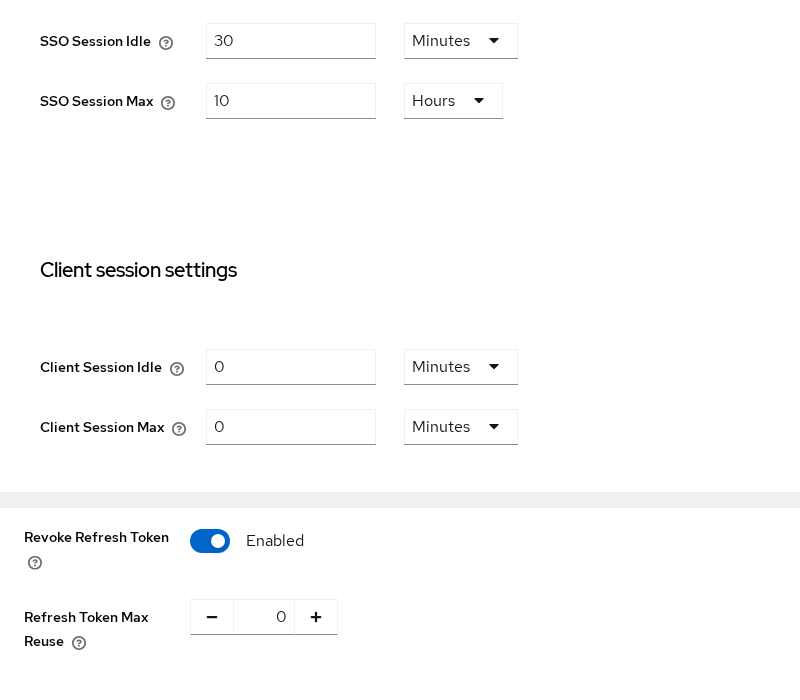
- Realm settings → Sessions — SSO and client session lifetimes
- Realm settings → Tokens → Refresh tokens — Revoke Refresh Token and Refresh Token Max Reuse
The upper part of the screenshot shows SSO Session Idle, SSO Session Max, Client Session Idle, and Client Session Max. The lower part shows Revoke Refresh Token enabled and Refresh Token Max Reuse set to 0:
Testing with this lab client showed:
- Revoke Refresh Token disabled — reusing the previous refresh token after a successful refresh still returned a new access token
- Revoke Refresh Token enabled and Max Reuse at
0— sending the superseded refresh token returnedinvalid_grant
Enable Revoke Refresh Token so Keycloak starts enforcing reuse limits on previously used refresh tokens:
ADMIN_TOKEN=$(curl -s -X POST 'http://127.0.0.1:8080/realms/master/protocol/openid-connect/token' \
  -H 'Content-Type: application/x-www-form-urlencoded' \
  -d 'grant_type=password' \
  -d 'client_id=admin-cli' \
  -d 'username=admin' \
  -d 'password=ChangeMe!2026' \
  | python3 -c "import sys,json; print(json.load(sys.stdin)['access_token'])")
Fetch the realm representation, set revokeRefreshToken to true, and write it back with PUT. A one-line helper keeps the JSON intact:
curl -s 'http://127.0.0.1:8080/admin/realms/golinuxcloud' \
  -H "Authorization: Bearer ${ADMIN_TOKEN}" \
  | python3 -c "import sys,json; r=json.load(sys.stdin); r['revokeRefreshToken']=True; r['refreshTokenMaxReuse']=0; print(json.dumps(r))" \
  | curl -s -X PUT 'http://127.0.0.1:8080/admin/realms/golinuxcloud' \
    -H "Authorization: Bearer ${ADMIN_TOKEN}" \
    -H 'Content-Type: application/json' \
    -d @-
The command exits silently on success when the realm update is accepted.
Obtain a fresh login and refresh once:
curl -s -X POST 'http://127.0.0.1:8080/realms/golinuxcloud/protocol/openid-connect/token' \
  -H 'Content-Type: application/x-www-form-urlencoded' \
  -d 'grant_type=password' \
  -d 'client_id=refresh-lab-app' \
  -d 'client_secret=RefreshLabSecret!2026' \
  -d 'username=tokenuser' \
  -d 'password=TokenUser!2026' \
  -d 'scope=openid' > /tmp/rot-a.json
Save the refresh token string from that login response:
OLD_REFRESH=$(python3 -c "import json; print(json.load(open('/tmp/rot-a.json'))['refresh_token'])")Exchange it once so Keycloak returns a new refresh-token JWT in the response:
curl -s -X POST 'http://127.0.0.1:8080/realms/golinuxcloud/protocol/openid-connect/token' \
  -H 'Content-Type: application/x-www-form-urlencoded' \
  -d 'grant_type=refresh_token' \
  -d 'client_id=refresh-lab-app' \
  -d 'client_secret=RefreshLabSecret!2026' \
  -d "refresh_token=${OLD_REFRESH}" > /tmp/rot-b.json
Send the superseded refresh token again:
curl -s -X POST 'http://127.0.0.1:8080/realms/golinuxcloud/protocol/openid-connect/token' \
  -H 'Content-Type: application/x-www-form-urlencoded' \
  -d 'grant_type=refresh_token' \
  -d 'client_id=refresh-lab-app' \
  -d 'client_secret=RefreshLabSecret!2026' \
  -d "refresh_token=${OLD_REFRESH}"
Sample output:
{"error":"invalid_grant","error_description":"Maximum allowed refresh token reuse exceeded"}That is the expected failure with Revoke Refresh Token enabled and Max Reuse set to 0. Reusing the previous refresh token is rejected. The client must discard OLD_REFRESH and keep only the refresh token from /tmp/rot-b.json.
Max Reuse and concurrent requests
Refresh Token Max Reuse controls how many times a superseded refresh token may still be accepted after Revoke Refresh Token is enabled. It can provide tolerance when concurrent requests race with refresh-token replacement, but it should not be your application's primary concurrency mechanism.
Set Max Reuse to 1 on the realm (same PUT pattern as above, with refreshTokenMaxReuse=1):
| Setting | Value | Effect in the lab |
|---|---|---|
revokeRefreshToken |
true |
Previously used refresh tokens are subject to reuse limits |
refreshTokenMaxReuse |
1 |
The immediately previous refresh token may succeed once more |
refreshTokenMaxReuse |
0 |
Any reuse of a superseded refresh token fails |
After login and one successful refresh, the first retry with the old refresh token succeeded in testing. A second retry with the same old token returned Maximum allowed refresh token reuse exceeded.
Where possible, serialize token refreshes and immediately store the latest returned refresh token. Treat Max Reuse as a server-side grace window, not a substitute for client-side refresh coordination.
Refresh-token expiration rules
Refresh failures often trace back to session timers rather than a mystery refresh TTL.
| Symptom in token response | Typical cause | Realm or client field |
|---|---|---|
refresh_expires_in near idle window after login |
Idle timeout is the limiting factor | Client Session Idle or SSO Session Idle |
| Refresh stops before SSO max | Shorter client-session cap | Client Session Max (falls back to SSO Session Max when unset) |
Token is not active after waiting |
Client or SSO idle elapsed | Lower idle temporarily to reproduce |
Session not active immediately |
Session revoked or user logged out | Admin session revoke or logout |
Maximum allowed refresh token reuse exceeded |
Superseded refresh token reused too many times | Revoke Refresh Token + Refresh Token Max Reuse |
Depending on your Keycloak session configuration, idle expiration may include a small grace window. Keycloak documents an additional two-minute window for idle-timeout handling when persistent user sessions are not active, so a 1 minute SSO Session Idle setting may not fail immediately at exactly 60 seconds.
To reproduce idle expiry without waiting 30 minutes, lower SSO Session Idle to 1 minute under Realm settings → Sessions, obtain tokens, wait past idle (and any grace window), then post the refresh grant again:
curl -s -X POST 'http://127.0.0.1:8080/realms/golinuxcloud/protocol/openid-connect/token' \
  -H 'Content-Type: application/x-www-form-urlencoded' \
  -d 'grant_type=refresh_token' \
  -d 'client_id=refresh-lab-app' \
  -d 'client_secret=RefreshLabSecret!2026' \
  -d "refresh_token=${REFRESH_TOKEN}"
Sample output after idle elapsed:
{"error":"invalid_grant","error_description":"Token is not active"}Restore SSO Session Idle to your normal value after the exercise.
Storage guidance by app type
Where the refresh token lives determines how much damage XSS or device theft can do.
| Application style | Suggested refresh storage | Main risk if storage is wrong |
|---|---|---|
| Server-side web app (confidential) | Server session or encrypted server store | Leaked server disk or logs |
| SPA without backend | Avoid long-lived refresh in localStorage; prefer BFF or native wrapper |
XSS reading browser storage |
| Mobile native | OS secure storage (Keychain / Keystore) | Rooted device extraction |
| Backend-for-frontend (BFF) | Refresh token stored server-side; browser receives only an HttpOnly Secure session cookie | Session misuse, CSRF, or compromise of server-side token storage |
Public browser clients cannot safely use a client secret. If a browser application receives refresh tokens directly, avoid persistent JavaScript-accessible storage such as localStorage and follow the storage strategy recommended by your OIDC library and application architecture — Keycloak public vs confidential clients explains the split.
Regardless of app type:
- Never pass refresh tokens in URLs or browser history
- Never log refresh tokens in frontend or shared application logs
Revocation and logout effects
Ending the SSO session invalidates normal refresh tokens tied to that session, even if the refresh JWT has not reached its exp claim.
List active sessions for tokenuser with the Admin API:
TOKENUSER_ID=$(curl -s 'http://127.0.0.1:8080/admin/realms/golinuxcloud/users?username=tokenuser&exact=true' \
  -H "Authorization: Bearer ${ADMIN_TOKEN}" \
  | python3 -c "import sys,json; print(json.load(sys.stdin)[0]['id'])")
List that user's online sessions:
curl -s "http://127.0.0.1:8080/admin/realms/golinuxcloud/users/${TOKENUSER_ID}/sessions" \
  -H "Authorization: Bearer ${ADMIN_TOKEN}" | python3 -m json.tool
Sample output (trimmed):
[
    {
        "id": "piZUtHNM2hDj2vAwzVALlvD2",
        "username": "tokenuser",
        "clients": {
            "refresh-lab-app": "refresh-lab-app"
        }
    }
]
Copy the session id from the response, then revoke it:
SESSION_ID='paste-session-id-from-response'

curl -s -o /dev/null -w '%{http_code}\n' -X DELETE \
  "http://127.0.0.1:8080/admin/realms/golinuxcloud/sessions/${SESSION_ID}" \
  -H "Authorization: Bearer ${ADMIN_TOKEN}"
Sample output:
204HTTP 204 means the session was removed. Retry the refresh grant with the same refresh token:
curl -s -X POST 'http://127.0.0.1:8080/realms/golinuxcloud/protocol/openid-connect/token' \
  -H 'Content-Type: application/x-www-form-urlencoded' \
  -d 'grant_type=refresh_token' \
  -d 'client_id=refresh-lab-app' \
  -d 'client_secret=RefreshLabSecret!2026' \
  -d "refresh_token=${REFRESH_TOKEN}"
Sample output:
{"error":"invalid_grant","error_description":"Session not active"}User logout through Keycloak has the same practical effect on online refresh tokens: the backing session ends, so refresh fails until the user signs in again. OIDC logout request details are covered in dedicated logout guides — this article stops at the session consequence you see at the token endpoint.
Troubleshoot invalid_grant
error_description (examples) |
Likely cause | Fix |
|---|---|---|
Session not active |
SSO session revoked, logged out, or expired | New interactive login; check Sessions in Admin Console |
Token is not active |
SSO idle or max reached | Increase idle only if policy allows; user re-authenticates |
Maximum allowed refresh token reuse exceeded |
Superseded refresh token after Revoke Refresh Token | Store and send only the latest refresh token; tune Max Reuse only for race windows |
Invalid refresh token |
Malformed token, wrong realm, or client mismatch | Verify client ID, secret, and unstored truncated token string |
No refresh_token in token response |
Flow does not issue refresh tokens, or client/policy suppresses them | Check which grant is in use and the client's token/flow policy; Implicit flow does not issue refresh tokens and Client Credentials normally does not either |
When refresh fails, check the user session before decoding JWT expiry in isolation. The Admin Console Sessions tab and the user Sessions list often explain a failure that looks like a token problem.
Summary
You walked through Keycloak refresh tokens as session-backed credentials, not standalone long-lived secrets. The lab obtained tokens with curl, refreshed access tokens successfully, enabled Revoke Refresh Token, and reproduced invalid_grant when a superseded refresh token was reused, when Max Reuse was exceeded, when the SSO session was revoked, and when idle timeout elapsed.
refresh_expires_in reflects the remaining usable window under client and SSO session limits — not a single rule like "refresh lifetime equals SSO Session Idle." Separating refresh-token replacement from previous-token rejection is the key distinction: a new refresh JWT in the response does not by itself mean the old token is invalid. Revoke Refresh Token and Max Reuse answer that second question.
For Authorization Code login, PKCE, and first token acquisition in a browser application, continue with Keycloak OpenID Connect tutorial and Keycloak Authorization Code flow. For session types and Admin API inspection, use Keycloak sessions explained.
References
- RFC 6749 — OAuth 2.0 (Refresh Token grant)
- RFC 9700 — OAuth 2.0 Security Best Current Practice
- OpenID Connect Core 1.0
- Keycloak Server Administration Guide — Sessions and tokens
- Keycloak Securing Applications — OpenID Connect
Frequently Asked Questions
How long does a Keycloak refresh token last?
For standard online refresh tokens, validity follows the client session and its parent SSO session. refresh_expires_in in the token response reflects the remaining window under those limits, including Client Session Idle/Max when configured and SSO Session Idle/Max as the broader cap. It is not a separate unlimited lifetime you can read once and forget.
Does Keycloak revoke the old refresh token by default?
In the Keycloak 26.7.3 realm used for this lab, Revoke Refresh Token was disabled initially. Enable it when you want Keycloak to reject previously used refresh tokens subject to Max Reuse. That is separate from whether Keycloak returns a new refresh-token JWT in the response.
What is Max Reuse?
Refresh Token Max Reuse (refreshTokenMaxReuse on the realm) controls how many times a superseded refresh token may still be exchanged after Revoke Refresh Token is enabled. Set it to 1 only when parallel refresh requests might briefly use the previous token. Set it to 0 for strict rejection of superseded tokens.
Why did logout invalidate refresh?
Online refresh tokens depend on an active user session. Logout or admin session revoke ends that session, so the token endpoint returns Session not active or Token is not active even if the refresh JWT has not expired.
Should an SPA store refresh tokens?
Avoid storing refresh tokens in browser localStorage when you can use a confidential backend or BFF that holds the refresh token server-side. Public SPAs should prefer Authorization Code flow with PKCE and an architecture that keeps refresh tokens out of JavaScript reach.
