
| Tested on | Red Hat Enterprise Linux 10.2 (Coughlan) |
|---|---|
| Package | podman-5.8.2-5.el10_2.x86_64quay.io/keycloak/keycloak:26.7.3 |
| Applies to | Any Linux host with Podman or Docker |
| Privilege | Normal user for rootless Podman; Keycloak admin access in the lab realm |
| Lab environment | Keycloak 26.7.3 on http://127.0.0.1:8080/ — Install Keycloak with Podman |
| Scope | RFC 7662 introspection with curl, confidential-client authentication, Keycloak 26.6.2+ audience checks, active true and false across expiry, logout, malformed and wrong-realm tokens, optional Accept: application/jwt, and a local-verification vs introspection decision guide. Does not cover JWKS signature verification implementation, OAuth revocation endpoint mechanics, or general token-type taxonomy. |
| Related guides | Keycloak OpenID Connect tutorial Keycloak public vs confidential clients Keycloak protocol mappers Keycloak client credentials grant Access token vs ID token vs refresh token |
Token introspection lets a resource server ask Keycloak whether a token is currently active. An active: true response means the token has passed Keycloak's token and session checks, but it does not automatically authorize every API operation — your service must still evaluate audience, scopes, and roles as appropriate. RFC 7662 reports active state and metadata; it does not make the final resource authorization decision.
Unlike local JWT validation, introspection requires your API to ask Keycloak about the token. That adds a network request, but it also lets Keycloak tell the API immediately when the user's session has been logged out or revoked. This lab wires two confidential clients, adds the audience mapper Keycloak 26.6.2+ requires, and walks through active: true and active: false responses with curl.
The walkthrough uses realm golinuxcloud, user tokenuser, token-issuing client refresh-lab-app, and introspection client introspect-lab-api on 127.0.0.1:8080. For OIDC discovery, UserInfo, and bearer validation patterns, see the Keycloak OpenID Connect tutorial.
What this introspection lab creates
When you finish, you can:
- Issue a user access token with
refresh-lab-appand confirmactive: truethroughintrospect-lab-api - Reproduce
active: falseafter logout, expiry, audience mismatch, malformed input, and cross-realm tokens - Compare when your API should call introspection versus validating a JWT locally
  refresh-lab-app                introspect-lab-api
  (issues token)                 (confidential API)
        |                                |
        |  access token (JWT)            |
        |------------------------------->|
        |                                |  POST /token/introspect
        |                                |  HTTP Basic client auth
        |                                v
        |                         Keycloak 26.7.3
        |                                |
        |                                |  { "active": true, ... }
        |                                v
        |                         resource server decision
Side effects in the lab realm:
- Confidential clients
refresh-lab-appandintrospect-lab-api(create both if they are not already present) - Audience mapper on
refresh-lab-appso access tokens includeintrospect-lab-apiinaud - No change to production token lifetimes after the short-lived expiry demo
What token introspection answers
Keycloak implements RFC 7662 at:
/realms/{realm}/protocol/openid-connect/token/introspectIntrospection answers different questions than local JWT verification:
| Question | Introspection | Local JWT verification |
|---|---|---|
| Is the signature valid? | Implicit when Keycloak accepts the token | You verify with realm JWKS |
| Is the token expired? | Returns active: false |
You read exp |
| Detects Keycloak session logout/revocation before token expiry | Yes, because Keycloak checks current server-side state | Not from the JWT alone |
| Can a public SPA call the endpoint? | No — confidential client only | N/A |
A token can be active: true and still lack the role your route needs. Treat active as the gate; apply your own policy on the claims that follow.
Endpoint and client requirements
Only confidential clients may call Keycloak's introspection endpoint because the request must include client authentication. Public clients cannot authenticate that way, so this lab uses the separate confidential client introspect-lab-api as the resource server that introspects tokens.
The introspecting client needs:
- Client authentication on (client secret or another supported method)
- Membership in the token audience on Keycloak 26.6.2 and later (see the next subsection)
- Form-encoded body with the
tokenparameter (and optionaltoken_type_hint)
This lab uses two clients:
| Client | Purpose | Configuration |
|---|---|---|
refresh-lab-app |
Obtains the test user's access token | Confidential; Direct Access Grants ON for this lab only |
introspect-lab-api |
Represents the resource server that introspects the token | Confidential; login flows OFF |
If refresh-lab-app does not already exist, create it with:
- Client type: OpenID Connect
- Client authentication: ON
- Standard flow: OFF
- Direct access grants: ON
Open Credentials → Client secret and copy the generated value — you need it when you export TOKEN_SECRET below.
Create introspect-lab-api as a confidential OpenID Connect client with authentication enabled:
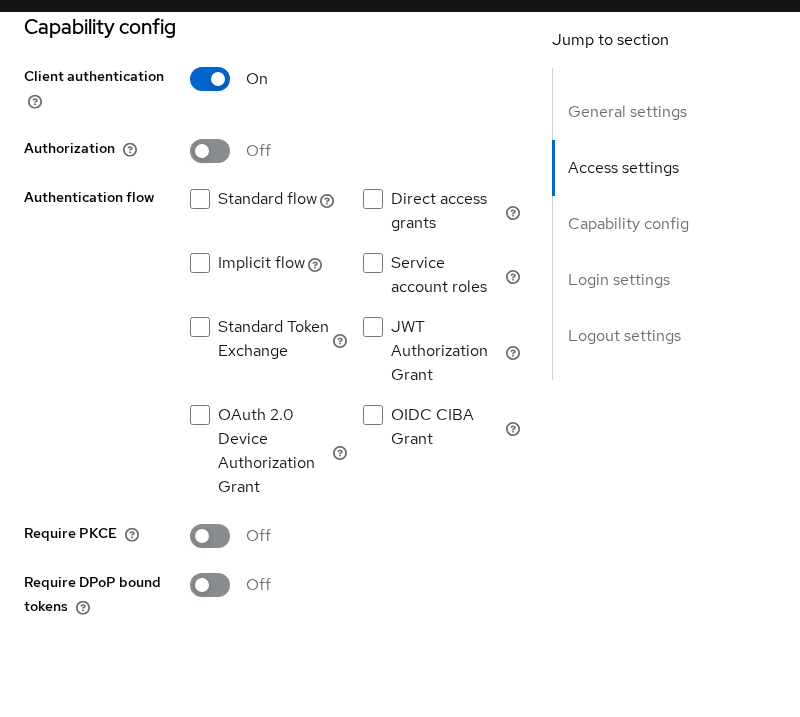
Open Credentials → Client secret on introspect-lab-api and copy the generated value for INTROSPECT_SECRET in the curl section.
Keycloak 26.6.2+ requires the introspecting client in aud
Starting with Keycloak 26.6.2, the introspection endpoint checks whether the client authenticating to /token/introspect appears in the access token's aud claim. The check prevents one confidential client from introspecting tokens that were intended for a different resource server.
In this lab:
- Access token issued to:
refresh-lab-app - API / introspection client:
introspect-lab-api
Therefore the token must contain:
"aud": [
    "introspect-lab-api",
    ...
]
If introspect-lab-api authenticates successfully but is missing from aud, Keycloak returns {"active": false} rather than exposing the token's claims. Keycloak's upgrade guidance for 26.6.2 instructs deployments to add the introspecting client through an audience mapper — that is the most common reason a valid-looking token suddenly introspects as inactive after an upgrade.
There are two clients here, so keep their roles straight: open the client that creates the token (refresh-lab-app) and add the API that will inspect it (introspect-lab-api) as the audience.
  refresh-lab-app
        |
        | issues access token
        | aud = introspect-lab-api
        v
  Access token
        |
        v
  introspect-lab-api
        |
        | POST /token/introspect
        v
  Keycloak
Wire the audience on the client that issues user tokens:
- Open Clients → refresh-lab-app → Client scopes.
- Open refresh-lab-app-dedicated.
- Select Mappers → Configure a new mapper → Audience.
- Set Included Client Audience to
introspect-lab-api. - Enable Add to access token and save.
The mapper belongs on refresh-lab-app because that client issues the user access token. introspect-lab-api is the audience you add to that token so the API may introspect it.
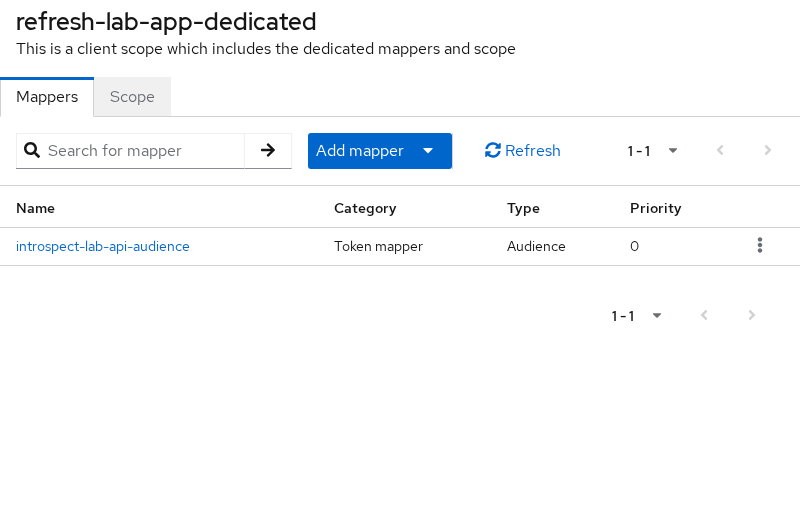
Without that mapper, introspection returns active: false even when UserInfo accepts the same bearer token.
Introspect a token with curl
Set base variables once so the curl examples stay readable. Paste each client secret from Credentials → Client secret on the matching client:
export KC_BASE='http://127.0.0.1:8080/realms/golinuxcloud/protocol/openid-connect'
export INTROSPECT_CLIENT='introspect-lab-api'
export INTROSPECT_SECRET='paste-introspect-lab-api-secret'
export TOKEN_CLIENT='refresh-lab-app'
export TOKEN_SECRET='paste-refresh-lab-app-secret'
This lab uses Keycloak's Direct Access Grant (grant_type=password) only as a shortcut to obtain a user access token for introspection testing. Do not use this grant in a real application; current OAuth security guidance says it must not be used. In an application, obtain the access token through an appropriate flow such as Authorization Code + PKCE.
Request an access token for tokenuser through refresh-lab-app:
TOKEN_RESP=$(curl -s -X POST "${KC_BASE}/token" \
  -u "${TOKEN_CLIENT}:${TOKEN_SECRET}" \
  -d 'grant_type=password' \
  -d 'username=tokenuser' \
  -d 'password=TokenUser!2026' \
-d 'scope=openid profile'){"access_token":"eyJhbGciOiJSUzI1NiIsInR5cCIgOiAiSldUIiwia2lkIiA6ICJUMk9SQ0dkbnd0Wl96UWpsYXY2WUc1S2h2a29KMndCdnFzWFlyc0FlcEhRIn0...","expires_in":300,"refresh_expires_in":1800,"refresh_token":"eyJhbGciOiJIUzUxMiIsInR5cCIgOiAiSldUIiwia2lkIiA6ICJhMzEyMzQ4Mi1iODdiLTRjZTUtOTVjMy0zYjkxZGMwMGZjMzYifQ...","token_type":"Bearer","id_token":"eyJhbGciOiJSUzI1NiIsInR5cCIgOiAiSldUIiwia2lkIiA6ICJUMk9SQ0dkbnd0Wl96UWpsYXY2WUc1S2h2a29KMndCdnFzWFlyc0FlcEhRIn0...","not-before-policy":0,"session_state":"ka8w1pRz6fAt40f2q67QGdy9","scope":"openid profile email"}Store the access token in a shell variable for the introspection calls:
ACCESS_TOKEN=$(printf '%s' "$TOKEN_RESP" | python3 -c 'import sys,json; print(json.load(sys.stdin)["access_token"])')expires_in: 300 means this access token lives five minutes. Introspection still tells you whether Keycloak considers the session active, not only whether exp is in the future.
Post that token to the introspection endpoint with HTTP Basic authentication:
curl -s -X POST "${KC_BASE}/token/introspect" \
  -u "${INTROSPECT_CLIENT}:${INTROSPECT_SECRET}" \
  -H 'Content-Type: application/x-www-form-urlencoded' \
  --data-urlencode "token=${ACCESS_TOKEN}"
When the audience mapper is configured, Keycloak answers with active: true and a JSON claim set — the next section walks through that response field by field.
Keycloak also accepts client_id and client_secret in the form body instead of Basic auth — useful when your HTTP client handles form posts more cleanly than Authorization headers.
Understand the response
A successful introspection of a live user access token returns active: true and a flattened claim set:
{
    "exp": 1790262048,
    "iat": 1790261748,
    "jti": "onrtro:05ccc145-9a51-2549-d6f1-85e63004a765",
    "iss": "http://127.0.0.1:8080/realms/golinuxcloud",
    "aud": [
        "introspect-lab-api",
        "orders-api",
        "account"
    ],
    "sub": "3c650623-fa6d-4252-9886-b5d5c093e7f5",
    "typ": "Bearer",
    "azp": "refresh-lab-app",
    "sid": "Ik1O0ckszWT7zxccbgchh2rc",
    "realm_access": {
        "roles": [
            "employee",
            "offline_access"
        ]
    },
    "resource_access": {
        "orders-api": {
            "roles": [
                "order-reader"
            ]
        }
    },
    "scope": "openid profile email",
    "preferred_username": "tokenuser",
    "client_id": "refresh-lab-app",
    "username": "tokenuser",
    "token_type": "Bearer",
    "active": true
}
Fields your API layer typically reads:
active— start here;falsemeans treat the token as invalidsub/username— who the token representsazp— which client obtained the token (refresh-lab-apphere)aud— which resource servers may rely on this token; must include your introspection clientexp/iat— lifetime metadata mirrored from the JWTrealm_accessandresource_access— roles for coarse authorization after the token passes the active check
When active is false, Keycloak returns only that flag. Do not expect username or role fields on inactive responses. Expiry, wrong realm, malformed input, and audience mismatch can all look identical from the response alone — RFC 7662 does not require the server to reveal why a token is inactive.
Why active is false
Run the same introspection client against tokens that should fail, so you recognize each pattern in logs.
Expired access token
Temporarily shorten the realm access-token lifespan to five seconds, issue a token, wait past exp, then post it to introspection:
curl -s -X POST "${KC_BASE}/token/introspect" \
  -u "${INTROSPECT_CLIENT}:${INTROSPECT_SECRET}" \
  --data-urlencode "token=${SHORT_LIVED_TOKEN}"
Keycloak answers with only the inactive flag:
{
    "active": false
}
Restore the realm lifespan when you finish so the lab stays on the default five-minute access tokens.
After logout
Call the logout endpoint with the refresh token, then introspect the still-unexpired access token:
REFRESH_TOKEN=$(printf '%s' "$TOKEN_RESP" | python3 -c 'import sys,json; print(json.load(sys.stdin)["refresh_token"])')End the session by posting that refresh token to the logout endpoint:
curl -s -X POST 'http://127.0.0.1:8080/realms/golinuxcloud/protocol/openid-connect/logout' \
  -H 'Content-Type: application/x-www-form-urlencoded' \
  -d "client_id=${TOKEN_CLIENT}" \
  -d "client_secret=${TOKEN_SECRET}" \
  --data-urlencode "refresh_token=${REFRESH_TOKEN}"
Logout succeeds with an empty body when the refresh token is accepted. Re-run introspection on the access token you captured before logout:
curl -s -X POST "${KC_BASE}/token/introspect" \
  -u "${INTROSPECT_CLIENT}:${INTROSPECT_SECRET}" \
  --data-urlencode "token=${ACCESS_TOKEN}"
The session is gone, so Keycloak returns:
{
    "active": false
}
That is the main reason APIs choose introspection over signature-only checks: logout and session revocation show up immediately.
Malformed or wrong-realm token
Post a deliberately invalid string to see the inactive response:
curl -s -X POST "${KC_BASE}/token/introspect" \
  -u "${INTROSPECT_CLIENT}:${INTROSPECT_SECRET}" \
-d 'token=not.a.valid.jwt'{
"active": false
}Introspection is realm-specific: send the token to the introspection endpoint belonging to the realm that issued it. A token minted in the master realm and posted to the golinuxcloud introspection URL fails the same way — Keycloak does not leak why the token was rejected.
Audience mismatch
When a confidential client whose ID is not listed in aud introspects the token, Keycloak also returns active: false. The JWT signature can be fine; the introspecting client simply is not an intended audience for that token.
JWT introspection response
Keycloak also supports Accept: application/jwt on introspection requests. On the client Advanced tab, open Advanced settings and turn on Support JWT claim in Introspection Response. When that toggle is on, the introspection response may include an additional jwt claim containing the full access token. This is particularly useful with Keycloak lightweight access tokens, where the edge token intentionally carries fewer claims.
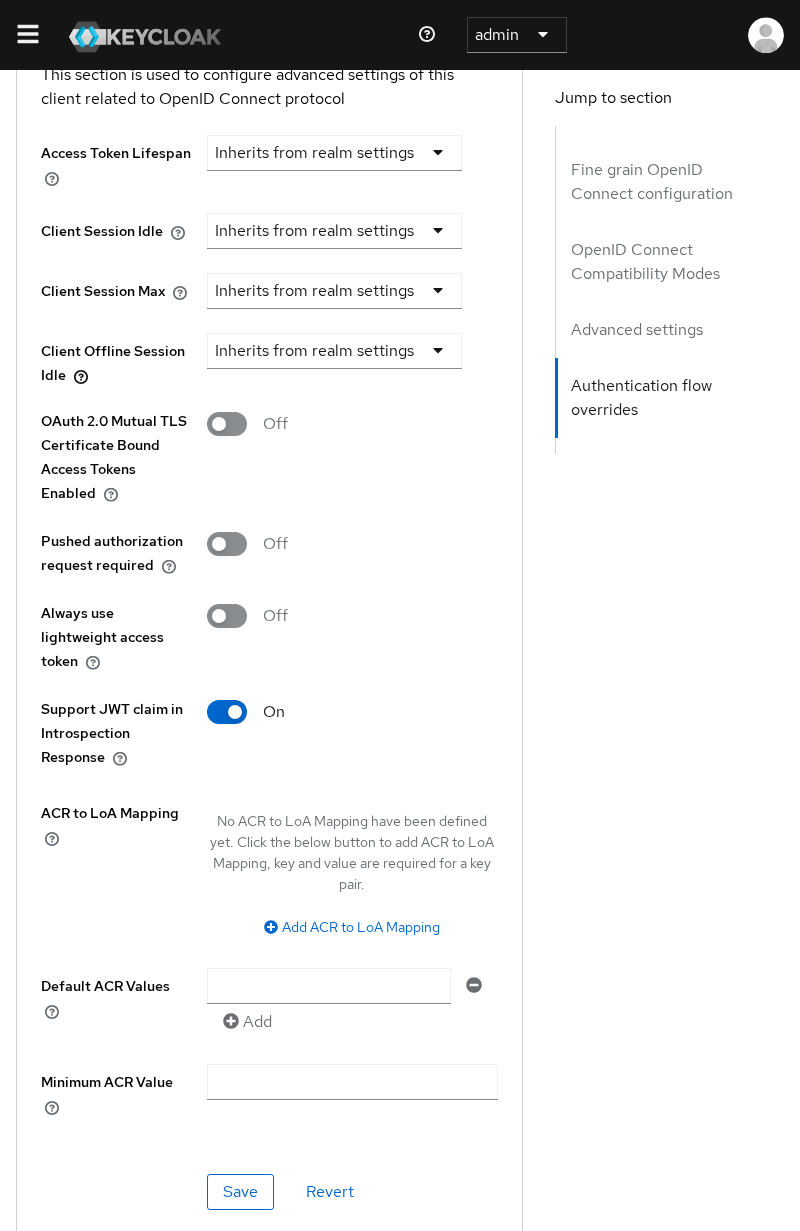
Send the same introspection request with the header:
curl -s -X POST "${KC_BASE}/token/introspect" \
  -u "${INTROSPECT_CLIENT}:${INTROSPECT_SECRET}" \
  -H 'Accept: application/jwt' \
  --data-urlencode "token=${ACCESS_TOKEN}"
With the normal access token used in this lab, my response remained the standard introspection claim set without a separate jwt field. The feature matters most when lightweight access tokens are enabled and the introspection client needs the full token payload returned in one step.
Introspection vs local JWT verification
| Factor | Local JWT verification | Token introspection |
|---|---|---|
| Request overhead | Local cryptographic verification after JWKS retrieval | Network request to Keycloak for each uncached check |
| Keycloak load | None on the validation path | Grows with API traffic unless you cache |
| Detects Keycloak session logout/revocation before token expiry | Not from the JWT alone | Yes, because Keycloak checks current server-side state |
| Works with opaque access tokens | No — see access token vs ID token vs refresh token | Yes |
| Needs client secret at the API | No — only public keys | Yes — confidential client credentials |
| Offline / partition tolerance | API can validate if JWKS is cached | API needs reachability to Keycloak |
A simple way to choose:
- High-volume edge APIs with JWT access tokens — verify signature,
iss,aud, andexplocally; cache JWKS bykid - Central policy enforcement or opaque tokens — introspect, but cache positive results carefully and fail closed when Keycloak is unreachable
- Immediate revocation — introspection or short access-token lifetimes with refresh; local verification alone cannot see admin session termination
The Keycloak client credentials grant article shows the same trade-off from the M2M side: signature validation avoids a round trip, introspection is authoritative for session state.
Caching, availability and security
Calling Keycloak for every token check introduces a few practical concerns:
- Caching — short-lived caching can reduce Keycloak load, but every cached positive result delays recognition of logout or revocation. Choose a TTL based on how much revocation delay your application can tolerate, and never cache beyond the token's remaining lifetime. RFC 7662 allows caching but notes the tradeoff: caching reduces load while increasing the window during which a revoked token may still appear active.
- Availability — introspection makes token validation dependent on Keycloak availability. APIs should normally fail closed when a token cannot be validated. If your architecture deliberately permits cached positive decisions during an outage, define that exception and its maximum age explicitly.
- Credential exposure — the introspection client secret belongs only on the resource server or API gateway, never in browser code. Rotate it like any other confidential-client secret.
Troubleshooting 401 and inactive tokens
| Symptom | Likely cause | Fix |
|---|---|---|
HTTP 401 invalid_client |
Missing or wrong client authentication | Send HTTP Basic or form client_id / client_secret for a confidential client |
HTTP 401 Client not allowed |
Public client attempted introspection | Create or use a confidential client with authentication on |
active: false on a fresh token UserInfo accepts |
Introspecting client not in aud (common after Keycloak 26.6.2+) |
Add an audience mapper on the issuing client; confirm aud in a decoded token |
active: false after logout |
Expected — session ended | Client must obtain a new token |
active: false only after several minutes |
Access token exp reached |
Refresh or re-authenticate; introspection mirrors expiry |
active: false for master-realm token |
Wrong realm introspection URL | Post to the realm that issued the token |
Decode the access token payload when audience issues are unclear:
python3 -c 'import os,json,base64; p=os.environ["ACCESS_TOKEN"].split(".")[1]; p+= "=" * (-len(p)%4); print(json.dumps(json.loads(base64.urlsafe_b64decode(p)), indent=2))'Look for aud and confirm your introspection client's ID is listed before you chase secret rotation or network problems.
Summary
Token introspection lets a confidential resource server ask Keycloak whether a bearer token is still active. You POST the token to /realms/{realm}/protocol/openid-connect/token/introspect with client authentication, read active, then apply authorization on the returned claims.
Since Keycloak 26.6.2, introspect-lab-api only sees active: true after you add it to the access token audience through a mapper on refresh-lab-app. That audience rule is easy to miss because UserInfo and local JWT signature checks do not enforce the same constraint — and it explains many post-upgrade searches for "valid token, active false".
Logout, expiry, malformed tokens, cross-realm tokens, and audience mismatch all collapse to active: false, while missing client credentials produce HTTP 401 instead. Use introspection when you need session-aware validation or opaque tokens; use local JWKS verification when you need speed and can accept revocation only at exp unless you add other controls.
For mapper patterns and claim shaping, continue with Keycloak protocol mappers. For refresh and session teardown that drive inactive introspection results, see Keycloak refresh tokens.
References
- RFC 7662 — OAuth 2.0 Token Introspection
- Keycloak — Securing applications with OpenID Connect (introspection endpoint)
- Keycloak Admin REST API — protocol mappers
Frequently Asked Questions
Can public clients introspect tokens?
No. Keycloak allows only confidential clients to call the introspection endpoint because the request must include client authentication. Browser SPAs and mobile apps without a server secret should validate JWTs locally or route tokens through a backend that introspects on their behalf.
Does introspection revoke tokens?
No. Introspection is read-only. Revoking access or refresh tokens uses separate OAuth revocation mechanics. Logging out or admin session termination makes introspection return active: false without calling a revoke endpoint from your API.
Why is active false when the JWT still decodes?
Common causes are audience mismatch for the introspecting client (especially after Keycloak 26.6.2+), user logout or session revocation, expiry, or posting the token to the wrong realm's introspection URL. Decode aud and confirm the introspecting client ID is listed before assuming the secret is wrong.
Should every API introspect every request?
Usually not at full traffic volume. Most JWT-based APIs verify signatures locally and reserve introspection for opaque tokens, high-risk routes, or when you must honor immediate logout. If you introspect, cache results briefly and fail closed on Keycloak outages unless policy explicitly allows otherwise.
Can Keycloak introspect refresh tokens?
Yes. Keycloak's introspection endpoint accepts both access and refresh tokens. The authenticated introspection client must still satisfy Keycloak's audience-validation rules. Resource servers normally introspect access tokens because those are the credentials presented to APIs.
