
| Tested on | Red Hat Enterprise Linux 10.2 (Coughlan) |
|---|---|
| Package | podman-5.8.2-5.el10_2.x86_64quay.io/keycloak/keycloak:26.7.3 |
| Applies to | Any Linux host with Podman or Docker |
| Privilege | Keycloak admin access in the target realm — bootstrap admin on the lab container is enough |
| Lab environment | Keycloak 26.7.3 on http://127.0.0.1:8080/ with golinuxcloud realm — Install Keycloak with Podman |
| Scope | Understand the different types of Keycloak sessions and how they relate — authentication, user, client, and offline sessions; cookies and tokens; persistence in Keycloak 26; and how to view or revoke sessions. Does not cover realm timeout tuning, refresh-token rotation, offline-token acquisition walkthrough, or OIDC logout protocol details. |
| Related guides | Access token vs ID token vs refresh token What is single sign-on (SSO)? Keycloak clients explained Create and manage Keycloak users Keycloak client scopes |
When a user signs in to an application through Keycloak, Keycloak needs to remember that the user has already authenticated. It stores this login state in a user session.
If the same user then opens another application connected to the same Keycloak realm, Keycloak can reuse that login and let the user in without asking for the password again. This is single sign-on (SSO).
Behind that simple login experience, Keycloak uses several related session types: authentication sessions while login is in progress, a user session after login succeeds, and client sessions for the applications the user accesses.
This guide explains how those sessions fit together, where tokens and cookies fit into the picture, and how offline sessions differ from normal sessions. The lab section at the end shows the relationships in Keycloak 26.7.3 using the Admin REST API.
What is a Keycloak session?
A Keycloak session is server-side login state. It records that a particular user has authenticated to a realm and, depending on the session type, which clients that user has accessed.
Keycloak does not store your application's session cookie. It stores its own session records on the Keycloak server. Applications receive tokens issued from those sessions, but tokens and sessions are not the same thing.
Understanding the different session types — authentication, user, client, and offline — is the key to reading Keycloak logs, Admin Console screens, and token responses without mixing them up.
How Keycloak sessions work
In Keycloak, a realm is the security boundary containing users, applications, and authentication settings. A user is the person who signs in. A client is an application or service that uses Keycloak for authentication — for example, an online store and its account portal can be two separate Keycloak clients.
The diagram below is the mental model most beginners need. Read it top to bottom for a normal browser login; the offline branch on the right applies when offline_access is granted.
  User opens an application
            │
            ▼
  ┌─────────────────────────┐
  │ Authentication session  │
  │ Login is in progress    │
  └────────────┬────────────┘
               │ login succeeds
               ▼
  ┌─────────────────────────┐
  │ User session / SSO      │
  │ "This user is logged in"│
  └────────────┬────────────┘
               │
         ┌─────┴──────┐
         ▼            ▼
  ┌────────────┐ ┌────────────┐
  │ Client     │ │ Client     │
  │ session: A │ │ session: B │
  └─────┬──────┘ └─────┬──────┘
        │              │
        ▼              ▼
   access / ID /   access / ID /
   refresh tokens  refresh tokens


  If offline_access is requested:

        User
         │
         ▼
  Offline user session
         │
         ▼
  Offline client session
         │
         ▼
  Offline refresh token
Authentication session vs user session
An authentication session exists while a login is still in progress. Keycloak uses it while displaying the login form, processing an OTP challenge, or completing another authentication step.
After authentication succeeds, Keycloak creates or reuses the user SSO session discussed throughout this article.
| State | Exists when |
|---|---|
| Authentication session | Login flow is still in progress |
| User session | Authentication has completed |
| Client session | An authenticated user has accessed a particular client |
Do not confuse this with KeycloakSession.
If you work with Keycloak extensions or its Java APIs, you may encounter the KeycloakSession interface. That is an internal server-side context used by Keycloak code to access providers, realms, clients, and other services. It is not the user's browser login session discussed here.
User session vs client session
A user session is the parent SSO-level session Keycloak creates after a successful login. Keycloak documentation describes it as the session that represents the user's overall authenticated state in the realm. Zero or more client sessions hang beneath it.
Suppose you have two applications in the same realm:
storefront-spa— a browser storefrontorders-api— an API the storefront calls
After the user signs in, Keycloak has one user session representing the user's overall SSO login.
When the user authenticates to storefront-spa, Keycloak associates a client session with the user session for that client. If the same SSO login is later used with orders-api, Keycloak associates another client session with the same user session.
In short:
- User session = which user is logged in
- Client session = which Keycloak client that logged-in user is using
When the user authenticates to a Keycloak client, Keycloak associates a client session with the existing user session for that client. Simply opening an arbitrary application does not create a client session — the client must participate in authentication or session establishment.
Session ID: sid and session_state
The user session has a server-side session ID. In current Keycloak releases, OIDC tokens normally expose that ID through the sid claim. The token endpoint response can also contain session_state.
user session
    └── session ID
          ├── sid in JWT
          └── session_state in token response
The id field in Admin API session output matches session_state on the token endpoint. Decode the access or ID token and look for sid when you need the same value inside the JWT.
sid inside OIDC tokens. The token endpoint can still return session_state. Older integrations may also expect a session_state claim inside the JWT — a protocol mapper can restore it if required.
Practical SSO example with two clients
To demonstrate SSO correctly, use the browser-based authorization code flow. After tokenuser authenticates once in a browser, opening a second client should not ask for credentials again.
The lab below uses realm golinuxcloud, user tokenuser, and clients orders-api and storefront-spa. Create tokenuser first if your realm is empty — see Create and manage Keycloak users. Client registration concepts are in Keycloak clients explained.
| Item | Value |
|---|---|
| Realm | golinuxcloud |
| User | tokenuser / TokenUser!2026 |
| Client A | orders-api (public, authorization code + Direct Access Grant for API demos) |
| Client B | storefront-spa (public SPA with PKCE) |
I signed in to orders-api first and then opened storefront-spa in the same browser, so both clients used the same Keycloak SSO cookie. The second client therefore reused the existing login instead of asking for the password again. The JSON below is what the Admin REST API returned.
The Admin Console can show the same information, but the REST API makes the relationship easier to see because Keycloak returns the user session and its client sessions in one JSON object.
The API requires administrator authentication. The next command obtains an admin access token from the master realm; we then use that token to query the session endpoint.
export KC_URL='http://127.0.0.1:8080'
export ADMIN_TOKEN=$(curl -s -X POST "${KC_URL}/realms/master/protocol/openid-connect/token" \
  -d 'username=admin' -d 'password=ChangeMe!2026' -d 'grant_type=password' -d 'client_id=admin-cli' \
  | python3 -c 'import sys,json; print(json.load(sys.stdin)["access_token"])')
Look up tokenuser and list that user's online sessions:
TOKENUSER_ID=$(curl -s "${KC_URL}/admin/realms/golinuxcloud/users?username=tokenuser&exact=true" \
  -H "Authorization: Bearer ${ADMIN_TOKEN}" \
  | python3 -c 'import sys,json; print(json.load(sys.stdin)[0]["id"])')

curl -s "${KC_URL}/admin/realms/golinuxcloud/users/${TOKENUSER_ID}/sessions" \
  -H "Authorization: Bearer ${ADMIN_TOKEN}"
Sample output after both clients authenticated:
[
  {
    "id": "VR_0RHQHcO0fvFZ3-mirA-TI",
    "username": "tokenuser",
    "userId": "3c650623-fa6d-4252-9886-b5d5c093e7f5",
    "ipAddress": "10.88.0.1",
    "start": 1790246849000,
    "lastAccess": 1790246849000,
    "rememberMe": false,
    "clients": {
      "939c64b7-f52c-4151-b722-12593df6c69a": "orders-api",
      "43e6ac50-48e8-4561-9c5c-c2b8fbf29445": "storefront-spa"
    },
    "transientUser": false
  }
]
Read the JSON in three steps:
"id": "VR_0RHQHcO0fvFZ3-mirA-TI"— one user session fortokenuser."clients": { "...": "orders-api", "...": "storefront-spa" }— two Keycloak clients connected to that same user session.- Therefore: one user session with an
orders-apiclient session and astorefront-spaclient session beneath it.
This shows exactly how Keycloak represents SSO: one user session can contain client sessions for multiple applications.
The same relationship appears in the Admin Console on Users → tokenuser → Sessions. One session row maps to one user session ID, and the Clients column lists every client session attached to it.
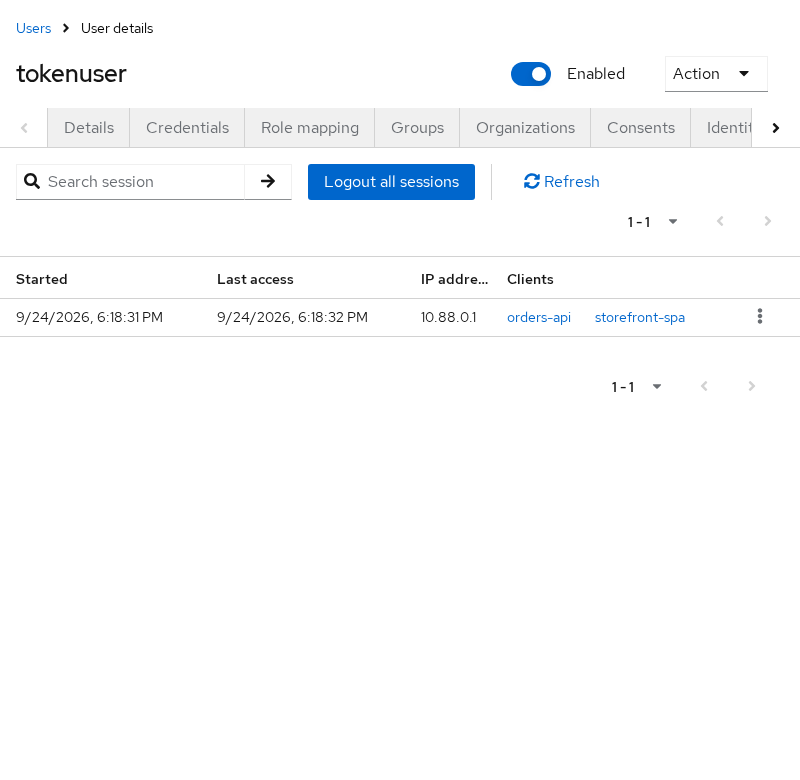
The keys in clients are internal client UUIDs; the values are the clientId labels you configure in the Admin Console. The transientUser field describes the user behind the session, not whether Keycloak used transient-session mode — see Advanced session behavior below.
Not every authentication flow creates sessions in the same way. For example, a Direct Access Grant can create a session without using the browser SSO cookie, which is why scripted tests sometimes show separate user sessions for the same account.
Session vs cookie vs token
It is easy to confuse three different pieces of login state:
| Store | Lives where | Holds | Inspected how |
|---|---|---|---|
| Keycloak SSO cookies | Browser, Keycloak host | Reference Keycloak uses to recognize the browser | Browser devtools → Application → Cookies |
| Application session | App server or browser storage | App-specific login flag | App logs or framework session API |
| OAuth/OIDC tokens | Client memory, secure storage, or server session | access_token, refresh_token, id_token |
Decode JWT or call token endpoint |
Keycloak stores SSO-related cookies in the browser so that it can recognize the browser when it returns. The cookie is not the user session itself — the actual session state exists on the Keycloak side. The browser cookie allows Keycloak to find or validate that login state.
Server-side idle and max rules still determine whether the session remains valid. The cookie does not keep the server session alive on its own.
This is why deleting an application's own cookie does not necessarily log the user out of Keycloak. The Keycloak SSO cookie may still exist, allowing the application to authenticate the user again without showing the login form while the Keycloak SSO session is still valid.
See Access token vs ID token vs refresh token for what each token type is for.
When the access token expires but the session does not
10:00  User enters username/password
       → Keycloak creates user session

10:00  Access token issued (expires at 10:05)

10:05  Access token expires
       BUT user session is still valid

10:05  Client uses refresh token
       → Keycloak sees valid session
       → new access token issued

       User does NOT type the password again
"My access token expired" and "my Keycloak login session ended" are two different events. This distinction is especially useful when troubleshooting a user who appears logged in even though an access token has expired.
Normal vs offline sessions
Normal (online) sessions represent an interactive login. They appear on Users → {user} → Sessions in the Admin Console and in GET .../users/{id}/sessions.
Why offline sessions exist
Imagine a user signs in to a cloud-backup application and gives it permission to back up files every night.
A normal refresh token depends on the user's normal login session. Eventually that session ends.
But the backup application may still need to obtain access tokens while the user is asleep, has closed the browser, or is no longer logged in. That is what Keycloak offline access is designed for.
When offline_access is granted, Keycloak creates separate offline session state and issues an offline token that the application can use to request new access tokens later. Keycloak keeps offline sessions separately from normal online sessions.
For Keycloak to issue an offline token, the user must have the offline_access realm role and the client must be allowed to request the offline_access client scope. The default Keycloak configuration normally sets up this scope for clients.
| Online user session | Offline session | |
|---|---|---|
| Created by | Browser login, authorization code, Direct Access Grant, etc. | Token request including offline_access |
| Visible at | .../users/{id}/sessions |
.../clients/{uuid}/offline-sessions |
| Refresh token | Standard refresh token tied to SSO idle/max | Offline refresh token, governed by offline-session settings |
Survives users/{id}/logout admin call |
No — online sessions cleared | Yes — until explicitly revoked |
| Typical use | Web SSO, active users | Background sync while the user is away |
Step-by-step offline token acquisition belongs in the dedicated offline-token lesson. Enable offline_access on a client through Keycloak client scopes.
Lab: view an offline session
Request tokens with offline_access using Direct Access Grant on orders-api (lab only — production apps should use authorization code flow):
curl -s -X POST "${KC_URL}/realms/golinuxcloud/protocol/openid-connect/token" \
  -d 'username=tokenuser' -d 'password=TokenUser!2026' \
  -d 'grant_type=password' -d 'client_id=orders-api' \
  -d 'scope=openid offline_access'
Sample fields from the response:
{
  "expires_in": 300,
  "refresh_expires_in": 0,
  "session_state": "CLbT_weEN3v90b95rOA21Mw9",
  "scope": "openid profile offline_access email"
}
refresh_expires_in: 0 does not mean the offline token is valid unconditionally forever. Unlike a normal refresh token, it is not governed by the regular SSO Session Idle and SSO Session Max settings. Its validity is controlled by offline-session settings such as Offline Session Idle and, when enabled, Offline Session Max. It can also be explicitly revoked.
offline_access is requested during the first interaction for a session, Keycloak can remove the temporary online session after creating the offline session. If the existing online SSO session was already in use, it remains active.
List offline sessions for the client (replace the client uuid if yours differs):
curl -s "${KC_URL}/admin/realms/golinuxcloud/clients/939c64b7-f52c-4151-b722-12593df6c69a/offline-sessions" \
  -H "Authorization: Bearer ${ADMIN_TOKEN}"
You should see a session object for tokenuser with only orders-api in clients.
You can verify the offline session through either the Admin REST API or the Admin Console.
In the Admin Console, open Clients → orders-api → Sessions. Online sessions appear with Type REGULAR; offline sessions appear with Type OFFLINE.
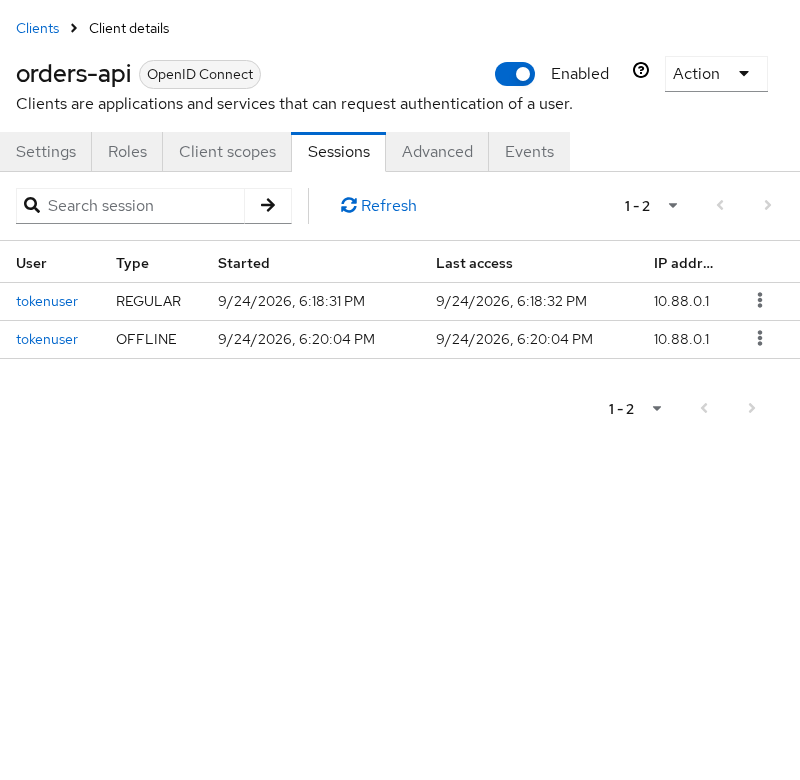
To revoke offline tokens for a user, open Users → tokenuser → Consents. Keycloak allows an administrator to revoke the user's consent for orders-api here, which also revokes that user's offline tokens for the client.
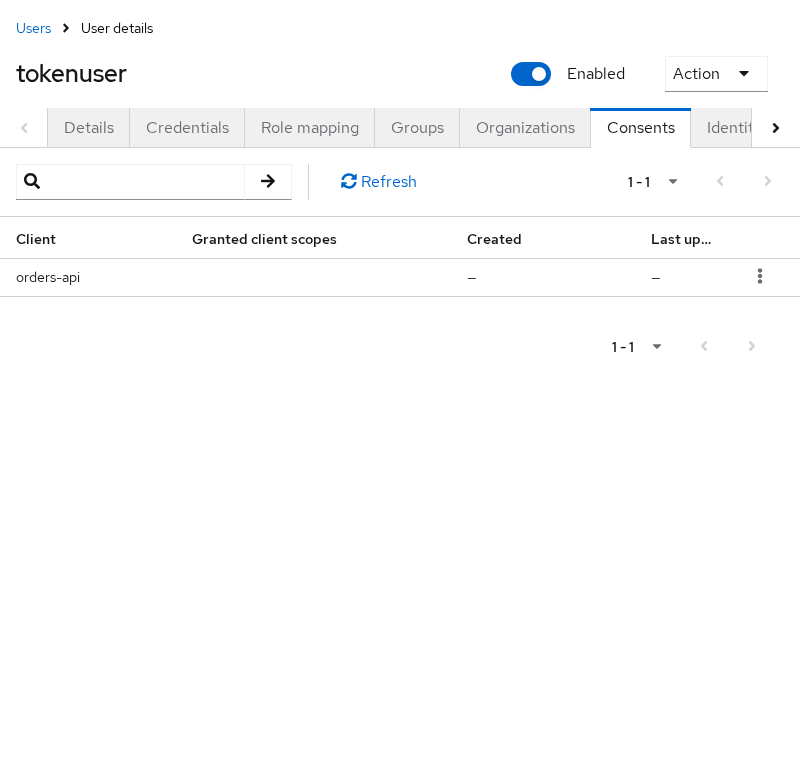
Use the three-dot menu for orders-api to revoke the consent when its offline tokens should stop working.
Advanced session behavior: persistent and transient sessions
The session types above are enough to understand normal Keycloak login and SSO behavior. Two additional terms you may encounter in Keycloak documentation are persistent sessions and transient sessions.
Persistent sessions are stored so that the login state can survive server restarts. Transient sessions do the opposite: Keycloak avoids storing a normal user session after authentication.
With persistent user sessions, Keycloak stores normal online user and client sessions in the database. This is the default behavior in Keycloak 26, so sessions can survive a Keycloak restart.
A transient session avoids creating a normal user session at all. Keycloak creates temporary authentication state only long enough to issue the token. Because there is no persistent user session, the token normally has no usable session ID and cannot be refreshed through a normal user session.
Do not confuse a transient session with a transient user. transientUser in the Admin REST representation describes the user behind the session; it does not by itself explain Keycloak's transient-session mode.
Where does Keycloak store sessions?
In Keycloak 26, user and client sessions are stored in the database by default.
Keycloak also keeps recently used session data in Infinispan caches named sessions and clientSessions. Think of these caches as faster copies of frequently accessed session data so that Keycloak does not need to read every session from the database repeatedly.
Offline sessions follow the same general idea and use the offlineSessions and offlineClientSessions caches.
This differs from older Keycloak releases where normal online sessions primarily lived in Infinispan. Because Keycloak 26 stores online sessions in the database by default, a normal server restart does not necessarily log users out.
View and revoke sessions
Once you understand the session types, viewing and revoking them is straightforward.
Admin Console
- Sign in to
http://127.0.0.1:8080/admin/, open Manage realms, and switch to golinuxcloud. - Go to Users → tokenuser → Sessions for online user sessions — see the screenshot in Practical SSO example with two clients.
- Use Sign out on one row to drop a single session, or Logout all sessions to clear every online session for that user.
- For offline tokens, open Clients → orders-api → Sessions to view offline rows, or Users → tokenuser → Consents to revoke them — see the screenshots in Normal vs offline sessions.
The sessions shown in the Admin Console are the same online user sessions returned by the Admin REST API. Offline sessions are easier to find per client through the API.
Useful Admin REST endpoints
| Action | Method and path |
|---|---|
| List user's online sessions | GET /admin/realms/{realm}/users/{user-id}/sessions |
| Delete one online session | DELETE /admin/realms/{realm}/sessions/{session-id} |
| Logout all online sessions for user | POST /admin/realms/{realm}/users/{user-id}/logout |
| List offline sessions for a client | GET /admin/realms/{realm}/clients/{client-uuid}/offline-sessions |
| List offline sessions for one user and client | GET /admin/realms/{realm}/users/{user-id}/offline-sessions/{client-uuid} |
| Revoke client consent and its offline tokens | DELETE /admin/realms/{realm}/users/{user-id}/consents/{client-id} |
Delete one online session
Read the first session id from the list when you only want to drop one browser login without touching other devices:
SESSION_ID=$(curl -s "${KC_URL}/admin/realms/golinuxcloud/users/${TOKENUSER_ID}/sessions" \
  -H "Authorization: Bearer ${ADMIN_TOKEN}" \
  | python3 -c 'import sys,json; print(json.load(sys.stdin)[0]["id"])')

curl -s -o /dev/null -w '%{http_code}\n' -X DELETE \
  "${KC_URL}/admin/realms/golinuxcloud/sessions/${SESSION_ID}" \
  -H "Authorization: Bearer ${ADMIN_TOKEN}"
204 means that user session and its client sessions are gone. Other users are unaffected.
Logout all online sessions for a user
Post to the user logout endpoint when every online SSO session for that account should be cleared at once:
curl -s -o /dev/null -w '%{http_code}\n' -X POST \
  "${KC_URL}/admin/realms/golinuxcloud/users/${TOKENUSER_ID}/logout" \
  -H "Authorization: Bearer ${ADMIN_TOKEN}"
A follow-up GET .../sessions returns []. Offline sessions are not removed by this call — revoke the client consent separately when offline tokens should stop working.
When RP-initiated logout ends the Keycloak user session, the client sessions belonging to that SSO session are also removed. Applications may additionally need front-channel or back-channel logout to clear their own local sessions; that is a separate logout topic.
Session vs token expiration
Sessions and tokens each have their own timers. They are related, but they do not represent the same object. An access token can therefore expire while its parent login session is still usable.
User session
│
├── SSO Session Idle
└── SSO Session Max
        │
        └── Client session
             ├── Client Session Idle
             └── Client Session Max

Access token
└── Access Token Lifespan

Offline session
├── Offline Session Idle
└── Offline Session Max
This article does not duplicate the timeout tuning guide — only how the layers interact. On the golinuxcloud lab realm with default settings:
| Signal | Lab observation |
|---|---|
Access token expires_in |
300 seconds (five minutes) |
Refresh token refresh_expires_in |
1800 seconds for a normal online grant with openid |
| SSO session | Outlives a single access token — refresh still works until idle/max |
| Offline refresh | refresh_expires_in: 0 — not governed by SSO idle/max; controlled by offline-session idle/max and revocation |
Compare access lifetime to the session id on the token endpoint:
curl -s -X POST "${KC_URL}/realms/golinuxcloud/protocol/openid-connect/token" \
  -d 'username=tokenuser' -d 'password=TokenUser!2026' \
  -d 'grant_type=password' -d 'client_id=orders-api' -d 'scope=openid' \
  | python3 -c 'import sys,json; d=json.load(sys.stdin); print("expires_in", d["expires_in"], "session_state", d["session_state"])'
Sample output:
expires_in 300 session_state 1KN_bSLK6S6Z47M-LSaJexEmAfter five minutes the access JWT is no longer valid for API calls, but the user session can still be active. The client can use its refresh token to request a new access token without showing the login form again, as long as the required session and refresh token are still valid.
Troubleshoot unexpected session behavior
| Symptom | Likely cause | What to check |
|---|---|---|
| User "still logged in" after access token expired | Normal — SSO session alive | Compare exp on JWT with .../users/{id}/sessions; refresh or re-auth |
| Second app prompts for password | Separate SSO session or expired parent | Browser cookies blocked; different realm; full logout ran |
| Session not visible in Admin Console | Wrong realm or offline list | Online: user Sessions tab; offline: client offline endpoint |
| Mobile app still syncs after admin logout | Offline sessions not cleared | Revoke client consent |
| Two user sessions for one user | Direct Access Grant without shared browser cookie | Prefer authorization code SSO in production |
refresh_expires_in: 0 on offline grant |
Offline token uses offline idle/max policy | Inspect offline session list, not online sessions |
| Users remain logged in after Keycloak restart | Persistent user sessions enabled | Keycloak 26 persists online sessions to the database by default |
Decision flow:
  Login problem?
       │
       ├─ API 401 with fresh access token? ──► token audience/roles (not session)
       │
       ├─ Refresh fails? ──► session revoked? idle/max? offline vs online?
       │
       ├─ Admin Console empty? ──► wrong realm / offline vs online tab
       │
       └─ Logout incomplete? ──► RP logout vs app cookie vs offline consent
Summary
Keycloak uses authentication sessions during login, user sessions after login succeeds, and client sessions for each application the user authenticates to. Offline sessions are a separate branch used when offline_access lets an application obtain tokens after the user is no longer actively logged in.
In the lab, signing in to orders-api and storefront-spa produced one user session with two client entries in the Admin API — one user session, two client sessions beneath it.
Tokens are issued from sessions but expire on their own schedule. Cookies help Keycloak recognize the browser; they are not the session itself. In Keycloak 26, online sessions persist in the database by default, so a controlled restart does not necessarily end every login.
References
- Keycloak Server Administration Guide — Sessions
- Keycloak Admin REST API — sessions
- OpenID Connect Session Management
Frequently Asked Questions
Is a Keycloak session the same as a token?
No. A session is server-side login state keyed by a session id (sid in JWTs; session_state on the token endpoint). Tokens are issued from that session and expire sooner. APIs validate tokens; operators revoke sessions to end login state for a user.
What is a client session?
A client session links one user session to one registered client. Multiple client sessions can share one user session during SSO. The Admin API lists them in the clients map on the user session object.
What creates an offline session?
Requesting the offline_access scope during a successful login or token grant creates offline user and client session state and issues an offline refresh token. The user must have the offline_access realm role and the client must be allowed to request the offline_access client scope.
Why did a token expire while the session remains?
Access tokens are intentionally short-lived. The SSO session can still be valid for refresh until idle or max lifespan ends, or until an admin revokes the session. Check expires_in on the token response separately from .../users/{id}/sessions.
How do I revoke all user sessions?
In the Admin Console, open the user → Sessions → Logout all sessions. With the API, POST /admin/realms/{realm}/users/{user-id}/logout clears online sessions. Revoke offline tokens separately through client consents.
Where are Keycloak sessions stored?
In Keycloak 26, online user and client sessions are persisted in the database by default, with sessions and clientSessions Infinispan caches for frequently accessed data. Offline sessions use the database plus offlineSessions and offlineClientSessions caches.
Does restarting Keycloak log users out?
Not necessarily on Keycloak 26 with persistent user sessions enabled. Online sessions are written to the database by default, so a normal restart often leaves existing SSO sessions intact. Sessions still expire through idle/max timeouts or explicit revocation.
