
| Tested on | Red Hat Enterprise Linux 10.2 (Coughlan) |
|---|---|
| Package | podman-5.8.2-5.el10_2.x86_64quay.io/keycloak/keycloak:26.7.3 |
| Applies to | Any Linux host with Podman or Docker |
| Privilege | Normal user for rootless Podman; Keycloak admin access in the lab realm |
| Lab environment | Keycloak 26.7.3 on http://127.0.0.1:8080/ with golinuxcloud realm, M2M client billing-sync, and resource server orders-api — Install Keycloak with Podman |
| Scope | Wire-level client_credentials grant: HTTP Basic client authentication, alternate form-body secret, JWT claim inspection (sub, azp, aud, exp, roles), simulated orders-api authorization checks, credential handling, and 400/401/403 diagnostics. Does not cover service-account client creation, role scope mapping setup, or full JWT signature verification. |
| Related guides | Keycloak service accounts Keycloak public vs confidential clients Keycloak OpenID Connect tutorial Access token vs ID token vs refresh token Keycloak protocol mappers |
Use the Keycloak client credentials grant when a backend job or microservice needs an access token without a human signing in. The client authenticates with its own credentials at Keycloak's token endpoint and receives an OAuth 2.0 access token it can send to protected APIs.
OAuth 2.0 calls this the Client Credentials Grant; developers often call it the Client Credentials Flow. Although billing-sync is configured as an OpenID Connect client in Keycloak, the client_credentials grant itself comes from OAuth 2.0, not OpenID Connect.
This walkthrough uses confidential client billing-sync in realm golinuxcloud. You request a token with curl and HTTP Basic authentication, read the service-account identity in the JWT, and walk through the authorization checks a resource server would apply.
In OAuth terminology, the API receiving and validating the access token is called the resource server. In this lab, orders-api plays that role.
If billing-sync is not configured yet, enable the service account and assign roles first in Keycloak service accounts — this article focuses on the grant itself and what to inspect after the token arrives.
How service accounts and client credentials fit together
Before choosing grants or reading token claims, it helps to see how Keycloak ties a confidential client to a machine identity:
  billing-sync
  Keycloak client
         │
         │  Service account roles = ON
         ▼
  service-account-billing-sync
  internal service-account user
         │
         │  client_credentials
         ▼
  access token
         │
         ▼
  orders-api
Enabling Service account roles gives a confidential client a built-in service-account identity. The Client Credentials Grant authenticates the client, and Keycloak issues an access token for that service-account identity. There is no human login in this flow.
The client and its service-account user are related but are not the same object:
billing-sync— the registered Keycloak client (client ID, secret, capability settings).service-account-billing-sync— Keycloak's internal user whose roles and attributes contribute to the access token.
The terms below show up together in Admin Console and JWT output:
- Confidential client —
billing-sync, with a client secret and Client authentication on. - Service account — the built-in user Keycloak creates when Service accounts roles is enabled.
- Client credentials grant — the OAuth 2.0
grant_type=client_credentialsrequest that returns the access token. - Service-account user —
service-account-billing-sync; the internal user whose UUID appears insub.
When client credentials is appropriate
OAuth 2.0 defines the client credentials grant for machine-to-machine (M2M) workloads where the client acts on its own behalf, not on behalf of a logged-in user.
Use grant_type=client_credentials when:
- A cron job, worker, or microservice calls APIs with no browser and no human present.
- The caller is a confidential client that can store a secret or private key.
- You need an access token only — not an ID token or refresh token for a person.
Do not use client credentials when:
- A user must sign in through a browser — use Authorization Code flow (Keycloak Authorization Code flow).
- The application is a public SPA or mobile app without a server secret — those clients cannot use this grant.
- The job must act with a specific user's delegated rights — use offline tokens or a user-bound flow instead.
  billing-sync (daemon)              Keycloak token endpoint          orders-api
        │                                    │                            │
        │  POST /token                       │                            │
        │  grant_type=client_credentials     │                            │
        │  HTTP Basic (client_id:secret)     │                            │
        ├───────────────────────────────────►│                            │
        │◄──────── access_token (JWT) ───────┤                            │
        │                                    │                            │
        │  GET /orders  Authorization: Bearer                             │
        ├────────────────────────────────────────────────────────────────►│
        │◄──────────── 200 or 403 ──────────────────────────────────────┤
This flow does not include:
- A browser redirect or authorization code.
- A normal user SSO session — by default, Keycloak does not create one for
client_credentials.
Prerequisite service account and roles
The token request in the next sections assumes confidential client billing-sync already exists with Client authentication and Service accounts roles enabled, and that its service account holds the roles orders-api needs.
| Item | Lab value |
|---|---|
| Realm | golinuxcloud |
| M2M client | billing-sync (confidential, service account enabled) |
| Resource server client | orders-api with role order-reader |
| Token subject | service-account-billing-sync |
For this client-secret-based client_credentials flow, enable both:
- Client authentication — lets
billing-syncauthenticate itself at the token endpoint. - Service account roles — enables the service-account identity used by the Client Credentials Grant.
The browser-oriented flows below are not needed:
- Standard flow — browser-based Authorization Code login.
- Direct access grants — password-based user authentication at the token endpoint.
- Implicit flow — browser-oriented OAuth/OIDC flow.
None of those is required when billing-sync authenticates as itself, so they stay off in the screenshot below.
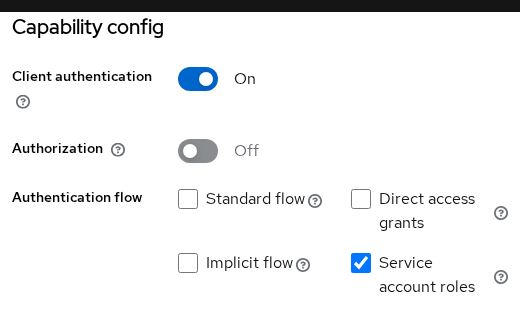
Copy the client secret from Clients → billing-sync → Credentials. Store production values in a vault or environment variable — not in shell history or source control.
The Credentials tab controls how the client proves its identity:
- Client Authenticator → Client Id and Secret —
billing-syncauthenticates with its client ID and secret at the token endpoint. - Allowed authentication method: Any — any supported client-secret method is permitted.
- This lab uses the client secret with HTTP Basic (see the curl example below).
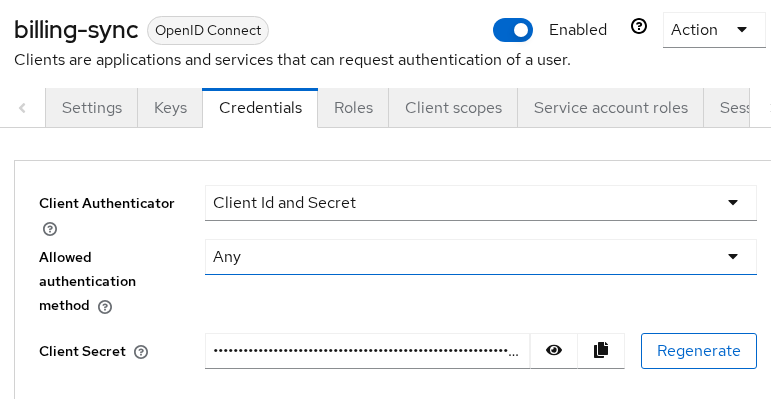
Role assignment, role scope mappings, and the intersection rule that controls which roles appear in the JWT belong to service-account setup, not this grant walkthrough. This article assumes order-reader is already visible under resource_access.orders-api in the token.
Set lab variables once, replacing the secret placeholder with the value from the Admin Console:
export KC_URL='http://127.0.0.1:8080'
export REALM='golinuxcloud'
export CLIENT_ID='billing-sync'
export CLIENT_SECRET='replace-with-billing-sync-client-secret'
export TOKEN_URL="${KC_URL}/realms/${REALM}/protocol/openid-connect/token"
What the token request sends
To obtain the access token, billing-sync sends one POST request to Keycloak's token endpoint with Content-Type: application/x-www-form-urlencoded.
Required form fields:
grant_type=client_credentialsclient_id— the M2M client ID (billing-sync), unless you send it through HTTP Basic instead
Confidential clients must also authenticate:
- This walkthrough uses HTTP Basic — the standard client-secret method and how Keycloak documents the default service-account request.
- Keycloak can also accept
client_idandclient_secretas form parameters when Client Id and Secret is configured.
Optional and derived token fields:
scope— requests optional client scopes the client is allowed to use.aud— normally set through client scopes and audience mappers, not anaudiencerequest parameter (that parameter applies to other grants such as token exchange). In this lab, a mapper addsorders-apitoaud.
The successful response contains access_token, token_type, and expires_in. In this lab, expires_in is 300 seconds. There is normally no refresh_token and no id_token — see the FAQ for why.
Request a token with curl
Authenticate with HTTP Basic and post grant_type=client_credentials.
curl -s -X POST "${TOKEN_URL}" \
  -H 'Content-Type: application/x-www-form-urlencoded' \
  -u "${CLIENT_ID}:${CLIENT_SECRET}" \
  -d 'grant_type=client_credentials' \
  > /tmp/billing-sync-token.json
With curl, -u sends the client ID and secret using HTTP Basic authentication. Conceptually, the request contains:
Authorization: Basic base64(billing-sync:<client-secret>)- Base64 is only an encoding, not encryption — use HTTPS in production so client credentials are protected in transit.
- There is no separate
client_idform field.curl -uplaces bothCLIENT_IDandCLIENT_SECRETin the HTTP Basic authorization header.
Display the saved JSON:
python3 -m json.tool /tmp/billing-sync-token.jsonSample output (access token trimmed):
{
    "access_token": "eyJhbGciOiJSUzI1NiIsInR5cCIgOiAiSldUI...",
    "expires_in": 300,
    "refresh_expires_in": 0,
    "token_type": "Bearer",
    "not-before-policy": 0,
    "scope": "profile email"
}
Read the response fields with that context:
scope: profile email— default client scopes attached to the client; not evidence of a human login.refresh_expires_in: 0— no refresh token was issued. When the access token expires,billing-syncauthenticates again withclient_credentials.
Alternate: client secret in the form body
Keycloak can also accept client_id and client_secret as form parameters when that client authentication method is allowed, but HTTP Basic is the standard client-secret authentication method and is the better default for this walkthrough.
curl -s -X POST "${TOKEN_URL}" \
  -H 'Content-Type: application/x-www-form-urlencoded' \
  -d "grant_type=client_credentials" \
  -d "client_id=${CLIENT_ID}" \
  -d "client_secret=${CLIENT_SECRET}" \
  | python3 -m json.tool | head -8
The JSON shape matches the Basic-auth request. Pick one style per service and keep it consistent in your deployment manifests.
Keep secrets out of shell history
Avoid typing the secret on the command line in production. Read it from the environment or a secrets file your orchestrator injects:
read -r -s CLIENT_SECRET
export CLIENT_SECRET
printf '\n'
After read -r -s, paste the secret and press Enter. The -s flag suppresses echo so the value does not appear on screen.
Inspect the machine token
The exact roles and audience in your token depend on the service account's role assignments, scope mappings, and audience mapper. We explain that relationship after inspecting the token; for now, the lab assumes those mappings are already configured.
Decoding the JWT payload shows which identity Keycloak bound to the token. This is inspection only — it does not verify the signature. Production APIs should validate iss, signature, and exp with JWKS or OAuth middleware; signature verification is planned in the JWKS lesson referenced from Keycloak OpenID Connect tutorial.
Extract selected claims from the access token:
python3 -c "import json,base64; t=json.load(open('/tmp/billing-sync-token.json'))['access_token']; p=t.split('.')[1]; p+='='*(-len(p)%4); c=json.loads(base64.urlsafe_b64decode(p)); print(json.dumps({k:c.get(k) for k in ('sub','azp','aud','exp','iat','typ','preferred_username','realm_access','resource_access','client_id')}, indent=2))"Sample output:
{
  "sub": "1ac5b0e2-5148-4298-a23d-ec9e8b9bd46e",
  "azp": "billing-sync",
  "aud": "orders-api",
  "exp": 1790257229,
  "iat": 1790256929,
  "typ": "Bearer",
  "preferred_username": "service-account-billing-sync",
  "realm_access": null,
  "resource_access": {
    "orders-api": {
      "roles": [
        "order-reader"
      ]
    }
  },
  "client_id": "billing-sync"
}
For this flow, focus first on five things:
sub— the unique ID of Keycloak's built-in service-account user forbilling-sync. In a user login token,subidentifies the human user instead.azpandclient_id— both identifybilling-syncin this token, but they come from different places.azpis the authorized-party claim. In Keycloak 26, the built-inservice_accountclient scope also adds service-account-specific claims such asclient_id,clientHost, andclientAddress.aud— audience;orders-apiin this lab because an audience mapper on a client scope adds it to the token.exp— expiry time (Unix seconds). Re-request beforeexppasses.resource_access.orders-api.roles— client roles the resource server should check:
resource_access
└── orders-api
    └── roles
        └── order-reader
Read that path from left to right: the token contains roles for the orders-api client, and order-reader is one of those client roles.
The token also contains supporting claims such as iat (issued-at time), typ (token type), and preferred_username, which Keycloak sets to the service-account username.
M2M tokens differ from interactive login tokens:
- No
nonceclaim and no ID token — client credentials authenticates the application, not a person. - Authorization Code flow returns
id_tokenand oftenrefresh_tokenbecause a human authenticated.
See Access token vs ID token vs refresh token for when each token type applies.
Check audience and roles at the API
The examples below decode the JWT so you can see the authorization checks. They do not perform full JWT validation. A real resource server must verify these before trusting aud or role claims:
- JWT signature (using realm JWKS)
- Issuer (
iss) - Expiration (
exp)
The next Python snippet simulates the decisions a real orders-api would make. It prints status messages for illustration; it does not run an actual HTTP server.
Save the access token to a variable:
export API_TOKEN=$(python3 -c "import json; print(json.load(open('/tmp/billing-sync-token.json'))['access_token'])")For demonstration, decode the token and check the two values orders-api cares about: its audience and the order-reader role. This still does not verify the JWT signature.
python3 <<'PY'
import base64, json, os

def decode_for_demo(token):
    part = token.split(".")[1]
    part += "=" * (-len(part) % 4)
    return json.loads(base64.urlsafe_b64decode(part))

token = os.environ.get("API_TOKEN", "")
if not token:
    print("Reject: missing Bearer token (API would return 401)")
    raise SystemExit(1)

claims = decode_for_demo(token)
aud = claims.get("aud", [])
if isinstance(aud, str):
    aud = [aud]
roles = claims.get("resource_access", {}).get("orders-api", {}).get("roles", [])

if "orders-api" not in aud:
    print("Reject: token was not issued for orders-api")
elif "order-reader" not in roles:
    print("Reject: order-reader role missing")
else:
    print("Allow request")
PY
Sample output:
Allow requestTypical API outcomes before and after token validation:
- Missing
Authorization: Bearerheader →401 Unauthorized(no token to validate). - Valid token but
order-readerabsent →403 Forbidden(authenticated, not authorized). - Audience mismatch → often treated as invalid for this API; framework-dependent, commonly
401.
| Situation | Typical response |
|---|---|
| Missing, malformed, expired, or bad-signature token | 401 Unauthorized |
| Valid token but caller lacks required role or permission | 403 Forbidden |
| Audience mismatch | Treat token as invalid for this API; response depends on framework, commonly 401 |
Wrong client secret at the token endpoint is a 401 from Keycloak, not a 403 from your API:
curl -s -w '\nHTTP status: %{http_code}\n' -X POST "${TOKEN_URL}" \
  -H 'Content-Type: application/x-www-form-urlencoded' \
  -u "${CLIENT_ID}:wrong-secret-value" \
  -d 'grant_type=client_credentials'
Sample output:
{"error":"unauthorized_client","error_description":"Invalid client or Invalid client credentials"}
HTTP status: 401
Fix the secret on the client or in your vault, then repeat the token request.
Production APIs send the access token in an Authorization: Bearer header. Your framework should parse that header, validate the JWT, then evaluate audience and roles before running handler code.
Scopes, audience and roles
Seeing a role in the Admin Console does not automatically mean it will appear in the access token. Keycloak considers both what the service account has been assigned and what the client is allowed to expose in its token.
Three controls work together:
- Client scopes linked to
billing-synccontrol which mappers run (profile, email, roles, audience). - Role assignments on the service account user define what the identity is allowed to hold.
- Role scope mappings control which assigned roles may appear in the access token.
How the lab token got its shape:
aud: orders-api— an audience mapper on a client scope targets the resource server. Adjust mappers in Keycloak protocol mappers if your API expects a different audience string.resource_access.orders-api.roles— client roles for the API;order-readerappears here, not underrealm_access, when only client roles are mapped.- Empty
resource_accesswith roles visible in Admin Console — scope mappings are missing, not role assignment.
Two separate controls govern scopes and roles:
- The
scoperequest parameter — requests optional client scopes assigned tobilling-sync. - Full scope allowed and role scope mappings — determine which assigned roles may appear in the access token. Full scope does not gate whether optional OIDC scopes can be requested through
scope.
A service account role being assigned does not automatically guarantee that the role appears in the token. Keycloak effectively asks two questions:
- Does the service-account user have the role?
- Is
billing-syncallowed to include that role through its scope mappings?
Only roles that pass both checks appear in the access token when Full scope allowed is off:
roles in token = service-account assigned roles ∩ allowed role scope mappingsCredential storage and rotation
- Do not commit the client secret to source control.
- Store it in your platform's secret store (vault, Kubernetes Secret, or CI variable).
- Regenerate it from Clients →
billing-sync→ Credentials if it is compromised, then update every deployment that calls the token endpoint. - Rotating the secret prevents new token requests from using the old secret, but it does not automatically invalidate access tokens already issued. Those tokens remain usable until they expire.
Troubleshoot 400, 401 and 403
| Symptom | Likely cause | Fix |
|---|---|---|
400 / invalid_request / Missing form parameter: grant_type |
grant_type omitted or typo |
Send grant_type=client_credentials |
401 / unauthorized_client / Invalid client credentials |
Wrong secret or rotated credential | Copy the current secret from Credentials |
401 / unauthorized_client / Client not enabled to retrieve service account |
Service accounts roles is off on a confidential client | Enable Service account roles on the client |
401 / unauthorized_client / Public client not allowed |
Client cannot authenticate itself because Client authentication is off | Use a confidential client: turn Client authentication on, configure credentials, and enable Service account roles |
400 / unsupported_grant_type |
Wrong grant string | Use exactly client_credentials |
Token OK, API 403, roles empty in JWT |
Role not in scope mappings | Map roles on Client scopes → roles → Scope |
| Token OK, API rejects token, roles present | aud mismatch or API checks wrong client namespace |
Align audience mapper with API expectation; read resource_access.<clientId>.roles |
No refresh_token in response |
Normal for this grant | Request a new access token when exp passes |
No id_token in response |
Normal — no user authentication | Use Authorization Code flow when you need identity claims for a person |
Missing grant_type reproduces the 400 path:
curl -s -w '\nHTTP status: %{http_code}\n' -X POST "${TOKEN_URL}" \
  -H 'Content-Type: application/x-www-form-urlencoded' \
  -u "${CLIENT_ID}:${CLIENT_SECRET}"
Sample output:
{"error":"invalid_request","error_description":"Missing form parameter: grant_type"}
HTTP status: 400
Summary
The Keycloak client credentials grant lets confidential M2M clients such as billing-sync obtain Bearer access tokens without a human login. You POST grant_type=client_credentials with HTTP Basic authentication (or form-body credentials as an alternate), receive a JWT whose sub is the service-account user and whose azp is the client, then pass that token to orders-api in an Authorization: Bearer header.
When debugging, read aud, exp, and resource_access together:
- Token endpoint
401— client authentication failed (wrong secret, missing capability). - API
401— token failed validation (missing header, bad signature, expiry, or audience mismatch). - API
403— token accepted but caller lacks the required role or permission.
By default, Keycloak does not issue an ID token or refresh token for this grant. When the access token expires, the client normally authenticates again with client_credentials to obtain a new one.
Configure the service account, role intersection, and scope mappings before you rely on this grant in production. For interactive browser login, use Authorization Code flow instead.
References
- RFC 6749 — Client Credentials Grant
- RFC 6749 — Client Authentication
- RFC 7009 — OAuth 2.0 Token Revocation
- Keycloak Server Administration Guide — Service accounts
- Keycloak Securing Apps — OIDC token endpoint
Frequently Asked Questions
Does client credentials authenticate a user?
No. The grant authenticates the client application. The access token sub claim identifies Keycloak's built-in service account user (service-account-<clientId>), not a person who typed a password.
Why is there no ID token?
ID tokens carry identity information about an authenticated end user. Client credentials does not run an end-user login, so the normal response contains an access token and no ID token. By default, Keycloak also does not issue a refresh token for this grant. Use Authorization Code flow when the application needs to know which human signed in.
Can a public client use client credentials?
No. Public clients cannot hold a client secret, and Keycloak blocks service-account token requests for them. Create a separate confidential client for backend jobs.
Why are roles missing from my token?
Assignment on the service account is only half the story. When Full scope allowed is off, roles must also appear on the roles client scope mappings. Assigned roles that are not mapped stay out of realm_access and resource_access.
Should the API introspect the token or validate the JWT locally?
- Local JWT validation — verify signature with the realm JWKS; no Keycloak round trip per request.
- Token introspection — ask Keycloak about the token's current state when that fits your architecture.
Whichever method you use, also validate issuer, audience, and authorization claims.
