
| Tested on | Red Hat Enterprise Linux 10.2 (Coughlan) |
|---|---|
| Package | podman-5.8.2-5.el10_2.x86_64quay.io/keycloak/keycloak:26.7.3 |
| Applies to | Any Linux host with Podman or Docker |
| Privilege | Normal user for rootless Podman; Keycloak admin access for client and scope configuration |
| Lab environment | Keycloak 26.7.3 on http://127.0.0.1:8080/ — Install Keycloak with Podman |
| Scope | Standard Token Exchange v2 (RFC 8693) for same-realm internal exchange: subject_token, requester effective client scopes, audience filtering, claim inspection before and after exchange, and troubleshooting invalid_request, access_denied, and disabled-client errors. Does not cover legacy v1 external IdP exchange, identity brokering, admin impersonation, or generic client-credentials grants. |
| Related guides | Keycloak Authorization Code flow Keycloak sessions explained Keycloak token introspection Access token vs ID token vs refresh token Keycloak public vs confidential clients |
Your storefront application holds an access token scoped for its own API, but the checkout service needs to call a separate billing API with a narrower token. The gateway could forward the original access token, but that token may contain audiences or roles the billing API does not need. Token exchange lets the gateway ask Keycloak for a new token tailored to the downstream call.
RFC 8693 token exchange solves that by letting a confidential client trade a subject_token for a new token aimed at a different audience. Keycloak 26.7.3 ships Standard Token Exchange v2 as a supported feature — not the older preview v1 flow that mixed impersonation and external IdP exchange.
This lab uses three clients in realm golinuxcloud: exchange-lab-store issues the user token, exchange-lab-gateway performs the exchange, and exchange-lab-billing is the target audience. You will compare JWT claims before and after exchange, use the audience parameter to narrow the exchanged token, and reproduce the errors Keycloak returns when the audience or client configuration is wrong.
What this token exchange lab creates
When you finish, you can:
- Enable Standard Token Exchange v2 on a confidential requester client
- Obtain a
subject_tokenfrom an initial client and exchange it for a gateway-issued token - Use the
audienceparameter to narrow audiences available from the gateway's client scopes - Read
access_deniedandinvalid_requestresponses for misconfigured exchange attempts
  exchange-lab-store          exchange-lab-gateway         exchange-lab-billing
  (initial client)            (requester — v2 enabled)       (target audience)
        |                              |                              |
        |  user login token            |  POST /token                 |
        |  azp=store                   |  grant_type=token-exchange   |
        |  aud includes gateway ------> |  subject_token + audience -->| billing API
        |                              |  new token azp=gateway         |
Side effects in the lab realm:
- Clients
exchange-lab-store,exchange-lab-gateway, andexchange-lab-billing - Client
exchange-lab-reportsfor the negative audience test only - Client scope
exchange-billing-audienceon the gateway client - Role
billing-readonexchange-lab-billingassigned totokenuser
For how access tokens relate to refresh tokens and ID tokens before you exchange them, see Access token vs ID token vs refresh token.
What token exchange solves
Token exchange lets a client that already holds a valid access token request a new token without sending the user through another login screen. The typical pattern:
- User authenticates to application A (
exchange-lab-store). - Application A passes its access token to backend service B (
exchange-lab-gateway). - Service B cannot call billing API C with that token — wrong audience, too many roles, or policy forbids forwarding it.
- Service B calls Keycloak with
grant_type=urn:ietf:params:oauth:grant-type:token-exchangeand the original token assubject_token. - Keycloak returns a fresh access token issued to service B, optionally filtered to audience C.
Standard v2 covers internal-internal exchange only: both the initial and target clients live in the same Keycloak realm. External IdP token import, impersonation, and SAML assertion exchange belong to legacy v1 or other features — out of scope here.
Standard v2 vs legacy v1
Keycloak implements two token exchange versions. Use v2 for new integrations.
| Topic | Standard v2 | Legacy v1 |
|---|---|---|
| Status | Supported; token-exchange-standard:v2 enabled by default |
Preview; deprecated; needs --features=preview or token-exchange |
| Same-realm exchange | Yes — RFC 8693 aligned | Yes — looser RFC interpretation |
| External IdP / impersonation | Not in v2 | Preview only in v1 |
| Requester client type | Confidential only | Limited public-client self-exchange |
| Authorization model | Client switch + audience check on subject_token |
Fine-grained admin permissions v1 |
audience parameter |
Filters audiences available from requester effective client scopes | Single target client semantics |
| FGAP v2 permissions | Not required | v1 FGAP required for v1 permissions |
Legacy tutorials that enable token-exchange preview and FGAP v1 permission policies describe a different path. For greenfield work on Keycloak 26.2+, configure Standard Token Exchange on the requester client and skip legacy permission tables.
Supported actors and claims
Three clients play distinct roles in the v2 lab:
| Role | Lab client | What it does |
|---|---|---|
| Initial / subject issuer | exchange-lab-store |
Authenticates tokenuser and issues the subject_token |
| Requester | exchange-lab-gateway |
Sends the token exchange grant; must be confidential with v2 enabled |
| Target audience | exchange-lab-billing |
Appears in the aud claim of the exchanged token |
Claims to compare before and after exchange:
| Claim | Before exchange (azp=store) |
After exchange (azp=gateway) |
|---|---|---|
sub |
User ID — unchanged | Same user |
azp |
exchange-lab-store |
exchange-lab-gateway |
aud |
Store token audiences (gateway + account in this lab) |
Audiences from gateway effective scopes; narrowed with audience |
resource_access |
Roles per client on the store token | Roles for audiences the gateway scopes and audience parameter allow |
subject_token is the existing access token that represents the user in the exchange. It is input to the exchange; Keycloak validates it and issues a separate token as output. The old token is not modified.
existing access token
   (subject_token)
          |
          v
       Keycloak
          |
          | token exchange
          v
    new access token
The user (sub) normally stays the same. These claims can change:
azpaud- Scopes
- Client roles in
resource_access
The subject_token must list the requester client in aud, unless the requester exchanges its own token. Keycloak returns access_denied with Client is not within the token audience when that check fails.
Configure clients and permissions
Create the three OIDC clients below:
exchange-lab-gatewaymust be confidential because it authenticates the token-exchange requestexchange-lab-storeis confidential for this lab setup, but Standard Token Exchange only requires the requester (exchange-lab-gateway) to be confidentialexchange-lab-billingrepresents the target API audience only and does not need a login flow or client secret
| Client | Authentication | Token exchange | Direct access grants | Notes |
|---|---|---|---|---|
exchange-lab-store |
Confidential (lab only) | Off | On | Audience mapper adds exchange-lab-gateway to access tokens |
exchange-lab-gateway |
Confidential (required) | On | Off | Requester; needs billing client scope |
exchange-lab-billing |
Public / no secret | Off | Off | Target API/audience; no login flow; role billing-read |
Standard Token Exchange v2 requires two layers:
- Server feature —
token-exchange-standard:v2is ON by default on Keycloak26.7.3 - Requester client — Standard Token Exchange must be enabled manually on
exchange-lab-gateway
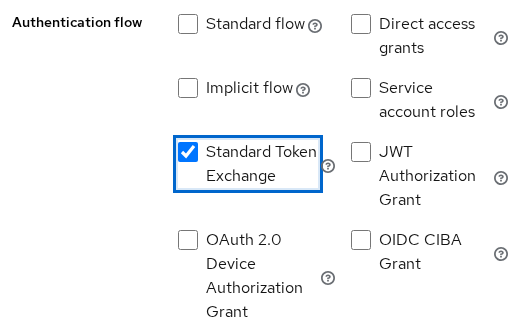
On exchange-lab-gateway, open Clients → exchange-lab-gateway → Settings → Capability config and enable Standard Token Exchange:
The Admin REST API uses the same setting as a client attribute:
standard.token.exchange.enabled=trueAdd an Audience mapper on exchange-lab-store so the store token includes exchange-lab-gateway in aud. Do not add exchange-lab-billing to the store token in this lab — billing should appear only after exchange. Without the gateway audience mapper, the gateway cannot exchange the token.
A client's effective client scopes are the scopes Keycloak actually applies when issuing the token. They include the client's default scopes and, when requested with scope=, any applicable optional scopes. Because exchange-billing-audience is attached as a default scope here, Keycloak automatically considers it when the gateway performs token exchange.
If scope is omitted from the exchange request, the requester's default client scopes are the effective scopes. Optional scopes are added only when you request them.
Create client scope exchange-billing-audience and configure:
- Mappers → Audience — Included Client Audience =
exchange-lab-billing; Add to access token = ON - Scope → Assign role — add
exchange-lab-billing→billing-readas a role scope mapping
Attach exchange-billing-audience to exchange-lab-gateway as a Default client scope.
Finally, assign the billing-read client role to tokenuser.
tokenuser
   |
   | has billing-read
   v
exchange-billing-audience
   |
   | role scope mapping allows billing-read
   | audience mapper adds exchange-lab-billing
   v
gateway effective scopes
   |
   v
exchanged token
aud = exchange-lab-billing
resource_access.billing = billing-read
Create exchange-lab-reports as a separate audience client for the negative test, but do not attach it to the gateway's effective client scopes and do not assign reports-read to tokenuser.
Copy each client secret from Clients → client → Credentials → Client secret, then set base variables for the curl steps:
export KC_BASE='http://127.0.0.1:8080/realms/golinuxcloud/protocol/openid-connect'
export STORE_CLIENT='exchange-lab-store'
export STORE_SECRET='paste-exchange-lab-store-secret'
export GATEWAY_CLIENT='exchange-lab-gateway'
export GATEWAY_SECRET='paste-exchange-lab-gateway-secret'
Make a token exchange request
Obtain a subject_token for tokenuser from the initial client:
grant_type=password) only as a shortcut to obtain a user access token so we can focus on token exchange. Do not use this grant in a real application. Obtain the original user token through an appropriate login flow such as Authorization Code with PKCE.
TOKEN_RESP=$(curl -s -X POST "${KC_BASE}/token" \
  -u "${STORE_CLIENT}:${STORE_SECRET}" \
  -d 'grant_type=password' \
  -d 'username=tokenuser' \
  -d 'password=TokenUser!2026' \
  -d 'scope=openid profile')
Store the access token in a shell variable:
SUBJECT_TOKEN=$(printf '%s' "$TOKEN_RESP" | python3 -c 'import sys,json; print(json.load(sys.stdin)["access_token"])')Decode the payload to confirm exchange-lab-gateway appears in aud and exchange-lab-billing does not:
printf '%s' "$SUBJECT_TOKEN" | python3 -c 'import sys,json,base64; t=sys.stdin.read().strip().split(".")[1]; t+="="*(-len(t)%4); c=json.loads(base64.urlsafe_b64decode(t)); print(json.dumps({k:c.get(k) for k in ["azp","aud","scope","preferred_username"]}, indent=2))'{
"azp": "exchange-lab-store",
"aud": [
"exchange-lab-gateway",
"account"
],
"scope": "openid profile email",
"preferred_username": "tokenuser"
}The aud array includes exchange-lab-gateway because of the audience mapper on the store client. That entry is required before the gateway can call the exchange endpoint. Billing is not in this token yet — that is the point of the exchange.
We intentionally leave out audience in this first request. That lets you inspect the token Keycloak builds from the gateway's default effective client scopes. In the next section, we'll add audience=exchange-lab-billing and compare how Keycloak filters the result.
Post the RFC 8693 token exchange grant as the gateway client:
curl -s -X POST "${KC_BASE}/token" \
  -u "${GATEWAY_CLIENT}:${GATEWAY_SECRET}" \
  --data-urlencode 'grant_type=urn:ietf:params:oauth:grant-type:token-exchange' \
  --data-urlencode "subject_token=${SUBJECT_TOKEN}" \
  --data-urlencode 'subject_token_type=urn:ietf:params:oauth:token-type:access_token' \
--data-urlencode 'requested_token_type=urn:ietf:params:oauth:token-type:access_token'{"access_token":"eyJhbGciOiJSUzI1NiIs...","expires_in":300,"token_type":"Bearer","issued_token_type":"urn:ietf:params:oauth:token-type:access_token","scope":"exchange-billing-audience profile email","refresh_expires_in":0,"not-before-policy":0}Keycloak issued a new access token with azp set to exchange-lab-gateway. The issued_token_type confirms v2 processed the exchange grant.
Audience and downscoping
Keycloak calls the audience parameter a downscoping mechanism, but the downscoping is relative to the audiences available for the new exchanged token — not necessarily a subset of the incoming subject_token.
subject_token
     |
     | proves user + gateway is allowed to exchange it
     v
exchange-lab-gateway
     |
     | its effective client scopes determine
     | which audiences/roles can enter new token
     v
candidate exchanged token
     |
     | audience=exchange-lab-billing
     | filters candidate audiences
     v
billing-only token
The audience parameter does not simply filter audiences already present in the subject_token. Keycloak:
- First resolves the new token from the requester client's effective client scopes
- Then narrows those available audiences with the
audienceparameter - Does not create an audience by itself — it only filters what the gateway scopes make available
Those gateway scopes can make audiences available even when they were not present in the original subject_token.
Standard Token Exchange may obtain scopes or audiences not present in the original subject_token unless you apply the downscope-assertion-grant-enforcer client policy. This lab relies on that default behavior so billing can appear only after exchange.
Without audience, the exchanged token reflects the gateway's effective client scopes — including billing in this lab. To call only the billing API, repeat the exchange with audience=exchange-lab-billing and capture the JSON response:
EXCHANGE_RESP=$(curl -s -X POST "${KC_BASE}/token" \
  -u "${GATEWAY_CLIENT}:${GATEWAY_SECRET}" \
  --data-urlencode 'grant_type=urn:ietf:params:oauth:grant-type:token-exchange' \
  --data-urlencode "subject_token=${SUBJECT_TOKEN}" \
  --data-urlencode 'subject_token_type=urn:ietf:params:oauth:token-type:access_token' \
  --data-urlencode 'audience=exchange-lab-billing')
Decode aud and resource_access from the billing-filtered token:
printf '%s' "$EXCHANGE_RESP" | python3 -c 'import sys,json,base64; d=json.load(sys.stdin); p=d["access_token"].split(".")[1]; p+="="*(-len(p)%4); c=json.loads(base64.urlsafe_b64decode(p)); print(json.dumps({"azp":c.get("azp"),"aud":c.get("aud"),"resource_access":c.get("resource_access",{})}, indent=2))'{
"azp": "exchange-lab-gateway",
"aud": "exchange-lab-billing",
"resource_access": {
"exchange-lab-billing": {
"roles": [
"billing-read"
]
}
}
}The exchanged token now contains only exchange-lab-billing in aud. Billing was not an audience of the original subject_token; the gateway's effective client scope made billing available, and audience=exchange-lab-billing selected it for the exchanged token.
The billing-filtered token also shows:
resource_accesscontaining onlybilling-read- The same user identity (
sub) with changed token privileges
Request an audience the gateway cannot produce for this user — exchange-lab-reports is deliberately not available through the gateway's effective client scopes:
curl -s -X POST "${KC_BASE}/token" \
  -u "${GATEWAY_CLIENT}:${GATEWAY_SECRET}" \
  --data-urlencode 'grant_type=urn:ietf:params:oauth:grant-type:token-exchange' \
  --data-urlencode "subject_token=${SUBJECT_TOKEN}" \
  --data-urlencode 'subject_token_type=urn:ietf:params:oauth:token-type:access_token' \
--data-urlencode 'audience=exchange-lab-reports'{"error":"invalid_request","error_description":"Requested audience not available: exchange-lab-reports"}Keycloak returns Requested audience not available when the requested audience cannot be resolved from the gateway's effective client scopes and the user's applicable client roles. In this lab, exchange-lab-reports is deliberately not made available to the user.
Inspect the exchanged token
Walk through these checks whenever you wire a new exchange path:
azpon the new token must be the requester client (exchange-lab-gateway), not the initial client.audmust list only the APIs the downstream service will call.resource_accessshould contain only roles for audiences you requested.subandpreferred_usernameshould match the original user — exchange does not switch identities.
For a server-side active check after exchange, POST the new token to the introspection endpoint as shown in Keycloak token introspection. Local JWT signature verification with realm JWKS is covered in the JWKS validation guide.
  subject_token (store)                exchanged_token (gateway)
  ┌─────────────────────┐              ┌─────────────────────┐
  │ azp: store          │   exchange   │ azp: gateway        │
  │ aud: [gateway,      │ ──────────► │ aud: billing only   │
  │       account]      │              │ roles: billing-read │
  │ roles: store token  │              │ sub: unchanged      │
  └─────────────────────┘              └─────────────────────┘
Security boundaries of Standard Token Exchange
Standard Token Exchange v2 re-issues a token for the same user under a different requester client; it is not Keycloak admin impersonation and it does not change the subject arbitrarily. This is not the separate experimental Token Exchange Delegation feature in Keycloak 26.7.
- The requester must be a confidential client with Standard Token Exchange enabled.
- The
subject_tokenmust already include the requester inaud(or be the requester's own token). - The
audienceparameter filters audiences available from the requester's effective client scopes; it does not create an audience by itself. - Those gateway scopes can make audiences available even when they were not in the original
subject_token. - Public clients cannot send v2 exchange requests; use the authorization code flow for SPAs instead — see Keycloak Authorization Code flow.
Out of scope for Standard v2 (use other Keycloak features if you need them):
- Swapping a Facebook or corporate IdP token for a Keycloak token (legacy v1 / identity brokering)
- Admin Console Impersonate or service-account impersonation flows
- Arbitrary
subreplacement without a validsubject_token
Keycloak does not revoke exchanged access tokens when you revoke the original subject_token. Treat exchanged access tokens as short-lived. If you request a refresh token in the exchange grant, revocation chains behave differently — see the Keycloak token exchange documentation.
Troubleshoot exchange errors
| Symptom | Likely cause | What to check |
|---|---|---|
Standard token exchange is not enabled for the requested client |
Requester switch off | Settings → Capability config → Standard Token Exchange on gateway; attribute standard.token.exchange.enabled=true |
Client is not within the token audience |
subject_token lacks requester in aud |
Audience mapper on initial client |
Requested audience not available |
Audience cannot be produced from gateway effective scopes and user role mappings | Gateway client scopes; user client roles for that audience |
Invalid token |
Malformed or expired subject_token |
Fresh login; token type must be access token |
unauthorized_client / invalid_client |
Wrong secret or public client | Confidential requester + correct -u client:secret |
| Exchanged token still has too many audiences | No audience parameter |
Add audience= to narrow the exchanged token |
Confirm exchange is disabled on a non-requester client:
curl -s -X POST "${KC_BASE}/token" \
  -u "${STORE_CLIENT}:${STORE_SECRET}" \
  --data-urlencode 'grant_type=urn:ietf:params:oauth:grant-type:token-exchange' \
  --data-urlencode "subject_token=${SUBJECT_TOKEN}" \
--data-urlencode 'subject_token_type=urn:ietf:params:oauth:token-type:access_token'{"error":"invalid_request","error_description":"Standard token exchange is not enabled for the requested client"}Migration notes for v1 tutorials
Older posts describe a different stack. When you migrate:
| v1 tutorial pattern | v2 replacement |
|---|---|
--features=token-exchange preview flag |
Not needed — v2 on by default |
FGAP v1 token-exchange scope permission |
Enable Standard token exchange on the requester client |
audience selects target client and copies its scopes |
audience filters audiences available from requester effective client scopes |
| Public SPA self-exchange | Authorization code flow + refresh grant |
| External token import | Identity brokering or JWT authorization grant — separate guides |
Keep legacy v1 enabled only while you still need external-internal exchange or impersonation previews. New same-realm token exchange should use Standard v2 exclusively.
Summary
You configured three Keycloak clients for Standard Token Exchange v2:
exchange-lab-storeissued thesubject_tokenexchange-lab-gatewayperformed the RFC 8693 exchange grantexchange-lab-billingbecame the target audience
The store token listed exchange-lab-gateway in aud but not billing. Without that gateway audience mapper, Keycloak returned access_denied.
A successful exchange:
- Changed
azpfromexchange-lab-storetoexchange-lab-gatewaywhile keeping the samesub - Made billing available through the gateway's effective client scopes even though it was absent from the original token
- Narrowed
audandresource_accessto billing only when you addedaudience=exchange-lab-billing
Requesting exchange-lab-reports failed with Requested audience not available because that audience is not available from the gateway's effective scopes for this user.
Standard v2 is the supported path on Keycloak 26.7.3:
- Enable it per confidential requester client
- Model available audiences with the requester's client scopes
- Treat exchange as constrained re-issuance for the same user, not admin impersonation
External IdP swap and legacy v1 permission tables belong in separate workflows.
References
- RFC 8693 — OAuth 2.0 Token Exchange
- Keycloak — Configuring and using token exchange
- Keycloak 26.2 — Standard Token Exchange announcement
Frequently Asked Questions
Is token exchange v2 enabled by default?
Yes at the server level. The token-exchange-standard:v2 feature is on when Keycloak starts. You still must enable Standard token exchange on each confidential client that sends exchange requests.
Can I exchange an external IdP token?
Not with Standard v2 alone. External-to-internal exchange is a legacy v1 preview capability or a separate identity-brokering flow. v2 supports same-realm access-token exchange only.
What is subject_token?
The existing access token that represents the user in the exchange. The requester client sends it to Keycloak as input; Keycloak validates it and issues a separate access token as output. The original token is not modified.
The user (sub) normally stays the same. These can change:
azpaud- Scopes
- Client roles
Why is the audience rejected?
Keycloak returns Requested audience not available when the requested audience cannot be resolved from the requester's effective client scopes and the user's applicable client roles. The audience parameter filters audiences available from those scopes; it does not create an audience by itself.
Is token exchange impersonation?
No. The sub claim stays the same user. Exchange re-issues tokens for the same subject under a different authorized party (azp) and can narrow audiences with the audience parameter. Admin impersonation and legacy v1 impersonation flows are separate features.
