
| Tested on | Red Hat Enterprise Linux 10.2 (Coughlan) |
|---|---|
| Package | podman-5.8.2-5.el10_2.x86_64quay.io/keycloak/keycloak:26.7.3 |
| Applies to | Any Linux host with Podman or Docker |
| Privilege | Normal user for rootless Podman; Keycloak admin access in the lab realm |
| Lab environment | Keycloak 26.7.3 on http://127.0.0.1:8080/ — Install Keycloak with Podman |
| Scope | Authorization Code flow (Standard Flow) for a confidential server-side web client: authorization URL, redirect handling, state and nonce, token exchange with client_secret, JWT inspection, refresh grant, and reproduced exchange errors. Does not cover full OIDC discovery setup, PKCE internals, OIDC logout, or refresh-token policy tuning. |
| Related guides | Keycloak OpenID Connect tutorial Keycloak public vs confidential clients Keycloak clients explained Keycloak sessions explained Access token vs ID token vs refresh token |
Authorization Code flow lets a web application sign users in through Keycloak without collecting the user's Keycloak password itself. The application redirects the browser to Keycloak, where the user authenticates.
Keycloak calls this grant Standard flow in the Admin Console — the same setting you enable when a browser application should redirect users to Keycloak for login.
Keycloak returns a short-lived code to your registered callback URL. Your backend exchanges that code at the token endpoint and receives OIDC tokens. Browser SPAs that cannot store a secret should use Authorization Code flow with PKCE instead — see the Keycloak OpenID Connect tutorial for that public-client walkthrough.
The authorization code is an intermediate value, not the final access token. Keycloak sends the short-lived code through the browser, but the sensitive token exchange happens directly between the application server and Keycloak. For a confidential client, the server also authenticates itself with its client secret. That design keeps access and refresh tokens out of the browser redirect URL.
How Keycloak Authorization Code Flow works
Before following the requests, it helps to know who is involved:
| Participant | What it does |
|---|---|
| User | Signs in as tokenuser |
| Browser | Follows redirects between orders-web and Keycloak |
Client application (orders-web) |
Starts login, receives the callback, exchanges the code |
| Keycloak | Authenticates the user and issues the code and tokens |
OAuth specifications call the user the resource owner and the application the client. You may encounter those terms in OAuth documentation and Keycloak discussions, but the plain-language names above are enough to follow this walkthrough.
The first part of the flow travels through the user's browser. This is often called the front channel.
Because the front channel passes through the browser, anything placed in the redirect URL can be visible to the browser. This is why Keycloak returns a short-lived authorization code there instead of sending the access and refresh tokens directly.
The token exchange happens directly between the application server and Keycloak, without sending the tokens through the browser. This server-to-server request is called the back channel. A confidential client can include client_secret on the back channel because the browser never sees that value.
  Browser              orders-web                 Keycloak
     │                      │                         │
     │ 1. Open application  │                         │
     ├─────────────────────►│                         │
     │                      │                         │
     │ 2. 302 redirect to   │                         │
     │    Keycloak /auth    │                         │
     │◄─────────────────────┤                         │
     │                      │                         │
     │ 3. GET /auth         │                         │
     ├──────────────────────────────────────────────►│
     │                      │                         │
     │ 4. Login page        │                         │
     │◄──────────────────────────────────────────────┤
     │                      │                         │
     │ 5. Submit credentials│                         │
     ├──────────────────────────────────────────────►│
     │                      │                         │
     │ 6. Redirect callback │                         │
     │    ?code=...         │                         │
     │◄──────────────────────────────────────────────┤
     │                      │                         │
     │ 7. GET /callback     │                         │
     ├─────────────────────►│                         │
     │                      │ 8. POST /token          │
     │                      │    + client_secret      │
     │                      ├────────────────────────►│
     │                      │◄── access/id/refresh ───┤
Steps 1–7 use the front channel. Step 8 is the back-channel exchange your server performs after the browser hits the callback route.
In a real web application, orders-web generates the authorization URL, redirects the browser to Keycloak, receives the callback automatically, and exchanges the code from server-side application code.
In this lab, you perform those same steps manually so you can see every request: open the authorization URL in a browser, copy the returned code, and use curl to perform the backend token exchange.
When to use Authorization Code flow
In OAuth 2.0 and OpenID Connect documentation the same pattern is called Authorization Code flow. Keycloak exposes it as Standard flow on each client.
Use the flow demonstrated in this article when:
- A human signs in through a browser.
- The application has a server-side backend that can safely hold client credentials.
- The application needs tokens after the user authenticates.
Public applications such as browser SPAs also use Authorization Code flow, but normally protect the code exchange with PKCE instead of storing a client secret. That variant is covered separately in the Keycloak OpenID Connect tutorial.
Do not use Authorization Code flow when:
- A backend service needs its own token with no user present — use
client_credentials(Keycloak service accounts). - You have the user's username and password in a script — do not replace browser login with Direct Access Grant. Keycloak still supports it for legacy and controlled testing scenarios, but new interactive applications should use browser-based Authorization Code flow.
In Keycloak:
- Standard flow enables Authorization Code flow.
- Direct access grants enables the password-based Direct Access Grant.
- Client authentication ON makes this a confidential client that can authenticate at the token endpoint.
- Client authentication OFF is used for public clients that cannot safely store client credentials.
A confidential server-side client authenticates itself to Keycloak, usually with a client secret. Public clients cannot safely keep such a secret, so they use PKCE to protect the authorization-code exchange. PKCE can also be used with confidential clients; it is not limited to public clients.
Configure the Keycloak client
Register confidential client orders-web for a server-side application with callback http://127.0.0.1:9000/callback. Client registration concepts are in Keycloak clients explained; public versus confidential trade-offs are in Keycloak public vs confidential clients.
| Item | Lab value |
|---|---|
| Realm | golinuxcloud |
| Client ID | orders-web |
| Client type | OpenID Connect, Client authentication ON |
| Redirect URI | http://127.0.0.1:9000/callback (exact match) |
| User | tokenuser / TokenUser!2026 |
In the Admin Console, open Clients → Create client (or edit orders-web if it already exists):
- Client type: OpenID Connect
- Client ID:
orders-web - Client authentication: ON
- Standard flow: ON
- Direct access grants: OFF
- Valid redirect URIs:
http://127.0.0.1:9000/callback
On Clients → orders-web → Settings, the Capability config section should match the Standard flow settings above:
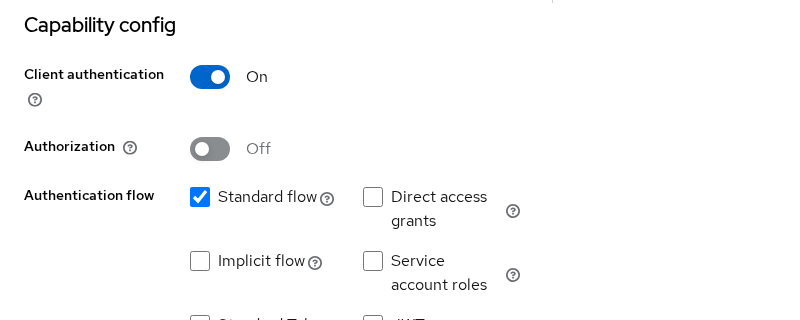
Direct access grants is disabled because this application does not send the user's username and password directly to the token endpoint. The user authenticates through the browser instead.
The separate Authorization switch can remain OFF; it enables Keycloak Authorization Services and is not required for the OIDC Authorization Code flow shown here.
Keycloak restricts redirect URIs so that it does not send an authorization code to an arbitrary location chosen by an attacker.
Keycloak first checks that the redirect_uri in the authorization request is allowed by the client's Valid redirect URIs configuration.
When the application later exchanges the code, it must send the same redirect_uri value that was used in that authorization request. Changing it during the token exchange causes the exchange to fail.
The same value must appear in three places: registered under Valid redirect URIs in Keycloak, in the redirect_uri parameter of the /auth request, and again in the /token exchange.
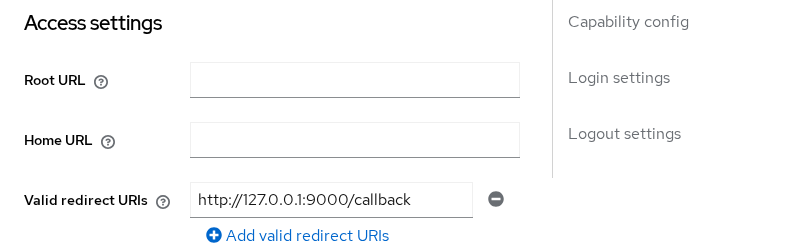
Register only the callback paths your application actually handles.
Copy the client secret from Clients → orders-web → Credentials → Client secret. Store production secrets in a vault or environment variable — not in source control.
Set lab variables once, replacing the secret placeholder with the value from the Admin Console:
export KC_URL='http://127.0.0.1:8080'
export REALM='golinuxcloud'
export CLIENT_ID='orders-web'
export CLIENT_SECRET='replace-with-orders-web-client-secret'
export REDIRECT_URI='http://127.0.0.1:9000/callback'
Keep client_secret on the server tier only. Browser JavaScript must not read it.
Build the authorization request
The authorization endpoint starts login. Keycloak exposes it per realm at /protocol/openid-connect/auth.
Generate fresh state and nonce values for each login attempt:
STATE=$(python3 -c "import secrets; print(secrets.token_urlsafe(16))")
NONCE=$(python3 -c "import secrets; print(secrets.token_urlsafe(16))")
echo "state=${STATE}"
Sample output:
state=St8_0ouugoL63WkD7gV1state and nonce are not interchangeable:
state                          nonce
  │                              │
  │ protects the browser         │ protects the ID token
  │ redirect                     │
  │                              │
  auth request ───────────────► callback          auth request ──────► ID token claim
  (value must match)                               (value must match)
For example, the application might generate state=abc123, send the browser to Keycloak with ...?state=abc123, and receive .../callback?code=...&state=abc123. The application then checks that the returned value matches the stored abc123. If those values do not match, reject the callback.
Notice that you validate state directly from the callback URL, while nonce is checked later inside the ID token. Keycloak does not need to return nonce as a separate callback parameter.
- Validate
statewhen the browser returns to your callback. - Validate
nonceafter you receive and verify the ID token.
Print the full authorization URL:
printf '%s\n' "${KC_URL}/realms/${REALM}/protocol/openid-connect/auth?client_id=${CLIENT_ID}&response_type=code&scope=openid%20profile%20email&redirect_uri=$(python3 -c "import urllib.parse,sys; print(urllib.parse.quote(sys.argv[1], safe=''))" "${REDIRECT_URI}")&state=${STATE}&nonce=${NONCE}"Open the URL in a browser and sign in as tokenuser.
Each query parameter answers one question:
| Parameter | Purpose |
|---|---|
client_id |
Which Keycloak client initiated login |
response_type=code |
Request an authorization code (Standard flow) |
scope=openid |
Make the request OpenID Connect; add profile email for more claims |
redirect_uri |
Must match a registered callback URI exactly |
state |
CSRF protection and request correlation |
nonce |
Binds the ID token to this login attempt |
For this manual lab, no application needs to listen on port 9000; after Keycloak redirects the browser, copy the callback URL from the address bar.
In a real application, something must handle that callback URL. The application's /callback route reads code and state, validates the response, and starts the token exchange automatically.
Handle the redirect and validate state
After a successful login, Keycloak redirects the browser to your callback with query parameters:
http://127.0.0.1:9000/callback
  ?state=St8_0ouugoL63WkD7gV1
  &session_state=9J2hg2totimXON5TlPx_kx5Z
  &iss=http%3A%2F%2F127.0.0.1%3A8080%2Frealms%2Fgolinuxcloud
  &code=0f58ed56-897b-2252-0fb0-00fb0d422639...
For this lab, focus on:
state— verify this matches the original requestcode— exchange this once for tokens
Keycloak may also include iss, which identifies the issuer (the Keycloak realm that produced the authorization response). It is not used in the manual code exchange below. Additional parameters such as session_state are not required for the code exchange shown here.
A production application should:
- Reject the callback if
statedoes not equal the value stored at login start. - Read the
codeparameter once and pass it to the server-side token exchange.
Copy the code value into a shell variable:
AUTH_CODE='0f58ed56-897b-2252-0fb0-00fb0d422639.9J2hg2totimXON5TlPx_kx5Z.bf636807-03a0-4331-bf6a-d687a829646c'If the returned state does not match the value stored for that login attempt, reject the callback. A mismatch can result from stale application state, multiple overlapping login attempts, or a forged request.
Exchange the code for tokens
The token endpoint accepts grant_type=authorization_code as a POST with form fields. For confidential clients, include client_secret in the same request.
Treat the authorization code as a short-lived sensitive credential: exchange it immediately, never log it, and do not expose it to third-party analytics.
curl -s -X POST "${KC_URL}/realms/${REALM}/protocol/openid-connect/token" \
  -H 'Content-Type: application/x-www-form-urlencoded' \
  -d "grant_type=authorization_code" \
  -d "client_id=${CLIENT_ID}" \
  -d "client_secret=${CLIENT_SECRET}" \
  -d "code=${AUTH_CODE}" \
  -d "redirect_uri=${REDIRECT_URI}" \
  > /tmp/orders-web-tokens.json
Display the saved response:
python3 -m json.tool /tmp/orders-web-tokens.jsonSample output (trimmed):
{
    "access_token": "eyJhbGciOiJSUzI1NiIsInR5cCIgOiAiSldUI...",
    "expires_in": 300,
    "refresh_expires_in": 1800,
    "refresh_token": "eyJhbGciOiJIUzUxMiIsInR5cCIgOiAiSldUI...",
    "token_type": "Bearer",
    "id_token": "eyJhbGciOiJSUzI1NiIsInR5cCIgOiAiSldUI...",
    "scope": "openid profile email",
    "session_state": "9J2hg2totimXON5TlPx_kx5Z"
}
Keycloak validates several facts before returning tokens:
| Check | What goes wrong when it fails |
|---|---|
Client authentication (client_id + valid client_secret) |
HTTP 401, typically unauthorized_client |
| Code exists, is unexpired, and is unused | invalid_grant — code not valid |
redirect_uri matches the original authorization request |
invalid_grant — incorrect redirect_uri |
The authorization code is one-time. Save the first successful response before running error tests below.
Use HTTPS on every redirect URI and token endpoint in production. The lab uses http://127.0.0.1 for local testing only.
Inspect the returned tokens
In this lab, the successful code exchange returns an access token, an ID token, and a refresh token. Including openid makes the request an OpenID Connect authentication request, which is why an ID token is returned.
- Access token — sent to APIs.
- ID token — tells the client who authenticated.
- Refresh token — obtains another access token later.
See Access token vs ID token vs refresh token for a fuller comparison.
The commands below decode JWT claims so you can inspect them. Decoding is not token validation because it does not verify the JWT signature.
A real OIDC library should perform the complete validation for you, including the signature, issuer (iss), audience (aud), expiration (exp), and nonce where applicable. The manual checks here only show what those claims look like. Signature verification and API audience mapping are covered in the Keycloak OpenID Connect tutorial.
Decode the ID token payload to confirm nonce and audience:
python3 -c "import json,base64,sys; t=json.load(open('/tmp/orders-web-tokens.json'))['id_token']; p=t.split('.')[1]; p+='='*(-len(p)%4); c=json.loads(base64.urlsafe_b64decode(p)); print(json.dumps({k:c.get(k) for k in ('iss','aud','sub','nonce','preferred_username','exp')}, indent=2))"Sample output:
{
  "iss": "http://127.0.0.1:8080/realms/golinuxcloud",
  "aud": "orders-web",
  "sub": "3c650623-fa6d-4252-9886-b5d5c093e7f5",
  "nonce": "Nc_5TkZJw_k0umbU_pM",
  "preferred_username": "tokenuser",
  "exp": 1790254870
}
Compare nonce to the value you sent in the authorization URL. Compare aud to your client ID.
Refresh the access token
After the access token expires, the client can request a new one with the refresh token. This example only shows the refresh request itself; refresh-token lifetime and rotation are configured separately in Keycloak.
REFRESH_TOKEN=$(python3 -c "import json; print(json.load(open('/tmp/orders-web-tokens.json'))['refresh_token'])")Post the refresh grant to the same token endpoint:
curl -s -X POST "${KC_URL}/realms/${REALM}/protocol/openid-connect/token" \
  -H 'Content-Type: application/x-www-form-urlencoded' \
  -d "grant_type=refresh_token" \
  -d "client_id=${CLIENT_ID}" \
  -d "client_secret=${CLIENT_SECRET}" \
  -d "refresh_token=${REFRESH_TOKEN}" \
  | python3 -m json.tool
Sample output (trimmed):
{
    "access_token": "eyJhbGciOiJSUzI1NiIsInR5cCIgOiAiSldUI...",
    "expires_in": 300,
    "refresh_expires_in": 1800,
    "refresh_token": "eyJhbGciOiJIUzUxMiIsInR5cCIgOiAiSldUI...",
    "token_type": "Bearer",
    "id_token": "eyJhbGciOiJSUzI1NiIsInR5cCIgOiAiSldUI...",
    "scope": "openid profile email"
}
The refresh response can include a refresh token. Replace your stored refresh token with the newest one returned by Keycloak, especially when refresh-token rotation or revocation policies are enabled.
Logging out is not the reverse of the authorization-code exchange; OIDC defines separate logout behavior. Keycloak sessions explained covers how SSO sessions relate to tokens; dedicated logout protocol guides cover browser logout and RP-initiated logout when you need them.
Public browser clients cannot follow the confidential-client pattern above. Use Authorization Code flow with PKCE and leave client_secret out of the browser — the Keycloak OpenID Connect tutorial demonstrates that path with client oidc-lab-app.
Troubleshoot code-flow errors
The following errors are common when wiring up Authorization Code flow for the first time.
Reused authorization code
Post the same code a second time:
curl -s -X POST "${KC_URL}/realms/${REALM}/protocol/openid-connect/token" \
  -H 'Content-Type: application/x-www-form-urlencoded' \
  -d "grant_type=authorization_code" \
  -d "client_id=${CLIENT_ID}" \
  -d "client_secret=${CLIENT_SECRET}" \
  -d "code=${AUTH_CODE}" \
  -d "redirect_uri=${REDIRECT_URI}"
Sample output:
{"error":"invalid_grant","error_description":"Code not valid"}Once a code has been exchanged successfully, it cannot be used again. If the application accidentally submits the callback twice, the second exchange therefore fails with invalid_grant. The same single-use rule also prevents an intercepted code from being replayed after it has already been used.
Wrong client secret
Send an incorrect secret (use a fresh code in real debugging; this lab uses a fake code to show the authentication error shape):
curl -s -w '\nHTTP:%{http_code}\n' -X POST "${KC_URL}/realms/${REALM}/protocol/openid-connect/token" \
  -H 'Content-Type: application/x-www-form-urlencoded' \
  -d 'grant_type=authorization_code' \
  -d "client_id=${CLIENT_ID}" \
  -d 'client_secret=wrong-secret-value' \
  -d 'code=fake-code' \
  -d "redirect_uri=${REDIRECT_URI}"
Sample output:
{"error":"unauthorized_client","error_description":"Invalid client or Invalid client credentials"}
HTTP:401
Mismatched redirect URI at exchange time
Complete a new browser login and copy a fresh AUTH_CODE. Then change redirect_uri in the token request:
curl -s -X POST "${KC_URL}/realms/${REALM}/protocol/openid-connect/token" \
  -H 'Content-Type: application/x-www-form-urlencoded' \
  -d "grant_type=authorization_code" \
  -d "client_id=${CLIENT_ID}" \
  -d "client_secret=${CLIENT_SECRET}" \
  -d "code=${AUTH_CODE}" \
  -d 'redirect_uri=http://127.0.0.1:9000/wrong-callback'
Sample output:
{"error":"invalid_grant","error_description":"Incorrect redirect_uri"}The redirect_uri in the token request must byte-match the value sent to the authorization endpoint.
| Symptom | Likely cause | Fix |
|---|---|---|
invalid_grant — Code not valid |
Code reused or expired | Start a new login; exchange immediately |
invalid_grant — Incorrect redirect_uri |
Token redirect_uri differs from /auth request |
Use the same registered URI in both steps |
unauthorized_client / HTTP 401 |
Wrong or missing client_secret |
Copy secret from Credentials tab |
invalid_redirect_uri on /auth |
Callback not registered | Add exact URI under Valid redirect URIs |
state mismatch on callback |
Stale tab or session mix-up | Store state server-side per login attempt |
Summary
Authorization Code flow — called Standard flow in Keycloak — is the browser-based flow used for interactive user login. In the confidential-client variant shown here, the application redirects the browser to Keycloak and exchanges the returned code from its server-side backend.
In this lab, confidential client orders-web completed that exchange with curl, returned access, ID, and refresh tokens, and failed predictably when the code was reused, the secret was wrong, or the redirect URI did not match. The application must also validate state when the browser returns and validate nonce in the ID token so that the response can be tied back to the login request that started the flow.
Public SPAs should not copy the confidential-client exchange verbatim. Use PKCE and omit the client secret from browser code — the Keycloak OpenID Connect tutorial walks through that variant. When tokens are issued, Keycloak sessions explained shows how the underlying SSO session relates to refresh and logout.
References
- Keycloak Securing Applications — OIDC — authorization and token endpoints
- OpenID Connect Core 1.0 — Authorization Code Flow —
state,nonce, and token response - RFC 6749 — OAuth 2.0 Authorization Framework — authorization code grant
- RFC 6749 — Token Error Response —
invalid_grantandunauthorized_client
Frequently Asked Questions
What is Standard Flow in Keycloak?
Standard flow is Keycloak's Admin Console name for OAuth 2.0 Authorization Code flow with response_type=code. Enable it on a client when the application should redirect the browser to Keycloak for login and later exchange the returned code at the token endpoint.
Why is the code one-time?
The authorization code is a short-lived intermediary secret. Allowing reuse would let an attacker who intercepts a single redirect exchange it for tokens. Keycloak invalidates the code after the first successful token request, which is why a second exchange returns invalid_grant.
Do I need PKCE?
Confidential server-side clients that send client_secret on the token endpoint do not require PKCE, though Keycloak can enforce it. Public clients — browser SPAs and mobile apps without a safe secret — should use Authorization Code flow with PKCE instead of a static client secret.
What does state protect?
state ties the callback to the login request your application initiated. When the callback returns, compare the state query parameter to the value you stored before redirecting the user. A mismatch can result from stale application state, overlapping login attempts, or a forged request.
Why does code exchange return invalid_grant?
invalid_grant is a bucket error. Common causes in Keycloak are a reused code, an expired code, a redirect_uri that does not match the authorization request, or a code issued to a different client. Read error_description in the JSON body for the precise reason.
