
| Tested on | Red Hat Enterprise Linux 10.2 (Coughlan) |
|---|---|
| Package | podman-5.8.2-5.el10_2.x86_64quay.io/keycloak/keycloak:26.7.3 |
| Applies to | Any Linux host with Podman or Docker |
| Privilege | Normal user for rootless Podman; Keycloak admin access for client logout URL configuration |
| Lab environment | Keycloak 26.7.3 on http://127.0.0.1:8080/ — Install Keycloak with Podman |
| Scope | OIDC RP-initiated logout at the end-session endpoint, id_token_hint and registered post_logout_redirect_uri, state round-trip, front-channel iframe logout, signed backchannel logout_token delivery, two-client logout propagation, legacy refresh-token direct logout caveat, and a diagnostic tree for “still logged in” symptoms. Does not repeat full session architecture, RFC 7009 token revocation mechanics, or SAML Single Logout. |
| Related guides | Keycloak sessions explained Keycloak token revocation Keycloak Authorization Code flow Keycloak OpenID Connect tutorial Keycloak public vs confidential clients |
Keycloak OIDC logout uses the realm end-session endpoint:
/realms/{realm}/protocol/openid-connect/logout
For browser sign-out, the standard approach is RP-Initiated Logout with an id_token_hint and, when required, a registered post_logout_redirect_uri.
A user signs out of your storefront application, but the admin portal on another subdomain still shows their name. The storefront cleared its own session cookie, yet Keycloak still has an active SSO session — and the second application never received a logout signal.
That failure is common in multi-application realms. “Logout” can mean:
- Clearing a local application cookie
- Ending the Keycloak user session
- Telling every relying party to drop its session
OpenID Connect RP-Initiated Logout standardizes the browser path; front-channel and backchannel logout extend it to other clients.
This lab uses:
- Two confidential clients in realm
golinuxcloud—logout-lab-storeandlogout-lab-admin - A Node.js listener on
127.0.0.1:9096that records backchannellogout_tokenposts
You will run RP-initiated logout with id_token_hint, reject an unregistered post-logout URI, and compare legacy refresh-token logout with distributed logout behavior.
How Keycloak OIDC logout works
A Keycloak logout has two separate jobs:
- End the user's SSO session in Keycloak.
- Tell applications that participated in that SSO session to clear their own local sessions.
  User browser          Store application          Keycloak            Other application
       |                       |                       |                        |
       | click Sign out        |                       |                        |
       |---------------------->|                       |                        |
       |                       | redirect to /logout   |                        |
       |<----------------------|                       |                        |
       |---------------------------------------------->|                        |
       |                       |                       |--- logout signal ----->|
       |<------------- post_logout_redirect -----------|                        |
       |                       |                                                |
       |         both applications clear their own local sessions               |
After the user clicks Sign out, the flow is:
- The application redirects the browser to Keycloak's logout endpoint
- Keycloak ends the SSO session
- Keycloak notifies other applications that participated in that session
- Keycloak redirects the browser to the registered post-logout page
The important distinction is that ending the Keycloak SSO session and clearing each application's local session are separate steps.
RP (Relying Party) is simply an application that uses Keycloak for authentication.
Side effects in the lab realm:
- Clients
logout-lab-storeandlogout-lab-adminwith logout URLs on127.0.0.1:9101and127.0.0.1:9102 - A listener on
127.0.0.1:9096for backchannel logout (stop it when you finish)
For how user, client, and SSO sessions relate before you touch logout URLs, see Keycloak sessions explained. For revoking individual tokens without a browser sign-out flow, see Keycloak token revocation.
What “logout” can mean
Three layers often get conflated:
| Layer | What ends | Who owns it |
|---|---|---|
| Application session | Local cookie or server-side app session | Your application |
| Keycloak SSO session | User session and client sessions in the realm | Keycloak |
| Distributed client logout | Sessions at other RPs in the same SSO login | Keycloak + each RP |
- Local application logout only — clears your cookie; does not call Keycloak
- RP-initiated logout — hits Keycloak's end-session endpoint so Keycloak can end its SSO session and notify other clients through front-channel or backchannel logout
- Keycloak SSO left active — the user can open another client without re-entering a password until the SSO session expires or Keycloak receives a proper logout request
Keycloak session topology
After login, Keycloak stores:
- User SSO session — shared browser login state
- Client sessions — one beneath the user session for each authenticated client
- Tokens —
access_token,refresh_token, andid_tokenissued from those sessions
  User SSO session
  (shared browser login state)
        |
        +--- client session: logout-lab-store
        |
        +--- client session: logout-lab-admin
The sid claim is the session identifier carried in tokens associated with the login. For RP-initiated logout, the application normally sends the previous ID token as id_token_hint, which lets Keycloak relate the logout request to the earlier OIDC login.
In a real browser deployment, both applications share one SSO session after the first login. This lab uses Direct Access Grant (grant_type=password) only to obtain tokens quickly for curl testing:
- Password grants can create separate user sessions per client
- Multi-client propagation demos that need one shared SSO session are easier in a browser Authorization Code flow
- The logout URL behavior and backchannel tokens are the same either way
Prepare the two-client lab
Create two confidential OpenID Connect clients:
| Client | Valid post logout redirect URI | Backchannel logout URL |
|---|---|---|
logout-lab-store |
http://127.0.0.1:9101/logged-out |
http://127.0.0.1:9096/backchannel-logout |
logout-lab-admin |
http://127.0.0.1:9102/logged-out |
http://127.0.0.1:9096/backchannel-logout |
Keycloak lets each client receive propagated logout through either the browser-based front channel or the server-to-server back channel:
- Front channel logout ON — Keycloak uses the Front channel logout URL
- Front channel logout OFF — Keycloak tries the Backchannel logout URL; if no backchannel URL exists, it can fall back to the legacy Admin URL
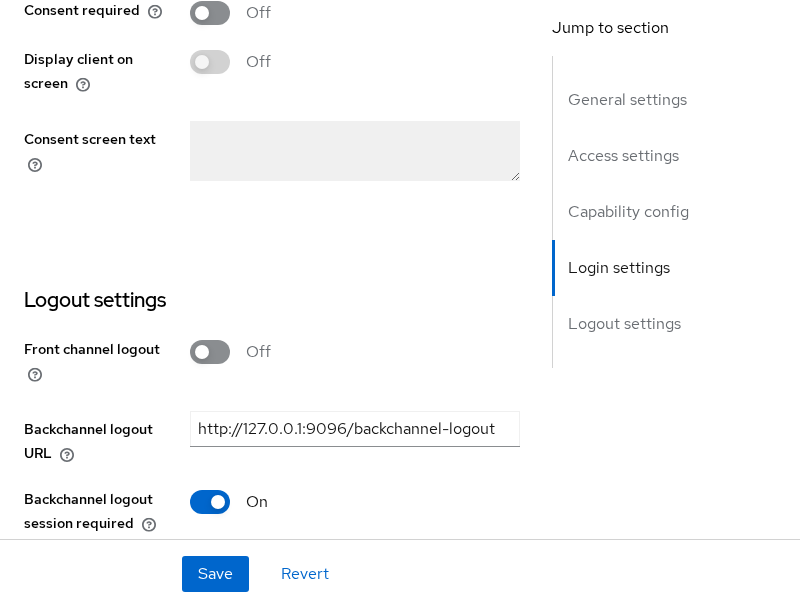
For the backchannel tests in this article, leave Front channel logout OFF and configure Backchannel logout URL. For a front-channel example, temporarily enable Front channel logout and configure its URL instead — see Front-channel logout below.
In the Admin Console, open Clients → logout-lab-store → Settings and register the logout URLs with Front channel logout set to Off:
Lab secrets:
logout-lab-store→LogoutStoreSecret!2026logout-lab-admin→LogoutAdminSecret!2026
Set base variables:
export KC_BASE='http://127.0.0.1:8080/realms/golinuxcloud/protocol/openid-connect'
export STORE_CLIENT='logout-lab-store'
export STORE_SECRET='LogoutStoreSecret!2026'
Keycloak publishes the end-session endpoint in discovery metadata:
curl -s 'http://127.0.0.1:8080/realms/golinuxcloud/.well-known/openid-configuration' | python3 -c 'import sys,json; d=json.load(sys.stdin); print(d["end_session_endpoint"])'http://127.0.0.1:8080/realms/golinuxcloud/protocol/openid-connect/logoutDiscovery also advertises frontchannel_logout_supported and backchannel_logout_supported as true on Keycloak 26.7.3.
RP-initiated logout
RP-initiated logout starts at the relying party. The application redirects the browser (or issues an HTTP GET) to the end-session endpoint with the ID token it stored at login.
Obtain tokens for tokenuser:
TOKEN_RESP=$(curl -s -X POST "${KC_BASE}/token" \
  -u "${STORE_CLIENT}:${STORE_SECRET}" \
  -d 'grant_type=password' \
  -d 'username=tokenuser' \
  -d 'password=TokenUser!2026' \
  -d 'scope=openid profile')
Store the ID token and refresh token:
ID_TOKEN=$(printf '%s' "$TOKEN_RESP" | python3 -c 'import sys,json; print(json.load(sys.stdin)["id_token"])')
REFRESH_TOKEN=$(printf '%s' "$TOKEN_RESP" | python3 -c 'import sys,json; print(json.load(sys.stdin)["refresh_token"])')
Build the logout URL with id_token_hint, client_id, post_logout_redirect_uri, and state:
python3 << 'PY'
import os, urllib.parse
params = urllib.parse.urlencode({
    "id_token_hint": os.environ["ID_TOKEN"],
    "client_id": os.environ["STORE_CLIENT"],
    "post_logout_redirect_uri": "http://127.0.0.1:9101/logged-out",
    "state": "store-signout-42",
})
print(f'{os.environ["KC_BASE"]}/logout?{params}')
PY
Send the request without following redirects so you can read the Location header:
ENC_ID=$(python3 -c "import urllib.parse,sys; print(urllib.parse.quote(sys.argv[1], safe=''))" "$ID_TOKEN")

curl -s -D /tmp/logout-rp.headers -o /dev/null \
"${KC_BASE}/logout?id_token_hint=${ENC_ID}&client_id=${STORE_CLIENT}&post_logout_redirect_uri=http://127.0.0.1:9101/logged-out&state=store-signout-42"HTTP/1.1 302 Found
Location: http://127.0.0.1:9101/logged-out?state=store-signout-42Keycloak ended the session tied to that ID token and redirected the user agent to your registered post-logout page:
- The
statevalue in the query string matches the value you sent - Your application should verify
statebefore showing a signed-out confirmation page
Confirm the refresh token no longer works:
curl -s -X POST "${KC_BASE}/token" \
  -u "${STORE_CLIENT}:${STORE_SECRET}" \
  -d 'grant_type=refresh_token' \
--data-urlencode "refresh_token=${REFRESH_TOKEN}"{"error":"invalid_grant","error_description":"Session not active"}- With
id_token_hint— identifies the previous OIDC login and normally avoids a logout confirmation prompt - Without
id_token_hint— Keycloak can still use the active browser SSO session, but a confirmation step may be shown
Post-logout redirect and state
post_logout_redirect_uri must exactly match an entry under Valid post logout redirect URIs on the client. Keycloak treats this list separately from login redirect URIs.
If you omit post_logout_redirect_uri:
- Keycloak does not redirect the browser to an application URL after logout
- Depending on the logout request and the client's Logout confirmation setting, Keycloak may display a logout or confirmation page instead
Try an unregistered URI:
curl -s -D /tmp/logout-bad.headers -o /tmp/logout-bad.html \
"${KC_BASE}/logout?id_token_hint=${ENC_ID}&client_id=${STORE_CLIENT}&post_logout_redirect_uri=http://127.0.0.1:9101/not-registered"HTTP/1.1 400 Bad RequestThe HTML body contains Invalid redirect uri. Keycloak rejects the logout before redirecting the user to an attacker-controlled URL.
| Parameter | Required? | Role |
|---|---|---|
id_token_hint |
Recommended | Identifies the previous login/session and normally avoids logout confirmation |
client_id |
Needed if Keycloak cannot identify the client from id_token_hint; either client_id or id_token_hint is needed with post_logout_redirect_uri |
Identifies the client |
post_logout_redirect_uri |
Optional | Where Keycloak sends the browser after logout |
state |
Optional | Opaque value returned unchanged with the post-logout redirect; store it before logout and verify the returned value so your application can correlate the response with the logout request it started |
Front-channel logout
This section explains front-channel behavior:
- The lab screenshot above shows Front channel logout Off for backchannel testing
- To reproduce front-channel logout in the Admin Console, turn Front channel logout On and register a Front channel logout URL such as
http://127.0.0.1:9101/frontchannel-logout
Front-channel logout uses hidden browser iframes. After Keycloak processes RP-initiated logout, it loads each other client’s Front channel logout URL in an iframe so those applications can clear local state in the user’s browser.
  Keycloak end-session
        |
        +--> iframe GET logout-lab-store/frontchannel-logout
        |
        +--> iframe GET logout-lab-admin/frontchannel-logout
Front-channel logout depends on the browser successfully loading the logout iframe. It can fail when:
- Content Security Policy blocks the iframe
- The browser or logout page closes before the request completes
Server-side applications that never open a browser never receive front-channel logout. Configure backchannel logout for APIs and background services instead.
Back-channel logout
Back-channel logout is server-to-server. Keycloak POSTs a signed logout_token JWT to each client’s Backchannel logout URL. The client validates the token and ends the matching server-side session without involving the browser.
Start a minimal listener on port 9096:
cat > backchannel-logout-listener.mjs << 'EOF'
import http from 'http';
const events = [];
http.createServer((req, res) => {
  if (req.method === 'POST' && req.url === '/backchannel-logout') {
    let body = '';
    req.on('data', (c) => { body += c; });
    req.on('end', () => {
      events.push({ at: Date.now(), body });
      console.log('logout_token received');
      res.writeHead(200, {
        'Cache-Control': 'no-store'
      });
      res.end();
    });
    return;
  }
  if (req.url === '/events') {
    res.end(JSON.stringify(events, null, 2));
    return;
  }
  res.writeHead(404);
  res.end();
}).listen(9096, '0.0.0.0', () => console.log('listening on 9096'));
EOF

node backchannel-logout-listener.mjs
A successful backchannel logout endpoint should:
- Return HTTP
200 - Prevent the response from being cached (
Cache-Control: no-store)
Run that listener in a separate terminal before the logout tests below.
Log in and capture a fresh refresh token:
TOKEN_RESP=$(curl -s -X POST "${KC_BASE}/token" \
  -u "${STORE_CLIENT}:${STORE_SECRET}" \
  -d 'grant_type=password' \
  -d 'username=tokenuser' \
  -d 'password=TokenUser!2026' \
  -d 'scope=openid profile')
REFRESH_TOKEN=$(printf '%s' "$TOKEN_RESP" | python3 -c 'import sys,json; print(json.load(sys.stdin)["refresh_token"])')
Post the refresh token to the legacy logout endpoint (covered in the next section). Keycloak responds with HTTP 204 and POSTs a logout_token to the backchannel URL:
curl -s -w "\nHTTP status: %{http_code}\n" -X POST "${KC_BASE}/logout" \
  -u "${STORE_CLIENT}:${STORE_SECRET}" \
--data-urlencode "refresh_token=${REFRESH_TOKEN}"HTTP status: 204Read what the listener captured:
curl -s http://127.0.0.1:9096/events[
{
"at": 1790268475484,
"body": "logout_token=eyJhbGciOiJSUzI1NiIsInR5cCIgOiAibG9nb3V0K2p3dCIsImtpZCIgOiAiVDJPUkNHZG53dFpfelFqbGF2NllHNUtodmtvSjJ3QnZxc1hZcnNBZXBIUSJ9..."
}
]Decode the JWT payload (middle segment) to inspect claims:
curl -s http://127.0.0.1:9096/events | python3 << 'PY'
import sys, json, base64, urllib.parse
body = json.load(sys.stdin)[0]["body"]
token = urllib.parse.unquote(body.split("logout_token=")[1])
payload = token.split(".")[1] + "=" * (-len(token.split(".")[1]) % 4)
claims = json.loads(base64.urlsafe_b64decode(payload))
print(json.dumps({k: claims[k] for k in ["iss", "aud", "sub", "sid", "typ", "events"] if k in claims}, indent=2))
PY{
"iss": "http://127.0.0.1:8080/realms/golinuxcloud",
"aud": "logout-lab-store",
"sub": "3c650623-fa6d-4252-9886-b5d5c093e7f5",
"sid": "qsakRQ7pgkhzl4xt7xvuWS2I",
"typ": "Logout",
"events": {
"http://schemas.openid.net/event/backchannel-logout": {}
}
}The decode step above is only for inspection. A real client must validate the signed logout_token before trusting it:
- Verify the JWT signature
- Check
issandaud - Confirm the required backchannel-logout event is present
- Apply applicable
sid/subsemantics - Reject tokens that contain a
nonceclaim
A valid logout token must identify the affected session or user through sid or sub, contain the backchannel-logout event, and must not contain a nonce claim. Do not treat a Base64-decoded logout token as validated.
Backchannel logout across multiple client sessions
Register both lab clients with the same backchannel listener URL so one process can record logout tokens for every client.
Because the curl logins in this lab use Direct Access Grant:
- They do not reproduce one shared browser SSO session
- This test uses an admin user logout to prove Keycloak sends backchannel logout notifications to all affected client sessions
- For a true browser SSO test, authenticate both clients through the same Authorization Code browser session and then initiate RP logout from one RP
Log in to both clients:
curl -s -X POST "${KC_BASE}/token" -u 'logout-lab-store:LogoutStoreSecret!2026' \
  -d 'grant_type=password' -d 'username=tokenuser' -d 'password=TokenUser!2026' -d 'scope=openid profile' > /dev/null

curl -s -X POST "${KC_BASE}/token" -u 'logout-lab-admin:LogoutAdminSecret!2026' \
  -d 'grant_type=password' -d 'username=tokenuser' -d 'password=TokenUser!2026' -d 'scope=openid profile' > /dev/null
The screenshot below contains several rows because the login tests were repeated. Each row is a user/client session, not an individual access token.
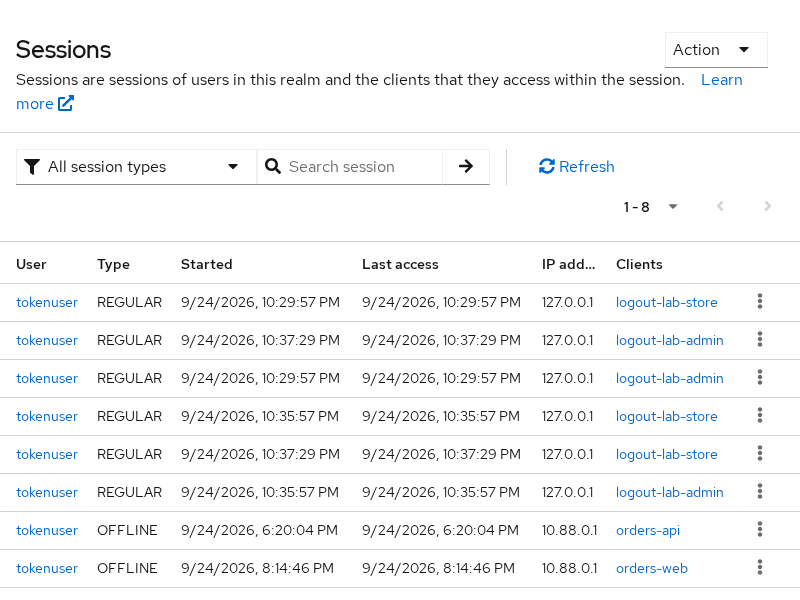
Open Sessions in the Admin Console to see active client sessions for tokenuser.
End every session for the user through the Admin REST API (simulating a full SSO sign-out):
ADMIN_TOKEN=$(curl -s -X POST 'http://127.0.0.1:8080/realms/master/protocol/openid-connect/token' \
  -d 'grant_type=password' -d 'client_id=admin-cli' \
  -d 'username=admin' -d 'password=YOUR_ADMIN_PASSWORD' | \
  python3 -c 'import sys,json; print(json.load(sys.stdin)["access_token"])')

TOKENUSER_ID=$(curl -s \
  'http://127.0.0.1:8080/admin/realms/golinuxcloud/users?username=tokenuser&exact=true' \
  -H "Authorization: Bearer ${ADMIN_TOKEN}" \
  | python3 -c 'import sys,json; print(json.load(sys.stdin)[0]["id"])')

curl -s -w "\nHTTP status: %{http_code}\n" -X POST \
  -H "Authorization: Bearer ${ADMIN_TOKEN}" \
"http://127.0.0.1:8080/admin/realms/golinuxcloud/users/${TOKENUSER_ID}/logout"HTTP status: 204Check the backchannel listener:
curl -s http://127.0.0.1:9096/events | python3 -c "
import sys,json,base64,urllib.parse
for e in json.load(sys.stdin):
    body=e['body']
    token=urllib.parse.unquote(body.split('logout_token=')[1])
    p=token.split('.')[1]+'='*(-len(token.split('.')[1])%4)
    c=json.loads(base64.urlsafe_b64decode(p))
    print('aud:', c.get('aud'))
"aud: logout-lab-admin
aud: logout-lab-storeKeycloak notified both clients through backchannel logout.
RP-initiated logout:
- Ends the Keycloak browser SSO session identified by the logout request
- Can notify other clients attached to that SSO session through their configured logout mechanism
- Does not automatically clear each application's local session — that is a separate step
This is why another application can still appear logged in if it never receives or processes the logout notification.
Legacy direct logout caveat
Older integrations POST a refresh_token directly to /logout with client authentication:
curl -s -w "\nHTTP status: %{http_code}\n" -X POST "${KC_BASE}/logout" \
  -u "${STORE_CLIENT}:${STORE_SECRET}" \
  --data-urlencode "refresh_token=${REFRESH_TOKEN}"
Keycloak 26.7.3 still returns HTTP 204 for a valid refresh token. Prefer RP-initiated logout for user-facing sign-out:
- Uses
id_token_hintper the current OpenID Connect specification - Works with post-logout redirects and
state - Triggers front-channel iframes when Front channel logout is enabled on other clients
- Aligns with current Keycloak documentation
Reserve direct refresh-token POST for backward-compatible service clients while you migrate. New applications should implement the end-session redirect pattern from the Keycloak Authorization Code flow lab.
Why logout appears not to work
| Symptom | Likely cause | What to check |
|---|---|---|
| App still shows logged in after Keycloak logout | Application session cookie not cleared | App logout handler must delete local session |
| Second client still works after logout from first | Logout notification not received or not processed | RP-initiated logout ends the Keycloak SSO session, but each application still has to clear its own local session. Check that the client received the configured front-channel or backchannel logout request and handled it. |
Invalid redirect uri on logout |
post_logout_redirect_uri not registered |
Valid post logout redirect URIs on the client |
| Front-channel silent logout fails | CSP blocks iframe | Browser devtools network tab; relax frame-src for Keycloak origin |
| Backchannel never arrives | Wrong URL, TLS, or firewall | Listener logs; URL must be reachable from Keycloak container |
| API still accepts bearer token | JWT valid until exp |
Logout ends Keycloak session; APIs need introspection or short TTL |
| Refresh still works | Different user session (password-grant lab) | Browser SSO shares one session; password grants may not |
Work through the tree top to bottom:
- Did the application clear its own session cookie or server-side session record?
- Did Keycloak return
302to the registered post-logout URI (or200without redirect)? - Does the Admin Console Sessions list still show the user?
- Did other clients register the correct front-channel or backchannel logout URL for their client type?
- Is the API checking only JWT
expwithout introspection?
After logout:
- Keycloak’s view of the login ends
- Self-contained JWTs at resource servers that never call Keycloak again are not automatically invalidated — the same boundary described in Keycloak token revocation
Summary
You configured two Keycloak clients for OIDC logout and walked through RP-initiated sign-out:
id_token_hint+post_logout_redirect_uri+state— Keycloak returned HTTP302to the post-logout page for valid URIs- Unregistered redirect — HTTP
400withInvalid redirect uri - After logout — the refresh grant returned
Session not active
Logout propagation by client type:
- Front-channel — browser iframes when Front channel logout is enabled
- Back-channel — signed
logout_tokento a server-side application, avoiding browser dependency - Admin user logout — triggered backchannel posts to both lab clients
The common integration mistake is stopping at local application logout. RP-initiated logout ends the Keycloak SSO session; each client's configured logout mechanism tells other applications to clear local sessions. If an API still accepts tokens after logout, add introspection or shorten access-token lifetimes rather than expecting logout alone to rewrite issued JWTs.
References
- OpenID Connect RP-Initiated Logout 1.0
- OpenID Connect Front-Channel Logout 1.0
- OpenID Connect Back-Channel Logout 1.0
- Keycloak Server Administration Guide — OpenID Connect clients
Frequently Asked Questions
Is id_token_hint required?
Recommended:
- Identifies the previous OIDC login and normally avoids a logout confirmation prompt
- If omitted, Keycloak can still use the active browser SSO session, but a confirmation step may be shown
- When you send
post_logout_redirect_uri, include eitherid_token_hintorclient_id
Why is the post-logout redirect rejected?
- The URI must appear verbatim under Valid post logout redirect URIs on the client
- Login redirect URIs are a separate list
- A typo, wrong port, or missing path produces HTTP
400withInvalid redirect uri
Front-channel vs backchannel logout?
Choose the mechanism that fits each client:
- Browser-centric applications — front-channel logout when Front channel logout is enabled
- Server-side applications — backchannel logout when front channel is off
- A realm can contain some clients using front-channel logout and others using backchannel logout
Does logout revoke access tokens?
- Logout ends the Keycloak user session and stops refresh grants
- Access tokens may still verify locally until
expunless the resource server calls introspection or you revoke tokens explicitly through the revocation endpoint
Why does the app still show me logged in?
Most often:
- The application never cleared its own session cookie after Keycloak logout
Less often:
- A second client was not registered for front-channel or backchannel logout
- The API trusts JWT expiry alone without checking Keycloak session state
