
| Tested on | Red Hat Enterprise Linux 10.2 (Coughlan) |
|---|---|
| Package | podman-5.8.2-5.el10_2.x86_64quay.io/keycloak/keycloak:26.7.3 |
| Applies to | Any Linux host with Podman or Docker |
| Privilege | Normal user for rootless Podman; Keycloak admin access in the lab realm |
| Lab environment | Keycloak 26.7.3 on http://127.0.0.1:8080/ with realm golinuxcloud, confidential client orders-web, and user tokenuser — Install Keycloak with Podman |
| Scope | Request offline_access through Authorization Code flow (with notes on other grants), inspect offline refresh tokens (typ: Offline), refresh after SSO session ends, Offline Session Idle and Max Limited, rotation with Revoke Refresh Token, consent revocation, secure storage for background jobs, and troubleshooting. Does not cover general session architecture, normal refresh-token policy detail, or full service-account setup. |
| Related guides | Keycloak Authorization Code flow Keycloak refresh tokens Keycloak sessions explained Keycloak client scopes Keycloak service accounts |
Request offline_access when a background job or mobile sync client needs delegated access on behalf of a user after the browser SSO session ends. Keycloak issues a separate offline refresh token backed by an offline session record.
An offline token is long-lived, but it is not valid forever. Keycloak can invalidate it when:
- Offline Session Idle or Offline Session Max is exceeded
- A refresh response rotates the token and the client replays the old one
- An administrator or user revokes consent or deletes the offline session
This walkthrough uses confidential client orders-web in realm golinuxcloud. You will:
- Build an authorization URL with
scope=offline_access - Exchange the code with curl
- Compare offline refresh behavior with a normal online refresh token after logout
- Inspect offline sessions in the Admin Console
For Standard flow basics and state/nonce handling, start with Keycloak Authorization Code flow.
What Is a Keycloak Offline Token?
A normal refresh token works only while the user's normal login session is still valid.
An offline token is a special refresh token that Keycloak can accept even after that browser SSO session has ended. This lets an application keep working on the user's behalf while the user is offline. In Keycloak, you can identify it by typ: Offline in the refresh-token payload.
Offline tokens are not a separate OAuth token type. They are refresh tokens governed by offline session state instead of the user's online SSO session.
| Signal | Normal online refresh token | Offline refresh token |
|---|---|---|
JWT typ claim |
Refresh |
Offline |
refresh_expires_in in token response |
Tied to client/SSO session limits (for example 1800) |
0 — not the SSO idle clock |
| Survives admin Logout all sessions | No — refresh returns Session not active |
Yes — offline session rows remain |
| Lifetime cap | SSO Session Idle/Max and Client Session Idle/Max | Offline Session Idle and Offline Session Max Limited |
| Typical use | Active web SSO | Night sync, mobile background fetch, ETL on behalf of a user |
Do not use refresh_expires_in: 0 as the source of truth for how long an offline token can remain usable. Check these instead:
- Offline Session Idle — how long the offline session survives without a refresh
- Offline Session Max Limited — hard ceiling when enabled
- Revocation state — consent, session delete, or rotation invalidating the stored refresh token
offline_access is requested during the first interaction, Keycloak can remove the temporary online session after creating the offline session. If the user already had an active online SSO session, that online session can remain alongside the offline session.
  User authenticates (Authorization Code + offline_access)
              |
              v
        Keycloak
              |
              +--- offline user session
              |         |
              |         +--- offline client session: orders-web
              |
              +--- offline refresh token (typ: Offline)
                        |
                        |  browser SSO can end
                        v
                  POST /token
                  grant_type=refresh_token
                        |
                        v
                  new access token (delegated user rights)
When Offline Access Is Appropriate
Use offline tokens when a client must act for a specific user while that user is not actively logged in:
- Mobile or desktop apps that sync files overnight
- Calendar or mail connectors that poll in the background
- Batch jobs that upload data on a schedule the user already approved
Prefer other grants when no human delegation is involved:
- Machine-to-machine API calls with no user context — use
client_credentials(Keycloak client credentials grant) - Active browser SSO where the user is present — a normal refresh token is enough (Keycloak refresh tokens)
Because an offline token can keep working after the user closes the browser or logs out, request offline_access only when the application genuinely needs background access.
Whether Keycloak displays a consent screen depends on the client and realm configuration, but the application should still treat offline access as long-lived delegated permission. Store every offline refresh token like a password the user lent to one application.
Prerequisites for offline access
For the Authorization Code flow used in this article, make sure:
- The
offline_accessclient scope is available to the client. - The user has the
offline_accessrealm role. - The client is configured for the authentication flow you are using.
This walkthrough uses Authorization Code flow because the common offline-token use case is delegated access on behalf of a user.
Keycloak can also issue offline tokens through other supported grants, but those variants are outside this walkthrough.
Client scope on the application
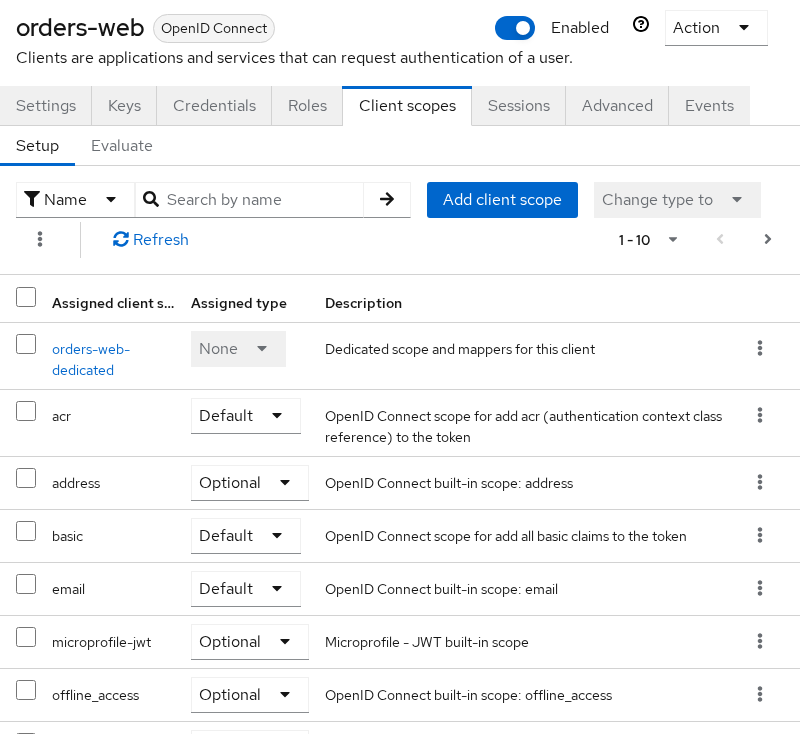
The offline_access client scope must be available to the client. On orders-web:
- It is linked as an optional client scope
- Offline tokens are issued only when the authorization request includes
offline_accessinscope
Open Clients → orders-web → Client scopes and confirm offline_access appears under optional scopes:
Scope assignment patterns are covered in Keycloak client scopes.
Realm role on the user
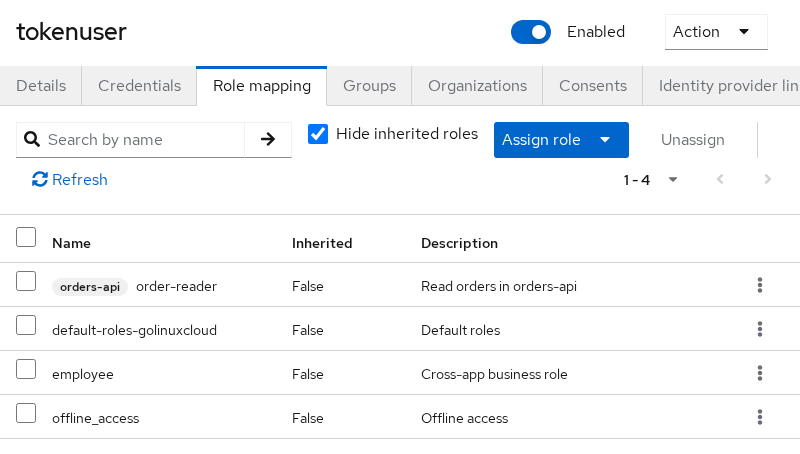
The user needs the offline_access realm role (directly or through a composite such as default-roles-golinuxcloud). Assign it under Users → tokenuser → Role mapping:
Client for Authorization Code flow
This lab uses confidential client orders-web from Keycloak Authorization Code flow with:
- Standard flow: ON
- Valid redirect URIs:
http://127.0.0.1:9000/callback - Client authentication: ON
Set lab variables once (replace the secret with the value from Clients → orders-web → Credentials):
export KC_URL='http://127.0.0.1:8080'
export REALM='golinuxcloud'
export CLIENT_ID='orders-web'
export CLIENT_SECRET='replace-with-orders-web-client-secret'
export REDIRECT_URI='http://127.0.0.1:9000/callback'
Confirm Keycloak answers before token work:
curl -s -o /dev/null -w '%{http_code}\n' "${KC_URL}/"Sample output:
302HTTP 302 means the server is up and redirecting to the welcome page.
Request the Offline Token
Add offline_access to the authorization request scope parameter alongside openid (and any profile or email scopes you need).
Generate fresh state and nonce values for each login attempt:
STATE=$(python3 -c "import secrets; print(secrets.token_urlsafe(16))")
NONCE=$(python3 -c "import secrets; print(secrets.token_urlsafe(16))")
echo "state=${STATE}"
Sample output:
state=kR9mP2xQvL8nWs4eT1aBPrint the authorization URL:
printf '%s\n' "${KC_URL}/realms/${REALM}/protocol/openid-connect/auth?client_id=${CLIENT_ID}&response_type=code&scope=openid%20profile%20email%20offline_access&redirect_uri=$(python3 -c "import urllib.parse,sys; print(urllib.parse.quote(sys.argv[1], safe=''))" "${REDIRECT_URI}")&state=${STATE}&nonce=${NONCE}"Open the URL in a browser and sign in as tokenuser / TokenUser!2026. After login, Keycloak redirects to the callback with a code parameter. Copy that value into a shell variable:
AUTH_CODE='1bba1e1a-6f4a-e012-dd5d-d09843259008.wPd8scIC64z84Zku8jWqTHnP.bf636807-03a0-4331-bf6a-d687a829646c'Exchange the code at the token endpoint:
curl -s -X POST "${KC_URL}/realms/${REALM}/protocol/openid-connect/token" \
  -H 'Content-Type: application/x-www-form-urlencoded' \
  -d "grant_type=authorization_code" \
  -d "client_id=${CLIENT_ID}" \
  -d "client_secret=${CLIENT_SECRET}" \
  -d "code=${AUTH_CODE}" \
  -d "redirect_uri=${REDIRECT_URI}" \
  > /tmp/offline-lab-tokens.json
Display the saved response:
python3 -m json.tool /tmp/offline-lab-tokens.jsonSample output (trimmed):
{
    "access_token": "eyJhbGciOiJSUzI1NiIsInR5cCIgOiAiSldUI...",
    "expires_in": 300,
    "refresh_expires_in": 0,
    "refresh_token": "eyJhbGciOiJIUzUxMiIsInR5cCIgOiAiSldUI...",
    "token_type": "Bearer",
    "id_token": "eyJhbGciOiJSUzI1NiIsInR5cCIgOiAiSldUI...",
    "scope": "openid profile offline_access email",
    "session_state": "wPd8scIC64z84Zku8jWqTHnP"
}
Two fields confirm offline access:
scopeincludesoffline_accessrefresh_expires_inis0instead of the SSO-bound value you see on a normal login
Decode the refresh token payload to read typ:
python3 -c "import json,base64; t=json.load(open('/tmp/offline-lab-tokens.json'))['refresh_token']; p=t.split('.')[1]; p+='='*(-len(p)%4); c=json.loads(base64.urlsafe_b64decode(p)); print(json.dumps({k:c.get(k) for k in ('typ','azp','scope')}, indent=2))"Sample output:
{
  "typ": "Offline",
  "azp": "orders-web",
  "scope": "openid roles web-origins profile acr offline_access basic email"
}
typ: Offline is the quick check that this refresh token is backed by an offline session, not the user's online SSO session alone.
Refresh After the SSO Session Ends
The practical test for offline tokens is whether refresh still works after the interactive login session is gone.
To prove the difference rather than just describe it, create two refresh tokens for the same user:
- one normal refresh token (authorization request without
offline_access) - one offline refresh token (authorization request with
offline_access)
Then remove the user's online sessions and try both tokens.
Expected result:
- normal refresh token → fails with
Session not active - offline refresh token → still works
Run the authorization and code-exchange steps twice: once with scope=openid profile email only, and once with offline_access included. Save each response to separate files and export the refresh tokens without calling the refresh grant yet.
curl -s -X POST "${KC_URL}/realms/${REALM}/protocol/openid-connect/token" \
  -H 'Content-Type: application/x-www-form-urlencoded' \
  -d "grant_type=authorization_code" \
  -d "client_id=${CLIENT_ID}" \
  -d "client_secret=${CLIENT_SECRET}" \
  -d "code=${NORMAL_AUTH_CODE}" \
  -d "redirect_uri=${REDIRECT_URI}" \
  > /tmp/normal-lab-tokens.json

NORMAL_REFRESH=$(python3 -c "import json; print(json.load(open('/tmp/normal-lab-tokens.json'))['refresh_token'])")
OFFLINE_REFRESH=$(python3 -c "import json; print(json.load(open('/tmp/offline-lab-tokens.json'))['refresh_token'])")
Replace NORMAL_AUTH_CODE with the code from a login that omitted offline_access. Use the offline code exchange from the previous section for /tmp/offline-lab-tokens.json.
Decode both refresh tokens to compare types:
python3 <<'PY'
import json, base64

def typ(path):
    t = json.load(open(path))["refresh_token"]
    p = t.split(".")[1] + "=" * (-len(t.split(".")[1]) % 4)
    return json.loads(base64.urlsafe_b64decode(p))["typ"]

print("offline typ:", typ("/tmp/offline-lab-tokens.json"))
print("normal typ:", typ("/tmp/normal-lab-tokens.json"))
PY
Sample output:
offline typ: Offline
normal typ: Refresh
Log out every online session for the user through the Admin API (equivalent to Users → tokenuser → Sessions → Logout all sessions):
ADMIN_TOKEN=$(curl -s -X POST "${KC_URL}/realms/master/protocol/openid-connect/token" \
  -H 'Content-Type: application/x-www-form-urlencoded' \
  -d 'grant_type=password' \
  -d 'client_id=admin-cli' \
  -d 'username=admin' \
  -d 'password=ChangeMe!2026' \
  | python3 -c "import sys,json; print(json.load(sys.stdin)['access_token'])")

USER_ID=$(curl -s \
  "${KC_URL}/admin/realms/${REALM}/users?username=tokenuser&exact=true" \
  -H "Authorization: Bearer ${ADMIN_TOKEN}" \
  | python3 -c 'import sys,json; print(json.load(sys.stdin)[0]["id"])')

curl -s -o /dev/null -w '%{http_code}\n' \
  -X POST "${KC_URL}/admin/realms/${REALM}/users/${USER_ID}/logout" \
  -H "Authorization: Bearer ${ADMIN_TOKEN}"
Sample output:
204HTTP 204 means online sessions for tokenuser were cleared. Offline session rows are not removed by this call.
Try the normal online refresh token:
curl -s -X POST "${KC_URL}/realms/${REALM}/protocol/openid-connect/token" \
  -H 'Content-Type: application/x-www-form-urlencoded' \
  -d 'grant_type=refresh_token' \
  -d "client_id=${CLIENT_ID}" \
  -d "client_secret=${CLIENT_SECRET}" \
  -d "refresh_token=${NORMAL_REFRESH}" \
  | python3 -m json.tool
Sample output:
{
    "error": "invalid_grant",
    "error_description": "Session not active"
}
The online refresh token died with the SSO session, which is expected.
Now try the offline refresh token without refreshing it earlier in this test:
curl -s -X POST "${KC_URL}/realms/${REALM}/protocol/openid-connect/token" \
  -H 'Content-Type: application/x-www-form-urlencoded' \
  -d 'grant_type=refresh_token' \
  -d "client_id=${CLIENT_ID}" \
  -d "client_secret=${CLIENT_SECRET}" \
  -d "refresh_token=${OFFLINE_REFRESH}" \
  | python3 -c "import sys,json; t=json.load(sys.stdin); print(json.dumps({k:t.get(k) for k in ('scope','refresh_expires_in','error','error_description')}, indent=2))"
Sample output:
{
  "scope": "openid profile offline_access email",
  "refresh_expires_in": 0,
  "error": null,
  "error_description": null
}
A new access token and scope containing offline_access means delegated refresh survived SSO logout. Store the new refresh_token from this response if rotation returned one.
  Timeline
  |--- user browser SSO (ends at logout) ---|
  |-------- offline session (separate row) ------------------------|
       ^                              ^
   code + offline_access          refresh still works
Offline Session Idle and Maximum
Offline tokens stop working when:
- The offline session exceeds Offline Session Idle without a refresh
- Offline Session Max Limited is enabled and the maximum lifespan is reached
- An administrator revokes consent or deletes the offline session row
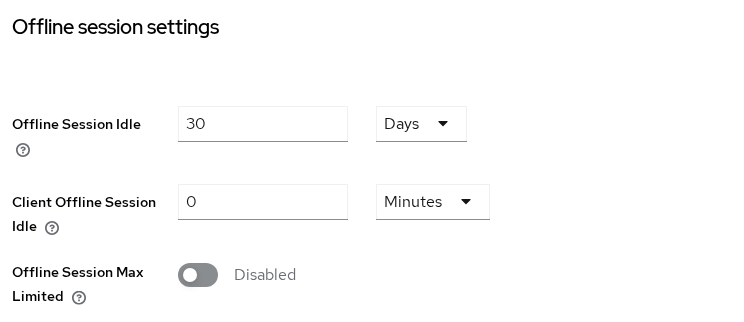
Configure idle and max under Realm settings → Sessions → Offline session settings:
| Setting | Lab default | Meaning |
|---|---|---|
| Offline Session Idle | 30 days | How long the offline session may remain unused before Keycloak considers it expired |
| Client Offline Session Idle | 0 minutes |
No shorter client override; the realm Offline Session Idle value applies |
| Offline Session Max Limited | Disabled | When enabled, caps total offline session lifetime regardless of refresh activity |
On realm golinuxcloud, the Admin API reports:
offlineSessionIdleTimeout: 2592000(30 days)offlineSessionMaxLifespanEnabled: false
Enable Offline Session Max Limited when you need a hard upper limit on offline access even if the token is refreshed regularly.
For a quick idle test in a throwaway realm, lower Offline Session Idle to a few minutes, wait without refreshing, and confirm the next refresh returns invalid_grant. Revert the setting when finished.
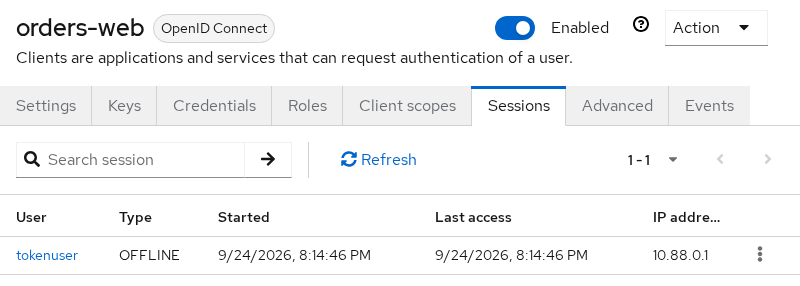
View active offline sessions under Clients → orders-web → Sessions:
- Type
OFFLINE— the offline session backing the long-lived refresh token - Type
REGULAR— an online SSO session that may still be present alongside the offline row (see the Keycloak 26 note above)
You can also list them with the Admin REST API:
Resolve the client internal ID before calling the offline-sessions endpoint:
CLIENT_UUID=$(curl -s \
  "${KC_URL}/admin/realms/${REALM}/clients?clientId=${CLIENT_ID}" \
  -H "Authorization: Bearer ${ADMIN_TOKEN}" \
  | python3 -c 'import sys,json; print(json.load(sys.stdin)[0]["id"])')
List offline sessions for orders-web:
curl -s "${KC_URL}/admin/realms/${REALM}/clients/${CLIENT_UUID}/offline-sessions" \
  -H "Authorization: Bearer ${ADMIN_TOKEN}" \
  | python3 -c "import sys,json; d=json.load(sys.stdin); print('sessions:', len(d)); print('user:', d[0]['username'] if d else 'none')"
Sample output:
sessions: 1
user: tokenuser
Rotation and Revocation
Offline refresh tokens follow the same rotation rules as online refresh tokens. On golinuxcloud:
- Revoke Refresh Token — enabled (
revokeRefreshToken: true) - Max Reuse —
0(no replay of a superseded refresh token)
When Revoke Refresh Token is enabled:
- Treat every successful refresh response as replacing the previously stored offline refresh token
- Save the new
refresh_tokenbefore discarding the old one
Set OLD_OFFLINE_REFRESH to the value you exchanged, refresh once to obtain a replacement, then replay the old string:
curl -s -X POST "${KC_URL}/realms/${REALM}/protocol/openid-connect/token" \
  -H 'Content-Type: application/x-www-form-urlencoded' \
  -d 'grant_type=refresh_token' \
  -d "client_id=${CLIENT_ID}" \
  -d "client_secret=${CLIENT_SECRET}" \
  -d "refresh_token=${OLD_OFFLINE_REFRESH}" \
  | python3 -m json.tool
Sample output:
{
    "error": "invalid_grant",
    "error_description": "Maximum allowed refresh token reuse exceeded"
}
That message is rotation enforcement, not an offline-session idle timeout. Deeper rotation tuning lives in Keycloak refresh tokens.
Revoke offline access
Administrators can stop offline tokens without waiting for idle expiry:
- Users → tokenuser → Consents — revoke consent for
orders-web(also removes offline tokens for that client) - Clients → orders-web → Sessions — sign out offline session rows
- Revoke the user's client consent:
curl -s -o /dev/null -w '%{http_code}\n' \
  -X DELETE "${KC_URL}/admin/realms/${REALM}/users/${USER_ID}/consents/${CLIENT_ID}" \
-H "Authorization: Bearer ${ADMIN_TOKEN}"- Delete a specific offline session when you know its session ID:
curl -s -o /dev/null -w '%{http_code}\n' \
  -X DELETE "${KC_URL}/admin/realms/${REALM}/sessions/${SESSION_ID}?isOffline=true" \
  -H "Authorization: Bearer ${ADMIN_TOKEN}"
HTTP 204 from either call means the revocation or session delete succeeded.
OIDC logout and offline-session revocation are separate concerns:
- Normal OIDC logout ends the online SSO session but does not normally remove offline sessions
- Backchannel logout revoke offline sessions is a client setting that includes a
revoke_offline_accessevent in the backchannel logout token - Explicit admin revocation is appropriate when offline access itself must be removed immediately
Secure Storage for Background Jobs
Offline refresh tokens grant ongoing access with the user's roles until expiry or revocation. Store them accordingly:
- Persist the offline refresh token in secure server-side storage, or in the platform secure store on mobile (Keychain, Android Keystore). Never embed them in browser JavaScript or commit them to git.
- Encrypt token files at rest and restrict file permissions on job runners.
- Tie each stored token to the user and client that requested it so rotation updates replace the correct stored copy.
- Log refresh usage per user and client; alert on sudden refresh spikes.
- Delete stored tokens when consent is revoked or the user disables background sync.
Access tokens remain short-lived. In a background job:
- Refresh shortly before each API call
- Send the access token to APIs in the
Authorizationheader - Keep access tokens in memory rather than storing them long term
Troubleshoot Missing or Invalid Offline Tokens
| Symptom | Likely cause | Fix |
|---|---|---|
scope lacks offline_access |
offline_access missing from authorization scope |
Add offline_access to the /auth URL scope parameter |
Refresh typ is Refresh, not Offline |
Offline scope not granted | Confirm optional client scope, user offline_access role, and scope parameter |
invalid_grant / Session not active right after logout |
Using a normal online refresh token | Request offline_access and store the offline refresh token |
invalid_grant / Stale token |
Old refresh token after rotation | Use the latest refresh_token from the previous refresh response |
Maximum allowed refresh token reuse exceeded |
Replayed superseded offline refresh | Persist the newest refresh token; expect one-time use when reuse is disabled |
| Refresh worked yesterday, fails today with no code change | Offline Session Idle or Max exceeded | Inspect Clients → orders-web → Sessions offline rows and realm offline timeouts |
| User should no longer sync but token still works | Offline session not revoked | Revoke client consent or delete offline session rows |
If offline_access is missing from the authorization request, Keycloak still returns tokens, but the refresh token behaves like a normal online token and stops working when the SSO session ends.
Summary
Keycloak offline tokens are offline refresh tokens (typ: Offline) issued when offline_access is granted for a client. They let a client obtain access tokens after browser SSO ends, but they remain bound to offline session idle and maximum settings, refresh-token rotation, and explicit revocation.
In this walkthrough on orders-web you:
- Requested
offline_accessand readrefresh_expires_in: 0withtyp: Offlinein the token response - Confirmed offline refresh still works after admin logout while a normal refresh returns
Session not active - Saw rotation block a replayed offline refresh with
Maximum allowed refresh token reuse exceeded
Tune Offline Session Idle and Offline Session Max Limited to match how long background jobs may run, store offline refresh tokens in secure server-side storage, and revoke consent when delegated access should stop.
For session types and where offline rows live in the data model, see Keycloak sessions explained. For machine-only API access with no user delegation, use Keycloak service accounts instead.
References
- Keycloak Server Administration Guide — Offline access
- OpenID Connect Core — offline_access scope
- OAuth 2.0 — Refreshing an Access Token (RFC 6749)
Frequently Asked Questions
Do offline tokens expire?
Yes. Offline tokens stop working when:
- Offline Session Idle is exceeded without a refresh
- Offline Session Max Limited is enabled and the max lifespan is reached
- An administrator revokes client consent or deletes the offline session
Do not treat refresh_expires_in: 0 as unlimited lifetime — check offline session settings instead.
Why was offline_access ignored?
Common causes:
offline_accessomitted from the authorizationscopeparameteroffline_accessnot linked as an optional client scope- User missing the
offline_accessrealm role
The returned refresh token stays typ: Refresh and dies with the SSO session.
Does logout revoke offline access?
By default:
- Browser OIDC logout — clears online SSO cookies; offline sessions remain
- Admin Logout all sessions — clears online sessions; offline sessions remain
Backchannel logout revoke offline sessions can include a revoke_offline_access event in the backchannel logout token when that client setting is enabled.
Revoke Users → {user} → Consents or offline session rows when offline access must end immediately.
Where are offline sessions shown?
In the Admin Console, open Clients → {client} → Sessions and look for Type OFFLINE. The Admin REST API exposes the same data at GET /admin/realms/{realm}/clients/{uuid}/offline-sessions.
Offline token vs service account?
| Offline token | Service account | |
|---|---|---|
| Identity | Delegates a specific user's rights | Client authenticates as itself |
| Grant | Authorization Code (or other user-facing flow) with offline_access |
client_credentials |
| Typical use | Per-user background sync | System integrations with no user context |
