
| Tested on | Red Hat Enterprise Linux 10.2 (Coughlan) |
|---|---|
| Package | podman-5.8.2-5.el10_2.x86_64quay.io/keycloak/keycloak:26.7.3 |
| Applies to | Any Linux host with Podman or Docker |
| Privilege | Normal user for curl; Keycloak admin access to disable grants on a client |
| Lab environment | Keycloak 26.7.3 on http://127.0.0.1:8080/ — Install Keycloak with Podman |
| Scope | What Keycloak Direct Access Grants are, how the flow differs from browser login, why OAuth BCP discourages it, common token-endpoint errors, per-client disablement, and which replacement flow fits each application type. Does not replace the full PKCE, device authorization, or client credentials tutorials. |
| Related guides | Keycloak PKCE tutorial Keycloak Device Authorization Grant Keycloak Client Credentials Grant Keycloak clients explained Keycloak OpenID Connect tutorial |
The Keycloak Direct Access Grants flow lets an application send a user's username and password directly to Keycloak and exchange them for tokens using grant_type=password. OAuth calls this the Resource Owner Password Credentials (ROPC) grant, or simply the password grant.
Keycloak still supports Direct Access Grants, but current OAuth security guidance says new applications should not use this flow. The main problem is that the application itself receives the user's password instead of redirecting the user to Keycloak's login page.
This article explains how the Direct Access Grants flow works, why that difference matters, and which Keycloak flow you should use instead.
What are Keycloak Direct Access Grants?
Two login patterns matter here:
- Normal browser login — the application redirects the user to Keycloak's login page; the user enters the password into Keycloak, and the application never sees it
- Direct Access Grants flow — the application asks the user for the username and password itself and sends those credentials to Keycloak in exchange for tokens
OAuth calls the second pattern the Resource Owner Password Credentials (ROPC) grant. You may also see these names:
- Password grant — informal OAuth name for the same flow
grant_type=password— parameter sent to the token endpoint in curl examples and token requests- Direct access grants — Keycloak Admin Console label for the client setting that enables the flow
POST /realms/{realm}/protocol/openid-connect/token
grant_type=password&client_id=...&username=...&password=...
Each client must have Direct access grants enabled before Keycloak accepts that request.
Normal browser login vs Direct Access Grant
Normal browser login (Authorization Code)

User/Browser                  Keycloak                  Application
     |                           |                           |
     |---- open application ------------------------------->|
     |                           |                           |
     |<--------- redirect to Keycloak login ----------------|
     |                           |                           |
     |--- username/password --->|                           |
     |                           |                           |
     |<--- redirect with authorization code ---------------|
     |---------------- code ------------------------------->|
     |                           |<---- exchange code -------|
     |                           |----- access token ------->|

Password is entered only into Keycloak.
The application receives a code, not the user's password.


Direct Access Grant / ROPC

User                    Application                    Keycloak
 |                           |                            |
 |-- username/password ----->|                            |
 |                           |-- grant_type=password ---->|
 |                           |   username/password         |
 |                           |<------ access token --------|
The important point is not how many HTTP requests each flow uses. It is who receives the user's password. With browser login, only Keycloak receives it. With Direct Access Grants, the application receives it too.
In security terminology, the password has crossed another trust boundary.
Important terms
| Term | Beginner meaning |
|---|---|
| Realm | A Keycloak security domain containing its own users, clients, roles, and authentication settings |
| User | Person who is signing in |
| Client | Application asking Keycloak to authenticate a user or issue tokens |
| Token endpoint | Keycloak URL where an application exchanges credentials or grants for tokens |
| Access token | Token a client sends to an API to show that it has been granted access to protected resources |
| Direct Access Grants | Keycloak client setting (directAccessGrantsEnabled) that allows grant_type=password |
| Password grant / ROPC | OAuth name for sending username and password directly to the token endpoint |
| Standard flow | Browser redirect login (Authorization Code), the usual production default |
Is Keycloak Direct Access Grant deprecated?
"Deprecated" and "still supported" mean different things here, and both show up in search results for keycloak direct access grants deprecated.
- Keycloak 26.x — Direct Access Grants are still available when enabled for a client. There is currently no documented Keycloak release version that removes the feature completely
- RFC 9700 — says clients must not use ROPC for new integrations, regardless of whether Keycloak eventually removes the feature
- Keycloak docs — still expose and document the feature, but recommend Authorization Code or Device Authorization instead
So, Direct Access Grants has not disappeared from Keycloak, but new applications should not be designed around it. OAuth BCP and Keycloak documentation still recommend Authorization Code or Device Authorization instead.
ROPC is also omitted from the current OAuth 2.1 draft. OAuth 2.1 is still a draft. RFC 9700 is therefore the published security guidance to follow today, and it explicitly says clients must not use ROPC.
Why Keycloak Direct Access Grants are not recommended
Imagine a payroll application using the Direct Access Grants flow. Instead of redirecting employees to Keycloak, the payroll application displays its own username/password form. Employees now have to trust the payroll application with their Keycloak password. If that application logs request bodies or is compromised, the central Keycloak credential may be exposed.
The problem is not just that ROPC is old. It changes who has access to the user's password and removes several parts of Keycloak's normal login flow. RFC 9700 says clients must not use the resource owner password credentials grant because:
- Greater phishing risk — users become accustomed to entering their Keycloak password into application login forms instead of only on the trusted Keycloak login page
- No authorization redirect — consent screens and step-up challenges happen outside Keycloak's browser login
- Credential handling — the application receives and forwards the password, so memory, logs, telemetry, debugging, or storage in the app can expose it
- MFA and federation gaps — WebAuthn, broker handoffs, and interactive required actions expect a browser login page
Enabling Direct Access Grants does not give the flow the capabilities of browser login:
- The user never sees Keycloak's hosted login theme or conditional MFA prompts
- Adding a client secret does not fix the main ROPC problem. A confidential client can authenticate itself to Keycloak, but the application still receives the user's password
- No normal browser SSO experience — the Direct Access Grants flow does not use the user's existing Keycloak browser login session; the client sends the username and password to the token endpoint instead
What does not work normally with Direct Access Grants?
Many Keycloak features assume an interactive browser login. The Direct Access Grants flow sends one HTTP request to the token endpoint, so those browser steps have nowhere to run.
Required actions such as UPDATE_PASSWORD
A required action is something Keycloak forces a user to complete after authentication. Common examples:
- Changing an expired password (
UPDATE_PASSWORD) - Configuring OTP (
CONFIGURE_TOTP) - Updating a profile
Set UPDATE_PASSWORD as a required action on tokenuser, then POST the password grant:
curl -sS -w '\nHTTP:%{http_code}\n' -X POST 'http://127.0.0.1:8080/realms/golinuxcloud/protocol/openid-connect/token' \
  -d 'grant_type=password' \
  -d 'client_id=dag-lab-legacy' \
  -d 'client_secret=dag-legacy-secret-2026' \
  -d 'username=tokenuser' \
  -d 'password=TokenUser!2026' \
  -d 'scope=openid'
When UPDATE_PASSWORD is pending on the account, the token endpoint refuses the grant:
{"error":"invalid_grant","error_description":"Account is not fully set up"}
HTTP:400
What happens:
- Keycloak processes the credentials
- The user still has a required action such as changing the password or configuring OTP
- The Direct Access Grants flow has no browser page where Keycloak can display that step
- Keycloak rejects the token request with
Account is not fully set up
The same response appears for user dag-mfa-user with pending CONFIGURE_TOTP.
MFA, OTP, WebAuthn, and passkeys
| Feature | Browser Authorization Code flow | Direct Access Grant |
|---|---|---|
| TOTP / OTP | Supported at login | Can be configured in the Direct Grant authentication flow, but lacks the normal interactive browser experience |
| WebAuthn / passkeys | Supported at login | Not available |
CONFIGURE_TOTP required action |
User completes in browser | Token request fails |
| Consent screen | Shown when configured | Bypassed |
An already-configured OTP can be part of a customized Direct Grant authentication flow. That is different from interactive authentication: the Direct Access Grants flow cannot display Keycloak pages for enrolling OTP, registering a passkey, or completing other browser-based challenges.
Direct Access Grants are a poor fit when your policy requires:
- Interactive MFA enrollment
- WebAuthn or passkeys
- Conditional browser-based challenges
LDAP federation vs external identity providers
Keycloak can connect to external user systems in two different ways, and the Direct Access Grants flow behaves differently with each:
- LDAP user federation — Keycloak receives the username and password and checks them against LDAP; because Keycloak participates in password validation, Direct Access Grants can work when the client allows it
- Identity brokering — Keycloak redirects the browser to another provider such as Microsoft Entra ID, Google, or another OIDC/SAML IdP; the Direct Access Grants flow has no browser redirect, so that broker login cannot take place
In short:
- LDAP federation — Keycloak can pass the submitted credentials to the federated user store for validation
- Identity brokering — Keycloak redirects the browser to another identity provider for authentication
Keycloak's documentation also notes that Direct Access Grants do not support identity brokering or social login in the normal redirect-oriented way.
Test Keycloak grant_type=password
Export lab variables for confidential client dag-lab-legacy:
export KC_BASE='http://127.0.0.1:8080'
export REALM='golinuxcloud'
export TOKEN_URL="${KC_BASE}/realms/${REALM}/protocol/openid-connect/token"
export LEGACY_CLIENT='dag-lab-legacy'
export LEGACY_SECRET='dag-legacy-secret-2026'
This lab uses a confidential client, so the request contains two different credentials: the user's password authenticates the user, while client_secret authenticates the application itself.
POST the password grant:
curl -sS -X POST "${TOKEN_URL}" \
  -d 'grant_type=password' \
  -d "client_id=${LEGACY_CLIENT}" \
  -d "client_secret=${LEGACY_SECRET}" \
  -d 'username=tokenuser' \
  -d 'password=TokenUser!2026' \
  -d 'scope=openid'
Keycloak returns HTTP 200 with bearer tokens. This is why ROPC is common in curl examples: one HTTP request returns a token. In a real application, however, that simplicity comes from giving the application the user's password.
The real response also contains token values such as access_token and usually refresh_token; they are omitted below because the JWT strings are long and do not help explain the flow.
{
  "token_type": "Bearer",
  "expires_in": 300,
  "scope": "openid profile email"
}
A wrong password returns a different error shape:
curl -sS -w '\nHTTP:%{http_code}\n' -X POST "${TOKEN_URL}" \
  -d 'grant_type=password' \
  -d "client_id=${LEGACY_CLIENT}" \
  -d "client_secret=${LEGACY_SECRET}" \
  -d 'username=tokenuser' \
  -d 'password=WrongPassword!' \
-d 'scope=openid'{"error":"invalid_grant","error_description":"Invalid user credentials"}
HTTP:400What should replace Direct Access Grants?
There is no single replacement for ROPC because different applications authenticate in different ways. Start with two questions:
- Is a human user signing in, or is the application acting by itself?
- If a human is signing in, can that user complete a browser login?
Then pick the flow:
- Human using a browser or native/mobile app → Authorization Code, usually with PKCE
- Human using a CLI or input-constrained device → Device Authorization
- No human user, such as a scheduled job or backend service → Client Credentials
Native apps should normally open the system browser rather than collecting the Keycloak password themselves.
| Application type | Who authenticates? | Safer Keycloak flow | GoLinuxCloud guide |
|---|---|---|---|
| SPA or native/mobile app | Human user | Authorization Code + PKCE | Keycloak PKCE tutorial |
| Server-rendered web app | Human user | Authorization Code (confidential client) | OpenID Connect tutorial |
| CLI / TV / input-constrained device used by a person | Human user (second device) | Device Authorization Grant | Device Authorization Grant |
| Cron job / microservice | Service only (no user) | Client Credentials | Client Credentials Grant |
For a CLI, Device Authorization works like this:
- The CLI displays a verification URL and short code
- The user signs in to Keycloak from a browser on another device
- The CLI never collects the user's password
See the Device Authorization Grant guide for the full flow.
How to disable Direct Access Grants
Disable it for one Keycloak client
Turn off Direct Access Grants on client dag-lab-locked and confirm Keycloak rejects password grant immediately:
curl -sS -w '\nHTTP:%{http_code}\n' -X POST "${TOKEN_URL}" \
  -d 'grant_type=password' \
  -d 'client_id=dag-lab-locked' \
  -d 'client_secret=dag-locked-secret-2026' \
  -d 'username=tokenuser' \
  -d 'password=TokenUser!2026' \
-d 'scope=openid'{"error":"unauthorized_client","error_description":"Client not allowed for direct access grants"}
HTTP:400In the Admin Console:
- Open the client → Settings → Capability config
- Switch Direct access grants off
- Leave Standard flow enabled for browser login replacements
See Keycloak clients explained for how capability flags map to grant types.
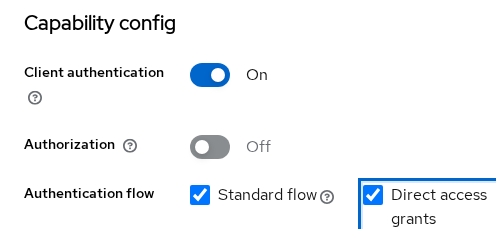
The screenshot below shows the setting enabled; switch it off to block grant_type=password.
In larger realms, you can also use the Keycloak Admin CLI or Admin REST API to find clients where directAccessGrantsEnabled is true. The Admin Console and one curl test are enough for most lab and small-team setups.
Block ROPC across multiple clients with Client Policies
A Client Policy is a Keycloak rule that can enforce client configuration or protocol requirements centrally.
Two controls operate at different levels:
- Direct access grants switch — disables ROPC for one client at a time in Settings → Capability config
- Client Policies — enforce rules across groups of clients under Realm settings → Client policies; the Reject ROPC Grant (
reject-ropc-grant) rule rejectsgrant_type=passwordeven when the client switch is still enabled
Common Direct Access Grant errors
Client not allowed for direct access grants
Typical causes:
- Direct access grants is disabled on the client
- A Client Policy with Reject ROPC Grant applies to the client
If you disabled the grant during migration, the error is expected. Use Authorization Code + PKCE, device flow, or client credentials instead of re-enabling ROPC.
Account is not fully set up
Typical causes:
- A pending required action such as
UPDATE_PASSWORDorCONFIGURE_TOTP - No browser page in the password-grant flow where Keycloak can show the task
Fix: the user completes the required action through a normal browser login.
Invalid user credentials
Typical causes:
- Incorrect username
- Incorrect password
- User authentication failed for another credential-related reason
If the same user can sign in through Keycloak's browser login, check the Direct Grant authentication flow and user state rather than assuming the password itself is wrong.
Migrating an existing application
If an existing application already uses ROPC, don't simply turn the switch off. Move it to the replacement flow first, then disable Direct Access Grants.
- Identify clients using Direct Access Grants — check each client's Direct access grants setting in the Admin Console
- Identify who is authenticating — a human using a web/mobile app, a human using a CLI/device, or the application/service itself
- Implement the replacement flow — PKCE, device authorization, or client credentials
- Disable Direct Access Grants on that client
- Verify the old password-grant request no longer works — expect
Client not allowed for direct access grants
Older curl demos and lab articles may still use password grant for quick token fetch. Treat that as a testing shortcut, not a pattern to copy into production.
Summary
The Keycloak Direct Access Grants flow implements the OAuth password grant (grant_type=password). Instead of redirecting the user to Keycloak, the application collects the username and password and sends them to the token endpoint. Keycloak 26.x still supports this flow, but RFC 9700 says clients must not use ROPC for new applications.
For human users, use Authorization Code with PKCE or Device Authorization when the device cannot conveniently handle browser login. For machine-to-machine access with no user, use Client Credentials. If an existing client still uses ROPC, migrate it first and then turn off Direct access grants.
References
- RFC 9700 — OAuth 2.0 Security Best Current Practice
- RFC 6749 — OAuth 2.0 (Resource Owner Password Credentials Grant)
- OAuth 2.1 draft — draft-ietf-oauth-v2-1-16
- Keycloak — Resource Owner Password Credentials (Direct Grant)
- Keycloak Server Administration Guide — OIDC clients
- OpenID Connect Discovery 1.0
Frequently Asked Questions
Is Direct Access Grants deprecated?
OAuth BCP says clients must not use the password grant. As of Keycloak 26.x, the flow remains available when enabled for a client. Keycloak documentation discourages it for new applications. For new integrations, leave it disabled. For existing production clients that still depend on ROPC, migrate them to an appropriate replacement before turning it off.
Why does Keycloak say "Client not allowed for direct access grants"?
The client's Direct access grants capability is disabled, or an applicable Client Policy rejects ROPC. If you intentionally disabled it during migration, this error is expected.
Is it safe for a trusted first-party app?
No. Even a first-party app that collects passwords:
- Trains users to enter Keycloak passwords outside Keycloak's login page
- Blocks interactive MFA enrollment and required actions
- Still handles the user's password in the application
Does the Direct Access Grants flow support MFA?
Not in the same way as browser login:
- TOTP can be wired into a customized Direct Grant authentication flow
- WebAuthn, passkey enrollment, and many step-up policies require the hosted login flow
- Password grant returns
Account is not fully set upwhen required actions are pending
Does Direct Access Grant work with LDAP or an external IdP?
LDAP user federation can work because Keycloak can validate the submitted credentials through the federated LDAP provider. OIDC/SAML brokering generally requires a browser redirect to the external identity provider, which ROPC cannot perform.
What replaces Direct Access Grants for a CLI?
Use the OAuth 2.0 Device Authorization Grant when a human must authorize the CLI. If no human is involved, use Client Credentials instead.
How do I disable Direct Access Grants?
- One client — Admin Console → client Settings → Capability config → turn off Direct access grants
- Multiple clients — Realm settings → Client policies → add a policy with Reject ROPC Grant
