
| Tested on | Red Hat Enterprise Linux 10.2 (Coughlan) |
|---|---|
| Package | podman-5.8.2-5.el10_2.x86_64quay.io/keycloak/keycloak:26.7.3 |
| Applies to | Any Linux host with Podman or Docker |
| Privilege | Normal user for rootless Podman; Keycloak admin access in the lab realm |
| Lab environment | Keycloak 26.7.3 on http://127.0.0.1:8080/ — Install Keycloak with Podman |
| Scope | Keycloak Device Authorization Grant (RFC 8628) on a public CLI client: device and user codes, browser verification, polling with authorization_pending and slow_down, terminal errors, and a UserInfo check. Does not cover Authorization Code or PKCE mechanics, Client Credentials, CIBA, refresh-token policy, or framework-specific CLI libraries. |
| Related guides | Keycloak OpenID Connect tutorial Keycloak PKCE tutorial Keycloak clients explained Keycloak public vs confidential clients Access token vs ID token vs refresh token |
A CLI running on a remote or headless system, smart TV, streaming device, or other client without a convenient local browser may still need a user to sign in. Keycloak Device Authorization Grant solves this by moving the interactive login to another browser while the original client waits for approval.
In this lab the CLI:
- asks Keycloak for a
device_codeand a separateuser_code - shows the operator a message such as “Open this URL and enter ABCD-EFGH”
- polls Keycloak until the user finishes in the browser
- receives access and refresh tokens only after approval
Realm golinuxcloud, public client device-lab-cli, and user tokenuser on Keycloak 26.7.3 at http://127.0.0.1:8080.
How Keycloak Device Authorization Grant works
Keycloak implements RFC 8628 for internet-connected devices with limited input or no suitable browser:
- The user never types a password on the CLI or TV
- Authentication and consent happen on a phone or laptop
- The device only polls with the
device_codeit received earlier
  Device / CLI                         Browser / Phone
       |                                    |
       | asks Keycloak for device code      |
       v                                    |
    Keycloak                                |
       |                                    |
       | user_code + verification_uri       |
       v                                    |
  Device shows:                             |
  "Open URL and enter ABCD-EFGH"            |
                                            |
                           user opens URL --+
                                    |
                                    v
                                 Keycloak
                                    |
                             user signs in
                             and approves
                                    |
                                    v
  Device keeps polling Keycloak
            |
            | approval complete
            v
      access / refresh tokens
Keycloak returns two different codes. Do not call the device_code an authorization code — RFC 8628 treats them as separate protocol values.
| Value | Who uses it? | Purpose |
|---|---|---|
device_code |
CLI or device | Long device-side code the CLI keeps and sends to Keycloak while polling; the user does not type it |
user_code |
Human user | Short code the user types at the verification page |
verification_uri |
Human user | Page where the user enters the user code |
verification_uri_complete |
Human or browser | Optional URL with the user code already embedded (link or QR-style handoff) |
expires_in |
Device | Seconds until this device authorization request expires |
interval |
Device | Minimum seconds to wait between token polling requests |
Two rules keep the codes separate:
user_code— intentionally short enough for a person to typedevice_code— opaque client-side credential for the pending transaction; not the code the user enters
Device Authorization Grant vs Authorization Code + PKCE
A beginner may ask why the CLI does not use PKCE. The difference is interaction capability, not public-versus-confidential client type alone.
| Authorization Code + PKCE | Device Authorization Grant |
|---|---|
| App can redirect or open a suitable browser on the same device | Remote/headless CLI, TV, console, or device without a suitable local browser |
| Browser returns to the app callback URI | User authenticates on another browser or device |
| App receives an authorization code and exchanges it | Device receives a device_code and polls the token endpoint |
| Typical web or mobile login | When local browser redirect is impractical |
When the application can open a browser and receive the authorization response locally, Authorization Code flow with PKCE is usually the better fit. Device flow is useful when that interaction is impractical — see the Keycloak PKCE tutorial for the redirect-based path.
Configure Device Authorization Grant in Keycloak
Create public client device-lab-cli in realm golinuxcloud. If you need realm or user setup first, use Create and manage Keycloak users.
Device Authorization Grant is a separate client capability. For this lab:
- Leave Standard flow and Direct access grants off
- Leave Client authentication off so the client stays public
- Send
client_idonly at the device and token endpoints — no client secret (RFC 8628 public-client behavior)
On Settings → Capability config, enable OAuth 2.0 Device Authorization Grant:
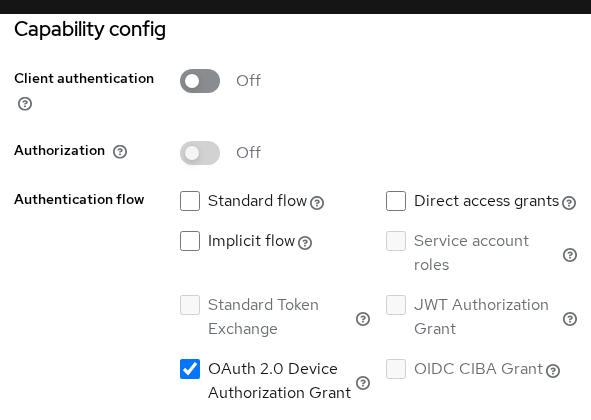
When you create the client through the Admin REST API, set oauth2.device.authorization.grant.enabled to "true" in client attributes. Keycloak does not accept a top-level oauth2DeviceAuthorizationGrantEnabled field on create.
This lab leaves Consent required off. That setting controls whether Keycloak requires general client consent, but consent-enabled client scopes can still cause Keycloak to show scope-specific approval items. That is why this lab still displays the Grant Access to Device Lab CLI page shown later.
Realm defaults on this host:
- OAuth 2.0 Device Code Lifespan: 600 seconds
- OAuth 2.0 Device Polling Interval: 5 seconds (advertised as
intervalin the device response)
Both live under Realm settings → Sessions. For the expired_token test later, I temporarily set device code lifespan to 30 seconds and restored 600 afterward.
Request a Keycloak device code and user code
The device authorization endpoint is:
POST /realms/{realm}/protocol/openid-connect/auth/deviceSet the realm base URL once:
export KC_BASE='http://127.0.0.1:8080/realms/golinuxcloud'Request codes once for the public client and save the JSON. Include scope when you need OpenID claims in the token — the rest of this walkthrough uses the same transaction:
DEVICE_RESP=$(curl -s -X POST "${KC_BASE}/protocol/openid-connect/auth/device" \
  -H 'Content-Type: application/x-www-form-urlencoded' \
  -d 'client_id=device-lab-cli' \
  -d 'scope=openid profile')
Pretty-print the response so you can read the fields:
echo "$DEVICE_RESP" | python3 -m json.toolSample output:
{
    "device_code": "DDLRLgqHfk8i4OH0vpPKwVjOkp64cjwZF5oCO-QAW3I",
    "user_code": "QOJQ-DMYB",
    "verification_uri": "http://127.0.0.1:8080/realms/golinuxcloud/device",
    "verification_uri_complete": "http://127.0.0.1:8080/realms/golinuxcloud/device?user_code=QOJQ-DMYB",
    "expires_in": 600,
    "interval": 5
}
The two URI fields serve different handoffs:
verification_uri— user opens a browser and typesuser_codemanuallyverification_uri_complete— code embedded in the query string for a clickable link or QR-style handoff (RFC 8628 non-textual transmission)
Still show the user_code in the CLI so the operator can confirm they are approving the right request.
Extract the device-side secret the poller needs:
DEVICE_CODE=$(python3 -c 'import json,sys; print(json.load(sys.stdin)["device_code"])' <<<"$DEVICE_RESP")Pull the human-readable code for the browser step:
USER_CODE=$(python3 -c 'import json,sys; print(json.load(sys.stdin)["user_code"])' <<<"$DEVICE_RESP")Keycloak also returns the minimum poll spacing:
POLL_INTERVAL=$(python3 -c 'import json,sys; print(json.load(sys.stdin)["interval"])' <<<"$DEVICE_RESP")Tell the operator what to do next:
printf 'Open %s and enter code: %s\n' \
  'http://127.0.0.1:8080/realms/golinuxcloud/device' "$USER_CODE"
Poll before browser approval
Polling is how the CLI learns that browser authorization finished. Start before anyone opens the verification URI — that proves why polling exists.
The token request uses the RFC 8628 grant type:
grant_type=urn:ietf:params:oauth:grant-type:device_code
device_code=<value from /auth/device>
client_id=device-lab-cli
Poll once without opening the browser:
curl -s -X POST "${KC_BASE}/protocol/openid-connect/token" \
  -H 'Content-Type: application/x-www-form-urlencoded' \
  -d 'grant_type=urn:ietf:params:oauth:grant-type:device_code' \
  -d 'client_id=device-lab-cli' \
  -d "device_code=${DEVICE_CODE}"
Sample output:
{"error":"authorization_pending","error_description":"The authorization request is still pending"}Nothing is wrong. Keycloak is telling the CLI that the user has not completed browser authorization yet. Wait at least interval seconds (five in this lab) before the next poll. RFC 8628 requires clients to respect that minimum spacing.
Authorize the device in a browser
Open verification_uri on a phone or laptop — or use verification_uri_complete if you want the code prefilled. Sign in as tokenuser with password TokenUser!2026. Keycloak 26.7.3 uses a two-step login form (username, then password).
After Keycloak authenticates the user, it may ask them to approve the scopes requested by device-lab-cli. In this lab the page lists:
- User roles
- User profile
- Email address
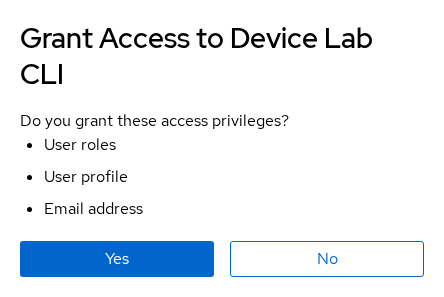
The CLI never receives the user's password. Authentication and consent happen in the browser directly with Keycloak; the CLI only learns whether authorization eventually succeeded.
The consent buttons map directly to polling outcomes:
- Yes — authorizes the pending device request; the next successful poll returns tokens
- No — the next poll returns
access_denied - Success — browser shows Device Login Successful with no redirect back to the CLI
Poll Keycloak until authorization completes
While the user works in the browser, the device keeps polling. Several responses are expected while the user is still completing browser authorization:
  Device starts polling
        |
        v
  authorization_pending
        |
        | wait interval
        v
   poll again
        |
        +--> authorization_pending -> keep waiting
        |
        +--> slow_down -> add 5 seconds to interval
        |
        +--> access_denied -> stop
        |
        +--> expired_token -> stop
        |
        +--> tokens -> success
RFC 8628 polling rules in short:
- Wait at least
intervalseconds between polls - On
slow_down, add five seconds to the interval for all later requests access_deniedandexpired_tokenend polling — start a new device authorization
A standards-correct loop:
while true; do
  sleep "$POLL_INTERVAL"
  TOKEN_BODY=$(curl -s -X POST "${KC_BASE}/protocol/openid-connect/token" \
    -H 'Content-Type: application/x-www-form-urlencoded' \
    -d 'grant_type=urn:ietf:params:oauth:grant-type:device_code' \
    -d 'client_id=device-lab-cli' \
    -d "device_code=${DEVICE_CODE}")
  ERROR=$(python3 -c 'import json,sys; print(json.loads(sys.argv[1]).get("error",""))' "$TOKEN_BODY")
  if [ -z "$ERROR" ]; then
    echo "$TOKEN_BODY"
    break
  fi
  case "$ERROR" in
    authorization_pending) continue ;;
    slow_down) POLL_INTERVAL=$((POLL_INTERVAL + 5)); continue ;;
    *) echo "$TOKEN_BODY"; exit 1 ;;
  esac
done
A production client should also back off on network timeouts rather than retrying immediately. RFC 8628 recommends reducing polling frequency — for example with exponential backoff — when communication errors occur.
Run the loop after browser approval. A successful poll returns tokens similar to:
{"access_token":"eyJhbGciOiJSUzI1NiIsInR5cCIgOiAiSldUIiwia2lkIiA6ICJUMk9SQ0dkbnd0Wl96UWpsYXY2WUc1S2h2a29KMndCdnFzWFlyc0FlcEhRIn0...","expires_in":300,"refresh_expires_in":1800,"refresh_token":"eyJhbGciOiJIUzUxMiIsInR5cCIgOiAiSldUIiwia2lkIiA6ICJhMzEyMzQ4Mi1iODdiLTRjZTUtOTVjMy0zYjkxZGMwMGZjMzYifQ...","token_type":"Bearer","id_token":"eyJhbGciOiJSUzI1NiIsInR5cCIgOiAiSldUIiwia2lkIiA6ICJUMk9SQ0dkbnd0Wl96UWpsYXY2WUc1S2h2a29KMndCdnFzWFlyc0FlcEhRIn0...","scope":"openid profile email"}The returned scope can include default client scopes configured on the Keycloak client in addition to scopes you list in the request. In this lab, email is attached as a default scope on device-lab-cli.
slow_down
If you poll faster than interval, Keycloak returns slow_down. Start a new device authorization request with the command above and update DEVICE_CODE from the new response. Before approving it in the browser, poll twice back-to-back:
curl -s -X POST "${KC_BASE}/protocol/openid-connect/token" \
  -H 'Content-Type: application/x-www-form-urlencoded' \
  -d 'grant_type=urn:ietf:params:oauth:grant-type:device_code' \
  -d 'client_id=device-lab-cli' \
  -d "device_code=${DEVICE_CODE}"
The first response is authorization_pending. The immediate second poll on the same code returns:
{"error":"slow_down","error_description":"Slow down"}Add five seconds to POLL_INTERVAL before the next attempt, as the loop above does.
access_denied
After the user clicks No on the consent screen, poll once more:
curl -s -X POST "${KC_BASE}/protocol/openid-connect/token" \
  -H 'Content-Type: application/x-www-form-urlencoded' \
  -d 'grant_type=urn:ietf:params:oauth:grant-type:device_code' \
  -d 'client_id=device-lab-cli' \
  -d "device_code=${DEVICE_CODE}"
Sample output:
{"error":"access_denied","error_description":"The end user denied the authorization request"}Start a new device authorization request; the old device_code will not succeed.
expired_token
If nobody approves before expires_in elapses, polling ends with expired_token. I shortened device code lifespan to 30 seconds in realm settings, waited 35 seconds without approving, then polled:
curl -s -X POST "${KC_BASE}/protocol/openid-connect/token" \
  -H 'Content-Type: application/x-www-form-urlencoded' \
  -d 'grant_type=urn:ietf:params:oauth:grant-type:device_code' \
  -d 'client_id=device-lab-cli' \
  -d "device_code=${DEVICE_CODE}"
Keycloak answered:
{"error":"expired_token","error_description":"Device code is expired"}Verify the access token with UserInfo
Once polling succeeds, the device client holds an access token. To confirm it represents the user who approved the device, call Keycloak's UserInfo endpoint with Authorization: Bearer.
Parse the token from the final poll response:
ACCESS_TOKEN=$(python3 -c 'import json,sys; print(json.loads(sys.argv[1])["access_token"])' "$TOKEN_BODY")Request the approved identity:
curl -s "${KC_BASE}/protocol/openid-connect/userinfo" \
  -H "Authorization: Bearer ${ACCESS_TOKEN}"
Sample output:
{"sub":"3c650623-fa6d-4252-9886-b5d5c093e7f5","email_verified":true,"name":"Token User","preferred_username":"tokenuser","given_name":"Token","family_name":"User","email":"tokenuser@golinuxcloud.lab"}The preferred_username value confirms tokenuser approved the device. Deeper JWT validation, audience mappers, and API resource-server checks belong in the Keycloak OpenID Connect tutorial.
Troubleshoot Keycloak device flow
| Response | Meaning | Client action |
|---|---|---|
authorization_pending |
User has not approved yet | Wait interval seconds; poll again |
slow_down |
Polling too quickly | Add 5 seconds to interval; poll again |
access_denied |
User rejected the request | Stop; start a new device authorization |
expired_token |
Device code expired | Stop; start a new device authorization |
invalid_client |
Wrong client_id or client misconfiguration |
Check client ID, enabled flag, and device grant setting |
| Symptom | Likely cause | Fix |
|---|---|---|
Client not allowed for OAuth device authorization grant |
Device grant disabled | Enable OAuth 2.0 Device Authorization Grant on the client |
Endless authorization_pending |
Browser step never finished | Open verification URI; sign in; click Yes |
| No consent page like the screenshot | Scopes not requested | Add scope=openid profile on /auth/device |
Tokens missing email or profile |
Scope omitted | Include the scopes you need in the device request |
Security considerations
- Treat
device_codeas a client-side credential for the pending transaction; do not expose it in operator-facing output or logs. Display the human-readableuser_codeinstead - Ask the user to confirm the code on screen matches the CLI before they click Yes
- Do not silently open
verification_uri_completewithout showing the user code — phishing becomes easier when the operator cannot verify the session - Obey
intervaland back off onslow_down; tight polling wastes resources and may annoy operators - Use HTTPS and a trusted hostname for
verification_uriin production;http://127.0.0.1:8080is lab-only
Store refresh tokens from CLI tools in OS secure storage when you need long-lived access — not world-readable files.
Summary
Keycloak Device Authorization Grant fits remote or headless CLIs and devices that cannot conveniently complete a local browser redirect. The device receives a device_code and shows the user a short user_code with a verification URI; the user signs in and approves on another browser while the CLI polls with grant_type=urn:ietf:params:oauth:grant-type:device_code.
Polling behavior is central to the flow. authorization_pending is normal before approval; slow_down means wait longer; access_denied and expired_token mean stop and start over. The device_code is not an authorization code — it is a separate RFC 8628 value used only during polling.
For browser-based login on the same device, use Authorization Code flow with PKCE instead. For token lifetime details after device login, see Keycloak refresh tokens.
References
- RFC 8628 — OAuth 2.0 Device Authorization Grant
- Keycloak Securing Applications — OpenID Connect layers
- Keycloak Server Administration Guide
Frequently Asked Questions
Is device flow for SPAs?
Usually not. A normal SPA already runs in a suitable browser and should generally use Authorization Code flow with PKCE. Device Authorization Grant is intended for clients where completing the browser login locally is impractical, such as remote or headless CLIs, TVs, consoles, or devices without a suitable browser.
What is the user code?
The user code is a short, human-readable value Keycloak returns alongside the device_code. The operator enters it at the verification URI, or confirms it matches a prefilled URL, so they know which CLI or device they are approving.
How often should the client poll?
Wait at least the interval value from the /auth/device response — five seconds in this lab. Poll again after each authorization_pending. When Keycloak returns slow_down, add five seconds to your wait time before the next attempt.
Why am I getting authorization_pending?
That response means the user has not finished browser authorization yet. It is expected while polling. Keep waiting until you receive tokens or a terminal error such as access_denied or expired_token.
Can the device open the browser automatically?
You can hand the user verification_uri_complete as a clickable link, but still show the user_code in the CLI. Without that check, the user cannot verify they are approving the correct session.
