
| Tested on | Red Hat Enterprise Linux 10.2 (Coughlan) |
|---|---|
| Package | podman-5.8.2-5.el10_2.x86_64quay.io/keycloak/keycloak:26.7.3 |
| Applies to | Any Linux host with Podman or Docker |
| Privilege | Normal user for rootless Podman; Keycloak admin access in the lab realm |
| Lab environment | Keycloak 26.7.3 on http://127.0.0.1:8080/ with HTTP authentication channel SPI — Install Keycloak with Podman |
| Scope | Keycloak Client Initiated Backchannel Authentication (OIDC CIBA): confidential client setup, HTTP authentication channel SPI and minimal channel service, backchannel request with login_hint, poll-mode auth_req_id exchange, ping-mode notes with documentation caveat, binding message rules, and authorization_pending / slow_down / access_denied / expired_token responses. Does not cover Device Authorization Grant, custom authenticator SPI development, or generic OIDC primer content. |
| Related guides | Keycloak Device Authorization Grant Keycloak Authorization Code flow Keycloak clients explained Keycloak public vs confidential clients Keycloak OpenID Connect tutorial |
Imagine a bank employee starting a transaction for a customer at a teller terminal, but the customer must approve authentication on their phone. The teller workstation already knows which customer should authenticate. It should not ask for the customer's password, and the customer's browser does not need to open on the teller terminal.
That is the problem Client Initiated Backchannel Authentication (CIBA) solves. The application sends Keycloak a backchannel authentication request for the known user. Keycloak contacts an authentication channel, the user approves on a separate device, and the application later receives tokens.
This walkthrough uses confidential client ciba-teller-app in realm golinuxcloud on Keycloak 26.7.3. You run a small Node.js authentication channel service, post a backchannel request with login_hint=tokenuser, simulate approval, and exchange the auth_req_id for access, refresh, and ID tokens in poll mode. CIBA is not enabled out of the box: Keycloak needs an authentication channel URI at startup and a client with OIDC CIBA Grant turned on.
What CIBA Solves
Client Initiated Backchannel Authentication (CIBA) is decoupled authentication. The consumption device (CD) never redirects the user's browser. Instead:
- The CD identifies the user with a hint such as
login_hint - Keycloak creates an
auth_req_idand contacts an authentication channel - The authentication channel reaches the user on an authentication device (AD) — a phone, banking app, or similar
- The CD receives tokens through poll delivery (this article's main path) — not through a front-channel redirect
That pattern fits call-center terminals, in-branch teller stations, and IoT panels where you already know the username but the user must confirm on another device.
CIBA vs Device Authorization Grant
Both grants help when the consumption device is not a good place for interactive login, but the user identification model differs.
| Topic | Device Authorization Grant (RFC 8628) | OIDC CIBA |
|---|---|---|
| Does the client know the user? | Usually not — user identifies themselves at the verification URI | Yes — client sends login_hint up front |
| Consumption device UX | Shows user_code and verification URL |
Shows binding_message; no browser redirect |
| Common client | CLI, TV, and input-constrained devices; often public | Authenticated confidential backchannel client |
| Token pickup | Poll with device_code |
Poll with auth_req_id (ping optional on some versions) |
| Built-in Keycloak UI | Verification page at /device |
External authentication channel required |
| GoLinuxCloud guide | Device Authorization Grant | This article |
Device flow: the device does not necessarily know the user. The user receives a code and verification URL, then identifies and authenticates themselves separately.
CIBA: the client already knows who should authenticate. Keycloak initiates authentication toward that user's authentication channel. No verification code needs to be entered on the consumption device.
CIBA Roles and Sequence
CIBA defines three main actors:
- Consumption device (CD) — the client that starts authentication. In this lab, this is
ciba-teller-app. - OpenID Provider (OP) — Keycloak, which creates the CIBA request and later issues tokens.
- Authentication device (AD) — the separate device where the user approves or rejects the request, such as a phone or banking app.
Keycloak also needs an authentication channel. This is the service Keycloak calls to reach the authentication device. With Keycloak's HTTP authentication channel provider, Keycloak sends a JSON delegation request to a configured endpoint, and that service handles the actual user notification and approval flow.
Consumption device        Keycloak        Authentication channel        Authentication device
(ciba-teller-app)                            service                    (phone / app)
       |                     |                   |                           |
       | 1. Start CIBA       |                   |                           |
       | login_hint=tokenuser|                   |                           |
       |-------------------->|                   |                           |
       |                     | 2. Delegate auth  |                           |
       |                     |------------------>|                           |
       |                     |                   |---- notify user --------->|
       |                     |                   |<--- approve / deny -------|
       |                     | 3. Result callback|                           |
       |                     |<------------------|                           |
       |                     |                                               |
       | 4. Poll with        |                                               |
       |    auth_req_id      |                                               |
       |-------------------->|                                               |
       |<---- tokens --------|                                               |

In this lab, the small Node.js service collapses the authentication-channel backend and a simulated approval step into one component. In production, those pieces are often separate: your channel might call a push notification service, a mobile SDK, or a call-center workflow before posting `SUCCEED` back to Keycloak.

`auth_req_id` identifies this specific CIBA authentication request. The client sends it to the token endpoint while waiting for the user to approve or deny the request. It is opaque: store and return it as-is rather than trying to interpret its contents.

---

## Keycloak Support and Prerequisites

After starting Keycloak with the authentication channel configured (see below), verify what CIBA capabilities your server advertises through OIDC discovery before you design around a delivery mode.

Set `KC_URL` and `REALM` first:

```bash
export KC_URL='http://127.0.0.1:8080'
export REALM='golinuxcloud'
Fetch discovery metadata and print the CIBA-related fields:
curl -s "${KC_URL}/realms/${REALM}/.well-known/openid-configuration" | python3 -c '
import sys, json
d = json.load(sys.stdin)
for k in (
    "backchannel_authentication_endpoint",
    "backchannel_token_delivery_modes_supported",
    "grant_types_supported",
):
    print(k, "=", d.get(k))
'
Sample output from the lab:
backchannel_authentication_endpoint = http://127.0.0.1:8080/realms/golinuxcloud/protocol/openid-connect/ext/ciba/auth
backchannel_token_delivery_modes_supported = ['poll', 'ping']
grant_types_supported = ['authorization_code', 'client_credentials', 'implicit', 'password', 'refresh_token', 'urn:ietf:params:oauth:grant-type:device_code', 'urn:openid:params:grant-type:ciba', 'urn:ietf:params:oauth:grant-type:token-exchange', 'urn:ietf:params:oauth:grant-type:uma-ticket', 'urn:ietf:params:oauth:grant-type:token-exchange']
The CIBA grant type and backchannel authentication endpoint are present. Push mode does not appear in backchannel_token_delivery_modes_supported on this release.
Lab constants
| Item | Value |
|---|---|
| Keycloak base URL | http://127.0.0.1:8080/ |
| Realm | golinuxcloud |
| CIBA client ID | ciba-teller-app |
| Client secret | replace-with-ciba-teller-app-client-secret |
| Test user | tokenuser / TokenUser!2026 |
| Auth channel URI | http://127.0.0.1:9095/ciba/delegate |
You need a running Keycloak instance from Install Keycloak with Podman and realm golinuxcloud with user tokenuser present.
Enable the HTTP authentication channel
Keycloak does not authenticate CIBA users through the built-in login theme. It delegates to an Authentication Channel Provider. The default HTTP Authentication Channel Provider POSTs a JSON delegation request to an external URI.
Keycloak SPI options use the --spi-<spi>--<provider>--<option> pattern. For CIBA, the SPI is ciba-auth-channel, the built-in provider is ciba-http-auth-channel, and the option is http-authentication-channel-uri:
--spi-ciba-auth-channel--ciba-http-auth-channel--http-authentication-channel-uri=<URL>Start Keycloak with that option and without outbound proxies intercepting localhost traffic:
podman run -d --name keycloak-ciba-lab \
  --network host \
  -e KC_BOOTSTRAP_ADMIN_USERNAME=admin \
  -e KC_BOOTSTRAP_ADMIN_PASSWORD='ChangeMe!2026' \
  -e KC_HTTP_PORT=8080 \
  -e NO_PROXY='127.0.0.1,localhost' \
  --unsetenv https_proxy \
  --unsetenv HTTPS_PROXY \
  quay.io/keycloak/keycloak:26.7.3 \
  start-dev \
  --spi-ciba-auth-channel--ciba-http-auth-channel--http-authentication-channel-uri=http://127.0.0.1:9095/ciba/delegate
--network host lets the container reach the authentication channel on the same host. If Keycloak runs with bridge networking instead, point the URI at a host IP the container can route to and ensure the channel listens on 0.0.0.0, not only 127.0.0.1.
A proxy environment variable caused Unexpected response from authentication device in testing until NO_PROXY covered 127.0.0.1.
Lab authentication channel service
CIBA cannot be exercised without an authentication channel. Keycloak POSTs a delegation request to your service; your service later POSTs the result to Keycloak's CIBA callback with the same bearer token:
  Keycloak
     |
     | POST /ciba/delegate
     | Authorization: Bearer <callback-token>
     v
  Lab authentication-channel service
     |
     ├── stores pending request
     |
     └── after approve/deny:
            POST /realms/.../ext/ciba/auth/callback
            Authorization: Bearer <same-token>
            {"status":"SUCCEED"}
Keycloak sends the CIBA authentication request to the configured authentication-channel service together with a bearer token. The channel stores the pending request, performs or simulates the user approval step, and then calls Keycloak's CIBA callback with the same bearer token and the final status such as SUCCEED or CANCELLED.
That callback tells Keycloak whether the user approved or rejected the authentication request.
Save the script below as ciba-auth-channel.mjs in your working directory:
#!/usr/bin/env node
import http from 'http';

const HOST = process.env.CIBA_CHANNEL_HOST || '127.0.0.1';
const PORT = Number(process.env.CIBA_CHANNEL_PORT || 9095);
const KC_BASE = process.env.KC_BASE || 'http://127.0.0.1:8080';
const REALM = process.env.KC_REALM || 'golinuxcloud';

const pending = [];
let seq = 0;

function json(res, status, body) {
  const payload = JSON.stringify(body);
  res.writeHead(status, {
    'Content-Type': 'application/json',
    'Content-Length': Buffer.byteLength(payload),
  });
  res.end(payload);
}

async function readBody(req) {
  const chunks = [];
  for await (const chunk of req) chunks.push(chunk);
  if (!chunks.length) return null;
  const raw = Buffer.concat(chunks).toString('utf8');
  if (!raw.trim()) return null;
  try {
    return JSON.parse(raw);
  } catch {
    return raw;
  }
}

async function notifyKeycloak(bearer, status) {
  const url = `${KC_BASE}/realms/${REALM}/protocol/openid-connect/ext/ciba/auth/callback`;
  const response = await fetch(url, {
    method: 'POST',
    headers: {
      'Content-Type': 'application/json',
      Authorization: `Bearer ${bearer}`,
    },
    body: JSON.stringify({ status }),
  });
  const text = await response.text();
  return { status: response.status, body: text };
}

const server = http.createServer(async (req, res) => {
  try {
    const url = new URL(req.url || '/', `http://${HOST}:${PORT}`);

    if (req.method === 'GET' && url.pathname === '/health') {
      return json(res, 200, { ok: true, pending: pending.length });
    }

    if (req.method === 'GET' && url.pathname === '/ciba/delegate/pending') {
      return json(
        res,
        200,
        pending.map(({ id, login_hint, scope, binding_message, receivedAt }) => ({
          id,
          login_hint,
          scope,
          binding_message,
          receivedAt,
        })),
      );
    }

    if (req.method === 'POST' && url.pathname === '/ciba/delegate') {
      const auth = req.headers.authorization || '';
      const bearer = auth.startsWith('Bearer ') ? auth.slice(7) : '';
      const body = await readBody(req);
      const id = `req-${++seq}`;
      pending.unshift({
        id,
        login_hint: body?.login_hint || '',
        scope: body?.scope || '',
        binding_message: body?.binding_message || '',
        bearer,
        receivedAt: Date.now(),
      });
      return res.writeHead(201).end();
    }

    if (req.method === 'POST' && url.pathname === '/ciba/delegate/approve') {
      const body = await readBody(req);
      const targetId = body?.id || 'latest';
      const status = body?.status || 'SUCCEED';
      const entry =
        targetId === 'latest' ? pending[0] : pending.find((p) => p.id === targetId);
      if (!entry) {
        return json(res, 404, { error: 'no pending delegation' });
      }
      const result = await notifyKeycloak(entry.bearer, status);
      if (result.status === 200) {
        const idx = pending.indexOf(entry);
        if (idx >= 0) pending.splice(idx, 1);
      }
      return json(res, result.status, { keycloak: result });
    }

    if (req.method === 'POST' && url.pathname === '/ciba/ping-notify') {
      return res.writeHead(204).end();
    }

    json(res, 404, { error: 'not found' });
  } catch (err) {
    json(res, 500, { error: String(err) });
  }
});

server.listen(PORT, HOST, () => {
  console.log(`CIBA auth channel listening on http://${HOST}:${PORT}`);
});
When the authentication-channel service receives Keycloak's delegation request, it returns HTTP 201. That only acknowledges receipt; it does not mean the user has approved yet. The final result comes later through the CIBA callback. HTTP 201 means the channel accepted the delegation; SUCCEED on the callback means user authentication completed.
Start the channel on all interfaces so Keycloak can connect:
CIBA_CHANNEL_HOST=0.0.0.0 node ciba-auth-channel.mjsThe process prints CIBA auth channel listening on http://0.0.0.0:9095 when it is ready.
Configure the Client and Authentication Channel
CIBA requires a confidential client. Public clients cannot use this grant.
Set realm CIBA policy defaults
Open Authentication → Policies → CIBA Policy in the Admin Console. The defaults on this lab realm are:
- Backchannel Token Delivery Mode:
poll - Expires In:
120seconds - Interval:
5seconds between poll requests - Authentication Requested User Hint:
login_hint
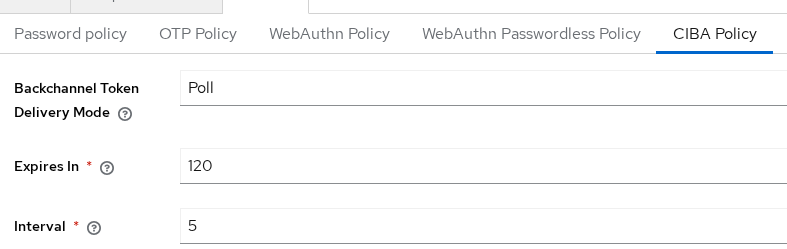
Per-client delivery mode can override the realm default when you configure advanced client attributes.
Create confidential client ciba-teller-app
Create client ciba-teller-app with Client authentication on and standard browser flows off for this lab. On the Capability config tab, enable OIDC CIBA Grant:
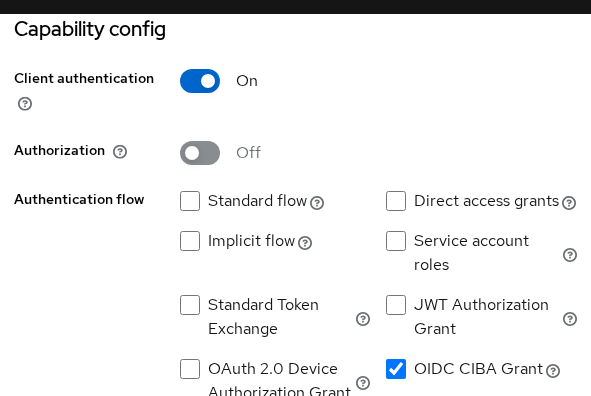
The equivalent client attributes are:
oidc.ciba.grant.enabled=trueciba.backchannel.token.delivery.mode=poll
Store the generated client secret as replace-with-ciba-teller-app-client-secret in your own notes before running the curl steps below.
Create a Backchannel Request
Export client variables for the curl examples:
export CLIENT='ciba-teller-app'
export SECRET='replace-with-ciba-teller-app-client-secret'
Post to the backchannel authentication endpoint with HTTP Basic client authentication, scope=openid, a login_hint, and a binding_message:
curl -s -X POST "${KC_URL}/realms/${REALM}/protocol/openid-connect/ext/ciba/auth" \
  -u "${CLIENT}:${SECRET}" \
  -d 'scope=openid profile email' \
  -d 'login_hint=tokenuser' \
  -d 'binding_message=Teller-terminal-42'
Sample output:
{"auth_req_id":"eyJhbGciOiJkaXIiLCJlbmMiOiJBMjU2Q0JDLUhTNTEyIn0...","expires_in":120,"interval":5}The three response fields control what happens next:
auth_req_id— which authentication request am I asking about?expires_in— how long can I keep trying?interval— how long must I wait between token requests?
Save the auth_req_id value for the token exchange:
export AUTH_REQ_ID='paste-auth-req-id-from-response'While this request was in flight, Keycloak POSTed a delegation payload to the authentication channel. List pending delegations:
curl -s http://127.0.0.1:9095/ciba/delegate/pendingSample output:
[{"id":"req-2","login_hint":"tokenuser","scope":"openid profile email roles profile email","binding_message":"Teller-terminal-42","receivedAt":1790262117497}]The channel received login_hint, scopes, and the binding message you sent from the consumption device.
Poll Mode End to End
Poll mode is the default CIBA delivery mode in this realm and the path the Keycloak Server Administration Guide documents as supported. The consumption device repeatedly POSTs to the token endpoint with grant_type=urn:openid:params:grant-type:ciba until Keycloak returns tokens or a terminal error.
Poll while authentication is still pending
Before anyone approves on the authentication device, Keycloak answers with authorization_pending:
curl -s -X POST "${KC_URL}/realms/${REALM}/protocol/openid-connect/token" \
  -u "${CLIENT}:${SECRET}" \
  -d 'grant_type=urn:openid:params:grant-type:ciba' \
  -d "auth_req_id=${AUTH_REQ_ID}"
Sample output:
{"error":"authorization_pending","error_description":"The authorization request is still pending as the end-user hasn't yet been authenticated."}authorization_pending means you waited correctly, but the user has not finished authentication yet. Wait at least interval seconds before polling again.
Simulate approval on the authentication device
The lab channel does not contain a real mobile authenticator. The next command simulates the user approving on an authentication device. The channel then sends SUCCEED back to Keycloak:
curl -s -X POST http://127.0.0.1:9095/ciba/delegate/approve \
  -H 'Content-Type: application/json' \
  -d '{"id":"latest","status":"SUCCEED"}'
Sample output:
{"keycloak":{"status":200,"body":"{\"type\":\"application\",\"subtype\":\"json\",\"parameters\":{},\"wildcardSubtype\":false,\"wildcardType\":false}"}}HTTP 200 from the callback means Keycloak accepted the authentication result.
Poll again after the interval
If you poll immediately after approval, Keycloak may answer with slow_down and too early to access because the five-second interval from the backchannel response has not elapsed yet. That is different from authorization_pending: slow_down means you asked Keycloak again too soon, not that the user is still deciding.
Wait six seconds, then poll again:
sleep 6
curl -s -X POST "${KC_URL}/realms/${REALM}/protocol/openid-connect/token" \
  -u "${CLIENT}:${SECRET}" \
  -d 'grant_type=urn:openid:params:grant-type:ciba' \
  -d "auth_req_id=${AUTH_REQ_ID}"
Sample output (trimmed):
{"access_token":"eyJhbGciOiJSUzI1NiIsInR5cCIgOiAiSldUIiwia2lkIiA6ICJ...","expires_in":300,"refresh_expires_in":1800,"refresh_token":"eyJhbGciOiJIUzUxMiIsInR5cCIgOiAiSldUIiwia2lkIiA6ICJ...","token_type":"Bearer","id_token":"eyJhbGciOiJSUzI1NiIsInR5cCIgOiAiSldUIiwia2lkIiA6ICJ...","not-before-policy":0,"session_state":"...","scope":"openid profile email"}Copy the access_token string from the poll JSON into a shell variable, then decode the payload to confirm the human user:
export ACCESS_TOKEN='paste-access-token-from-poll-response'
python3 - <<'PY'
import os, json, base64
token = os.environ.get("ACCESS_TOKEN", "")
if not token:
    print("Set ACCESS_TOKEN from the poll response first")
    raise SystemExit(0)
payload = token.split(".")[1]
payload += "=" * (-len(payload) % 4)
claims = json.loads(base64.urlsafe_b64decode(payload))
print("preferred_username:", claims.get("preferred_username"))
print("azp:", claims.get("azp"))
PY
After you export ACCESS_TOKEN from the JSON, the decode step printed preferred_username: tokenuser and azp: ciba-teller-app in testing.
Denied and expired poll responses
Start a fresh backchannel request to capture deny and expiry behavior without touching the successful poll above.
If the authentication channel reports CANCELLED, the next poll returns access_denied:
curl -s -X POST "${KC_URL}/realms/${REALM}/protocol/openid-connect/token" \
  -u "${CLIENT}:${SECRET}" \
  -d 'grant_type=urn:openid:params:grant-type:ciba' \
  -d "auth_req_id=${DENIED_AUTH_REQ_ID}"
Sample output:
{"error":"access_denied","error_description":"not authorized"}For expiry, shorten Expires In under CIBA Policy to 30 seconds, start a new backchannel request, and wait without approving. The poll then returns expired_token:
curl -s -X POST "${KC_URL}/realms/${REALM}/protocol/openid-connect/token" \
  -u "${CLIENT}:${SECRET}" \
  -d 'grant_type=urn:openid:params:grant-type:ciba' \
  -d "auth_req_id=${EXPIRED_AUTH_REQ_ID}"
Sample output:
{"error":"expired_token","error_description":"authentication timed out"}You must start a new backchannel request after expired_token; the old auth_req_id cannot be revived.
What about CIBA ping mode in Keycloak?
Keycloak 26.7.3 in this lab advertised both poll and ping in OIDC discovery, and I was able to exercise the ping path shown below.
There is an important documentation caveat: the current Keycloak Server Administration Guide still states that only poll mode is supported. Treat ping mode as version-specific behavior and verify your server's discovery metadata before designing around it.
Re-check delivery modes on your server:
curl -s "${KC_URL}/realms/${REALM}/.well-known/openid-configuration" | python3 -c '
import sys, json
d = json.load(sys.stdin)
print(d.get("backchannel_token_delivery_modes_supported"))
'
Sample output from the lab:
['poll', 'ping']Ping mode shifts work from constant polling to a client notification endpoint. Configure a second confidential client with these attributes:
oidc.ciba.grant.enabled=trueciba.backchannel.token.delivery.mode=pingciba.backchannel.client.notification.endpoint=http://127.0.0.1:9095/ciba/ping-notify
The backchannel request must include client_notification_token when ping mode is active:
curl -s -X POST "${KC_URL}/realms/${REALM}/protocol/openid-connect/ext/ciba/auth" \
  -u "ciba-ping-app:replace-with-ciba-ping-app-client-secret" \
  -d 'scope=openid' \
  -d 'login_hint=tokenuser' \
  -d 'binding_message=Ping-mode-01' \
  -d 'client_notification_token=ping-notify-token-01'
After approval, Keycloak POSTs to the notification endpoint with the bearer token you supplied. The lab channel logged a ping_notify event when that happened.
The consumption device still makes one token request with the auth_req_id after it receives the ping. Ping mode reduces aggressive polling; it does not remove the token endpoint exchange.
Production ping endpoints should be HTTPS URLs reachable from Keycloak, as required by the CIBA specification.
Binding, Login Hints and Security
CIBA security depends on correctly binding the consumption device request to the authentication device action.
login_hint
Keycloak 26.7.3 supports login_hint as the user identification mode. The value must match an existing username in the realm. Post a backchannel request with a nonexistent hint to see the failure:
curl -s -X POST "${KC_URL}/realms/${REALM}/protocol/openid-connect/ext/ciba/auth" \
  -u "${CLIENT}:${SECRET}" \
  -d 'scope=openid' \
  -d 'login_hint=nobody-here' \
  -d 'binding_message=Bad-user-01'
Sample output:
{"error":"invalid_request","error_description":"invalid_user"}binding_message
The optional binding_message helps the user recognize which consumption device started the request.
Keycloak 26.7.3 applies stricter validation to binding_message than the general CIBA description might suggest:
- Maximum length of 50 characters
- Characters must match
^[a-zA-Z0-9-._+/!?#]{1,50}$ - Spaces are rejected
A message such as Approve teller terminal sign-in fails with invalid_binding_message. Use Teller-terminal-42 instead.
Show the same binding text on both the consumption device UI and the authentication device UI in production integrations.
Authentication channel trust
The HTTP authentication channel sits outside Keycloak. Keycloak includes a bearer token in the Authorization header of the delegation request. The authentication-channel service must return that same token when it sends the authentication result to Keycloak's CIBA callback with status set to SUCCEED, CANCELLED, or UNAUTHORIZED. Treat the channel endpoint as a trusted internal service, not a public internet callback.
Confidential client only
Keep the client secret on the consumption device server. CIBA is not available for public clients in Keycloak, which matches the specification's expectation that the backchannel caller can authenticate itself.
Troubleshoot CIBA Errors
| Symptom | Likely cause | Fix |
|---|---|---|
Client not allowed OIDC CIBA Grant |
CIBA capability disabled on the client | Enable OIDC CIBA Grant or set oidc.ciba.grant.enabled=true |
Authentication Channel Provider not found or Authentication Channel Request URI not set |
Missing SPI URI at Keycloak startup | Add --spi-ciba-auth-channel--ciba-http-auth-channel--http-authentication-channel-uri=... |
Unexpected response from authentication device |
Channel unreachable or HTTP proxy intercepting localhost | Listen on 0.0.0.0, fix container routing, set NO_PROXY for 127.0.0.1 |
invalid_binding_message |
Spaces or disallowed characters in binding_message |
Use ≤50 characters from the allowed set; no spaces |
invalid_user |
login_hint does not match a realm user |
Create the user or fix the hint |
authorization_pending forever |
Authentication channel never callbacks | Approve through the channel; check channel logs |
slow_down right after approval |
Poll interval not respected | Wait at least the interval seconds from the backchannel response |
expired_token |
auth_req_id lifetime exceeded |
Start a fresh backchannel request |
CIBA Backchannel Client Notification Endpoint must be set on ping client |
Missing notification URL | Set ciba.backchannel.client.notification.endpoint on the client |
Summary
Keycloak CIBA lets a confidential client start user authentication without redirecting a browser on the consumption device. You enable OIDC CIBA Grant on the client, configure an HTTP authentication channel URI at Keycloak startup, run a channel service that implements Keycloak's delegation contract, and post a backchannel request with login_hint and an optional binding_message. Keycloak returns auth_req_id, expires_in, and interval; the consumption device polls with the CIBA grant type until tokens arrive or a terminal error appears.
The important distinction is that Keycloak does not contact the user's phone directly. Keycloak talks to your authentication-channel service, and that service is responsible for reaching the user's authentication device. Poll mode is the documented, tested default on Keycloak 26.7.3. Ping mode appeared in discovery and worked in this lab, but official administration docs still list poll only — verify discovery on your version before you depend on ping.
For headless clients that do not know the username yet, stay with Device Authorization Grant. For browser-based apps on the same device, use Authorization Code flow with PKCE instead.
References
- OpenID Connect Client Initiated Backchannel Authentication Core 1.0
- Keycloak Securing Applications — OIDC layers (backchannel authentication endpoint)
- Red Hat build of Keycloak 26.6 — SSO protocols (CIBA policy and authentication channel)
Frequently Asked Questions
How is CIBA different from Device Authorization Grant?
Device Authorization Grant is for clients that do not know the user yet. The device shows a user_code and verification URL, and the user identifies themselves at that page. CIBA is for clients that already know the username (login_hint) and start authentication on a separate device through a backchannel. Device flow is common on public input-constrained clients; CIBA expects a confidential backchannel client.
Does CIBA redirect the user's browser on the consumption device?
No. The consumption device talks to Keycloak directly at the backchannel authentication endpoint. User interaction happens on the authentication device through your authentication channel integration, not through a front-channel redirect on the CD.
What is auth_req_id?
auth_req_id is the opaque identifier Keycloak returns from the backchannel authentication endpoint. The consumption device presents it at the token endpoint with grant_type=urn:openid:params:grant-type:ciba until authentication completes or the request expires. Store it as-is; do not try to parse it.
Does Keycloak support CIBA ping mode?
Keycloak 26.7.3 discovery in this lab listed poll and ping, and the ping path worked when configured. The current Server Administration Guide still says only poll is supported. Check backchannel_token_delivery_modes_supported on your server and treat ping as version-specific until documentation and implementation align.
Is CIBA suitable for production?
CIBA can be production-ready when you run a secure, highly available authentication channel, protect client secrets, and validate binding messages in your UX. Keycloak ships the protocol endpoints and SPI hooks; you own the authentication channel that reaches the user on the authentication device, which is the main integration cost.
