
| Tested on | Red Hat Enterprise Linux 10.2 (Coughlan) Windows Server 2025 AD DC — WIN-8S0K67EP5EO.lab.example (192.168.56.128) |
|---|---|
| Package | quay.io/keycloak/keycloak:26.7.3 |
| Applies to | Keycloak 26.x with Microsoft Active Directory user federation (lab-ad provider) and a group-ldap-mapper |
| Privilege | Keycloak realm admin; AD bind account that can read group and memberOf attributes |
| Lab environment | Keycloak on http://127.0.0.1:8080/ — Install Keycloak with PodmanPrerequisite — Map Active Directory groups to Keycloak roles (working ad-groups mapper) |
| Scope | Active Directory–specific reasons Sync LDAP groups to Keycloak imports zero groups or federated users lack expected memberships: LDAP Groups DN (application OU vs CN=Builtin vs wrong container), User roles retrieve strategy (memberOf vs recursive AD chain), and Preserve group inheritance with nested AD groups. Does not cover greenfield mapper setup, Kerberos, or OpenLDAP-only group mappers — see Keycloak LDAP groups not syncing for vendor-neutral LDAP group sync. |
| Related guides | Map Active Directory groups to Keycloak roles Integrate Keycloak with Active Directory Keycloak Active Directory users not syncing Keycloak LDAP groups not syncing Keycloak tutorial |
Sync LDAP groups to Keycloak can report zero imports while user federation still binds, or groups can appear in Keycloak while a user’s Groups tab stays empty. On Active Directory, those symptoms usually trace to LDAP Groups DN scope, how the group mapper reads membership (memberOf vs recursive retrieval), or confusion between nested AD groups and what AD stores on each user.
Use ldapsearch on the RHEL host where Keycloak runs with the same bind DN, LDAP Groups DN, and membership attributes the mapper uses. This guide assumes the ad-groups mapper you configured during Active Directory group-to-role mapping. If users never imported, fix Active Directory user sync before you tune group membership.
Keycloak AD Groups Not Syncing or 0 Imported Groups: Quick Fix
If Sync LDAP groups to Keycloak returns 0 imported groups or users lack AD groups in Keycloak, check these in order:
- LDAP Groups DN — does it contain the security group objects you expect (not only users)?
- Group object classes and filters — AD groups use
group; a custom filter can exclude every group. - Sync LDAP groups — run it on the group-ldap-mapper, not only Sync all users on the provider.
- User roles retrieve strategy —
memberOfreturns only direct groups on the user; nested parent groups need the AD recursive strategy. - Preserve group inheritance — controls the Keycloak group tree, not transitive user membership by itself.
- User import — federated users must exist before membership appears on the user record.
Mirror LDAP Groups DN and filters with ldapsearch. If LDAP does not return the group object, Keycloak cannot import it.
| Symptom | Check first |
|---|---|
0 imported groups, 0 updated groups after group sync |
LDAP Groups DN points at an empty OU or wrong container |
| Hundreds of unwanted groups | LDAP Groups DN set to CN=Builtin,DC=… or another broad base |
| Groups sync but user has no memberships | User roles retrieve strategy vs actual AD memberOf; user not imported |
| User in child AD group only | Parent group missing from memberOf — expected unless recursive strategy is enabled |
| Nested groups flat in Keycloak | Preserve group inheritance off on the group mapper |
Group sync imports group objects; user membership is resolved separately when the user logs in or when you refresh federation.
How Keycloak syncs Active Directory groups
The group-ldap-mapper on lab-ad searches LDAP Groups DN for group objects and creates Keycloak groups. Sync LDAP groups to Keycloak bulk-imports or updates those objects. Whether a user belongs to a group depends on User roles retrieve strategy and the Member-of LDAP attribute (usually memberOf on AD).
   group-ldap-mapper (ad-groups)
              |
    LDAP Groups DN search
              v
     AD group objects (cn)
              v
 Sync LDAP groups → Keycloak /Groups
              |
   User login / federation refresh
              v
 memberOf or recursive member search
              v
User → Groups membership in Keycloak| Setting | Lab working value | Common AD mistake |
|---|---|---|
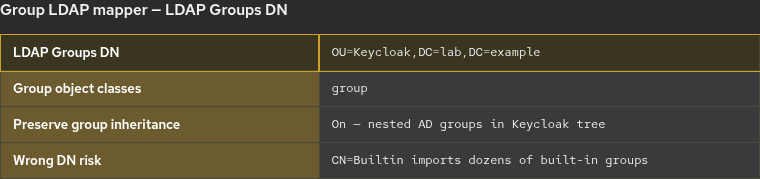
| LDAP Groups DN | OU=Keycloak,DC=lab,DC=example |
CN=Builtin,DC=lab,DC=example (built-in groups) |
| Member-of LDAP attribute | memberOf |
Empty or wrong attribute for AD |
| User roles retrieve strategy | Load from user memberOf |
Expecting parent groups when AD only lists direct memberOf |
| Preserve group inheritance | On | Off when you want nested paths like /KC-App-Users/KC-App-Developers |
Realm golinuxcloud and mapper ad-groups match the group-to-role mapping guide.
Fix missing or zero imported AD groups
Start with the settings that define which group objects Keycloak can see:
- Open User federation →
lab-ad→ Mappers →ad-groups. - Confirm LDAP Groups DN and Group object classes.
- Run Sync LDAP groups to Keycloak on the mapper.
- Confirm groups under Groups in the realm.
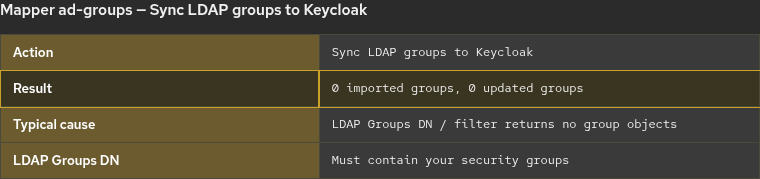
If LDAP returns no group entries under LDAP Groups DN, group sync can finish with zero imported groups even when Test connection on the provider succeeds.
Starting point (lab)
| Item | Lab value |
|---|---|
| Realm | golinuxcloud |
| Provider | lab-ad |
| Group mapper | ad-groups (group-ldap-mapper) |
| LDAP Groups DN | OU=Keycloak,DC=lab,DC=example |
| AD groups | KC-App-Admins, KC-App-Users, KC-App-Developers |
| Test users | kc-roleuser (memberOf includes KC-App-Admins); jane (member of KC-App-Developers) |
Where to run LDAP commands
Run ldapsearch on the RHEL host where Keycloak runs, not on the domain controller and not inside the Keycloak container:
sudo dnf install -y openldap-clientsSet StartTLS trust once per shell (same PEM as the integration guide):
export LDAPTLS_CACERT=~/keycloak-ad-lab/trust/lab-dc.pemThe host must resolve win-8s0k67ep5eo.lab.example, reach port 389, and trust the DC certificate used for StartTLS.
Check LDAP Groups DN and Builtin vs OU groups
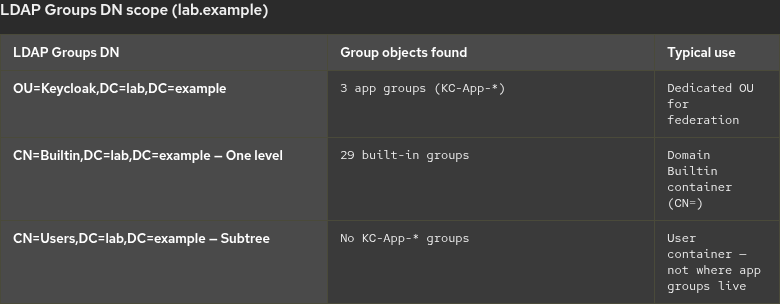
Application security groups usually live in an OU you manage (OU=Keycloak,DC=lab,DC=example). Built-in AD groups live under CN=Builtin,DC=lab,DC=example (a CN container, not OU=Builtin). Pointing LDAP Groups DN at the wrong container either imports nothing useful or pulls dozens of built-in groups you never mapped.
Test LDAP Groups DN with ldapsearch
List group objects under the OU Keycloak should sync (-W prompts for the bind password):
ldapsearch -x -ZZ -H ldap://win-8s0k67ep5eo.lab.example:389 \
  -D "keycloak-bind@lab.example" -W \
  -b "OU=Keycloak,DC=lab,DC=example" -s sub "(objectClass=group)" cn
Sample output:
dn: CN=KC-App-Admins,OU=Keycloak,DC=lab,DC=example
cn: KC-App-Admins

dn: CN=KC-App-Users,OU=Keycloak,DC=lab,DC=example
cn: KC-App-Users

dn: CN=KC-App-Developers,OU=Keycloak,DC=lab,DC=example
cn: KC-App-Developers
Three cn lines mean Keycloak can import three groups when LDAP Groups DN matches this OU.
To see why CN=Builtin is a poor default for application roles, count built-in groups at one level:
ldapsearch -x -ZZ -H ldap://win-8s0k67ep5eo.lab.example:389 \
  -D "keycloak-bind@lab.example" -W \
  -b "CN=Builtin,DC=lab,DC=example" -s one "(objectClass=group)" cn
On the lab DC, that search returned 29 cn lines (for example Administrators under CN=Builtin,DC=lab,DC=example). Keep LDAP Groups DN on your application OU unless you intentionally import built-in groups.
Application groups such as KC-App-Admins are not stored under CN=Users. A subtree search from CN=Users,DC=lab,DC=example for KC-App-Admins returns no group entry, which is why LDAP Groups DN must target the OU that actually holds your security groups.
Check User roles retrieve strategy and memberOf
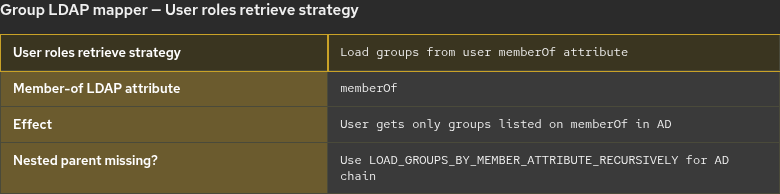
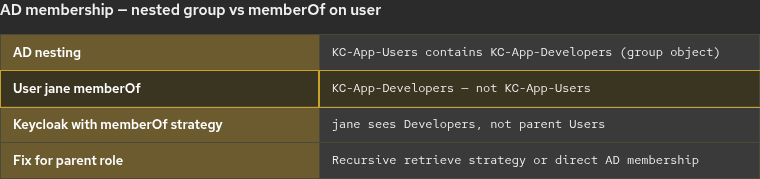
Active Directory maintains each user’s direct group memberships in memberOf. If a group contains another group, the member attribute on the parent lists the child group, but users in the child group do not automatically gain the parent in memberOf.
Nested AD groups vs memberOf on the user
In the lab, KC-App-Users lists KC-App-Developers as a member (group nesting). User jane is a member of KC-App-Developers but her memberOf does not include KC-App-Users:
Confirm nesting on the parent group:
ldapsearch -x -ZZ -H ldap://win-8s0k67ep5eo.lab.example:389 \
  -D "keycloak-bind@lab.example" -W \
  -b "OU=Keycloak,DC=lab,DC=example" -s sub "(cn=KC-App-Users)" member
Sample output:
member: CN=KC-App-Developers,OU=Keycloak,DC=lab,DC=exampleRead memberOf for the same user Keycloak federates:
ldapsearch -x -ZZ -H ldap://win-8s0k67ep5eo.lab.example:389 \
  -D "keycloak-bind@lab.example" -W \
  -b "DC=lab,DC=example" -s sub "(sAMAccountName=jane)" memberOf
Sample output:
memberOf: CN=KC-App-Developers,OU=Keycloak,DC=lab,DC=example
memberOf: CN=KC-App-Admins,OU=Keycloak,DC=lab,DC=example
memberOf: CN=Network-Admins,CN=Users,DC=lab,DC=example
KC-App-Users is absent because AD does not add parent groups to memberOf for users who are only in the child group.
| Strategy (Admin Console label) | When to use |
|---|---|
Load groups from user attribute (memberOf) |
Default AD path; matches direct memberOf only |
| Load groups by member attribute recursively | User should inherit parent groups through nested AD membership (AD matching rule in chain) |
Preserve group inheritance builds /KC-App-Users/KC-App-Developers in the Keycloak group tree. It does not replace recursive membership: a user with only KC-App-Developers on memberOf still needs the recursive strategy to appear in the parent Keycloak group for role mappings on KC-App-Users.
After you change retrieve strategy, have the user sign in again or refresh federation, then open Users → the account → Groups.
Verify group sync and user membership
- Set LDAP Groups DN to an OU that
ldapsearchlists with your application groups. - Run Sync LDAP groups to Keycloak on
ad-groups. - Open Groups and confirm
KC-App-Adminsand nested paths when Preserve group inheritance is on. - Run Sync all users on
lab-adif the account is not already federated. - Open Users →
kc-roleuser→ Groups and confirmKC-App-AdminswhenmemberOfincludes that group.
When groups already exist, sync may report 0 imported groups, 3 updated groups instead of new imports. That is normal on a realm that already ran the mapping guide.
Troubleshoot Keycloak AD group sync
| Symptom | Likely cause | Fix |
|---|---|---|
0 imported groups after mapper sync |
LDAP Groups DN empty or wrong | Point DN at the OU that holds security groups; verify with ldapsearch |
| Too many groups imported | DN set to CN=Builtin or domain root |
Narrow LDAP Groups DN to an application OU |
| User missing all groups | User not imported or strategy mismatch | Sync users; read memberOf with ldapsearch and match retrieve strategy |
| User in child group only | Direct memberOf strategy |
Enable recursive member retrieval for AD nesting, or add direct AD membership |
| Parent/child tree wrong in Keycloak | Preserve group inheritance off | Enable inheritance, save mapper, run group sync again |
| Roles missing in token | Group sync OK but role mapped on different group | Map roles on the group the user actually joins in Keycloak |
| Non-AD LDAP directory | Different attributes and filters | Use the vendor-neutral Keycloak LDAP group sync troubleshooting page |
Summary
When Active Directory groups do not appear in Keycloak, first confirm LDAP Groups DN returns your security groups with ldapsearch. Built-in groups under CN=Builtin and application groups under a dedicated OU are different targets; swapping CN and OU in the DN is a common misconfiguration.
Group sync imports objects; user membership follows User roles retrieve strategy. With memberOf, users receive only groups AD lists on their account. Nested AD groups such as KC-App-Users → KC-App-Developers require recursive retrieval if users should inherit parent groups without direct memberOf entries.
After LDAP Groups DN and retrieve strategy match AD, run Sync LDAP groups to Keycloak, sync users if needed, and confirm memberships on the federated user. Return to the group-to-role mapping walkthrough when you need realm role assignment on imported groups.
References
- Keycloak Server Administration Guide — LDAP mappers and sync
- Keycloak Server Administration Guide — LDAP user federation
- Microsoft Learn — Active Directory security groups
Frequently Asked Questions
Why does Sync LDAP groups import zero groups when users sync fine?
User federation bind and user search use Users DN. Group sync uses LDAP Groups DN on the group-ldap-mapper. An empty or incorrect groups base returns zero group objects even when user sync succeeds.
Should LDAP Groups DN be CN=Builtin or an OU?
Use an OU that contains the application security groups you intend to map (OU=Keycloak,DC=lab,DC=example in the lab). CN=Builtin,DC=lab,DC=example holds built-in domain groups such as Administrators, which is usually too broad for application role mapping.
Why is a user in KC-App-Developers but not KC-App-Users in Keycloak?
AD nested groups do not add parent groups to the user’s memberOf attribute. With the default memberOf retrieve strategy, Keycloak lists only direct memberOf values. Use the AD recursive retrieve strategy if parent group membership must apply.
Is this article the same as Keycloak LDAP groups not syncing?
No. This page focuses on Active Directory LDAP Groups DN, CN=Builtin vs OU layouts, memberOf, and nested group behavior. The generic LDAP groups troubleshooting guide covers vendor-neutral mapper and connection issues.
