
| Tested on | Red Hat Enterprise Linux 10.2 (Coughlan) |
|---|---|
| Package | podman-5.8.2-5.el10_2.x86_64quay.io/keycloak/keycloak:26.7.3PyJWT 2.15.0 with cryptography |
| Applies to | Any Linux host with Podman or Docker |
| Privilege | Normal user for rootless Podman; Keycloak admin access when reading realm keys |
| Lab environment | Keycloak 26.7.3 on http://127.0.0.1:8080/ — Install Keycloak with Podman |
| Scope | OIDC discovery, JWKS fetch from /certs, kid selection, RS256 signature verification, iss/aud/exp claim checks, rejecting ID tokens at APIs, minimal validate-lab-api client and audience mapper setup, JWKS caching with PyJWT refresh on unknown kid, and a Python reference validator with five negative tests. Does not cover RFC 7662 token introspection, full protocol mapper catalog, live key rotation drills, or framework-specific middleware. |
| Related guides | Keycloak token introspection Keycloak OpenID Connect tutorial Access token vs ID token vs refresh token Keycloak protocol mappers Keycloak public vs confidential clients |
Verify Keycloak access tokens locally with the realm JWKS document instead of calling Keycloak on every API request. Fetch jwks_uri from OIDC discovery, match the token header kid to a signing key, check the RS256 signature, then validate issuer, audience, expiry, and token type before you trust any claim.
Local verification is fast and stateless, but it only proves cryptographic integrity and claim shape. It does not tell you whether Keycloak revoked the session five seconds ago.
This lab uses:
- Realm
golinuxcloudon127.0.0.1:8080 - User
tokenuser - Token client
refresh-lab-app - API audience
validate-lab-api
When you need live revocation awareness, compare the trade-off in Keycloak token introspection.
What this JWT validation lab creates
When you finish, you can:
- Read
issuerandjwks_urifrom the realm discovery document - Match a bearer token
kidto the correct RSA public key - Accept a valid access token and reject an ID token, wrong audience, wrong issuer, expired token, and unknown
kid
A JWKS (JSON Web Key Set) is a JSON document containing the public keys that applications use to verify tokens signed by Keycloak. The JWT header contains a kid value that tells your API which public key in the JWKS should be used.
The validation flow is straightforward: your API receives a JWT, reads its kid, finds the matching key in Keycloak's JWKS, verifies the token signature, and then checks claims such as iss, aud, exp, and the token type before accepting the request.
  Keycloak                refresh-lab-app              validate-lab-api
  (issues JWT)            (gets access token)          (your API)
      |                           |                          |
      |---- access token ------->|                          |
      |                           |                          |
      |                           | Authorization: Bearer    |
      |                           | <JWT>                    |
      |                           |------------------------->|
      |                           |                          |
      |                           |                    1) read header.kid
      |                           |                    2) fetch/cache JWKS
      |                           |                    3) verify signature
      |                           |                    4) check iss/aud/exp/type
      |                           |                          |
      |                           |                     allow or 401
The important distinction is that refresh-lab-app does not create or sign the JWT. Keycloak issues the token, the client sends that token to the API, and validate-lab-api verifies it using Keycloak's public keys.
Side effects in the lab realm:
- Confidential client
refresh-lab-appif you create it here - Logical API client
validate-lab-apias the expectedaudvalue - Access tokens must include
validate-lab-apiinaudafter you add an audience mapper
What JWT validation must prove
Decoding the middle segment of a JWT is not validation. Anyone can Base64url-decode the payload and read sub or realm_access. Your API must prove several independent facts before it uses any claim for authorization.
| Check | What it blocks |
|---|---|
Trusted issuer (iss) |
Tokens minted by another realm or host |
Allowed algorithm (alg) |
none or unexpected asymmetric algorithms |
| Signature against JWKS | Forged or tampered tokens |
exp / nbf window |
Replay after expiry or clock-skew abuse |
aud contains your API client |
Tokens intended for a different resource server |
Keycloak token type claim (typ, when present) |
ID token confusion at the API layer |
Signature verification alone is necessary but not sufficient. A correctly signed ID token still must not authorize your orders API. A valid signature is only the first check. Your API still needs to:
- Verify who issued the token (
iss) - Verify who it was issued for (
aud) - Confirm it is still within its valid time window (
exp/nbf)
Discover Keycloak issuer and JWKS URI
Start from the realm OpenID Provider metadata. Keycloak publishes it at:
/realms/{realm}/.well-known/openid-configurationRequest the discovery document for golinuxcloud:
curl -s 'http://127.0.0.1:8080/realms/golinuxcloud/.well-known/openid-configuration'{
"issuer": "http://127.0.0.1:8080/realms/golinuxcloud",
"authorization_endpoint": "http://127.0.0.1:8080/realms/golinuxcloud/protocol/openid-connect/auth",
"token_endpoint": "http://127.0.0.1:8080/realms/golinuxcloud/protocol/openid-connect/token",
"jwks_uri": "http://127.0.0.1:8080/realms/golinuxcloud/protocol/openid-connect/certs",
...
}Configure your API from discovery:
- Trust the exact
issuervalue - Trust the exact
jwks_urivalue - Do not hard-code a single PEM file from a blog post — Keycloak rotates signing keys and publishes the current set at
jwks_uri
Export discovery results once for the curl steps that follow:
export REALM_BASE='http://127.0.0.1:8080/realms/golinuxcloud'
export ISSUER='http://127.0.0.1:8080/realms/golinuxcloud'
export JWKS_URI='http://127.0.0.1:8080/realms/golinuxcloud/protocol/openid-connect/certs'
export API_AUDIENCE='validate-lab-api'
The Admin Console Realm settings → Keys tab shows the active RS256 signing key and its kid. That kid must match the token header and a sig entry in JWKS.
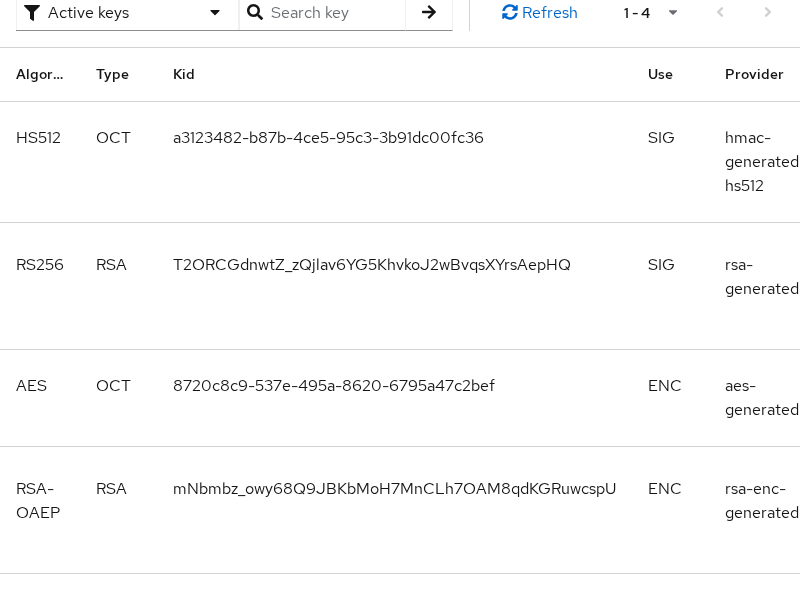
Use = SIG means the key is used for signing, but that alone is not enough to select the key. The screenshot lists several key types:
- HS512 / SIG — a signing key for a different algorithm
- RS256 / SIG — the row that matches this lab's access tokens when
kidalso matches - ENC rows — encryption keys; do not use them for access-token signature checks
For the access token in this lab, the JWT header says alg: RS256 and provides a kid. Pick the RS256 / RSA / SIG row whose kid matches the token header.
JWT header
  alg = RS256 ─────────┐
                       ├──► find RS256 / SIG key with matching kid
  kid = T2ORCG... ─────┘
Keycloak's certificate endpoint can expose one or more public keys for token verification, so matching the token's kid and expected algorithm is the right mental model.
Create the API audience client
Create a client named validate-lab-api to represent the protected API. It does not perform login; you only need its client ID as the token audience.
In Clients → Create client:
- Client type: OpenID Connect
- Client ID:
validate-lab-api - Client authentication: OFF
- Standard flow: OFF
- Direct access grants: OFF
Save the client. No redirect URIs or credentials are required for this lab.
On refresh-lab-app, add an audience mapper so access tokens include that client ID:
- Open Clients → refresh-lab-app → Client scopes → refresh-lab-app-dedicated → Add mapper → By configuration → Audience.
- Set Included Client Audience to
validate-lab-api. - Turn Add to access token ON.
If your mapper uses Included Client Audience, the target client must exist in Keycloak before you can select it. That is why you create validate-lab-api first. Mapper types beyond this lab minimum are covered in Keycloak protocol mappers.
Select the signing key by kid
A JWT header names the signing key. Split the token, decode the header, and read kid and alg before you touch the payload.
Obtain a lab access token. Export the token client secret from Clients → refresh-lab-app → Credentials → Client secret. Create the client if needed with:
- Client authentication ON (confidential)
- Direct Access Grants ON for this lab only
export KC_BASE="${REALM_BASE}/protocol/openid-connect"
export TOKEN_CLIENT='refresh-lab-app'
export TOKEN_SECRET='paste-refresh-lab-app-secret'grant_type=password) only to fetch a bearer token quickly. Do not enable that grant in production applications. Use Authorization Code with PKCE in real browser login flows.
Request a user access token:
TOKEN_RESP=$(curl -s -X POST "${KC_BASE}/token" \
  -u "${TOKEN_CLIENT}:${TOKEN_SECRET}" \
  -d 'grant_type=password' \
  -d 'username=tokenuser' \
  -d 'password=TokenUser!2026' \
  -d 'scope=openid profile')
Store the access token string:
ACCESS_TOKEN=$(printf '%s' "$TOKEN_RESP" | python3 -c 'import sys,json; print(json.load(sys.stdin)["access_token"])')Decode the JWT header and print kid plus alg:
python3 -c "import base64,json,os; h=os.environ['ACCESS_TOKEN'].split('.')[0]; h+='='*((4-len(h)%4)%4); print(json.dumps(json.loads(base64.urlsafe_b64decode(h)), indent=2))"{
"alg": "RS256",
"typ": "JWT",
"kid": "T2ORCGdnwtZ_zQjlav6YG5KhvkoJ2wBvqsXYrsAepHQ"
}Fetch JWKS from the certs endpoint (same document jwks_uri points to):
curl -s "${JWKS_URI}"{
"keys": [
{
"kid": "T2ORCGdnwtZ_zQjlav6YG5KhvkoJ2wBvqsXYrsAepHQ",
"kty": "RSA",
"alg": "RS256",
"use": "sig",
"n": "0m2iCqPDhl0jSs...",
"e": "AQAB"
},
{
"kid": "mNbmbz_owy68Q9JBKbMoH7MnCLh7OAM8qdKGRuwcspU",
"kty": "RSA",
"alg": "RSA-OAEP",
"use": "enc",
...
}
]
}Pick the JWK that matches all of these:
kidequals the token headerkiduseissigalgmatches the token header algorithm (RS256in this lab)
Encryption keys (use: enc) never verify access token signatures.
Verify signature and algorithm
Allow only algorithms your deployment expects. Keycloak realm access tokens in this lab use RS256. Reject tokens when:
algisnonealgis an unexpected HMAC algorithmalgis not on your allow list
Fetch keys only after the algorithm check passes.
Keycloak
   |
   | signs JWT with private key
   v
Access token
   |
   | sent to API
   v
API
   |
   | fetches public key from JWKS
   v
verifies signature
The private signing key never leaves Keycloak. Your API only downloads the corresponding public key from the realm certs endpoint.
Pseudocode for the signature step:
1. header = base64url_decode(token.part[0])
2. if header.alg not in ALLOWED: reject
3. jwk = jwks.find(kid = header.kid, use = "sig")
4. if jwk is missing: refresh JWKS once, then reject if still missing
5. if RSA_verify(header.alg, jwk, token): continue else reject
PyJWKClient:
- Fetches and caches the JWKS document
- Reads the JWT
kidand selects a matching signing key - Refreshes JWKS once on an unknown
kid, subject to the library's refresh cooldown
Install the libraries on your workstation:
python3 -m pip install --user PyJWT cryptographyThe reference validator in the next section wraps jwt.decode() with an algorithm allow list pinned to the realm signing algorithm (RS256 in this lab) and explicit issuer and audience checks.
Validate issuer, audience, and time claims
After the signature checks pass, validate claims your API relies on.
| Claim | Rule for validate-lab-api |
|---|---|
iss |
Must equal configured ISSUER exactly |
aud |
Must include validate-lab-api (string or array) |
exp |
Must be in the future (small clock skew optional) |
nbf |
When present, must not be in the future beyond skew |
Keycloak access tokens often carry multiple audiences (account, service clients, custom API clients). After the signature checks pass:
- Check membership in
aud, not string equality against the only array value - Reject the token when your API client is missing from
aud, even if the signature verifies - Add the audience mapper from the section above when
validate-lab-apiis absent from the token
Decode the payload claims for inspection (still not validation):
python3 -c "import base64,json,os; p=os.environ['ACCESS_TOKEN'].split('.')[1]; p+='='*((4-len(p)%4)%4); d=json.loads(base64.urlsafe_b64decode(p)); print(json.dumps({k:d[k] for k in ['iss','aud','typ','azp','exp'] if k in d}, indent=2))"{
"iss": "http://127.0.0.1:8080/realms/golinuxcloud",
"aud": [
"introspect-lab-api",
"validate-lab-api",
"orders-api",
"account"
],
"typ": "Bearer",
"azp": "refresh-lab-app",
"exp": 1790268000
}In the payload output above:
azpnames the OAuth client that requested the token (refresh-lab-apphere)audnames which resource servers may accept the token — your API checks forvalidate-lab-api
Reject the wrong token type
OIDC returns both an access token and an ID token when scope includes openid. They may share the same RS256 signer and kid, so signature verification alone does not tell them apart.
In the Keycloak tokens used in this lab, access tokens carry typ: Bearer and ID tokens carry typ: ID. Reject an ID token at your resource API even if it verifies with the same signing key.
| Token | typ in this lab |
Accept at resource API? |
|---|---|---|
| Access token | Bearer |
Yes, after full validation |
| ID token | ID |
No — client-side identity proof |
ID tokens prove who logged in to the client application. Sending an ID token to a backend API is a common token confusion mistake. An ID token must fail API validation anyway because:
- Its audience targets the OIDC client, not
validate-lab-api - Keycloak sets
typ: IDas an additional wrong-token signal
Prove an ID token is rejected by the API
Extract the ID token returned in the same login:
ID_TOKEN=$(printf '%s' "$TOKEN_RESP" | python3 -c 'import sys,json; print(json.load(sys.stdin)["id_token"])')Inspect its important claims (decode only for inspection):
python3 -c "import base64,json,os; p=os.environ['ID_TOKEN'].split('.')[1]; p+='='*((4-len(p)%4)%4); d=json.loads(base64.urlsafe_b64decode(p)); print(json.dumps({k:d[k] for k in ['iss','aud','typ','azp','exp'] if k in d}, indent=2))"In this Keycloak lab, the ID token payload should show:
typ: IDaudset to the OIDC client (refresh-lab-app), notvalidate-lab-api
Pass the ID token to the API validator:
python3 validate_keycloak_jwt.py "$ID_TOKEN"The validator rejects it. Either outcome is correct:
InvalidAudienceErrorwhen the audience check runs firstWrong token type for API: typ=IDwhen thetypcheck runs first
An ID token is not a bearer access token for validate-lab-api.
The access token from the same response passes:
python3 validate_keycloak_jwt.py "$ACCESS_TOKEN"{
"status": "valid",
"sub": "3c650623-fa6d-4252-9886-b5d5c093e7f5",
"aud": [
"introspect-lab-api",
"validate-lab-api",
"orders-api",
"account"
]
}JWKS caching and key rotation
Download JWKS once per process (or on a TTL) and cache by kid.
During key rotation:
- Keycloak can publish both the new signing key and older verification keys
- Tokens signed with the previous key continue to validate while that public key remains in JWKS
- Remove old keys only after tokens signed with them can no longer be valid
Recommended cache behavior:
- Let your JWKS client refresh when header
kidis missing from the cached set (PyJWT does this with a cooldown) - Cap refresh frequency to avoid hammering
/certson every request - Keep the previous key set briefly if rotation overlaps token lifetimes
Test an unknown kid
This does not perform a real Keycloak key rotation. It verifies that your validator rejects a token whose kid cannot be resolved after JWKS lookup and refresh.
python3 << 'PYEOF'
import base64, json, os
from jwt import PyJWKClient

token = os.environ["ACCESS_TOKEN"]
header = json.loads(base64.urlsafe_b64decode(token.split(".")[0] + "=="))
header["kid"] = "unknown-kid-00000000000000000000000000000000"
fake = base64.urlsafe_b64encode(json.dumps(header, separators=(",", ":")).encode()).rstrip(b"=").decode()
tampered = fake + "." + ".".join(token.split(".")[1:])
client = PyJWKClient(os.environ["JWKS_URI"], cache_keys=True)
try:
    client.get_signing_key_from_jwt(tampered)
except Exception as exc:
    print(f"{type(exc).__name__}: {exc}")
PYEOFPyJWKClientError: Unable to find a signing key that matches: "unknown-kid-00000000000000000000000000000000"A token whose header references a key that never existed in JWKS should fail this way. During real rotation:
- Keep both old and new signing keys published in JWKS
- Remove the old key only after outstanding tokens signed with it can no longer be valid
Reference implementation
Save this validator as validate_keycloak_jwt.py next to your lab scripts. It:
- Discovers metadata from the realm
- Enforces the realm signing algorithm allow list
- Lets PyJWT validate standard claims including
aud - Applies a Keycloak-specific
typ: IDcheck after signature verification
#!/usr/bin/env python3
from __future__ import annotations

import json
import sys
import urllib.request
from dataclasses import dataclass
from typing import Any

import jwt
from jwt import PyJWKClient


@dataclass
class ValidatorConfig:
    issuer: str
    jwks_uri: str
    expected_audience: str
    allowed_algorithms: tuple[str, ...] = ("RS256",)


class KeycloakJwtValidator:
    def __init__(self, config: ValidatorConfig) -> None:
        self.config = config
        self._jwks_client = PyJWKClient(config.jwks_uri, cache_keys=True)

    def validate_access_token(self, token: str) -> dict[str, Any]:
        header = jwt.get_unverified_header(token)
        if header.get("alg") not in self.config.allowed_algorithms:
            raise jwt.InvalidAlgorithmError(f"Algorithm {header.get('alg')} is not allowed")

        signing_key = self._jwks_client.get_signing_key_from_jwt(token)
        claims = jwt.decode(
            token,
            signing_key.key,
            algorithms=list(self.config.allowed_algorithms),
            issuer=self.config.issuer,
            audience=self.config.expected_audience,
            options={"require": ["exp", "iss", "sub", "aud"]},
        )

        if claims.get("typ") == "ID":
            raise ValueError(f"Wrong token type for API: typ={claims.get('typ')}")

        return claims


def discover(realm_base: str) -> dict[str, str]:
    with urllib.request.urlopen(f"{realm_base}/.well-known/openid-configuration") as resp:
        doc = json.load(resp)
    return {"issuer": doc["issuer"], "jwks_uri": doc["jwks_uri"]}


def main() -> int:
    meta = discover("http://127.0.0.1:8080/realms/golinuxcloud")
    validator = KeycloakJwtValidator(
        ValidatorConfig(
            issuer=meta["issuer"],
            jwks_uri=meta["jwks_uri"],
            expected_audience="validate-lab-api",
        )
    )
    claims = validator.validate_access_token(sys.argv[1])
    print(json.dumps({"status": "valid", "sub": claims["sub"], "aud": claims.get("aud")}, indent=2))
    return 0


if __name__ == "__main__":
raise SystemExit(main())Run the negative tests against the same ACCESS_TOKEN variable.
Wrong audience — expect InvalidAudienceError:
python3 << 'PYEOF'
import os
from validate_keycloak_jwt import KeycloakJwtValidator, ValidatorConfig

validator = KeycloakJwtValidator(ValidatorConfig(
    issuer=os.environ["ISSUER"], jwks_uri=os.environ["JWKS_URI"], expected_audience="wrong-api-client"))
try:
    validator.validate_access_token(os.environ["ACCESS_TOKEN"])
except Exception as exc:
    print(f"{type(exc).__name__}: {exc}")
PYEOFInvalidAudienceError: Invalid audienceWrong issuer — expect InvalidIssuerError:
python3 << 'PYEOF'
import os
from validate_keycloak_jwt import KeycloakJwtValidator, ValidatorConfig

validator = KeycloakJwtValidator(ValidatorConfig(
    issuer="http://evil.example/realms/golinuxcloud", jwks_uri=os.environ["JWKS_URI"], expected_audience="validate-lab-api"))
try:
    validator.validate_access_token(os.environ["ACCESS_TOKEN"])
except Exception as exc:
    print(f"{type(exc).__name__}: {exc}")
PYEOFInvalidIssuerError: Invalid issuerExpired token — shorten the realm access token lifespan in Admin Console for this demo, wait past exp, then run the validator on the stale bearer string:
python3 validate_keycloak_jwt.py "$ACCESS_TOKEN"ExpiredSignatureError: Signature has expiredPort the same steps to other stacks:
- Node —
jose - Java — Nimbus
- Go —
lestrrat-go/jwx
In each case: discover jwks_uri, resolve kid, verify RS256, then apply the claim rules above.
Troubleshoot JWT validation errors
| Symptom | Likely cause | Fix |
|---|---|---|
Invalid issuer |
API ISSUER does not match token iss (scheme, host, or realm) |
Copy issuer from discovery; align reverse-proxy public URL with token iss |
Invalid audience / custom audience error |
API client missing from aud |
Create the API audience client and add an audience mapper on the issuing client |
Invalid audience on an otherwise signed token, or Wrong token type for API: typ=ID |
Caller sent ID token to API | Accept access tokens only; read ID tokens in the client app |
Unable to find a signing key for kid |
Unknown kid after JWKS lookup/refresh, or old key removed too early during rotation |
Reject the token; during rotation, keep old verification keys published until those tokens expire |
| Signature OK but API should deny anyway | User logged out while JWT still unexpired | Use token introspection when you need live revocation |
Algorithm ... is not allowed |
Token uses unexpected alg |
Pin the allow list to the algorithm your realm is configured to use (RS256 in this lab) |
Summary
Keycloak publishes realm signing keys at jwks_uri, and every access token header points to one of those keys through kid. In this lab you:
- Fetched discovery metadata
- Created the
validate-lab-apiaudience client - Matched
kidto asigJWK - Verified RS256
- Enforced
iss,aud,exp, and Keycloak token type before trustingsubor roles
The common misread is stopping after Base64 decode or signature success. Keep these checks in place:
- ID tokens can verify with the same keys as access tokens
- A valid signature does not mean the token was meant for your API
- Check
audon every request - Treat Keycloak's
typ: IDas an extra signal when an ID token reaches your API
For operations:
- Let your JWKS client refresh on unknown
kid(PyJWT does this automatically within its cooldown) - During rotation, keep old verification keys in JWKS until tokens signed with them can no longer be valid
- When you must honor logout before
exp, local JWT validation is not enough — call introspection or maintain a revocation layer
References
- RFC 7517 — JSON Web Key (JWK)
- RFC 7519 — JSON Web Token (JWT)
- OpenID Connect Discovery 1.0
- Keycloak Server Administration — OIDC clients
Frequently Asked Questions
Is decoding a JWT validation?
No. Base64url decoding only reveals JSON. Validation means:
- Verifying the signature with the realm public key
- Checking
issandaud - Enforcing
exp - Confirming the token type is appropriate for your API
Which Keycloak URL returns JWKS?
The JWKS document is at /realms/{realm}/protocol/openid-connect/certs. Discovery lists the same URL in the jwks_uri field of /.well-known/openid-configuration.
Do I validate the ID token or the access token at my API?
Validate access tokens at resource APIs. ID tokens are for the client application to learn who authenticated. APIs that accept ID tokens as bearer credentials risk token confusion even when the signature is valid.
Why is audience missing from my access token?
Keycloak does not automatically add every client ID to aud. Fix the token by:
- Creating the API client first
- Adding an audience mapper on the issuing client so your API client ID appears in access tokens
Without that mapper, signature verification may succeed while audience checks fail.
How do I handle unknown kid errors?
Treat unknown kid as a lookup failure after JWKS fetch and refresh:
- PyJWT refreshes JWKS once when it sees an unknown
kid, subject to its cooldown - If the
kidis still missing, reject the token - During rotation, keep old verification keys published in JWKS until tokens signed with them can no longer be valid
