
| Tested on | Red Hat Enterprise Linux 10.2 (Coughlan) |
|---|---|
| Package | podman-5.8.2-5.el10_2.x86_64quay.io/keycloak/keycloak:26.7.3 |
| Applies to | Any Linux host with Podman or Docker |
| Privilege | Normal user for curl and browser tests; Keycloak admin access to change client capabilities |
| Lab environment | Keycloak 26.7.3 on http://127.0.0.1:8080/ — Install Keycloak with Podman |
| Scope | What Keycloak Implicit Flow is, why RFC 9700 and RFC 10017 discourage it for browser apps, how response_type=token differs from Authorization Code with PKCE, a single-client lab migration, and per-client disablement. Does not replace the full Keycloak PKCE or Authorization Code flow tutorials. |
| Related guides | Keycloak PKCE tutorial Keycloak Authorization Code flow Keycloak public vs confidential clients Keycloak clients explained Keycloak OpenID Connect tutorial |
Keycloak Implicit Flow is an OAuth/OpenID Connect login flow where Keycloak returns tokens directly through the browser after the user signs in, instead of first returning an authorization code that the application exchanges for tokens.
Keycloak still supports Implicit Flow, but it should not be used for new browser applications. Modern SPAs should use Authorization Code with PKCE instead.
The grant returns tokens through the browser front channel, commonly in the URL fragment (#access_token=...). Those tokens become available to JavaScript running in the browser and may be exposed through browser history, extensions, client-side logging, or other browser-side mechanisms. RFC 9700 identifies token leakage and replay as core risks with the implicit grant.
What is Keycloak Implicit Flow?
Implicit Flow asks Keycloak to return tokens from the authorization endpoint instead of returning an authorization code for a back-channel exchange at the token endpoint.
The response_type parameter tells Keycloak what the client wants back from the authorization endpoint. response_type=token asks Keycloak to return an access token directly, while response_type=code asks for an authorization code.
GET /realms/{realm}/protocol/openid-connect/auth
  ?client_id=implicit-lab-spa
  &response_type=token
  &redirect_uri=http://127.0.0.1:9100/callback
  &scope=openid
  &state=imp-test
After the user signs in, Keycloak redirects to your redirect_uri with tokens in the URL fragment:
http://127.0.0.1:9100/callback#access_token=abc123
                   └───────────────────
                       URL fragment
Everything after # is the fragment. The browser exposes it to client-side JavaScript, but it is not included in the normal HTTP request sent to the web server.
In Keycloak Admin Console, the capability flag is Implicit flow (implicitFlowEnabled).
Implicit Flow

Browser / SPA                 Keycloak
     |                           |
     |--- response_type=token -->|
     |                           |
     |<------ login page --------|
     |                           |
     |--- user signs in -------->|
     |                           |
     |<-- redirect --------------|
     |    #access_token=...       |
     |                           |

What happens in this flow:

- The SPA sends `response_type=token`, asking Keycloak to return an access token directly after authentication.
- Keycloak shows its normal login page, so the user still enters credentials into Keycloak, not into the SPA.
- After successful login, Keycloak redirects the browser back to the SPA with the access token in the URL fragment (`#access_token=...`).
- The SPA reads the fragment through JavaScript, typically from `window.location.hash`.
- There is no authorization-code exchange with the token endpoint in this flow.
Important terms
| Term | Beginner meaning |
|---|---|
| SPA | Single-page web application whose JavaScript runs in the browser |
| Authorization endpoint | Keycloak URL where the browser starts login |
| Token endpoint | Keycloak URL used to exchange an authorization code for tokens |
| URL fragment | Part after #; readable by browser JavaScript |
| PKCE | Mechanism that binds the authorization request and code exchange using a verifier/challenge |
Is Keycloak Implicit Flow deprecated?
"Deprecated" and "still supported" mean different things here, and both show up in search results for keycloak implicit flow deprecated.
- Keycloak 26.x — Implicit Flow is still available when Implicit flow is enabled on a client
- RFC 9700 — says clients should not use the implicit grant for new integrations
- RFC 10017 — says browser-based clients must use Authorization Code rather than Implicit to obtain access tokens
So, Implicit Flow has not disappeared from Keycloak, but new browser applications should not be designed around it. OAuth BCP and Keycloak documentation recommend Authorization Code with PKCE instead.
Why Implicit Flow was used for SPAs
Browser-based JavaScript applications are public clients, which means they cannot safely keep a client secret. Historically, browsers also could not reliably call a cross-origin token endpoint because CORS support was not yet widespread. Implicit Flow avoided that extra token request by returning the access token directly through the browser.
Modern browsers and authorization servers support CORS, and PKCE protects the authorization-code exchange without relying on a client secret. That is why browser applications can now use Authorization Code with PKCE instead.
For how public clients differ from confidential backends, see Keycloak public vs confidential clients.
Why Implicit Flow is no longer recommended
RFC 9700 says clients should not use the implicit grant because the access token is issued through the authorization response, which creates token leakage and replay risks. RFC 10017 applies the same guidance specifically to browser-based applications.
The practical limitations compared with Authorization Code + PKCE are:
- Token exposure in the browser — the access token is delivered through the browser front channel and may remain accessible through browser history, JavaScript, extensions, client-side telemetry, or copied URLs until the application removes it
- No refresh token in the redirect — Keycloak does not issue a refresh token in the implicit redirect; when the access token expires, the SPA must start another authorization request to Keycloak. If the user's Keycloak SSO session is still valid, that redirect may complete without asking for credentials again
- Less suitable than Authorization Code + PKCE — public browser clients should use
response_type=codewith PKCE instead of putting access tokens in the authorization response
If you find Implicit flow enabled on an existing SPA, treat it as a legacy configuration to migrate rather than the starting point for a new integration.
Implicit Flow vs Authorization Code with PKCE
Both flows run in the browser on a public client. The security difference is where tokens appear and whether you get refresh support.
| Topic | Implicit (response_type=token) |
Authorization Code + PKCE (response_type=code) |
|---|---|---|
| Token delivery | URL fragment (#access_token=...) |
Authorization code in query string; tokens from POST /token |
| Refresh token | Not returned in implicit redirect | Returned when client and scopes allow |
| Client secret | Not used (public client) | Not used; the SPA uses PKCE to protect the authorization-code exchange |
| PKCE | Not applicable | code_challenge / code_verifier required on modern clients |
| Recommended for new SPAs | No | Yes |
For a new SPA, the decision is straightforward: keep Implicit flow disabled and use Standard flow (Authorization Code) with PKCE. Existing SPAs can usually keep the same registered redirect URI; what changes is response_type and how the frontend handles the callback.
Authorization Code + PKCE

Browser / SPA                 Keycloak
     |                           |
     |--- response_type=code --->|
     |                           |
     |<------ login page --------|
     |                           |
     |--- user signs in -------->|
     |                           |
     |<----- ?code=abc ----------|
     |                           |
     |--- code + verifier ------>|
     |<------ tokens ------------|
What happens in this flow:
- The SPA sends
response_type=code, asking Keycloak to return an authorization code instead of an access token. - The user still signs in on Keycloak's login page, so the SPA does not handle the user's password.
- Keycloak redirects the browser back to the SPA with a short-lived authorization code in the query string (
?code=...). - The SPA sends that code together with the PKCE
code_verifierto Keycloak's token endpoint. - Keycloak verifies that the
code_verifiermatches the original PKCE challenge and then returns the tokens in the token-endpoint response.
Full PKCE mechanics live in the Keycloak PKCE tutorial. This article focuses on recognizing Implicit Flow and switching the client capability flags.
Test a legacy Keycloak Implicit Flow
Set these constants once in your shell:
export KC_BASE='http://127.0.0.1:8080'
export REALM='golinuxcloud'
export REDIRECT='http://127.0.0.1:9100/callback'
export AUTH_URL="${KC_BASE}/realms/${REALM}/protocol/openid-connect/auth"
You need a listener on the redirect port so the browser can complete the redirect:
python3 -m http.server 9100 --bind 127.0.0.1 >/tmp/callback-9100.log 2>&1 &Use one public client, implicit-lab-spa, with Implicit flow ON, Standard flow OFF, and Valid redirect URIs set to http://127.0.0.1:9100/callback. Test user: tokenuser / TokenUser!2026. See Keycloak clients explained for the full create-client path.
Open the authorization URL in a browser:
printf '%s\n' "${AUTH_URL}?client_id=implicit-lab-spa&response_type=token&redirect_uri=http%3A%2F%2F127.0.0.1%3A9100%2Fcallback&scope=openid&state=imp-test&nonce=n-imp-test"Sign in as tokenuser. After success, the address bar shows a fragment like:
http://127.0.0.1:9100/callback#state=imp-test&session_state=...&iss=...&access_token=eyJhbGciOiJSUzI1NiIs...&token_type=Bearer&expires_in=900Note what is missing: there is no refresh_token parameter in the fragment. When the access token expires, the SPA must start another authorization request to Keycloak.
Migrate Implicit Flow to Authorization Code + PKCE
Migrate the same client, implicit-lab-spa, in place:
- Turn Standard flow ON and Implicit flow OFF
- Under Advanced settings, set PKCE Method to
S256. Keycloak will then require S256 PKCE for authorization-code requests from this client. - Update the frontend OIDC library from
response_type=tokentoresponse_type=codewith PKCE
You can usually keep the same registered redirect URI. What changes is how the SPA starts the authorization request and handles the callback.
Before migration — implicit redirect:
http://127.0.0.1:9100/callback#access_token=...&token_type=Bearer&expires_in=900After migration — authorization code in the query string:
http://127.0.0.1:9100/callback?state=mig-test&session_state=...&code=69624d97-9db6-34bb-81bc-98ed181ed7b2....The SPA's OIDC library sends the code plus PKCE verifier to Keycloak's token endpoint and receives the tokens in the response body. Authorization Code flow can return a refresh token, allowing the client to request new access tokens without putting access tokens in the authorization response.
Step-by-step PKCE verification, token exchange, and failure cases are in the Keycloak PKCE tutorial.
Disable Implicit Flow in Keycloak
In the Admin Console, open Clients → your client → Settings → Capability config and confirm Implicit flow is OFF while Standard flow stays ON. For larger environments, the Admin REST API exposes the same setting as implicitFlowEnabled.
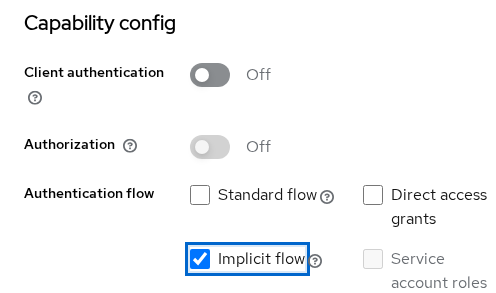
The screenshot above shows the legacy state before migration: Implicit flow ON and Standard flow OFF.
After migration, confirm that old response_type=token requests are rejected:
curl -sS -D - -o /dev/null \
  "${AUTH_URL}?client_id=implicit-lab-spa&response_type=token&redirect_uri=http%3A%2F%2F127.0.0.1%3A9100%2Fcallback&scope=openid&state=lock"
Sample output (trimmed to Location):
Location: http://127.0.0.1:9100/callback#error=unauthorized_client&error_description=Client+is+not+allowed+to+initiate+browser+login+with+given+response_type.+Implicit+flow+is+disabled+for+the+client.&state=lock&iss=...unauthorized_client with Implicit flow is disabled for the client is the expected signal for older frontend code that still sends response_type=token.
Common migration errors
| Symptom | Likely cause | Fix |
|---|---|---|
unauthorized_client / implicit flow disabled |
Client has Implicit flow OFF (expected after migration) | Update SPA to response_type=code with PKCE; do not re-enable implicit |
invalid_request / missing code_challenge |
PKCE required on client | Send code_challenge and code_challenge_method=S256 on the auth request |
invalid_grant on code exchange |
Wrong redirect_uri, reused code, or verifier mismatch |
Match redirect URI exactly; exchange immediately; keep verifier paired with challenge |
| Blank page after login, no token | Still parsing location.hash after switching to code flow |
Read code from query string; let the OIDC library handle token exchange |
Summary
Keycloak Implicit Flow returns an access token in the URL fragment when the SPA sends response_type=token. That pattern made sense before PKCE, but it exposes tokens through the browser front channel and does not deliver a refresh token in the redirect. RFC 9700 and RFC 10017 recommend Authorization Code with PKCE for browser applications instead.
On Keycloak 26.7.3, find clients that still have Implicit flow enabled, migrate the same client to Standard flow with PKCE, and confirm that old response_type=token requests receive unauthorized_client. You can usually keep the same redirect URI; the application changes how it starts and finishes OIDC. After migration, the browser receives only an authorization code in the redirect. The SPA exchanges that code at Keycloak's token endpoint and receives the tokens there instead of putting an access token in the authorization response.
References
- RFC 9700 — OAuth 2.0 Security Best Current Practice
- RFC 10017 — OAuth 2.0 for Browser-Based Applications
- RFC 6749 — OAuth 2.0 Implicit Grant
- RFC 7636 — Proof Key for Code Exchange (PKCE)
- OpenID Connect Core 1.0 — Authentication flows
- Keycloak Server Administration Guide — OIDC clients
Frequently Asked Questions
Is implicit flow deprecated?
Keycloak still supports Implicit Flow, so the setting has not disappeared from the product. However, RFC 9700 says clients should not use the implicit grant, and RFC 10017 says browser-based clients must use Authorization Code rather than Implicit to obtain access tokens. Migrate existing SPAs to Standard flow with PKCE and disable Implicit flow on each client.
Why is there no refresh token?
The implicit redirect delivers access (and optionally ID) tokens in the fragment. Keycloak does not issue a refresh token in that redirect. Because the implicit response has no refresh token, the application must obtain a new access token through another authorization request. Older SPAs often implemented this with hidden-iframe or silent-renew techniques, which are less reliable with modern browser privacy restrictions.
Can a SPA use code flow?
Yes. PKCE protects the authorization-code exchange for public browser clients that cannot safely keep a client secret. Keycloak can enforce PKCE for the client by setting PKCE Method to S256.
Will migration change redirect URIs?
Usually not. You keep the same Valid redirect URIs and change response_type, PKCE parameters, and how the frontend handles the callback (?code= instead of #access_token=).
How do I disable implicit flow?
Open the client in Admin Console → Settings → Capability config → turn Implicit flow OFF while Standard flow stays ON. Verify response_type=token returns unauthorized_client before you remove old SDK settings from the codebase.
