
| Tested on | Red Hat Enterprise Linux 10.2 (Coughlan) |
|---|---|
| Package | podman-5.8.2-5.el10_2.x86_64quay.io/keycloak/keycloak:26.7.3 |
| Applies to | Any Linux host with Podman or Docker |
| Privilege | Keycloak admin access to edit realm SMTP and login settings; normal user for browser reset tests |
| Lab environment | Keycloak 26.7.3 on http://127.0.0.1:8080/ — Install Keycloak with Podman |
| Scope | Realm SMTP prerequisites, enabling forgot password, user email and action-token lifespan, full reset-credentials flow for local users, enumeration-safe responses, expired and reused links, federated-user limits, and troubleshooting missing links or mail failures. Does not cover production SMTP provider setup, the full required-actions catalog, or custom email themes. |
| Related guides | Install Keycloak with Podman Keycloak required actions Keycloak password policy Create and manage users in Keycloak Keycloak user federation vs identity brokering |
Forgot password lets users recover access without an admin reset. Keycloak sends a signed action-token link, runs the built-in reset-credentials flow, and lands on the Update password screen. An action token is a short-lived signed JWT embedded in the reset link. It authorizes only the specific reset action; it is not an access token for APIs.
A working forgot-password flow depends on four pieces: SMTP, the realm setting, an email address on the user, and the built-in reset-credentials flow. This guide configures each one and then tests both successful and failure paths. The lab uses a local SMTP catcher on 127.0.0.1:1025 with host-network Podman so Keycloak can reach the listener.
Forgot-password flow and dependencies
Before you hunt for a missing link, confirm each dependency:
| Dependency | Why it matters |
|---|---|
Realm SMTP (smtpServer) |
Without outbound mail, the UI may still say “check your email” but nothing is delivered |
resetPasswordAllowed |
Realm Login setting that exposes Forgot Password? on the password step |
User email |
Keycloak needs a mailbox address on the account to send the reset link |
| Built-in reset credentials flow | Authentication flow Keycloak binds when the user starts a reset |
actionTokenGeneratedByUserLifespan |
Caps how long the emailed /login-actions/action-token link stays valid (seconds) |
  ┌──────────────┐  Forgot Password?   ┌─────────────────────┐
  │ Login (pwd)  │ ─────────────────► │ reset credentials    │
  │ step         │  submit username   │ authentication flow  │
  └──────┬───────┘                    └──────────┬──────────┘
         │                                       │ SMTP
         │                                       v
         │                            ┌──────────────────────┐
         │                            │ Email with action-   │
         │                            │ token link           │
         │                            └──────────┬───────────┘
         │                                       │ user opens link
         v                                       v
  ┌──────────────┐                    ┌──────────────────────┐
  │ Generic      │                    │ UPDATE_PASSWORD form │
  │ confirmation │                    │ (new password)       │
  │ (same for    │                    └──────────────────────┘
  │ known or     │
  │ unknown user)│
  └──────────────┘
Lab user forgot-lab-user in realm golinuxcloud has an email address on the account for the walkthrough. Side effects: realm SMTP points at the local catcher for this article only.
Configure SMTP first
Keycloak does not ship a mail relay. Point realm email settings at a relay your container can reach. With host-network Podman, 127.0.0.1:1025 works; bridge networking often needs the host gateway IP instead.
Admin Console: open Realm settings → Email on golinuxcloud and configure:
- Host — SMTP server hostname or IP (
127.0.0.1in this lab) - Port — listener port (
1025for the local catcher) - From — envelope sender Keycloak uses in reset mail
- Encryption — SSL / STARTTLS switches to match your relay
- Authentication — username and password when the relay requires auth
Click Test connection before you test forgot password. Keycloak sends a probe message to the address you enter and logs SMTP errors if the relay is unreachable.
Admin REST equivalent — export shared lab variables and apply the same profile:
export KC_BASE='http://127.0.0.1:8080'
export REALM='golinuxcloud'

ADMIN_TOKEN=$(curl -sS -X POST "${KC_BASE}/realms/master/protocol/openid-connect/token" \
  -d 'grant_type=password' -d 'client_id=admin-cli' \
  -d 'username=admin' \
  -d 'password=YOUR_ADMIN_PASSWORD' | \
  python3 -c "import sys,json; print(json.load(sys.stdin)['access_token'])")
The Admin REST examples use admin-cli only for local lab automation; this is not an application login pattern.
Pull the current SMTP block so you know what you are replacing:
curl -sS -H "Authorization: Bearer ${ADMIN_TOKEN}" \
  "${KC_BASE}/admin/realms/${REALM}" | \
  python3 -c "import sys,json; r=json.load(sys.stdin); print(r.get('smtpServer',{}))"
Sample output on a fresh realm:
{}Merge a minimal lab profile (no TLS, open relay on localhost):
curl -sS -o /dev/null -w 'smtp-update:%{http_code}\n' -X PUT \
  -H "Authorization: Bearer ${ADMIN_TOKEN}" -H 'Content-Type: application/json' \
  "${KC_BASE}/admin/realms/${REALM}" \
  -d '{
    "smtpServer": {
      "host": "127.0.0.1",
      "port": "1025",
      "from": "keycloak-noreply@golinuxcloud.lab",
      "fromDisplayName": "GoLinuxCloud Keycloak",
      "ssl": "false",
      "starttls": "false",
      "auth": "false"
    }
  }'
Sample output:
smtp-update:204HTTP 204 means Keycloak accepted the partial realm update. Production relays need TLS, credentials, and DNS-aligned from addresses; this article stops at proving Keycloak can hand a message to SMTP.
Enable forgot password
Turn on self-service reset at the realm level. In the Admin Console, open Realm settings → Login and enable Forgot password.
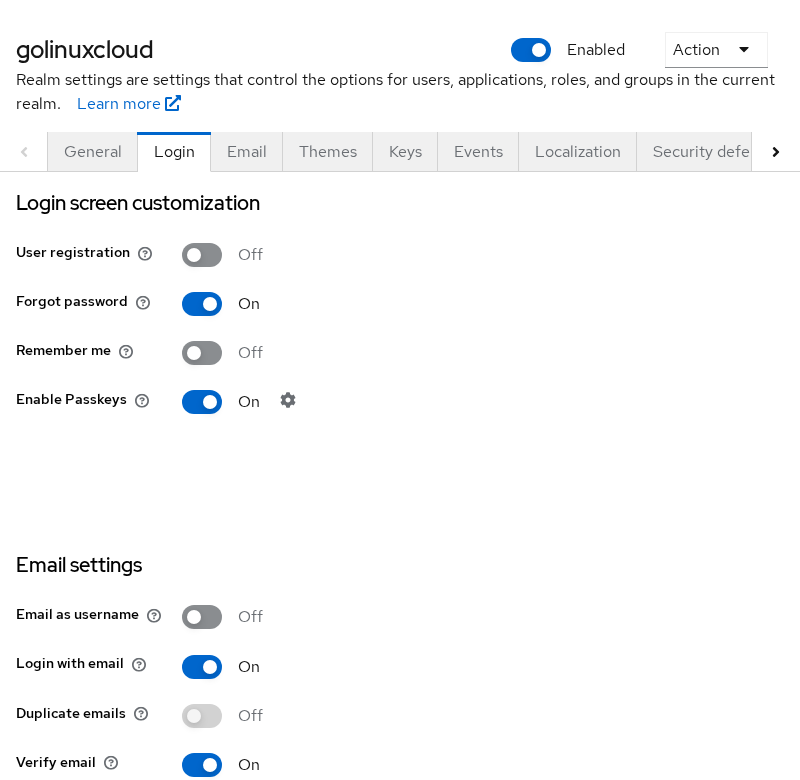
The same flag through Admin REST is resetPasswordAllowed:
curl -sS -H "Authorization: Bearer ${ADMIN_TOKEN}" \
  "${KC_BASE}/admin/realms/${REALM}" | python3 <<'PY'
import json, os, sys, urllib.request
realm = json.load(sys.stdin)
realm['resetPasswordAllowed'] = True
realm['loginWithEmailAllowed'] = True
req = urllib.request.Request(
    f"{os.environ['KC_BASE']}/admin/realms/{os.environ['REALM']}",
    data=json.dumps(realm).encode(),
    headers={
        'Authorization': f"Bearer {os.environ['ADMIN_TOKEN']}",
        'Content-Type': 'application/json',
    },
    method='PUT',
)
urllib.request.urlopen(req)
print('resetPasswordAllowed=true')
PY
Sample output:
resetPasswordAllowed=trueKeycloak 26 uses a username-first login page. Forgot Password? appears on the password step after you submit a username, not on the first screen.
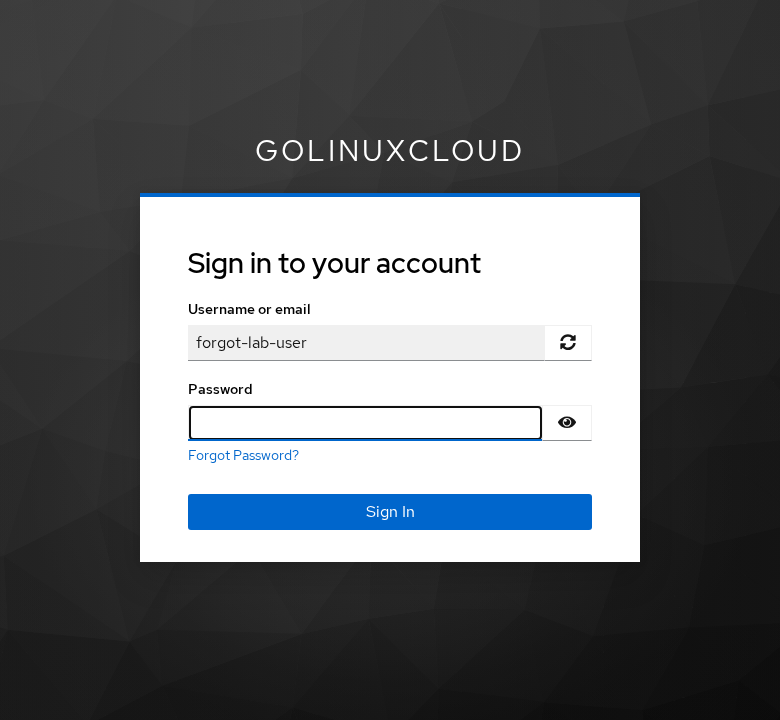
If the link is still missing, confirm resetPasswordAllowed is true and that you reached the password form (enter a username, click Sign In).
Set user email and reset-link lifespan
Reset email targets the email field on the user record. Create or update the account with a reachable address — see Create and manage users in Keycloak for User Profile fields such as employeeId on this lab realm.
Check reset-link timing before you blame “broken” links:
curl -sS -H "Authorization: Bearer ${ADMIN_TOKEN}" \
  "${KC_BASE}/admin/realms/${REALM}" | \
  python3 -c "
import sys, json
r = json.load(sys.stdin)
print('actionTokenGeneratedByUserLifespan', r.get('actionTokenGeneratedByUserLifespan'))"
Sample output:
actionTokenGeneratedByUserLifespan 300| Setting | Meaning |
|---|---|
actionTokenGeneratedByUserLifespan |
Maximum lifetime of the user-generated reset link (seconds) |
In the Admin Console this corresponds to the user-initiated action lifespan under realm token settings. Shorter values help security testing; raise them only when mail latency or mobile clients need more time.
Run a complete password reset
Walk the flow the way an end user would, using the built-in account client (standard browser login, no PKCE):
http://127.0.0.1:8080/realms/golinuxcloud/protocol/openid-connect/auth?client_id=account&redirect_uri=http://127.0.0.1:8080/realms/golinuxcloud/account/&response_type=code&scope=openidEnter forgot-lab-user, continue to the password step, and click Forgot Password?
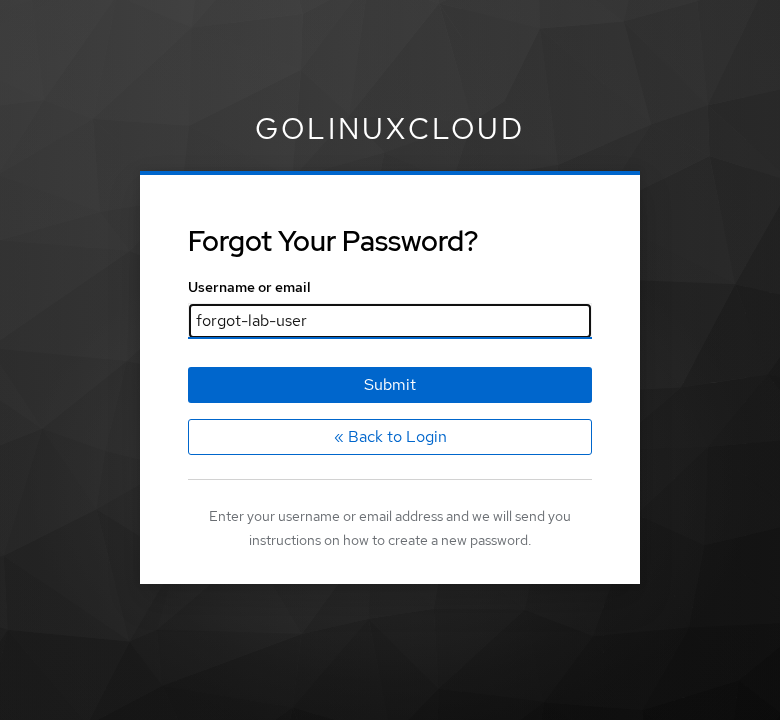
Submit the username again on the reset form. Keycloak shows the same confirmation whether or not it found a mailbox to target (covered in the next section):
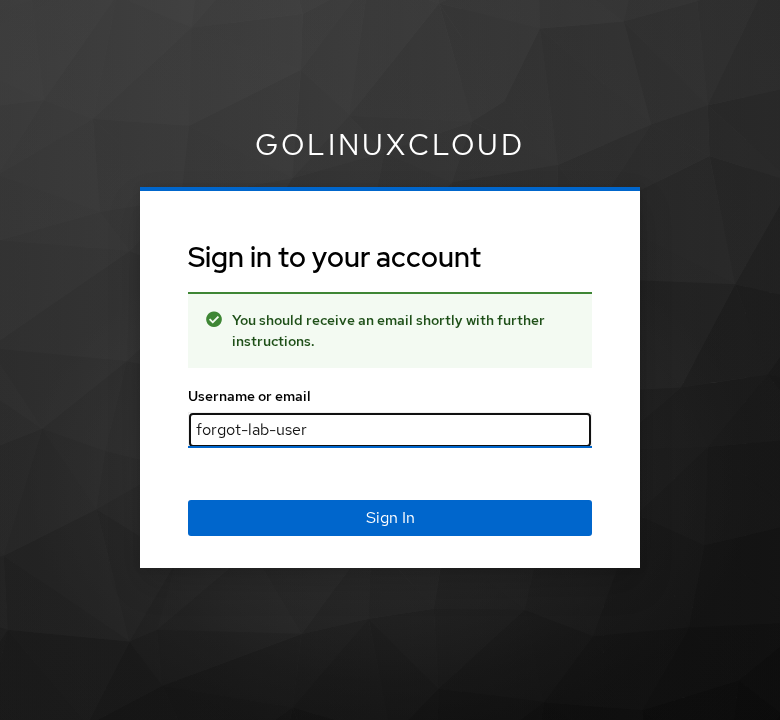
The plain-text mail contains a link shaped like:
http://127.0.0.1:8080/realms/golinuxcloud/login-actions/action-token?key=eyJhbGciOiJIUzUxMiIs...Open the link in a browser. Keycloak signs the user in for that action only and shows Update password:
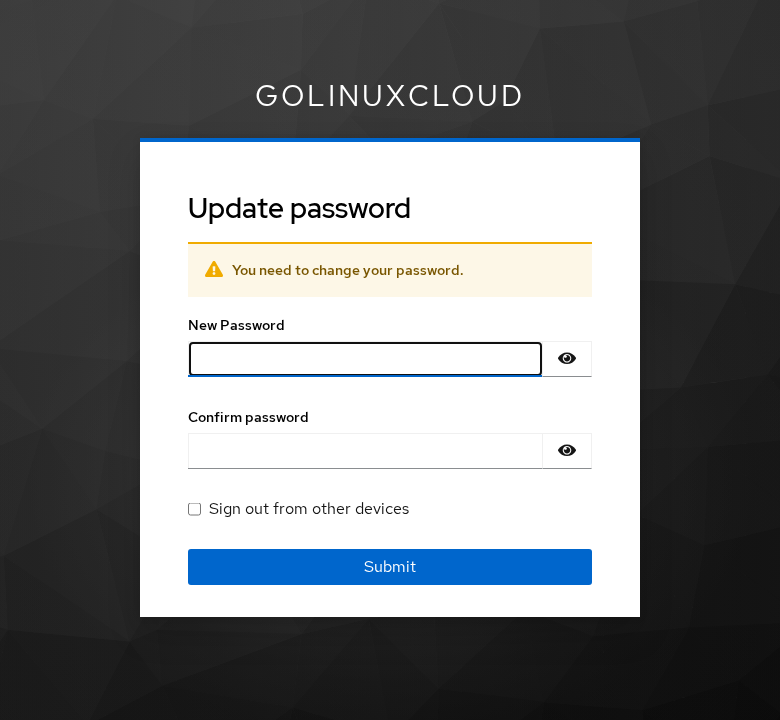
Set and confirm a new password, then submit. A successful change returns you toward the client redirect (here the Account Console).
Keycloak 26.x also controls what happens after the reset through Authentication → Flows → reset credentials → Send Reset Email → Force login after reset. The current default is only-federated: users stored directly in Keycloak can continue in the same authentication session, while federated users are required to sign in again. Set it to true if you want every user to authenticate again after resetting credentials.
After reset, sign out if necessary and log in again using forgot-lab-user and the new password.
The new password must still satisfy the realm password policy when rules are configured.
How Keycloak prevents user enumeration
Submitting no-such-user-9999 on the forgot-password form returns the same banner as a real account:
You should receive an email shortly with further instructions.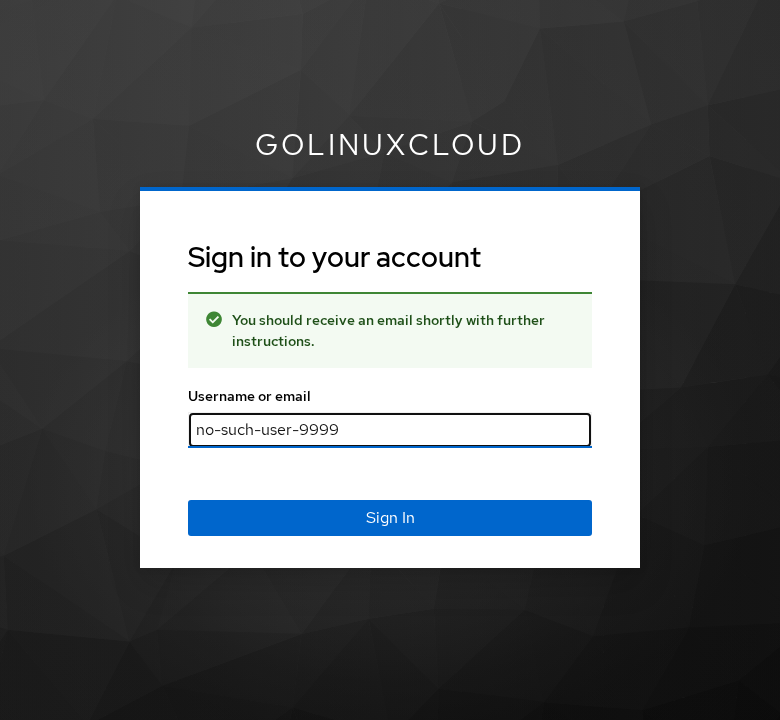
No email is captured for the unknown name in this lab, but the browser message does not reveal that fact. That is deliberate: different text would let attackers learn which usernames exist.
Trade-off: help-desk tickets from users who mistyped an address look the same as successful sends. Combine safe UI copy with mail-server logs or Keycloak events when you need to diagnose delivery.
Reset-credentials authentication flow
Forgot password is not a separate microservice. It is the built-in reset credentials authentication flow (alias reset credentials, builtIn=true).
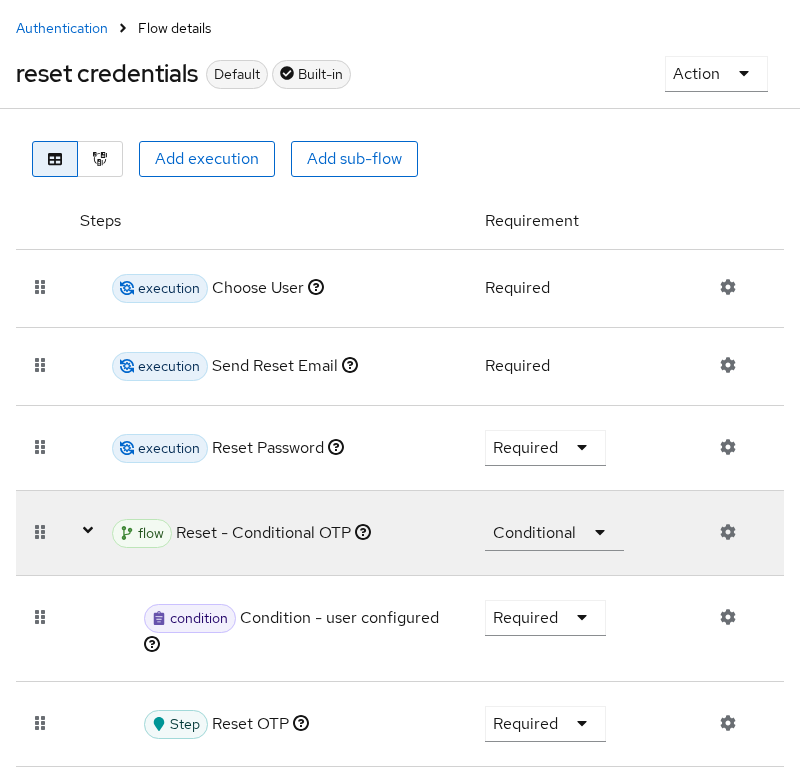
The default tree runs Choose User, Send Reset Email, Reset Password, and Reset - Conditional OTP. List flows when you need to confirm the alias or clone it:
curl -sS -H "Authorization: Bearer ${ADMIN_TOKEN}" \
  "${KC_BASE}/admin/realms/${REALM}/authentication/flows" | \
  python3 -c "
import sys, json
for f in json.load(sys.stdin):
    if 'reset' in f.get('alias','').lower():
        print(f['alias'], 'builtIn=', f.get('builtIn'))"
Sample output:
reset credentials builtIn= TrueCustom copies belong in Authentication → Flows when you need extra steps (for example reCAPTCHA). Keep executions aligned with authentication flows concepts: the reset flow only runs after the user chooses Forgot Password? and submits an identifier.
Action links are single-use. Opening the same /login-actions/action-token URL twice after a successful password change shows an error page instead of the form again.
Password reset can also reset OTP
Keycloak's built-in reset credentials flow is not limited to the password. If the user already has OTP configured, the flow can also require the user to configure OTP again.
The default flow includes a Reset - Conditional OTP subflow. If you want forgot-password to change only the password, open Authentication → Flows → reset credentials and disable Reset - Conditional OTP.
reset credentials
    |
    +-- Choose User
    |
    +-- Send Reset Email
    |
    +-- Reset Password
    |
    +-- Reset - Conditional OTP
Federated user behavior
If the user storage provider is read-only, Keycloak cannot write the new password to the external directory. The reset flow may reach the password-update step, but the credential update fails when Keycloak attempts to write through the provider. Those users should use the directory's own password-reset mechanism unless the federation provider is configured for password writes.
Keycloak 26.x also treats federated users differently after reset: with Force login after reset at the default only-federated setting, federated users must sign in again when the reset completes in the same browser session.
See Keycloak user federation vs identity brokering for provider modes. Writable LDAP password sync is a separate integration decision; do not assume forgot password replaces IdP workflows.
Troubleshoot missing button, email, and link errors
| Symptom | Likely cause | Fix |
|---|---|---|
| No Forgot Password? link | resetPasswordAllowed false, or still on username-only step |
Enable the realm switch; enter username first, then open the password screen |
| Confirmation shown, no email | SMTP host/port wrong from container network, relay down, or user has no email |
Fix smtpServer.host (127.0.0.1 with host networking), verify listener, set an email address on the user |
| HTTP 500 on submit | SMTP unreachable (common when using bridge IP instead of host gateway) | Match SMTP host to a route Keycloak can open; read podman logs for SMTPTransport stack traces |
| Link shows Action expired. | actionTokenGeneratedByUserLifespan elapsed, or clock skew |
Resend reset; widen lifespan temporarily; sync NTP on host and containers |
| Link invalid after first use | Token consumed | Request a fresh reset; old links cannot be replayed |
| Weak password rejected at end | Realm password policy | Follow policy hints on the form; see password policy guide |
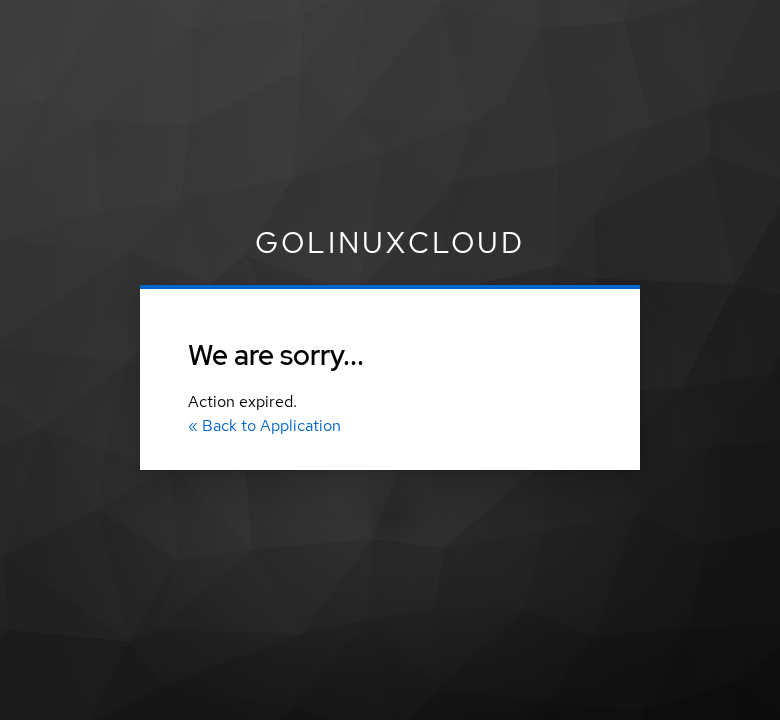
When SMTP is broken, Keycloak still renders the success banner but logs a connection failure. Troubleshoot SMTP delivery from Keycloak logs after a failed send:
podman logs --tail 20 keycloak-groups-lab 2>&1 | grep -iE 'SMTP|mail|19999'Sample output (port intentionally wrong for the test):
at org.eclipse.angus.mail.smtp.SMTPTransport.openServer(SMTPTransport.java:2193)Enable Realm settings → Events (already on in this lab) and filter for SEND_RESET_PASSWORD or RESET_PASSWORD when you need an audit trail in the Admin Console.
execute-actions-email with UPDATE_PASSWORD is an admin-driven cousin to forgot password — different trigger, same action form. See Keycloak required actions for that path.
Summary
Forgot password in Keycloak is a chain: SMTP that the container can reach, resetPasswordAllowed on the realm, a user account with an email address, and the built-in reset-credentials flow that emails an action-token link. The login UI stays enumeration-safe by showing the same confirmation for unknown usernames, which means you diagnose delivery with logs and events rather than the banner text.
I walked a local user from Forgot Password? through the Update password form, signed in again with the new password, and reproduced expired and reused link errors by tightening actionTokenGeneratedByUserLifespan. The default reset flow can also reconfigure OTP through Reset - Conditional OTP; federated read-only accounts need directory-side resets instead.
For production, pair this flow with a real relay, sensible token lifespans, and password policy rules so self-service resets meet the same strength bar as admin-initiated changes.
References
- Keycloak Server Administration Guide — Forgot password
- Keycloak Server Administration Guide — Email settings
- Keycloak Server Administration Guide — Authentication flows
Frequently Asked Questions
Why is Forgot Password not visible?
Keycloak shows the link on the password step after username entry when resetPasswordAllowed is true. If you only see the username form, submit a username first. Also confirm the realm Login switch is enabled and you are not using a client whose theme hides recovery links.
Why is no email sent?
The UI confirmation does not prove delivery. Check that smtpServer points at a host Keycloak can open from its network namespace, the relay is listening, and the user has a valid email attribute. Container logs often show SMTPTransport connection errors when the host or port is wrong.
How long is the reset link valid?
By default actionTokenGeneratedByUserLifespan is 300 seconds (five minutes) for user-initiated resets. Admins can change the realm value; expired tokens show Action expired.
Can users reset LDAP passwords through Keycloak?
Only when the user storage provider allows password writes to the directory. Read-only LDAP or AD federation blocks Keycloak-side password updates; users must use directory self-service or an admin reset instead.
Why does Keycloak show the same message for unknown users?
To prevent account enumeration. Attackers cannot distinguish “unknown username” from “email dispatched” using the browser text alone. Use mail logs or events when you need to trace a specific request.
