
| Tested on | Red Hat Enterprise Linux 10.2 (Coughlan) |
|---|---|
| Package | podman-5.8.2-5.el10_2.x86_64quay.io/keycloak/keycloak:26.7.3 |
| Applies to | Any Linux host with Podman or Docker |
| Privilege | Keycloak admin access to edit realm password policy; normal user for Account Console password-change tests |
| Lab environment | Keycloak 26.7.3 on http://127.0.0.1:8080/ — Install Keycloak with Podman |
| Scope | Realm password policy syntax, user-facing composition and lifecycle rules, hashing algorithm and iteration settings, when policies apply to existing credentials, temporary passwords with required actions, federated-user boundaries, and troubleshooting rejected passwords. Does not cover brute-force lockout, forgot-password flows, or LDAP/Active Directory password-policy configuration. |
| Related guides | Create and manage users in Keycloak Keycloak required actions Keycloak user federation vs identity brokering Keycloak brute-force detection Install Keycloak with Podman |
A tighter Keycloak password policy does not rewrite every stored hash the moment you click Save. Keycloak checks composition rules when a password is created or changed. Changing the realm's hashing configuration does not rewrite every stored password immediately — Keycloak can update an older password hash to the current hashing configuration after that user successfully authenticates.
This guide separates user-facing rules (length, history, expiry) from storage policies (hashAlgorithm, hashIterations), tests weak, reused, and regex-rejected passwords on Keycloak 26.7.3, and shows that an existing user keeps logging in with an old short password until they set a new one. For temporary passwords and the UPDATE_PASSWORD screen, see Keycloak required actions.
How Keycloak password policy works
Keycloak password policy affects two different parts of password handling:
- Password validation — decides whether a new or changed password is acceptable.
- Password storage — controls how an accepted password is hashed before Keycloak stores it.
  ┌──────────────────┐   create / change / reset   ┌─────────────────────────┐
  │ Realm password   │ ───────────────────────────►│ Policy validator          │
  │ policy string    │                             │ (length, history, regex)  │
  └────────┬─────────┘                             └────────────┬────────────┘
           │ hashAlgorithm / hashIterations                      │
           v                                                     v
  ┌──────────────────┐   successful login may rehash   ┌───────┴──────────────┐
  │ Credential store │ ◄───────────────────────────────│ Password + history   │
  │ (local users)    │                                 │ credential records   │
  └──────────────────┘                                 └──────────────────────┘
The examples below use three users to reproduce these behaviors in realm golinuxcloud:
| Username | Scenario |
|---|---|
pwdpolicy-lab |
Length, history, and regex rejection |
pwdpolicy-temp |
Temporary password → UPDATE_PASSWORD at login |
pwdpolicy-existing |
Short password survives policy tighten until reset |
Side effects: realm passwordPolicy is set for the walkthrough. Revert or adjust before other labs share the same realm.
Keycloak password policy overview
Keycloak stores one passwordPolicy string on the realm. Each clause uses policyName(value); combine clauses with and.
| Category | Example policies | Checked when |
|---|---|---|
| Composition | length, digits, upperCase, lowerCase, specialChars, notUsername, regexPattern, passwordBlacklist |
Password create or change |
| Lifecycle | passwordHistory, forceExpiredPasswordChange |
Password change; expiry on login |
| Storage | hashAlgorithm, hashIterations |
Password write; rehash on login when parameters increase |
User-facing rules answer “is this password acceptable?” Hashing policies answer “how is the accepted password stored?”
User-facing password rules
Open Authentication → Policies in the Admin Console. The Password policy tab lists active rules and an Add policy control.
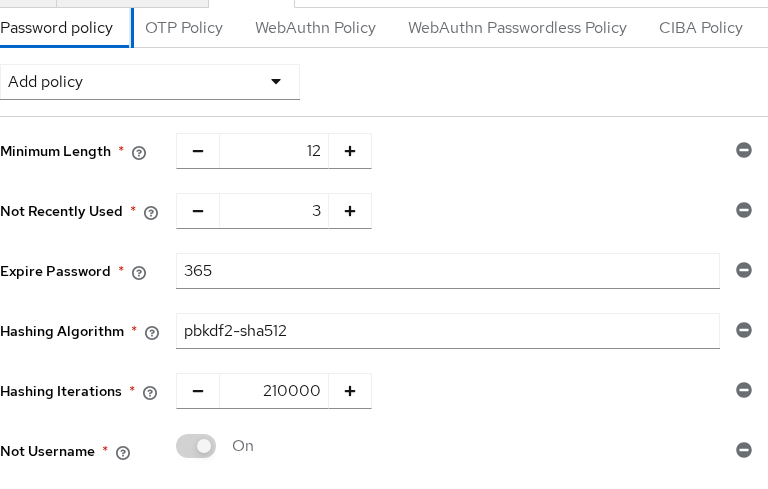
| Admin Console label | Realm passwordPolicy clause |
|---|---|
| Minimum Length | length(12) |
| Not Recently Used | passwordHistory(3) |
| Expire Password | forceExpiredPasswordChange(365) |
| Hashing Algorithm | hashAlgorithm(...) |
| Hashing Iterations | hashIterations(...) |
| Not Username | notUsername |
The Admin Console uses friendly labels, while the realm representation uses the provider IDs shown in the right column. They configure the same policy.
Keycloak also provides Not Recently Used (In Days). Do not confuse the two controls:
- Not Recently Used keeps a count-based history, such as the last 3 passwords.
- Not Recently Used (In Days) prevents reuse based on how recently a password was used.
The lab policy used for API tests:
length(12) and passwordHistory(3) and forceExpiredPasswordChange(365) and hashAlgorithm(pbkdf2-sha512) and hashIterations(210000) and notUsernameApply it with the Admin REST API when you prefer automation:
export KC_BASE='http://127.0.0.1:8080'
export REALM='golinuxcloud'

ADMIN_TOKEN=$(curl -sS -X POST "${KC_BASE}/realms/master/protocol/openid-connect/token" \
  -d 'grant_type=password' -d 'client_id=admin-cli' \
  -d 'username=admin' -d 'password=ChangeMe!2026' | \
  python3 -c "import sys,json; print(json.load(sys.stdin)['access_token'])")
Read the current policy before you change it:
curl -sS -H "Authorization: Bearer ${ADMIN_TOKEN}" \
  "${KC_BASE}/admin/realms/${REALM}" | \
  python3 -c "import sys,json; print('passwordPolicy:', json.load(sys.stdin).get('passwordPolicy'))"
Set the lab policy:
curl -sS -H "Authorization: Bearer ${ADMIN_TOKEN}" \
  "${KC_BASE}/admin/realms/${REALM}" | python3 -c "
import json, os, sys, urllib.request
realm = json.load(sys.stdin)
realm['passwordPolicy'] = (
    'length(12) and passwordHistory(3) and forceExpiredPasswordChange(365) '
    'and hashAlgorithm(pbkdf2-sha512) and hashIterations(210000) and notUsername'
)
T = os.environ['ADMIN_TOKEN']
KC = os.environ['KC_BASE']
REALM = os.environ['REALM']
req = urllib.request.Request(
    f'{KC}/admin/realms/{REALM}',
    data=json.dumps(realm).encode(),
    headers={'Authorization': f'Bearer {T}', 'Content-Type': 'application/json'},
    method='PUT',
)
urllib.request.urlopen(req)
print('passwordPolicy updated')"
A password shorter than 12 characters fails admin reset with HTTP 400:
USER_ID=$(curl -sS -H "Authorization: Bearer ${ADMIN_TOKEN}" \
  "${KC_BASE}/admin/realms/${REALM}/users?username=pwdpolicy-lab&exact=true" | \
  python3 -c "import sys,json; print(json.load(sys.stdin)[0]['id'])")

curl -sS -w '\nHTTP:%{http_code}\n' -X PUT \
  -H "Authorization: Bearer ${ADMIN_TOKEN}" -H 'Content-Type: application/json' \
  "${KC_BASE}/admin/realms/${REALM}/users/${USER_ID}/reset-password" \
  -d '{"type":"password","value":"short1!","temporary":false}'
Sample output:
{"error":"invalidPasswordMinLengthMessage","error_description":"Invalid password: minimum length 12."}
HTTP:400
On the Account Console update form, the same minimum-length rule surfaces in the UI:
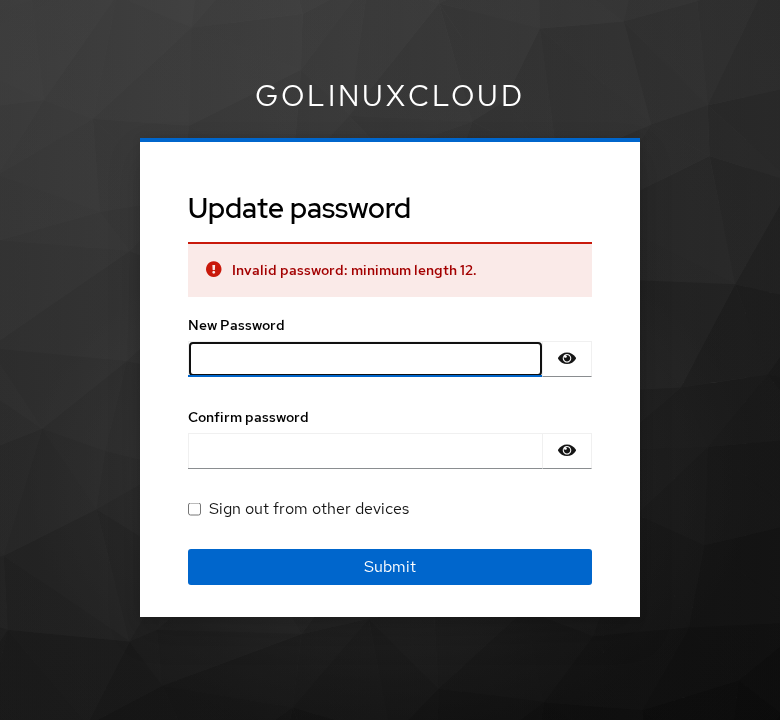
Prefer length and blocklists over long special-character checklists. A 12-character passphrase such as GoodPassphrase!2026 is easier for users to remember than P@ss1 padded to meet four arbitrary composition counters.
Block common passwords with Password Blacklist
Keycloak can reject passwords contained in a denylist file through the Password blacklist policy.
The file contains one blocked password per line and is normally placed under:
$KC_HOME/data/password-blacklists/
You then select the blacklist file from Authentication → Policies → Password policy.
This is different from a regex rule. A regex checks the password's format, while a blacklist rejects specific known passwords.
The blacklist is only as useful as the file you provide. Keycloak does not automatically download or maintain a breached-password database; you supply the denylist file and select it in the password policy.
Password history and expiration
passwordHistory(3) stores prior hashes so users cannot rotate back to a recent password. After four admin resets with different passphrases, setting an earlier value returned HTTP 400 with invalidPasswordHistoryMessage.
Keycloak also creates a password-history credential alongside the active password credential. Inspect both through the credentials API:
curl -sS -H "Authorization: Bearer ${ADMIN_TOKEN}" \
  "${KC_BASE}/admin/realms/${REALM}/users/${USER_ID}/credentials" | \
  python3 -c "
import json, sys
for c in json.load(sys.stdin):
    print(c['type'], c.get('credentialData'))"
The active password and history entries both showed pbkdf2-sha512 at 210000 iterations in credentialData.
forceExpiredPasswordChange(365) marks passwords older than 365 days expired. On the next login Keycloak queues UPDATE_PASSWORD as a required action. The number is days, not minutes—use a short lab realm copy if you need to demo expiry quickly.
Password hashing and automatic rehash
Keycloak 26.x uses Argon2 by default for non-FIPS deployments. pbkdf2-sha512 is the default in FIPS deployments.
This lab explicitly switches to pbkdf2-sha512 so that the hashIterations setting and login-time rehash behavior are easy to observe. It should not be read as a recommendation to replace Argon2 with PBKDF2 on a normal Keycloak deployment.
The two policies used in this lab are:
hashAlgorithm(pbkdf2-sha512)— selects PBKDF2 with SHA-512hashIterations(210000)— sets the PBKDF2 work factor
When a user logs in successfully, Keycloak can upgrade stored iterations to match the realm policy. I lowered the policy to hashIterations(50000), logged in, then raised it to hashIterations(600000) and authenticated again. The credentialData on the password credential moved from 50000 to 600000 iterations while the algorithm stayed pbkdf2-sha512.
That upgrade is lazy: it happens on successful authentication, not for every account the moment you edit the realm.
When policy changes take effect
A password-policy change does not automatically make existing passwords non-compliant at login.
The lab created pwdpolicy-existing with no policy and password OldShort1! (eight characters). After enabling length(12):
- Password grant login with
OldShort1!still returned tokens. - Admin reset with the same weak password failed policy validation.
- Admin reset with
NewLongPassphrase!2026succeeded.
Changing a composition rule such as length(12) does not test every existing password again. For example, a user whose existing password is only eight characters can continue authenticating with it. The 12-character rule is enforced the next time that password is created or changed.
Hashing-policy changes are different: Keycloak can transparently rehash an existing password after a successful login without asking the user to choose a new password.
Plan communications and forced UPDATE_PASSWORD assignments when you need everyone off weak passwords—not only a realm policy edit.
Configure and test a policy
Add policies from the Admin Console or build the and-chained string in automation. Test each rule with a deliberate failure before you roll the policy to production.
Regex policies use regexPattern(pattern):
curl -sS -H "Authorization: Bearer ${ADMIN_TOKEN}" \
  "${KC_BASE}/admin/realms/${REALM}" | python3 -c "
import json, os, urllib.request
realm = json.load(sys.stdin)
base = realm['passwordPolicy']
realm['passwordPolicy'] = base + ' and regexPattern(^[^@]+!20[0-9]{2}$)'
T = os.environ['ADMIN_TOKEN']
KC = os.environ['KC_BASE']
REALM = os.environ['REALM']
req = urllib.request.Request(
    f'{KC}/admin/realms/{REALM}',
    data=json.dumps(realm).encode(),
    headers={'Authorization': f'Bearer {T}', 'Content-Type': 'application/json'},
    method='PUT',
)
urllib.request.urlopen(req)
print('regexPattern added')"
A password that misses the pattern returns:
{"error":"invalidPasswordRegexPatternMessage","error_description":"Invalid password: fails to match regex pattern(s)."}Keep regexes short and documented. A pattern that requires !20xx at the end is useful for teaching but rarely belongs in production.
Temporary passwords and required actions
A temporary password is a lifecycle shortcut, not a separate policy type. Reset with "temporary": true and Keycloak adds UPDATE_PASSWORD to requiredActions:
TEMP_ID=$(curl -sS -H "Authorization: Bearer ${ADMIN_TOKEN}" \
  "${KC_BASE}/admin/realms/${REALM}/users?username=pwdpolicy-temp&exact=true" | \
  python3 -c "import sys,json; print(json.load(sys.stdin)[0]['id'])")

curl -sS -o /dev/null -w 'reset-temporary:%{http_code}\n' -X PUT \
  -H "Authorization: Bearer ${ADMIN_TOKEN}" -H 'Content-Type: application/json' \
  "${KC_BASE}/admin/realms/${REALM}/users/${TEMP_ID}/reset-password" \
  -d '{"type":"password","value":"TempPassphrase!2026","temporary":true}'
Sample output:
reset-temporary:204The temporary password must still satisfy composition rules. HTTP 204 means the password was accepted; the user record then includes UPDATE_PASSWORD:
curl -sS -H "Authorization: Bearer ${ADMIN_TOKEN}" \
  "${KC_BASE}/admin/realms/${REALM}/users/${TEMP_ID}" | \
  python3 -c "import sys,json; print('requiredActions:', json.load(sys.stdin).get('requiredActions'))"
Sample output:
requiredActions: ['UPDATE_PASSWORD']At browser login, Keycloak stops on the update form before Account Console access:
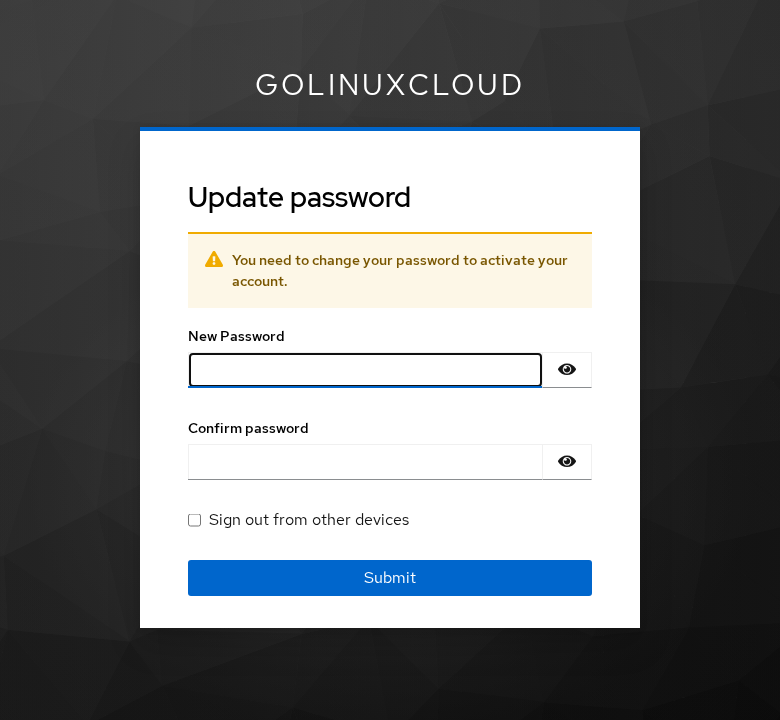
The same flow applies when creating users with temporary passwords through Admin Console or API.
Federated user considerations
Password policy on a Keycloak realm applies to passwords Keycloak stores for local users. For LDAP or Active Directory federation:
- Directory bind authentication can leave password changes and complexity rules with the directory.
- Read-only LDAP mappers block Keycloak-side password updates even when realm policy would allow them.
- Brokering through an external IdP means the upstream provider owns password rules.
- Keycloak 26.6+ also has an Enable LDAP password policy option that can react to LDAP password-policy controls, for example by adding
UPDATE_PASSWORDwhen the directory reports that the password must be changed. The directory still remains responsible for storing and enforcing its own password.
Use Keycloak policy for locally managed credentials; align with directory policy when LDAP/AD is authoritative. Federation topology is covered in Keycloak user federation vs identity brokering—this page does not duplicate LDAP pwdPolicy configuration.
Policy design guidance
Practical defaults for application realms:
- Prefer password length over composition rules. Current NIST guidance uses 15 characters minimum for password-only authentication and allows a minimum of 8 characters when the password is used as part of MFA. Choose the realm value according to your authentication model and organizational requirements.
- Use
passwordHistory(5)or more on admin-facing realms; lower values are fine for teaching labs. - Add a Password blacklist denylist for commonly used or compromised passwords.
- Do not enable periodic password expiration only because the feature exists. Current NIST and OWASP guidance discourages arbitrary password rotation.
- Use
forceExpiredPasswordChangewhen your organization has a specific compliance requirement or when you intentionally need passwords rotated. - Force an immediate
UPDATE_PASSWORDwhen a credential is known or suspected to be compromised. - Raise
hashIterationsgradually when using PBKDF2; login-triggered rehash spreads load over time. - Pair policy with brute-force detection—lockout answers repeated guesses; password policy answers guessable passwords.
Document the policy string in change tickets. When auditors ask whether old passwords were invalidated, answer precisely: only after the user changes password or you force UPDATE_PASSWORD.
Troubleshoot rejected passwords
| Symptom | Likely cause | Fix |
|---|---|---|
invalidPasswordMinLengthMessage |
Password below length(n) |
Choose a longer passphrase; check policy string |
invalidPasswordHistoryMessage |
Reused one of the last N passwords | Pick a new value; history applies on user and admin reset |
invalidPasswordRegexPatternMessage |
Fails regexPattern |
Fix pattern or password; test regex in isolation |
| User logs in with “weak” old password after policy change | Policy is not retroactive | Force UPDATE_PASSWORD or admin reset with compliant password |
| Federated user cannot change password in Account Console | LDAP read-only or vendor owns passwords | Change password in directory or enable writable sync |
Login slow after raising hashIterations |
Rehash work on first successful login | Expected once per user; stage iteration increases |
Summary
Keycloak password policy is one realm string with composition, lifecycle, and hashing clauses. Composition rules run when passwords are set or changed—not as a background sweep across every stored hash. Existing users keep authenticating with old passwords until they complete an update that satisfies the new rules.
Separate what users see (length, passwordHistory, regexPattern, Password blacklist) from how Keycloak stores accepted passwords (hashAlgorithm, hashIterations). Hash parameters can upgrade on the next successful login when iterations increase, without forcing the user to choose a new password. Pair temporary passwords and forceExpiredPasswordChange with required-action assignments when you need a hard cutover.
For user lifecycle around resets and credentials, continue with Create and manage users in Keycloak.
References
- Keycloak Server Administration Guide — Password policies
- Keycloak Server Administration Guide — Password policy types
- Keycloak Admin REST API — Realm representation
Frequently Asked Questions
Do new password rules affect existing passwords immediately?
No. Keycloak validates policy when a password is created or updated, and on expiry-driven login flows. Existing hashes stay valid for login until the user or an admin sets a new password that passes the current rules. To force rotation, assign UPDATE_PASSWORD or use a temporary password reset.
Which hashing algorithm does Keycloak use?
On current Keycloak releases, Argon2 is the default for non-FIPS deployments, while pbkdf2-sha512 is used by default in FIPS mode.
This lab explicitly configures PBKDF2-SHA512 so that its iteration count and automatic rehash behavior can be inspected. Inspect credentialData on the user credentials endpoint to see the active algorithm and iteration count.
Can I use a regex in Keycloak password policy?
Yes. Add regexPattern(your-pattern) to the policy string. Invalid passwords return invalidPasswordRegexPatternMessage. Test the pattern against real passphrases before you enable it in production.
How does password history work?
passwordHistory(n) keeps hashes of the last n passwords. When a user or admin tries to set a password that matches a stored history entry, Keycloak returns invalidPasswordHistoryMessage. History entries appear as password-history credentials on the user.
Who enforces passwords for LDAP or Active Directory users?
When users authenticate against LDAP/AD, the directory password policy is usually authoritative. Keycloak realm policy applies to locally stored credentials. Read-only federation prevents Keycloak-side password changes even when realm rules would allow them.
