
| Tested on | Red Hat Enterprise Linux 10.2 (Coughlan) |
|---|---|
| Package | podman-5.8.2-5.el10_2.x86_64quay.io/keycloak/keycloak:26.7.3PyJWT 2.15.0 with cryptography |
| Applies to | Any Linux host with Podman or Docker |
| Privilege | Normal user for rootless Podman; Keycloak admin access for client configuration |
| Lab environment | Keycloak 26.7.3 on http://127.0.0.1:8080/ — Install Keycloak with Podman |
| Scope | DPoP proof JWT generation (ES256), JWK thumbprint and cnf.jkt binding, token-endpoint and resource-request proofs, optional vs required DPoP on clients, replay and htu/htm/ath failure reproduction, and a minimal Python resource API verifier. Does not cover generic JWT validation steps, mTLS client authentication, or framework-specific DPoP libraries. |
| Related guides | Keycloak JWKS and JWT validation Keycloak token revocation Keycloak public vs confidential clients Access token vs ID token vs refresh token Keycloak Standard Token Exchange |
A stolen OAuth Bearer token can normally be replayed by anyone who has the token string.
RFC 9449 DPoP (Demonstrating Proof-of-Possession) changes that model:
- The client holds an asymmetric key pair
- Keycloak places the public-key thumbprint in
cnf.jkt - Each request must include a signed proof that the client still holds the matching private key
This lab uses confidential client dpop-lab-client in realm golinuxcloud with Require DPoP bound tokens enabled. You will:
- Generate an ES256 key pair and request a DPoP-bound token from the token endpoint
- Call Keycloak UserInfo and a local resource API with
Authorization: DPoP - Reproduce replay, wrong-key, and wrong-URI failures
What threat DPoP addresses
- Bearer token — possession of the token string is enough to use it; a leak from browser storage, logs, or an intermediary can be replayed until expiry
- DPoP — does not encrypt the token; adds a cryptographic proof that the caller holds the private key registered at token issuance
- Stolen access token alone — useless to an attacker who lacks the signing key
Typical cases where DPoP helps:
- A token leaks through browser storage, proxy logs, or a compromised intermediary
- A downstream service receives a user token and could replay it against other APIs
- You need sender-constrained tokens without mutual TLS on every client
How Keycloak DPoP works
  Client generates key pair
          |
          | DPoP proof + public JWK
          v
       Keycloak
          |
          | access token
          | cnf.jkt = public-key thumbprint
          v
        Client
          |
          | access token + fresh DPoP proof
          v
     Resource API
          |
          | compare proof key thumbprint
          | with token cnf.jkt
          v
       allow / 401
Each DPoP-protected request needs a new proof JWT:
- Token endpoint — proof includes
jti,htm,htu, andiat; noathyet - Resource request — proof also includes
ath,htm, andhtuso the API can bind the call to the presented access token
Side effects in the lab realm:
- Confidential client
dpop-lab-clientwithdpop.bound.access.tokens=trueand direct-access grants - Optional comparison client
dpop-lab-optional(DPoP not required) - Local resource API on
127.0.0.1:9097(Python script in this article bundle)
For how to validate the JWT signature and iss/aud claims after DPoP checks pass, see Keycloak JWKS and JWT validation.
Bearer vs DPoP token flow
| Step | Bearer token | DPoP-bound token |
|---|---|---|
| Token request | Client ID + secret (or public-client PKCE) | Same grant parameters plus DPoP header with proof JWT |
| Token payload | No cnf claim |
cnf.jkt thumbprint of client public key |
| API request header | Authorization: Bearer <token> |
Authorization: DPoP <token> plus DPoP: <new proof> |
| Proof at token endpoint | Not used | htm=POST, htu=<token URL>, no ath |
| Proof at resource | Not used | htm and htu match the API call; ath hashes the access token |
| Stolen token alone | Usable until expiry | Not usable without the private key |
  Bearer                         DPoP
  ------                         ----
  token -----------------> API   token + signed proof -----> API
         (any holder)                    (key holder only)
Keycloak support and limitations
DPoP was available as a preview feature starting with Keycloak 23 and became an officially supported feature in Keycloak 26.4. This article was tested on Keycloak 26.7.3, where no preview feature flag is required.
| Topic | Keycloak 26.7.3 behavior |
|---|---|
| Feature flag | Supported by default — no --features=preview |
| Client switch | Require DPoP bound tokens under Capability config (maps to dpop.bound.access.tokens) |
| Optional binding | When the switch is off, a valid DPoP proof still binds the token; omitting proof issues a Bearer token |
| Lab proof algorithm | ES256 with a P-256 EC key |
| Token response | token_type: DPoP; access token typ claim is DPoP |
| Confirmation claim | cnf.jkt — base64url SHA-256 thumbprint of the proof JWK |
| Authorization scheme | Resource requests use Authorization: DPoP <token>, not Bearer |
| Confidential clients | Access token bound; refresh token secured by client secret |
| Public clients | Both access and refresh tokens bound to the DPoP key |
Limitations to plan around:
- Implicit and hybrid flows are rejected when DPoP is required on the client
- Every resource server must validate DPoP proofs — Bearer-only middleware rejects bound tokens
- Proof
iatmust fall within the server's acceptance window (replay caches also apply at resource servers) - DPoP does not replace token revocation or session management. A DPoP-bound token still follows the normal Keycloak token lifetime and revocation rules
This lab intentionally uses ES256/P-256 throughout. DPoP itself supports asymmetric proof algorithms; the sample verifier below is kept EC-only so the key-generation and verification code stay easy to follow.
Prepare the lab client
Create confidential client dpop-lab-client in realm golinuxcloud with direct-access grants and DPoP required. In the Admin Console, open Clients → dpop-lab-client → Settings, scroll to Capability config, and enable Require DPoP bound tokens:
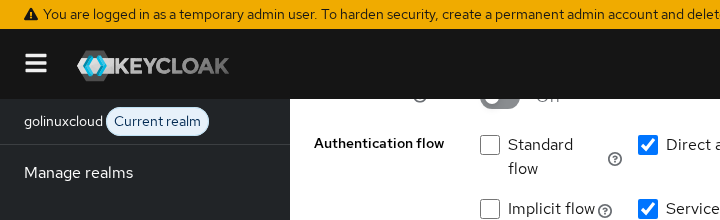
When Require DPoP bound tokens is on:
- Token requests without a valid
DPoPheader fail immediately - The same setting via Admin REST API uses client attribute
dpop.bound.access.tokens=true
Confirm the enforcement with a plain client-credentials request:
curl -s -X POST "http://127.0.0.1:8080/realms/golinuxcloud/protocol/openid-connect/token" \
  -d 'grant_type=client_credentials' \
  -d 'client_id=dpop-lab-client' \
  -d 'client_secret=dpop-lab-secret-2026'
Keycloak rejects the call because no proof accompanied the grant:
{"error":"invalid_request","error_description":"DPoP proof is missing"}Create a proof key
DPoP proofs are signed with an asymmetric key the client generates locally. This lab uses ES256 (P-256). Copy dpop_lab_helper.py from this article bundle into your working directory — it:
- Generates the key pair
- Computes the JWK thumbprint
- Builds proof JWTs
Install dependencies if needed, then generate a key pair and persist it for the rest of the lab:
python3 -m pip install --user 'PyJWT[crypto]'With PyJWT and cryptography available, generate the key pair and write it to /tmp/dpop-lab-key.pkl:
python3 <<'PY'
import pickle
from dpop_lab_helper import generate_ec_key, jwk_thumbprint

priv, jwk = generate_ec_key()
with open('/tmp/dpop-lab-key.pkl', 'wb') as fh:
    pickle.dump((priv, jwk), fh)
print('cnf.jkt will be:', jwk_thumbprint(jwk))
PY
Set the lab constants once per shell session:
export KC_URL='http://127.0.0.1:8080'
export REALM='golinuxcloud'
export TOKEN_URL="${KC_URL}/realms/${REALM}/protocol/openid-connect/token"
export CLIENT_ID='dpop-lab-client'
export CLIENT_SECRET='dpop-lab-secret-2026'
The printed thumbprint is the base64url SHA-256 hash of the canonical JWK. Keycloak writes that value into cnf.jkt when you request a token with a matching proof.
Build the token-endpoint proof JWT
The token-endpoint proof binds the grant to POST on the exact token URL. RFC 9449 rules for this stage:
- Header
typmust bedpop+jwt - Header
jwkcarries the public key (notcnf— that lives in the access token later) - Body includes
jti,htm,htu, andiat - Do not send
ath— there is no access token yet
Generate the proof and inspect its parts:
python3 <<'PY'
import base64, json, pickle
from dpop_lab_helper import create_dpop_proof, jwk_thumbprint

priv, jwk = pickle.load(open('/tmp/dpop-lab-key.pkl', 'rb'))
proof = create_dpop_proof(priv, jwk, "http://127.0.0.1:8080/realms/golinuxcloud/protocol/openid-connect/token", "POST")
header, body, _ = proof.split(".")
pad = lambda s: s + "=" * (-len(s) % 4)
print("jkt:", jwk_thumbprint(jwk))
print("header:", json.dumps(json.loads(base64.urlsafe_b64decode(pad(header))), indent=2))
print("body:", json.dumps(json.loads(base64.urlsafe_b64decode(pad(body))), indent=2))
PY
Sample output:
jkt: HfQm1nm3PR56ij8CW_yIjcDJBA2oZ6jVPmqMsLQ6G4Q
header: {
  "alg": "ES256",
  "typ": "dpop+jwt",
  "jwk": {
    "kty": "EC",
    "crv": "P-256",
    "x": "kWkVFbbqde2y...",
    "y": "BKpvYD8oxD8E..."
  }
}
body: {
  "jti": "ed84d78b-c3d7-45e0-8b74-b1f72b6a9658",
  "htm": "POST",
  "htu": "http://127.0.0.1:8080/realms/golinuxcloud/protocol/openid-connect/token",
  "iat": 1790270888
}
Each token request needs a new jti. Reusing a proof against Keycloak fails the same way resource servers reject replays.
What is DPoP-Nonce?
- A server can require an additional one-time value to make proof replay harder
- It returns that value in the
DPoP-Nonceresponse header - The client creates a new proof containing
"nonce": "<value returned by the server>"and retries the request
The simple lab below does not enable nonce challenges, but production DPoP clients should be prepared to handle them.
Request a DPoP-bound token
This walkthrough uses Direct Access Grant only to keep the DPoP requests visible in curl:
- It is not the recommended login flow for new applications
- Browser and native applications normally combine DPoP with Authorization Code flow (typically with PKCE)
- The DPoP proof mechanics below are the part we are isolating in this lab
Export the proof into a shell variable, then POST the password grant with the DPoP header. Confidential clients still send client_secret; the proof is additional, not a replacement.
export DPOP_PROOF=$(python3 -c 'import pickle; from dpop_lab_helper import create_dpop_proof; p,j=pickle.load(open("/tmp/dpop-lab-key.pkl","rb")); print(create_dpop_proof(p,j,"'"${TOKEN_URL}"'","POST"))')Request a user access token for tokenuser:
curl -s -X POST "${TOKEN_URL}" \
  -H "DPoP: ${DPOP_PROOF}" \
  -d 'grant_type=password' \
  -d "client_id=${CLIENT_ID}" \
  -d "client_secret=${CLIENT_SECRET}" \
  -d 'username=tokenuser' \
  -d 'password=TokenUser!2026' \
  -d 'scope=openid' > /tmp/dpop-token.json
The response shows token_type: DPoP instead of Bearer:
{
  "token_type": "DPoP",
  "expires_in": 300,
  "access_token": "eyJhbGciOiJSUzI1NiIs...",
  "refresh_token": "eyJhbGciOiJIUzI1NiIs...",
  "scope": "openid profile email"
}
Decode the access token middle segment to read the confirmation claim:
python3 -c 'import json,base64; t=json.load(open("/tmp/dpop-token.json"))["access_token"]; p=t.split(".")[1]; p+="="*(-len(p)%4); c=json.loads(base64.urlsafe_b64decode(p)); print(json.dumps({"typ":c.get("typ"),"azp":c.get("azp"),"cnf":c.get("cnf")}, indent=2))'The payload includes the thumbprint Keycloak computed from your proof JWK:
  "typ": "DPoP",
  "azp": "dpop-lab-client",
  "cnf": {
    "jkt": "HfQm1nm3PR56ij8CW_yIjcDJBA2oZ6jVPmqMsLQ6G4Q",
    "kc-jkt-type": "DPoP"
  },
cnf.jkt is the proof-of-possession binding. Resource servers compare it to the thumbprint of the public key inside each incoming DPoP proof header.
Optional DPoP on a non-required client
Client dpop-lab-optional leaves Require DPoP bound tokens off:
- Without a proof, Keycloak still issues a normal Bearer token (
cnfabsent) - Sending a valid proof voluntarily binds the token the same way
- Use optional mode when you are migrating APIs that must accept Bearer tokens during a transition period
Verify proof at the resource server
Keycloak enforces DPoP on its own UserInfo endpoint. Start a minimal local API to show the checks your backend must implement.
Save dpop-resource-api.py from this article bundle (or copy the script below) and start it:
python3 dpop-resource-api.py &The listener prints DPoP resource API listening on http://127.0.0.1:9097/api/orders. A request without Authorization: DPoP returns HTTP 401:
{"error": "authorization_scheme_must_be_dpop"}
HTTP:401
Export the access token from the earlier step:
export ACCESS_TOKEN=$(python3 -c 'import json; print(json.load(open("/tmp/dpop-token.json"))["access_token"])')Build a resource proof with claims the token-endpoint proof omitted:
ath— base64url SHA-256 hash of the access tokenhtm/htu— must match the API URL and HTTP method
export API_URL='http://127.0.0.1:9097/api/orders'
export DPOP_API_PROOF=$(python3 -c 'import pickle; from dpop_lab_helper import create_dpop_proof; p,j=pickle.load(open("/tmp/dpop-lab-key.pkl","rb")); print(create_dpop_proof(p,j,"'"${API_URL}"'","GET","'"${ACCESS_TOKEN}"'"))')
Call the API with the DPoP authorization scheme:
curl -s -w '\nHTTP:%{http_code}\n' "${API_URL}" \
  -H "Authorization: DPoP ${ACCESS_TOKEN}" \
  -H "DPoP: ${DPOP_API_PROOF}"
A valid proof returns HTTP 200 and echoes the subject plus the bound thumbprint:
{"status": "ok", "sub": "3c650623-fa6d-4252-9886-b5d5c093e7f5", "cnf_jkt": "HfQm1nm3PR56ij8CW_yIjcDJBA2oZ6jVPmqMsLQ6G4Q"}
HTTP:200
The verifier script checks, in order:
Authorizationscheme isDPoP- Proof signature matches the embedded
jwk(ES256 in this lab) htmandhtumatch the incoming requestathmatches the presented access tokeniatis recent (within a 120-second acceptance window in the sample; production systems should configure an appropriate window and clock skew)cnf.jktin the JWT equals the proof JWK thumbprintjtihas not been seen within the replay cache TTL
The sample API also verifies the Keycloak JWT:
- Checks — signature, issuer, and expiration
- Skips — audience validation, so this section can focus on DPoP itself
- Production — must also verify that the access token contains the audience expected by that API
For full JWT validation steps, see Keycloak JWKS and JWT validation.
Keycloak UserInfo as a built-in resource server
Keycloak applies the same rules to /protocol/openid-connect/userinfo. Build a fresh proof for the UserInfo URL:
export USERINFO_URL="${KC_URL}/realms/${REALM}/protocol/openid-connect/userinfo"
export DPOP_USERINFO_PROOF=$(python3 -c 'import pickle; from dpop_lab_helper import create_dpop_proof; p,j=pickle.load(open("/tmp/dpop-lab-key.pkl","rb")); print(create_dpop_proof(p,j,"'"${USERINFO_URL}"'","GET","'"${ACCESS_TOKEN}"'"))')
Call UserInfo with the DPoP scheme:
curl -s -w '\nHTTP:%{http_code}\n' "${USERINFO_URL}" \
  -H "Authorization: DPoP ${ACCESS_TOKEN}" \
  -H "DPoP: ${DPOP_USERINFO_PROOF}"
Keycloak returns the user profile when the proof matches:
{"sub":"3c650623-fa6d-4252-9886-b5d5c093e7f5","preferred_username":"tokenuser","email":"tokenuser@golinuxcloud.lab"}
HTTP:200
Repeat the UserInfo call with the Bearer scheme to confirm Keycloak rejects it:
curl -s -o /dev/null -w 'HTTP:%{http_code}\n' "${USERINFO_URL}" -H "Authorization: Bearer ${ACCESS_TOKEN}"The status line shows HTTP 401 because DPoP-bound tokens require the DPoP authorization scheme.
Replay and binding failure tests
Reproduce the failures your monitoring should catch.
Replay the same proof
Submit the same DPoP header twice against the resource API. The first request in a new session returns HTTP 200; send the identical headers again:
curl -s -w '\nHTTP:%{http_code}\n' "${API_URL}" -H "Authorization: DPoP ${ACCESS_TOKEN}" -H "DPoP: ${DPOP_API_PROOF}"The replay cache rejects the duplicate jti:
{"error": "dpop_proof_replay"}
HTTP:401
Keycloak UserInfo applies the same jti tracking — a reused proof returns HTTP 401 even if the access token is still valid.
Wrong private key
Build a proof with a fresh key pair while presenting the original access token:
python3 -c 'from dpop_lab_helper import generate_ec_key, create_dpop_proof; p,j=generate_ec_key(); print(create_dpop_proof(p,j,"'"${API_URL}"'","GET","'"${ACCESS_TOKEN}"'"))' > /tmp/bad-dpop-proof.txt
curl -s -w '\nHTTP:%{http_code}\n' "${API_URL}" -H "Authorization: DPoP ${ACCESS_TOKEN}" -H "DPoP: $(cat /tmp/bad-dpop-proof.txt)"
The API reports a thumbprint mismatch:
{"error": "jkt_mismatch"}
HTTP:401
Wrong htu or htm
Point htu at the token endpoint while calling the orders API:
python3 -c 'import pickle; from dpop_lab_helper import create_dpop_proof; p,j=pickle.load(open("/tmp/dpop-lab-key.pkl","rb")); print(create_dpop_proof(p,j,"'"${TOKEN_URL}"'","GET","'"${ACCESS_TOKEN}"'"))' > /tmp/wrong-htu-proof.txt
curl -s -w '\nHTTP:%{http_code}\n' "${API_URL}" -H "Authorization: DPoP ${ACCESS_TOKEN}" -H "DPoP: $(cat /tmp/wrong-htu-proof.txt)"
The resource API rejects the URI binding:
{"error": "htu_mismatch"}
HTTP:401
Set htm to POST on a GET UserInfo request and Keycloak returns HTTP 401 for the method mismatch.
| Symptom | Likely cause | Fix |
|---|---|---|
DPoP proof is missing at token endpoint |
Client has Require DPoP bound tokens on | Generate a proof with htm=POST and correct htu |
HTTP 401 with Authorization: Bearer |
DPoP-bound token requires DPoP scheme |
Change the scheme to DPoP and include a fresh proof |
jkt_mismatch / invalid proof |
Proof signed with a different key than token binding | Reuse the same key pair that requested the token |
htu_mismatch or htm_mismatch |
Proof built for a different URL or method | Recompute htu without query strings; match HTTP verb |
dpop_proof_replay |
Reused jti |
Generate a new proof per request |
dpop_proof_too_old |
Proof iat outside the acceptance window |
Build a fresh proof with current iat; sync NTP on client and server |
HTTP 401 on UserInfo after success |
Replayed proof or clock skew on iat |
New jti and fresh iat; sync NTP on client and server |
DPoP vs mTLS
Both approaches constrain who can use a token, but they operate at different layers.
| Topic | DPoP | mTLS (OAuth client authentication) |
|---|---|---|
| Binding mechanism | Per-request proof JWT + cnf.jkt in token |
TLS client certificate during connection |
| Stolen bearer token | Useless without private key | Useless without client cert private key |
| Browser / SPA | Works with ephemeral JS keys | Impractical in typical browsers |
| API gateway changes | Validate DPoP header and JWT claims |
Terminate TLS and forward cert fingerprint |
| Operational overhead | Key rotation per client instance | PKI provisioning and cert renewal |
| Keycloak support | Client toggle + proof on token and UserInfo | Separate client-auth configuration (out of scope here) |
- DPoP — useful when the client can protect a private key and the API needs protection against replay of a stolen access token
- mTLS — provides a different sender-constraining mechanism when client certificates are already part of the deployment
Summary
DPoP turns a bearer access token into a sender-constrained credential:
- Keycloak embeds
cnf.jktin the JWT and returnstoken_type: DPoP - The client sends a signed proof on every token and resource request
- On Keycloak
26.7.3, enable Require DPoP bound tokens under Capability config, generate an ES256 key pair, and send a token-endpoint proof withhtm=POSTand the token URL ashtu
Resource servers must:
- Switch from
BearertoDPoPauthorization - Validate a fresh proof whose JWK thumbprint matches
cnf.jkt - Enforce
ath,htu,htm, recentiat, and single-usejtivalues
The local dpop-resource-api.py listener and Keycloak UserInfo both reject replayed proofs, stale proofs, wrong keys, and mismatched URI or method bindings with HTTP 401.
DPoP does not encrypt tokens and does not replace normal token revocation or session management. Its job is specifically to prevent a copied access token from being useful without the matching private key. Optional DPoP binding lets confidential back-end services harden access tokens without forcing mTLS on every caller.
References
- RFC 9449 — OAuth 2.0 Demonstrating Proof of Possession (DPoP)
- RFC 7638 — JSON Web Key (JWK) Thumbprint
- Keycloak — Securing applications with DPoP
Frequently Asked Questions
Does DPoP encrypt the token?
No:
- DPoP does not encrypt the access token or its claims
- It binds the token to a public-key thumbprint (
cnf.jkt) and requires a signed proof JWT on each request - Transport encryption still comes from HTTPS
What is cnf.jkt?
- Base64url-encoded SHA-256 thumbprint of the client's DPoP public JWK, computed per RFC 7638
- Keycloak writes it into the access token at issuance
- Resource servers recompute the thumbprint from the
jwkin each DPoP proof header and reject requests when the values differ
Must every API request include proof?
Yes for DPoP-bound tokens:
- Each protected resource call needs a new proof JWT in the
DPoPheader - The access token goes in
Authorization: DPoP - The proof includes an
athclaim hashing that access token - The token-endpoint request is the only call that omits
ath
How is replay prevented?
- Each proof carries a unique
jti - Keycloak and conforming resource servers cache seen
jtivalues for a short window and reject duplicates with HTTP401 - Servers may also issue
DPoP-Noncechallenges for stricter replay resistance
Is Keycloak DPoP production-ready?
- DPoP became officially supported in Keycloak 26.4
- On Keycloak
26.7.3no preview flag is required - Production rollout still requires every resource server and API gateway to validate DPoP proofs, use the
DPoPauthorization scheme, and handle clock skew and nonce policies consistently
