
| Tested on | Red Hat Enterprise Linux 10.2 (Coughlan) |
|---|---|
| Package | Keycloak 26.7.3 (ZIP, start-dev --http-port=18082 --features=scim-api)curl-8.12.1-4.el10_2.4.x86_64jq-1.7.1-11.el10_2.2.x86_64 |
| Applies to | Keycloak 26.7.x SCIM authentication (Preview, --features=scim-api). On Keycloak 26.8+, SCIM is supported and the authentication model is the same, but current Keycloak guidance requires Full Scope Allowed to be disabled and the required realm-management roles to be assigned both to the client's dedicated scope and its service account. |
| Lab environment | Isolated Keycloak on http://127.0.0.1:18082 (separate from other labs on port 8080). Enable SCIM on the realm first — Keycloak SCIM API. |
| Privilege | Bootstrap admin to create clients, mappers, and service-account roles |
| Scope | How a non-human SCIM client authenticates to Keycloak (OAuth client credentials and bearer tokens), why the access token must list the SCIM base URL in aud, and which realm-management roles allow discovery, read, search, and write. Does not cover first-time SCIM enablement, user/group CRUD walkthroughs, or Entra provisioning. |
| Related guides | Keycloak SCIM API Fix Keycloak SCIM 401 and 403 Manage users and groups with SCIM Keycloak service accounts Keycloak client credentials |
This article covers Keycloak's built-in SCIM API (26.7 preview, 26.8 supported). It is not about older third-party Keycloak SCIM extensions.
A SCIM connector does not log in like a person. Instead, it authenticates as an application using a client ID and client secret. Keycloak returns an OAuth access token, and the connector sends that token with each SCIM request. Keycloak then verifies the token, checks that the token was issued for this SCIM API (the audience), and checks whether the client's service account has permission to perform the requested operation.
This guide builds that setup step by step on Keycloak 26.7.3. It uses two example clients (scim-reader and scim-provisioner) so you can see exactly how read-only and provisioning permissions differ. Keycloak does not require two clients — one confidential client with the right roles is enough. Enable the server feature and realm SCIM switch first; the steps below assume realm golinuxcloud already exposes /realms/golinuxcloud/scim/v2.
Quick answer
To call Keycloak's SCIM API, create a confidential client with Service account roles enabled and obtain an access token with the client credentials grant. The token must contain the realm's SCIM base URL in its aud claim. Give the service account view-users for read-only access, or manage-users when the connector must create, update, or delete users and groups.
Client ID + client secret
        |
        v
OAuth client_credentials
        |
        v
   Access token
        |
        v
SCIM URL in aud? ----no----> 401
        |
       yes
        v
Required realm-management role? ----no----> 403
        |
       yes
        v
SCIM request allowedKeycloak 26.7.x: SCIM is a Preview feature. Start the server with --features=scim-api.
Keycloak 26.8 and later: SCIM is a supported feature and the scim-api feature is enabled by default.
Bearer authentication, audience validation, and realm-management permissions apply on both paths. On 26.8+, Keycloak instructs you not to enable Full Scope Allowed on the SCIM client — set it to Off on the dedicated scope, assign the required realm-management roles under Scope mappings on that dedicated scope, and assign the same roles on Service account roles. The access token receives the intersection of those two role lists. The screenshots in this guide were captured on Keycloak 26.7.3. The dedicated-scope configuration shown below follows the current Keycloak 26.8 guidance. In the 26.7.3 lab, assigning the role only under Service account roles was sufficient; on 26.8+, configure both the dedicated-scope role mapping and the service-account role assignment.
How Keycloak SCIM authentication works
Keycloak SCIM uses OAuth 2.0 bearer tokens (RFC 6750). There is no separate SCIM username or password and no API key header defined by Keycloak itself. Only confidential clients can access the SCIM endpoints.
Three things decide whether the SCIM request succeeds:
- Client authentication — the client ID and secret authenticate the SCIM application to Keycloak's token endpoint.
- Token audience — the resulting access token must identify the SCIM API as an intended recipient (
audincludes the realm SCIM base URL). - Authorization — the service account's
realm-managementroles (and on 26.8+, the intersection with dedicated-scope role mappings) determine what the caller can do.
Authentication (is the token valid and intended for this SCIM API?) is separate from authorization (is this service account allowed to perform the operation?).
Think of the HTTP status codes this way:
- 401 Unauthorized — Keycloak cannot accept this token for the SCIM API (missing bearer token, invalid JWT, or wrong audience).
- 403 Forbidden — the token is accepted, but the caller is not allowed to perform this operation (missing role, or a protected administrative user or group).
Symptom-first fixes live on Fix Keycloak SCIM 401 and 403.
SCIM provisions accounts; it does not replace OIDC or SAML login — see LDAP vs SAML vs OIDC vs SCIM. For vocabulary around service provider versus identity provider, see IdP vs service provider.
Lab layout
This article uses a dedicated Keycloak process on port 18082 so it does not touch another lab on 8080.
| Item | Value |
|---|---|
| SCIM base URL | http://127.0.0.1:18082/realms/golinuxcloud/scim/v2 |
| Token endpoint | http://127.0.0.1:18082/realms/golinuxcloud/protocol/openid-connect/token |
| Example read client | scim-reader / <reader-client-secret> with view-users |
| Example provision client | scim-provisioner / <provisioner-client-secret> with manage-users |
| Sample user | ada (local realm user for read tests) |
Export the SCIM base URL once in your shell. Every curl example appends /Users, /Groups, or /ServiceProviderConfig to it:
SCIM_BASE='http://127.0.0.1:18082/realms/golinuxcloud/scim/v2'Create a confidential SCIM client
A SCIM connector is a server-side application, not a person signing in through a browser. In Keycloak, create it as a confidential client by turning Client authentication on. That lets the application authenticate with its own client credentials. Enable Service account roles so those credentials represent a non-human Keycloak service account.
Public clients are for applications that cannot safely keep a client secret, such as browser or mobile apps. Keycloak does not support them for SCIM API calls.
Open http://127.0.0.1:18082/admin/, sign in as the bootstrap admin, and select realm golinuxcloud. Create the read example client first:
- Open Clients and click Create client.
- Set Client ID to
scim-readerand click Next. - On Capability config, switch Client authentication to On.
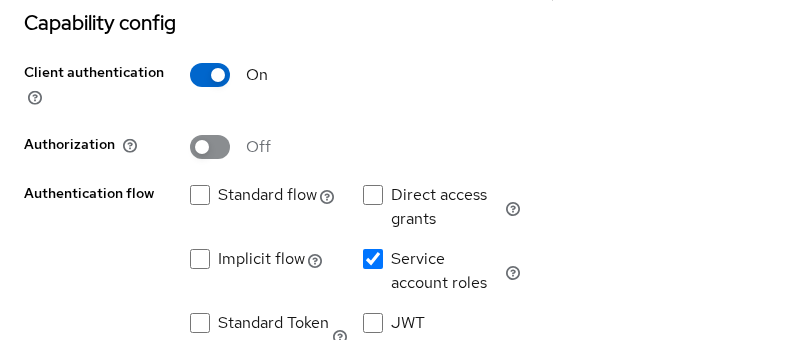
- Under Authentication flow, clear Standard flow and enable Service account roles only.
- Click Next, leave login URLs empty, and click Save.
Repeat the wizard for scim-provisioner if you want a separate provision example. One client is enough for production when you assign the roles the connector needs.
When Service account roles is enabled, Keycloak creates an internal user for that client. For scim-reader, the username is service-account-scim-reader. Roles on the Service account roles tab belong to this non-human identity, not to an employee account.
The Capability config section should show client authentication on and only service account roles enabled:
After Save, open Credentials on each client. Copy the generated secret from behind the eye icon into your connector vault — not into screenshots or tickets:
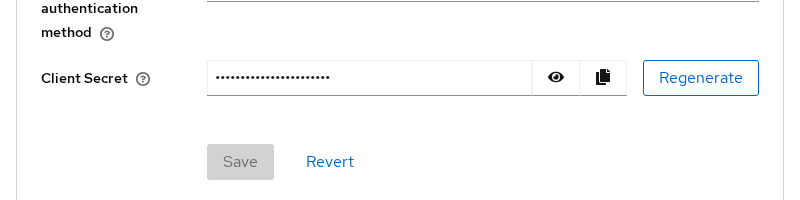
Treat the client secret like a password. Anyone who obtains it can authenticate as this service account and receive whatever permissions its access token allows.
Request a SCIM access token with client credentials
Keycloak issues tokens through the client credentials grant. The client_credentials grant returns an access token for the service account. The connector requests another access token when the current one expires; there is normally no user-style refresh-token workflow here.
Copy the generated secret from the Credentials tab, then export it in your shell:
READER_SECRET='paste-generated-secret-here'Request a token for the read client:
curl -sS -X POST 'http://127.0.0.1:18082/realms/golinuxcloud/protocol/openid-connect/token' \
  -H 'Content-Type: application/x-www-form-urlencoded' \
  -d 'grant_type=client_credentials' \
  -d 'client_id=scim-reader' \
-d "client_secret=$READER_SECRET"{
"access_token": "eyJhbGciOiJSUzI1NiIsInR5cCIgOiAiSldUIiwia2lkIiA6ICJ...",
"expires_in": 300,
"token_type": "Bearer",
"scope": "profile email"
}expires_in is the lifetime in seconds for this realm and client. Request a new token after role or mapper changes; existing JWTs keep their old claims.
Store only the access token when you script SCIM calls:
READER_TOKEN=$(curl -sS -X POST 'http://127.0.0.1:18082/realms/golinuxcloud/protocol/openid-connect/token' \
  -H 'Content-Type: application/x-www-form-urlencoded' \
  -d 'grant_type=client_credentials' \
  -d 'client_id=scim-reader' \
  -d "client_secret=$READER_SECRET" | jq -r '.access_token')
The assignment prints nothing. Use the same pattern with scim-provisioner and its secret when you test writes.
Add the SCIM audience to the Keycloak access token
aud is short for audience. It tells the receiving API which service the token was intended for. A token can be correctly signed by Keycloak and still be rejected by SCIM if the SCIM base URL is not one of its audiences.
A valid client-credentials token is not automatically valid for SCIM. Keycloak checks that the JWT aud claim includes the exact SCIM base URL for the realm — scheme, host, port, and /realms/<realm>/scim/v2 path. Without that audience, SCIM returns 401 with Invalid token audience even when view-users is assigned. That is authentication, not a missing role.
Add an Audience protocol mapper on each client's dedicated scope:
- Open Clients →
scim-reader→ Client scopes. - Click
scim-reader-dedicatedin the assigned list. - Click Configure a new mapper → Audience (or open the existing
scim-audiencemapper). - Set Name to
scim-audience. - Leave Included Client Audience empty. Set Included Custom Audience to
http://127.0.0.1:18082/realms/golinuxcloud/scim/v2. - Enable Add to access token and click Save.
Repeat on scim-provisioner-dedicated for the provisioner client.
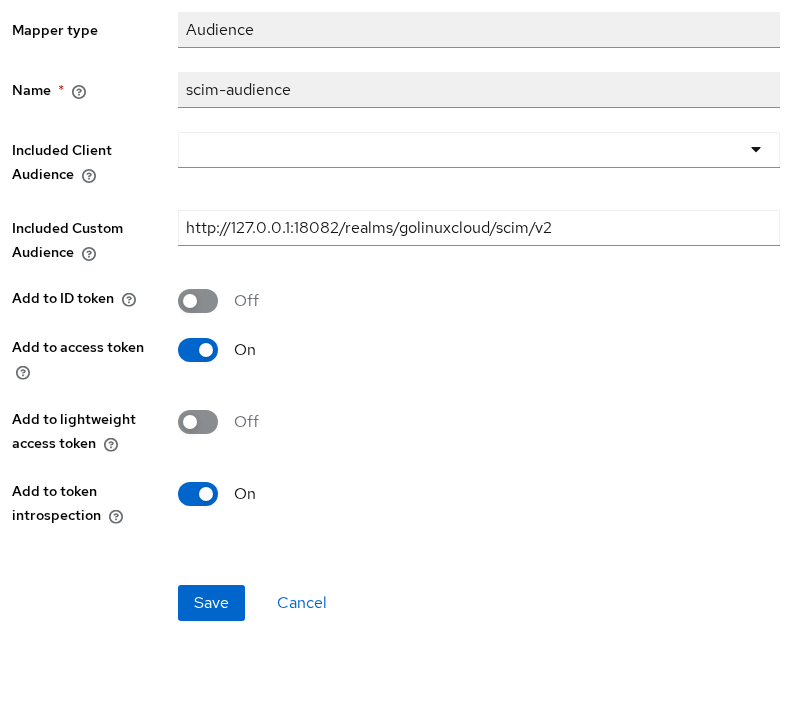
Behind a reverse proxy, configure the audience with the externally visible SCIM base URL expected by Keycloak, rather than blindly copying an internal container hostname. The audience comparison is URL-sensitive, so 127.0.0.1, localhost, different ports, and different schemes are not interchangeable.
You can decode the token to verify that the mapper actually added the SCIM audience. The jq pipeline below handles base64url padding that a plain base64 -d pipe often misses:
curl -sS -X POST 'http://127.0.0.1:18082/realms/golinuxcloud/protocol/openid-connect/token' \
  -H 'Content-Type: application/x-www-form-urlencoded' \
  -d 'grant_type=client_credentials' \
  -d 'client_id=scim-reader' \
  -d "client_secret=$READER_SECRET" \
| jq -r '.access_token | split(".")[1] | gsub("-";"+") | gsub("_";"/") | . + "==" | @base64d | fromjson | {azp, aud}'{
"azp": "scim-reader",
"aud": [
"http://127.0.0.1:18082/realms/golinuxcloud/scim/v2",
"realm-management",
"account"
]
}The SCIM URL appears in aud alongside built-in audiences. azp identifies the client that requested the token.
Which Keycloak roles are required for SCIM?
SCIM defines API operations, but it does not introduce a new Keycloak role such as scim-admin. Keycloak authorizes SCIM requests using existing administrative roles on the built-in realm-management client. For example, view-users allows reading user resources, while manage-users permits create, update, and delete operations on users and groups.
On the tested Keycloak 26.7.3 setup, assign these permissions under Clients → <client> → Service account roles, not under the client's own Roles tab. Keycloak 26.8+ additionally requires the corresponding role scope mappings described below.
Read-only access with view-users
For a read-only connector — one that periodically reads users and group membership from Keycloak but cannot create, modify, or delete them:
- Open Clients →
scim-reader→ Service account roles. - Click Assign role → Filter by clients →
realm-management. - Check
view-usersand click Assign.
In this Keycloak 26.7.3 lab, assigning view-users also brought the query permissions needed for discovery. If you configure narrower permissions manually, remember that user searches require query-users, group searches require query-groups, and discovery accepts either one.
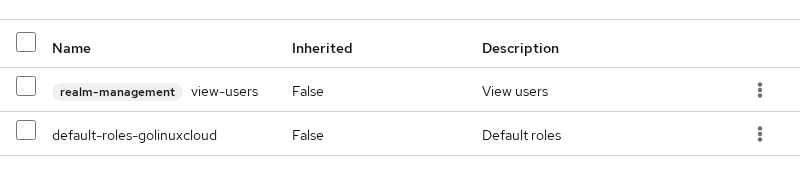
Provisioning access with manage-users
For connectors that create, update, patch, or delete users and groups, assign manage-users on the provisioner client:
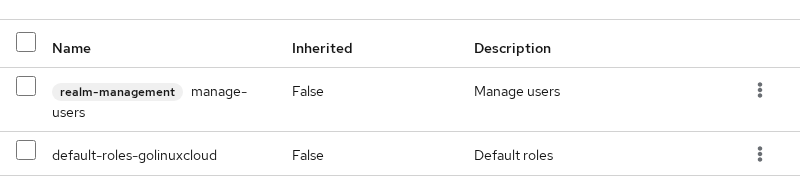
manage-users covers write operations for both users and groups in this setup. You do not need a separate group-management role for standard SCIM provisioning.
If Fine-Grained Admin Permissions are enabled, these broad roles can be restricted further so the SCIM client can access only selected users or groups.
Keycloak 26.8 and later: dedicated scope and Full Scope Allowed
On Keycloak 26.8+, do not enable Full Scope Allowed on the SCIM client. Set Full Scope Allowed to Off on the dedicated scope (scim-reader-dedicated, and so on). Assign the same realm-management roles under Clients → <client> → Client scopes → <client>-dedicated → Scope → Assign role, and on Service account roles. The access token receives the intersection of those two role lists.
- Open Clients →
scim-reader→ Client scopes →scim-reader-dedicated. - Open the Scope tab and confirm Full scope allowed is Off.
- Click Assign role → Client roles → filter to
realm-management→ assignview-users(ormanage-userson a provisioner client). - Assign the same role on Service account roles as in the sections above.
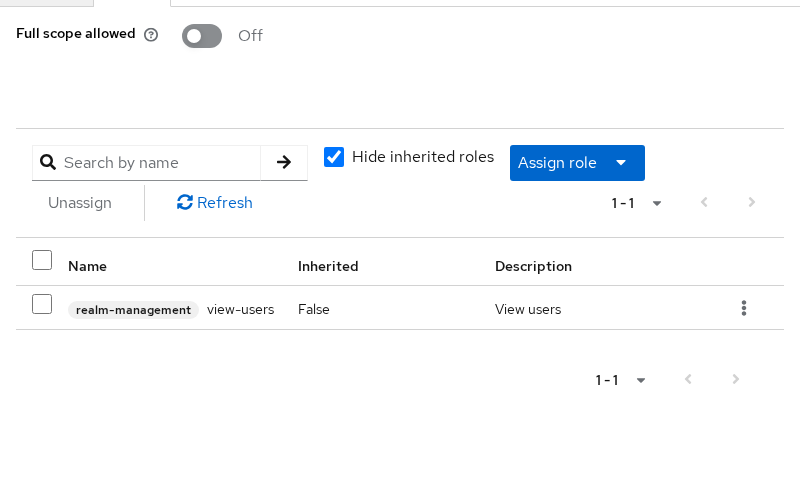
If a role appears only on Service account roles but not on the dedicated scope mappings, the token omits it when Full Scope Allowed is off. On 26.7.3 in this lab, service-account roles alone were enough; on 26.8+, configure both places before you test tokens.
Keycloak SCIM role matrix
These are the roles Keycloak checks for each SCIM operation. The Observed result column reflects what I saw on Keycloak 26.7.3 with SCIM enabled on realm golinuxcloud.
| SCIM request | Minimum realm-management role |
Observed result in this lab without it |
|---|---|---|
Discovery (/ServiceProviderConfig, /ResourceTypes, /Schemas) |
query-users or query-groups |
403 with no detail |
Search or list /Users |
query-users |
403 or empty Resources |
Search or list /Groups |
query-groups |
403 or empty Resources |
Read /Users/{id} |
view-users |
403 |
Read /Groups/{id} |
view-users |
403 |
| Create, update, or delete users or groups | manage-users |
403 |
query-users and view-users are not the same. query-users permits searching and listing users; view-users permits returning complete user resources. In my 26.7.3 test, a token with only query-users could report totalResults while returning no entries in Resources. Most read-only SCIM connectors should use view-users rather than assembling only query permissions.
view-realm alone did not unlock SCIM discovery in this lab.
With scim-reader and view-users, reads succeed but POST /Users returns 403 until you assign manage-users on a provisioner client and request a new token.
Verify the configuration
First test a discovery endpoint with the reader token:
curl -sS -w '\nHTTP %{http_code}\n' -H "Authorization: Bearer $READER_TOKEN" \
-H 'Accept: application/scim+json' "$SCIM_BASE/ServiceProviderConfig" | tail -3... "authenticationSchemes":[{"type":"oauthbearertoken","name":"OAuth Bearer Token"...
HTTP 200HTTP 200 on ServiceProviderConfig confirms bearer authentication, audience, and at least query-level permission.
List users to confirm read access to resource bodies:
curl -sS -H "Authorization: Bearer $READER_TOKEN" -H 'Accept: application/scim+json' \
"$SCIM_BASE/Users?count=10" | jq '{totalResults, Resources: [.Resources[]?.userName]}'{
"totalResults": 1,
"Resources": [
"ada"
]
}User ada appears in the list. Service account users created for clients do not show up as ordinary SCIM users.
Optional: separate read-only and provisioning clients
Keycloak requires only one SCIM client, but you may deliberately separate read-only and provisioning integrations:
scim-reader+view-users: reads users and groups without write permission.scim-provisioner+manage-users: creates, modifies, and deletes users and groups.
Separate credentials reduce the permissions exposed if the read-only connector's secret is compromised. Do not assign realm-admin or manage-realm to SCIM service accounts unless you intend to grant broad admin API access through the same token.
SCIM tokens vs Admin REST API tokens
Both APIs live on the same Keycloak realm, but they are not interchangeable. SCIM relies on the same administrative permission model as the Admin REST API, but SCIM adds its own endpoint and audience requirements.
| Topic | SCIM (/realms/<realm>/scim/v2) |
Admin REST (/admin/realms/<realm>/...) |
|---|---|---|
| Endpoint | /realms/<realm>/scim/v2 |
/admin/realms/<realm>/... |
| Access token | Must satisfy SCIM audience validation | Must carry permissions accepted by Admin REST |
| Authorization | realm-management roles (and FGAP when enabled) |
realm-management roles (and FGAP when enabled) |
| Primary use | Standards-based identity provisioning | Keycloak-specific administration |
A token that works against /admin/realms/.../users is not automatically accepted by SCIM. Configure SCIM audience and roles on the connector client, then test against /scim/v2 endpoints.
Troubleshooting 401 and 403
| Symptom | Likely cause | Fix |
|---|---|---|
401 Bearer token required |
Missing or malformed Authorization header |
Send Authorization: Bearer <access_token> from client credentials |
401 Invalid token audience |
aud lacks SCIM base URL |
Add Audience mapper with exact SCIM URL; request a new token |
403 on discovery |
No query-users / query-groups |
Assign query role or view-users |
403 on GET /Users/{id} |
Only query-users |
Assign view-users |
403 on POST /Users |
Only view-users |
Assign manage-users on provisioner client |
403 with roles assigned (26.8+) |
Role only on service account, not on dedicated scope | Disable Full Scope Allowed, then assign the required role to both the dedicated client's Scope mappings and Service account roles |
403 on admin user write |
Protected administrative account | Change admin outside SCIM |
Step-by-step reproductions and curl transcripts for each status code are in the companion troubleshooting article for SCIM 401 and 403 responses.
Summary
Keycloak SCIM authentication is OAuth bearer tokens from confidential service-account clients. The client credentials grant supplies the JWT; an Audience mapper adds the realm SCIM base URL to aud; realm-management roles on the service account decide whether discovery, read, or write succeeds. On Keycloak 26.8+, keep Full Scope Allowed off and assign the same roles on the dedicated scope and the service account so the token receives their intersection.
In this lab, scim-reader with view-users could list and read user ada but could not create users. scim-provisioner with manage-users could create accounts once the same audience mapper was in place. The access token lifetime here was five minutes (expires_in: 300), and role changes required a fresh token.
When you configure a real SCIM connector, enable SCIM on the realm first, then configure the audience and only the roles the connector actually needs before you point Entra or another system at the SCIM URL. If a request still returns 401 or 403 after you assign the expected role, check token and audience problems before changing roles.
References
- Keycloak Server Administration Guide — SCIM
- Keycloak 26.8.0 release announcement — SCIM API supported
- RFC 7644 — SCIM Protocol
- RFC 6750 — OAuth 2.0 Bearer Token Usage
Frequently Asked Questions
Does Keycloak SCIM use a bearer token?
Yes. Every SCIM request must send Authorization: Bearer <access_token>. Keycloak documents OAuth bearer authentication in ServiceProviderConfig. Obtain the token with the OAuth 2.0 client credentials grant on a confidential client that has service accounts enabled.
Why does Keycloak SCIM require an audience claim?
The access token must name the SCIM API as an intended recipient. Keycloak compares the request URL to the JWT aud claim. If the realm SCIM base URL is missing, SCIM returns 401 Invalid token audience before it evaluates realm-management roles.
Which role is required to create SCIM users?
Assign the realm-management role manage-users to the client's service account and to the client's dedicated scope role mappings as well. Keycloak 26.8 documentation instructs SCIM clients to use Full Scope Allowed = Off. view-users allows reads; it does not authorize POST, PUT, PATCH, or DELETE on /Users or /Groups.
Can a public Keycloak client call SCIM?
No. Keycloak expects a confidential client that can authenticate with a client secret and use the client credentials grant. Public clients are not appropriate for server-side provisioning secrets.
Should I use an admin user token for SCIM?
No. Use a dedicated confidential client with service accounts and only the realm-management roles the connector needs. Admin user passwords and broad realm-admin tokens expand blast radius if the connector or secret leaks.
