
| Tested on | Red Hat Enterprise Linux 10.2 (Coughlan) |
|---|---|
| Package | podman-5.8.2-5.el10_2.x86_64quay.io/keycloak/keycloak:26.7.4curl-8.12.1-4.el10_2.4.x86_64jq-1.7.1-11.el10_2.2.x86_64 |
| Applies to | Any Linux host with Podman or Docker |
| Lab environment | Container keycloak-scim-auth-errors on 127.0.0.1:18081 with --features=scim-api — isolated from another Keycloak on port 8080. SCIM must already be enabled on the realm; see Keycloak SCIM API. |
| Privilege | Normal user (rootless Podman). Service-account role changes need the bootstrap admin or equivalent |
| Scope | Diagnose and fix Keycloak SCIM 401 Unauthorized and 403 Forbidden responses: missing or invalid bearer tokens, wrong aud audience, insufficient realm-management roles on the SCIM service account, and protected administrative users or groups. Does not cover first-time SCIM enablement, client creation, or outbound provisioning connectors. |
| Related guides | Keycloak SCIM API Keycloak client credentials Realm role vs client role Keycloak protocol mappers Keycloak service accounts |
realm-management permissions, but verify version-specific behavior if you are running a newer release.
A SCIM call that returns 401 or 403 usually points to one of a few layers: a missing, expired, or unreadable bearer token; an access token whose aud claim does not match the SCIM base URL; insufficient realm-management permissions; or a protected administrative user or group.
This page walks through each failure with curl -i so you can tell whether the failure is the token, audience, or permission check, then fixes it in the Admin Console or with a fresh token. Start by checking the token itself, then its SCIM audience, and finally the service-account permissions. This order lets you rule out authentication problems before troubleshooting authorization.
When an external application calls Keycloak's SCIM API, it does not log in as a normal user. A confidential Keycloak client uses its service account to request an OAuth access token. That token is then sent to the SCIM endpoint.
Keycloak checks two different things:
- Is this token valid for this SCIM API?
- Is the service account allowed to perform this SCIM operation?
That distinction is what separates most 401 and 403 errors.
SCIM client
    |
    | client_id + client_secret
    v
Keycloak token endpoint
    |
    | access token
    v
SCIM endpoint
    |
    +-- token/audience invalid ------> 401
    |
    +-- token valid, permission denied -> 403
    |
    +-- allowed ---------------------> 200/201/204
Keycloak SCIM 401 vs 403: Quick Diagnosis
Keycloak separates authentication from authorization on SCIM:
401— authentication or token validation failed before SCIM authorization ran.403— the bearer token was accepted, but the caller or user or group being accessed is not permitted.
| HTTP status | Layer | Typical detail or body |
What to check first |
|---|---|---|---|
| 401 | Authentication / token validation | Bearer token required |
Send Authorization: Bearer with a fresh client-credentials token |
| 401 | Authentication / token validation | Invalid token audience |
Decode aud; it must include the exact SCIM base URL |
| 401 | Authentication / token validation | Same as missing token | Expired token, malformed JWT, or wrong realm in the token request |
| 403 | Authorization | {"status":"403"} only |
realm-management roles: query-users or query-groups for discovery; view-users for reads; manage-users for writes |
| 403 | Authorization | {"status":"403"} on PUT/PATCH |
Protected administrative user or group, even when manage-users is granted |
SCIM reuses Keycloak's existing administrative permission model rather than defining a separate SCIM role system. For the standard realm-management roles used in this guide, the additional SCIM requirement is the correct aud claim.
Use one diagnostic URL for every step below. ServiceProviderConfig is a read-only SCIM metadata endpoint. It describes capabilities such as filtering and PATCH support, so it is useful for testing authentication and permissions without modifying users or groups:
http://127.0.0.1:18081/realms/golinuxcloud/scim/v2/ServiceProviderConfig Request
|
v
Bearer token present?
|
+-- No ----------------------> 401
|
v
Token valid + correct SCIM aud?
|
+-- No ----------------------> 401
|
v
Required realm-management role?
|
+-- No ----------------------> 403
|
v
Protected admin resource?
|
+-- Yes ---------------------> 403
|
v
200 / 201 / 204Keep a reusable probe in your shell. -i prints response headers with the body, which helps when a proxy strips JSON:
SCIM_BASE='http://127.0.0.1:18081/realms/golinuxcloud/scim/v2'
curl -sS -i -H 'Accept: application/scim+json' "${SCIM_BASE}/ServiceProviderConfig"
Getting 404 instead of 401 or 403?
If the request returns 404, stop troubleshooting the token. First verify:
- the realm name in
/realms/<realm>/scim/v2 - that the server SCIM feature is enabled
- that
scimApiEnabledis on for the realm
A working SCIM route normally reaches authentication and returns 401 when called without a token. Enablement steps live on Keycloak SCIM API. A nonexistent realm returns {"error":"Realm does not exist"} instead of a SCIM error document.
Fix 401 Bearer Token Required
What the bearer token represents
A SCIM request carries an OAuth access token in the Authorization: Bearer header. That token proves the caller authenticated as a Keycloak client's service account. Without it, Keycloak cannot start token or audience validation and returns 401.
Reproduce the error
With SCIM enabled, an unauthenticated call should return a SCIM error document:
curl -sS -i -H 'Accept: application/scim+json' \
'http://127.0.0.1:18081/realms/golinuxcloud/scim/v2/ServiceProviderConfig'HTTP/1.1 401 Unauthorized
content-length: 107
Content-Type: application/json
{"schemas":["urn:ietf:params:scim:api:messages:2.0:Error"],"status":"401","detail":"Bearer token required"}Bearer token required is literal. Add Authorization: Bearer <access_token>.
A non-JWT string is treated the same way:
curl -sS -i -H 'Authorization: Bearer not-a-real-token' \
  -H 'Accept: application/scim+json' \
'http://127.0.0.1:18081/realms/golinuxcloud/scim/v2/ServiceProviderConfig'HTTP/1.1 401 Unauthorized
content-length: 107
Content-Type: application/json
{"schemas":["urn:ietf:params:scim:api:messages:2.0:Error"],"status":"401","detail":"Bearer token required"}Keycloak returns the same Bearer token required detail for this malformed value, so the response alone does not tell you whether the token was missing or unreadable. In either case, request a fresh token from the correct realm and retry before investigating permissions.
Use a confidential client
A SCIM connector is usually a server-to-server application, so it needs to authenticate without an interactive user login. Keycloak therefore requires a confidential client that can safely hold a client secret. Public clients, such as browser-based applications that cannot protect a secret, are not supported for SCIM API access.
With service accounts enabled, that confidential client can use the OAuth 2.0 client-credentials grant to obtain an access token.
For the examples below, scim-client has:
- Client authentication: On
- Service account roles: On
Client creation and first-time setup stay on Keycloak SCIM API and Keycloak client credentials.
Request a client-credentials token
The client credentials grant is an OAuth flow for machine-to-machine authentication. Instead of a username and password, the application sends its client_id and client_secret, and Keycloak issues an access token representing the client's service account.
Request a token from the same realm as the SCIM URL:
curl -sS -X POST 'http://127.0.0.1:18081/realms/golinuxcloud/protocol/openid-connect/token' \
  -d 'grant_type=client_credentials' \
  -d 'client_id=scim-client' \
-d 'client_secret=scim-lab-secret-2026'{
"access_token": "eyJhbGciOiJSUzI1NiIsInR5cCIgOiAiSldUIiwia2lkIiA6ICJ...",
"expires_in": 300,
"token_type": "Bearer",
"scope": "profile email"
}This lab returns expires_in: 300, meaning the token is valid for five minutes. Your value can differ if the realm or client token lifespan has been changed. When debugging, request a fresh token instead of assuming an older token is still valid.
Store only the token in a variable when you script checks — the assignment prints nothing:
ACCESS_TOKEN=$(curl -sS -X POST 'http://127.0.0.1:18081/realms/golinuxcloud/protocol/openid-connect/token' \
  -d 'grant_type=client_credentials' \
  -d 'client_id=scim-client' \
  -d 'client_secret=scim-lab-secret-2026' \
  | jq -r '.access_token')
Retest with Authorization: Bearer
Send the token on the diagnostic URL. Without the audience mapper configured below, the next section shows the Invalid token audience response instead of HTTP 200.
Fix 401 Invalid Token Audience
A valid client-credentials token can still fail SCIM with 401 Invalid token audience.
What the aud claim means
The aud claim tells Keycloak which API the access token was issued to be used with. A token can therefore be correctly signed and unexpired but still be rejected by SCIM if the SCIM API URL is not one of its allowed audiences.
Keycloak requires the access token aud claim to include the realm SCIM base URL exactly — scheme, host, port, and /realms/{realm}/scim/v2 path. A valid token for one Keycloak API is not automatically valid for every Keycloak API.
Check the aud claim
With view-users on the service account but no audience mapper, decode the token payload:
curl -sS -X POST 'http://127.0.0.1:18081/realms/golinuxcloud/protocol/openid-connect/token' \
  -d 'grant_type=client_credentials' \
  -d 'client_id=scim-client' \
  -d 'client_secret=scim-lab-secret-2026' \
| jq -r '.access_token | split(".")[1] | gsub("-";"+") | gsub("_";"/") | . + "==" | @base64d | fromjson | {azp, aud}'{
"azp": "scim-client",
"aud": [
"realm-management",
"account"
]
}The token already contains aud values, but the SCIM URL is missing. Because Keycloak validates the SCIM endpoint against the aud claim, this token is rejected even though it was issued successfully. Store the access token, then send it to SCIM:
ACCESS_TOKEN=$(curl -sS -X POST 'http://127.0.0.1:18081/realms/golinuxcloud/protocol/openid-connect/token' \
  -d 'grant_type=client_credentials' \
  -d 'client_id=scim-client' \
  -d 'client_secret=scim-lab-secret-2026' \
  | jq -r '.access_token')

curl -sS -i -H "Authorization: Bearer $ACCESS_TOKEN" \
  -H 'Accept: application/scim+json' \
'http://127.0.0.1:18081/realms/golinuxcloud/scim/v2/ServiceProviderConfig'HTTP/1.1 401 Unauthorized
content-length: 108
Content-Type: application/json
{"schemas":["urn:ietf:params:scim:api:messages:2.0:Error"],"status":"401","detail":"Invalid token audience"}The token was successfully issued, but SCIM rejected it because the required audience was missing from aud.
Configure the SCIM audience mapper
Open http://127.0.0.1:18081/admin/, sign in as the bootstrap admin, and select realm golinuxcloud in the top-left realm menu. Add an Audience protocol mapper on the SCIM client's dedicated scope:
- Open Clients and click
scim-client. - Open the Client scopes tab and click
scim-client-dedicatedin the assigned list. - Click Configure a new mapper and choose Audience.
- Set Name to
scim-audience. - Leave Included Client Audience empty. Set Included Custom Audience to your SCIM base URL (
http://127.0.0.1:18081/realms/golinuxcloud/scim/v2in this lab). - Keep Add to access token enabled. Add to ID token can remain off because SCIM API requests authenticate with the OAuth access token, not the ID token.
- Click Save.
The custom audience must match the URL your SCIM client calls, including scheme, host, and port:
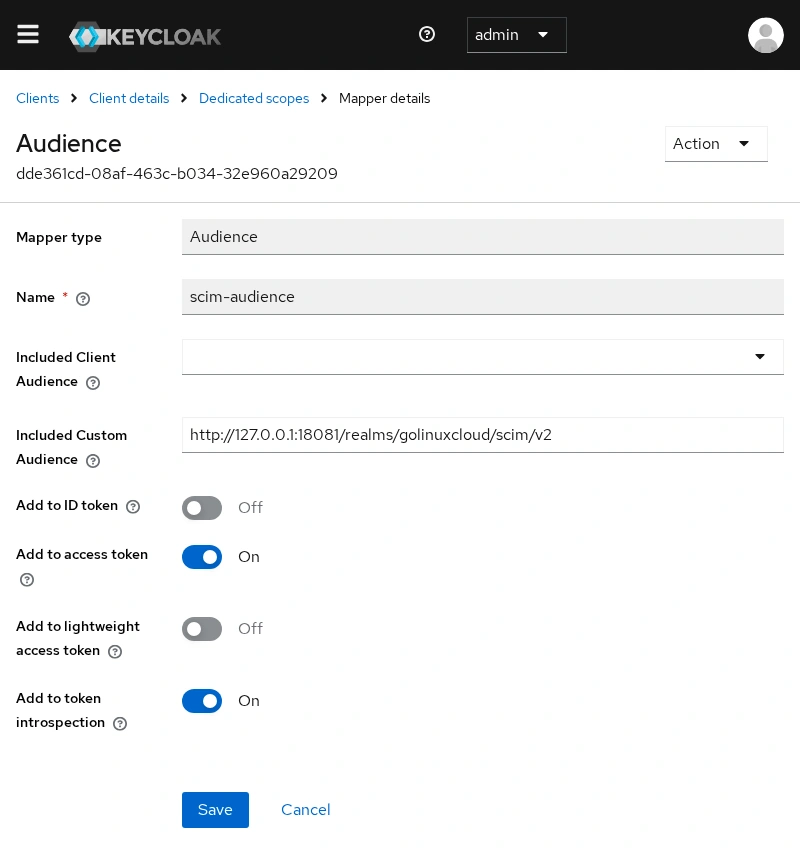
Only Add to access token is required for this SCIM bearer-token check; Add to token introspection in the screenshot is not required for the SCIM request itself.
After Save, request a new client-credentials token before you retest — mappers apply only to tokens issued after the change.
The same mapper from the shell uses the client internal UUID:
CLIENT_UUID=$(podman exec keycloak-scim-auth-errors /opt/keycloak/bin/kcadm.sh get clients -r golinuxcloud \
  -q clientId=scim-client --fields id --format csv --noquotes)

podman exec keycloak-scim-auth-errors /opt/keycloak/bin/kcadm.sh create \
  "clients/${CLIENT_UUID}/protocol-mappers/models" -r golinuxcloud \
  -s name=scim-audience \
  -s protocol=openid-connect \
  -s protocolMapper=oidc-audience-mapper \
  -s 'config."included.custom.audience"=http://127.0.0.1:18081/realms/golinuxcloud/scim/v2' \
  -s 'config."access.token.claim"=true' \
-s 'config."id.token.claim"=false'Created new model with id 'dde361cd-08af-463c-b034-32e960a29209'Request a new token
Read aud again after the mapper is in place:
curl -sS -X POST 'http://127.0.0.1:18081/realms/golinuxcloud/protocol/openid-connect/token' \
  -d 'grant_type=client_credentials' \
  -d 'client_id=scim-client' \
  -d 'client_secret=scim-lab-secret-2026' \
| jq -r '.access_token | split(".")[1] | gsub("-";"+") | gsub("_";"/") | . + "==" | @base64d | fromjson | {azp, aud}'{
"azp": "scim-client",
"aud": [
"http://127.0.0.1:18081/realms/golinuxcloud/scim/v2",
"realm-management",
"account"
]
}The SCIM base URL is now in aud. Retry ServiceProviderConfig — if roles are assigned, the status moves from 401 to 200 or 403.
Why localhost vs 127.0.0.1 matters
Point the mapper at localhost while curl uses 127.0.0.1 and SCIM still rejects the token:
curl -sS -w '\nHTTP %{http_code}\n' -H "Authorization: Bearer $ACCESS_TOKEN" \
  -H 'Accept: application/scim+json' \
'http://127.0.0.1:18081/realms/golinuxcloud/scim/v2/ServiceProviderConfig'{"schemas":["urn:ietf:params:scim:api:messages:2.0:Error"],"status":"401","detail":"Invalid token audience"}
HTTP 401Both hostnames resolve to the same machine, but the audience string must match the URL in the request character for character.
Reverse proxy audience considerations
The audience identifies the SCIM API as the caller sees it. Therefore, if clients call https://sso.example.com/..., using Keycloak's internal container address such as http://keycloak:8080/... creates a different audience and the token is rejected.
Behind a reverse proxy, build aud from the public URL clients use (https://sso.example.com/realms/prod/scim/v2), not an internal http://keycloak:8080 address, unless every SCIM client calls the internal name.
Fix SCIM 403 Forbidden
After the audience is correct, 403 Forbidden means authorization failed. Keycloak evaluates realm-management roles on the service-account-scim-client user — the same administrative permission model used by the Admin REST API.
When service accounts are enabled, Keycloak creates a special non-human user for the client, named service-account-<client-id>. The OAuth client authenticates with its client ID and secret, but Keycloak evaluates the roles assigned to this service-account user when deciding what the client may do.
scim-client
    |
    | Client authentication + Service accounts
    v
service-account-scim-client
    |
    | realm-management roles
    +-- view-users
    +-- manage-users
realm-management is a built-in Keycloak client that contains administrative roles for managing a realm. Roles such as query-users, view-users, and manage-users belong to this client; they are not application roles created by scim-client. Assign them on Clients → scim-client → Service account roles, not under Clients → scim-client → Roles.
The SCIM API reuses Keycloak's existing realm-management permissions. A service account that already has the required Admin REST API roles does not need separate SCIM roles. Its access token must also contain the SCIM base URL in the aud claim before the same token is accepted by the SCIM endpoint.
Which realm-management role does SCIM need?
| Operation | Minimum role | What it allows |
|---|---|---|
| SCIM discovery endpoints | query-users or query-groups |
Read SCIM capability metadata |
| Search/list users | query-users |
Find matching users, but not necessarily read their complete SCIM resources |
| Read full user/group resource | view-users |
Return resource attributes |
| Create, update, and delete users or groups (full provisioning) | manage-users |
Full provisioning access |
view-realm alone did not unlock SCIM discovery in this 26.7.4 test.
query-users vs view-users vs manage-users
Choose the least privilege required by the connector:
- Read/search only: assign
view-users. - Create, update, and delete users and groups (full provisioning): assign
manage-users.
manage-users implies the read and query permissions required for those operations, so you do not need to add view-users separately just to make a full-provisioning client work.
To reproduce the permission failure in this lab, temporarily remove the realm-management role mappings from service-account-scim-client, then request a fresh token and call ServiceProviderConfig:
ACCESS_TOKEN=$(curl -sS -X POST 'http://127.0.0.1:18081/realms/golinuxcloud/protocol/openid-connect/token' \
  -d 'grant_type=client_credentials' \
  -d 'client_id=scim-client' \
  -d 'client_secret=scim-lab-secret-2026' \
  | jq -r '.access_token')

curl -sS -i -H "Authorization: Bearer $ACCESS_TOKEN" \
  -H 'Accept: application/scim+json' \
'http://127.0.0.1:18081/realms/golinuxcloud/scim/v2/ServiceProviderConfig'HTTP/1.1 403 Forbidden
content-length: 74
Content-Type: application/json
{"schemas":["urn:ietf:params:scim:api:messages:2.0:Error"],"status":"403"}A 403 response with no detail field usually means the token was accepted but the caller is not permitted.
With only query-users, the discovery endpoint ServiceProviderConfig can return HTTP 200, but user reads fail. query-users lets Keycloak determine which users match the search, but it does not grant permission to return the full user resources:
curl -sS -H "Authorization: Bearer $ACCESS_TOKEN" -H 'Accept: application/scim+json' \
  'http://127.0.0.1:18081/realms/golinuxcloud/scim/v2/Users?count=10' \
| jq '{totalResults, itemsPerPage, Resources: [.Resources[]? | .userName]}'{
"totalResults": 1,
"itemsPerPage": 0,
"Resources": []
}That is why totalResults can be non-zero while Resources remains empty. Assign view-users when the SCIM client must read the returned users. GET by id then returns 403 without it:
ADA_ID='f4ce7596-5fee-4708-bdae-668cea31c62d'
curl -sS -i -H "Authorization: Bearer $ACCESS_TOKEN" \
  -H 'Accept: application/scim+json' \
"http://127.0.0.1:18081/realms/golinuxcloud/scim/v2/Users/${ADA_ID}"HTTP/1.1 403 Forbidden
content-length: 74
Content-Type: application/json
{"schemas":["urn:ietf:params:scim:api:messages:2.0:Error"],"status":"403"}Assign the service-account role
On scim-client, open the Service account roles tab. Keycloak shows roles for service-account-scim-client, the non-human user behind the client-credentials grant.
- Click Assign role.
- Open the Filter by clients tab and search for
realm-management. - Check
view-usersfor read-only SCIM access, ormanage-usersfor create, update, and delete users and groups (full provisioning). - Click Assign.
The screenshot below shows both mappings because they were assigned during separate read and write tests in this lab. A full provisioning client needs only manage-users:
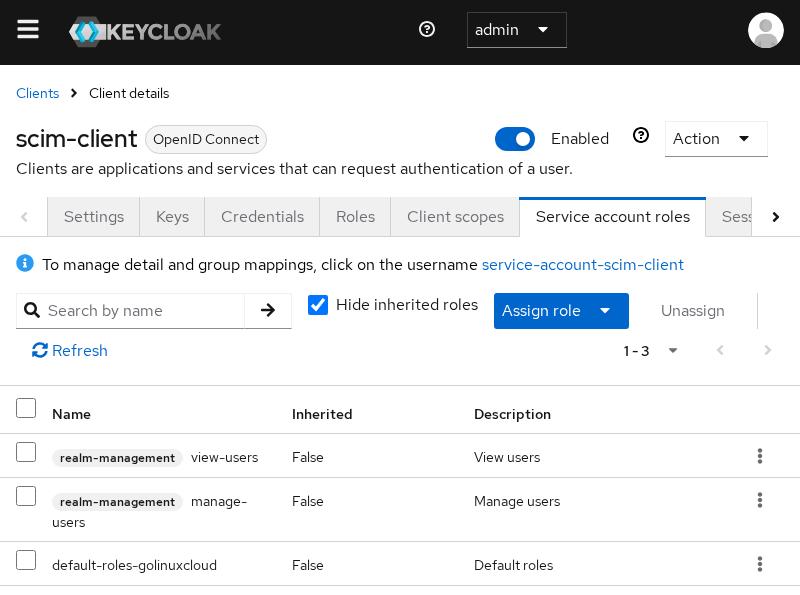
The access token contains the service account's effective roles when the token is issued. Changing a role mapping does not modify an already-issued JWT, so obtain a new token before testing again.
From the shell, grant view-users the same way:
podman exec keycloak-scim-auth-errors /opt/keycloak/bin/kcadm.sh add-roles -r golinuxcloud \
  --uusername service-account-scim-client \
  --cclientid realm-management \
  --rolename view-users
add-roles prints nothing when the mapping is stored.
Reproduce a write failure without manage-users
With view-users only, reads work. POST /Users does not:
curl -sS -i -H "Authorization: Bearer $ACCESS_TOKEN" \
  -H 'Accept: application/scim+json' -H 'Content-Type: application/scim+json' \
  -X POST 'http://127.0.0.1:18081/realms/golinuxcloud/scim/v2/Users' \
-d '{"schemas":["urn:ietf:params:scim:schemas:core:2.0:User"],"userName":"bob","name":{"givenName":"Bob","familyName":"Example"},"emails":[{"value":"bob@example.com","primary":true}]}'HTTP/1.1 403 Forbidden
content-length: 74
Content-Type: application/json
{"schemas":["urn:ietf:params:scim:api:messages:2.0:Error"],"status":"403"}Return to Service account roles, assign manage-users from realm-management, request a new token, and the same payload returns HTTP 201 with a SCIM user body.
Still Getting 403 with manage-users?
Protected administrative users
This protection is intentional. SCIM connectors often have broad provisioning rights, so Keycloak prevents them from modifying accounts or groups that control Keycloak administration.
Keycloak treats a user as administrative when the user receives an administrative role directly, through a group, or through a composite role — including assignments through realm-management in the master realm or the current realm. For protected admin users, SCIM reads return only a minimal representation, while PUT, PATCH, and DELETE are rejected with 403 Forbidden.
Even with manage-users, a SCIM PUT that disables a realm administrator is refused. In this lab, user scim-admin-test holds realm-admin:
ADMIN_UID='b40c565a-78af-4bf1-aec6-962de51c8cb2'
curl -sS -H "Authorization: Bearer $ACCESS_TOKEN" -H 'Accept: application/scim+json' \
  "http://127.0.0.1:18081/realms/golinuxcloud/scim/v2/Users/${ADMIN_UID}" \
| jq '{id, userName, active}'{
"id": "b40c565a-78af-4bf1-aec6-962de51c8cb2",
"userName": "scim-admin-test",
"active": null
}Keycloak omits active from the protected user's SCIM representation. Because the jq filter asks for a missing field, it displays "active": null; this does not mean that the account is disabled. Attempt to deactivate the user over SCIM:
curl -sS -i -H "Authorization: Bearer $ACCESS_TOKEN" \
  -H 'Accept: application/scim+json' -H 'Content-Type: application/scim+json' \
  -X PUT "http://127.0.0.1:18081/realms/golinuxcloud/scim/v2/Users/${ADMIN_UID}" \
-d '{"schemas":["urn:ietf:params:scim:schemas:core:2.0:User"],"id":"b40c565a-78af-4bf1-aec6-962de51c8cb2","userName":"scim-admin-test","active":false}'HTTP/1.1 403 Forbidden
content-length: 74
Content-Type: application/json
{"schemas":["urn:ietf:params:scim:api:messages:2.0:Error"],"status":"403"}Change those accounts in the Admin Console or the Admin REST API, not through SCIM.
Protected administrative groups
The same rule applies to groups that carry administrative roles. A 403 can also occur when a SCIM PATCH tries to add or remove membership from an administrative group. Keycloak protects membership changes involving those groups as well as direct updates to the group itself. Child groups can inherit the protection.
403.
Inspect the Access Token
Never paste production access tokens into tickets or chat. For local debugging, decode the JWT payload in the shell without sending it to a third party.
Decoding a JWT only lets you inspect its claims; it does not verify the token's signature. Here that is sufficient because you are inspecting a token you just obtained directly from your own Keycloak server.
Print aud, expiry, and realm-management roles from the middle segment:
curl -sS -X POST 'http://127.0.0.1:18081/realms/golinuxcloud/protocol/openid-connect/token' \
  -d 'grant_type=client_credentials' \
  -d 'client_id=scim-client' \
  -d 'client_secret=scim-lab-secret-2026' \
  | jq -r '.access_token | split(".")[1] | gsub("-";"+") | gsub("_";"/") | . + "==" | @base64d | fromjson | {azp, aud, exp, iat, roles: .resource_access["realm-management"].roles}'
Check four fields in order:
audmust include the SCIM base URL you call in curl.expmust be in the future (Unix epoch seconds).azpshould be your SCIM client id (scim-clienthere).rolesshould list therealm-managementroles you assigned.
If you change a mapper or role mapping, request a new token. Keycloak does not rewrite tokens that were already issued.
If the response body is not enough
At the default INFO level, Keycloak may not log a dedicated SCIM authorization denial. If the response body is not enough, temporarily enable org.keycloak:debug and correlate the log timestamp with the failing curl -i request.
Once the token, audience, and permissions are correct, this probe should return HTTP 200:
curl -sS \
  -H "Authorization: Bearer $ACCESS_TOKEN" \
  -H 'Accept: application/scim+json' \
  'http://127.0.0.1:18081/realms/golinuxcloud/scim/v2/ServiceProviderConfig' \
| jq '{patch: .patch.supported, filter: .filter.supported}'{
"patch": true,
"filter": true
}Confirm the HTTP status separately so the status line does not break the JSON pipeline:
curl -sS -o /dev/null -w 'HTTP %{http_code}\n' \
  -H "Authorization: Bearer $ACCESS_TOKEN" \
  -H 'Accept: application/scim+json' \
'http://127.0.0.1:18081/realms/golinuxcloud/scim/v2/ServiceProviderConfig'HTTP 200Summary
Keycloak SCIM returns 401 when the bearer token is missing, unreadable, expired, or not aimed at the SCIM API. The two JSON details you see most often are Bearer token required and Invalid token audience. The second one is fixed by adding the realm SCIM base URL to the access token aud claim with an Audience mapper, then requesting a fresh client-credentials token.
403 means Keycloak accepted the token but authorization failed — either the service account lacks the required realm-management role, or the user or group being accessed is protected. query-users can expose counts without returning user resources; view-users is for reads; manage-users covers create, update, and delete users and groups (full provisioning) and implies the read permissions you need for that workflow.
Start every investigation on ServiceProviderConfig with curl -i, decode aud and roles locally, and check the bearer token first, then aud, then the service-account roles. Most fixes land in the Admin Console on the audience mapper and service-account roles tabs. First-time SCIM enablement and client creation stay on Keycloak SCIM API.
References
- Keycloak 26.7.4 Server Administration Guide: Managing users and groups through SCIM
- Keycloak 26.8 Server Administration Guide: Managing users and groups through SCIM
- Keycloak 26.8 Release Notes
- RFC 7644: SCIM Protocol
- RFC 6750: OAuth 2.0 Bearer Token Usage
Frequently Asked Questions
Why does Keycloak SCIM return 401 with a valid token?
The token may be valid for Admin API work, but SCIM also requires the realm SCIM base URL in aud. If aud does not include http://<host>:<port>/realms/<realm>/scim/v2, Keycloak returns 401 with Invalid token audience. Add an Audience mapper, match the hostname and port you use in curl, and request a new token.
Can a valid Keycloak access token still return 401 Invalid token audience?
Yes. Signature and expiry validation are only part of token validation. Keycloak SCIM also checks whether the token's aud claim contains the exact SCIM base URL. A token can therefore work for another Keycloak API and still be rejected by SCIM.
What should the SCIM audience be?
The full SCIM base URL for the realm: http://<host>:<port>/realms/<realm-name>/scim/v2. It must match the URL in your SCIM requests character for character, including http versus https and 127.0.0.1 versus localhost.
Why does Keycloak SCIM return 403 even with a valid token?
A valid token proves authentication succeeded; it does not automatically grant permission to manage users or groups. For write operations, the service account normally needs manage-users from the built-in realm-management client. A 403 can also occur for protected administrative resources or resource-specific permissions.
Why can I read a SCIM resource but not update it?
Reads need view-users. Updates need manage-users. A separate case is protected administrative users: Keycloak may allow a restricted GET but still return 403 on PUT or PATCH.
Can Keycloak block changes to admin users through SCIM?
Yes. Administrative users and groups are only partly visible over SCIM, and writes against them are refused with HTTP 403 even when the SCIM client has manage-users. Manage those accounts through the Admin Console or Admin REST API.
