
| Tested on | Red Hat Enterprise Linux 10.2 (Coughlan) |
|---|---|
| Package | podman-5.8.2-5.el10_2.x86_64quay.io/keycloak/keycloak:26.8.0openssl-3.5.5-6.el10_2.x86_64libxml2-2.12.5-10.el10_2.2.x86_64xmlsec1-1.2.39-3.el10.x86_64 |
| Applies to | Any Linux host with Podman or Docker |
| Privilege | Normal user (rootless Podman). Realm setup uses the Keycloak bootstrap admin |
| Scope | Which Keycloak switch signs a SAML response, signs an assertion, requires a signed AuthnRequest, or encrypts an assertion, whose public certificate each side must hold, and how to confirm the result in the XML. Does not cover HTTPS listener setup or a general certificate-authority design. |
| Related guides | Keycloak SAML metadata Keycloak SP-Initiated vs IdP-Initiated SAML SSO Keycloak SAML Single Logout Keycloak SAML NameID Keycloak SAML attribute mapper |
Turn on the SAML signature and encryption switches that match what the service provider asked for, then check which XML element actually changed. A signed response, a signed assertion, a signed AuthnRequest, and an encrypted assertion each use a different key and a different Keycloak control.
Start from the two-realm login in Keycloak SAML SSO. Realm company is the identity provider on 127.0.0.1:18105. Realm apps is the SAML service provider and broker on 127.0.0.1:18106. This lab uses start-dev over HTTP. The HTTP URLs are only for local testing. XML signatures still let the receiving side verify the SAML message's origin and integrity, but they do not hide its contents. Assertion encryption provides content confidentiality. In production, use HTTPS in addition to SAML message signing and encryption.
Quick Answer
In Keycloak SAML, the sender signs with its private key and the receiver verifies with the sender's public certificate. Encryption works in the opposite key direction. The identity provider encrypts the assertion with the service provider's public key, and only the service provider's private key can decrypt it.
A private key stays with its owner and is used to sign or decrypt. A public certificate contains the corresponding public key and can safely be shared with the peer for signature verification or encryption.
- Sign documents: sign the outer SAML
Response - Sign assertions: sign the inner
Assertion - Client signature required and Want AuthnRequests signed: require and sign the service provider's
AuthnRequest - Encrypt assertions and Want Assertions encrypted: the identity provider encrypts the assertion, and the broker requires that encryption
| Keycloak setting | Side | Meaning |
|---|---|---|
| Sign documents | IdP SAML client | Sign the outer Response |
| Sign assertions | IdP SAML client | Sign the inner Assertion |
| Validate Signatures | SP / broker | Verify signatures received from the upstream IdP |
| Want Assertions signed | SP / broker | Require an inner Assertion signature |
| Want AuthnRequests signed | SP / broker | Sign requests sent to the upstream IdP |
| Client signature required | IdP SAML client | Require and verify signed SAML documents from the SP. In this login, that means the AuthnRequest |
| Encrypt assertions | IdP SAML client | Encrypt the assertion with the SP public key |
| Want Assertions encrypted | SP / broker | Require incoming assertions to be encrypted. Keycloak decrypts them using the matching realm private key |
SAML Signing vs Encryption vs HTTPS
HTTPS, an XML signature, and XML encryption answer different questions:
- HTTPS protects the browser connection. It does not tell the service provider who created the assertion.
- An XML signature lets the receiver verify that the message was signed with the private key corresponding to a trusted public certificate, and that the signed XML has not changed.
- XML encryption makes the assertion unreadable to anyone who does not have the matching decryption private key.
A signature does not hide the NameID. Encryption does not prove who wrote the message. I left both signing switches off for the first login. The decoded SAMLResponse had a readable NameID and no signature or encrypted assertion.
Count signature and encryption markers in that baseline file:
grep -o 'SignatureMethod' response.xml | wc -l0Zero means Keycloak did not sign the response or the assertion. The same file also has no encrypted assertion:
grep -o 'EncryptedAssertion' response.xml | wc -l0The NameID is still in clear text. Alice's username is the value I created in the company realm:
grep -o 'saml:NameID[^<]*' response.xmlsaml:NameID Format="urn:oasis:names:tc:SAML:1.1:nameid-format:unspecified">aliceThis unsigned, unencrypted response is our baseline for the later tests. Signing adds Signature. Encryption replaces the clear assertion with EncryptedAssertion.
Who Owns Which SAML Key
For signatures, the sender keeps the private key and the receiver stores the sender's public certificate. For encryption, the sender needs the receiver's public certificate. Certificates published in SAML metadata contain public keys and are meant to be shared with the peer. I did not export a private key.
┌─────────────────────────────┐         ┌──────────────────────────────┐
│ company realm (IdP)         │         │ apps realm (SP / broker)     │
│                             │         │                              │
│ signing private key         │ ──────► │ verifies with the company    │
│ signs Response or Assertion │         │ signing certificate          │
│                             │         │                              │
│ encrypts the assertion to   │ ◄────── │ encryption public key        │
│ the apps public certificate │         │ apps decrypts with private   │
│                             │         │                              │
│ verifies a signed           │ ◄────── │ signs AuthnRequest with the  │
│ AuthnRequest                │         │ apps signing private key     │
└─────────────────────────────┘         └──────────────────────────────┘
The easiest rule to remember is this: to verify a signature, trust the sender's certificate. To encrypt data, use the receiver's certificate.
| Message | Sender action | Receiver action | Public certificate required |
|---|---|---|---|
| Response or assertion | company signs |
apps verifies |
apps needs the company signing certificate |
| AuthnRequest | apps signs |
company verifies |
company needs the apps signing certificate |
| Assertion encryption | company encrypts |
apps decrypts |
company needs the apps encryption certificate |
A Java truststore is a different store. It decides which TLS servers the process will talk to. It is not the SAML signing certificate on the client, and it is not the validating certificate on the broker.
The company descriptor URL is http://127.0.0.1:18105/realms/company/protocol/saml/descriptor. I saved that document to idp.xml before I added a second realm key. It publishes one signing certificate:
grep -o 'use="signing"' idp.xml | wc -l1These commands write files, so successful execution may produce no terminal output. Wrap that certificate as PEM:
{
  echo '-----BEGIN CERTIFICATE-----'
  xmllint --xpath 'string((//*[local-name()="KeyDescriptor" and @use="signing"]//*[local-name()="X509Certificate"])[1])' idp.xml \
    | tr -d '[:space:]' | fold -w 64
  echo
  echo '-----END CERTIFICATE-----'
} > idp-signing.pem
Read the subject and SHA-256 fingerprint from that PEM:
openssl x509 -in idp-signing.pem -noout -subject -fingerprint -sha256subject=CN=company
sha256 Fingerprint=74:D6:DE:17:AC:2B:8E:0B:8F:67:84:C6:CE:A7:5A:12:92:7E:2C:E6:7E:BF:C0:51:C1:93:F0:14:84:0E:31:22In this Keycloak-generated certificate, the subject CN=company matches the realm name. Do not rely on the CN alone to identify a key. Compare the SHA-256 fingerprint. Write the public key beside it for xmlsec1:
openssl x509 -in idp-signing.pem -pubkey -noout > idp-signing.pubAfter Client signature required and Encrypt assertions were on, the apps metadata published:
- One apps signing certificate for AuthnRequest verification
- One apps encryption certificate for assertion encryption
The company client needs both public certificates. The identity provider must encrypt for the receiver, so it uses the service provider's public encryption key, not its own.
Sign the SAML Response and/or Assertion
Sign documents signs the SAML Response. Sign assertions signs the Assertion inside it.
SAMLResponse
├── Signature      ← Sign documents
└── Assertion
    └── Signature  ← Sign assertions
Want Assertions signed specifically requires the inner Assertion signature. A valid signature on only the outer Response is not enough. I turned the two signing switches on one at a time so the Reference URI showed which element was covered.
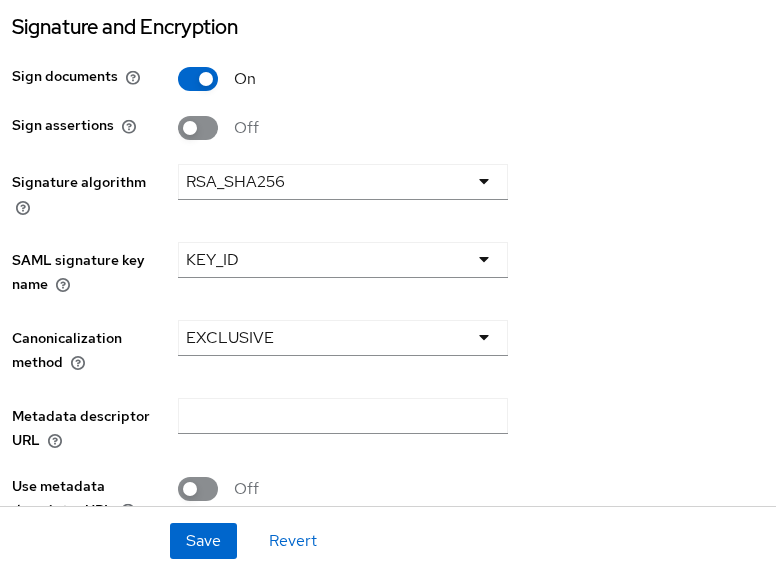
With Sign documents on, the signature sits on the response, before the assertion. The signature method is RSA-SHA256:
grep -o 'SignatureMethod Algorithm="[^"]*"' response-signed.xmlSignatureMethod Algorithm="http://www.w3.org/2001/04/xmldsig-more#rsa-sha256"An XML signature contains a Reference to the XML element it protects. If the URI points to the Response ID, the Response is signed. If it points to the Assertion ID, the Assertion is signed. Read the response ID and the signature reference. They name the same element when the response itself is signed:
xmllint --xpath 'string(//*[local-name()="Response"]/@ID)' response-signed.xmlID_9bc0a4ba-f3c6-4b45-94dd-9e46f3990c90The signature reference should name that same ID:
xmllint --xpath 'string(//*[local-name()="Reference"]/@URI)' response-signed.xml#ID_9bc0a4ba-f3c6-4b45-94dd-9e46f3990c90The leading # means "this ID in the same document." The assertion in that file had a different ID, ID_753a62fd-a06b-4aad-80eb-25295d79b9e2, and the signature did not point at it. The NameID was still readable. Signing did not hide Alice.
I then turned Sign documents off and Sign assertions on. The signature moved inside the assertion, and the reference matched the assertion ID:
grep -o 'Reference URI="[^"]*"' response-assertion.xmlReference URI="#ID_4ca539a2-01ae-4726-b7a8-346ae414cf7a"The assertion ID is the same value without the leading #:
grep -o 'Assertion ID="[^"]*"' response-assertion.xmlAssertion ID="ID_4ca539a2-01ae-4726-b7a8-346ae414cf7a"On the broker I left Want Assertions signed off while only the response was signed. Login continued. I then turned Want Assertions signed on without signing the assertion. The result separated signature validity from the required signed element:
- The company signature on the response was still valid
xmlsec1accepted it with the company public key- The broker still said
Invalid signature in response from identity provider. - Want Assertions signed required a signature on the assertion, not just the response
This article uses failures only to prove what each switch requires. For a login that is already failing because of a stale certificate, the wrong signed element, or modified XML, use Fix Keycloak SAML invalid signature errors.
xmlsec1 checks the assertion signature when you tell it that the assertion ID attribute is the signature id:
xmlsec1 --verify --pubkey-pem idp-signing.pub \
  --id-attr:ID urn:oasis:names:tc:SAML:2.0:assertion:Assertion response-assertion.xml
In this local lab, the Keycloak realm certificate is self-signed, so xmlsec1 may print certificate-chain warnings. The relevant signature result here is the final OK or FAIL:
OK
SignedInfo References (ok/all): 1/1
Manifests References (ok/all): 0/0
OK and 1/1 prove two things about this file:
- The XML signature validates with the public key you supplied
- The one referenced element matched its digest
They do not prove that Keycloak is configured with the same certificate or requires a signature on that element. The canonicalization method in both messages was exclusive XML canonicalization, http://www.w3.org/2001/10/xml-exc-c14n#, which is the EXCLUSIVE value Keycloak wrote into the signature.
Require Signed AuthnRequests
Client signature required belongs in a specific place and uses a specific key:
- Location: the identity-provider-side SAML client that represents the service provider
- Tab: Keys, not the broker identity-provider page or the Sign documents block
- Requirement: signed SAML documents from the service provider. In this login, that is the
AuthnRequest - Certificate: the apps signing certificate, not the company signing key
These controls describe the same request from opposite sides. One side signs it. The other side requires and verifies it.
apps broker                                      company IdP

Want AuthnRequests signed = ON  ─────────────►   Client signature required = ON
signs the AuthnRequest                           verifies with the apps certificate
You are now on the company realm's SAML client representing apps.
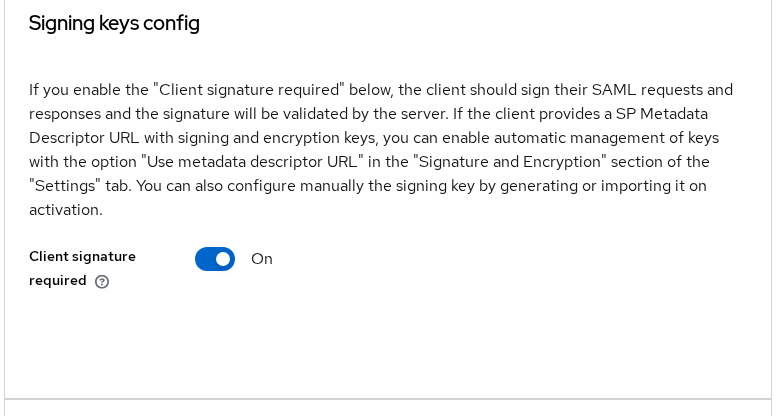
I turned Client signature required on and left Want AuthnRequests signed off on the apps broker. The failed login showed:
- The browser never reached the company username form
- The company page said
Invalid requester - The AuthnRequest had no
Signatureelement
Want AuthnRequests signed makes the apps realm sign the request with the apps realm key. I turned it on, kept RSA_SHA256, and tried again:
- The company realm showed the login form and accepted the request
- The signature method was
http://www.w3.org/2001/04/xmldsig-more#rsa-sha256 - The signature checked with the apps signing certificate, not the company certificate
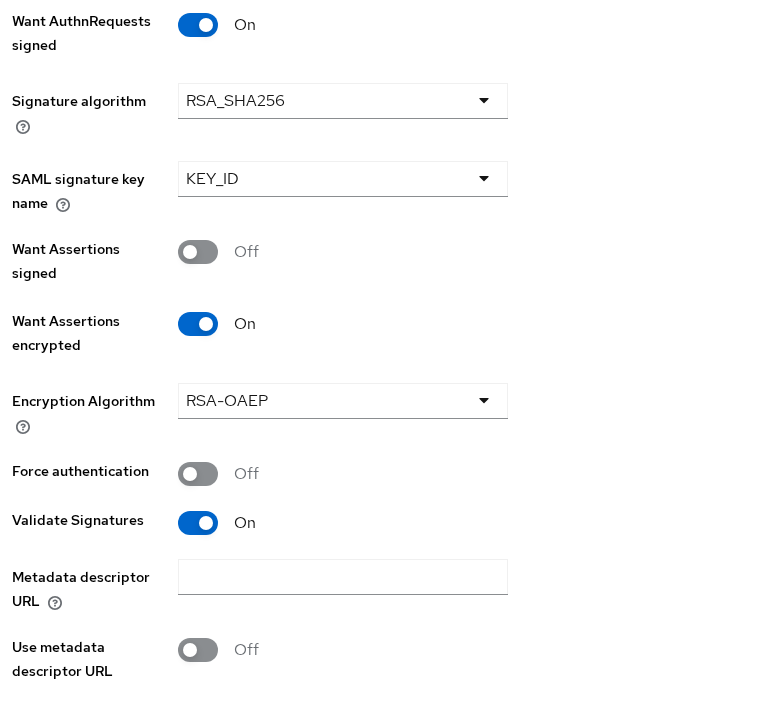
These settings control different directions:
- Want AuthnRequests signed and Signature algorithm: apps to company
- Validate Signatures: company to apps. Depending on the message and configuration, that may be the
Response, theAssertion, or another signed SAML message from the upstream identity provider - Want Assertions encrypted and Encryption Algorithm: company to apps. The encryption uses the apps public key
In this Keycloak 26.8.0 response, the assertion data was encrypted with AES-256-GCM. RSA-OAEP protects the encryption key.
Configure Assertion Encryption
Encrypt assertions uses the service provider's public key. Enabling assertion encryption does not mean the identity provider encrypts with its own keypair. Encryption is always targeted at the receiver.
Realm company creates the encrypted assertion, while realm apps requires and decrypts it.
company IdP                                      apps SP / broker

Encrypt assertions = ON          ─────────────►  Want Assertions encrypted = ON
encrypts with the apps                           decrypts with the apps
public certificate                               private key
This is the IdP-side SAML client in realm company.
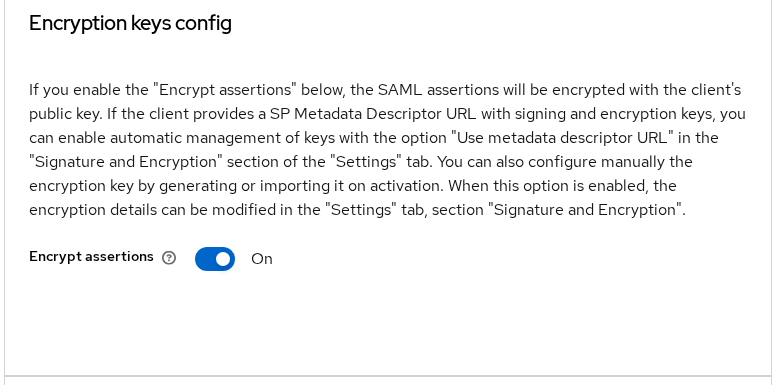
I configured the encryption pair:
- Company client: apps encryption certificate and Encrypt assertions on
- Apps broker: Want Assertions encrypted on
- Company client: Sign documents remained on
The response was therefore signed while its assertion was encrypted. The apps realm then showed Update Account Information. That first-broker-login page did not appear on the signature failures above, so this login means the broker decrypted the assertion.
The saved response no longer contains Alice's NameID:
grep -o 'alice' response-encrypted.xml | wc -l0SAML XML encryption uses hybrid encryption here. Keycloak encrypts the assertion itself with a temporary symmetric AES key, because AES is efficient for the data. It then encrypts that AES key with the service provider's RSA public key using RSA-OAEP. Read both algorithm URIs from the encrypted response:
grep -o 'EncryptionMethod Algorithm="[^"]*"' response-encrypted.xmlEncryptionMethod Algorithm="http://www.w3.org/2009/xmlenc11#aes256-gcm"
EncryptionMethod Algorithm="http://www.w3.org/2009/xmlenc11#rsa-oaep"The encrypted response records several independent choices:
- RSA-OAEP digest:
http://www.w3.org/2001/04/xmlenc#sha256 - RSA-OAEP MGF:
http://www.w3.org/2009/xmlenc11#mgf1sha256 - Client encryption dropdowns: Choose
- Outer response: still signed
Those URIs are what Keycloak 26.8 wrote. The outer signature reference points at the response ID:
grep -o 'Reference URI="[^"]*"' response-encrypted.xmlReference URI="#ID_21f6fc05-0370-44bb-acec-591461fb3747"Anyone who can see the POST can verify that outer signature if they have the company public certificate. They cannot read the NameID without the apps encryption private key.
Choose Current Signature Algorithms
Choose a signing algorithm that the receiving system supports and permits. In this test, Keycloak generated RSA-SHA256 signatures and used exclusive canonicalization.
- On the SAML client, Signature algorithm controls documents Keycloak signs as the identity provider
- On the broker identity-provider configuration, Signature Algorithm applies to outgoing
AuthnRequestmessages when Want AuthnRequests signed is enabled - Incoming XML signatures carry their algorithm identifiers inside the SAML signature
The receiver must support and permit those algorithms. You do not make verification work by setting an identical dropdown on both sides. EXCLUSIVE is the canonicalization method Keycloak used when creating these signatures. A receiver must support the canonicalization method declared in the XML signature. It does not normally need you to copy the identity provider's signing dropdown into a separate incoming-verification setting.
The remaining settings in this test were:
- Signature algorithms: no SHA-1, which Keycloak marks as deprecated
- Signature key name:
KEY_ID, which puts the realm key id inKeyName - Broker encryption algorithm:
RSA-OAEPfor the key wrap - Assertion content algorithm: AES-256-GCM
Verify Signed and Encrypted XML
Verify the signed response with the company public key from the descriptor that was current when that response was issued. Point --id-attr at the response ID when Sign documents produced the signature:
xmlsec1 --verify --pubkey-pem idp-signing.pub \
  --id-attr:ID urn:oasis:names:tc:SAML:2.0:protocol:Response response-signed.xml
The self-signed warning appears again, and the check succeeds:
OK
SignedInfo References (ok/all): 1/1
Manifests References (ok/all): 0/0
OK with 1/1 means the signature matches this public key and the referenced element. Want Assertions signed can still reject that response, because it wants the signature on the assertion.
I then verified the same file with the apps signing public key. The XML is unchanged. Only the verification key is different. xmlsec1 exits with status 1:
xmlsec1 --verify --pubkey-pem sp-signing.pub \
--id-attr:ID urn:oasis:names:tc:SAML:2.0:protocol:Response response-signed.xmlfunc=xmlSecOpenSSLEvpSignatureVerify:file=evp_signatures.c:line=453:obj=rsa-sha256:subj=unknown:error=18:data do not match:details=EVP_VerifyFinal: signature verification failed
FAIL
SignedInfo References (ok/all): 1/1
Manifests References (ok/all): 0/0
Error: failed to verify file "response-signed.xml"The broker showed the same symptom when I pinned the apps certificate as the company validating certificate: Invalid signature in response from identity provider. The signature was valid for the company key and invalid for the certificate the broker was holding.
Do not pass --insecure and treat that as the result. With --pubkey-pem, the self-signed chain warning is not the pass/fail line. Read OK or FAIL.
Certificate Rotation and Metadata
The service provider must trust the certificate that signs new responses. I added an rsa-generated realm key at priority 200 and left the original key active at priority 100. In this test, after the new RS256 key became active at higher priority, newly issued responses were signed with it. Download the company descriptor after that key is active:
curl -fsS -o idp.xml -w '%{http_code} %{content_type}\n' \
http://127.0.0.1:18105/realms/company/protocol/saml/descriptor200 application/xml;charset=UTF-8The realm now publishes two signing certificates:
grep -o 'use="signing"' idp.xml | wc -l2In this captured metadata, the first certificate matched the newly active signing key, so I extract that certificate for this test. In a real rotation, confirm its fingerprint or KeyName before assuming ordering identifies the active key. Write that certificate as PEM:
{
  echo '-----BEGIN CERTIFICATE-----'
  xmllint --xpath 'string((//*[local-name()="KeyDescriptor" and @use="signing"]//*[local-name()="X509Certificate"])[1])' idp.xml \
    | tr -d '[:space:]' | fold -w 64
  echo
  echo '-----END CERTIFICATE-----'
} > idp-signing.pem
The fingerprint is no longer 74:D6:...:
openssl x509 -in idp-signing.pem -noout -subject -fingerprint -sha256subject=CN=company
sha256 Fingerprint=64:E1:63:98:BE:E5:46:93:0D:7B:3C:09:B2:5B:07:2F:8F:1E:E1:D8:4C:A2:CE:A5:CA:BB:C6:0E:9E:87:F0:1BThe KeyName on that new signing descriptor is -Wnprl7uRDMmUSzJMVnoMGwblcHOSaOnY4Be-aeppik. The response I verified earlier carried the old key id, HoQ37cELMmgUatifMQm4tGKE6jovDa1VChpLsE0meVw.
I left the broker's validating certificate on the old fingerprint and signed in again. The page said Invalid signature in response from identity provider. The old public key still verified the earlier response with xmlsec1. I replaced the broker certificate with the new PEM body, without the BEGIN and END lines, and the next login reached Update Account Information again.
When you rotate, update every peer that pins the old certificate, or keep the old key active only until those peers have the new one. If Use metadata descriptor URL is enabled on the broker, Keycloak can download and cache identity provider validation certificates from the metadata URL. If it is off, a manually pasted certificate does not update just because the metadata changed. Keycloak SAML metadata is where that descriptor is published.
Common Key/Algorithm Mistakes
| Symptom | Likely cause | Fix |
|---|---|---|
Invalid signature in response from identity provider. while xmlsec1 prints OK for the response |
Want Assertions signed is on, but only the response is signed | Turn on Sign assertions, or turn Want Assertions signed off if a response signature is what you agreed |
Same invalid-signature page, and xmlsec1 prints FAIL for the pinned key |
The peer has the wrong or old signing certificate | Compare SHA-256 fingerprints and paste the current signing certificate |
Invalid requester before the login form |
Client signature required is on and the AuthnRequest is unsigned | Turn on Want AuthnRequests signed and install the service provider signing certificate, or turn Client signature required off |
NameID is not visible in the decoded response |
The Assertion is encrypted |
Expected. Decrypt the EncryptedAssertion with the service provider's matching private key before inspecting NameID or attributes |
| Certificate matches, but the peer rejects the signature algorithm | The sender uses an algorithm the receiver does not support or allow | Configure the sender to use a supported algorithm such as RSA-SHA256, and confirm the receiver permits it |
| TLS truststore changes, SAML error stays | The truststore is not the SAML signing certificate | Update the client signing certificate or the broker validating certificate |
A wrong certificate and a response-only signature can produce the same sentence in the browser. Check the Reference URI and the fingerprint before you replace keys.
Summary
In this test, Sign documents signed the SAML Response with RSA-SHA256, while Sign assertions placed the signature on the Assertion instead. The Reference URI tells you which one you configured. The company realm signs with its private key, and the service provider checks that signature with the company public certificate from metadata.
Client signature required checks the opposite direction. The apps realm must sign the AuthnRequest, and the company client must hold the apps signing certificate. An unsigned request stopped at Invalid requester until Want AuthnRequests signed was on.
Encrypt assertions hides the assertion with the apps encryption certificate. The encrypted response used AES-256-GCM and RSA-OAEP with SHA-256, and the apps broker could still decrypt it. HTTPS does not replace either control. After a realm key rotation, compare the new fingerprint with the certificate the peer has pinned. A stale certificate fails with the same invalid-signature page as a signature that covers the wrong element.
References
- Keycloak 26.8.0 Server Administration: SAML clients documents Sign documents, Sign assertions, Client signature required, and Encrypt assertions.
- Keycloak 26.8.0 Server Administration: SAML v2.0 identity providers documents Want AuthnRequests signed, Validate signatures, and the assertion signing and encryption switches on the broker.
- XML Signature Syntax and Processing Version 1.1 defines
Signature,Reference, and signature methods such as RSA-SHA256. - XML Encryption Syntax and Processing Version 1.1 defines
EncryptedDataand the AES-GCM and RSA-OAEP algorithm URIs. - SAML V2.0 Core defines
Response,Assertion,AuthnRequest, andEncryptedAssertion.
Frequently Asked Questions
Should the SAML response or assertion be signed?
Sign the element the service provider requires. A response signature covers the response element. An assertion signature covers the assertion. Some products accept either. Keycloak's Want Assertions signed switch accepts a signature on the assertion, and it rejected a response that was signed only on the outside.
Does HTTPS replace SAML signing?
No. HTTPS protects the connection between the browser and the server. The XML signature lets the service provider check that the identity provider signed the SAML element. You can use both. A valid TLS session does not prove that the assertion was signed.
Whose certificate encrypts a SAML assertion?
The service provider's encryption certificate. The identity provider encrypts with that public key. The service provider decrypts with its private key. The identity provider's own signing certificate is the one the service provider uses to check signatures, not the key that hides the assertion.
Can Keycloak require signed AuthnRequests?
Yes. Turn on Client signature required on the identity provider client and install the service provider signing certificate. On a Keycloak broker, also turn on Want AuthnRequests signed so the broker signs the request with its realm key. An unsigned request then fails with Invalid requester.
Which signing algorithm should I use?
Use RSA-SHA256 for signatures Keycloak creates. Keycloak treats SHA-1 signature algorithms as deprecated. In this test the signed messages used the RSA-SHA256 signature method, a SHA-256 digest, and exclusive canonicalization. Those choices are recorded in the signature. A receiver has to support them. Setting the same dropdown on the verifier is not what makes an incoming signature valid.
