
| Tested on | Red Hat Enterprise Linux 10.2 (Coughlan) |
|---|---|
| Package | podman-5.8.2-5.el10_2.x86_64quay.io/keycloak/keycloak:26.8.0openssl-3.5.5-6.el10_2.x86_64libxml2-2.12.5-10.el10_2.2.x86_64xmlsec1-1.2.39-3.el10.x86_64 |
| Applies to | Any Linux host with Podman or Docker |
| Privilege | Normal user (rootless Podman). Realm setup uses the Keycloak bootstrap admin |
| Scope | Why Keycloak reports an invalid SAML signature, how to tell a stale signing certificate from a signature on the wrong element or an unsigned AuthnRequest, and how to confirm the repair with the public certificate. Does not cover JWT or access-token signature errors, and turning validation off is not the fix. |
| Related guides | Keycloak SAML metadata Keycloak SP-Initiated vs IdP-Initiated SAML SSO Keycloak SAML NameID Keycloak SAML attribute mapper Map Keycloak roles and groups into SAML assertions |
First identify which Keycloak realm rejected the message. That tells you which signature and certificate to inspect. An invalid SAML signature means the receiver could not satisfy its signature check. It does not mean the login password was wrong.
Common causes:
- The wrong public certificate
- A modified signed element
- An unsupported or mismatched signing algorithm
- A signature required on a different SAML element
Start from the two-realm login in Keycloak SAML SSO. Realm company is the identity provider on 127.0.0.1:18107. Realm apps is the SAML broker on 127.0.0.1:18108. Sign and encrypt Keycloak SAML assertions is where those switches are configured. This page is the path I used after the broker, or the company realm, rejected a message that had been accepted a minute earlier.
Quick Answer
First identify which side rejected the message.
- The apps broker says
Invalid signature in response from identity provider: inspect the identity provider's signedSAMLResponseorAssertion, and the identity provider certificate stored on the broker. - The company realm says
Invalid requesterbefore login: inspect the service provider'sAuthnRequest, and the service provider certificate stored on the SAML client. - If the signature validates with the expected public key but Keycloak still rejects it, check whether Keycloak expected the
Assertionto be signed instead of only the outerResponse.
The certificate used to verify an incoming message belongs to the sender, not the receiver.
SP / broker (apps)                              IdP (company)

AuthnRequest, signed by apps  ───────────────►  verifies the apps certificate

verifies the company certificate  ◄───────────  SAMLResponse, signed by company
First Identify Which Signature Failed
A signature error on the broker and a signature error on the identity provider involve different sender certificates. Note which realm painted the error, and which SAML message was in that POST.
| What you see | Direction | Who verifies | Message to inspect |
|---|---|---|---|
Invalid signature in response from identity provider. on the apps realm |
IdP to SP | Broker verifies the IdP | SAMLResponse |
Invalid requester on the company realm, before the login form |
SP to IdP | IdP verifies the SP | AuthnRequest |
| A signed SAML logout fails the same way | Sender to receiver | The peer that received the logout message | LogoutRequest or LogoutResponse |
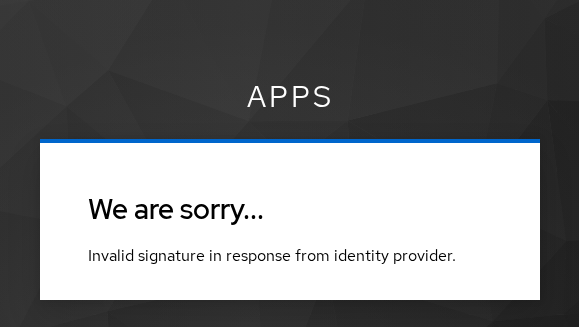
I produced the apps error by leaving Validate signatures on and replacing the company certificate with a different public certificate. The company realm had still signed the response. The broker was verifying it with the wrong key.
Do not start by turning Validate signatures off.
- This Keycloak stops reporting the mismatch
- A service provider outside Keycloak still rejects the signature
- You lose the error that tells you which check failed
A clock difference is a different failure. Keycloak reports an assertion that is not yet valid, or that has expired, from the Conditions timestamps. That check is not the XML signature. When xmlsec1 prints FAIL, or the fingerprints differ, fixing the clock will not make the signature match.
Check Whether Response or Assertion Is Signed
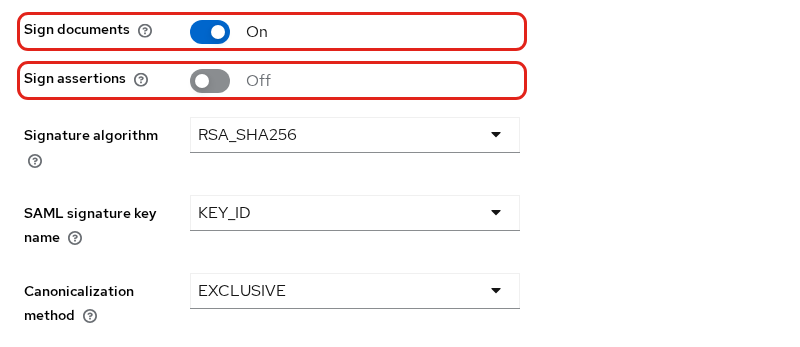
Sign documents signs the Response. Sign assertions signs the Assertion.
SAMLResponse
├── Signature      ← Sign documents
└── Assertion
    └── Signature  ← Sign assertions
When Want Assertions signed is enabled, the broker requires a signature on the inner Assertion. A valid signature on only the outer Response does not satisfy that requirement. The response below is from a login that reached Update Account Information, with Sign documents on and Sign assertions off.
Those switches are on the company client's Settings tab. Signature algorithm, SAML signature key name, and Canonicalization method are on the same block:
The response ID and the signature reference are the same value:
xmllint --xpath 'string(//*[local-name()="Response"]/@ID)' response.xmlID_a1dcc9b2-cf65-43c4-a94f-2415968059ebAn XML signature contains a Reference to the element whose digest it protects.
- The URI matches the
ResponseID: the outerResponseis signed - The URI matches the
AssertionID: theAssertionis signed
This reference points at the response, not at the assertion:
xmllint --xpath 'string(//*[local-name()="Reference"]/@URI)' response.xml#ID_a1dcc9b2-cf65-43c4-a94f-2415968059ebThe assertion in that file is ID_e8e5cba2-4d05-4a7d-99a1-07957a61e7f0. The signature does not name it. The signature method is RSA-SHA256:
grep -o 'SignatureMethod Algorithm="[^"]*"' response.xmlSignatureMethod Algorithm="http://www.w3.org/2001/04/xmldsig-more#rsa-sha256"The next section checks this file with the company public key, and xmlsec1 prints OK. I then turned Want Assertions signed on and left Sign assertions off. The next login showed the same apps error, Invalid signature in response from identity provider.
xmlsec1still printedOKfor that new response- The signature was valid
- It still covered the
Response, not theAssertion - The broker was asking for a signature on the assertion
Turn on Sign assertions, or turn Want Assertions signed off when a response signature is what you agreed. Replacing the certificate does not fix this case.
Compare the Keycloak Signing Certificate
The company realm signs with its active RS256 private key. Compare the same public certificate in each of these places:
- Realm metadata
- Realm settings, Keys
- The broker field Validating X509 certificates
A Java truststore is not that broker field.
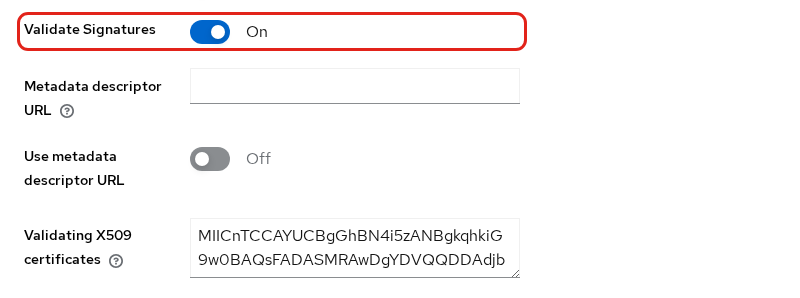
On the company-idp provider, Validate signatures is on and Use metadata descriptor URL is off, so Keycloak uses the certificate pasted below that switch:
The descriptor is http://127.0.0.1:18107/realms/company/protocol/saml/descriptor. I saved a copy to idp.xml while the realm still published one signing certificate:
grep -o 'use="signing"' idp.xml | wc -l1Wrap the first signing certificate. The command prints nothing:
{
  echo '-----BEGIN CERTIFICATE-----'
  xmllint --xpath 'string((//*[local-name()="KeyDescriptor" and @use="signing"]//*[local-name()="X509Certificate"])[1])' idp.xml \
    | tr -d '[:space:]' | fold -w 64
  echo
  echo '-----END CERTIFICATE-----'
} > idp-signing.pem
Read the subject and SHA-256 fingerprint:
openssl x509 -in idp-signing.pem -noout -subject -fingerprint -sha256subject=CN=company
sha256 Fingerprint=0B:01:C9:C0:11:9D:00:0B:30:F5:FD:57:17:CB:F5:86:60:EF:81:6E:8D:4C:CC:0D:D0:AE:1F:BB:D1:A5:F7:ABIn this generated certificate:
- The subject CN is
company, matching the realm name - The SHA-256 fingerprint is a short identifier for the certificate
- A different fingerprint on the broker means it is trusting a different key
Write the public key for xmlsec1. That command is silent:
openssl x509 -in idp-signing.pem -pubkey -noout > idp-signing.pubVerify the saved response with that key. xmlsec1 first warns that the realm certificate is self-signed. The result line is OK:
xmlsec1 --verify --pubkey-pem idp-signing.pub \
--id-attr:ID urn:oasis:names:tc:SAML:2.0:protocol:Response response.xmlOK
SignedInfo References (ok/all): 1/1
Manifests References (ok/all): 0/0OK on that file means:
- This captured XML validates with the public key you supplied
- It does not prove the broker is configured with that same certificate
- It does not prove Keycloak required the signature on the same element
I then replaced the broker's validating certificate with the apps realm signing certificate, fingerprint 77:B4:88:BD:C1:87:2E:6F:73:3F:FD:42:0D:35:C7:58:6F:5D:19:2A:A4:2C:D0:FF:93:58:25:B8:C4:42:27:03. The next login showed the invalid-signature card above. The captured response was unchanged. Only the public key used for verification was different. Checking the same file with the apps public key fails, and the command exits 1:
xmlsec1 --verify --pubkey-pem sp-signing.pub \
--id-attr:ID urn:oasis:names:tc:SAML:2.0:protocol:Response response.xmlfunc=xmlSecOpenSSLEvpSignatureVerify:file=evp_signatures.c:line=453:obj=rsa-sha256:subj=unknown:error=18:data do not match:details=EVP_VerifyFinal: signature verification failed
FAIL
SignedInfo References (ok/all): 1/1
Manifests References (ok/all): 0/0
Error: failed to verify file "response.xml"1/1 means the digest of the response still matches. The signature value does not match this public key, so the certificate is wrong and the XML was not edited. I put the 0B:01:... certificate back, and the next login reached Update Account Information again.
Fix Stale Metadata After Key Rotation or Upgrade
Peers keep the previous certificate after any of these changes:
- A Keycloak upgrade
- A new realm
- A new realm key
I added an rsa-generated RS256 key at priority 200 and left the original key active at priority 100. Download the descriptor after the new key is active:
curl -fsS -o idp-rotated.xml -w '%{http_code} %{content_type}\n' \
http://127.0.0.1:18107/realms/company/protocol/saml/descriptor200 application/xml;charset=UTF-8The realm now publishes two signing certificates:
grep -o 'use="signing"' idp-rotated.xml | wc -l2In this 26.8.0 test, the first signing certificate in the descriptor was the newly active key. Verify the key ID or fingerprint instead of relying on metadata order alone. Extract that first certificate the same way. The command prints nothing:
{
  echo '-----BEGIN CERTIFICATE-----'
  xmllint --xpath 'string((//*[local-name()="KeyDescriptor" and @use="signing"]//*[local-name()="X509Certificate"])[1])' idp-rotated.xml \
    | tr -d '[:space:]' | fold -w 64
  echo
  echo '-----END CERTIFICATE-----'
} > idp-new.pem
The fingerprint is no longer 0B:01:...:
openssl x509 -in idp-new.pem -noout -fingerprint -sha256sha256 Fingerprint=E8:50:FC:B3:78:32:AC:EE:A3:F7:36:60:76:76:56:41:BF:0B:3A:49:01:69:1E:78:BB:F0:3E:5C:14:CA:16:B2The new KeyName in metadata is fAe0nwine7ELG6dClI4_e57Sgm7fudx98DoDZk1bryU. The response verified earlier carried the old key id, WLsf79FApT4MUOK5PB6Pj_VRjQ1ul3R09IDynQ3Hsqk.
The broker was still pinning the old certificate, and Use metadata descriptor URL was off. The next login used the same invalid-signature page. Listing both certificates in metadata does not update a pasted certificate. I replaced the broker certificate with the new PEM body, without the BEGIN and END lines. The next login reached Update Account Information.
Use metadata descriptor URL changes where the broker gets that certificate:
- On: Keycloak can refresh and cache validation certificates from the identity provider metadata
- Off: a pasted certificate stays stale until you update it
Keycloak SAML metadata is where that descriptor is published.
After a move to a current Keycloak, compare this fingerprint with the certificate the service provider has stored. If they differ, refresh that peer. Do not turn validation off to get past the upgrade.
Fix Client Signature Required Errors
Client signature required protects the opposite direction, from the service provider to the identity provider.
- It is set on the identity provider
- Keycloak verifies SAML documents coming from the service provider
- The public certificate is the one stored on that SAML client
- The check does not use the company signing key
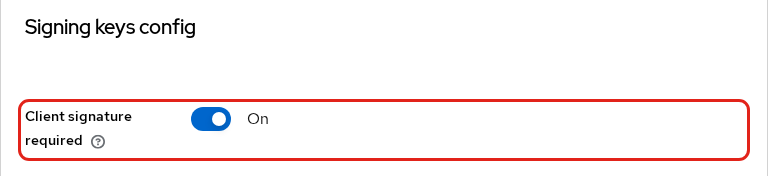
On the company realm's SAML client representing apps, import the apps realm public signing certificate under the client's Keys configuration. I turned Client signature required on, imported that certificate, and left Want AuthnRequests signed off. That switch is on the client's Keys tab, under Signing keys config:
The company page stopped the login before the username form:
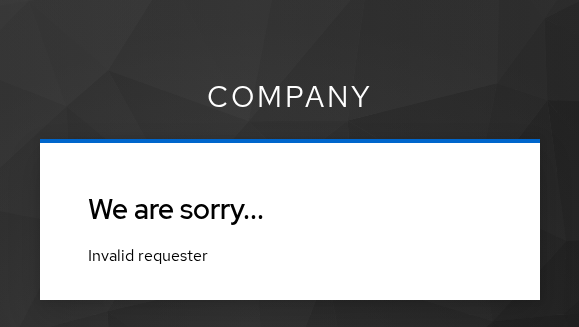
The AuthnRequest in that POST had no Signature element. The company realm was asked to verify a signature that was not there.
- In this test, the cause was that missing
AuthnRequestsignature - The same page can cover other request-validation failures
- It is not the apps error from the certificate section
- Pasting the company certificate onto the broker does not clear it
Confirm the server log and inspect the AuthnRequest before changing certificates.
On the apps realm's SAML identity-provider configuration, Want AuthnRequests signed makes the broker sign outgoing AuthnRequest messages with the apps realm signing key. I turned that on. The signature method was http://www.w3.org/2001/04/xmldsig-more#rsa-sha256, and xmlsec1 accepted it with the apps public key. The login then continued through the company form to the apps realm. If the service provider cannot sign requests, turn Client signature required off. Leaving it on and sending an unsigned request will keep producing Invalid requester.
Check Signature and Canonicalization Algorithms
The signed response and the signed AuthnRequest used the same settings. On the company client they are the three fields under Sign documents:
- Signature algorithm:
RSA_SHA256, which ishttp://www.w3.org/2001/04/xmldsig-more#rsa-sha256 - Canonicalization:
EXCLUSIVE, which ishttp://www.w3.org/2001/10/xml-exc-c14n# - Signature key name:
KEY_ID, soKeyNameis the realm key id
Confirm that the signer uses an algorithm the receiving product supports.
- The XML signature records the signature and canonicalization algorithms
- A receiver may reject an algorithm it does not permit even when the certificate is correct
- Keycloak marks SHA-1 signature algorithms as deprecated. Avoid SHA-1
- A peer that only accepts SHA-256 rejects a SHA-1 signature even when the fingerprint matches
I did not use SHA-1 in this test.
Rule Out Proxy or XML Modification
Signature validation fails if the signed XML content changes after signing.
- A proxy matters only when it alters the decoded XML
- Transporting or re-encoding the HTTP form, without changing that XML, does not break the signature
- Decoding, editing, reformatting, and then re-encoding the signed XML can make validation fail
- Keep an untouched decoded copy for verification, as shown in Decode Keycloak SAML
The fingerprint can still match while the signature fails.
I changed the NameID in a copy of the valid response from alice to alicx and checked it with the same company public key that had printed OK. The digest no longer matches, so the reference count is 0/1 rather than 1/1:
xmlsec1 --verify --pubkey-pem idp-signing.pub \
--id-attr:ID urn:oasis:names:tc:SAML:2.0:protocol:Response response-tampered.xmlfunc=xmlSecOpenSSLEvpDigestVerify:file=digests.c:line=355:obj=sha256:subj=unknown:error=12:invalid data:data and digest do not match
FAIL
SignedInfo References (ok/all): 0/1
Manifests References (ok/all): 0/0
Error: failed to verify file "response-tampered.xml"Think of the checks in two stages:
- Digest check: is the signed XML still the same?
- Signature check: was that digest signed by the expected private key?
0/1 means the content changed. 1/1 plus a signature failure means the content is intact and the public key or signature does not match.
xmlsec1 or what you observe |
Likely problem |
|---|---|
Correct public key, result OK |
The signature is cryptographically valid for that key |
Wrong public key, EVP_VerifyFinal, references 1/1 |
Wrong or stale certificate |
Correct key, digest mismatch, references 0/1 |
The signed XML changed |
| XML uses an unsupported or deprecated algorithm | Algorithm policy or interoperability |
Response signature is valid, but Keycloak requires an Assertion signature |
The wrong element was signed |
Do not treat a changed document as a certificate rotation.
Verify the Fix with a Fresh SAML Trace
After the broker had the new certificate, I signed in again and saved that response as response-rotated.xml. Its KeyName was the new realm key. Verify it with the new public key, not with the certificate you replaced:
xmlsec1 --verify --pubkey-pem idp-new.pub \
--id-attr:ID urn:oasis:names:tc:SAML:2.0:protocol:Response response-rotated.xmlOK
SignedInfo References (ok/all): 1/1
Manifests References (ok/all): 0/0The old public key still fails this file. The command exits 1:
xmlsec1 --verify --pubkey-pem idp-signing.pub \
--id-attr:ID urn:oasis:names:tc:SAML:2.0:protocol:Response response-rotated.xmlfunc=xmlSecOpenSSLEvpSignatureVerify:file=evp_signatures.c:line=453:obj=rsa-sha256:subj=unknown:error=18:data do not match:details=EVP_VerifyFinal: signature verification failed
FAIL
SignedInfo References (ok/all): 1/1
Manifests References (ok/all): 0/0
Error: failed to verify file "response-rotated.xml"Record three things from the login that works:
- The SHA-256 fingerprint
- The
ReferenceURI - Whether the browser left the error card
Update Account Information on the apps realm meant the broker accepted this response. A later peer that still has the 0B:01:... certificate will fail until it gets E8:50:....
Check the Realm Log for the Failing Signature
The error card names the realm. The log on that same server is where the check is recorded. No extra log level is required to see which side failed.
| Realm | Log to read | What that log is checking |
|---|---|---|
apps broker |
The apps server log | Response and assertion verification |
company identity provider |
The company server log | AuthnRequest verification |
Search that log for:
signatureinvalid requesterverification
A line on the apps server is the identity provider's signature. A line on the company server is the service provider's signature.
Summary
The apps error Invalid signature in response from identity provider. means the broker rejected the company signature. Check the Reference URI first. If it names the response and Want Assertions signed is on, the signature is on the wrong element. If xmlsec1 prints OK with the company public key and FAIL with the certificate the broker has, replace that certificate.
When Keycloak starts signing with a new realm key, the signing certificate advertised in metadata changes. The broker kept 0B:01:... after the active key became E8:50:..., and the same error came back until I pasted the new certificate. Invalid requester on the company realm is a separate check. In this test, Client signature required saw an AuthnRequest with no signature. The same page can also appear for other request-validation failures, so read the company log before you replace a certificate.
A modified NameID fails with a digest mismatch (0/1) even when the public key is the one that signed the original response. Turning signature validation off hides these differences. Match the certificate, the signed element, and RSA_SHA256, then confirm the next response with xmlsec1.
References
- Keycloak 26.8.0 Server Administration: SAML clients documents Sign documents, Sign assertions, and Client signature required.
- Keycloak 26.8.0 Server Administration: SAML v2.0 identity providers documents Validate signatures, Want Assertions signed, and Want AuthnRequests signed.
- XML Signature Syntax and Processing Version 1.1 defines
Reference, signature methods, and digest verification. - SAML V2.0 Core defines
Response,Assertion, andAuthnRequest. - SAML V2.0 Metadata defines the signing
KeyDescriptorpublished by an identity provider.
Frequently Asked Questions
Why did SAML signatures fail after a Keycloak upgrade?
The service provider is usually still trusting the signing certificate from before the upgrade. A new realm or a new realm key publishes a different certificate in metadata. I added a new RS256 key and the fingerprint changed from 0B:01:... to E8:50:.... The broker rejected responses until I replaced its validating certificate. Compare those fingerprints before you turn validation off.
Where is Keycloak's SAML signing certificate?
Open Realm settings, then Keys, and use the active RS256 key. The same public certificate is published in a signing KeyDescriptor in the realm SAML metadata at /realms/{realm}/protocol/saml/descriptor. In this 26.8.0 rotation test the newly active key was the first signing certificate, but confirm the key ID or fingerprint rather than trusting metadata order. The private key stays on that Keycloak. Give peers only the certificate or the metadata.
Can I disable signature validation?
You can turn Validate signatures off on a broker, or turn Client signature required off on a client. That only stops this Keycloak from checking. It does not make another product accept a signature, and it hides a stale certificate. Put the current signing certificate on the peer instead.
What does Client signature required do?
It tells the identity provider to verify the service provider's signature on the AuthnRequest. The check uses the service provider certificate stored on the client. An unsigned request stops on the company realm with Invalid requester. It does not produce the apps-realm invalid-signature page.
Does certificate rotation require a metadata refresh?
Yes, for every peer that pinned the old certificate or cached the old metadata. A descriptor that lists the old and new certificates does not update a certificate you pasted while Use metadata descriptor URL is off. After rotation, compare the SHA-256 fingerprint and replace the pinned certificate.
