
| Tested on | Red Hat Enterprise Linux 10.2 (Coughlan) |
|---|---|
| Package | podman-5.8.2-5.el10_2.x86_64quay.io/keycloak/keycloak:26.8.0libxml2-2.12.5-10.el10_2.2.x86_64 |
| Applies to | Any Linux host with Podman or Docker |
| Privilege | Normal user (rootless Podman). Realm setup uses the Keycloak bootstrap admin |
| Scope | What Keycloak SAML Single Logout terminates, how to configure SLO endpoints, inspect LogoutRequest and LogoutResponse, verify IdP and broker sessions, and diagnose a success response that does not finish logout. Does not promise deletion of every application cookie or session across arbitrary service providers. |
| Related guides | Keycloak SP-Initiated vs IdP-Initiated SAML SSO Keycloak SAML NameID Map Keycloak roles and groups into SAML assertions Keycloak SAML attribute mapper Authentication vs authorization |
SAML Single Logout coordinates session termination between an identity provider and one or more service providers. A successful LogoutResponse confirms that one peer processed the request. It does not prove that every application cleared its own session cookie.
The test starts from the working two-realm login in Keycloak SAML SSO. Realm company is the IdP on port 18095. Realm apps is the SAML SP/broker on port 18096. I ran logout in both directions and then broke the response URL to leave one Keycloak session behind.
Quick Answer
Keycloak SAML Single Logout uses LogoutRequest and LogoutResponse to coordinate logout between the identity provider and the service provider.
The initiator is the side that starts logout by sending LogoutRequest. The responder is the peer that receives that request, removes the matching session, and returns LogoutResponse.
The Single Logout Service (SLO) endpoint is the URL where a SAML peer receives logout protocol messages. A Success status only means the responder processed the request. The initiating session is not necessarily gone until the response returns to the correct SLO endpoint.
Verify these separately:
- Response
Destination InResponseTo- Keycloak sessions on both sides
- Any application-local session
A Success response does not mean the entire logout completed. In the failure reproduced below:
- The responder removed its own session
- It returned
Success - It sent the response to the wrong URL
- The initiator never finished logout
What SAML Single Logout Actually Logs Out
One browser login can create several related pieces of state:
- The application has its own local session and cookie.
- The
appsrealm has a user session for the account console. - The
companyrealm has an SSO session with a client session for the SAML SP. - The browser carries cookies for both Keycloak realms.
SLO asks each participating SAML peer to terminate the session identified by the logout message. It cannot directly delete a cookie owned by an application on another host. That application has to:
- Receive and process the logout request
- Clear its local session
- Return a response when the profile requires one
┌─────────┐     ┌─────────────────────┐     ┌──────────────────────┐
│ Browser │ ──► │ apps realm          │ ──► │ company realm        │
│ cookies │     │ SP / broker session │     │ IdP SSO session      │
└─────────┘     └─────────────────────┘     └──────────┬───────────┘
       │                                               │
       │                  optional peer                │
       └──────────────► ┌────────────────┐ ◄───────────┘
                        │ second SAML SP │
                        │ local session  │
                        └────────────────┘
SLO becomes harder once more than one service provider shares the IdP session. Keycloak can notify a peer only when that peer has:
- A client session
- A reachable SLO endpoint
- Compatible logout support
The two-Keycloak test has one SAML SP. It does not claim that an unrelated application will clear its cookie.
SAML Session Topology in Keycloak
Alice first signed in to the apps account console through Company IdP. Before logout, the company realm showed one user session tied to the SAML client http://127.0.0.1:18096/realms/apps.
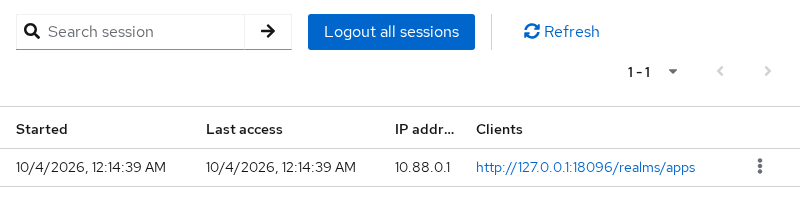
The value under Clients is the SAML client's Client ID, the service provider Entity ID attached to Alice's company-realm session. It is not simply the page currently open in the browser.
The same login creates related but separate sessions in the two realms:
| Realm | Session role | Client attached to the session |
|---|---|---|
company |
IdP SSO session | http://127.0.0.1:18096/realms/apps |
apps |
Broker realm session | account-console |
The authentication assertion also carried a SessionIndex. Keycloak later put the corresponding value in LogoutRequest. Think of SessionIndex as the SAML-login session reference shared by the identity provider and the service provider.
- It helps the peer locate the session created by the earlier SAML authentication
- It is not the Keycloak browser cookie
- It is not the application's own session ID
For the IdP-initiated test, I also opened the company account console in the same browser. The company user session then had two client sessions: its local account-console client and the SAML client for realm apps. Signing out there gave the company realm a session from which to notify the SAML peer.
Configure the Single Logout Service URL
For the SP-initiated logout tested first, the endpoints are used like this:
apps (SP / broker)                              company (IdP)

LogoutRequest  ─────────────────────────────►   /realms/company/protocol/saml

/realms/apps/broker/company-idp/endpoint  ◄──   LogoutResponse
Each peer publishes its own receiving endpoint. The company URL is where company receives logout messages. The apps broker URL is where apps receives them. There is not one shared SLO URL.
A SAML binding defines how the logout message travels:
- HTTP-POST carries it in an HTML form
- HTTP-Redirect carries it in the URL
- In this lab, both bindings use the same broker endpoint
Keycloak publishes the company realm SLO endpoint in IdP metadata:
http://127.0.0.1:18095/realms/company/protocol/samlThe apps broker publishes its SAML logout endpoint at:
http://127.0.0.1:18096/realms/apps/broker/company-idp/endpointFetch the broker descriptor so the endpoint can be checked without relying on a copied console value:
curl -fsS http://127.0.0.1:18096/realms/apps/broker/company-idp/endpoint/descriptor -o sp.xmlcurl exits without output when the descriptor is saved. Ask xmllint for each SingleLogoutService binding and location:
xmllint --xpath \
  '//*[local-name()="SingleLogoutService"]/@Binding | //*[local-name()="SingleLogoutService"]/@Location' \
sp.xmlBinding="urn:oasis:names:tc:SAML:2.0:bindings:HTTP-POST"
Location="http://127.0.0.1:18096/realms/apps/broker/company-idp/endpoint"
Binding="urn:oasis:names:tc:SAML:2.0:bindings:HTTP-Redirect"
Location="http://127.0.0.1:18096/realms/apps/broker/company-idp/endpoint"In this metadata, both POST and Redirect logout messages use the same broker URL.
On the SAML client in realm company, Master SAML Processing URL is the client's general SAML callback endpoint. If you configure a specific Logout Service POST or Redirect Binding URL, Keycloak uses that more specific logout endpoint for that binding instead. I set both logout URLs to the broker endpoint.
You are on the company realm's SAML client representing the apps service provider. These fields therefore contain the apps broker's SLO endpoint.
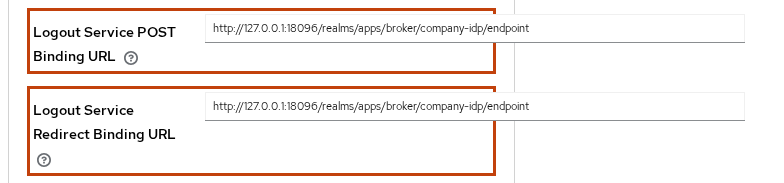
Configure the IdP-side client from Clients > the apps SAML client > Settings:
- Set Valid redirect URIs to the apps broker endpoint.
- Open Fine Grain SAML Endpoint Configuration.
- Paste the broker endpoint into both Logout Service POST Binding URL and Logout Service Redirect Binding URL.
- Save the client.
On realm apps, open Identity providers, then company-idp, then Advanced:
- Set Single Logout Service URL to the company realm protocol endpoint
- Enable Post Binding Logout so the browser carries logout messages as form POSTs
- Keep Validate Signatures enabled when the IdP signs its SAML documents
- Keep the IdP certificate current
Front channel logout controls whether the browser visits the application logout endpoint:
- On: the browser delivers logout, which is what an application needs when it must clear a cookie
- Off: Keycloak sends a background SAML logout request instead of relying on the user's browser
- This is different from OIDC Back-Channel Logout and its logout token
Whether that background request succeeds depends on the logout endpoint and behavior supported by the service provider.
Front channel means the user's browser participates in delivering logout to the application. This is useful when the application must receive the browser request to clear its own cookie.

Turning the switch on does not by itself guarantee that every application logs out. The endpoint must work, and the browser must complete the logout hop.
If the fine-grained logout URL is empty, Keycloak can use the Master SAML Processing URL as the general SAML processing endpoint. Check the generated metadata and the actual Destination to confirm which URL Keycloak is using.
SP-Initiated Logout Flow
Alice clicks Sign out in the apps account console. The account console itself uses OIDC with realm apps, so Keycloak first starts a normal local logout in that realm.
Alice originally entered apps through the company SAML identity provider. Because that SAML broker session is attached to her apps session, realm apps must also tell company to terminate the matching SAML session. That starts the SP-initiated SAML logout.
The browser followed this sequence:
- The account console called the apps realm logout endpoint.
- Realm
appscreated aLogoutRequest, and the browser carried it as a POST to the company SLO endpoint. - Realm
companyremoved its matching session, created theLogoutResponse, and the browser posted it back to the apps broker SLO endpoint. - Realm
appscompleted its logout and returned to the account-console sign-in page.
                apps broker
                     ↓
 LogoutRequest, NameID=alice, SessionIndex
                     ↓
               company realm
                     ↓
      remove the matching SAML session
                     ↓
LogoutResponse, InResponseTo, Status=Success
                     ↓
   apps finishes its user-session logout
After the response returned, Alice had no active session in either realm. Opening the apps account console showed its sign-in page instead of silently returning to the personal-info screen.
IdP-Initiated Logout Flow and Peer Support
In IdP-initiated logout, the same message types travel in the opposite direction. Realm company starts the SAML logout exchange:
- It uses the same
LogoutRequestandLogoutResponse - It does not introduce a different SAML message type
- Only the direction changes
Alice had an active company session with the SAML client and the company account console attached. Signing out from the company account console made realm company the logout initiator.
Realm company created a LogoutRequest, and the browser carried it as a POST to the apps broker SLO endpoint. Realm apps removed its session, created the LogoutResponse, and the browser posted it back to the company SLO endpoint. This capture had no RelayState on either POST.
This confirmed that the Keycloak broker accepted IdP-initiated SLO for the active session. It does not prove support in a different SAML toolkit. A peer must:
- advertise or register a Single Logout Service endpoint;
- match the
NameIDandSessionIndexto an active session; - process the binding used by the initiator;
- clear its own local session before acknowledging the request.
After the IdP-initiated exchange, both realms again showed no Alice sessions.
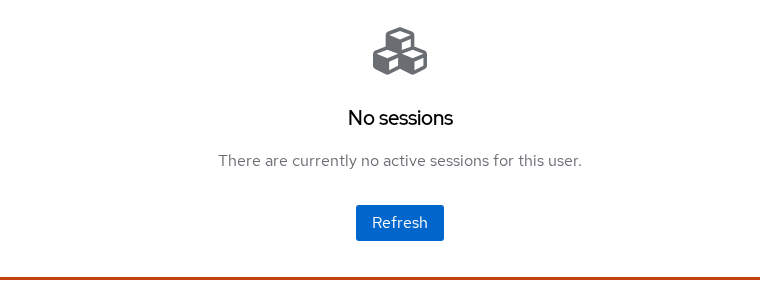
I separately checked realm apps. Alice's broker session was gone there as well.
Inspect LogoutRequest and LogoutResponse
Capture the form POSTs in browser developer tools:
- The first body contains
SAMLRequest - The return POST contains
SAMLResponse - Many browser tools have already URL-decoded those values
- Save only the base64 value before decoding
This capture uses HTTP-POST, so the parsed form value is Base64-encoded XML and can be decoded directly. An HTTP-Redirect logout message is additionally URL-encoded and DEFLATE-compressed. Decode Keycloak SAML covers that binding. Decode the SP-initiated request into readable XML. The command prints nothing when it writes the file:
printf '%s' "$SAML_LOGOUT_REQUEST" | base64 -d | xmllint --format - > logout-request.xmlRead the request ID, destination, subject, and session index together:
xmllint --xpath \
  'concat("ID=",string(/*/@ID)," Destination=",string(/*/@Destination)," NameID=",string(//*[local-name()="NameID"])," SessionIndex=",string(//*[local-name()="SessionIndex"]))' \
logout-request.xmlID=ID_b15e308b-8c0b-45cd-ad9a-fb18d20c34bd Destination=http://127.0.0.1:18095/realms/company/protocol/saml NameID=alice SessionIndex=QguTQhFhjU7L26Lncyqb7K8x::af25988c-ec92-49c1-9306-30184314c06dThe issuer in that request was http://127.0.0.1:18096/realms/apps. NameID tells the peer which user the logout concerns. SessionIndex narrows that to the specific SAML login session. Together they identify the login that realm company needs to terminate.
Decode the response from the company realm in the same way:
printf '%s' "$SAML_LOGOUT_RESPONSE" | base64 -d | xmllint --format - > logout-response.xmlCheck that InResponseTo matches the request ID and that the top-level status is Success:
xmllint --xpath \
  'concat("InResponseTo=",string(/*/@InResponseTo)," Status=",string(//*[local-name()="StatusCode"]/@Value))' \
logout-response.xmlInResponseTo=ID_b15e308b-8c0b-45cd-ad9a-fb18d20c34bd Status=urn:oasis:names:tc:SAML:2.0:status:SuccessThink of InResponseTo as the correlation link. It lets the initiator confirm that this LogoutResponse is answering the LogoutRequest it sent. The value here matches the captured request ID, and the response also echoed the request's RelayState unchanged. After the status, still check:
- The session in realm
company - The session in realm
apps - The application after you reopen it
The IdP-initiated test used the same LogoutRequest and LogoutResponse, but company sent the request and apps returned the response:
| Field | IdP-initiated request or response |
|---|---|
| Request issuer | http://127.0.0.1:18095/realms/company |
| Request destination | http://127.0.0.1:18096/realms/apps/broker/company-idp/endpoint |
| Response issuer | http://127.0.0.1:18096/realms/apps |
Response InResponseTo |
ID_d6afa05f-cd4d-44f1-b6ef-f0a2bc911d51 |
| Response status | urn:oasis:names:tc:SAML:2.0:status:Success |
RelayState |
Absent on both IdP-initiated POSTs |
Why a Session Can Remain After Success
I changed the company client's Logout Service POST Binding URL to http://127.0.0.1:18097/wrong-slo and repeated the SP-initiated logout. Realm company still processed the request. Read the status and destination from the decoded response:
xmllint --xpath \
  'concat("Status=",string(//*[local-name()="StatusCode"]/@Value)," Destination=",string(/*/@Destination))' \
broken-response.xmlStatus=urn:oasis:names:tc:SAML:2.0:status:Success Destination=http://127.0.0.1:18097/wrong-sloThe output confirms that Keycloak created a success response for the wrong destination:
- The browser delivered that response to
http://127.0.0.1:18097/wrong-slo - The company session was gone
- The apps session remained active
- Realm
appsnever received the response it needed to finish its broker logout
The responder had completed its part, but the initiator had not received the response needed to complete its own logout.
This failure shows why Status and Destination must be checked separately:
Successmeans the responder successfully processed thatLogoutRequest. It does not certify that the browser delivered the response correctly or that every other participant cleared its own session.Destinationsays where the browser must deliver that response.- The initiator finishes its own flow only after the response returns to the expected endpoint.
An application session can also remain after both Keycloak sessions disappear. SAML cannot delete that application's cookie remotely. The application's SLO handler must receive the browser or background request and invalidate its own state.
Front-Channel Browser and CSP Limitations
Front-channel logout depends on the browser completing every hop. In the single-peer test, the browser performed top-level form POSTs. With several front-channel clients, Keycloak may need the browser to visit multiple logout endpoints. That can fail even when the SAML XML itself is correct. This two-Keycloak lab does not reproduce that multi-client failure, but these are the next things to check when one peer remains logged in.
That creates failure cases outside the SAML XML:
- Content Security Policy or frame restrictions block a logout frame.
- Third-party cookie policy prevents the framed application from seeing its session cookie.
- The user closes the tab before every client endpoint runs.
- One endpoint is unreachable from the browser even though Keycloak can reach it.
Do not treat a cleared Keycloak session as proof that all client cookies are gone. Reopen each application in the same browser and confirm that it asks for authentication.
A SOAP SingleLogoutService endpoint provides a server-to-server SAML logout path, so the browser does not have to carry the logout message. If your service provider supports SOAP SLO, it can be useful where browser-based logout is unreliable.
Troubleshoot SLO Step by Step
Start with the message route, then check the XML, Keycloak sessions, and the application's local session. Find the failed SAML hop first. Changing session timeouts or cookies before that usually does not address the underlying problem.
| Symptom | Stage | Likely cause | Check or fix |
|---|---|---|---|
No LogoutRequest leaves Keycloak |
Request creation | The peer has no usable SLO URL, or the active session is not attached to that client | Check the user Sessions tab, client metadata, and the broker's Single Logout Service URL |
| Request goes to the wrong host or path | Request delivery | Fine-grain logout URL or Master SAML Processing URL is wrong | Fix the registered URL and verify Destination in the captured XML |
| Peer rejects the request | Request validation | NameID or SessionIndex does not identify an active session, or the signature or binding is unacceptable to that peer |
Compare the logout fields with the assertion that created the session |
LogoutRequest reaches the peer, but no LogoutResponse returns |
Responder processing | The peer rejected the request or failed before creating a response | Check the responder logs, plus request NameID, SessionIndex, signature, and binding |
LogoutResponse says Success, but initiator session remains |
Response delivery | Response was posted to the wrong endpoint or never returned | Read response Destination, browser network errors, and the initiator's events |
| Both Keycloak sessions are gone, but app opens without login | Application-local cleanup | The application kept its own session cookie | Confirm its SLO handler ran and deleted local session state |
| One peer remains logged in | Front-channel completion | Front-channel call was blocked or the peer does not support SLO | Check CSP, frame policy, browser cookies, and that peer's SLO implementation |
| Admin-triggered logout cannot complete a browser-only front-channel logout | Browser delivery | No user browser is available to carry the request | Use a SAML peer or backchannel mechanism supported by that client. Browser-dependent logout requires an active browser flow |
The fastest protocol check is to compare request ID with response InResponseTo. Then verify:
Destination- The top-level status
- Sessions on both sides
A success status without the expected return POST is an incomplete exchange.
Summary
SAML Single Logout coordinates sessions; it does not provide a universal cookie eraser. In the SP-initiated test, realm apps sent a LogoutRequest to realm company. The response returned to the broker with a matching InResponseTo and Success, and both Keycloak sessions disappeared. The IdP-initiated test used the same LogoutRequest and LogoutResponse, but company sent the request and apps returned the response, and both sessions disappeared.
The SLO URL controls whether the initiator ever sees the response. Pointing it at a wrong endpoint left the apps session active even though the company realm returned Success and removed its own session. Always read Destination and verify each realm after the exchange.
Front-channel propagation still relies on the browser, cookies, frames, and CSP. Confirm logout by reopening each application in the same browser. For a second SAML SP, verify its endpoint and local cookie behavior independently instead of assuming the first successful peer proves logout everywhere.
References
- Keycloak 26.8.0 Server Administration: SAML clients documents the Master SAML Processing URL, fine-grain logout URLs, and Front channel logout.
- Keycloak 26.8.0 Server Administration: SAML v2.0 identity providers documents Single Logout Service URL and logout settings on a SAML identity provider.
- Keycloak 26.8.0 Server Administration: front-channel logout describes browser, iframe, CSP, and incomplete-page risks.
- SAML 2.0 Core section 3.7 defines
LogoutRequest,LogoutResponse, and Single Logout processing rules. - SAML 2.0 Profiles section 4.4 defines the Single Logout profile and participant flow.
Frequently Asked Questions
Does Keycloak support SAML SLO?
Yes. Keycloak can send and receive SAML LogoutRequest and LogoutResponse messages as an identity provider or as a broker/service provider. Configure the peer's Single Logout Service endpoint and use a binding both sides support.
Why does logout succeed but my app session remain?
Success means the SAML responder processed the request. The response may still have gone to the wrong endpoint, the initiating Keycloak session may not have received it, or the application may have kept its own local cookie. Verify the response destination, both Keycloak sessions, and the application's logout handler separately.
What is SingleLogoutService URL?
It is the endpoint where a SAML peer receives logout protocol messages. Metadata can publish different URLs for POST, Redirect, Artifact, or SOAP bindings. In Keycloak, a fine-grain logout URL overrides the general Master SAML Processing URL for that binding.
Does SLO log out every SP?
Not automatically. The IdP can notify service providers attached to the SSO session, but each peer needs a reachable compatible logout endpoint and must clear its own local session. A blocked browser call or unsupported peer can remain logged in.
How do I inspect a SAML LogoutRequest?
Capture the request in browser developer tools, copy the SAMLRequest form value, base64-decode it, and format the XML. Check the issuer, destination, NameID, SessionIndex, and request ID. Then confirm the response InResponseTo matches that ID.
