
| Tested on | RHEL 10.2 (Coughlan) |
|---|---|
| Package | Wireshark 4.4.2, tcpdump 4.99.4 |
| Applies to | Wireshark on Linux, Windows, or macOS when analyzing QUIC over UDP and HTTP/3 inside QUIC |
| Privilege | Normal user for PCAP analysis; sudo or CAP_NET_RAW to capture; TLS secrets from a client you control for decryption |
| Scope | QUIC and HTTP/3 packet types, display filters, decrypting with SSLKEYLOGFILE and (Pre)-Master-Secret log filename, and reading HTTP/3 streams after decryption. Does not replace full TLS cryptography theory, CDN QUIC tuning, or server deployment. |
| Related guides | Wireshark tutorial Decrypt SSL/TLS in Wireshark DNS troubleshooting in Wireshark TCP connection failures in Wireshark 802.1Q VLAN tags in Wireshark |
HTTP/3 commonly carries HTTPS over QUIC on UDP port 443. QUIC itself is a UDP-based transport and can use other ports. In Wireshark, QUIC starts as IP and UDP traffic. Expand the QUIC layer to inspect its packet types and TLS handshake, then load the session secrets if you need Wireshark to decode HTTP/3 HEADERS, DATA, and other application frames.
The screenshots use a local HTTP/3-capable server so encrypted and decrypted captures can be compared consistently. You can use the same filters and key-log workflow with your own captures when the client can export TLS session secrets.
QUIC is the transport; HTTP/3 is one application protocol that runs over QUIC. Seeing quic in the display filter does not prove the application is HTTP/3 until ALPN and application decoding confirm it.
Before you load a file:
- QUIC — a transport protocol on UDP that multiplexes streams and embeds TLS 1.3.
- HTTP/3 — HTTP requests and responses carried over QUIC streams instead of TCP.
- Long-header packets — used mainly during connection establishment and include Initial, 0-RTT, Handshake, and Retry.
- Short-header packets — used for 1-RTT traffic after suitable keys are available.
Key takeaways
- QUIC uses UDP. A display filter of
tcp.port == 443will not show HTTP/3. - Filter QUIC with
quic; narrow toquic.long.packet_type == 0for Initial packets orhttp3after decryption. - Initial packets are often decodable without a key log, because their protection keys are derived from information visible in the connection. Handshake and 1-RTT payloads require session secrets before Wireshark can decode their encrypted contents.
- Short packets stay Protected Payload until you set
(Pre)-Master-Secret log filenameto anSSLKEYLOGFILEfrom the same session. - HTTP/3 appears as its own protocol layer (
http3) with HEADERS, DATA, and SETTINGS once QUIC payload decryption works. - Side-by-side QUIC and TCP/TLS captures help when you need to confirm whether UDP traffic reached your capture point.
QUIC packet types at a glance
| QUIC packet | What it means |
|---|---|
| Initial | Starts a connection and carries early TLS handshake data |
| 0-RTT | Early application data from a resumed connection |
| Handshake | Carries later TLS handshake data |
| Retry | Server asks the client to retry with a token |
| Version Negotiation | Endpoint reports that the offered QUIC version is unsupported |
| Short header | 1-RTT encrypted traffic after connection setup |
Capture environment
The figures come from loopback traffic to a TLS server on UDP/TCP port 10443 (HTTP/3 enabled on UDP). One trace pair was recorded with and without a matching TLS key log; a third trace used TCP with HTTP/2 for comparison.
| Capture | Role |
|---|---|
| QUIC without key log | Full QUIC exchange with no TLS secrets loaded in Wireshark |
| QUIC with matching key log | QUIC capture recorded while the matching TLS key log was being written |
| TCP HTTPS comparison | Deliberate TCP/TLS capture to the same service (not automatic HTTP/3 fallback) |
How QUIC shows up in the packet list
Wireshark labels QUIC connections with connection IDs in the Info column. A typical new connection starts with Initial packets, may include Retry, 0-RTT, or Handshake packets depending on the connection, and then moves to short-header 1-RTT traffic that shows as Protected Payload or HTTP/3 once decryption is available.
DCID is the destination connection ID and SCID is the source connection ID. QUIC uses connection IDs so a connection can survive some address or port changes without being tied only to the classic TCP-style four-tuple.
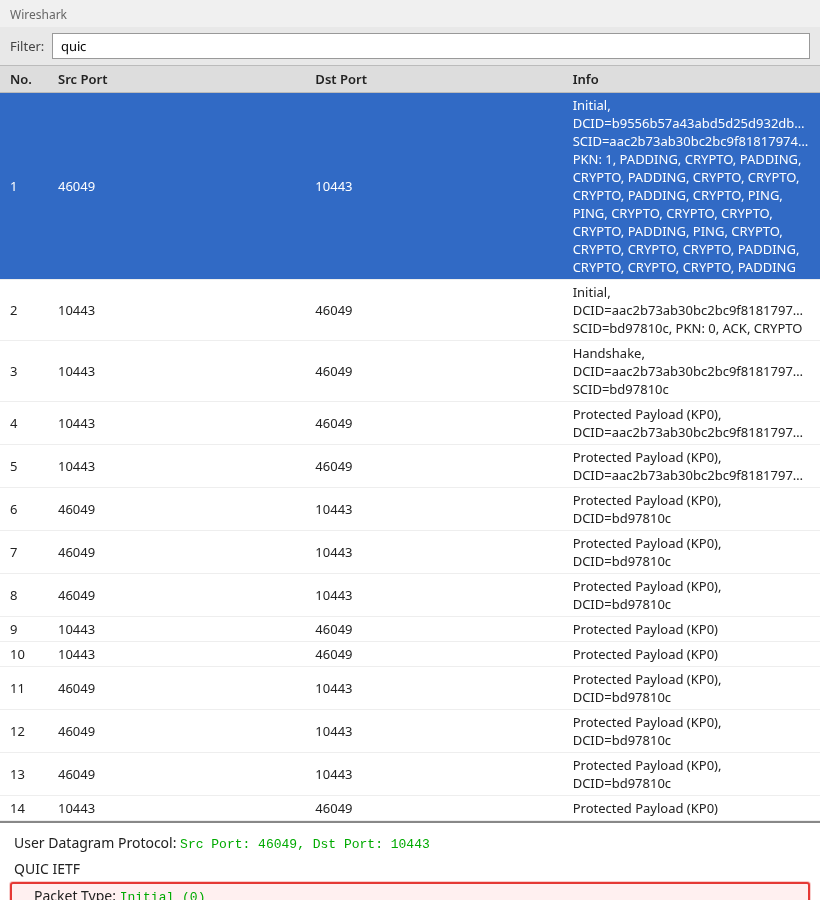
The selected row is a QUIC Initial long header on UDP. Expand the Initial packet to see the TLS handshake carried inside QUIC CRYPTO frames.
QUIC filters
Type a display filter in the toolbar. A green background means Wireshark accepted the expression.
All QUIC packets in the file:
quicInitial packets only (long header type 0):
quic.long.packet_type == 0Handshake long headers:
quic.long.packet_type == 2Typical HTTP/3 HTTPS traffic on UDP 443:
udp.port == 443When your capture uses another UDP port:
udp.port == 10443udp port 443 is valid in tcpdump capture syntax. quic and http3 are Wireshark display filters. You cannot express http3 in classic BPF capture filters because HTTP/3 is decoded only after dissection.
From QUIC handshake to HTTP/3 streams
On an Initial packet, follow QUIC IETF → CRYPTO to reach Transport Layer Security. QUIC uses the TLS 1.3 handshake for authentication and key establishment, but carries the TLS handshake messages in CRYPTO frames instead of TLS records over a TCP byte stream.
During the QUIC TLS handshake, HTTP/3 is selected through ALPN, typically the h3 token. After successful negotiation and decryption, Wireshark can dissect HTTP/3 frames on QUIC streams.
Once QUIC establishes the connection, HTTP/3 does not appear as a separate TCP-style conversation. Its requests and responses are carried on QUIC streams. After decryption, Wireshark can label those stream frames as HEADERS, DATA, and SETTINGS, which is where HTTP/3 analysis starts.
After keys are available, short packets decode to HTTP/3. The list column may read HTTP3 with STREAM, HEADERS, or DATA hints.
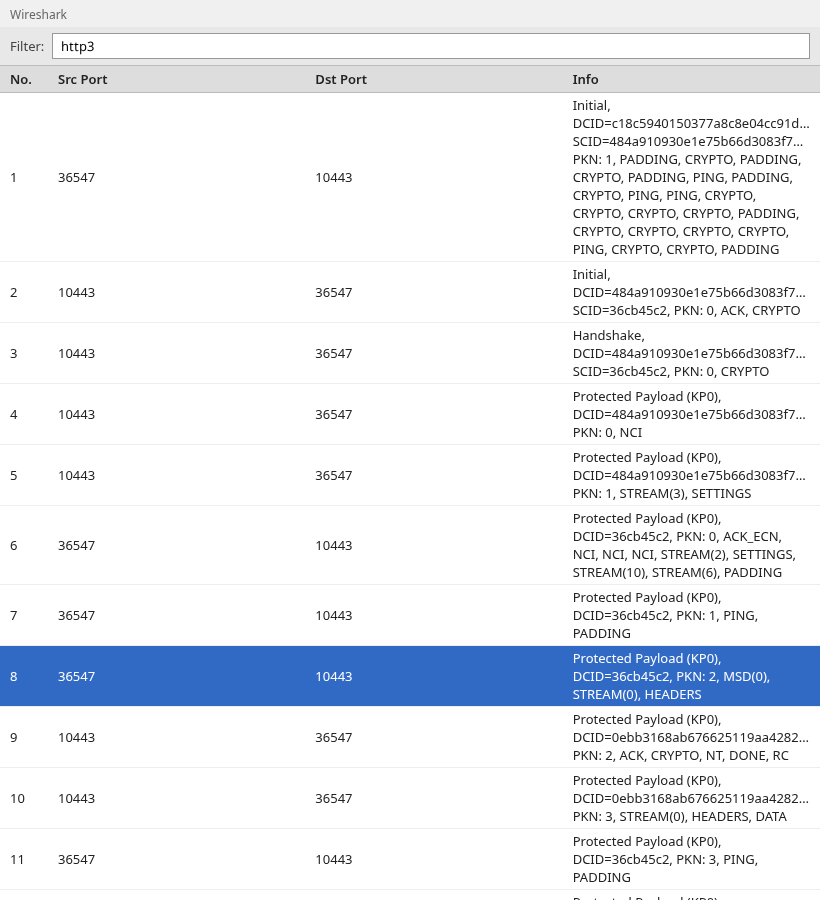
HTTP/3 maps requests and responses onto QUIC streams. Wireshark shows stream IDs in the Info column (for example STREAM(0), HEADERS). Use a display filter when you want only application frames:
http3Request headers only:
http3.headersIf your Wireshark build offers Follow → QUIC Stream, use it when you need a stream-oriented view. If your goal is to inspect HTTP requests and responses, the http3 filter is usually more useful than following the raw QUIC stream.
Decrypt QUIC and HTTP/3 with a key log
Wireshark cannot decrypt protected QUIC payloads unless it has the session secrets. Provide TLS 1.3 traffic secrets from the client, the same way as TCP TLS.
Treat the key log as sensitive: anyone with the matching PCAP and TLS secrets can decrypt those captured sessions.
The full walkthrough for SSLKEYLOGFILE, browser setup, and the (Pre)-Master-Secret log filename preference lives in the TLS decryption tutorial. QUIC uses that same key log format; point Wireshark at the file captured during the trace.
On Linux with HTTP/3 curl, export secrets in the same shell that runs the client:
export SSLKEYLOGFILE=/path/to/sslkeys.logRun the client while the capture records that connection. The key log must contain secrets for the QUIC connection in your PCAP.
In Wireshark, open Edit → Preferences → Protocols → TLS and set (Pre)-Master-Secret log filename to that log path. Reload the capture if you change the preference mid-session.
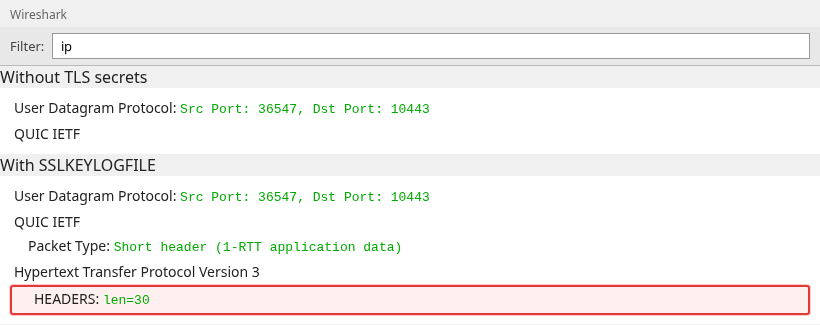
Without the log, the same short packet stays a Protected Payload line. With the log, Wireshark can show HTTP/3 with HEADERS on a QUIC stream. If you still see only protected payloads, check that the key log was generated by the same client process and same QUIC connection as the PCAP, and that you did not mix two different client runs.
Quick tshark check when you have a paired PCAP and key log:
tshark -r capture.pcapng -o tls.keylog_file:/path/to/sslkeys.log -Y http3 -c 3You should see HTTP3 packets with HEADERS or DATA in the summary.
QUIC vs TCP HTTPS on the same service
Many servers speak HTTP/3 on UDP and HTTP/2 or HTTP/1.1 on TCP at the same logical URL. If the site works in a browser but your TCP-only capture appears empty, check whether the browser used QUIC over UDP instead.
For comparison, capture the same service over TCP/HTTP/2. This does not prove that the client automatically fell back from HTTP/3; it simply shows how TCP/TLS looks beside QUIC.
That comparison trace shows a normal TCP three-way handshake and TLS on the service port.
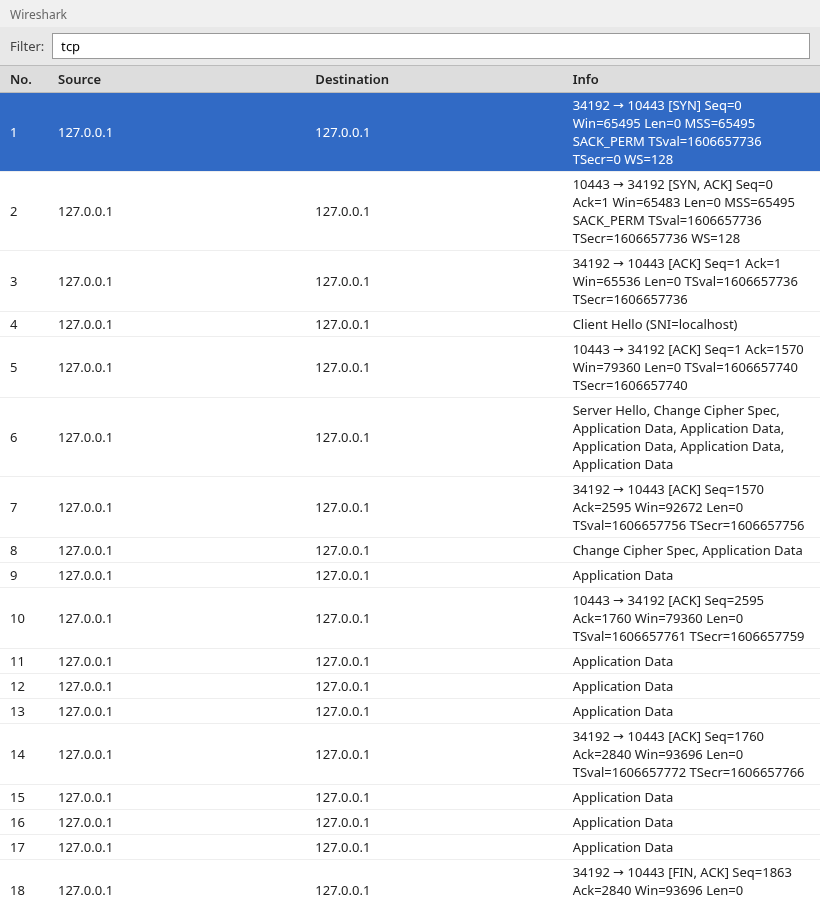
Filter contrast:
| Goal | Display filter |
|---|---|
| QUIC only | quic |
| TCP TLS to same host | tcp.port == 443 && tls |
| HTTP/2 after TCP decrypt | http2 |
| HTTP/3 after QUIC decrypt | http3 |
Replace 443 with your capture port when the service does not use the default HTTPS port.
Troubleshooting checklist
If QUIC or HTTP/3 is not decoding as expected, check these points first:
- Confirm the trace contains UDP to the port you expect, not only TCP.
- Apply
quicfirst. If zero packets match, UDP/QUIC may not be present at that capture point, a capture filter may have excluded it, or Wireshark may not have recognized QUIC on a non-standard port. If you know the UDP flow is QUIC but Wireshark does not decode it, check Analyze → Decode As or the QUIC dissector settings. - For decryption, verify Edit → Preferences → Protocols → TLS points at the key log from the same run as the PCAP.
- If Initial packets exist but
http3never appears, secrets are missing or mismatched; Protected Payload on short headers is expected until they load. - Some corporate firewalls block or restrict UDP/443 while TCP/443 still works. If QUIC is absent, verify whether UDP reaches the server before assuming Wireshark failed to decode it.
- If tcpdump reports packets dropped by the kernel, the capture host may not be keeping up. Increase capture buffers or reduce capture load before interpreting missing QUIC packets as network loss.
Summary
QUIC is UDP transport with TLS inside CRYPTO frames. HTTP/3 is the application layer you care about for modern HTTPS semantics once ALPN selects h3 and Wireshark has the right secrets. Start with quic and long-header filters, load a matching key log when you need HEADERS and streams, and compare against TCP/TLS on the same service when UDP might be missing from the file.
FAQ
Does every QUIC capture mean HTTP/3?
No. quic only shows the transport. Confirm HTTP/3 with decrypted http3 frames or ALPN h3 in the TLS handshake inside QUIC.
Why can I read some Initial packets without a key log?
Initial packet protection uses keys derived from visible connection information, so Wireshark can often parse them. Handshake and 1-RTT data still need session secrets from your key log.
Why do I see QUIC on a port other than 443?
QUIC is not tied to 443. HTTP/3 on the public internet usually uses UDP 443, but labs, proxies, and custom services can use any UDP port your capture recorded.
References
- Wireshark QUIC dissector documentation — Wireshark QUIC wiki
- IETF QUIC — RFC 9000
- IETF HTTP/3 — RFC 9114
- TLS key log format used by
SSLKEYLOGFILE— NSS key log format
