
| Tested on | RHEL 10.2 (Coughlan) and Windows Server 2025 (domain lab.example) |
|---|---|
| Package | Wireshark 4.4.2, krb5-workstation 1.21.3, openldap-clients 2.6.10 |
| Applies to | Kerberos v5 captures on UDP or TCP port 88 against Active Directory |
| Privilege | No root access is required to open a capture. A domain account is required to request tickets. |
| Scope | How to read AS-REQ, AS-REP, TGS-REQ, TGS-REP, and AP-REQ in Wireshark, and how to tell a normal pre-authentication message from a failed login. Does not cover Active Directory installation, Kerberoasting, or golden tickets. |
| Related guides | Wireshark tutorial Analyze LDAP traffic ldapsearch command |
Kerberos in a Windows capture is a short ticket exchange. AS-REQ and AS-REP obtain the Ticket Granting Ticket. TGS-REQ and TGS-REP obtain a ticket for one service. The client then presents that ticket in an AP-REQ.
The first KDC error is often part of a normal login. KRB5KDC_ERR_PREAUTH_REQUIRED means the KDC requires pre-authentication. In a normal password-based exchange, the client retries with a PA-ENC-TIMESTAMP protected by a key derived from the user's password; a following AS-REP confirms that TGT acquisition succeeded.
Key takeaways
To see whether Kerberos succeeded, follow AS-REQ and AS-REP for the Ticket Granting Ticket, then TGS-REQ and TGS-REP for the service principal name. The application packet is AP-REQ. KRB5KDC_ERR_PREAUTH_REQUIRED on the first AS-REQ is the KDC asking for pre-authentication, not a failed password by itself.
- AS-REQ and AS-REP obtain the Ticket Granting Ticket (TGT). The TGT is encrypted with the KDC's
krbtgtkey. - TGS-REQ and TGS-REP obtain a ticket for one service principal name (SPN). That ticket is encrypted with the service account's key.
- AP-REQ presents the service ticket to the application. AP-REP appears when that application uses mutual authentication.
- A key derived from the user's password protects the pre-authentication timestamp (
PA-ENC-TIMESTAMP). It does not encrypt the AS-REQ body. - You may see TGS-REQ and no AS-REQ when the client already has a cached TGT.
- Kerberos also depends on DNS, the SPN, and clock agreement between the client and the domain controller.
Kerberos packet flow
Active Directory answers Kerberos on UDP and TCP port 88. One domain controller runs both services that the client talks to. The messages are still easy to separate in Wireshark, because each one names a different service.
KDC, Authentication Service, and Ticket Granting Service
The Key Distribution Center (KDC) is the domain controller. It has two roles:
- The Authentication Service checks the user and returns a TGT.
- The Ticket Granting Service accepts that TGT and returns a ticket for one SPN.
The application, such as a file server or LDAP, is not the KDC. It only sees the service ticket later, inside AP-REQ.
A few names come up in every Kerberos packet:
- A principal is a Kerberos identity.
janeis a user principal.cifs/WIN-8S0K67EP5EO.lab.exampleis a service principal. - The realm is the Kerberos name of the domain. It is conventionally written in uppercase; here the AD domain
lab.exampleappears as realmLAB.EXAMPLE. - A service principal name (SPN) is the service class plus the host, such as
cifs/fileserverfor a file share orldap/dcfor directory access. - The ticket cache is where the client stores tickets it already received, so it does not ask the KDC again for each connection.
TGT vs service ticket
A TGT is a ticket for krbtgt/REALM. The client cannot read it. The KDC encrypted it with the krbtgt account key. A service ticket names the target, such as cifs/fileserver or ldap/dc. The KDC encrypts that ticket with the target account's key, not with the user's password and not with a vague secret shared with every server.
Client asks the Authentication Service for a TGT
                       ↓
   AS-REP returns the Ticket Granting Ticket
                       ↓
   TGS-REQ asks for a ticket for one service
                       ↓
      TGS-REP returns that service ticket
                       ↓
   AP-REQ presents the ticket to the service
The client still has to prove the password before the TGT is issued. That proof is a timestamp encrypted with a key derived from the password. It travels in pre-authentication data, not as an encrypted copy of the whole AS-REQ.
Wireshark filters for Kerberos
The Wireshark tutorial covers the display filter bar. These filters match the message types in this capture:
kerberosshows Kerberos on port 88 and Kerberos carried inside LDAP or SMBkerberos.msg_type == 10is AS-REQkerberos.msg_type == 11is AS-REPkerberos.msg_type == 12is TGS-REQkerberos.msg_type == 13is TGS-REPkerberos.msg_type == 14is AP-REQ, including the one nested inside a TGS-REQkerberos.msg_type == 15is AP-REPkerberos.error_codeshows KDC errors, including the pre-authentication request
List the Kerberos messages in a saved capture:
tshark -r kerberos-fresh.pcap -Y kerberos -T fields -e frame.number -e _ws.col.Info1 AS-REQ
2 KRB Error: KRB5KDC_ERR_PREAUTH_REQUIRED
3 AS-REQ
4 KRB Error: KRB5KRB_ERR_RESPONSE_TOO_BIG
8 AS-REQ
9 AS-REP
17 TGS-REQ
19 TGS-REP
30 TGS-REQ
32 TGS-REP
37 bindRequest(1) "<ROOT>" sasl
38 bindResponse(1) saslBindInProgressThe list groups into four parts:
- Frames 1 to 9 obtain the TGT
- Frames 17 and 19 obtain the CIFS service ticket
- Frames 30 and 32 obtain a second service ticket, for LDAP
- Frames 37 and 38 are the LDAP bind that presents the LDAP ticket
The same list in the packet pane:
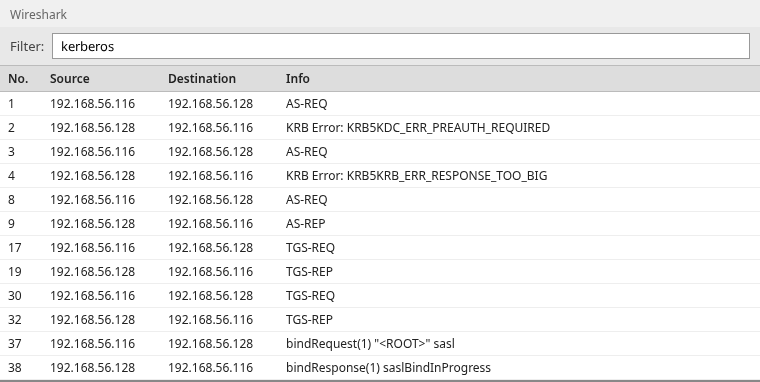
Gaps in the frame numbers are the TCP handshake and other packets that the kerberos filter hides.
The screenshots use these values. Replace them with the ones in your capture:
- Client:
192.168.56.116 - Domain controller and KDC:
192.168.56.128 - Realm and user:
LAB.EXAMPLEandjane - Services: CIFS and LDAP on
WIN-8S0K67EP5EO.lab.example
The traffic came from a TGT request, a CIFS ticket request, and an LDAP bind that used Kerberos. You do not need to reproduce it to analyze your own PCAP.
Read the AS-REQ and AS-REP
Frames 1 through 9 show a fresh TGT acquisition. Follow the client principal, the krbtgt service name, and the changing pre-authentication data. AS-REP is the successful end of this part of the exchange.
First AS-REQ
Frame 1 is the first AS-REQ. The body is readable. Nothing in it is encrypted with the user's password.
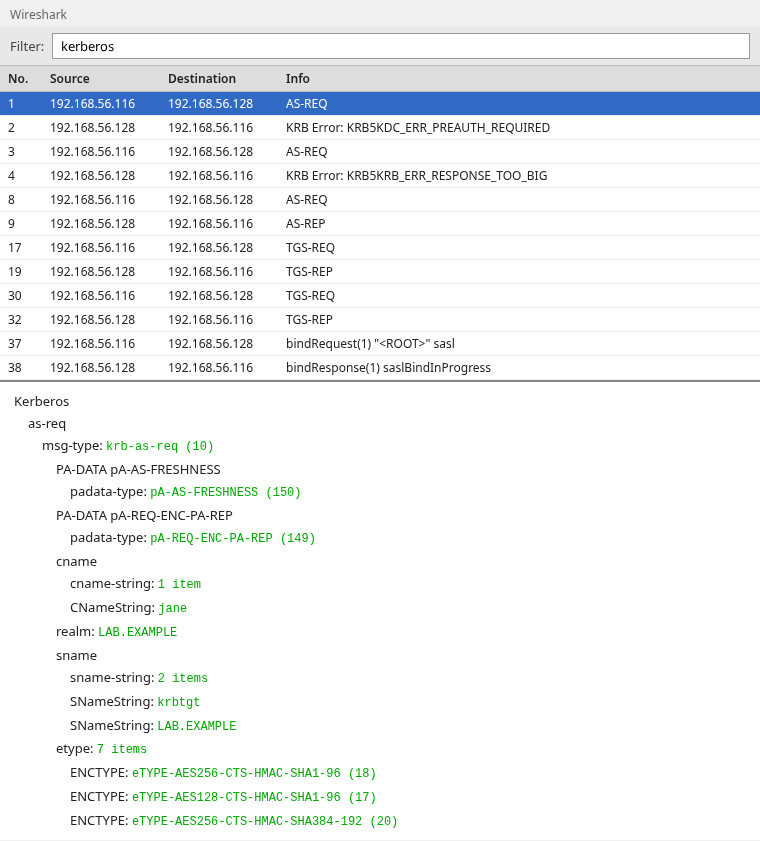
Read these fields together:
CNameString: janeis the client principalrealm: LAB.EXAMPLEis the domainSNameString: krbtgtandSNameString: LAB.EXAMPLEare the TGT service, writtenkrbtgt/LAB.EXAMPLE- The
etypelist is the encryption types the client can use, in order of preference, with AES256 first
The pre-authentication items in this first request are pA-AS-FRESHNESS and pA-REQ-ENC-PA-REP. There is no PA-ENC-TIMESTAMP, so no password-derived proof appears in this request.
Why PREAUTH_REQUIRED can be normal
Frame 2 is KRB5KDC_ERR_PREAUTH_REQUIRED, error code 25. Active Directory expects pre-authentication, so it answers the bare AS-REQ by asking for it.
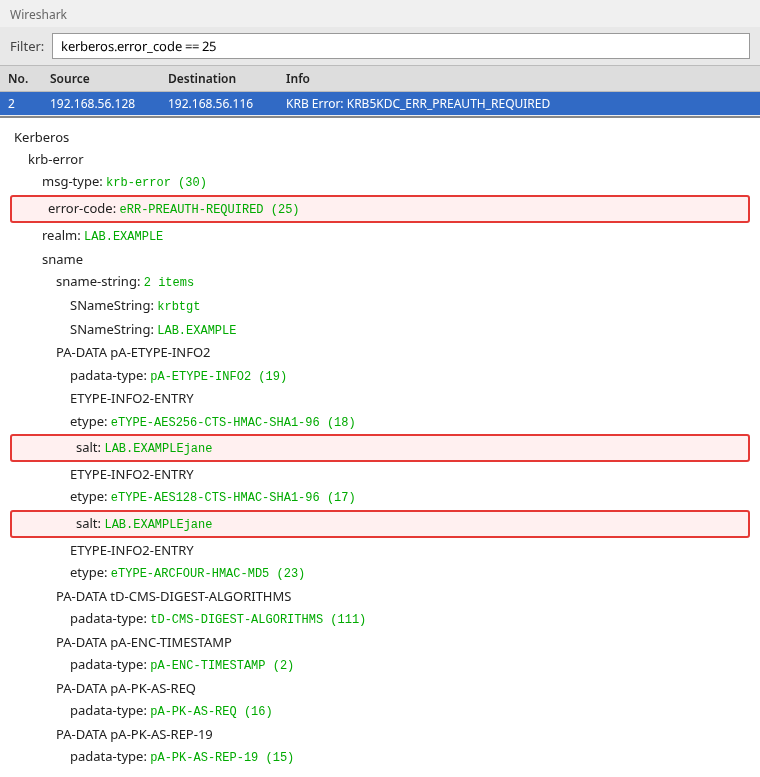
error-code: eRR-PREAUTH-REQUIRED (25) is the request for proof, not a rejected password. PA-ETYPE-INFO2 tells the client which encryption type, salt, and key-derivation parameters to use. A salt is extra text mixed with the password so two accounts with the same password still get different keys. In this capture the KDC advertises AES256 with salt LAB.EXAMPLEjane. The client combines that information with the user's password to derive the key used for PA-ENC-TIMESTAMP. The KDC never sends the key itself.
What comes next decides whether this error matters:
- An AS-REQ with
PA-ENC-TIMESTAMPand then an AS-REP follow: the error was only the first step - A complete capture ends here with no retry: the attempt did not get past pre-authentication
- The trace may be incomplete: a missing retry alone does not prove failure
AS-REQ with pre-authentication
Frame 3 repeats the same user and the same krbtgt/LAB.EXAMPLE service. The new item is PA-ENC-TIMESTAMP.
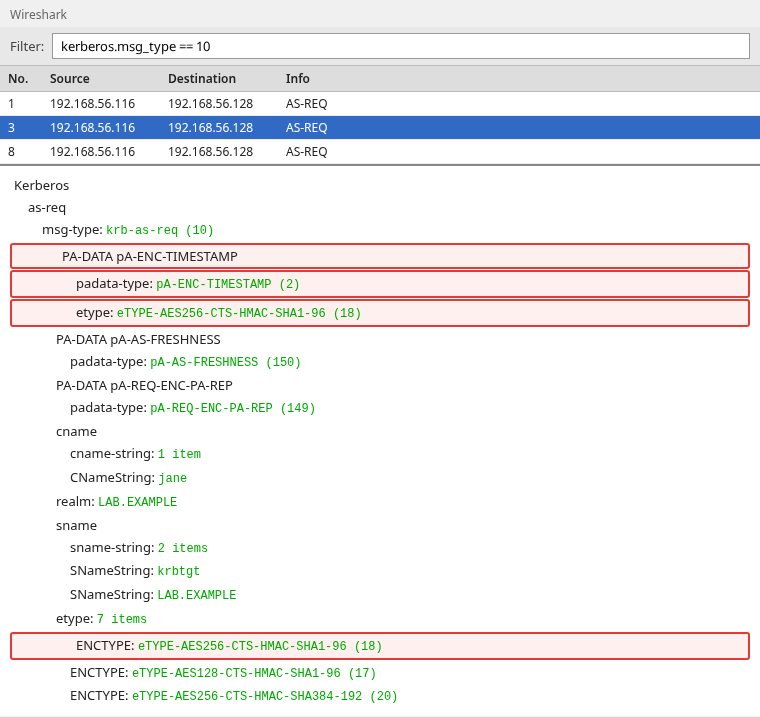
padata-type: pA-ENC-TIMESTAMP (2) and etype: eTYPE-AES256-CTS-HMAC-SHA1-96 (18) mean the client encrypted a timestamp with the key derived from the password and the salt from frame 2. Wireshark shows ciphertext there. It does not show the password. The request body below that timestamp is still cleartext.
Frame 4 is KRB5KRB_ERR_RESPONSE_TOO_BIG (52). The AS-REP was too large for a single UDP reply, which is common in Active Directory because the ticket carries the user's group information. The client sends the same AS-REQ again on TCP in frame 8. It is not a second login and not a bad password.
AS-REP and the TGT
Frame 9 is the AS-REP. This is the packet that delivers the TGT.
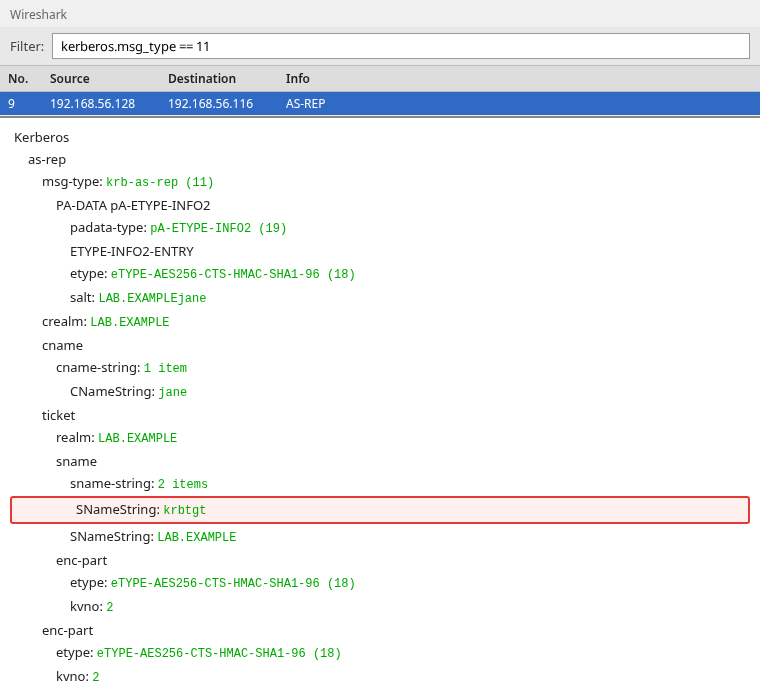
CNameString: jane matches the request. enc-part is Wireshark's label for an encrypted block, and kvno is the key version number of the account whose key encrypted it. An AS-REP has two of those blocks:
- The
enc-partinsideticketis the TGT itself. It useskvno: 2, thekrbtgtkey on this domain. The client cannot decrypt it and only passes it back to the KDC later. - The
enc-partoutsideticketis encrypted with the user's key. The client decrypts it to get the session key it will use with the TGT.
Both blocks show AES256 and kvno: 2, but they belong to two different accounts. The matching number is a coincidence, not the same key.
Read the TGS-REQ and TGS-REP
Frames 17 and 19 request and return the CIFS service ticket. The TGT is not a file-share ticket. It only authorizes the client to ask the Ticket Granting Service for one.
The returned ticket uses kvno: 3, the key version of the account that owns the SPN. Active Directory's default SPN service-class mappings allow cifs to map to the computer account's HOST SPN, so a normal computer account can satisfy this CIFS ticket request without a separately registered cifs/ SPN. Custom service accounts or aliases may still require explicit SPN registration.
TGS-REQ
Frame 17 is the TGS-REQ. Wireshark also shows message type 14 here, because a TGS-REQ carries the TGT inside an AP-REQ. That inner AP-REQ is for the KDC. It is not the packet the file server receives.
Find the requested SPN
The requested service is in the TGS-REQ body, after the embedded TGT.
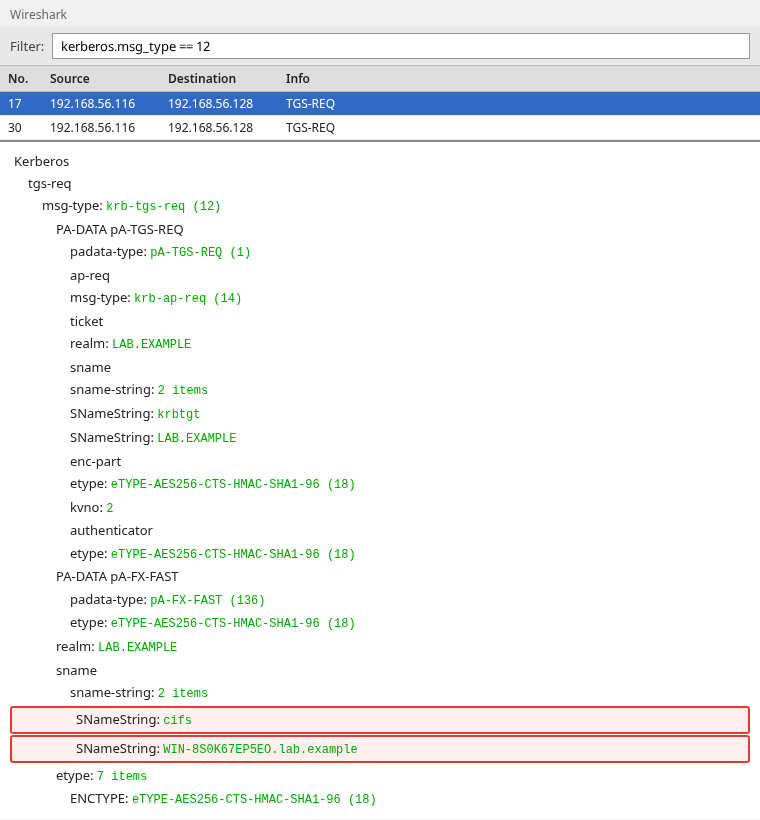
The highlighted SNameString values are cifs and WIN-8S0K67EP5EO.lab.example. Together they are the SPN cifs/WIN-8S0K67EP5EO.lab.example. The earlier SNameString: krbtgt sits inside the AP-REQ ticket and is the TGT being presented, not the service being requested.
pA-FX-FAST is Kerberos armoring (FAST), an extra encrypted wrapper that protects part of the exchange. The SPN above is still in the clear in the request body, so you do not need a key to see which service was requested.
TGS-REP
Frame 19 is the TGS-REP. It has the same two-block shape as the AS-REP:
CNameStringisjane, and the ticket'sSNameStringvalues are againcifsandWIN-8S0K67EP5EO.lab.example- The ticket
enc-partis AES256 withkvno: 3, encrypted with the computer account's key. The client cannot read it. - The second
enc-partis encrypted with the TGT session key, so the client can read the new service session key
Find the AP-REQ sent to the service
A service ticket stays in the cache until an application presents it. This capture used a GSSAPI ldapsearch command to present an LDAP ticket. An SMB session setup carries the same AP-REQ shape for a cifs SPN.
AP-REQ
Frame 37 is the LDAP bind. The Kerberos message inside it is AP-REQ, type 14. The LDAP capture guide shows the bind itself. The ticket inside this bind is the Kerberos part.
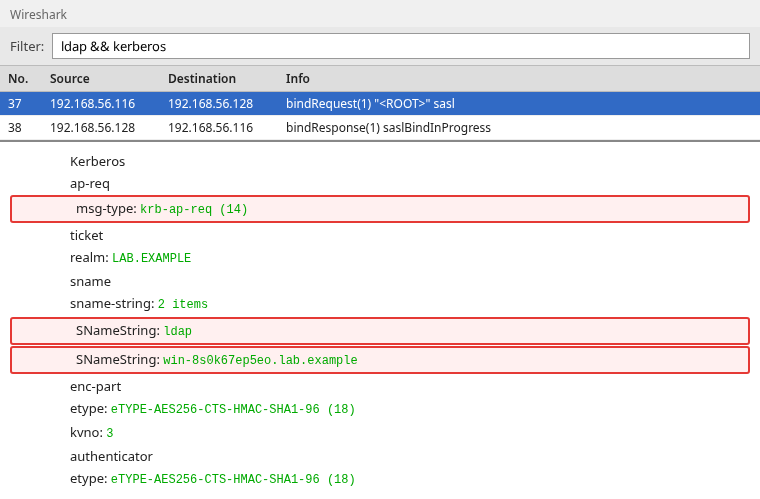
Read the AP-REQ fields in this order:
msg-type: krb-ap-req (14)marks the ticket being presented to the serviceSNameString: ldapandSNameString: win-8s0k67ep5eo.lab.examplename the service that must decrypt the ticket. The host is lowercase because the client normalized the name before building the SPN.kvno: 3is the computer account key version again- The authenticator is a fresh timestamp encrypted with the service session key. It proves the client holds that key and was not just replaying a copied ticket.
Filter kerberos.msg_type == 14 also matches the AP-REQ nested in a TGS-REQ. Limit it with ldap && kerberos, or with smb2 && kerberos when the application is a file share, so you are looking at the service and not at the KDC.
When AP-REP appears
Frame 38 is AP-REP, type 15. Mutual authentication means the service proves it could decrypt the ticket.
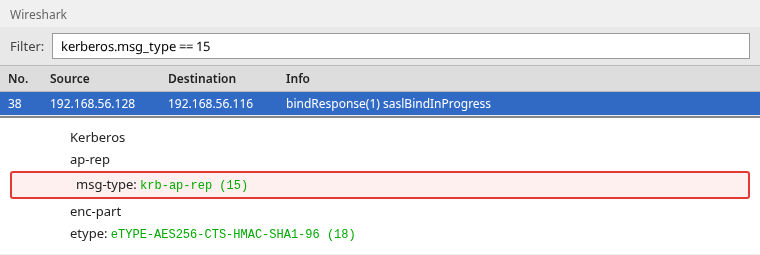
msg-type: krb-ap-rep (15) is that proof. The enc-part is ciphertext for the client. In this capture, frame 38 contains AP-REP and confirms the mutual-authentication exchange.
When AP-REQ sets the mutual-required flag, the service must return AP-REP. If you do not see one, check the AP-REQ flags and the surrounding application traffic before deciding that mutual authentication was not used:
- The reply may be carried inside the application protocol, such as an SMB or LDAP response
- The exchange may have failed before the service answered
- The capture may be incomplete
Why AS-REQ may be missing
A capture that starts at TGS-REQ is often a client that already logged on. The TGT is in the cache, so the client never talks to the Authentication Service again until that TGT expires or is purged.
Cached TGT
With jane's TGT still cached, a request for a different SPN produced only the Ticket Granting Service exchange. The Kerberos filter on that capture has no AS-REQ and no AS-REP:

Frame 4 asks for the ticket and frame 6 returns it. This is normal when the client already has a valid TGT. Purge the user's tickets before a new capture only when you specifically need to record the AS exchange.
Troubleshoot Kerberos errors
Compare the error with the next Kerberos packet. A normal pre-authentication exchange continues. A real failure stops.
PREAUTH_REQUIRED
KRB5KDC_ERR_PREAUTH_REQUIRED (25) says the KDC requires pre-authentication. In this password-based trace, look for a retry containing PA-ENC-TIMESTAMP, followed by AS-REP. KRB5KDC_ERR_PREAUTH_FAILED (24) is different: the timestamp did not verify.
Client principal unknown
An account that is not in the domain fails on the first AS-REQ. There is no TGT to retry with. The example capture has one AS-REQ and then KRB5KDC_ERR_C_PRINCIPAL_UNKNOWN. In the packet tree the code is eRR-C-PRINCIPAL-UNKNOWN (6), and CNameString is nosuchuser. Filter kerberos.error_code == 6.
Service principal unknown
A wrong SPN fails at the Ticket Granting Service after the TGT already exists. The initial authentication can succeed and the file share can still fail.
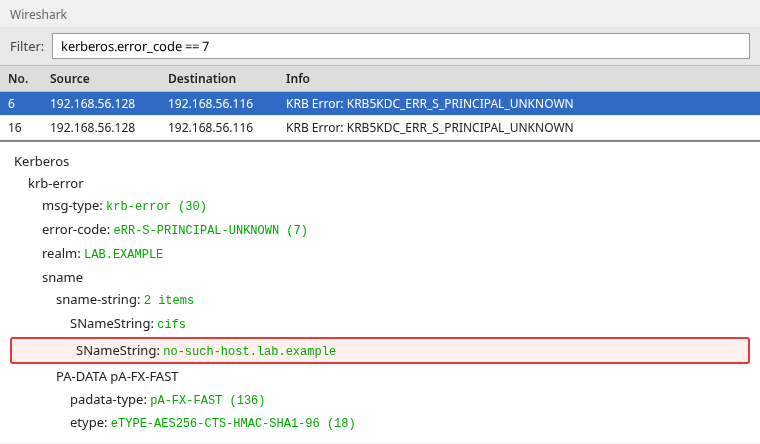
eRR-S-PRINCIPAL-UNKNOWN (7) names cifs and no-such-host.lab.example. The client retried, so the same error appears twice. The fix is the SPN registered on the service account, or the host name the client used to build it. Filter kerberos.error_code == 7.
Clock skew
The timestamp inside PA-ENC-TIMESTAMP has to agree with the domain controller. Active Directory's default maximum clock skew is five minutes, although administrators can change that policy. When the clocks exceed the allowed difference, the error code is eRR-SKEW (37). Filter kerberos.error_code == 37.
Every Kerberos error carries the KDC's own clock in the stime field. In the pre-authentication error from this capture, stime is Oct 6, 2026 21:25:14 IST. Compare that with the client clock before you change encryption settings or reset the account.
Encryption-type mismatch
The successful AS-REQ offered AES256 first, and the KDC accepted it. In the failure example, the client was deliberately restricted to Camellia-256 while the KDC did not issue that type. The KDC still sends PREAUTH_REQUIRED first because the account exists. The next AS-REQ carries PA-ENC-TIMESTAMP with Camellia-256, and the answer is KRB5KDC_ERR_ETYPE_NOSUPP.
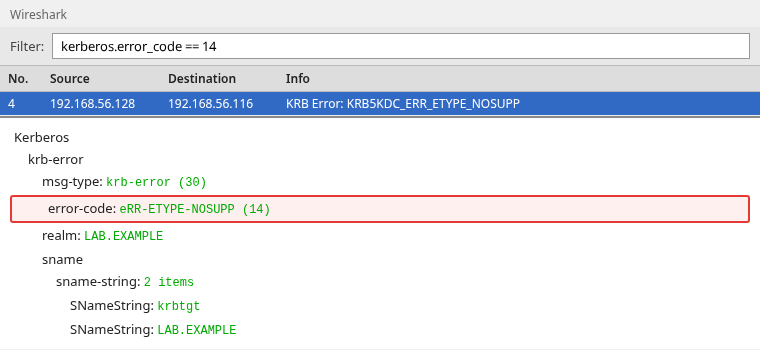
eRR-ETYPE-NOSUPP (14) is the mismatch. Filter kerberos.error_code == 14. In a real capture, compare the etypes in the request with the encryption types supported by the account, service, and domain policy.
Ticket cannot be decrypted: KRB_AP_ERR_MODIFIED
KRB_AP_ERR_MODIFIED appears after the client obtained a service ticket but the target cannot decrypt it. Wireshark names it eRR-MODIFIED (41). Filter kerberos.error_code == 41.
The KDC encrypts the ticket with the key of whichever account holds the SPN. If the service runs under a different account, it cannot decrypt the ticket. Common causes:
- The SPN is registered on the wrong account
- The same SPN exists on two accounts
- The service account password changed and the service or another domain controller still has the old key
Check that the SPN belongs to the account actually running the service and that the service is using that account's current key.
Decrypt Kerberos fields with a keytab
The fields that matter for a login, the principal, the realm, the SPN, and the error code, are already visible. The ticket enc-part and the timestamp ciphertext stay encrypted unless Wireshark has the matching key.
A keytab is a file that stores Kerberos keys for one or more accounts. Under Preferences, Protocols, Kerberos, Wireshark can load one, but each key decrypts only the blocks it protects:
- The user key decrypts
PA-ENC-TIMESTAMPand the client portion of AS-REP - The
krbtgtkey decrypts the TGT - The service account key decrypts that service's ticket
This capture has none of those keys, so the ciphertext stays opaque. The principal, the SPN, and the error code do not need a key.
Summary
A Kerberos capture is the TGT exchange, then one TGS exchange per service, then an AP-REQ when the application is contacted. AS-REP frame 9 is the TGT for krbtgt/LAB.EXAMPLE, encrypted with the krbtgt key. TGS-REP frame 19 is the CIFS ticket, encrypted with the computer account key at kvno 3. The LDAP bind is where this capture presents a ticket, and the bind response includes AP-REP because LDAP asked for mutual authentication.
KRB5KDC_ERR_PREAUTH_REQUIRED is the normal first reply in this password-based exchange. The password-derived key protects the following PA-ENC-TIMESTAMP. RESPONSE_TOO_BIG only moves the same AS-REQ from UDP to TCP. Unknown users fail with error 6, unknown SPNs with error 7, unsupported etypes with error 14, clock skew with error 37, and a ticket the target cannot decrypt with error 41.
If the trace starts at TGS-REQ, the client already had a TGT. Purge that cache when you need the AS exchange in the capture. The SPN in the TGS-REQ body is the service name to check against DNS and the account that should own it.
References
- RFC 4120: The Kerberos Network Authentication Service (V5)
- Kerberos authentication overview (Microsoft Learn)
- Kerberos authentication troubleshooting guidance (Microsoft Learn)
- Wireshark display filter reference: kerberos
Frequently Asked Questions
Is KRB5KDC_ERR_PREAUTH_REQUIRED a failed login?
Not by itself. Error 25 means the KDC requires pre-authentication. This password-based exchange then sends an AS-REQ containing PA-ENC-TIMESTAMP and receives AS-REP. If a complete capture stops on error 25, the attempt did not progress; PREAUTH_FAILED (24) means the supplied proof did not verify.
What is the difference between a TGT and a service ticket?
The TGT is the ticket in AS-REP whose service name is krbtgt/REALM. It is encrypted with the krbtgt key. A service ticket is the ticket in TGS-REP whose service name is the SPN the client asked for, such as cifs/hostname. It is encrypted with that service account's key.
Why do I see TGS-REQ but no AS-REQ?
The client already has a TGT in its cache, so it does not contact the Authentication Service again. Purge the tickets for that user before starting a new capture if you need the AS-REQ and AS-REP in the same trace.
How do I find the SPN in Wireshark?
Open the TGS-REQ and read SNameString in the request body. The two values are the service class and the host, for example cifs and the domain controller's host name. Do not use the krbtgt name inside the embedded AP-REQ. That name is the TGT, not the service being requested.
Can Wireshark decrypt Kerberos tickets?
Only the parts for which you already have a keytab. The user key opens the pre-authentication timestamp and the client portion of AS-REP. The krbtgt key opens the TGT. The service account key opens that service ticket. The principal, realm, SPN, and error code are visible without a key.
