
| Tested on | RHEL 10.2 (Coughlan) |
|---|---|
| Package | Wireshark 4.4.2 |
| Applies to | IPv4 and IPv6 captures in Wireshark |
| Privilege | No root access is required to filter an open capture |
| Scope | Display filters for one IPv4 or IPv6 host, a two-host conversation, a CIDR subnet, and an exclusion, plus short checks for fragments, the Don't Fragment bit, and TTL. Does not cover the display-filter language, IPv4 header layout, GeoIP, or TCP and UDP port filters. |
| Related guides | Wireshark tutorial How to use Wireshark Analyze IP fragmentation with Wireshark TTL in Wireshark |
Paste ip.src, ip.dst, or ip.addr into the display filter bar to keep one IPv4 host. The field you pick decides whether that is the source, the destination, or either side. The IPv6 names are ipv6.src, ipv6.dst, and ipv6.addr.
The examples use 192.168.1.10, 192.168.1.20, and the documentation prefix 2001:db8::/32. Replace them with the addresses in your file. A display filter only hides rows. Clear the bar and they come back.
Wireshark IP Filters Cheat Sheet
Paste the right-hand column into the display filter bar. == and eq are the same operator. && and and are the same operator.
| Goal | Display filter |
|---|---|
| IPv4 only | ip |
| IPv6 only | ipv6 |
| Source IPv4 | ip.src == 192.168.1.10 |
| Destination IPv4 | ip.dst == 192.168.1.10 |
| Either direction | ip.addr == 192.168.1.10 |
| Two hosts | ip.addr == 192.168.1.10 && ip.addr == 192.168.1.20 |
| Any of several IPv4 addresses | ip.addr in {192.168.1.10, 192.168.1.20, 192.168.1.50} |
| IPv4 subnet | ip.addr == 192.168.1.0/24 |
| Exclude one host | !(ip.addr == 192.168.1.10) |
| Exclude subnet | !(ip.addr == 192.168.1.0/24) |
| IPv6 source | ipv6.src == 2001:db8::10 |
| IPv6 destination | ipv6.dst == 2001:db8::10 |
| Either IPv6 direction | ipv6.addr == 2001:db8::10 |
| IPv4 fragments | ip.flags.mf == 1 || ip.frag_offset > 0 |
| Don't Fragment bit set | ip.flags.df == 1 |
| TTL below a value | ip.ttl < 64 |
The bar turns green when Wireshark accepts the expression. A red bar means the expression was rejected. Fix the field name before you treat an empty list as a real result.
Filter One IP Address
ip.src, ip.dst, and ip.addr each take one IPv4 address. They do not match IPv6. Right-click Source Address or Destination Address and choose Apply as Filter, then Selected. Wireshark fills the bar from the field you clicked. Change ip.src to ip.addr when you want either side.
The sample file also contains 192.168.1.50, 10.1.1.5, 10.2.2.2, a ping from 10.9.9.9, and two IPv6 packets, so a host filter has something to hide.
Source IP
ip.src == 192.168.1.10 keeps packets that host sent: the SYN and ACK to 192.168.1.20, and the SYN to 10.1.1.5. The reply from 192.168.1.20 stays hidden, because 192.168.1.10 is the destination on that packet.
Destination IP
ip.dst == 192.168.1.10 keeps packets sent to that host: the SYN-ACK from 192.168.1.20 and the SSH SYN from 192.168.1.50. Packets 192.168.1.10 sent do not match.
Either source or destination
ip.addr == 192.168.1.10 matches either side. Use it for every peer, including replies. The Wireshark tutorial introduces the filter bar if you have not used it yet.
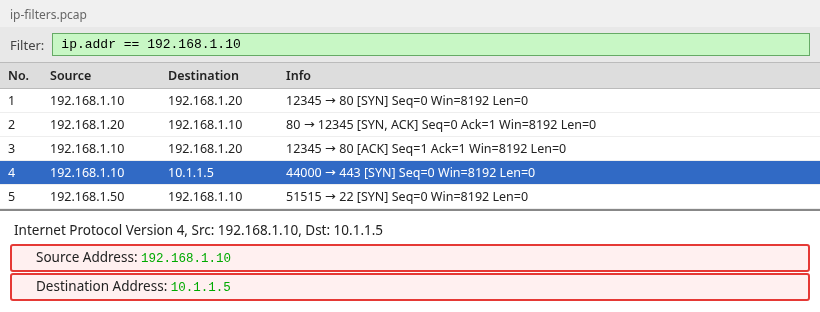
Five packets match. On frame 4 the address is the source and 10.1.1.5 is the destination. Frame 5 matches the other way, with 192.168.1.10 as the destination. Hidden rows keep their frame numbers. Clear the bar and frame 6 is still frame 6.
Filter Traffic Between Two Hosts
Both addresses have to be on the same packet. Direction does not matter:
ip.addr == 192.168.1.10 && ip.addr == 192.168.1.20
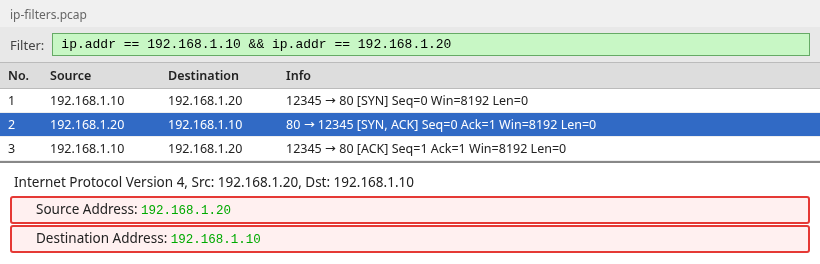
Frame 2 is the reply, source 192.168.1.20 and destination 192.168.1.10. The SYN from 192.168.1.10 to 10.1.1.5 is gone, because 192.168.1.20 is not on it.
ip.addr == 192.168.1.10 || ip.addr == 192.168.1.20 is the other question. It keeps any packet involving either host, including the SSH SYN from 192.168.1.50 and the ping to 192.168.1.20. Use && for one conversation and || when either host is enough.
ip.addr in {192.168.1.10, 192.168.1.20, 192.168.1.50} is the same idea for a list. A packet matches when either side is one of those addresses. The ping from 10.9.9.9 to 192.168.1.20 matches, because the destination is in the set. It is not limited to traffic among those three hosts.
Filter an IPv4 Subnet
ip.addr == 192.168.1.0/24 matches when either side is inside 192.168.1.0 through 192.168.1.255. The ping from 10.9.9.9 to 192.168.1.20 matches on the destination. ip.src == 192.168.1.0/24 does not match that ping, because the source is outside the prefix.
Wireshark applies the prefix length, so ip.addr == 192.168.1.10/24 is the same subnet. You do not have to zero the host bits.
Exclude an IP or Subnet
!(ip.addr == 192.168.1.10) hides every packet with that address on either side. IPv6 rows stay.
!(ip.addr == 192.168.1.0/24) drops the subnet, including the ping to 192.168.1.20. Traffic between 10.2.2.2 and 10.2.2.3 stays.
Why negating the full ip.addr expression matters
In a normal IPv4 packet, ip.addr represents both the source and destination addresses, so it is a multi-value field. The operator decides whether one copy is enough.
!(ip.addr == 192.168.1.10)is the exclusion to paste. The packet is hidden when either side equals that address. Packets with no IPv4 header, including IPv6, stay.ip.addr != 192.168.1.10has meant "every copy differs" since Wireshark 3.6. An IPv4 packet is kept only when neither side is that host. A packet with noip.addrfield fails the test, so IPv6 rows disappear. In the sample file,!()keeps the two IPv6 frames and!=does not.ip.addr !== 192.168.1.10means any copy differs. The SYN from 192.168.1.10 to 192.168.1.20 still matches, because the destination is not 192.168.1.10. Before Wireshark 3.6, plain!=had this meaning. If an exclusion seems to hide nothing, check for!==, or for!=on a Wireshark older than 3.6.
IPv6 Address Filters
ip.src and ip.addr ignore IPv6. The addresses below are documentation addresses. Substitute yours.
Source
ipv6.src == 2001:db8::10 keeps packets that address sent. Here that is the SYN to 2001:db8::20.
Destination
ipv6.dst == 2001:db8::10 keeps packets sent to it. Here that is the SYN-ACK coming back.
Either direction
ipv6.addr == 2001:db8::10 matches either side. A prefix works too: ipv6.addr == 2001:db8::/32 matches the whole block. Join two ipv6.addr tests with && for one conversation.
Useful IP Troubleshooting Filters
These three read header fields. They do not name the fault by themselves.
Fragmented IPv4 packets
ip.flags.mf == 1 || ip.frag_offset > 0 keeps every IPv4 fragment, including the last piece. That piece has More Fragments clear, so a filter on More Fragments alone drops it. Read the offset and the reassembly tree in the IP fragmentation guide.
Don't Fragment flag
ip.flags.df == 1 means the IPv4 Don't Fragment bit is set. It does not mean the packet is too large or that an MTU problem occurred. In this capture, several small TCP packets have DF set because the host's IPv4 stack marked them Don't Fragment.
TTL
ip.ttl < 64 keeps packets under that TTL. Here that is only the ICMP echo, which has TTL 5. Common defaults are 64 on many Linux systems and 128 on Windows, but the initial TTL is configurable, so change 64 to the value you expected. How to read a low TTL is in TTL in Wireshark.
Display Filter vs Capture Filter
A display filter hides rows in a file you already have. A capture filter decides what is saved, and dropped packets are gone. The names differ: ipv6 is the display filter, and ip6 is the capture filter. ip6 is not a display filter.
| Goal | Display filter | Capture filter |
|---|---|---|
| One IPv4 host, either side | ip.addr == 192.168.1.10 |
host 192.168.1.10 |
| Two hosts | ip.addr == 192.168.1.10 && ip.addr == 192.168.1.20 |
host 192.168.1.10 and host 192.168.1.20 |
| IPv4 subnet | ip.addr == 192.168.1.0/24 |
net 192.168.1.0/24 |
| Exclude one host | !(ip.addr == 192.168.1.10) |
not host 192.168.1.10 |
| IPv4 only | ip |
ip |
| IPv6 only | ipv6 |
ip6 |
host takes an IPv4 or IPv6 address. ip.addr does not. The IPv6 capture filter is host 2001:db8::10.
Common IP Filter Mistakes
ip.addr matches both directions
ip.addr == 192.168.1.10 shows traffic the host sent and traffic it received. Use ip.src when the replies should stay hidden.
Display filters do not change the PCAP
Clear the bar and the hidden rows come back with the same frame numbers. An ordinary save writes every packet, including rows the filter hid. For a smaller file, use File, Export Specified Packets, and choose Displayed.
Oversized host-capture packets do not automatically prove MTU trouble
A length above 1500 is not a broken path MTU on its own. On the sending host, the NIC may split a large TCP segment only as it leaves the machine, so Wireshark sees the large segment. Don't Fragment set, More Fragments clear, and fragment offset 0 means the frame is not an IP fragment. Check where you captured before you call it a path fault.
Summary
ip.src, ip.dst, and ip.addr select an IPv4 address, and the ipv6. names do the same for IPv6. The addr form matches either side. Two tests joined with && are one conversation. The same tests joined with || are either host. A /24 matches the subnet even when the address in front of it is a host, because Wireshark applies the prefix.
Exclude a host with !(ip.addr == 192.168.1.10). Since Wireshark 3.6, != means every copy of the field differs, so IPv6 disappears along with that host. !== means any copy differs, so a packet that host sent can still match.
A display filter hides rows. A capture filter decides what is saved, and it uses host, net, and ip6. The Don't Fragment bit, and a large length on the sending host, are not an MTU verdict. Start those checks with the fragment and TTL filters.
References
- Wireshark User's Guide: Building display filter expressions, comparison operators, the Wireshark 3.6 change to
!=, and CIDR matching - Wireshark IP display filter reference
- Wireshark IPv6 display filter reference
- pcap-filter manual, capture filters such as
host,net,ip, andip6
Frequently Asked Questions
How do I filter one IP address in Wireshark?
Use ip.addr == 192.168.1.10 for either side, ip.src for packets the host sent, and ip.dst for packets sent to it. Replace the address with yours. IPv6 uses ipv6.addr, ipv6.src, and ipv6.dst.
How do I filter between two IP addresses?
Use ip.addr == 192.168.1.10 && ip.addr == 192.168.1.20. Both addresses must be on the same packet, in either direction. || instead of && keeps every packet that involves either host, including traffic with other machines.
How do I exclude an IP address?
Use !(ip.addr == 192.168.1.10). That hides the address on either side and keeps other packets, including IPv6. On Wireshark 3.6 and later, != hides that host among IPv4 packets and also hides packets with no IPv4 header. !== does not exclude the host.
Can Wireshark filter a CIDR subnet?
Yes. ip.addr == 192.168.1.0/24 matches either side inside that prefix, and ip.src == 192.168.1.0/24 matches only the source. 192.168.1.10/24 is the same subnet. IPv6 uses the same form, for example ipv6.addr == 2001:db8::/32.
What is the IPv6 equivalent of ip.addr?
ipv6.addr. The source is ipv6.src and the destination is ipv6.dst. ip.addr does not match IPv6. A capture filter says ip6 or host, not ipv6.addr.
Are Wireshark display filters and capture filters the same?
No. A display filter hides rows, and clearing it brings them back. A capture filter decides what is written, and dropped packets are gone. host 192.168.1.10 is the capture filter. ip.addr == 192.168.1.10 is the display filter.
