
| Tested on | RHEL 10.2 (Coughlan) |
|---|---|
| Package | Wireshark 4.4.2, tcpdump 4.99.4 |
| Applies to | Wireshark on Linux, Windows, or macOS when analyzing TCP connection attempts |
| Privilege | Normal user for PCAP analysis; sudo or CAP_NET_RAW to capture on an interface |
| Scope | Packet patterns for TCP connection refused, SYN timeout, and incomplete handshakes (final ACK missing) in Wireshark, plus display filters and where to capture. Does not cover TCP sequence arithmetic, deep retransmission tuning, or RST origin/TTL forensics. |
| Related guides | Wireshark tutorial DNS troubleshooting in Wireshark TCP retransmission analysis TCP Previous segment not captured Wireshark IP filters cheat sheet |
When an application reports connection timed out or connection refused, the failure is already visible in the first few TCP packets if you captured the attempt. Wireshark shows whether the other side answered with a reset, stayed silent, or answered the SYN but never received your final ACK.
This guide maps the main packet patterns you can recognize in the packet list without re-deriving TCP flag theory. Use a trace from the client, server, or a middle tap — then record a second capture when you need to locate a drop.
A capture point is the device or interface where packets were recorded, such as the client, server, firewall, or SPAN (switch mirror) port. Wireshark only knows what that capture location saw.
Key takeaways
- If you see
SYN → SYN/ACK → ACK, TCP connected successfully. Troubleshoot TLS or the application next. - If you see
SYN → RST/ACK, the connection was actively refused. A closed port is the common cause; a firewall or other middle device can send the same pattern. - If you see repeated SYNs with no reply, the connection is timing out. A silent firewall or ACL (access-control rule), unreachable host, routing problem, or missing return path can all cause this.
- If you see repeated SYN/ACKs, the side sending SYN/ACK never observed the final ACK. Compare client and server captures before you decide where it was lost.
- Wireshark shows what happened at the capture location; it does not by itself name the firewall or router that dropped a packet.
- Capture from both sides when the ticket depends on where a segment disappeared.
Before you read the pattern table, three TCP flags matter:
SYN— starts a new TCP connection.ACK— confirms that a TCP packet or sequence position was received.RST— immediately rejects or aborts a TCP connection.
A normal connection starts with SYN → SYN/ACK → ACK.
TCP connection failure patterns at a glance
| Pattern | What you see in order | Typical client symptom | First place to check |
|---|---|---|---|
| Healthy handshake | SYN → SYN/ACK → ACK | Connected | Application or TLS above TCP |
| Refused | SYN → RST/ACK | Connection refused | Target port and process on server |
| Timeout (no reply) | SYN → SYN retransmission → … | Connection timed out | Path, silent firewall or ACL, wrong or unreachable IP, server down |
| Incomplete handshake (final ACK missing) | SYN → SYN/ACK → SYN/ACK retransmission → … | Timeout or hang | ACK return path, client, or capture placement |
| Client reset after SYN/ACK | SYN → SYN/ACK → RST (from client) | Refused or abort | Connection state on client, local firewall/NAT, scan or packet tool |
The rows describe direction and expert labels, not every possible FIN or payload packet after the connection opens.
Wireshark filters for TCP connection attempts
Narrow the list before you follow a stream. Type a display filter in the toolbar; a green bar means Wireshark accepted it.
Find one failed connection first
If you know the server IP and port, start with a narrow filter such as:
ip.addr == 192.168.20.20 && tcp.port == 9910Select one packet from the failed attempt, then right-click it and choose Conversation Filter → TCP, or note its tcp.stream number and use:
tcp.stream eq NReplace N with that stream index. That keeps unrelated TCP connections out of the packet list.
Useful filters once the list is manageable:
tcp.flags.syn == 1First SYNs only (no ACK bit):
tcp.flags.syn == 1 && tcp.flags.ack == 0Resets:
tcp.flags.reset == 1Retransmissions (SYN or SYN/ACK retries show up here):
tcp.analysis.retransmissionTo surface connection attempts, SYN/ACKs, and resets in one pass:
tcp.flags.syn == 1 || tcp.flags.reset == 1After you pick one failed attempt, lock the conversation with tcp.stream eq N as above. For flag basics tied to sequence numbers, see TCP sequence and ACK numbers — this page stays on connection-establishment failure shapes only.
Healthy TCP three-way handshake
A successful open is three segments: client SYN, server SYN/ACK, client ACK. These three packets only establish TCP. HTTP, TLS, SSH, or other application data starts after this handshake completes.
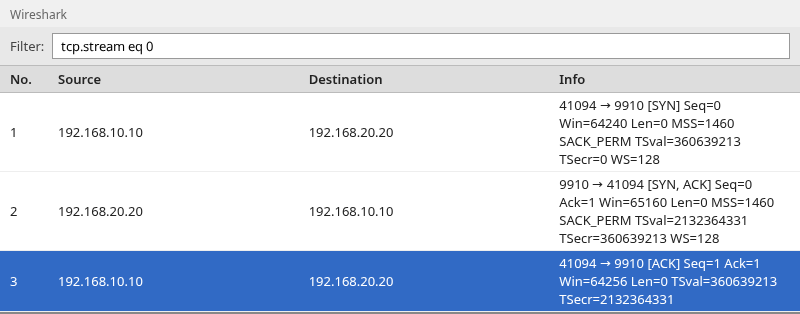
Frame order is what matters: SYN with only the SYN flag set, SYN/ACK from the server, then an ACK that completes the exchange. If your ticket is about slow TLS or HTTP, move above TCP once this pattern is present.
Connection refused — SYN followed by RST
Closed port
When nothing listens on the destination TCP port, a typical Linux server replies to your SYN with RST/ACK. The client library surfaces that as connection refused. The RST you see may still come from a firewall or other middlebox that answers for the destination IP, not only from the application host.
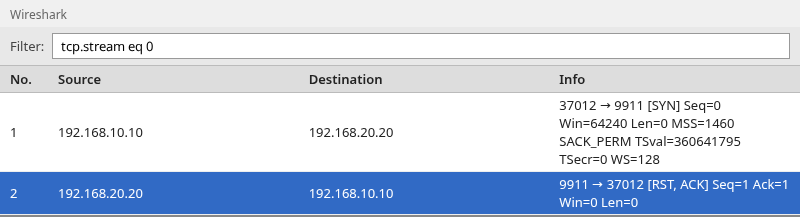
The RST arrives quickly because the operating system rejected the connection attempt — nothing was accepting connections on that port. You should not see a long train of SYN retransmissions unless a firewall or other middle device is interfering.
Firewall reject vs application reject
Some filters answer a SYN with RST/ACK (reject) instead of dropping it. That still looks like refused at the client, but the RST may come from a firewall rather than the application server.
A silent drop does not produce RST; the client keeps retransmitting SYN and eventually times out. Compare the refused and timeout screenshots below before you blame the application port.
Connection timeout — SYN retransmissions with no reply
If no host returns SYN/ACK (or ICMP errors you filtered out), the client retransmits the SYN. Wireshark marks later copies with [TCP Retransmission].
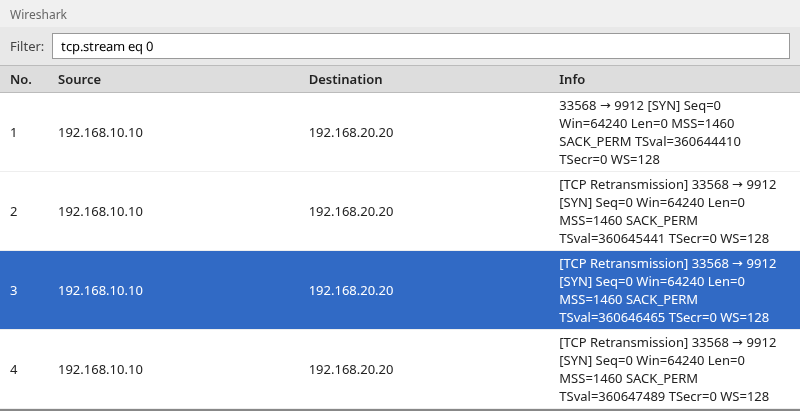
From one PCAP, timeout shares the same silhouette for several root causes:
- Silent firewall or ACL (access-control rule) on the path (no RST, no SYN/ACK).
- Server down or unreachable IP — nothing answers the SYN.
- Routing or return-path failure (SYN may leave the client but no reply reaches it).
A wrong TCP port on a reachable host usually produces RST/ACK (refused), not a SYN timeout, unless a filter silently drops that port.
Verify the destination IP and port, capture on the server or a middle hop, and check firewall or ACL logs. TCP retransmission analysis goes deeper on RTO and retry timing once data flows; here the retransmitted segments are still SYN-only.
SYN-ACK arrives but final ACK is missing
When the server answers SYN/ACK but never sees the third handshake packet, it retransmits SYN/ACK. The final ACK tells the server, “I received your SYN/ACK; the TCP connection can now move to the established state.” Without it, the server keeps retrying SYN/ACK. The client application usually still waits or times out.
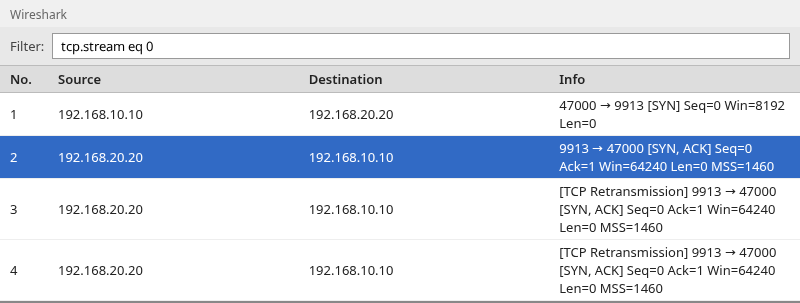
Repeated SYN/ACKs mean the sender of the SYN/ACK did not observe the final ACK. Depending on your capture location, that ACK may never have left the client, may have been dropped on the path, may have reached the server but been missed by your trace, or may have used a path your capture point did not see.
Compare client- and server-side captures before you assign the failure to a firewall or route. This is different from TCP Previous segment not captured, which concerns sequence gaps after a connection is already transferring data.
SYN/ACK followed by client RST
A different failure looks like SYN → SYN/ACK → RST with the reset coming from the client side.
The server accepted the SYN far enough to send SYN/ACK, but the client rejected the reply instead of completing the handshake.
Common reasons include:
- the client no longer has a matching connection open;
- a local firewall or NAT device changed or rejected the connection state;
- a scanning or packet-generation tool sent the original SYN instead of a normal application connection.
This is different from SYN → RST/ACK, where the server side rejects the connection immediately.
Which side should you investigate?
| What the capture shows | Likely focus | Next step |
|---|---|---|
| SYN → RST/ACK from server IP | Service on target port | On Linux, run ss -tlnp to check whether a process is listening on the expected port; confirm bind address |
| SYN retransmissions, nothing else | Path or filter before server | Verify route and destination IP/port; capture on server; check firewall or ACL logs |
| SYN/ACK then SYN/ACK retransmissions | Final ACK not observed | Compare client and server captures; check whether ACK was generated and crossed the path |
| SYN/ACK then RST from client | Client or local policy | Whether the client still has the connection open; NAT/firewall; whether a tool sent the SYN |
| Healthy handshake, app still fails | Layer above TCP | TLS, HTTP, or app logs — not more SYN analysis |
Why one capture point may not be enough
A firewall may drop the SYN so the server never sees it, while a client-side trace shows only retransmissions. Alternatively the server sends SYN/ACK but a different path drops the client’s ACK — the server trace shows SYN/ACK retries while the client trace may show only SYN and SYN/ACK.
Wireshark answers what reached the interface that produced the file. When the ticket requires knowing which hop dropped traffic, align two PCAPs on time and IP/port, or use a SPAN/mirror port on a switch that can see both directions of the flow.
Read the same failure from both sides
The same ticket can look different depending on where you tapped.
A client-side capture may show SYN → SYN retransmission → … while a server-side file has no packets at all. That places the loss before traffic reaches the server (or before the server interface you recorded).
If the server logs each SYN and sends SYN/ACK, but the client capture never shows those SYN/ACKs, focus on the return path between those two capture locations.
If both sides record SYN, SYN/ACK, and ACK, TCP established successfully at the endpoints and the investigation should move to TLS or the application — not more handshake analysis.
Summary
TCP connection failures fall into a small set of visible patterns: complete handshake, active RST/ACK, silent SYN retries, missing final ACK (SYN/ACK retries), or client RST after SYN/ACK. Match the application error — refused versus timed out — to those shapes before you chase application logs.
RST/ACK right after SYN means the attempt was rejected by the server or a middle device such as a firewall; a closed port is common but not the only source. Endless SYN retransmissions mean no usable reply reached the capture location. SYN/ACK retransmissions mean the final ACK was not observed by the side that sent SYN/ACK.
Compare captures from both ends when the symptom alone does not tell you which hop failed.
Filter with tcp.flags.syn, tcp.flags.reset, and tcp.analysis.retransmission, then follow tcp.stream for one attempt. Add a second capture when the business impact depends on where the SYN or ACK disappeared.
References
- Wireshark Wiki: TCP analysis
- Wireshark display filter reference: TCP flags
- RFC 9293: Transmission Control Protocol (TCP)
Frequently Asked Questions
What does repeated SYN mean in Wireshark?
The client sent an initial SYN and did not get an acceptable SYN/ACK (or got no answer at all). Wireshark shows the same SYN again with [TCP Retransmission]. That pattern matches timeout at the application layer until something answers or the stack gives up.
What does RST after SYN mean?
The connection attempt was actively rejected. A closed listening port on Linux commonly returns RST/ACK immediately after your SYN, but a firewall or other middlebox can generate the same visible pattern toward the client.
How does connection refused look in Wireshark?
You usually see two packets: your SYN, then RST/ACK from the destination IP and port. The client never sends the third handshake ACK because the connection was not accepted.
How does timeout look in Wireshark?
You see one SYN and multiple SYN retransmissions without SYN/ACK in between. There is no RST unless a middlebox injects one later.
Why does the server retransmit SYN-ACK?
The sender of SYN/ACK did not observe an acceptable final ACK. It retries SYN/ACK the same way it would retry lost data. Compare client and server captures before you blame a single firewall or route; the ACK may never have been sent, may have been dropped, or may be missing only from your file.
Why does the client send RST after SYN/ACK?
The server answered the SYN, but the client reset the attempt instead of completing the handshake. That often means the client no longer had a matching connection open, or a local firewall, NAT device, or scan tool interfered. It is not the same as RST/ACK immediately after your SYN from the server side.
Can Wireshark identify which firewall dropped the SYN?
Not from a single file. Wireshark only shows what the capture interface recorded. Compare client, server, and middle captures, or follow routing and firewall policy on the path.
