
| Tested on | RHEL 10.2 (Coughlan) |
|---|---|
| Package | Wireshark 4.4.2 |
| Applies to | Wireshark on Linux, Windows, or macOS when analyzing a TCP capture |
| Privilege | Normal user for PCAP analysis |
| Scope | How TCP sequence and acknowledgment numbers work in Wireshark, including relative numbering, cumulative ACK, and SYN/FIN sequence-space rules. Does not cover full retransmission diagnosis. |
| Related guides | Wireshark tutorial TCP retransmission analysis in Wireshark Wireshark IP filters cheat sheet TCP receive window in Wireshark Analyze HTTP response in Wireshark |
In Wireshark, TCP sequence numbers track byte positions sent in one direction, while acknowledgment numbers tell the peer which byte is expected next. For normal data, Next Seq = Seq + Len; SYN and FIN each consume one additional sequence number.
A simple way to picture it: each side of a TCP connection numbers every byte it sends, like page numbers in a book. Seq says "this packet starts at byte number X", and Ack says "I have everything up to here, please send byte number Y next".
Key takeaways
- For normal TCP data,
Next Seq = Seq + Len. For example,Seq=1andLen=100givesNext Seq=101. Ackis the next sequence number the receiver expects from the other side.Ack=301means bytes through300arrived in order and byte301is expected next.- Seq and Ack belong to different directions of the TCP connection. Each side's
Seqcounts the bytes it sends, and itsAckcounts the bytes it received from the other side. - SYN and FIN each consume one sequence number even when
Len=0. An ACK-only packet does not consume sequence space. - Wireshark shows relative sequence numbers by default. That is why the first SYN normally appears as
Seq=0instead of the much larger 32-bit value carried on the wire. Next Sequence Numberis calculated by Wireshark; it is not a separate TCP header field.
Terms used in this guide
You only need a handful of words to follow the rest of the page:
| Term | Plain meaning |
|---|---|
| Segment | A unit of TCP data made of a TCP header and optional payload. In a normal Wireshark capture, you usually inspect each TCP segment as a packet-list row |
| Payload | The application data inside a segment, such as part of an HTTP request. Wireshark's Len column is the payload size in bytes |
| Peer | The other end of the connection. If you are looking at the client, the peer is the server |
| SYN flag | "Let's open a connection." Sent once by each side at the start |
| ACK flag | "My acknowledgment number is valid." It tells the peer which sequence number I expect next |
| FIN flag | "I have finished sending data in this direction." Each side sends its own FIN when it is done sending |
| ISN | Initial Sequence Number, the starting number each side picks in its SYN |
A flag is just a bit in the TCP header. One packet can carry several flags at once, which is why Wireshark shows rows such as [SYN, ACK] or [FIN, ACK].
TCP Seq and ACK quick formula
Start with the simple version. It covers almost every packet you will look at:
Normal data:  Next Seq = Seq + Len
SYN:          Next Seq = Seq + 1
FIN:          Next Seq = Seq + 1
ACK only:     Next Seq = Seq       (nothing was sent, so nothing moves)
Here is a sender and receiver using those rules:
Sender:    Seq=1  Len=100   → carries bytes 1 through 100, Next Seq=101
Receiver:  Ack=101          → "I have bytes 1 to 100, send byte 101 next"
The receiver's Ack usually lands on the sender's Next Seq, because both point at the first byte that has not arrived yet. They sit in different packets travelling in opposite directions, so you will not see Ack = Seq + Len inside the same row.
Written as one rule, the two formulas are:
| What you are calculating | Rule |
|---|---|
| Next sequence position for this segment | Next Seq = Seq + Len + SYN + FIN |
| ACK sent by the receiver | Ack = next sequence number expected from the peer |
In the first rule, SYN and FIN count as 1 when that flag is set and 0 when it is not. They are added separately because Wireshark's Len column counts only payload bytes.
What sequence and acknowledgment numbers actually mean
TCP treats each connection as two separate one-way streams of bytes: client to server, and server to client. Each stream has its own numbering, called its sequence space.
The sequence number on a segment is the number of the first payload byte it carries. The acknowledgment number tells the peer which byte should come next. It only means something when the ACK flag is set, so the Ack=0 you see on the very first SYN is not acknowledging anything.
The ACK flag itself does not use up a sequence number. Only payload bytes, SYN, and FIN do. That is why a packet that only acknowledges data, with Len=0 and no SYN or FIN, has Next Seq equal to its own Seq.
TCP has two independent byte streams
In the example conversation, the two streams move like this:
| Endpoint | Its own sequence numbers (relative) | Its Ack refers to |
|---|---|---|
| Client | 0 → 1 → 101 → 301 → … |
Bytes received from the server |
| Server | 0 → 1 → 51 → 52 → … |
Bytes received from the client |
The client's Ack column follows the server's sequence numbers, and the server's Ack column follows the client's. Keep that in mind whenever you compare numbers: compare Seq with the Seq of packets from the same sender, and compare Ack with the other side's Next Seq.
Add Seq, Next Seq, ACK, and Len columns in Wireshark
Open your TCP capture with File → Open, then add four columns so the math stays visible in the packet list. Click any TCP row, then expand Transmission Control Protocol in the middle pane (the packet details):
| Step | Action |
|---|---|
| Add Seq | Right-click Sequence Number, choose Apply as Column |
| Add Next Seq | Right-click Next Sequence Number, choose Apply as Column |
| Add Ack | Right-click Acknowledgment Number, choose Apply as Column |
| Add Len | Right-click TCP Segment Len, choose Apply as Column |
The display filter bar sits above the packet list. Type tcp and press Enter. A green bar means the filter is valid, and red means Wireshark rejected it.
The screenshots below use one short TCP conversation. The same column layout works on any capture you already have. With the four columns added, the whole conversation looks like this:
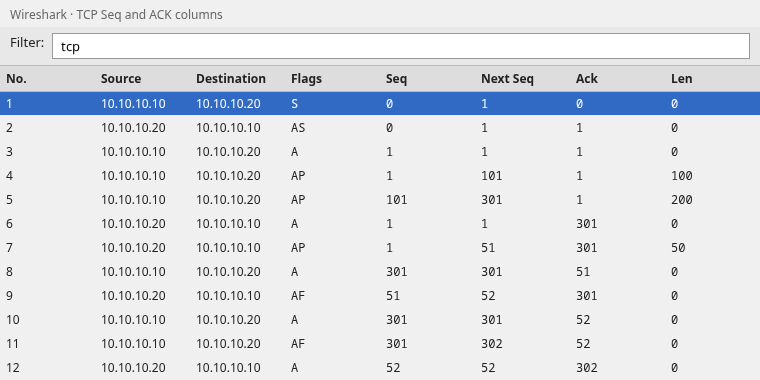
Scan the Len column for payload size, then check whether Next Seq equals Seq + Len on data rows. On SYN and FIN rows, look for the extra one.
Here are the same 12 packets as text, with what each one is doing. The rest of the page refers to these frame numbers:
| Frame | Direction | Flags | Seq | Next Seq | Ack | Len | What happens |
|---|---|---|---|---|---|---|---|
| 1 | Client → Server | SYN | 0 | 1 | 0 | 0 | Client asks to open the connection |
| 2 | Server → Client | SYN, ACK | 0 | 1 | 1 | 0 | Server agrees and acknowledges the client SYN |
| 3 | Client → Server | ACK | 1 | 1 | 1 | 0 | Client acknowledges the server SYN |
| 4 | Client → Server | PSH, ACK | 1 | 101 | 1 | 100 | Client sends bytes 1 to 100 |
| 5 | Client → Server | PSH, ACK | 101 | 301 | 1 | 200 | Client sends bytes 101 to 300 |
| 6 | Server → Client | ACK | 1 | 1 | 301 | 0 | Server confirms all 300 client bytes |
| 7 | Server → Client | PSH, ACK | 1 | 51 | 301 | 50 | Server sends bytes 1 to 50 |
| 8 | Client → Server | ACK | 301 | 301 | 51 | 0 | Client confirms all 50 server bytes |
| 9 | Server → Client | FIN, ACK | 51 | 52 | 301 | 0 | Server has nothing more to send |
| 10 | Client → Server | ACK | 301 | 301 | 52 | 0 | Client acknowledges the server FIN |
| 11 | Client → Server | FIN, ACK | 301 | 302 | 52 | 0 | Client has nothing more to send |
| 12 | Server → Client | ACK | 52 | 52 | 302 | 0 | Server acknowledges the client FIN |
PSH affects how TCP presents received data to the application, but it does not consume sequence space or change the Seq/ACK calculations discussed here.
Three-way handshake sequence numbers
The first three packets open the connection and let each side announce its starting number. Wireshark uses relative numbering by default, so each side's SYN appears as Seq=0. Raw versus relative values are explained further down.
| Frame | Flags | Seq | Next Seq | Ack | Len | Meaning |
|---|---|---|---|---|---|---|
| 1 | SYN | 0 | 1 | 0 | 0 | Client opens. Ack=0 means nothing here because the ACK flag is not set |
| 2 | SYN, ACK | 0 | 1 | 1 | 0 | Server answers and acknowledges the client SYN |
| 3 | ACK | 1 | 1 | 1 | 0 | Client confirms the server SYN |
SYN consumes one sequence number
A SYN carries no application data (Len=0), but it still uses up one sequence number. When Wireshark sees a normal three-way handshake and uses relative numbering, the first payload byte normally starts at Seq=1 because the SYN already consumed sequence number 0.
Frame 3 also shows Seq=1 and Next Seq=1. It is an ACK-only packet with no payload, so it does not move the client's numbering forward. The client's first data packet in frame 4 still starts at Seq=1.
The SYN packet detail also shows the real starting number, in the raw field:
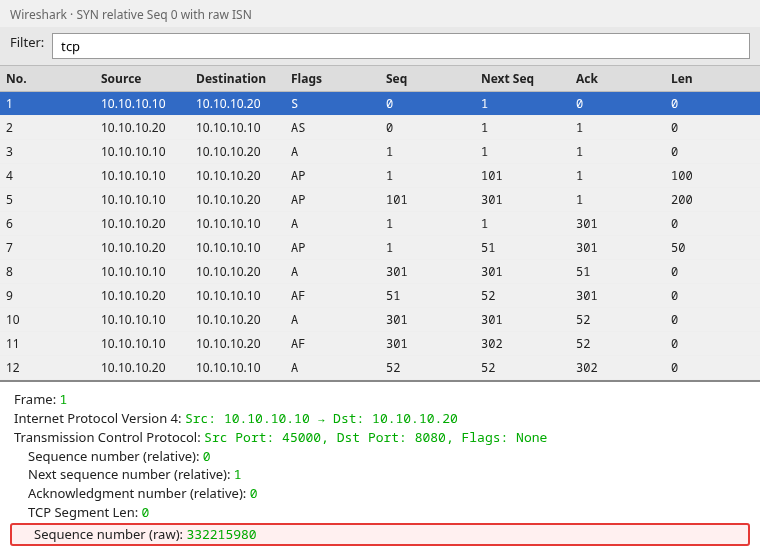
Relative Seq=0 and Next Seq=1 keep the math easy to read. The raw field shows the 32-bit ISN the TCP stack actually put on the wire, here 332215980.
Follow the first data segment
After the handshake, frame 4 carries the first 100 bytes from the client.
Seq + Len = Next Seq
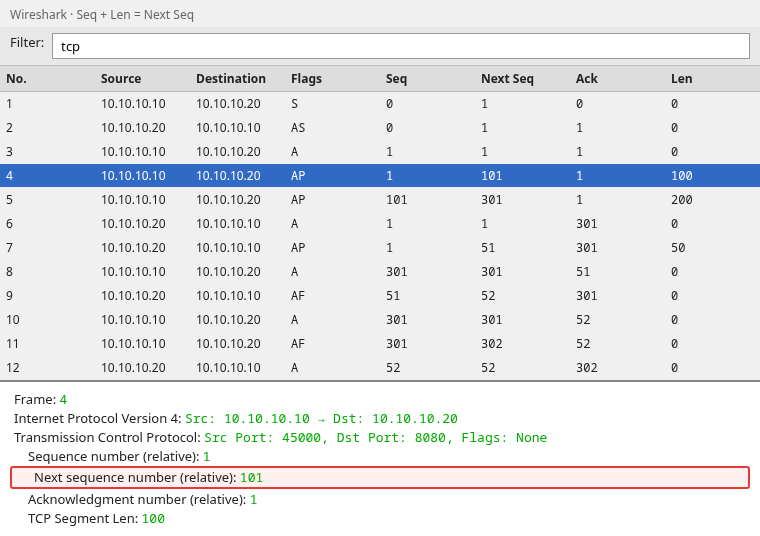
The highlighted row shows Next sequence number (relative): 101, which is 1 + 100. The packet carried bytes 1 to 100, so the next unused byte number is 101.
Why ACK is the next byte expected
Frame 5 sends another 200 bytes starting at Seq=101, which covers bytes 101 to 300. The server then replies once, in frame 6, with Ack=301.
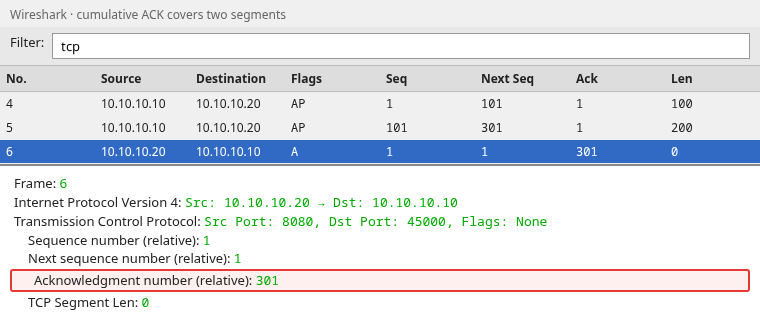
Ack=301 means the server has every byte from 1 through 300, and byte 301 is the next one it wants. One ACK covered both data packets, which is called a cumulative acknowledgment.
Follow data in the opposite direction
The server numbers its own bytes separately. Frame 7 sends 50 bytes at Seq=1 with Len=50, so the server's Next Seq becomes 51.
The client answers in frame 8 with Ack=51: it has server bytes 1 to 50 and expects byte 51 next. In that same packet, the client's own Seq is still 301, because the client sent no new data of its own. Its Seq counts what it sends, and its Ack counts what it received.
Why Wireshark sequence numbers start at 0
The real TCP Initial Sequence Number (ISN) is a 32-bit value chosen by the operating system when the connection opens. It is normally a large number. Wireshark subtracts each side's ISN from every later number, so the conversation starts at zero and the byte counting is easy to follow.
| View | First client SYN sequence |
|---|---|
| On the wire (raw) | 332215980 |
| Wireshark default (relative) | 0 |
Relative vs raw sequence numbers
Relative numbering is enabled by default. You can turn it off under Edit → Preferences → Protocols → TCP → Relative sequence numbers. That helps when you need to match numbers logged by another tool, such as a firewall or tcpdump, which usually print raw values.
Switching the setting does not change the capture, only how Wireshark displays sequence and acknowledgment numbers. The raw value is also always available in the packet details as Sequence Number (raw) (tcp.seq_raw).
What is Wireshark's Next Sequence Number?
The TCP header only carries two of these numbers:
- Sequence Number
- Acknowledgment Number
There is no Next Sequence Number field in a real TCP packet. Wireshark works it out from the sequence number, the payload length, and whether SYN or FIN is set, then shows it in square brackets in the packet details. Square brackets in Wireshark mean "calculated by Wireshark, not read from the packet". You can still add it as a column, which is what makes the math easy to check.
tcp.nxtseq describes the sequence position immediately after the current segment. Wireshark also keeps its own running "next expected sequence number" for each direction while it analyzes the stream, and uses that to flag gaps, retransmissions, and out-of-order packets. The two values are not always the same, so treat Next Seq as a per-packet calculation, not as Wireshark's verdict on the stream.
Why ACK does not increase after every packet
Receivers do not have to acknowledge every packet one by one. In the example, the server waited for two client data packets and then sent one ACK:
| Client sends | Server ACK |
|---|---|
Frame 4: Seq=1, Len=100 |
(no ACK yet) |
Frame 5: Seq=101, Len=200 |
Frame 6: Ack=301 |
Cumulative ACK
TCP acknowledgments are cumulative. One Ack=301 confirms every byte up to and including byte 300, no matter how many packets carried them.
Delayed ACK
Operating systems may briefly delay an ACK in case more data arrives and one ACK can cover it all. This is called delayed ACK. In a busy capture you will therefore see fewer ACK packets than data packets, even when the connection is healthy. That on its own does not mean anything was lost.
FIN and sequence numbers
Closing a connection follows the same counting rules. A FIN uses up one sequence number, just like a SYN, even though it carries no payload.
Frame 9 is the server's FIN at Seq=51, with Len=0 and Next Seq=52:
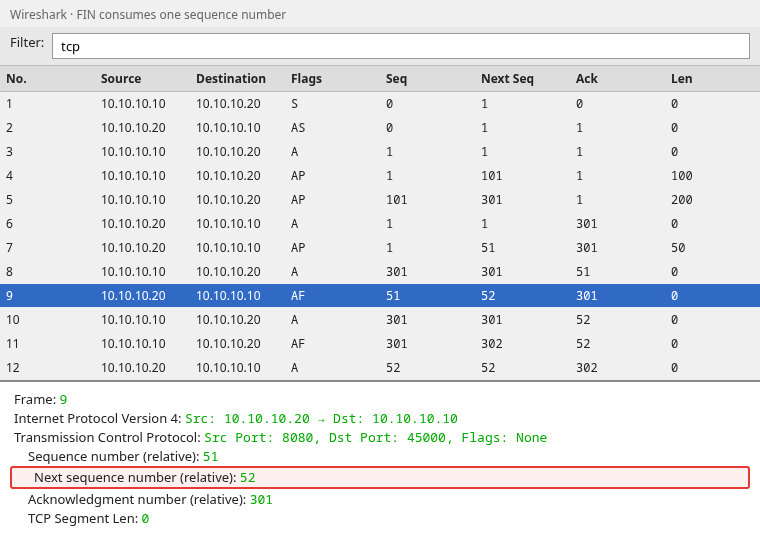
The client acknowledges it with Ack=52 in frame 10, which is one more than the 51 the server's data alone would give. The extra one is the FIN. The client then sends its own FIN in frame 11, and the server acknowledges it with Ack=302 in frame 12.
How Seq/ACK reveals a missing segment
Because ACKs are cumulative, the receiver can only acknowledge bytes that arrived in an unbroken run. When data beyond a gap shows up, its Ack cannot move past the gap, so it keeps repeating the number of the first missing byte.
The screenshot below shows that pattern when bytes 101–200 never arrive but a later packet does:
| Step | Event |
|---|---|
| 1 | Client sends bytes 1–100 |
| 2 | Server Ack=101 |
| 3 | Client sends bytes 201–300, while bytes 101–200 are missing |
| 4 | Server sends duplicate Ack=101 |
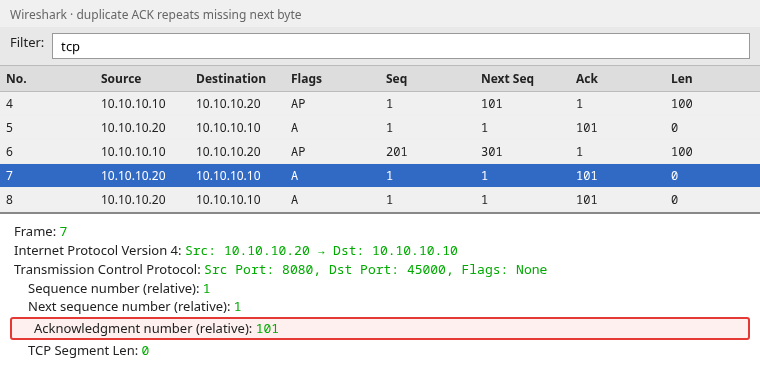
The server still needs byte 101, so every ACK it sends stays at 101 even though bytes 201 to 300 arrived. Wireshark labels these repeats as duplicate ACKs. Duplicate ACKs alone do not prove packet loss, because packets that arrive out of order can produce the same pattern for a moment.
For full retransmission, fast retransmit, and recovery timing, see TCP retransmission analysis in Wireshark.
TCP Seq/ACK troubleshooting cheat sheet
| Symptom in Wireshark | Likely read | What to check |
|---|---|---|
Next Seq is one greater than Seq + Len |
SYN or FIN set | Flags column on the same segment |
Next packet from the same sender has a Seq lower than the previous Next Seq |
Possible retransmission or overlapping/out-of-order traffic | Compare packets in the same direction and check Expert Information |
Ack stuck while later Seq advances |
Missing segment in that direction | Compare Ack to expected next byte |
Duplicate ACKs with the same Ack |
Receiver still expects an earlier sequence position | Check for a missing or out-of-order segment |
Sequence starts at 0 |
Relative numbering enabled | Preferences → TCP → Relative sequence numbers |
Ack tracks opposite direction |
Normal TCP behavior | Match client/server IP before comparing numbers |
| Large raw ISN in one tool, zero in Wireshark | Display mode difference | Toggle relative numbering in both tools |
Useful display filters:
tcp.analysis.retransmission
tcp.analysis.duplicate_ack
tcp.analysis.out_of_order
tcp.flags.syn == 1
tcp.flags.fin == 1
Filter syntax goes in the display filter bar. Green means valid; red means fix the expression before continuing.
Summary
TCP sequence and acknowledgment numbers become readable once you separate the two directions and apply two rules: Next Seq = Seq + Len with an extra one for SYN or FIN, and Ack equals the next byte expected from the peer when the ACK flag is set.
Wireshark's default relative numbering starts each conversation at zero, and the Next Seq column is calculated by Wireshark. Neither changes what was on the wire, but both make the byte counting visible. Cumulative and delayed ACK explain why one acknowledgment can cover several data segments without meaning anything was lost.
When Ack stops moving while new data keeps arriving from the other side, you are usually looking at a gap in the byte stream. Use that signal for a quick check, then move to the retransmission guide when you need recovery detail.
References
- Wireshark Wiki: TCP analysis
- Wireshark Wiki: TCP relative sequence numbers
- RFC 9293: Transmission Control Protocol (TCP)
Frequently Asked Questions
Does ACK equal previous Seq + length?
For a simple in-order data transfer, the peer's ACK will usually reach at least Seq + Len after receiving that data. It can be higher when one cumulative ACK covers additional bytes, or stay lower when an earlier byte is still missing. Remember that SYN and FIN each consume one additional sequence number. The Ack inside your own outgoing packet refers to the other direction, so it is not your sequence number plus one.
Why is the next Seq not previous ACK + 1?
Sequence numbers and acknowledgment numbers track different directions. Your next sequence number depends on how many bytes you sent. Your ACK field reports what you received from the peer. Mixing the two produces the wrong prediction.
What does ACK 1501 mean?
The receiver has all bytes through position 1500 and expects byte 1501 next from the sender. If the stream started at relative sequence 1, that ACK confirms 1500 payload bytes in order.
Why does Wireshark start sequence numbers at zero?
Relative sequence numbers are enabled by default. Wireshark subtracts each side's starting number so the first sequence number displays as zero, while the byte counting stays the same.
Is Next Sequence Number a TCP header field?
No. Wireshark computes tcp.nxtseq from the sequence number, segment length, and SYN/FIN flags, which is why it appears in square brackets. The header carries only sequence and acknowledgment numbers.
Why isn't every TCP packet acknowledged separately?
ACKs are cumulative and may also be delayed. A receiver can acknowledge several segments with one ACK instead of sending a separate ACK for every packet.
