
| Tested on | RHEL 10.2 (Coughlan) |
|---|---|
| Package | Wireshark 4.4.2OpenSSL 3.5.5curl 8.12.1openldap-clients 2.6.10tcpdump 4.99.4 |
| Applies to | Wireshark 4.x on Linux, Windows, and macOS. The capture commands below are Linux. |
| Privilege | Root or sudo to capture packets. A normal user can open the PCAP and load the key log. |
| Scope | How to decrypt HTTPS and LDAPS in Wireshark with a TLS key log, which clients actually write SSLKEYLOGFILE, and why a capture stays encrypted when the secrets are missing or from another session. Does not cover building a certificate authority or decrypting with an RSA server private key. |
| Related guides | Analyze TLS and mTLS in Wireshark Analyze HTTP responses in Wireshark Analyze LDAP traffic in Wireshark Configure OpenLDAP with TLS Wireshark tutorial |
Use a TLS key log to read HTTPS and LDAPS in Wireshark. The same session secrets turn encrypted application data into HTTP for one capture and into LDAP bind and search messages for the other.
The key log is not produced by Wireshark, and setting SSLKEYLOGFILE does not make every program log keys. The client that creates the TLS connection has to be built with a library that writes those secrets, and the capture has to contain that same handshake.
Key takeaways
- Wireshark cannot decrypt modern TLS from the PCAP alone. You need the per-session TLS secrets from the same connection.
SSLKEYLOGFILEworks only when that client’s TLS stack supports key logging.- A TLS key log works with TLS 1.3 and ephemeral key exchange. The legacy method of loading an RSA server private key does not.
- The PCAP and the key log must belong to the same TLS session. Start the capture before opening a new connection so the PCAP includes the TLS handshake.
- After decryption, HTTPS is dissected as HTTP or HTTP/2, and LDAPS becomes LDAP fields such as
bindRequestandsearchRequest. - Treat the key log as sensitive. Anyone with both the capture and the matching secrets can read the decrypted traffic.
What you need to decrypt HTTPS or LDAPS
You need two files from the same connection:
- A PCAP that includes the TLS handshake, not only later application data.
- A key log written by a program that took part in that connection.
Wireshark then uses the secrets to decrypt that session. A key log from an unrelated TLS session does not decrypt the packets. TLS and mTLS handshakes in Wireshark shows why TLS 1.3 hides the handshake after ServerHello until those secrets are loaded.
Client
├── HTTPS request
└── LDAPS search
        |
     TLS 1.3
        |
        v
   Test server
Both clients talk TLS 1.3 to a test server. The application on top is HTTP in one capture and LDAP in the other. The decryption step is the same.
How TLS session-key logging works
During the handshake the two sides derive session keys. With TLS 1.3 and with Diffie-Hellman key exchange, those keys are not encrypted to the server’s RSA public key, so the server private key cannot recover them later. A key log is a text file of the secrets from that handshake. Each line starts with a label such as SERVER_HANDSHAKE_TRAFFIC_SECRET or CLIENT_TRAFFIC_SECRET_0, then a client random, then the secret.
SSLKEYLOGFILE is the environment variable many TLS stacks check for the path of that file. Wireshark reads it from Edit, Preferences, Protocols, TLS, (Pre)-Master-Secret log filename. The command-line name of the same preference is tls.keylog_file.
Keep the key log private. Anyone who has the key log and the matching capture can decrypt those sessions. Do not attach the raw file to a ticket or commit it.
Does SSLKEYLOGFILE work with my application?
Check which TLS library the client actually uses before you trust an empty or a missing key log. ldd $(command -v ldapsearch) and curl -V show the library. On this host, curl -V reports OpenSSL 3.5.5, and ldapsearch is linked to libssl.so.3.
| Client or TLS stack | What to expect |
|---|---|
| Firefox or Chromium | Writes a key log when SSLKEYLOGFILE is set before the browser starts. Quit an already running browser first. |
| curl with OpenSSL 3.4 or later | Setting the variable on the command writes the file. Confirm the file grows. This curl is 8.12.1 built with OpenSSL 3.5.5. |
| GnuTLS | The library honors SSLKEYLOGFILE. |
| OpenSSL 3.4 and later | libssl writes the file for programs that use it. ldapsearch on this host did. |
| OpenSSL older than 3.4 | The variable alone does nothing unless that application registers key logging. The file stays empty. |
| A capture from someone else’s machine | You cannot decrypt it later unless you also have the secrets from that session. |
A program linked to an older OpenSSL, or started before the variable was set, produces the failure people report: the path exists, the connection succeeded, and the key log is empty.
Capture environment
The screenshots use a local TLS 1.3 server so the HTTPS and LDAPS captures are easy to compare. Building the certificates is covered in create a client and server certificate. Standing up LDAP with TLS is covered in configure OpenLDAP with TLS.
| Piece | In these captures |
|---|---|
| Wireshark | 4.4.2 |
| TLS library | OpenSSL 3.5.5 |
| HTTPS | curl to 127.0.0.1:18443 |
| LDAPS | ldapsearch to 127.0.0.1:636 |
| Key log | SSLKEYLOGFILE on the client command |
Your addresses and ports will differ. The messages to look for are the HTTP request after decryption, and bindRequest plus searchRequest for LDAPS.
Capture HTTPS and a matching key log
Start the capture before the request, and start the client with the key log variable set. Leave tcpdump running:
sudo tcpdump -i lo -U -w https.pcap port 18443tcpdump: listening on lo, link-type EN10MB (Ethernet), snapshot length 262144 byteslo is the loopback interface, which is where this local server receives connections. Use the interface that carries your traffic, and replace 18443 with the server port. In another terminal, make one new request. --cacert ca.crt tells curl to trust the CA that issued the test server certificate, while --resolve sends localhost to 127.0.0.1. --noproxy '*' keeps the TLS session on that server when https_proxy is set, instead of opening it to a proxy:
SSLKEYLOGFILE=https.keys curl -sS --noproxy '*' --tlsv1.2 --tls-max 1.3 \
  --cacert ca.crt --resolve localhost:18443:127.0.0.1 \
https://localhost:18443/ -o /dev/null -w 'http=%{http_code}\n'http=200http=200 means the request finished. Press Ctrl+C in the tcpdump terminal. For Chrome or Firefox, export SSLKEYLOGFILE in the shell, quit any browser that is already open, and start the browser from that shell before you open the site.
Print only the labels. The rest of each line is the secret:
cut -d' ' -f1 https.keys | sort -uCLIENT_HANDSHAKE_TRAFFIC_SECRET
CLIENT_TRAFFIC_SECRET_0
EXPORTER_SECRET
SERVER_HANDSHAKE_TRAFFIC_SECRET
SERVER_TRAFFIC_SECRET_0Those labels mean the file contains TLS 1.3 secrets. They do not by themselves prove the secrets belong to https.pcap. Loading the file in Wireshark is the check.
Decrypt HTTPS in Wireshark
Open https.pcap before you load the key log. The handshake is visible only through ServerHello. Everything after that is Application Data, which is the encrypted HTTP.
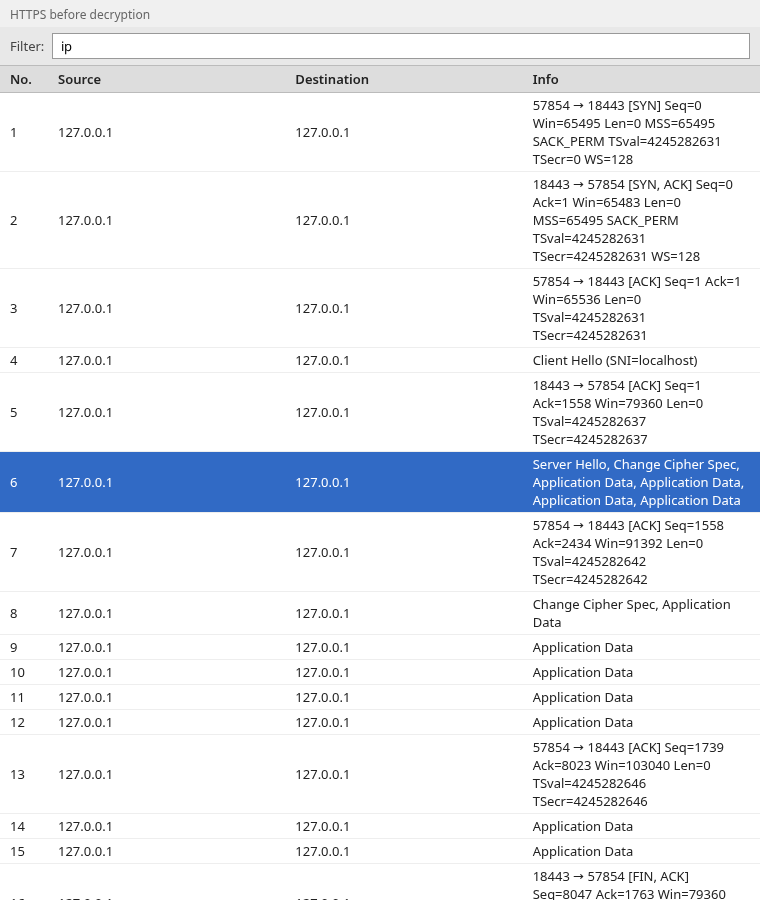
Frame 6 is the server flight. The Info column lists Application Data several times because TLS 1.3 uses outer record type 23 for the encrypted handshake and for the HTTP that follows.
Configure the key log file
- Choose Edit, then Preferences. On macOS the menu is Wireshark, then Preferences.
- Expand Protocols and select TLS.
- Next to (Pre)-Master-Secret log filename, browse to
https.keysand click OK.
Wireshark decodes the file again. To return to the encrypted view, clear that field and click OK. The same setting on the command line:
tshark -r https.pcap -o tls.keylog_file:https.keys \
-Y 'http.request.method' -T fields -e _ws.col.InfoGET / HTTP/1.1Verify decrypted HTTP
Filter the packet list with http. Frame 9 is the request that was hidden in Application Data.
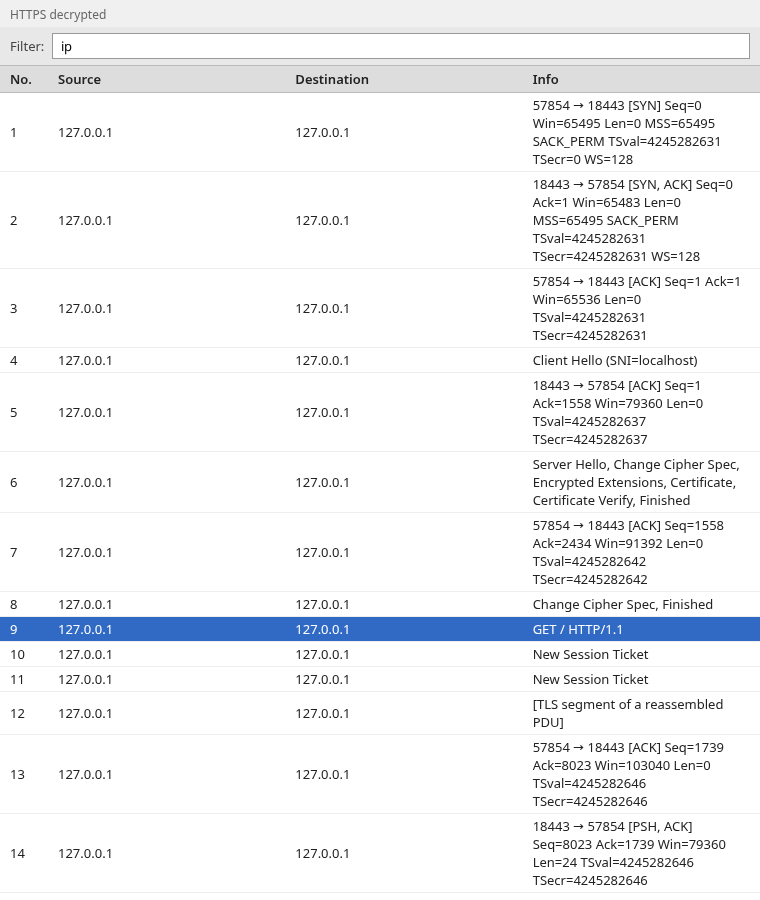
GET / HTTP/1.1 means the session secrets matched this connection and Wireshark decoded the request. The curl status for that same request was 200. If your client negotiated HTTP/2, the filter is http2 and the Info column names HTTP/2 frames instead of GET. That is still a successful decrypt. Reading status lines and bodies is covered in analyze HTTP responses in Wireshark.
Capture LDAPS and a matching key log
Use the same order on the LDAP port. Start the capture first:
sudo tcpdump -i lo -U -w ldaps.pcap port 636tcpdump: listening on lo, link-type EN10MB (Ethernet), snapshot length 262144 bytesThen run the search from a client that can write the key log. LDAPTLS_REQCERT=never is only for this test server, whose certificate is not in the default trust store. For a server you trust, leave verification on and point ldapsearch at that CA:
LDAPTLS_REQCERT=never SSLKEYLOGFILE=ldaps.keys \
ldapsearch -H ldaps://127.0.0.1:636 -x -b 'dc=example,dc=com' '(objectClass=*)' cn# search result
search: 2
result: 0 Success
# numResponses: 1result: 0 Success means the bind and the search completed. numResponses: 1 is the final search-result message. Press Ctrl+C in the tcpdump terminal. ldaps.keys from this run has one SERVER_HANDSHAKE_TRAFFIC_SECRET line, because ldapsearch opened one TLS session.
An ldapsearch linked to OpenSSL older than 3.4 can succeed at the search and still leave ldaps.keys empty. Check the library before you treat an empty file as a Wireshark bug.
Decrypt LDAPS in Wireshark
Open ldaps.pcap with no key log. It looks like the HTTPS capture: ClientHello, ServerHello, then Application Data.
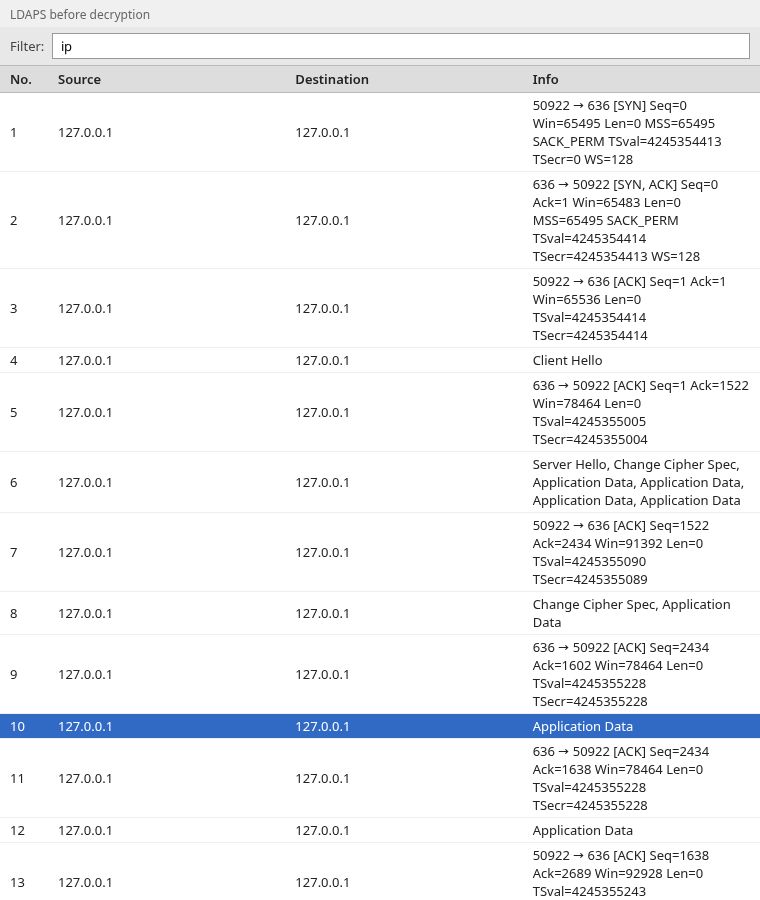
Load ldaps.keys in the same TLS preference. Filter with ldap.
tshark -r ldaps.pcap -o tls.keylog_file:ldaps.keys \
-Y ldap -T fields -e frame.number -e _ws.col.Info10 bindRequest(1) "<ROOT>" simple
16 bindResponse(1) success
18 searchRequest(2) "dc=example,dc=com" wholeSubtree
19 searchResDone(2) success [0 results]
20 unbindRequest(3)Verify BindRequest and SearchRequest
The Info column is the decrypted LDAP. Frame 10 is an anonymous simple bind. Frame 16 is success. Frame 18 is the search for dc=example,dc=com, and frame 19 is the result with zero entries.
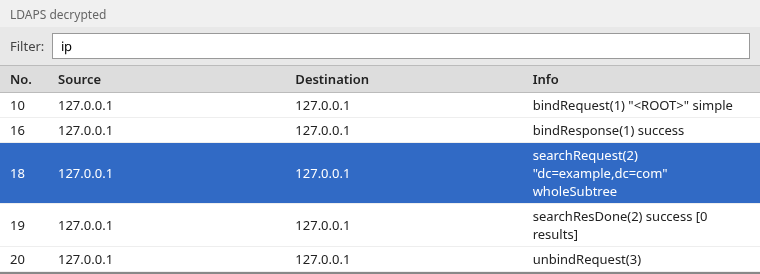
If those lines appear, the key log belongs to this LDAPS connection. Analyze LDAP traffic in Wireshark covers the bind and search fields once they are visible.
Why TLS decryption does not work
Empty key log
The file stays at 0 bytes, or it is never created. Typical causes:
- The client was already running when you set
SSLKEYLOGFILE. Quit it and start it again from the environment that has the variable. - The TLS library does not log keys. OpenSSL before 3.4 does not, unless that application added a key-log callback.
- The variable points at a directory you cannot write, or the process is a service that never inherited your shell environment.
- The packets came from a different program, such as a browser you did not restart, or from another device.
Wrong session
The key log has SERVER_HANDSHAKE_TRAFFIC_SECRET lines, and Wireshark still shows Application Data. A key log from another connection contains the same labels. Load the file that was written during the capture you have open, not a leftover from an earlier test.
Missing handshake
The capture started after the handshake. The key log can be correct and still fail to decrypt, because Wireshark needs the client random from ClientHello to select the secrets. Start the capture, then open one new connection. A browser tab that was already connected does not repeat the handshake.
Unsupported TLS library
curl -V or ldd on the client shows a library that does not implement SSLKEYLOGFILE. Switch to a client that does, such as this curl build, Firefox, Chromium, or openssl s_client -keylogfile, and capture that connection.
Private RSA key limitations
Loading the server’s RSA private key under the TLS preference decrypts only old TLS sessions that used RSA key transport. TLS 1.3 does not use that method, and neither do modern TLS 1.2 cipher suites that use Diffie-Hellman. Those sessions need the key log.
Embed TLS secrets into a PCAPNG file
Wireshark can store the secrets inside a pcapng file as a Decryption Secrets Block. editcap writes a new file. It does not modify https.pcap:
editcap --inject-secrets tls,https.keys https.pcap https-secrets.pcapngOpen the pcapng with no key-log preference. The HTTP request is already decoded:
tshark -r https-secrets.pcapng -Y 'http.request.method' -T fields -e _ws.col.InfoGET / HTTP/1.1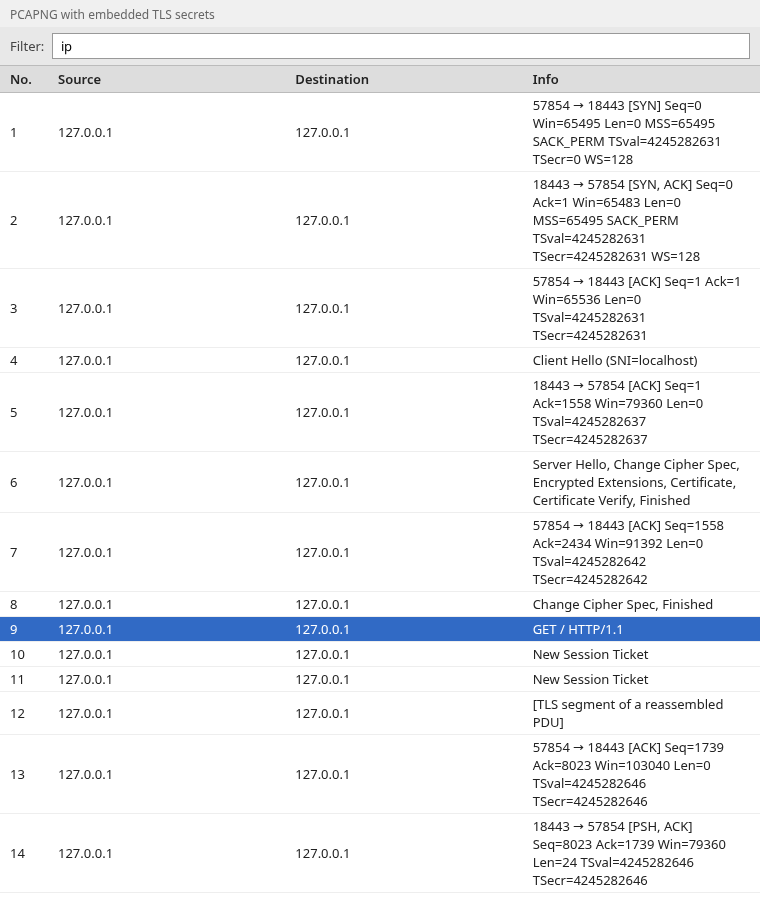
Treat that pcapng as sensitive. Anyone who opens it can decrypt the sessions whose secrets were injected. Share https.pcap when you need to hand over packets without the keys.
Can I decrypt an old PCAP without session keys?
Not for a modern TLS session. If the capture used TLS 1.3, or TLS 1.2 with Diffie-Hellman, the session keys existed only on the client and the server during that handshake. They are not in the PCAP. Finding the server’s RSA private key later does not recreate them.
You can decrypt that file only if some participant logged the secrets at the time, or if you still have a key log from that exact session. A new connection to the same server produces different secrets and does not open the old capture.
Summary
HTTPS and LDAPS in these captures were ordinary TLS 1.3. Wireshark showed Application Data until the client’s key log was loaded. After that, the HTTPS capture contained GET / HTTP/1.1, and the LDAPS capture contained bindRequest, bindResponse, and searchRequest.
SSLKEYLOGFILE produced those files here because curl and ldapsearch use OpenSSL 3.5.5, which writes the log from the library. The same variable does nothing for an older OpenSSL build that never registered key logging, or for a process that started before the variable was set. An empty file is that failure, not a sign that Wireshark cannot read TLS 1.3.
The secrets have to come from the same handshake that is in the PCAP. A capture that missed ClientHello, or a key log from another session, stays encrypted. An RSA server private key does not replace the key log. If you inject the secrets into a pcapng file, protect that file the way you would protect the key log itself.
References
- Wireshark TLS wiki — key log decryption,
(Pre)-Master-Secret log filename, and embedding secrets in pcapng - SSL_CTX_set_keylog_callback — OpenSSL key logging and
SSLKEYLOGFILEon OpenSSL 3.5 - GnuTLS environment variables —
SSLKEYLOGFILEin GnuTLS - editcap —
--inject-secrets - RFC 9846: TLS 1.3 — handshake messages after ServerHello are encrypted
Frequently Asked Questions
Why is my SSLKEYLOGFILE empty?
The client connected without a TLS stack that writes the file, or the process never saw the variable. Quit the program, set SSLKEYLOGFILE, start it again, and connect once. On OpenSSL older than 3.4 the variable is not enough unless that application turns key logging on.
Can I decrypt a PCAP I already have if I did not log keys?
Not when the session used TLS 1.3 or Diffie-Hellman. The session secrets are not in the capture, and a later connection to the same server creates different secrets.
Does the server RSA private key decrypt TLS 1.3?
No. TLS 1.3 does not encrypt the session secret to the server RSA key. Wireshark needs a key log from that session.
What does an empty search result mean after LDAPS decrypts?
searchResDone with success and zero results means the server answered the search and found no entries. The TLS decrypt worked. The directory did not contain a matching object.
