
| Tested on | RHEL 10.2 (Coughlan) |
|---|---|
| Package | Wireshark 4.4.2, tcpdump 4.99.4 |
| Applies to | Any host running Wireshark. The pattern is Layer 2, so the switch vendor does not change what the capture shows. |
| Privilege | Permission to capture on the affected VLAN. Reading STP state and the MAC table needs the switch admin login. |
| Scope | Why a VLAN can fill with broadcasts, how to tell a forwarding loop from ordinary ARP in Wireshark, and which switch checks locate the port. A second cable that Spanning Tree is blocking is not a loop. Does not cover how to configure STP. |
| Related guides | Wireshark Tutorial How to use Wireshark Find a duplicate IP with ARP Measure bandwidth in Wireshark Capture packets on a remote host |
A forwarding loop is two or more Layer 2 paths that both stay active, so a flooded frame such as ARP leaves on one link and comes back on the other. Spanning Tree is supposed to block the extra path. When it does not, the switch floods that frame again, and the copies pile up.
Wireshark shows the repetition and the jump in broadcast rate. It does not name the switch port. The MAC table, the STP state, and the port counters do that part. Capture on a host in the VLAN, or on a SPAN port if that host is somewhere else. How to use Wireshark covers the capture itself.
Key Takeaways
- A redundant Layer 2 path is not a loop by itself. STP or RSTP can block one path and forward on the other.
- A forwarding loop keeps more than one path active, so flooded frames such as ARP circulate and can become a broadcast storm.
- In Wireshark, look for the same broadcast or multicast frame repeating within microseconds, not for the mere presence of broadcasts.
- An I/O Graph makes the jump from a quiet second to a stream of copies easy to see.
- Wireshark identifies the traffic pattern. MAC-table flapping, STP state, and port counters locate the physical loop.
What a Layer-2 Network Loop Actually Is
Two switches with two cables are normal when one cable is blocking. The failure is both cables forwarding, so a flooded frame leaves on one link and comes back on the other.
┌────────┐      ┌──────────┐   link 1, forwarding    ┌──────────┐      ┌────────┐
│ Host 1 │ ──── │ Switch A │ ─────────────────────── │ Switch B │ ──── │ Host 2 │
└────────┘      └──────────┘                         └──────────┘      └────────┘
                     │                                    ▲
                     └────── link 2, blocking (STP) ──────┘
Host 1 is 10.88.77.1 (02:d1:11:11:11:01). Host 2 is 10.88.77.2 (02:d1:11:11:11:02). Switch A and Switch B are two Linux bridges, brdnlws1 and brdnlws2, with two links between them. Nothing in this capture is on the office LAN.
Redundant links are not automatically a loop
With STP on, one end of the second link was blocking and Host 1 got a single ARP reply. That is redundancy. The loop capture is those same two links after both of them were forwarding.
Why broadcasts multiply in a forwarding loop
A switch floods a broadcast, and unknown unicast, out of every port except the one it arrived on. In a loop the frame takes this path:
        Host 1 sends one ARP request
                     ↓
     Switch A floods it out both links
                     ↓
Switch B floods each copy out the other link
                     ↓
  The copies return to Switch A and repeat
Each trip adds another copy of the same frame. That is why one extra cable can fill a VLAN in a second.
Wireshark Filters for Network Loops
Start with broadcasts and ARP. Narrow to one MAC once you know which frame is repeating. Use stp to see whether BPDUs are on the link at all.
| Filter | What you are looking for |
|---|---|
eth.dst == ff:ff:ff:ff:ff:ff |
Broadcasts. In a loop they are copies of one frame. |
arp |
The frame that usually circulates. Compare the sender and the target. |
stp |
BPDUs. A few are normal. None, on a link that should be running STP, is a clue. |
eth.addr == 02:d1:11:11:11:01 |
Frames for one MAC. Replace the address with the sender you keep seeing. |
If you cannot sit on the VLAN, a SPAN session or a remote capture still shows the repeated frames. A capture on a router interface often misses them, because a router does not forward the Layer 2 flood.
What a Network Loop Looks Like in Wireshark
With both links forwarding, Host 1 sent one ARP for 10.88.77.2. These are the first 12 copies, still inside 161 microseconds.
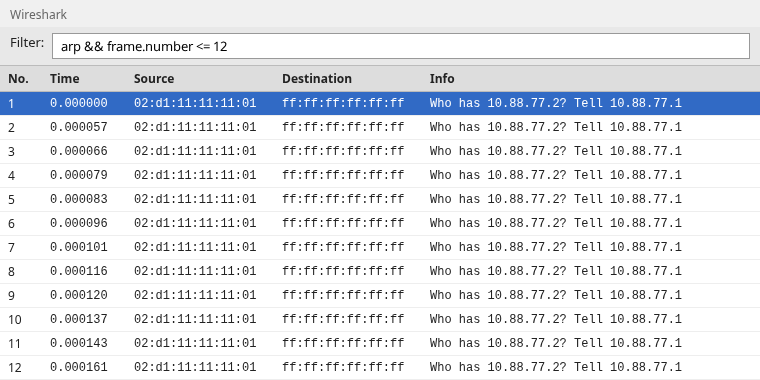
Every row has the same source, destination ff:ff:ff:ff:ff:ff, and Info text. Frame 2 is 57 microseconds after frame 1. A host that retries an unanswered ARP waits about a second, not a few microseconds.
The list stops at frame 12 so the rows stay readable. Count every broadcast in the file:
tshark -r loop.pcap -Y 'eth.dst == ff:ff:ff:ff:ff:ff' | wc -l1355All 1,355 frames are that one request. The arp filter and eth.addr == 02:d1:11:11:11:01 match the same 1,355 frames. There is no ARP reply in the file.
Repeated broadcast and ARP frames
Open frame 2 and compare the fields that identify the request. They match frame 1.
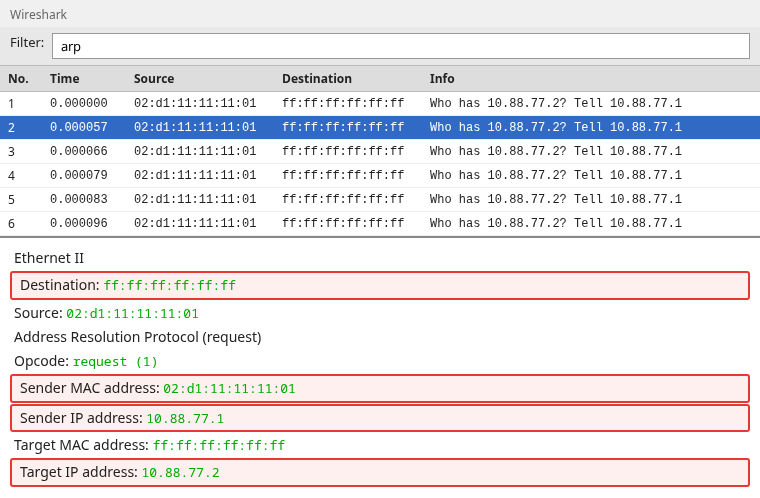
The highlighted fields are what you compare across rows:
- Destination
ff:ff:ff:ff:ff:ff, so the switch floods it - Sender MAC
02:d1:11:11:11:01and sender IP10.88.77.1 - Target IP
10.88.77.2
If those stay the same while the time barely moves, one frame is going around.
How to distinguish repeated frames from normal ARP traffic
A busy subnet still does not look like this.
- A normal request is one broadcast, then one unicast reply, then quiet.
- A scan changes the target IP, and the gap is milliseconds or longer.
- A duplicate IP is two MAC addresses answering for one IP. Every copy here uses the same sender and the same target.
- If the Info text changes from row to row, the frames are not one circulating request.
The same sender, the same target, and the microsecond spacing are the loop. A high broadcast count by itself is not.
Visualize the broadcast storm with I/O Graph
Statistics, I/O Graphs shows how fast the copies took over. Set the interval to 1 second and the Y axis to bits. That window is also how you measure bandwidth in Wireshark. Here you want the jump, not a capacity number.
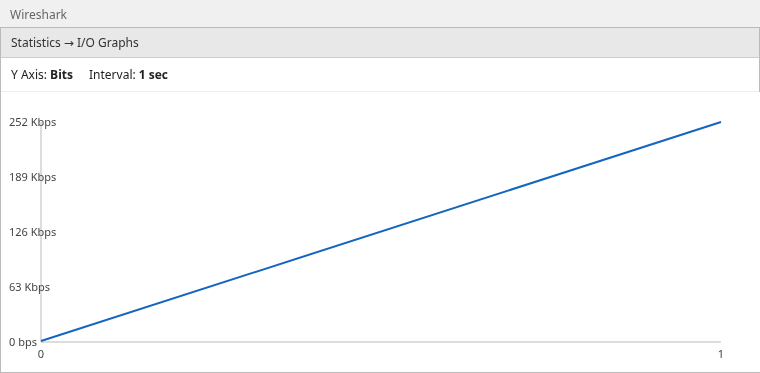
Wireshark draws a line between one-second points, so the slope is the change from one bucket to the next.
- The point at 0 seconds is the healthy exchange, a few frames sitting on the baseline.
- The point at 1 second is 749 copies of the ARP request, about 252 Kbps.
I rate-limited the links, so 252 Kbps is that cap. Without the cap the same copies fill the link. The packet list is what proves the bytes are one repeated frame.
Compare a Healthy Capture with a Loop Capture
Before the second link was forwarding, STP held one end of it in blocking. Host 1 sent the same ARP. Frame 1 was a BPDU, so the exchange is frames 2 and 3.

The reply is unicast, from 02:d1:11:11:11:02 back to 02:d1:11:11:11:01, and it happens once. The time goes from 0.232937 to 0.233014, which is 77 microseconds, and then ARP stops.
| One path blocking | Both paths forwarding | |
|---|---|---|
| ARP request | One broadcast | 1,355 copies of that broadcast |
| ARP reply | One unicast, 77 microseconds later | None in the capture |
| Spacing | Quiet after the reply | More copies within microseconds |
| What the bytes are | One question and one answer | The same question, repeated |
Can Wireshark Tell You Which Switch Port Is Causing the Loop?
No. The capture shows which frame is multiplying and which MAC sent it. Host 1 created this ARP, and every host on the VLAN would see the copies. That does not say which cable to pull.
What the PCAP can prove
One flooded frame is circulating, the copies are microseconds apart, and the sender fields stay the same. One host capture is enough to decide you have a loop. It is not enough to choose the port unless you captured the two cables separately and compared them.
What must be checked on the switches
The next section shows the same checks on the Linux bridges:
- One redundant port should be blocking. If both forward, that pair is the loop.
- The sender MAC should stay on the host port, not move between links.
- The two looping ports climb together in the counters.
Shut one of those ports and confirm the copies stop. Shutting the wrong port only drops the host that was using it.
Check STP, MAC Flapping and Port Utilization
These checks are from the Linux bridges in the capture, not from a switch vendor CLI. On your switch, open the STP state, the MAC table, and the interface rates. The port names below will not match.
STP/RSTP state
While STP was on, one inter-bridge link was forwarding and one end of the other link was blocking. Read bridge link show and look at the state column:
bridge link show289: dnla1@dnla2: <BROADCAST,MULTICAST,UP,LOWER_UP> mtu 1500 master brdnlws1 state forwarding priority 32 cost 2
290: dnlb2@dnlb1: <BROADCAST,MULTICAST,UP,LOWER_UP> mtu 1500 master brdnlws2 state blocking priority 32 cost 2dnla1 is link 1, forwarding. dnlb2 is one end of link 2, blocking. That is the healthy pair. When both links forwarded, dnlb2 had left blocking and the ARP request multiplied.
Those bridges decided that from BPDUs. On the forwarding link, two configuration BPDUs arrived about a second apart. That is STP working, not a storm.
tshark -r stp.pcap -Y stp 1 0.000000 a6:17:62:38:6c:69 → Spanning-tree-(for-bridges)_00 STP 52 Conf. TC + Root = 32768/0/12:ee:53:d3:d5:12 Cost = 0 Port = 0x8002
2 1.024129 a6:17:62:38:6c:69 → Spanning-tree-(for-bridges)_00 STP 52 Conf. TC + Root = 32768/0/12:ee:53:d3:d5:12 Cost = 0 Port = 0x8002A few configuration BPDUs mean STP is alive on that link. None, where you expected them, fits an unmanaged switch, STP disabled, or BPDU filter. A host port often does not receive BPDUs, so check the switch.
MAC address-table instability
During the loop I dumped the bridge forwarding table. The two host addresses were learned on the links between the bridges, not on the port where Host 1 is attached:
bridge fdb show02:d1:11:11:11:01 dev dnla1 master brdnlws1
02:d1:11:11:11:02 dev dnlb1 master brdnlws1Host 1's MAC was learned on dnla1, the link toward Switch B, not on dnlh1p, the port that faces Host 1. The circulating frame arrived from the other bridge, so the table pointed at the wrong port.
On a switch, read the MAC table twice, a second apart. If the same address moves, those two ports are the candidates.
Abnormally high port utilization
On the switch, look for that same jump on the two ports that face each other. Both directions climb, and the other ports in the VLAN fill with broadcasts even though no new application started. A busy server can fill one port. It does not make one ARP frame reappear every few microseconds on every other port.
Common Causes of Layer-2 Loops
This capture was the second link moving from blocking to forwarding. Stop one forwarding path, then confirm the copies are gone.
Two cables between switches without effective STP
A second cable is fine when STP blocks one end. It is a loop when both ends forward: STP is off, the switches disagree on the VLAN, or BPDUs stop and the blocking port ages into forwarding. The capture is still one broadcast, repeated.
Unmanaged switches
An unmanaged switch floods broadcasts and does not run STP. Two cables between a pair of them loop immediately. There is no blocking port to read. You find the extra cable.
Accidental self-loop
A cable from one switch port into another port on the same switch is a loop with no second device. A managed switch usually blocks one of those ports. If it does not run STP, the capture fills with whatever broadcast was already on the wire.
Incorrect edge/PortFast configuration
PortFast, or an edge port, is for a single host. It forwards before listening and learning. Plug a switch into that port and the extra path can loop until STP catches up, or for as long as the port ignores BPDUs. If BPDU guard is off, the storm shows up in Wireshark and that edge port is the first place to look.
Verify the Network After Removing the Loop
Shut one forwarding path and capture again on the same host. You want one ARP request, one unicast reply, and an I/O Graph back on the baseline.
I shut the second link after the 1,355 copies, and new copies stopped. Give the switches a few seconds to relearn MAC addresses. Entries learned during the loop point at the wrong port, so a unicast flow can stay broken until they age out. If the copies continue, the loop is another pair of ports. Go back to the MAC table and the port rates.
Summary
A second Layer 2 path is normal when STP blocks one end of it. It becomes a forwarding loop when both paths forward and the same flooded frame circulates. One ARP request came back 1,355 times. With the extra link blocking, that ARP was one request and one unicast reply.
The I/O Graph is that jump from a quiet second to hundreds of frames. This capture levels off near 252 Kbps because the links were rate-limited. On a port with no rate limit, those copies fill the link. Treat a high broadcast rate as a loop only when the frames are copies.
Wireshark does not name the switch port. Find the port that should be blocking, the MAC on the wrong port, and the counters that climbed together. Shut one of those ports and capture again. One request, one reply, and a quiet graph means the loop is gone.
References
- Wireshark Ethernet display filter reference for
eth.dstandeth.addr - Wireshark ARP display filter reference
- Wireshark STP display filter reference
- Wireshark User's Guide: I/O Graphs
- Cisco: Understanding and Configuring Spanning Tree Protocol (STP)
Frequently Asked Questions
Can Wireshark detect a network loop?
Wireshark shows the symptom: the same broadcast comes back many times within microseconds, and the broadcast rate jumps. It does not name the switch port.
Does high broadcast traffic always mean a loop?
No. A scan or a host that just booted can send many broadcasts that are not copies of one frame. A loop repeats one sender MAC, one sender IP, and one target.
Why do I see the same ARP packet repeatedly?
The switch flooded the request, it returned on a second forwarding path, and the switch flooded it again. The text stays "Who has 10.88.77.2? Tell 10.88.77.1" because the frame did not change. A normal host retry waits about a second.
Can Wireshark locate the switch port causing the loop?
Not from one host capture. The capture shows which frame is circulating. The port comes from the switches: a redundant port that is forwarding instead of blocking, a MAC that moves, and port counters that climb together.
Does STP prevent all network loops?
STP and RSTP block a redundant path when BPDUs flow and the switches honor them. They do not help in these cases:
- STP is off
- The switch does not speak STP
- BPDU filter drops the BPDUs
- An edge port forwards even when a switch is plugged into it
A blocking port can also start forwarding if it stops hearing BPDUs.
