
| Tested on | RHEL 10.2 (Coughlan) |
|---|---|
| Package | Wireshark 4.4.2, BIND 9.18.33, tcpdump 4.99.4 |
| Applies to | Wireshark on Linux, Windows, or macOS when analyzing DNS over UDP or TCP port 53 |
| Privilege | Normal user for PCAP analysis; sudo or CAP_NET_RAW to capture on an interface |
| Scope | DNS failure patterns in Wireshark — NOERROR/NODATA, NXDOMAIN, SERVFAIL, REFUSED, no response, retransmitted queries, and slow answers using dns.time and dns.response_missing. Does not cover BIND server build-out, dig tutorials, DNS enumeration, or decrypting DoH/DoT. |
| Related guides | Wireshark tutorial TCP connection failures in Wireshark Wireshark DNS troubleshooting profile Wireshark IP filters cheat sheet TCP retransmission analysis |
When an application cannot resolve a hostname, the answer is usually already in the DNS packets if you captured the attempt. Wireshark shows whether the resolver returned a negative reply, an empty NOERROR, a server error, silence, or a slow but successful answer.
This guide maps those outcomes to packet shapes you can recognize in the packet list. Use a trace from the client, a resolver, or a tap in front of your DNS server — then confirm which IP address actually received the query.
A capture point is the interface where packets were recorded. Wireshark only knows what that location saw; a missing response in one file does not always mean the server never answered.
Key takeaways
- If you see DNS reply code (RCODE) No such name (3), the queried DNS name does not exist according to that answer. It is an explicit DNS response, not a timeout.
- No error (0) with zero answer records can mean NODATA — the queried name may exist but the requested record type is absent. Check the Authority section so the packet is not a DNS referral, not NXDOMAIN.
- If you see reply code Server failure (2), the server could not complete the query — SERVFAIL does not prove the name is missing.
- If you see reply code Refused (5), the server rejected the query — policy, ACL, or recursion settings are common causes.
- If you see queries with no matching response in the capture, treat that as timeout or loss at your capture point; use
dns.response_missingin Wireshark 4.4+ after the file is fully loaded. - Match each answer to its question with the transaction ID together with the queried name and endpoints, or use Wireshark’s Request in / Answer to frame links.
- Use
dns.timeon response packets for query-to-response delay at the capture location — not end-to-end application latency by itself. - Compare the destination IP of the query with the DNS server you expected; wrong resolver choice looks like a DNS failure in the app.
Before you read the pattern table, three DNS message roles matter:
- Query — the OS stub resolver or upstream resolver asks for a queried hostname (QNAME) and requested record type (QTYPE), such as A or AAAA (QR bit clear).
- Response — the DNS resolver or authoritative server returns an answer or a DNS reply code (RCODE) (QR bit set).
- DNS reply code (RCODE) — status in the response header (for example No error, NXDOMAIN, SERVFAIL, Refused).
On most laptops and servers, the application does not talk to the authoritative zone server directly:
        Application
              ↓
     OS stub resolver
              ↓
       DNS resolver
   (server your device asks)
              ↓
 Authoritative DNS server
 (zone owner for the name)
A client-side capture usually shows UDP/TCP port 53 between the host and its configured resolver, not every hop to the authority.
DNS troubleshooting decision table
| Symptom in the app | What you see in the capture | Likely meaning | Next check |
|---|---|---|---|
| Resolved address | Response, RCODE 0, answers present | Name resolved for that type | App or TCP/TLS above DNS |
| Name exists, wrong record type | Response, RCODE 0, answer count 0 | Often NODATA; inspect Authority section to distinguish it from a referral | Requested type, CNAME chain, SOA vs NS in Authority |
| Name does not exist | Response, RCODE NXDOMAIN (3) | Resolver returned that the queried name does not exist | Spelling, search domain, split DNS, wrong zone |
| Lookup failed / server error | Response, RCODE SERVFAIL (2) | Resolver could not complete the lookup | Server logs, zone data, DNSSEC, upstream forwarder |
| Refused / policy | Response, RCODE REFUSED (5) | Server declined the query | ACL, allow-query, recursion allowed or not |
| Timeout | Same query/name/type repeated with no matching response | Loss, firewall, wrong IP, or server down from this tap | Path, firewall logs, capture on resolver and client |
| Slow pages, DNS OK | Response with high dns.time |
Resolver or path latency | Compare resolvers, capture closer to client |
Reply codes at a glance
| Pattern | RCODE | Meaning |
|---|---|---|
| Answer returned | 0 (NOERROR) | Name resolved for the requested type |
| NOERROR, no answer | 0 (NOERROR) | Often NODATA; inspect Authority section to distinguish it from a referral |
| NXDOMAIN | 3 | Queried name does not exist |
| SERVFAIL | 2 | Resolver could not complete the lookup |
| REFUSED | 5 | Server declined the query |
| No response | — | Timeout, loss, or answer not visible at this capture point |
Wireshark DNS troubleshooting filters
Type a display filter in the toolbar; a green bar means Wireshark accepted it.
If dns shows nothing, modern applications may use encrypted DNS such as DNS over HTTPS (DoH) or DNS over TLS (DoT). Those lookups do not appear as ordinary UDP/TCP port 53 DNS in the capture unless you decrypt the session or capture inside the resolver process.
Find one lookup first
If you know the hostname, start with an exact name filter:
dns.qry.name == "ghost.lab.test"When several queries for that name appear, select one packet and use the transaction ID, source and destination IPs, and Wireshark’s Response in / Answer to links to isolate the matching pair. You can also filter on ID together with the name, for example dns.id == 0xd01c && dns.qry.name == "ghost.lab.test".
Useful filters once the list is manageable:
dnsQueries only:
dns.flags.response == 0Responses only:
dns.flags.response == 1Reply codes:
dns.flags.rcode == 3dns.flags.rcode == 2dns.flags.rcode == 5Candidate NODATA (empty Answer section):
dns.flags.rcode == 0 && dns.count.answers == 0 && dns.flags.response == 1This filter finds candidate NODATA responses. It can also match other NOERROR responses with an empty Answer section, such as referrals, so inspect the Authority section before calling the result NODATA.
Wireshark 4.4 and later mark queries that never get a matching response in the same file:
dns.response_missingRepeated queries (often retries after loss or timeout):
dns.retransmissionNormal DNS query and response
A simple UDP lookup is one query and one response. The query lists the QNAME and QTYPE; the response repeats the ID, sets the response bit, and includes RCODE plus answer records when the name exists for that type.
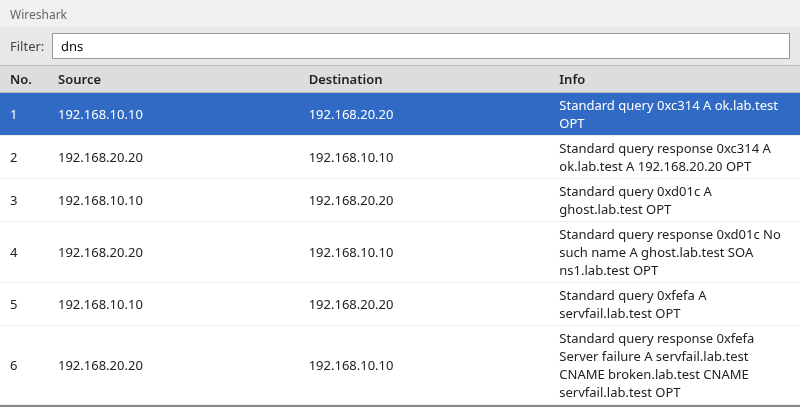
In the screenshot, ok.lab.test returns Standard query response, No error with an A record. ghost.lab.test returns No such name. servfail.lab.test returns Server failure — a different failure class than NXDOMAIN.
These three packets only carry DNS. The application still opens TCP or TLS after it learns an address — see TCP connection failures in Wireshark when the name resolves but the connection fails.
NXDOMAIN — name does not exist
NXDOMAIN is DNS reply code (RCODE) 3 in the response header. Wireshark labels it No such name in the Info column and under Reply code in the detail pane.
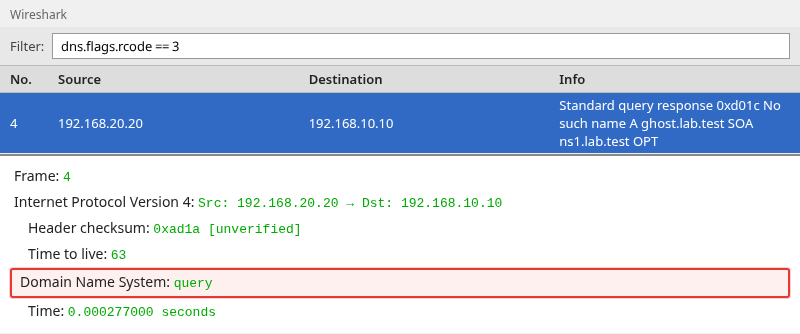
NXDOMAIN means the queried name itself does not exist in DNS. It does not simply mean that the requested record type is missing. Applications often surface it as “name or service not known.”
If you expected the name to exist, check search lists, split-horizon DNS, and whether the client queried the resolver you think it did (see below). A typo and a missing zone record look the same in the capture.
NOERROR with no answer — name exists but record is missing
A DNS response can return No error (0) and still contain no answer records. When the Authority section supports a negative answer (for example an SOA for the zone), that pattern is often called NODATA — the name exists but the requested type is absent. The same NOERROR and empty Answer shape can also be a referral (NS records in Authority pointing elsewhere), so read Authority before you label the packet.
That is different from NXDOMAIN:
- NXDOMAIN — the queried name does not exist.
- NODATA — the name exists, but there is no record of the requested type (after you rule out a referral).
For example, an A query for a name that only has an AAAA record can return NOERROR with an empty Answer section and a supporting SOA in Authority.
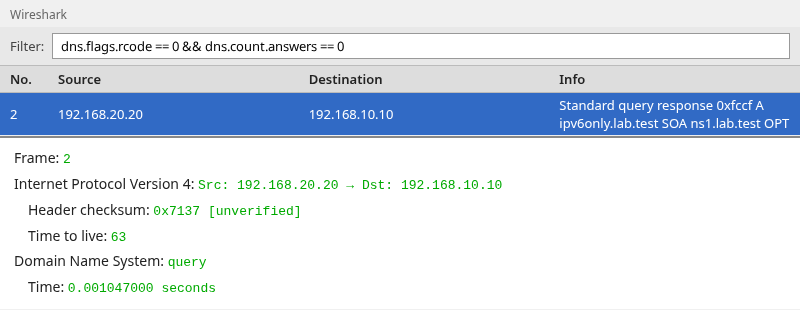
Check the reply code, answer count, and Authority section before assuming that “no A record” means NXDOMAIN.
SERVFAIL — DNS server could not complete the query
SERVFAIL is RCODE 2. The server received the query but could not produce a valid answer.
Typical causes include upstream timeout, broken delegation, DNSSEC validation failure, malformed zone data, or an internal resolver error.
It does not mean the name is definitely absent. NXDOMAIN is explicit “not found”; SERVFAIL is “I could not answer reliably.”
In the lab trace, servfail.lab.test uses a CNAME loop so BIND returns SERVFAIL with an extended DNS error hint. Production SERVFAIL causes differ, but the Wireshark shape is the same: response bit set, RCODE 2.
REFUSED — resolver rejected the query
REFUSED is RCODE 5. The server was reachable but declined to answer — for example allow-query restrictions on an authoritative server, or recursion refused when the client asked for a name outside the served zone.
Filter with dns.flags.rcode == 5 and read the source IP of the response to see which DNS server refused the query. You can also open the matching query and read its destination IP. REFUSED is an explicit policy outcome, not silence.
DNS query with no response
When the client sends a query and no response appears in the capture, the application usually waits and retries. You may see the same query retried, often with the same transaction ID; Wireshark can mark later copies as [DNS retransmission] when they fall within the retransmission window.
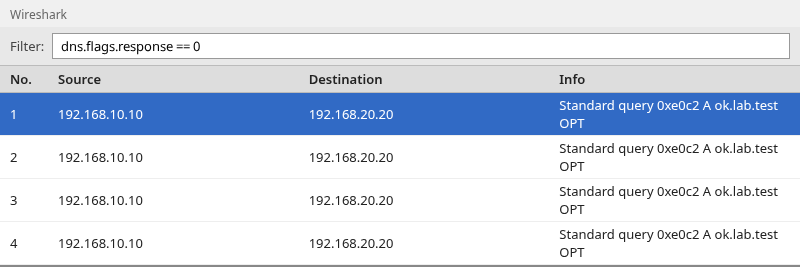
This pattern matches timeout at the application layer, but one PCAP cannot distinguish firewall drop, server loss, and a response that left the server on a path your tap did not see.
dns.response_missing
In Wireshark 4.4+, after the capture is fully loaded, queries with no matching response in the file can be flagged for analysis. Filter:
dns.response_missingThat filter answers “which questions in this file never got an answer I can see?” — not “which server is broken?” Compare client-side and resolver-side captures before you blame a single hop.
Repeated or retransmitted query
dns.retransmissionshows queries Wireshark treats as retries. Retries can mean loss or timeout, but some resolvers also retry when an earlier answer was slow. Pair retransmissions with dns.response_missing and with whether any response eventually arrives.
Find slow DNS responses
On response packets, dns.time is the elapsed time between the matching query and this answer at the capture point.
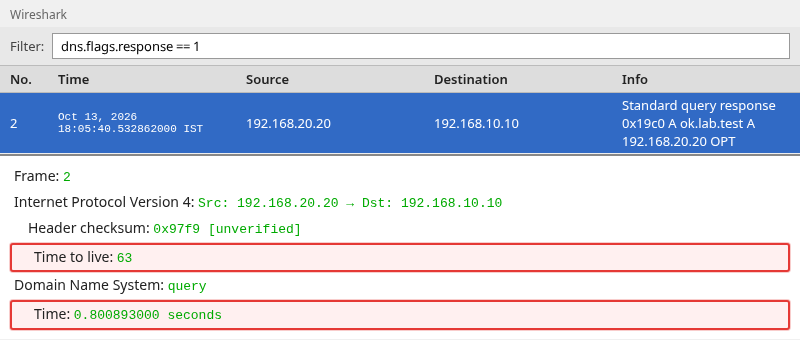
Filter slow answers (adjust the threshold to your SLA):
dns.time > 0.5Capture-point caveat
dns.time measures what your trace saw between query and response. Capture on the client NIC includes resolver RTT and local stack delay; capture on a datacenter resolver mostly reflects server and upstream path. For user-facing slowness, a client-side trace is usually more representative.
High dns.time with healthy TCP to the same host points back to DNS or resolver choice, not application payload loss.
Match a DNS response to its query
A DNS response normally carries the same 16-bit transaction ID as the query it answers. Because IDs can be reused, confirm the endpoints and question name when multiple lookups overlap, or use Wireshark’s frame links:
- On a response: [Answer to request in frame N]
- On a query: [Response in frame N] when the answer is in the file
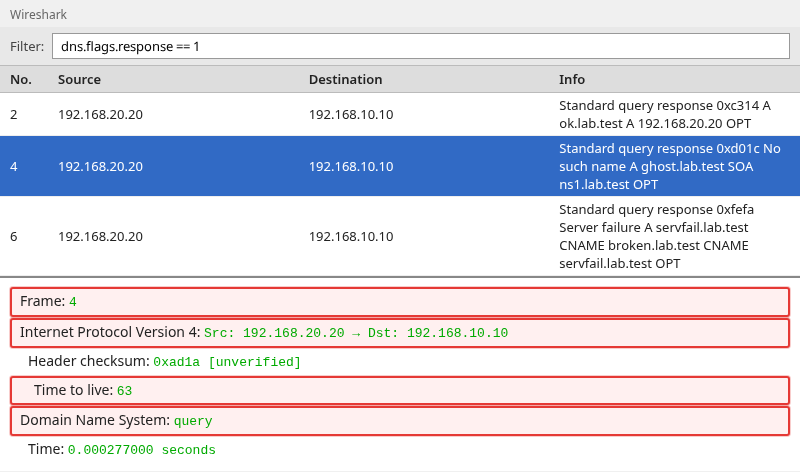
Use the link when multiple lookups overlap in time. Filter one name first (dns.qry.name contains "example.com"), then follow the pair before you interpret RCODE or dns.time.
Which DNS server did the client actually query?
Read the destination IP on the query packet — that is the DNS resolver or authoritative server the host used for that attempt, regardless of what you configured in /etc/resolv.conf or DHCP.
If the destination is a loopback or local address (for example 127.0.0.53 or 127.0.0.1), you are seeing a local stub or forwarder on the host. That process may send a second DNS query to the real upstream resolver, which your capture might not show unless you tap the right interface.
| Observation | What to verify |
|---|---|
| Queries go to an unexpected IP | VPN split tunnel, local forwarder, hard-coded resolver in the app |
| Queries go to loopback | systemd-resolved, dnsmasq, or VPN agent — follow upstream query separately |
| Queries reach the right server but RCODE is wrong | Zone content, views, or forwarder policy on that server |
| Queries never leave the client | Local firewall or broken loopback forwarder |
| Queries reach the server but no response in this file | Return path, asymmetric routing, or capture placement |
Wireshark shows the traffic that reached your interface. It does not replace resolver configuration review.
Summary
DNS failures in Wireshark fall into a small set of visible patterns: successful NOERROR with answers, NOERROR/NODATA with an empty answer section, explicit NXDOMAIN, server-side SERVFAIL, policy REFUSED, silence with retries, and slow but successful responses.
NXDOMAIN means the queried name does not exist. NOERROR with zero answers may be NODATA after you inspect Authority and rule out a referral. Missing responses and dns.response_missing mean your capture never saw an answer for that question — compare another capture point before you treat it as definitive packet loss.
Use dns.flags.response, dns.flags.rcode, dns.count.answers, dns.response_missing, dns.retransmission, and dns.time to narrow the list, then pair query and response by ID and name or Wireshark’s frame links. When the name resolves but the app still fails, move up the stack to TCP connection failures or TLS — not more DNS filters alone.
References
- Wireshark Wiki: DNS
- Wireshark display filter reference: DNS
- RFC 1035: Domain Names — implementation and specification
- RFC 6891: EDNS(0)
Frequently Asked Questions
What is NXDOMAIN in Wireshark?
NXDOMAIN is DNS RCODE 3 (Name Error). The response has the QR bit set and Wireshark shows No such name in the Info column. It means the queried name does not exist — not that the network timed out and not that only the record type is missing.
What is the difference between NXDOMAIN and NODATA?
NXDOMAIN (RCODE 3) means the domain name in the query does not exist. NODATA is usually NOERROR (RCODE 0) with zero answer records and Authority that supports a negative answer — the name exists, but there is no record of the requested type (for example an A query when only AAAA exists). The same filter shape can also match referrals, so check Authority for NS versus SOA before you call it NODATA.
What is the difference between NXDOMAIN and SERVFAIL?
NXDOMAIN (RCODE 3) means the server completed the query and reports the name does not exist. SERVFAIL (RCODE 2) means the server could not produce a valid answer. A missing name is not the only cause of SERVFAIL.
How do I find unanswered DNS queries?
Filter dns.flags.response == 0 and look for queries with no matching response in the trace. In Wireshark 4.4+, dns.response_missing lists queries with no answer in the file after analysis completes.
How do I measure DNS response time?
Open the response packet and read dns.time, or filter dns.time > 0.5 to surface slow answers. The value is measured at the capture point between the matched query and response.
Why does the client send the same DNS query repeatedly?
The resolver or OS often retries when no answer arrives in time, or when an earlier UDP response was lost. Wireshark may mark retries as dns.retransmission. Compare with dns.response_missing and whether any response eventually appears.
Can Wireshark show which DNS server was used?
Yes. Read the destination IP address on the DNS query packet (UDP or TCP port 53). That is the server the client contacted for that lookup; loopback destinations usually mean a local stub forwarder.
