
| Tested on | RHEL 10.2 (Coughlan) |
|---|---|
| Package | freeradius-3.2.8-2.el10.x86_64, freeradius-ldap-3.2.8-2.el10.x86_64, freeradius-utils-3.2.8-2.el10.x86_64, openldap-clients-2.6.10-1.el10.x86_64, openldap-servers-2.6.10-1.el10_2.x86_64 |
| Applies to | Linux hosts running FreeRADIUS 3.2 against OpenLDAP |
| Privilege | root or sudo to edit /etc/raddb and run the packaged server in debug mode |
| Scope | How to make FreeRADIUS authenticate an OpenLDAP user with PAP and return a different RADIUS reply based on LDAP group membership. Does not cover Active Directory, Winbind, MS-CHAP, PEAP, or installing the LDAP server. |
| Related guides | FreeRADIUS PAP and CHAP FreeRADIUS with Active Directory ldapsearch command OpenLDAP tutorial Wireshark tutorial |
FreeRADIUS can check an OpenLDAP password and then return a different RADIUS reply for each LDAP group. LDAP stores the account, the stored password, and the group membership. FreeRADIUS still decides Access-Accept or Access-Reject.
The directory in these examples already answers searches. Creating users, groups, and the service account belongs in the OpenLDAP tutorial, not here.
Key takeaways
To authenticate FreeRADIUS users against OpenLDAP, configure the LDAP module to find one user and return its userPassword, then let the pap module verify the submitted password. For authorization, configure the LDAP group search and check LDAP-Group in the authorize section to return the RADIUS attributes you want for each group. Use radiusd -X whenever the result is not what you expect.
- LDAP supplies the account, stored password, and group membership. FreeRADIUS still makes the RADIUS decision.
- PAP can verify a stored
{SSHA}value. You do not needAuth-Type := ldapwhen the directory returns that value. Filter-Idin this example only proves that each group produced a different reply. Replace it with the attribute your NAS actually uses.- A user search must return exactly one entry. Confirm that with
ldapsearchbefore you change FreeRADIUS. radiusd -Xseparates a bad password, a missing user, a group miss, a bind failure, and a TLS failure.
How FreeRADIUS uses LDAP
Authentication asks whether the password is right. Authorization asks what the reply should contain. LDAP supplies the data. It does not answer the RADIUS packet.
Authentication vs authorization
PAP is the method here. The Access-Request carries User-Password, protected with the RADIUS shared secret. The PAP and CHAP guide shows that protection, and why CHAP needs the original password. FreeRADIUS calls the LDAP userPassword value the known-good password and compares the submitted password with it.
After the user is found, a group check can add reply attributes. Filter-Id is used here only to prove that group authorization produced different RADIUS replies. Replace it with the attribute your NAS actually consumes. FreeRADIUS does not enforce the label. It is not a Cisco privilege level.
LDAP as the datastore, PAP as the authenticator
The ldap module searches the directory and copies attributes into the request. The pap module compares the password. An {SSHA} value works for PAP because PAP can hash the submitted password and compare the results. CHAP fails with that value because CHAP needs the original password, and a one-way hash cannot be turned back into it.
    RADIUS method, here PAP
               ↓
FreeRADIUS searches and compares
               ↓
 LDAP user, password, and group
               ↓
 Access-Accept or Access-Reject
Bind as user means FreeRADIUS signs in to LDAP as the person requesting access and treats a successful LDAP bind as proof of the password. That works only when the request contains User-Password, and it is the fallback when a directory will not return a known-good password. OpenLDAP can return userPassword to a service account that may read it, so this setup does not set Auth-Type := ldap.
The examples use OpenLDAP on 192.168.56.116, with users under ou=people,dc=example,dc=com and groups under ou=groups,dc=example,dc=com. Groups are posixGroup entries that list users through memberUid. Replace these values with the base DNs and membership attribute from your directory. uid=alice is in cn=radius-admins, and uid=bob is in cn=radius-users. Both passwords are stored as {SSHA}.
Verify the LDAP lookups
If the search is wrong, FreeRADIUS repeats it. FreeRADIUS needs a bind account that can search users and groups and, for this PAP design, read userPassword. An anonymous search usually cannot see that attribute, and then PAP has nothing to compare. Test the account with the ldapsearch command before you change FreeRADIUS.
User lookup
Users are under ou=people,dc=example,dc=com and are identified by uid. Search for alice and ask only for uid, so the hash is not printed:
ldapsearch -x -LLL -H ldap://192.168.56.116:389 \
  -D 'cn=radius-reader,ou=services,dc=example,dc=com' -w 'radius-reader-secret' \
-b 'ou=people,dc=example,dc=com' '(uid=alice)' uiddn: uid=alice,ou=people,dc=example,dc=com
uid: aliceOne DN means the filter is specific enough. Zero entries means the base DN or the uid is wrong. Two entries means FreeRADIUS will refuse the search later. In this example Alice's userPassword is stored as {SSHA}. FreeRADIUS maps that value to Password-With-Header.
Group membership lookup
Groups are under ou=groups,dc=example,dc=com. Membership is memberUid on the posixGroup, not an Active Directory memberOf attribute on the user. Confirm Alice's group:
ldapsearch -x -LLL -H ldap://192.168.56.116:389 \
  -D 'cn=radius-reader,ou=services,dc=example,dc=com' -w 'radius-reader-secret' \
-b 'ou=groups,dc=example,dc=com' '(memberUid=alice)' cn memberUiddn: cn=radius-admins,ou=groups,dc=example,dc=com
cn: radius-admins
memberUid: alicememberUid: alice is the membership FreeRADIUS will test.
Configure the FreeRADIUS LDAP module
On Debian and Ubuntu the debug command is often freeradius -X, and the configuration directory is /etc/freeradius/3.0. The paths below are from this RHEL host. The packaged file is /etc/raddb/mods-available/ldap. FreeRADIUS loads the names linked from mods-enabled. Leave sites-enabled/default and inner-tunnel in place, and enable ldap:
sudo ln -s ../mods-available/ldap /etc/raddb/mods-enabled/ldapThe link prints nothing when it succeeds. ../mods-available/ldap is relative to mods-enabled, so ls -l /etc/raddb/mods-enabled/ldap should point at that file.
LDAP server and bind account
Set the directory address, the service account, and the suffix. The bind password is not Alice's login password. Leave TLS commented until the search is confirmed. A later section turns StartTLS on.
server = '192.168.56.116'
identity = 'cn=radius-reader,ou=services,dc=example,dc=com'
password = radius-reader-secret
base_dn = 'dc=example,dc=com'
User base and password mapping
Put the user search in the module's user block so the lines are not pasted into the wrong scope. Double quotes let ${..base_dn} expand to dc=example,dc=com. Single quotes would send that text to the directory literally.
user {
    base_dn = "ou=people,${..base_dn}"
    filter = "(uid=%{%{Stripped-User-Name}:-%{User-Name}})"
}
%{%{Stripped-User-Name}:-%{User-Name}} uses Stripped-User-Name when FreeRADIUS has removed a realm, and User-Name otherwise. For alice the filter becomes (uid=alice) and must return one entry. Do not replace uid with sAMAccountName on this directory.
The default update block already copies userPassword to Password-With-Header. Leave that line. PAP reads the {SSHA} prefix from the copy and chooses the comparison. If the copy is missing, the user search can succeed and PAP still has no known-good password.
Group base and memberUid
For this directory, comment out membership_attribute = 'memberOf' and use membership_filter, because membership is stored on the group as memberUid, not on the user as memberOf. name_attribute = cn compares the short name radius-admins, not the full DN.
group {
    base_dn = "ou=groups,${..base_dn}"
    filter = '(objectClass=posixGroup)'
    name_attribute = cn
    membership_filter = "(memberUid=%{%{Stripped-User-Name}:-%{User-Name}})"
    # membership_attribute = 'memberOf'
}
Authorize by LDAP group
The default site is the virtual server for a normal login. Its authorize section already lists -ldap just before pap. The leading minus means a missing module does not abort startup. Once the symlink exists, that line runs the search.
LDAP-Group is not a field in the Access-Request. Comparing it makes FreeRADIUS search the directory. The syntax below is the FreeRADIUS 3.2 form used here. FreeRADIUS 4 documents the same idea as %ldap.group().
Filter-Id is only the example reply. This policy also permits only the two named groups. If LDAP should authenticate everyone and groups should only change the reply, remove the final reject.
Add the policy immediately after -ldap:
-ldap
if (ok || updated) {
    if (&LDAP-Group == "radius-admins") {
        update reply {
            &Filter-Id := "admin-access"
        }
    }
    elsif (&LDAP-Group == "radius-users") {
        update reply {
            &Filter-Id := "user-access"
        }
    }
    else {
        reject
    }
}
-ldap searches for the user. if (ok || updated) continues only when that search found someone. radius-admins gets admin-access, radius-users gets user-access, and anyone else is rejected before PAP can accept them. := replaces any previous value.
For alice, debug shows the group search returning true:
(0) Searching for user in group "radius-admins"
(0) Performing search in "ou=groups,dc=example,dc=com" with filter "(&(cn=radius-admins)(objectClass=posixGroup)(memberUid=alice))", scope "sub"
(0) if (&LDAP-Group == "radius-admins")  -> TRUE
A miss prints Search returned no results and User is not a member of "radius-admins". The elsif then tries radius-users.
Test PAP with radtest
FreeRADIUS answers only clients listed in /etc/raddb/clients.conf. A client here is radtest, not a person. secret is the RADIUS shared secret, not the LDAP bind password.
client radius_lab {
    ipaddr = 192.168.56.116
    secret = radius-lab-secret
}
Stop a running radiusd so port 1812 is free, then start debug mode with the sudo command. Leave that terminal open.
sudo radiusd -XWait until the log says the server is listening:
Ready to process requestsStartup should also print Bind successful for cn=radius-reader. Bind credentials incorrect means the bind DN or password does not match, and the server does not reach the ready line.
Successful PAP
In a second terminal, send Alice's password. The last argument is the RADIUS shared secret:
radtest -t pap alice correct-horse 192.168.56.116 0 radius-lab-secretReceived Access-Accept Id 31 from 192.168.56.116:1812 to 192.168.56.116:54884 length 52
Filter-Id = "admin-access"Access-Accept plus Filter-Id = "admin-access" means both the password and the radius-admins check succeeded.
Wrong password
Send the same user with a different password:
radtest -t pap alice wrong-password 192.168.56.116 0 radius-lab-secret(0) -: Expected Access-Accept got Access-Reject
Received Access-Reject Id 143 from 192.168.56.116:1812 to 192.168.56.116:44502 length 38radtest prints the first line because it expected an accept. The debug log names the failed comparison:
pap: Comparing with "known-good" SSHA-Password
pap: ERROR: SSHA digest does not match "known good" digest
The user was found and the group still matched. The reply is Access-Reject because the password did not, so there is no Filter-Id.
bob uses the same password and the other group:
radtest -t pap bob correct-horse 192.168.56.116 0 radius-lab-secretReceived Access-Accept Id 99 from 192.168.56.116:1812 to 192.168.56.116:53635 length 51
Filter-Id = "user-access"Same password, different group, different reply.
Debug with radiusd -X
The accept and reject above look similar until you read the debug log. A good PAP lookup shows the user DN, the {SSHA} value, and a successful comparison:
(0) ldap: Performing search in "ou=people,dc=example,dc=com" with filter "(uid=alice)", scope "sub"
(0) ldap: User object found at DN "uid=alice,ou=people,dc=example,dc=com"
(0) ldap: control:Password-With-Header += '{SSHA}9i83AEEbL4BU07KuXMOqHye8vABuVuAp'
(0) pap: Comparing with "known-good" SSHA-Password
(0) pap: User authenticated successfully
(0) is the request number. scope "sub" searches that container and everything under it. PAP compared the submitted password with the {SSHA} value. FreeRADIUS did not bind as alice.
A user who exists but is in neither allowed group hits the final reject even when the password is right:
User is not a member of "radius-admins"
User is not a member of "radius-users"
[reject] = reject
An unknown username never reaches that test:
ldap: Search returned no results
pap: WARNING: No "known good" password found for the user.  Not setting Auth-Type
Both still show up as Access-Reject in radtest. The debug line tells you which one it was.
Analyze RADIUS and LDAP in Wireshark
If the capture includes both RADIUS and LDAP, use the display filter radius or ldap to follow the decision. In this example both services run on 192.168.56.116, so the LDAP packets were captured on the loopback interface. The Wireshark tutorial covers the packet list and the display filter bar.
The list ends in Access-Accept with Filter-Id:
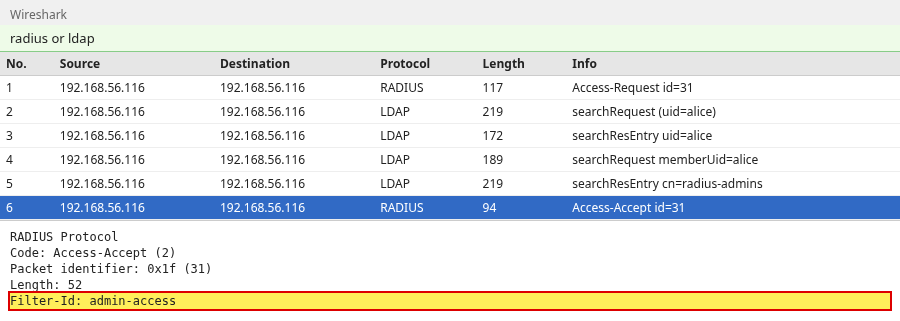
The six packets are the whole decision:
- Access-Request for
alice - LDAP search for
(uid=alice) - Alice's entry, including
userPassword - LDAP group search
cn=radius-admins- Access-Accept with
Filter-Id = "admin-access"
The Access-Request is RADIUS code 1. User-Password is hidden with the shared secret. Wireshark shows the recovered value only after you set that secret in the RADIUS preferences.
The user Search Request contains (uid=alice). The following Search Result Entry contains userPassword:
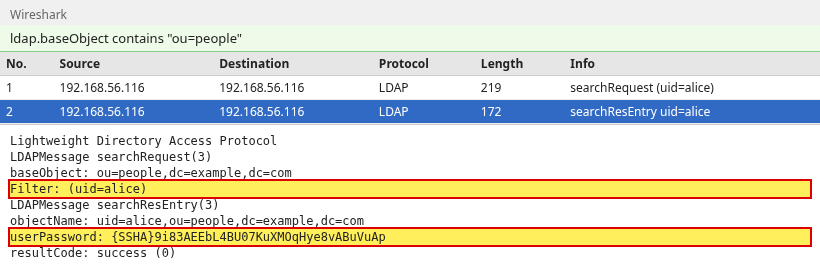
FreeRADIUS copies that value to Password-With-Header, and PAP reads the {SSHA} prefix. This capture shows the hash because the connection is still unencrypted. For a disposable test, confirming the search before TLS makes the failure easier to see. Do not expose userPassword over an untrusted network. In a real environment, use StartTLS or LDAPS from the start.
The group filter is an AND of cn=radius-admins, objectClass=posixGroup, and memberUid=alice. Wireshark adds one pair of parentheses around that filter. The result is memberUid: alice:
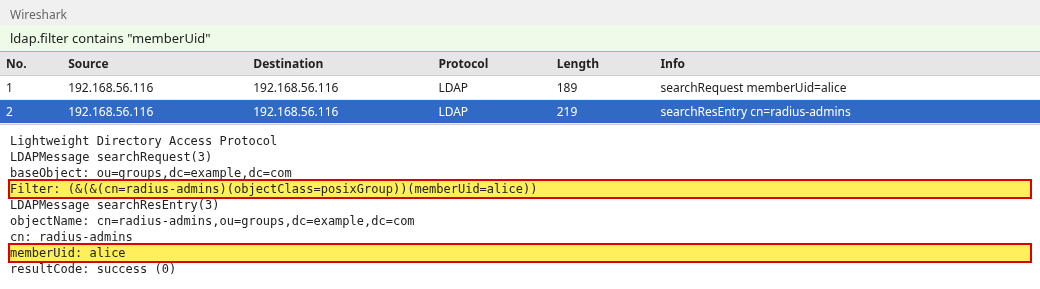
That is why LDAP-Group == "radius-admins" is true and the Access-Accept carries admin-access. The Accept is code 2 and uses the same id as the request. A wrong password is a separate pair: same id, Access-Reject, code 3, and no Filter-Id. The user search still returns Alice. The reject comes from the SSHA comparison.

Troubleshoot FreeRADIUS LDAP
radtest prints Access-Reject for several different failures. Read radiusd -X for the line that names the cause.
User not found
Search returned no results means the filter matched nothing. Check uid and the people base DN with ldapsearch. A name that is not in the directory is rejected:
radtest -t pap nobody correct-horse 192.168.56.116 0 radius-lab-secret(0) -: Expected Access-Accept got Access-Reject
Received Access-Reject Id 206 from 192.168.56.116:1812 to 192.168.56.116:37042 length 38That is an Access-Reject, not a timeout. PAP had no stored password because the search returned no entry.
Multiple user results
Two matches are not a successful lookup. FreeRADIUS rejects the request:
ldap: ERROR: Ambiguous search result, returned 2 unsorted entries (should return 1 or 0). Enable sorting, or specify a more restrictive base_dn, filter or scopeThe next lines name both DNs. Narrow base_dn or the filter until ldapsearch returns one entry.
LDAP bind failure
A wrong bind password fails while the server is starting, before it can answer clients:
rlm_ldap (ldap): Bind credentials incorrect: Invalid credentialsradiusd -X does not reach Ready to process requests, and radtest reports no reply. That is not an Access-Reject. Fix identity and password, then start it again.
If the directory is down after startup, the process can still be running:
rlm_ldap (ldap): Bind with cn=radius-reader,ou=services,dc=example,dc=com to ldap://192.168.56.116:389 failed: Can't contact LDAP serverA bad password for alice logs SSHA digest does not match. A stopped directory logs Can't contact LDAP server.
userPassword not readable
If the entry has no userPassword, or the bind account cannot read it, the search finds the user and then warns:
ldap: WARNING: No "known good" password added. Ensure the admin user has permission to read the password attributePAP then reports that no known-good password was found. Give the bind account read access to userPassword. The same situation can print a hint about Active Directory and Auth-Type := LDAP. On OpenLDAP that hint means the attribute was missing. It does not mean you should switch this server to a user bind.
Group membership does not match
User is not a member of "radius-admins" means the group search returned nothing. Check memberUid and the group base DN. If membership_attribute = 'memberOf' is still active, and this directory stores membership on the group instead, the check does not see memberUid. Use the membership_filter in the group block above.
TLS trust failure
A CA that does not match the directory certificate stops the LDAP module during startup. The log says TLS certificate verification: Error, self-signed certificate and Could not start TLS: Connect error. radiusd -X does not reach Ready to process requests. The next section is the configuration that avoids that.
Enable StartTLS
For a disposable test environment, validating the LDAP search before enabling TLS can make troubleshooting easier. Do not expose userPassword over an untrusted network. In a real environment, use StartTLS or LDAPS from the start.
StartTLS stays on port 389 and encrypts after the connection opens. It is not a separate listener on port 636. In the module's tls block:
start_tls = yes
ca_file = /etc/raddb/certs/ldap-ca.pem
require_cert = 'demand'
ca_file is the CA that signed the directory certificate. require_cert = 'demand' refuses the connection when that certificate does not verify. Restart radiusd -X. With the matching CA, startup still logs Bind successful, and alice still receives Filter-Id = "admin-access".
Confirm StartTLS from the shell before you blame FreeRADIUS. LDAPTLS_CACERT points at the same CA, and -ZZ aborts if TLS fails:
LDAPTLS_CACERT=/etc/raddb/certs/ldap-ca.pem ldapsearch -x -LLL -ZZ \
  -H ldap://192.168.56.116:389 \
  -D 'cn=radius-reader,ou=services,dc=example,dc=com' -w 'radius-reader-secret' \
-b 'ou=people,dc=example,dc=com' '(uid=alice)' uiddn: uid=alice,ou=people,dc=example,dc=com
uid: aliceThe DN means this client accepted the certificate. Point ca_file at a different certificate and the module fails at startup:
TLS certificate verification: Error, self-signed certificate
rlm_ldap (ldap): Could not start TLS: Connect error
The server does not reach Ready to process requests. Put the directory CA in ca_file and start it again. After StartTLS, Wireshark no longer shows the LDAP filter or userPassword.
OpenLDAP vs Active Directory
OpenLDAP can return userPassword, so FreeRADIUS performs PAP itself. Active Directory will not return that password. For PAP, FreeRADIUS can validate the supplied password by binding as that user. For MS-CHAP, use Winbind or NTLM instead. LDAP can still look up the user and the groups.
Use FreeRADIUS with Active Directory when the accounts live in AD. Do not copy an Auth-Type := ldap block from that setup onto a directory that already returns the hash.
Summary
FreeRADIUS stays the authentication server. OpenLDAP stores the users, the {SSHA} passwords, and the posixGroup membership. The LDAP module finds one user and returns userPassword. PAP compares it. LDAP-Group then adds the reply attribute for that group. In this example that attribute is Filter-Id, and the final reject allows only radius-admins and radius-users.
A wrong password, a missing user, and a user in neither group all look similar in radtest. radiusd -X separates a digest mismatch, an empty search, and an explicit reject. A wrong bind password or a TLS CA mismatch stops the server before it is ready, so the client gets no reply rather than an Access-Reject. Use StartTLS or LDAPS on any directory that is not a disposable test. For Active Directory PAP, bind as the user. For MS-CHAP, use Winbind or NTLM.
References
- FreeRADIUS: authenticating users with LDAP
- FreeRADIUS upgrade notes for the LDAP module
- RFC 2865: Remote Authentication Dial In User Service
- OpenLDAP administrator's guide
Frequently Asked Questions
Does FreeRADIUS authenticate users directly through LDAP?
FreeRADIUS searches LDAP and then runs the RADIUS method itself. For PAP it reads userPassword and compares the value. The directory is the datastore. It is not a PAP or CHAP server.
Why does PAP work but CHAP fail with my LDAP password format?
PAP can verify a stored hash such as {SSHA}. CHAP needs the original password so FreeRADIUS can calculate the response. A one-way userPassword cannot supply that, and the debug line is Cleartext-Password is required for authentication.
Can FreeRADIUS authorize users based on LDAP groups?
Yes. After the user search succeeds, compare LDAP-Group with the group cn. This example returns Filter-Id admin-access for radius-admins and user-access for radius-users, and rejects a user who is in neither group. Remove that final reject if every valid LDAP user should authenticate and the groups should only change the reply.
Should FreeRADIUS bind as the user?
Not for OpenLDAP, when the bind account can read userPassword. Bind-as-user is the fallback for a directory that will not return a known-good password, and it only works when the request contains User-Password. Leave Auth-Type unset and let PAP do the comparison.
Should I use LDAP or Winbind for Active Directory?
Active Directory does not return the user's known-good password through a normal LDAP search. For PAP, FreeRADIUS can bind as that user. For MS-CHAP, use Winbind or NTLM. LDAP can still look up the user and the groups. Do not point this OpenLDAP password lookup at AD and expect the same result.
