
| Tested on | RHEL 10.2 (Coughlan) Windows Server 2025 Standard, build 26100.32230 |
|---|---|
| Package | freeradius-3.2.8-2.el10.x86_64, freeradius-ldap-3.2.8-2.el10.x86_64, freeradius-utils-3.2.8-2.el10.x86_64, samba-winbind-4.23.5-111.el10_2.x86_64, krb5-workstation-1.21.3-10.el10_2.x86_64, openldap-clients-2.6.10-1.el10.x86_64 |
| Applies to | FreeRADIUS 3.2 on Linux, joined to Active Directory with Samba Winbind |
| Privilege | root on the FreeRADIUS host, an AD account that can join a computer, and a directory account that can read users and groups |
| Example environment | One Windows Server 2025 domain controller and one RHEL host running FreeRADIUS, on the same network |
| Scope | How to join the FreeRADIUS host to AD, check MSCHAPv2 through Winbind, and set a RADIUS reply from AD group membership. Does not cover PEAP certificates, wireless controller setup, or installing Active Directory. |
| Related guides | FreeRADIUS with LDAP FreeRADIUS PAP and CHAP Join Samba to a Windows domain Wireshark tutorial PEAP MS-CHAPv2 with NPS |
Join the FreeRADIUS host to Active Directory and let Winbind check MSCHAPv2 passwords. Winbind is the Samba service that asks a domain controller about users. MSCHAPv2 is still commonly used inside PEAP for enterprise Wi-Fi and in some VPN deployments. The request carries a challenge and a response, not the password. Active Directory will not return that password in an LDAP search, so a directory login that works for PAP does not work here.
When the password is valid, radtest receives Access-Accept, the RADIUS yes. Alice in Network-Admins and Bob in Network-Users get different Filter-Id labels in that reply. The Linux host has to be a member of the domain before either test can succeed.
Key Takeaways
- MSCHAPv2 does not send the password. FreeRADIUS cannot check it by reading a password attribute from AD.
- PAP is the method that does send the password, so a directory bind can work for PAP. This page is the MSCHAPv2 path:
ntlm_authasks the local Winbind service, and Winbind asks a domain controller. - LDAP/LDAPS is used here for group lookup and authorization. It does not validate the MSCHAPv2 password response.
- A user can be in the right group and still type the wrong password. Those are two separate checks.
- FreeRADIUS can reach Winbind directly when it is built with
libwbclient, or throughntlm_auth. This RHEL build usesntlm_auth.
How FreeRADIUS Authenticates Active Directory Users
A Wi-Fi or VPN login that uses MSCHAPv2 sends a challenge and a response. The RADIUS server has to prove the response matches the password stored in AD. It never sees the password itself.
Why normal LDAP password lookup is different with AD
FreeRADIUS PAP and CHAP shows the split. PAP puts the password in the Access-Request, protected by the RADIUS shared secret. FreeRADIUS can then bind as that user, which means it logs in to the directory with the password from the request, or it compares a stored hash. The FreeRADIUS LDAP guide does that against OpenLDAP, which can return userPassword.
Active Directory does not return the password on a normal LDAP search. MSCHAPv2 never puts the password in the request either. Both facts block the OpenLDAP-style check:
- There is no cleartext password in the Access-Request for a bind.
- There is no NT hash in the LDAP result for FreeRADIUS to compare locally.
- A successful LDAP bind as the user only works when the request contains
User-Password.
Winbind, MSCHAPv2 and LDAP group authorization
On a host that has joined the domain, Winbind can ask a domain controller whether the MSCHAPv2 response matches the user's password. FreeRADIUS does not join the domain itself. It runs ntlm_auth, a small Samba program that hands the challenge and the response to the local Winbind service.
Group membership is a separate question. An LDAPS search reads memberOf, the attribute where AD lists that user's groups. The RADIUS reply then gets a Filter-Id, a short label a switch or VPN gateway can match.
  RADIUS client
        ↓
FreeRADIUS mschap
        ↓
    ntlm_auth
        ↓
     Winbind
        ↓
 Active Directory
FreeRADIUS
↓
LDAPS
↓
AD group membership
↓
Filter-IdExample environment
| Item | Value |
|---|---|
| Domain | lab.example (NetBIOS LAB) |
| Domain controller | win-8s0k67ep5eo.lab.example (192.168.56.128) |
| FreeRADIUS host | vm1.lab.example (192.168.56.116) |
| Admin user | alice in Network-Admins |
| Ordinary user | bob in Network-Users |
| LDAP reader | radius-reader@lab.example |
An OU is a folder in Active Directory. The accounts in the examples are arranged like this:
- Alice and Bob live in
OU=RADIUS,DC=lab,DC=example Network-Adminsalready exists underCN=UsersNetwork-Usersis in the RADIUS OU- Alice's password in the commands below is
<alice-password> - Bob's password in the commands below is
<bob-password>
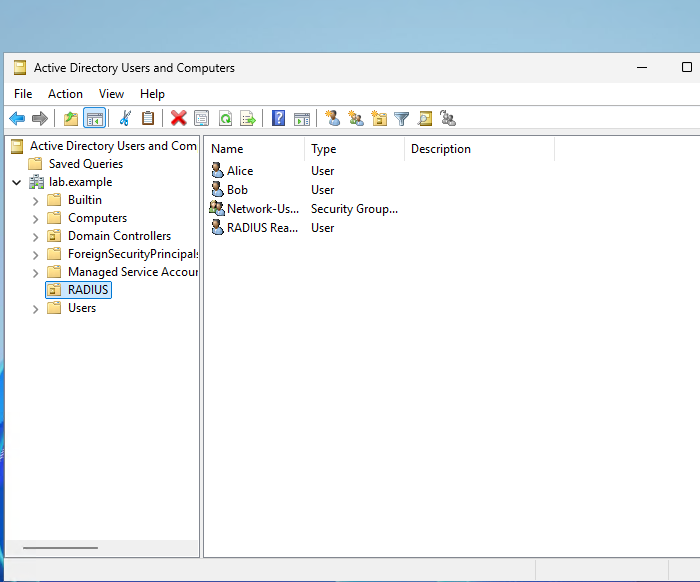
Alice is a member of Network-Admins. Open her properties and select the Member Of tab.
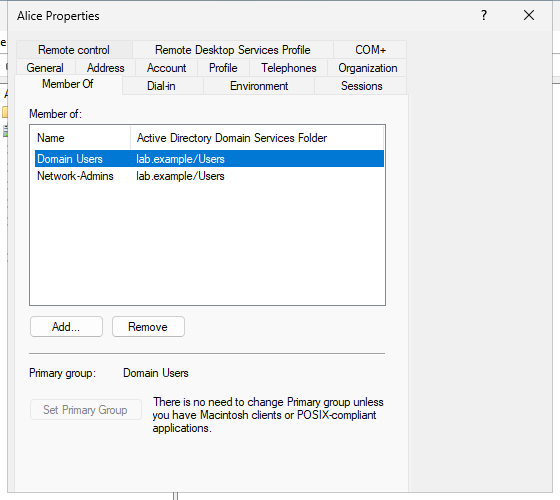
Network-Admins is the direct group the RADIUS policy matches. Domain Users is the primary group, shown on its own line at the bottom of that tab.
Bob is a member of Network-Users.
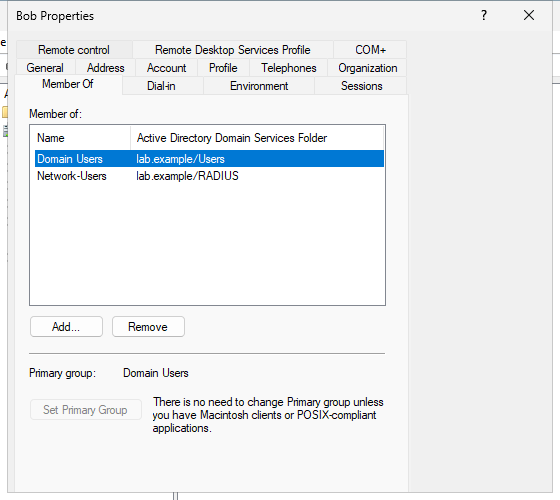
That group is stored in the RADIUS OU, so the folder column reads lab.example/RADIUS. The reader account is only there so FreeRADIUS can search the directory.
Prepare the FreeRADIUS Host for Active Directory
The FreeRADIUS host has to be ready for a domain join before you install Samba. AD uses Kerberos for that join. Kerberos requires the clocks to be closely synchronized. In a typical Active Directory domain, the default tolerance is about five minutes. Check three things:
- The host's DNS name is inside the AD domain, such as
vm1.lab.example - The host can resolve the domain and the domain controller
- The clock is inside the domain's Kerberos tolerance, about five minutes by default
DNS and time requirements
Confirm three DNS answers before you install Samba. These queries use whatever resolver the host is using. On a normal deployment that resolver is the domain controller.
- The SOA proves the zone exists
- The Kerberos SRV record names the domain controller and port 88
- The A record is the address the FreeRADIUS host must be able to reach
Start with the SOA:
dig lab.example SOA +noall +answerlab.example. 600 IN SOA lab.example. hostmaster.lab.example. 1791302509 1200 180 1209600 600An SOA answer means the resolver is authoritative for the zone, or it forwarded the query to a server that is. NXDOMAIN here means the join will not find a domain controller.
dig _kerberos._tcp.lab.example SRV +noall +answer_kerberos._tcp.lab.example. 600 IN SRV 0 100 88 win-8s0k67ep5eo.lab.example.Port 88 in that record is the Kerberos service on the domain controller. The target name has to resolve to an address the FreeRADIUS host can reach.
dig win-8s0k67ep5eo.lab.example A +noall +answerwin-8s0k67ep5eo.lab.example. 600 IN A 192.168.56.128192.168.56.128 is the domain controller used for the rest of this walkthrough. If the A record points at an address that is not reachable from the FreeRADIUS host, fix DNS before the join.
Samba and Winbind packages
Install the domain-member tools. FreeRADIUS is already on this host.
sudo dnf install -y samba samba-winbind samba-winbind-clients samba-common-tools krb5-workstationThe packages that this host installed are samba-winbind-4.23.5-111.el10_2 and krb5-workstation-1.21.3-10.el10_2, next to FreeRADIUS 3.2.8.
Point Kerberos at the AD realm. dns_lookup_kdc uses the SRV record from the previous section.
includedir /etc/krb5.conf.d/

[libdefaults]
    default_realm = LAB.EXAMPLE
    dns_lookup_realm = false
    dns_lookup_kdc = true
    rdns = false
    ticket_lifetime = 24h
    forwardable = true
Write a short smb.conf. Two settings decide whether the later RADIUS tests can succeed:
ntlm auth = mschapv2-and-ntlmv2-onlyallows the MSCHAPv2-style NTLM response used byntlm_auth --allow-mschapv2. Ordinary NTLMv1 stays disabled.winbind use default domain = yeslets the bare usernamealicematchLAB\alice. Without it, Winbind expects the domain prefix.
[global]
   workgroup = LAB
   security = ads
   realm = LAB.EXAMPLE
   winbind use default domain = yes
   winbind enum users = yes
   winbind enum groups = yes
   template shell = /bin/bash
   template homedir = /home/%U
   idmap config * : backend = tdb
   idmap config * : range = 10000-999999
   idmap config LAB : backend = rid
   idmap config LAB : range = 1000000-1999999
   ntlm auth = mschapv2-and-ntlmv2-only
   kerberos method = secrets and keytab
   dedicated keytab file = /etc/krb5.keytab
Two names in that file have to match the domain, and they are not the same string:
realmis the Kerberos realm, uppercase:LAB.EXAMPLEworkgroupis the short NetBIOS name:LAB
Join the FreeRADIUS Host to the AD Domain
The join creates a computer account in Active Directory and stores the machine-account trust credentials in Samba's local state. Winbind uses that trust when it asks the domain controller to validate users. This configuration also sets kerberos method = secrets and keytab, so Samba can maintain /etc/krb5.keytab for Kerberos operations. The keytab is not the trust secret that wbinfo -t checks. Samba domain join covers the same net ads join step for a file server. Here the only consumer of that membership is Winbind, for RADIUS.
-S names the domain controller so the join does not depend on a second DNS search. The command prompts for the password of an account that can join computers. Do not put that password in a shell history line.
sudo net ads join -U Administrator -S win-8s0k67ep5eo.lab.exampleDNS update failed: NT_STATUS_UNSUCCESSFUL
Using short domain name -- LAB
Joined 'VM1' to dns domain 'lab.example'
DNS Update for vm1.lab.example failed: ERROR_DNS_GSS_ERRORJoined 'VM1' is the line that matters. The DNS update lines mean the domain controller did not write an A record for this host. Add that record if clients must look the FreeRADIUS host up by name. The radtest commands below use 127.0.0.1, so they do not need it.
Start Winbind and leave it enabled. FreeRADIUS calls it on every MSCHAPv2 request.
sudo systemctl enable --now winbindThe command prints a symlink path when the unit was not already enabled. systemctl is-active winbind should print active.
Verify the domain trust
Ask Samba whether the local machine-account credentials still match the computer account in Active Directory:
sudo net ads testjoinJoin is OKJoin is OK means Samba's local machine-account credentials still match the computer account in Active Directory. A later failure usually means that computer password changed on one side only.
wbinfo -tchecking the trust secret for domain LAB via RPC calls succeededThat check is the trust between this host and the domain, not a user password. If it fails, MSCHAPv2 will fail for every user.
Verify AD user lookup
Resolve Alice through Winbind before you send a RADIUS request. A missing user here fails every later radtest.
wbinfo -i alicealice:*:1001109:1000513::/home/alice:/bin/bashRead the line from left to right: username, * because Linux is not storing the AD password, uid, gid, home directory, and shell. The uid is inside the LAB idmap range from smb.conf. Bob resolves the same way.
wbinfo -i bobbob:*:1001110:1000513::/home/bob:/bin/bashA user that is missing here will not succeed in radtest, even when the account is enabled in AD.
Connect FreeRADIUS MSCHAP to Winbind
The mschap module already sits in the authorize and authenticate sections of the default site. When a request contains MS-CHAP-Challenge, that module sets Auth-Type to MS-CHAP. MS-CHAPv1 puts the answer in MS-CHAP-Response. MSCHAPv2 puts it in MS-CHAP2-Response. Both land in this module. What you still have to configure is where that check is sent.
How the MSCHAPv2 challenge is validated
In /etc/raddb/mods-available/mschap, set ntlm_auth to the real binary. The line passes the proof from the RADIUS request into Samba:
- The username expansion drops a domain prefix, so
aliceandLAB\aliceboth becomealice --domain=LABis the NetBIOS name fromsmb.conf--challengeand--nt-responseare the challenge and the NT response from the RADIUS request--allow-mschapv2matchesntlm auth = mschapv2-and-ntlmv2-only, so a later MSCHAPv2 client is allowed through that Samba setting
ntlm_auth = "/usr/bin/ntlm_auth --request-nt-key --allow-mschapv2 --username=%{%{Stripped-User-Name}:-%{%{User-Name}:-None}} --domain=LAB --challenge=%{%{mschap:Challenge}:-00} --nt-response=%{%{mschap:NT-Response}:-00}"ntlm_auth returns an NT_KEY when the domain controller accepts the response. FreeRADIUS uses that key material to derive the MPPE attributes returned with Access-Accept. Treat the value as sensitive and do not include it in logs or screenshots you share.
radiusd runs as the radiusd user. Winbind's privileged socket is group wbpriv and mode 750. Add radiusd to that group or every request fails even when wbinfo -a works as root.
sudo usermod -aG wbpriv radiusdusermod prints nothing when the group is added. Restart FreeRADIUS so the process picks up the new group.
sudo systemctl restart radiusdsystemctl is-active radiusd should print active.
Direct Winbind versus ntlm_auth
Upstream FreeRADIUS can call Winbind in-process when it is built against libwbclient. The settings are winbind_username and winbind_domain in the same mschap file, with ntlm_auth left commented. That path is what the FreeRADIUS Winbind guide describes.
This RHEL package was not built that way. Enabling those two lines and clearing ntlm_auth makes radiusd -XC fail:
/etc/raddb/mods-enabled/mschap[11]: 'winbind' is not enabled in this build.Leave the direct Winbind lines commented. ntlm_auth is the working path on this package, and it still uses Winbind. It is not a second directory and it is not LDAP.
Test an Active Directory User
radtest -t mschap is a backend sanity test. It builds one Access-Request with MS-CHAPv1 attributes (MS-CHAP-Response). Access-Accept proves FreeRADIUS, ntlm_auth, Winbind, and Active Directory are connected. A later PEAP-MSCHAPv2 client sends MS-CHAP2-Response through the same ntlm_auth line. After the password, the arguments are the server (127.0.0.1), a NAS port (0), and the shared secret (testing123). That secret belongs to the localhost client in /etc/raddb/clients.conf. Change it before this host accepts requests from anything except these local tests.
Valid password
Send Alice's real password. Access-Accept with the same RADIUS id means the domain controller accepted the MS-CHAP response through the configured Winbind/ntlm_auth path.
radtest -t mschap alice '<alice-password>' 127.0.0.1 0 testing123Sent Access-Request Id 88 from 0.0.0.0:38578 to 127.0.0.1:1812 length 131
User-Name = "alice"
NAS-IP-Address = 192.168.56.116
NAS-Port = 0
Received Access-Accept Id 88 from 127.0.0.1:1812 to 127.0.0.1:38578 length 118
Filter-Id = "network-admins"Filter-Id = "network-admins" is the group result from the next section, not part of the password check. The packet also carries MPPE key attributes. Those are derived from the NT key, so the sample above leaves them out.
A debug run (radiusd -X) shows the same handoff. The expanded argument is --username=alice, and ntlm_auth returns code 0 plus a line that starts with NT_KEY. That value is sensitive key material, so it is not printed here.
Wrong password
Send a password Alice does not use. The server should answer Access-Reject with the same id.
radtest -t mschap alice 'wrong-password' 127.0.0.1 0 testing123Sent Access-Request Id 53 from 0.0.0.0:37496 to 127.0.0.1:1812 length 131
User-Name = "alice"
Received Access-Reject Id 53 from 127.0.0.1:1812 to 127.0.0.1:37496 length 79
MS-CHAP-Error = "\000E=691 R=1 C=ba9da9f05fa274f9 V=2"Read the MS-CHAP-Error value as four fields:
E=691means authentication failed.R=1tells the client that it may retry.C=carries a new challenge for the retry.V=identifies the password-change protocol version when password changing is involved. It does not tell you whether the packet used MS-CHAPv1 or MSCHAPv2.
The request attribute is what distinguishes the two. MS-CHAP-Response is MS-CHAPv1. MS-CHAP2-Response is MSCHAPv2.
radtest also prints Expected Access-Accept got Access-Reject because it assumes success. The Received line is the server's answer.
ntlm_auth exits 1 with The attempted logon is invalid and status 0xc000006d. That status is a bad logon. The module may also log MS-CHAP2-Response is incorrect. That sentence is the module's reject text, and it shows up here even though radtest sent MS-CHAP-Response. It does not mean this test processed an MSCHAPv2 packet. A missing user and a down domain controller look different, and both are covered under troubleshooting.
Authorize by Active Directory Group
The password check does not know about Network-Admins or Network-Users. A second module reads group membership and sets Filter-Id. A switch, access point, or VPN gateway can match that label and pick a policy. The label in this walkthrough only shows which group matched. A VLAN number would be a different RADIUS attribute.
Why LDAP is still useful
LDAP is how FreeRADIUS reads the directory. A simple bind sends the username and password on an unprotected LDAP connection. This domain controller rejects that on port 389. The error is Strong(er) authentication required. LDAPS, which is LDAP over TLS on port 636, satisfies that requirement.
FreeRADIUS has to trust the CA that issued the domain controller certificate. That certificate needs the Server Authentication purpose, and its name has to match the domain controller. In a normal Active Directory Certificate Services deployment, export the issuing CA or the root CA and set ca_file to that file. Do not save the server's leaf certificate and treat it as the CA.
This example uses a self-signed certificate, so the certificate the domain controller presents is the trust anchor. Issued To and Issued By are both win-8s0k67ep5eo.lab.example. On the domain controller, that certificate is in the Personal store.
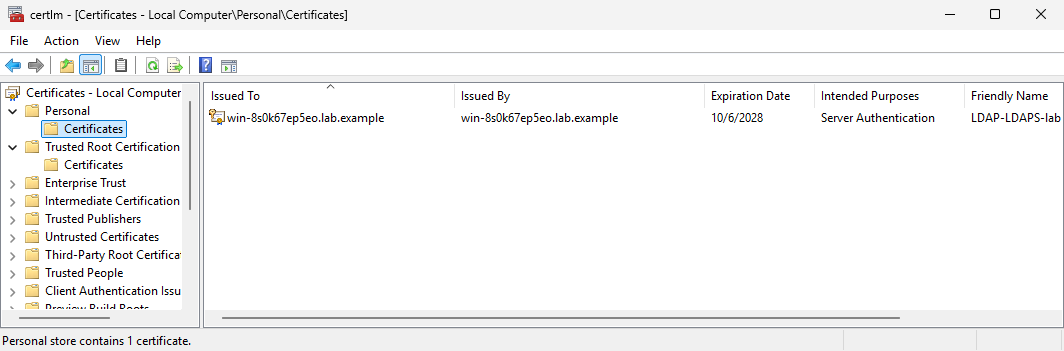
Issued By matches Issued To because this certificate is self-signed. Server Authentication is the purpose LDAPS needs. In a normal CA deployment those two names differ, and you export the CA instead of this leaf. Save that certificate:
echo | openssl s_client -connect 192.168.56.128:636 -tls1_2 \
  -servername win-8s0k67ep5eo.lab.example 2>/dev/null \
  | openssl x509 -outform PEM | sudo tee /etc/raddb/certs/lab-dc.pem >/dev/null
tee writes the PEM and the redirect hides it. radiusd cannot read a root-only file, so give the certificate to that group:
sudo chgrp radiusd /etc/raddb/certs/lab-dc.pemchgrp prints nothing. The file has to be group-readable by radiusd.
Create /etc/raddb/mods-available/ldap_ad as its own module instance so the stock ldap module can point at a different directory. user.base_dn is the OU that holds the accounts. A search of the domain root on this controller returned a referral, and FreeRADIUS aborted it. The OU search returns the user entry.
membership_attribute = memberOf reads the groups from the user object. name_attribute = cn lets the policy compare Network-Admins instead of the full DN.
ldap ldap_ad {
    server = 'win-8s0k67ep5eo.lab.example'
    port = 636
    identity = 'radius-reader@lab.example'
    password = '<ldap-reader-password>'
    base_dn = 'DC=lab,DC=example'
    chase_referrals = yes
    rebind = yes
    sasl {
    }
    tls {
        ca_file = /etc/raddb/certs/lab-dc.pem
        require_cert = 'demand'
    }
    user {
        base_dn = "OU=RADIUS,${..base_dn}"
        filter = "(sAMAccountName=%{%{Stripped-User-Name}:-%{User-Name}})"
    }
    group {
        base_dn = "${..base_dn}"
        filter = '(objectClass=group)'
        name_attribute = cn
        membership_attribute = 'memberOf'
    }
}
Enable the instance. ln prints nothing when the symlink is created.
sudo ln -s ../mods-available/ldap_ad /etc/raddb/mods-enabled/ldap_adConfirm the reader account can see Alice's group. -W prompts for <ldap-reader-password>, so the secret stays out of the shell history. The prompt is not part of the LDAP result below.
LDAPTLS_CACERT=/etc/raddb/certs/lab-dc.pem ldapsearch -x -LLL \
  -H ldaps://win-8s0k67ep5eo.lab.example \
  -D 'radius-reader@lab.example' -W \
-b 'OU=RADIUS,DC=lab,DC=example' '(sAMAccountName=alice)' memberOfdn: CN=Alice,OU=RADIUS,DC=lab,DC=example
memberOf: CN=Network-Admins,CN=Users,DC=lab,DC=examplememberOf lists Network-Admins. Bob's entry lists Network-Users in the RADIUS OU. If this search fails, FreeRADIUS will fail the same way.
This comparison uses direct membership. Two Active Directory cases need a different filter:
- Nested groups do not appear in
memberOf. The matching rule1.2.840.113556.1.4.1941walks them. - The user's primary group is stored in
primaryGroupID, not inmemberOf.
Network-Admins versus Network-Users
Because the module instance is named ldap_ad, the group attribute is ldap_ad-LDAP-Group. A module named ldap would use LDAP-Group instead.
Put the check in authorize, immediately after the mschap line that detects the challenge. A user in neither group is rejected before Winbind is called. Alice and Bob match, so the password check still runs.
mschap
if (&MS-CHAP-Challenge) {
    ldap_ad
    if (&ldap_ad-LDAP-Group == "Network-Admins") {
        update reply {
            &Filter-Id := "network-admins"
        }
    }
    elsif (&ldap_ad-LDAP-Group == "Network-Users") {
        update reply {
            &Filter-Id := "network-users"
        }
    }
    else {
        reject
    }
}
Restart FreeRADIUS after the edit.
sudo systemctl restart radiusdAlice's Access-Accept already showed Filter-Id = "network-admins". Bob's request uses the same secret and the same port.
radtest -t mschap bob '<bob-password>' 127.0.0.1 0 testing123Sent Access-Request Id 174 from 0.0.0.0:55053 to 127.0.0.1:1812 length 129
User-Name = "bob"
Received Access-Accept Id 174 from 127.0.0.1:1812 to 127.0.0.1:55053 length 117
Filter-Id = "network-users"Same radtest check, different reply. Debug for Alice shows if (&ldap_ad-LDAP-Group == "Network-Admins") -> TRUE and then Filter-Id := "network-admins". Bob's request sets network-users the same way, before ntlm_auth runs.
A wrong password still matches the group first. The request is then rejected by ntlm_auth, and the default reject filter drops Filter-Id from the Access-Reject. Group membership does not mean the password was accepted.
Analyze the Authentication in Wireshark
Wireshark shows the RADIUS pair. Capture on the interface that carries the Access-Request. For radtest to 127.0.0.1, that interface is lo.
sudo tcpdump -i lo -s 0 -w /tmp/fr-ad-radius.pcap port 1812Run the Alice radtest in another terminal, then stop tcpdump. Open the file and set the display filter to radius.
RADIUS MS-CHAP exchange
The request and the accept share one RADIUS id. In this capture the id is 139.

Id 139 on both rows means the accept answers that request. A later login can reuse an id, so the id is a pair key inside one capture, not a permanent session number.
What is and is not visible on the wire
This radtest Access-Request contains:
User-Name(alice)MS-CHAP-ChallengeMS-CHAP-Response(MS-CHAPv1)
Expand that request. The password is not one of the fields.
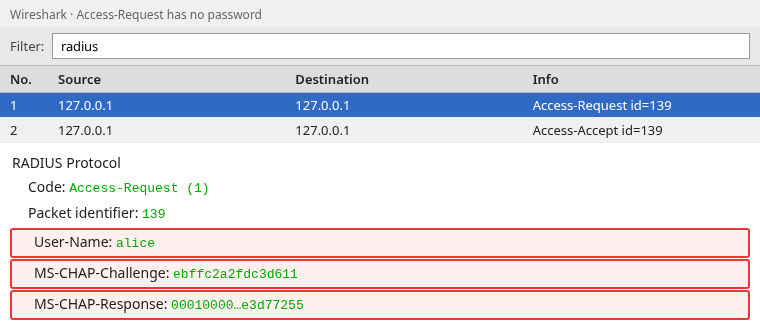
MS-CHAP-Response is the NT calculation, which is why an LDAP search cannot check it. A PEAP-MSCHAPv2 client sends MS-CHAP2-Response instead of MS-CHAP-Response. That attribute also omits the password, and it reaches the same ntlm_auth line.
The Access-Accept contains:
Filter-Id(network-admins), the group label from the LDAP check- MPPE key attributes, which Wireshark can name but cannot turn back into the AD password
The group search is not in this capture. It is LDAPS to port 636, so the filter and the memberOf result stay inside TLS. The ldapsearch output above is the readable copy. Port 389 will not show it either: this domain controller refuses unsigned simple binds.
Troubleshoot FreeRADIUS and AD
Domain join failed
net ads join fails before the Joined line for one of these reasons:
- The account is not allowed to add computers to the domain
- The clocks differ by more than the Kerberos tolerance, about five minutes by default
- The host cannot reach port 88 (Kerberos) or port 389 (LDAP) on the domain controller
Fix DNS and time, then join again. net ads testjoin is the check after a reboot as well.
DNS or realm mismatch
These three strings have to agree. The KDC is the Kerberos service on the domain controller. A lower-case realm, or a realm copied from the DNS suffix without checking, produces a join that cannot find it.
realminsmb.confisLAB.EXAMPLEdefault_realminkrb5.confisLAB.EXAMPLEworkgroupis the short NetBIOS name,LAB
Use the real AD DNS domain, and make sure the Linux host can resolve the domain controller's SRV and A records. Those answers normally come from the domain controller.
Winbind cannot find the user
wbinfo -i alice fails when:
- The account is disabled
- The password does not meet domain policy, so the account cannot be enabled
idmap config LABdoes not cover that user's RID, the numeric id AD assigned to the account
Enable the account and confirm wbinfo -u lists the name before you retry RADIUS. A disabled account often shows up as a wrong password from ntlm_auth.
Access-Reject with the correct password
Read the debug line, not only Access-Reject.
0xc000006dis a bad password or a username Winbind does not accept. The module may logMS-CHAP2-Response is incorrectfor that failure, including whenradtestsent MS-CHAPv1. Checkwbinfo -a 'alice%<alice-password>'as root.0xc000005e(No logon servers) means Winbind lost the domain controller.wbinfo -tandwbinfo -Pshould succeed before the next RADIUS attempt. Restartingwinbindcleared it here after the directory service restarted.Failed performing searchfromldap_adrejects the request before the password is checked. A referral from a domain-wide search does that. Pointuser.base_dnat the OU that holds the accounts.
Winbind privileged socket permissions
wbinfo -a can succeed as root while radtest still fails. That happens when the radiusd user cannot read /var/lib/samba/winbindd_privileged, the socket Winbind reserves for password checks. Confirm:
- The directory is
root:wbprivand mode750 id radiusdlists thewbprivgroupradiusdwas restarted afterusermod
If ausearch -m avc -c radiusd shows a denial, the group change alone will not fix it.
Group lookup works but authentication fails
That split is expected when LDAP is healthy and Winbind is not. ldapsearch returning memberOf only proves the reader account and LDAPS. The password still goes through ntlm_auth. Check:
- Winbind is running and
wbinfo -tsucceeds smb.confcontainsntlm auth = mschapv2-and-ntlmv2-only- The
mschapmodule points at/usr/bin/ntlm_auth
Do not point the MSCHAPv2 check at the LDAP password.
Where PEAP-MSCHAPv2 Fits
PEAP is a TLS tunnel commonly used to carry MSCHAPv2 in enterprise Wi-Fi. The inner MSCHAPv2 request is handled by the same mschap module and Winbind backend configured here. That client sends MS-CHAP2-Response. The radtest check above sends MS-CHAP-Response and proves that FreeRADIUS, ntlm_auth, Winbind, and Active Directory are connected. The outer certificate and the wireless profile are a separate setup. PEAP with NPS shows that outer exchange on Windows NPS.
Summary
FreeRADIUS checks an Active Directory password for MSCHAPv2 by joining the host with Samba and calling Winbind through ntlm_auth. A search of the directory cannot replace that step, because AD does not return the password and MSCHAPv2 does not send it. On this RHEL build the in-process Winbind options are not compiled in, so ntlm_auth is the path that returns Access-Accept.
Alice and Bob both authenticate. The LDAPS group check sets Filter-Id to network-admins or network-users. A wrong password still matches the group and is then rejected with MS-CHAP error 691. The group result and the password result are different lines in the debug log.
Keep the host's DNS and clock aligned with the domain, keep radiusd in the wbpriv group, and treat NT_KEY as sensitive key material. PEAP can reuse this inner check later. It does not change how Winbind validates the response.
References
- FreeRADIUS: Active Directory authentication with Winbind
- FreeRADIUS LDAP authentication, including the Active Directory limitation
- Samba domain member setup
- RFC 2759, Microsoft PPP CHAP Extensions, Version 2
- RFC 2865, RADIUS
Frequently Asked Questions
Should FreeRADIUS use LDAP or Winbind with Active Directory?
Use Winbind for the password check when the client sends MSCHAPv2. Use LDAP or LDAPS when you need group membership or other directory attributes. LDAP alone cannot validate MSCHAPv2 against AD.
Can FreeRADIUS authenticate AD users with MSCHAPv2?
Yes. The host joins the domain, Winbind stays running, and the mschap module calls ntlm_auth with the challenge and the NT response. A correct password returns Access-Accept.
Is ntlm_auth still required?
On this RHEL FreeRADIUS 3.2.8 package, yes. The package is not compiled with direct Winbind support, and radiusd exits if you enable winbind_username instead. ntlm_auth is the supported way for that package to reach Winbind. A FreeRADIUS build that includes libwbclient can use the direct Winbind settings instead.
Can LDAP still be used for AD group authorization?
Yes. A reader account over LDAPS can read memberOf, and the policy can set a reply such as Filter-Id from the group name. That search does not check the password.
Does the FreeRADIUS host need to join the AD domain?
Yes, for this MSCHAPv2 path. Winbind answers the challenge only after the host has a computer account and a working trust. net ads testjoin should print Join is OK.
