
| Tested on | RHEL 10.2 (Coughlan) |
|---|---|
| Package | Wireshark 4.4.2 |
| Applies to | Wireshark on Linux, Windows, or macOS when analyzing TCP in a PCAP |
| Privilege | Normal user for capture analysis |
| Scope | Why Wireshark shows TCP Previous segment not captured and TCP ACKed unseen segment, how to separate a sequence gap in the file from real wire loss, and which follow-up filters to use. Does not replace full TCP sequence math or retransmission tuning. |
| Related guides | Wireshark tutorial Troubleshoot TCP connection failures TCP sequence and ACK numbers TCP retransmission analysis Wireshark IP filters cheat sheet |
Wireshark marks [TCP Previous segment not captured] when the next TCP segment in a stream does not continue where the last captured segment left off. That is a gap in your trace, not automatic proof that the network dropped a packet.
The same expert line often appears beside [TCP ACKed unseen segment]. Together they answer the question you opened the capture with: did bytes go missing on the wire, or did your capture start late, sit on the wrong interface, or drop frames while the connection kept working?
Key takeaways
- Previous segment not captured means Wireshark expected a different sequence number than the one in this row.
- The warning does not prove packet loss. Late capture start, tap placement, and capture drops can all create the same label.
- ACKed unseen segment means an acknowledgment in the file covers bytes you never captured; the receiver likely got data your trace missed.
- Duplicate ACKs followed by retransmission of the missing sequence range are evidence that TCP detected a gap and performed recovery. That usually points to packet loss or significant reordering, but a second capture point is needed to locate the problem.
- Compare captures from client, server, or a SPAN when you must prove where a segment disappeared.
What "TCP Previous Segment Not Captured" Means
Wireshark tracks each TCP conversation and remembers the next sequence number it expects in each direction. If you already use TCP sequence and ACK numbers, the idea is the same: for payload data, the next segment should usually start where the previous one ended (Next Seq from the last segment in that direction).
How Wireshark detects a sequence-number gap
Suppose the last segment you captured from the sender carried Seq=1001 and Len=500. Wireshark expects the next sender segment at sequence 1501. If the next row instead shows Seq=2001, bytes 1501 through 2000 are missing from the PCAP. Wireshark annotates the new row with [TCP Previous segment not captured].
That math uses only what is inside the file. Wireshark does not know whether those bytes were never sent, lost in the network, or simply never written to your capture file.
Why the warning does not prove packet loss
A gap in sequence numbers always means "something is missing from this recording." Common causes include:
- The capture started after the connection was already carrying data.
- The capture process or NIC dropped packets because it could not keep up.
- A SPAN or mirror port, or another capture appliance, missed traffic.
- The capture point did not see every path taken by the flow.
- The segment was genuinely lost or arrived out of order on the path you are watching.
The fix is to read the rows after the gap, not to treat every Previous segment line as congestion.
Filter Previous Segment Not Captured Packets
Jump straight to annotated rows with a display filter in the toolbar above the packet list. Green means the filter parsed; red means edit the expression.
tcp.analysis.lost_segmenttcp.analysis.lost_segment is the field behind the Previous segment expert text. Related filters for the next steps:
tcp.analysis.ack_lost_segment
tcp.analysis.retransmission
tcp.analysis.fast_retransmission
tcp.analysis.duplicate_ack
tcp.analysis.out_of_order
tcp.analysis.ack_lost_segment matches expert text for acknowledged data that never appeared in the capture (the same condition as [TCP ACKed unseen segment]). Use tcp.analysis.flags when you want every TCP analysis annotation in one list.
The screenshot below uses tcp.analysis.lost_segment on a transfer where tc netem dropped traffic so you can see the expert label without scrolling the whole file.
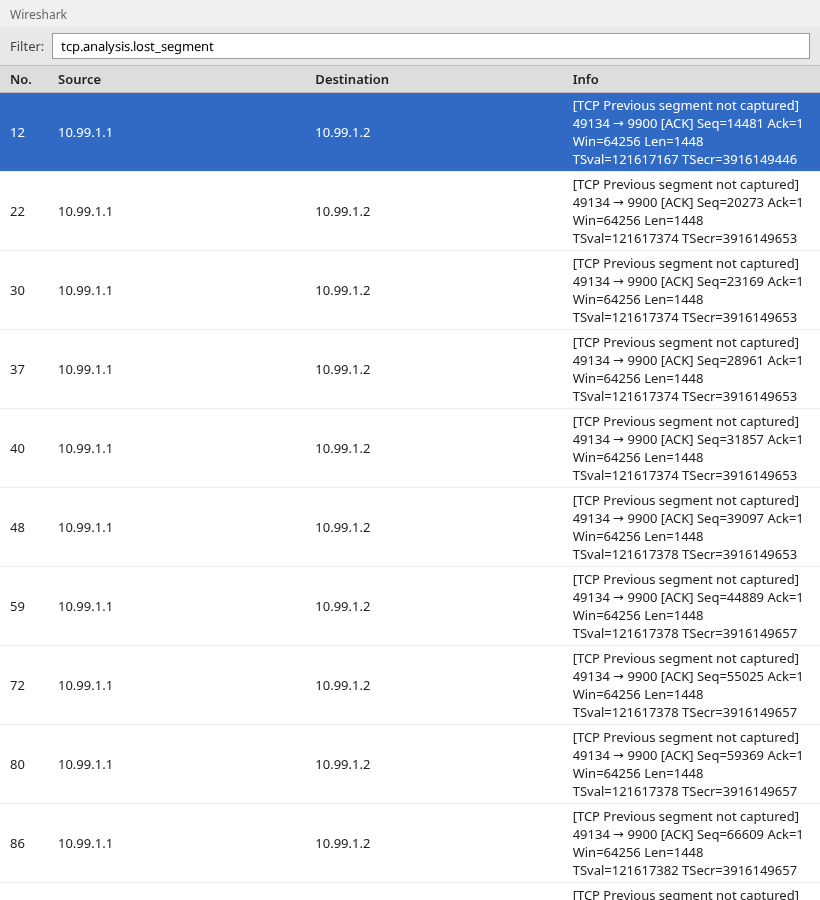
Each listed row is a sequence jump Wireshark could not reconcile with the segments already in the file. Note the stream and direction, then follow that stream forward for ACK and retransmission behavior.
Previous Segment vs ACKed Unseen vs Retransmission
Wireshark may add several TCP analysis labels to the same connection. They describe different observations and should not be treated as interchangeable.
| Wireshark label | What Wireshark observed | What it usually tells you |
|---|---|---|
TCP Previous segment not captured |
A sequence number starts beyond the next sequence number Wireshark expected | Bytes are missing from the capture at this point; the reason is not known yet |
TCP ACKed unseen segment |
An ACK covers bytes for which Wireshark never saw the corresponding data | The receiver saw data that this capture did not |
TCP Out-Of-Order |
A segment arrived with sequence numbers below the next sequence position Wireshark expected | Packets may have been reordered, or an earlier segment may have been delayed |
TCP Retransmission |
Wireshark sees sequence space that was previously transmitted | The sender sent those bytes again |
TCP Fast Retransmission |
A retransmission follows TCP duplicate-ACK behavior quickly enough to match fast recovery | TCP likely reacted to a detected gap before the retransmission timer expired |
TCP Dup ACK |
The receiver repeats an acknowledgment number while waiting for missing sequence space | Look for a missing or reordered segment immediately before it |
The important distinction is that Previous segment not captured describes a gap in what Wireshark saw. Retransmission and duplicate-ACK behavior provide additional evidence about what TCP itself experienced.
Scenario 1 — The Capture Started in the Middle of a Connection
You start dumpcap after the app has already connected, or you open a PCAP trimmed to "the interesting part." The first TCP rows may be payload with no SYN in sight.
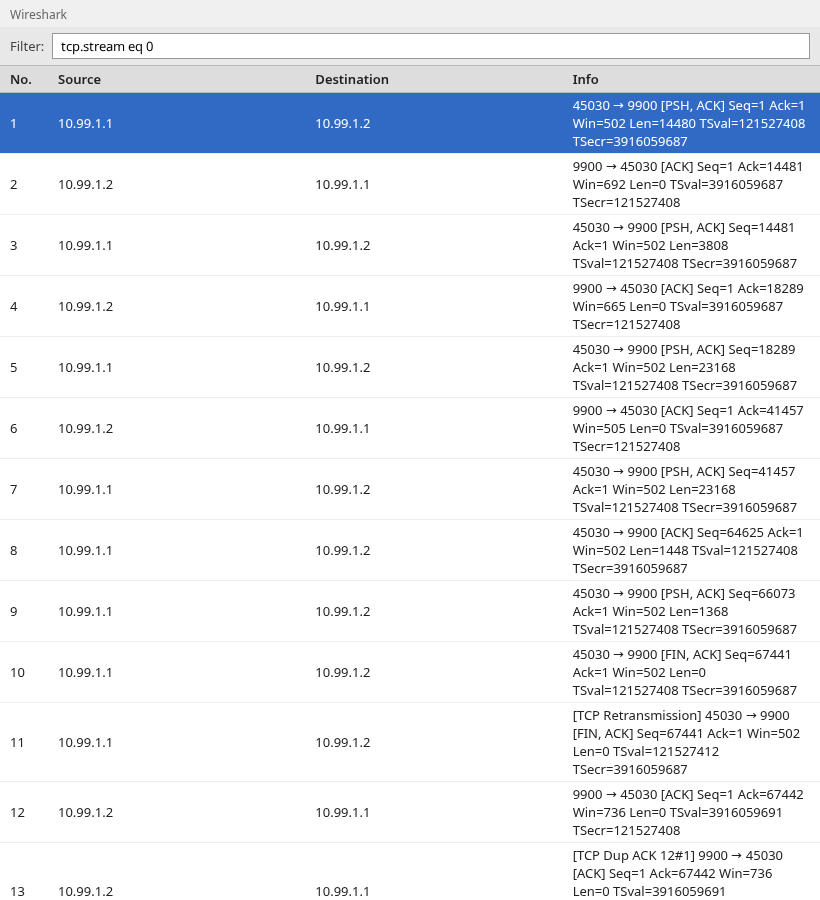
When the first visible segment is not the start of the conversation, Wireshark may still show relative sequence numbers from that point. You might not get a warning on row one, but any jump inside the file still triggers Previous segment not captured.
What to check:
- Scroll to the first packet of the TCP stream (
Follow → TCP Streamor filtertcp.stream eq N). If the stream begins with payload and there is no SYN, SYN-ACK, and ACK handshake in the file, assume the capture may have started late or been trimmed. Treat warnings near the beginning cautiously until later ACK or retransmission behavior gives more evidence. - If the application clearly works in your ticket but the trace begins with bulk data, ask for a capture taken from connection open or reproduce with a longer pre-roll before the failure window.
Scenario 2 — The Network Actually Lost a TCP Segment
When the path loses data, the receiver keeps acknowledging the last in-order byte. The sender eventually retransmits the missing range. In Wireshark that pattern is duplicate ACKs, then retransmission, often with Previous segment not captured on the out-of-order or retried segment.
The capture below comes from a bulk TCP transfer across a link with intentional packet loss. Expert info stacks on the same stream.
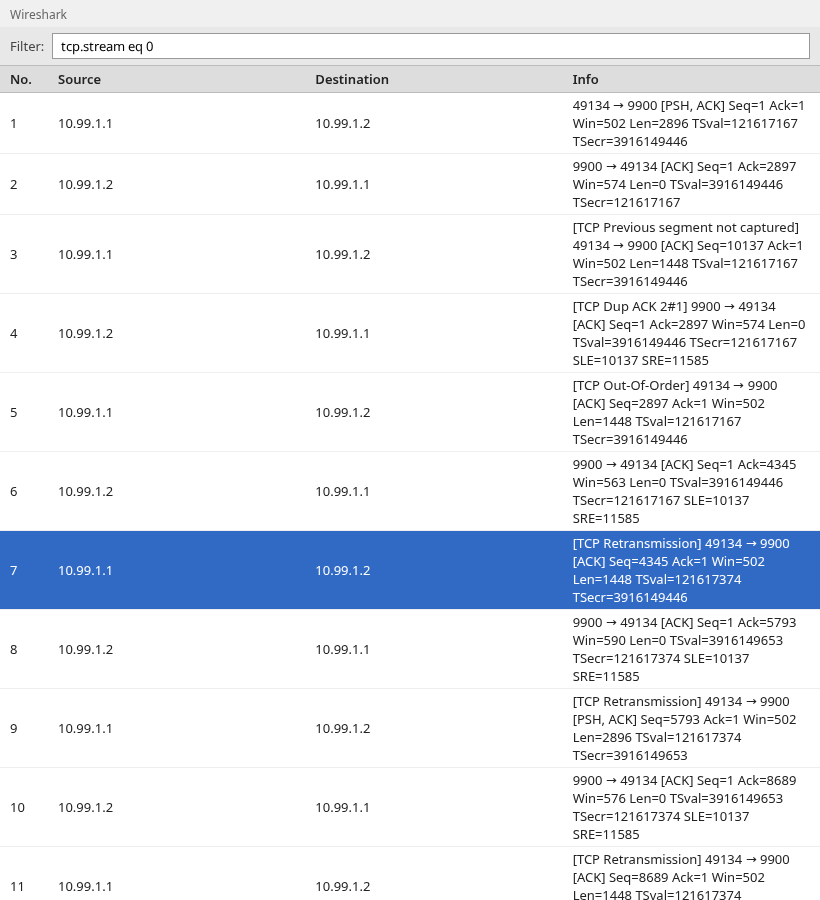
Read the story in order: gap label on the segment that arrived out of sequence, duplicate ACKs pinning the hole, then a retransmission covering the missing sequence space. [TCP Out-Of-Order] means a later-arriving segment filled sequence space Wireshark had already expected earlier; it often accompanies reordering and is not by itself proof of loss.
This pattern is much stronger evidence of a real delivery gap than Previous segment not captured alone. Duplicate ACKs followed by retransmission show that TCP detected missing or reordered sequence space and performed recovery. Use a second capture point if you need to prove where the loss occurred.
Duplicate ACKs
Duplicate ACK lines share the same acknowledgment number while the receiver still waits for an earlier sequence position. In the screenshot, [TCP Dup ACK …] rows stay at one Ack value until the hole fills.
Retransmission of the missing sequence range
[TCP Retransmission] (or fast retransmission) with sequence numbers inside the gap means the sender had to send those bytes again. Pair that with TCP retransmission analysis when you need RTO timing or chronic loss rates.
Scenario 3 — The Receiver Got Data but Wireshark Missed It
Here the connection completes, but your file is incomplete. Wireshark sees an ACK that acknowledges bytes you never captured, and labels it [TCP ACKed unseen segment]. The next data segment often also shows Previous segment not captured because the trace still lacks the acknowledged range.
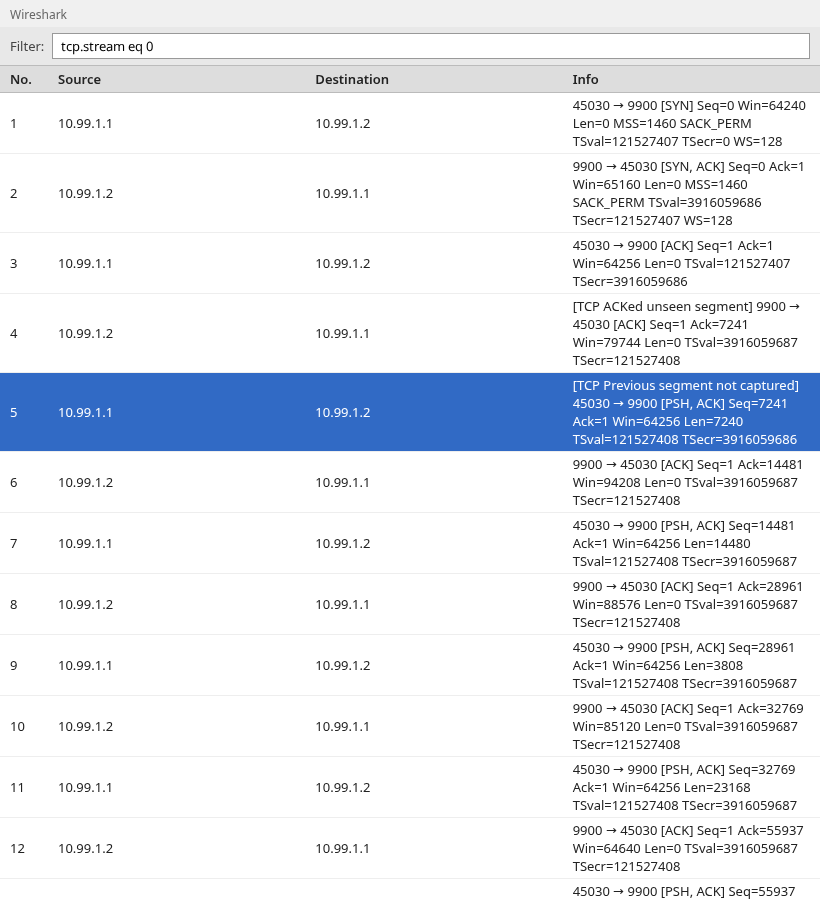
ACKed unseen segment is strong evidence that the peer received payload your capture did not record. Typical causes:
- Capture at an intermediate point that sees only one direction because forward and return paths are asymmetric.
- Capturing on the wrong interface of a multi-homed host, leaving part of the conversation out of the PCAP.
- SPAN oversubscription or an overloaded capture appliance.
- Starting or stopping the capture in the middle of a large transfer.
TCP ACKed unseen segment
The ACK row's acknowledgment number moved past sequence positions that never appear as sender segments in your file. The receiver therefore had those bytes; your trace does not.
Capture drops vs wire loss
| Evidence in the PCAP | Likely interpretation |
|---|---|
| ACKed unseen segment, connection completes, no retransmission for the "missing" range | Strongly suggests capture or tap miss; compare another capture point |
| Previous segment + duplicate ACK + retransmission for the same range | TCP recovery consistent with loss or reordering on the monitored path |
| Warnings only at the first packets of a stream with no handshake | Late capture start |
| Capture-file or interface statistics report packet drops during the capture | Local capture loss |
Check Whether the Capture Dropped Packets
Before you blame the network, check whether the capture process itself reported packet drops.
In Wireshark, open Statistics → Capture File Properties. Look for interface or capture statistics that report dropped packets. Those numbers are available only when the capture format and capture source recorded them, so a missing or zero drop count does not prove that nothing was missed.
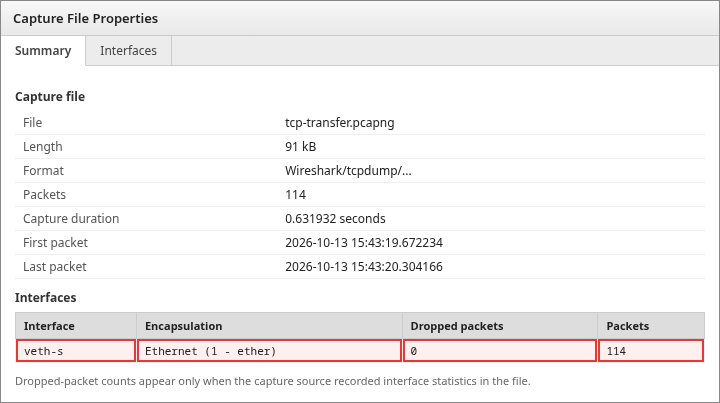
The Dropped packets column is what you want when it is populated. A reported capture drop makes TCP Previous segment not captured easier to explain: the endpoints may have exchanged the segment successfully even though it never reached the PCAP.
From the command line, inspect capture-file metadata with capinfos on the PCAP you are analyzing:
capinfos capture.pcapngSample output:
File name:           capture.pcapng
Number of packets:   114
Capture duration:    0.631932 seconds
Number of interfaces in file: 1
Interface #0 info:
                     Encapsulation = Ethernet (1 - ether)
                     Number of stat entries = 0
When the file records dropped-packet information, capinfos includes it in the capture statistics. An empty statistics block, as in the sample above, only means this file did not store interface drop counters.
A zero or unavailable drop counter does not prove network loss. SPAN ports, taps, intermediate capture appliances, or the wrong capture location can still miss traffic without that loss appearing in the local capture statistics.
How to Tell Capture Loss from Network Loss
Use this decision flow when a ticket only includes one PCAP:
| Symptom in your file | Likely cause | Next step |
|---|---|---|
| Expert warnings at the top; no SYN; app already connected | Late or trimmed capture | Recapture from handshake or note the limitation in the report |
| ACKed unseen segment; few or no retransmissions for that range | Strongly suggests capture miss or one-sided view | Second capture on the other host or on the SPAN facing the sender |
| Duplicate ACKs + retransmission covering the gap | TCP recovery consistent with loss or reordering | Correlate with interface errors, QoS, or path changes; add a second capture point to locate loss |
| Warnings everywhere; capture metadata reports dropped packets | Capture resource limit | Faster disk, dedicated tap, or dumpcap tuning; check Capture File Properties when the format records drops |
When stakes are high, align two traces on time and TCP sequence numbers. The side that shows the payload without a retransmission usually tells you whether the segment left the sender.
Why Capture Location Matters
Client-side
A client-side capture shows what reaches or leaves that client's capture interface. On multi-interface systems, VPNs, containers, or virtual adapters, traffic may use a different interface than the one you captured.
Server-side
A server capture sees replies leaving the host but may miss client retransmissions if they never arrive. Combine with client or middle capture when the ticket blames "the network."
SPAN/TAP
A mirror port can drop under burst traffic long before endpoints notice. Previous segment warnings on a SPAN while both hosts report clean transfers usually mean fix the capture appliance, not the router.
When Should You Actually Worry?
Not every Previous segment line needs a war room. Treat the warning as low-confidence evidence when:
- The trace clearly starts mid-connection and the ticket is about a later event.
- A single gap never pairs with duplicate ACKs, retransmissions, or application errors.
Escalate when:
- Retransmissions and duplicate ACKs cluster around the same time as user-visible slowness or timeout.
- The same missing sequence range appears differently at two capture points.
- Capture and interface statistics look clean, yet TCP repeatedly retransmits the same ranges.
Summary
[TCP Previous segment not captured] is Wireshark's way of saying the next segment does not continue the byte stream it was tracking in your file. That is always a gap in the recording; it is only sometimes a gap on the wire.
Late capture starts explain many harmless warnings at the top of a stream. [TCP ACKed unseen segment] tells you the receiver acknowledged bytes you never stored, which points to capture placement or drops while the TCP stack on the peer kept going. Duplicate ACKs and retransmissions on the same missing range provide stronger evidence of actual TCP recovery, but they still do not identify the exact cause or location without another observation point.
Filter with tcp.analysis.lost_segment, follow the stream forward, and add a second capture point when the business impact does not match a one-sided trace. For sequence math and recovery timing, keep TCP sequence and ACK numbers and TCP retransmission analysis open beside this page.
References
- Wireshark Wiki: TCP analysis
- Wireshark display filter reference: tcp.analysis fields
- RFC 9293: Transmission Control Protocol (TCP)
Frequently Asked Questions
Does Previous Segment Not Captured mean packet loss?
Not by itself. It only means Wireshark did not see the sequence numbers that should have appeared next in the PCAP. Packet loss is one explanation; late capture, capture drops, and an incomplete view of the path are others. Look for duplicate ACKs and retransmissions on the same range before you call it wire loss.
What does TCP ACKed unseen segment mean?
An acknowledgment in your file covers sequence numbers for which no sender data segment appears in the capture. The receiving stack had those bytes; your trace does not. That pattern usually means a capture miss or a one-sided view, not a broken TCP implementation.
Why does the warning appear at the start of a capture?
You often started recording after the handshake or after data was already moving. Wireshark has no earlier segments to anchor the stream, so the first rows you see can disagree with acknowledgments already on the wire. Scroll for a SYN or note that the trace begins mid-session.
Can Wireshark itself miss packets?
Yes. The capture process can miss frames when capture buffers overflow, the capture host cannot keep up, or a SPAN or mirror port drops traffic. End hosts may keep transferring while your file has holes, which produces the same expert labels as a short network glitch.
How do I prove where a TCP packet was lost?
Compare two captures taken at different points on the path with matching timestamps. If the sender-side trace shows the segment and the client-side trace does not, the loss sits between them. If neither shows it but the receiver ACKed the bytes, your capture path missed the traffic.
