
| Tested on | RHEL 10.2 (Coughlan) |
|---|---|
| Package | Wireshark 4.4.2, ethtool 6.15, iproute 6.17 |
| Applies to | IPv4 packet captures in Wireshark |
| Privilege | No root access is required to open a capture |
| Scope | How to group IPv4 fragments, read More Fragments and the fragment offset, confirm Wireshark reassembled them, and tell a Don't Fragment failure from a large offload capture. Does not cover TCP MSS tuning, retransmission diagnosis, or IPv6 fragmentation. |
| Related guides | Wireshark tutorial Wireshark IP filters cheat sheet How to use Wireshark |
IPv4 fragments that belong to one datagram share an Identification value. The first piece has fragment offset 0. Later pieces continue from there, and More Fragments tells you whether another piece should follow.
A frame larger than the link MTU is not automatically a fragment. Don't Fragment plus ICMP Fragmentation Needed is a path MTU failure. A huge packet captured on the sending host is often segmentation offload.
Key takeaways
To decide whether fragmentation happened, group packets by Identification, then read More Fragments and the fragment offset. Wireshark can rebuild the original datagram when every piece is present.
- Fragments of one original datagram share an Identification value. The source address, destination address, and protocol complete the reassembly identity.
- The first fragment has offset 0. Later fragments have a non-zero offset.
- More Fragments (MF) set means another fragment follows. The last fragment has MF clear.
- If DF is set and an IPv4 packet is too large for the router's outgoing-link MTU, the router must not fragment it. It drops the packet and normally returns ICMP Destination Unreachable, code 4 (Fragmentation Needed).
- Wireshark reassembles the pieces on the fragment that completes the set, then dissects the original UDP payload.
- A very large packet captured on a host can come from segmentation offload. DF set, MF clear, and offset 0 means it is not an IP fragment.
Capture fragments from your own network
Where you capture decides whether fragments appear at all. A router splits a datagram only as it leaves on the smaller link, so a capture taken before that point shows one large packet:
- On the sending host, when a router does the splitting, you see the original datagram once, with MF clear and offset 0. A capture on this lab's client showed a single 1428-byte packet and no fragments.
- On the router's outgoing interface, or on the receiving host, you see the fragments. Wireshark reads packets before the receiver's IP stack reassembles them, so a receiver capture still shows every piece that arrived.
- When the sender's own interface MTU is smaller than the datagram and DF is clear, the sender fragments it, and the pieces also appear in a sender capture.
If large requests fail and small ones work, capture on both ends at the same time. Comparing the two files shows which side lost a piece or never received a reply.
Use a capture filter on the host address, such as host 10.80.2.2, or just ip. A capture filter decides what gets saved to the file, unlike a display filter, which only hides rows. A capture filter such as udp port 9999 keeps the first fragment and silently drops the rest, because later fragments carry no UDP header and so no port to match.
Once the file is open, these steps find one datagram and its pieces:
- Apply the display filter
ip.flags.mf == 1 || ip.frag_offset > 0. If no rows match, the capture contains no IPv4 fragments, so go to the MTU and DF section or the offload section instead. - Click a row whose Info column shows
off=0. In the packet details pane, expand Internet Protocol Version 4, then Flags. - Right-click Identification and choose Apply as Filter, then Selected. Wireshark writes the
ip.id == 0x...filter for your datagram, so you do not have to type the number. - Optionally, right-click Identification, More fragments, and Fragment Offset and choose Apply as Column for each. Every row then shows those values without expanding the header.
- On the first fragment, click the
[Reassembled IPv4 in frame: N]line to jump to the frame that holds the rebuilt datagram.
Wireshark filters for IP fragmentation
The Wireshark tutorial covers the display filter bar. A green bar means the expression is valid. These filters match the captures below:
| Filter | What it matches |
|---|---|
ip.flags.mf == 1 || ip.frag_offset > 0 |
Every fragment, including the tail. MF alone misses the tail, because that piece has MF clear. |
ip.id == 0x85a2 |
One datagram. Substitute the Identification from your capture. Decimal works too, so ip.id == 34210 matches the same frames. |
ip.reassembled_in |
Fragments that Wireshark rebuilt into a later frame. Here that is frames 1 and 2. |
ip.fragments |
The frame that holds the reassembled datagram. Here that is frame 3 only. |
ip.fragment.error |
An illegal set, such as an overlap. A missing fragment does not set it. |
icmp.type == 3 && icmp.code == 4 |
ICMP Fragmentation Needed. |
You can do the same check from the command line with tshark, which installs with Wireshark. The options used here:
-rreads a saved capture file-2makes two passes over the file, so early fragments can point to the frame that reassembled them, as they do in the Wireshark window-Yapplies a display filter-T fieldswith one-eper field prints only the columns you name
List the three pieces that share this Identification:
tshark -2 -r fragments.pcap -Y 'ip.id == 0x85a2' -T fields \
-e frame.number -e ip.id -e ip.flags.mf -e ip.frag_offset -e ip.len -e ip.reassembled_in -e _ws.col.Info1 0x85a2 True 0 572 3 Fragmented IP protocol (proto=UDP 17, off=0, ID=85a2) [Reassembled in #3]
2 0x85a2 True 69 572 3 Fragmented IP protocol (proto=UDP 17, off=552, ID=85a2) [Reassembled in #3]
3 0x85a2 False 138 324 35592 → 9999 Len=1400Reading the columns from left to right:
- Frame number and Identification
- More Fragments, where True means MF is set
- The raw fragment offset, an 8-byte count, so 69 is byte 552, which Info already prints as
off=552 - IPv4 length
- The frame that reassembled this piece, which is 3 for the first two rows
- Info, which shows the UDP ports only on frame 3, because reassembly finishes there
The screenshots use these values. Replace them with the ones in your capture:
- Client
10.80.1.1, with an interface MTU of 1500 - Router
10.80.1.2, forwarding toward server10.80.2.2 - Outgoing MTU on that hop: 576
- One UDP payload of 1400 bytes, so the original IPv4 length is 1428, with DF clear
The fragments show a TTL (Time to Live) of 63. Every router that forwards a packet lowers TTL by 1, and the client sent it with 64. So the router created these pieces. The client did not split the datagram itself. Linux usually starts at 64 and Windows at 128, so in your own capture, a fragment TTL just below one of those values means one or more routers have already forwarded it.
MTU vs IP fragmentation
A few terms come up in every section:
- A datagram is one IPv4 packet as the sender built it, before any router touches it.
- A fragment is one piece of an IPv4 datagram after an IPv4 sender or a router splits it to fit an MTU. Each piece gets its own IPv4 header. In the capture below, the intermediate router does the split.
- The header is the 20 bytes of addresses and flags at the start of the packet. The payload is the data after it, here a UDP header plus the application bytes.
- For IP over Ethernet, the MTU is the largest IP packet that fits in the Ethernet payload. A normal Ethernet MTU is 1500 bytes, including the IPv4 header but not the Ethernet header.
- A flag is "set" when its bit is 1 and "clear" when it is 0. Wireshark prints these as Set and Not set.
An intermediate router can fragment a packet when both of these are true:
- The packet is larger than the MTU of the link it has to leave on
- Fragmentation is allowed, meaning Don't Fragment (DF) is clear
If DF is set, the router drops the packet instead of splitting it. ICMP Fragmentation Needed is the error message for that drop. It is not a notice sent after a router has successfully fragmented a packet.
   Client sends one 1428-byte IPv4 datagram
                       ↓
   Outgoing link MTU is 576 and DF is clear
                       ↓
   Three fragments share one Identification
                       ↓
Wireshark reassembles them on the last fragment
Where MSS fits
Maximum Segment Size (MSS) is a TCP option carried in the SYN, the first packet of a TCP connection. Each side announces the largest TCP payload it will accept. An MSS of 1460 keeps one TCP segment inside a 1500-byte Ethernet packet: 1460 bytes of data, 20 bytes of TCP header, and 20 bytes of IPv4 header.
MSS does not apply to this capture:
- MSS is a TCP setting, not an IPv4 header field
- UDP has no MSS, so nothing stopped the 1428-byte UDP datagram from being built
- The next hop was 576 bytes and DF was clear, so the router split it
Use MSS to explain why a TCP segment was a certain size. Use Identification, MF, and offset to explain an IPv4 fragment.
How IPv4 fragmentation works
Here is how the 1428-byte datagram turns into three pieces:
- The original datagram is a 20-byte IPv4 header plus 1408 bytes of payload.
- Those 1408 bytes are the 8-byte UDP header and the 1400 bytes of application data.
- The outgoing MTU is 576. Each fragment needs its own 20-byte header, which leaves room for 556 bytes of payload.
- Every piece except the last must carry a multiple of 8 bytes, so 556 rounds down to 552.
- Two pieces of 552 bytes cover 1104 bytes. The last piece carries the remaining 304.
Three header fields let the receiver put the pieces back together: Identification, the More Fragments flag, and Fragment Offset.
Identification
Identification is a number the sender puts on each datagram. Whoever splits the datagram copies that number into every fragment. Fragments of one datagram share an Identification value, but do not use ip.id alone when a capture is large. Match it together with the source address, the destination address, and the IP protocol. In this small capture, ip.id == 0x85a2 (decimal 34210) is enough to isolate the example.
More Fragments flag
More Fragments (MF) answers one question: does another piece follow this one?
- Frames 1 and 2 have MF set, so more data follows each of them.
- Frame 3 has MF clear, so it is the tail, the last piece.
MF clear on its own does not make a packet a fragment, because an ordinary packet also has MF clear. A packet with MF clear is a fragment only when its offset is non-zero, or when an earlier frame with the same Identification has MF set.
Fragment Offset
Fragment Offset says where this piece's payload starts inside the original payload. The header stores it as a count of 8-byte blocks, not bytes. Wireshark's detail line multiplies by 8 and shows bytes, but the display filter still compares against the raw block count.
- Frame 1: filter value 0, detail line Fragment Offset 0
- Frame 2: filter value 69, and 69 × 8 = 552 on the detail line and in
off=552 - Frame 3: filter value 138, and 138 × 8 = 1104
ip.frag_offset == 69 matches frame 2. ip.frag_offset == 552 matches nothing here, even though the detail line says 552. Use ip.frag_offset > 0 for every piece after the first, and read the byte position from the detail pane. The Wireshark IP filters cheat sheet lists the other ip. fields.
How the receiver knows reassembly is complete
The receiver, and Wireshark, need three things before the original datagram exists again:
- One Identification, with the same source, destination, and protocol
- Offsets that cover every byte, with no hole
- One fragment with MF clear, which marks the end
The numbers in this capture add up:
- The two earlier pieces cover 552 + 552 = 1104 bytes
- The tail starts exactly at byte 1104, so there is no gap
- The tail carries 304 bytes, so the total payload is 1104 + 304 = 1408
Analyze a fragmented datagram in Wireshark
Only the first fragment contains the UDP header, which holds the port numbers. Later fragments are plain payload bytes with no ports. Wireshark therefore labels frames 1 and 2 "Fragmented IP protocol" and shows the ports 35592 → 9999 only on frame 3, after reassembly. If you see a first fragment and the tail never appears, check whether the capture filter was on a port before you blame the network.
First fragment
Frame 1 is the start of Identification 0x85a2.
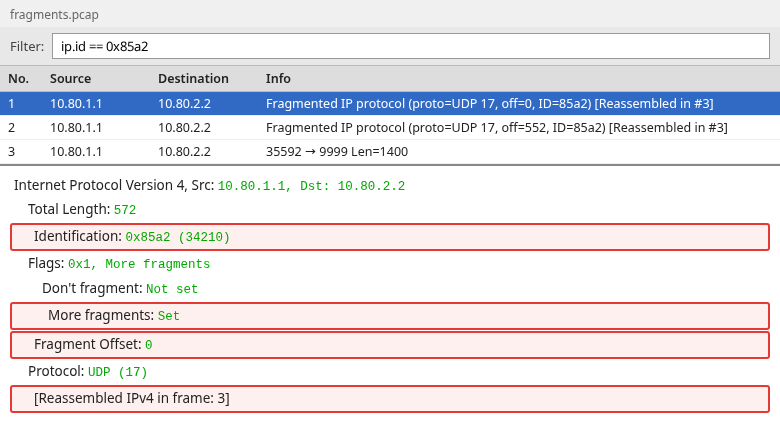
Check three fields on the first piece:
- More Fragments is set, so more pieces follow
- Fragment Offset is 0, so this piece starts the payload
- Don't Fragment is not set, so the router was allowed to split the datagram
The IPv4 length is 572: a 20-byte header plus 552 bytes of payload. The [Reassembled IPv4 in frame: 3] line, and the [Reassembled in #3] tag in the Info column, tell you the rest of this datagram arrived and Wireshark rebuilt it on frame 3.
Middle fragments
Frame 2 is the next piece of the same datagram.
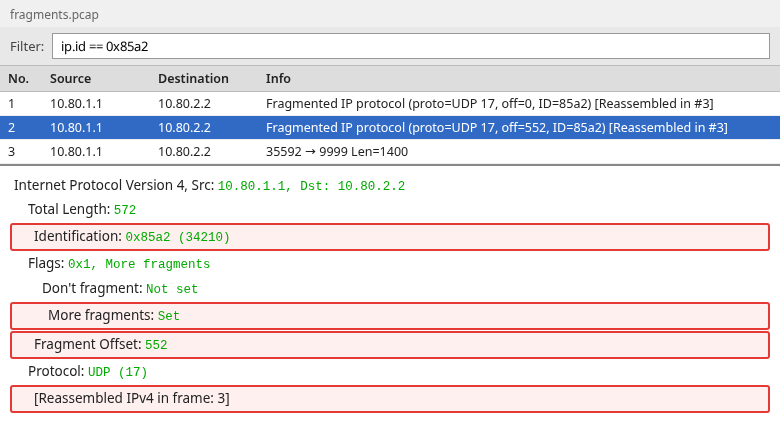
On the middle piece:
- Identification still reads
0x85a2, so it belongs to the same datagram - More Fragments is still set, so another piece follows
- Fragment Offset is 552, right where frame 1's 552 bytes ended
This frame has no UDP header, so the ports are not available yet.
Final fragment
Frame 3 is the tail.
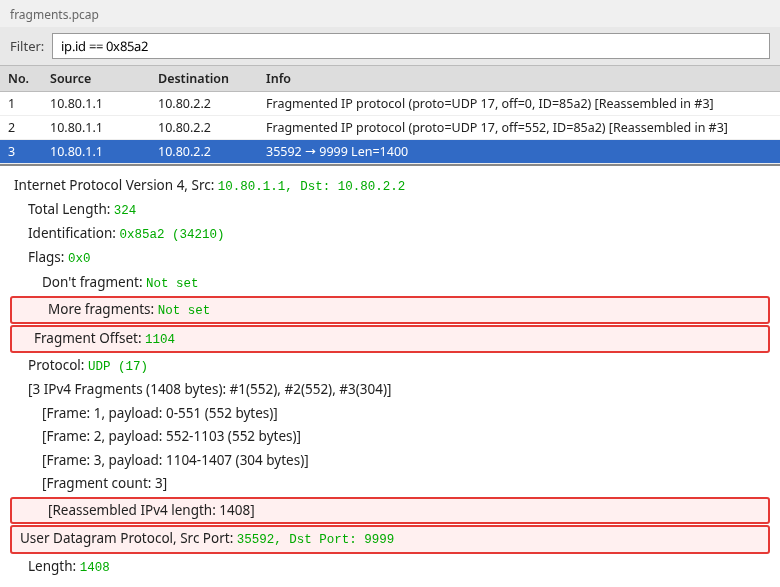
On the tail:
- More Fragments is not set, so nothing follows
- Fragment Offset is 1104, right where frame 2 ended
- The IPv4 length is 324: a 20-byte header plus 304 bytes of payload
The Info column switches to the UDP ports because this frame completes the set.
Verify reassembly
The same frame lists the pieces under the IPv4 header:
- Frame 1, payload bytes 0-551 (552 bytes)
- Frame 2, payload bytes 552-1103 (552 bytes)
- Frame 3, payload bytes 1104-1407 (304 bytes)
- Reassembled IPv4 length 1408, which is also the UDP length
The ranges meet, and the UDP header is visible only here. Source port 35592 and destination port 9999 belong to the original datagram. If those ports are missing, reassembly has not finished.
How Wireshark reassembles IP fragments
With IPv4 reassembly enabled, Wireshark rebuilds the datagram from the fragments present in the capture. It does this from the file, whether or not the receiving host succeeded. If every fragment is present and no reassembly tree appears, check that "Reassemble fragmented IP datagrams" is enabled. The quickest way there is to right-click the Internet Protocol Version 4 line in the details pane and open Protocol Preferences. It works like this:
- Wireshark holds each fragment until it has every piece for one Identification, source, destination, and protocol
- The rebuilt datagram is shown on the fragment that completes the set, which here is frame 3
- Frames 1 and 2 point forward to it with
[Reassembled IPv4 in frame: 3] - Filtering on
ip.fragmentstakes you straight to frame 3
ip.fragments vs ip.fragment
The two field names differ by one letter and are easy to confuse:
ip.fragments(plural) is the whole fragment list. It exists only on the frame that holds the rebuilt datagram, frame 3.ip.fragment(singular) is each entry inside that list, pointing to frames 1, 2, and 3. It is also stored only on frame 3.ip.reassembled.lengthis 1408 on frame 3 and empty on the earlier frames.
Both fields find the completed datagram, not each piece. To list the pieces, use ip.flags.mf == 1 || ip.frag_offset > 0. The earlier pieces carry ip.reassembled_in, the frame number of the rebuilt datagram.
Find the frame containing the reassembled packet
The fastest route is the [Reassembled IPv4 in frame: N] link on any earlier fragment. Without that link, filter on ip.id and look for the row that has either of these:
- An Info column that shows the application or the ports instead of "Fragmented IP protocol"
- A fragment list and a UDP header in the detail pane
If every row for that Identification still says "Fragmented IP protocol", and none of them has a "Reassembled in" tag, at least one piece is missing.
Detect missing or broken fragments
Reassembly errors
ip.fragment.error flags pieces that cannot fit together correctly:
- Two pieces cover the same byte range (an overlap)
- Two overlapping pieces disagree about the bytes they share
- More than one piece claims to be the tail
- A piece runs past the end of the datagram
The complete capture has none of these, so the filter matches nothing. A missing piece is a different failure. Wireshark does not set ip.fragment.error just because a piece never arrived.
What happens when one fragment is lost
The next file is the same datagram with the middle fragment absent. Frame 1 still starts at offset 0. The next frame jumps to offset 1104, so bytes 552 through 1103 are not in the capture.
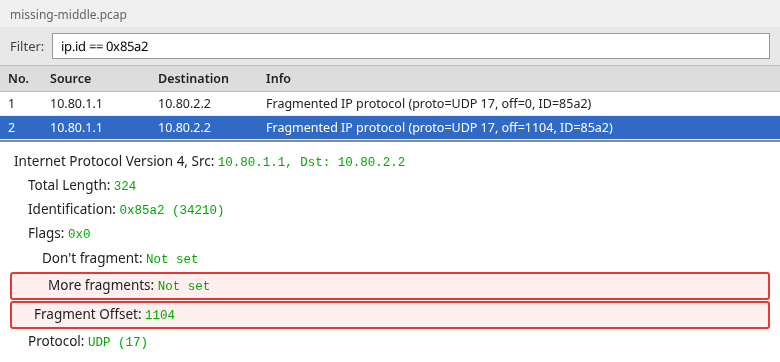
These signs point to a missing piece:
- The offsets jump from 0 to 1104 with nothing in between
- There is no fragment list and no UDP header
- Frame 1 has no
[Reassembled IPv4 in frame]line, andip.reassembled_inandip.fragmentsboth match nothing - The tail still says "Fragmented IP protocol" even though MF is clear
Wireshark does not fill the hole, and neither does the receiving host. The receiver throws the incomplete datagram away after a timeout. The application never gets a shorter UDP packet. It gets nothing, so it usually waits and then times out too.
When a piece is missing in your capture, narrow down where it went:
- Look for the missing offset in a capture taken closer to the sender. If it is there, the piece was lost on the path. If it is not, the sender or the capture point never had it.
- Check firewalls, NAT devices, and load balancers on the path. Non-first fragments have no ports, so a rule that matches on ports can drop them while letting the first fragment through.
- Check the capture itself. A port-based capture filter, or a busy capture that drops packets, produces the same gap. Statistics, Capture File Properties shows dropped packets when the capture tool recorded them.
Diagnose MTU and DF problems
DF=1 and packet too large
This capture was produced by sending an oversized ICMP Echo Request with DF set. The key evidence is in the packet itself: IPv4 length 1428, DF set, and the returning ICMP type 3 code 4 message reporting MTU 576. Its Identification is 0x0000, a different datagram from 0x85a2.
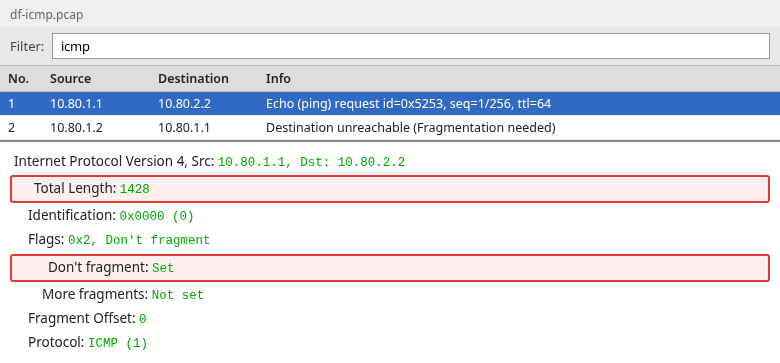
Don't Fragment is set, More Fragments is not set, and the offset is 0. This is a whole packet, not a fragment. Because DF is set and the packet does not fit the next hop, the router must drop it rather than split it.
ICMP Fragmentation Needed
Filter the return message with icmp.type == 3 && icmp.code == 4.
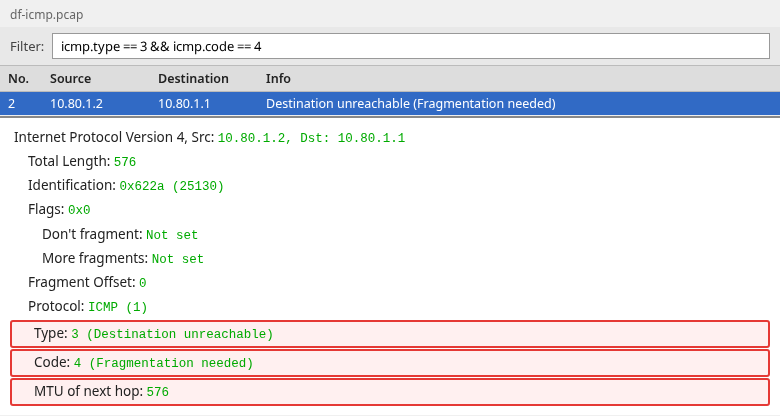
ICMP (Internet Control Message Protocol) is how routers report delivery problems. Read the message field by field:
- Type 3 is Destination Unreachable
- Code 4 is Fragmentation Needed, the reason the packet could not be delivered
- MTU of next hop is 576, the size of the link the 1428-byte packet could not fit through
- The source is the router,
10.80.1.2, and the destination is the host that sent the oversized ping - Expand the ICMP payload to see the start of the dropped ping copied inside, including Don't Fragment
The number to act on is the next-hop MTU. When you find this message in your own capture, use it like this:
- Compare it with the MTU you expected on that path. A value a little below 1500, such as 1400 to 1476, often points to a VPN, GRE, or IPsec tunnel adding its own headers.
- Note which router sent it. The source address of the ICMP message is the hop with the smaller link.
- Check that the sender reacts. After the ICMP error, later packets with DF set should be no larger than the reported MTU. If they stay at the old size, the ICMP message is not reaching the sender, or the sender is ignoring it.
Sometimes the oversized DF packet is in the capture and no Fragmentation Needed follows. That is still a drop, not a successful split. Common reasons:
- The router dropped the packet without sending ICMP
- A firewall on the path blocked the ICMP message
- The capture point does not see the return traffic
A real fragment set looks like the first capture: DF clear, MF set on every piece except the tail, and offsets that meet.
Path MTU Discovery
The path MTU is the smallest MTU on any link between two hosts. Path MTU Discovery is how a sender finds it without fragmenting anything:
- The sender sets DF on its packets
- A router whose next link is too small drops the packet and sends Fragmentation Needed with that link's MTU
- The sender lowers its packet size to that MTU and tries again
Here the reported MTU is 576 bytes, header included. A later packet with DF set has to be 576 bytes or smaller to cross the same hop. In Wireshark, read MTU of next hop on the ICMP error.
When a firewall blocks those ICMP messages, the sender never learns the smaller size. Small packets keep working while large ones disappear. A common symptom is a connection that opens but then stalls when it starts sending a lot of data.
Why Wireshark sometimes shows packets larger than the MTU
A packet larger than the interface MTU is often segmentation offload, not an IP fragment.
TSO, GSO, and where you capture
Offload means the operating system hands work to the network card or to a later stage of the network stack. With TCP segmentation offload (TSO) or generic segmentation offload (GSO), the system builds one large TCP segment. That segment is cut into MSS-sized packets only at the very end, just before it leaves on the wire.
Wireshark on the sending host captures the packet before that cut. As a result it can show an IPv4 length far larger than the interface MTU, even though no packet that size ever crossed the network.
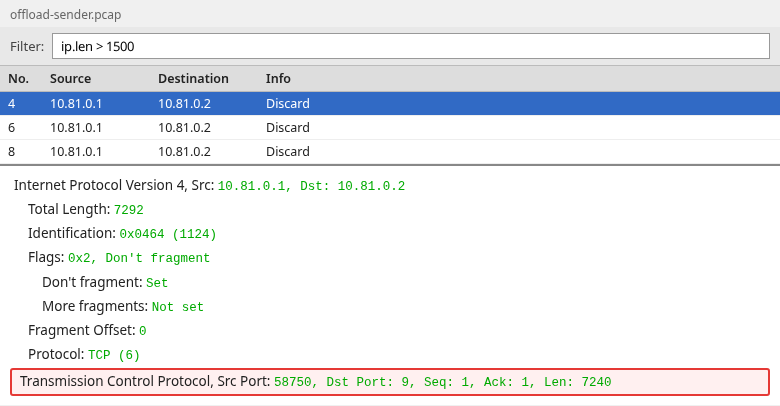
Frame 4 is 7292 bytes of IPv4 carrying 7240 bytes of TCP payload. Three readings show it is not an IP fragment:
- Don't Fragment is set, so no router may split it
- More Fragments is not set
- Fragment Offset is 0
The Info column says Discard because TCP port 9 is the discard service, a test service that throws data away. It does not mean the packet was lost.
I compared this with the same transfer and offload turned off:
- The interface MTU is 1500 and the SYN advertises MSS 1460
- With TSO and GSO off, the data left as 1500-byte IPv4 packets
- Each packet carried 1448 bytes of TCP payload. The other 12 bytes of the MSS went to the TCP timestamp option.
Generic receive offload (GRO) does the reverse on the receiving host. It merges several arriving packets into one before Wireshark sees them, so one frame looks larger than anything on the wire.
DF set, MF clear, and offset 0 only show that the frame is not an IPv4 fragment. If the captured IPv4 length is also larger than the MTU you know that interface uses, host offload is a strong possibility. Confirm the interface MTU and the capture point. A SPAN or tap capture shows what actually crossed the wire. A jumbo MTU, receive aggregation, or a different capture point can also produce a large frame.
Check MTU and offload on the capture host
On a Linux capture host, ip link show prints the interface MTU. Replace enp0s8 with the interface you captured on:
ip link show enp0s83: enp0s8: <BROADCAST,MULTICAST,UP,LOWER_UP> mtu 1500 qdisc fq_codel state UP mode DEFAULT group default qlen 1000
link/ether 08:00:27:c4:4f:20 brd ff:ff:ff:ff:ff:ff
altname enx080027c44f20The mtu 1500 field is the number to compare with the IPv4 length in Wireshark. An MTU of 9000 here would mean jumbo frames, and large captured packets could then be real.
ethtool -k lists the offload features of the same interface. This filters it down to the three that change what Wireshark sees:
ethtool -k enp0s8 | grep -E 'tcp-segmentation-offload|generic-segmentation-offload|generic-receive-offload'tcp-segmentation-offload: on
generic-segmentation-offload: on
generic-receive-offload: onAll three are on, which is the default on most Linux hosts. With these settings, large frames in a capture taken on this host are expected and are not fragments. On Windows, the same settings appear as Large Send Offload and Receive Segment Coalescing in the network adapter's advanced properties.
Fragmentation vs TCP segmentation
Both splits produce smaller packets. The fields that group them are different.
| IPv4 fragmentation | TCP segmentation | |
|---|---|---|
| Who splits the data | The IPv4 sender or an intermediate router, when DF is clear and the packet exceeds the outgoing MTU. The router does it in this capture | The sender, into TCP segments bounded by MSS |
| What ties the pieces together | The same ip.id, source, destination, and protocol |
The same TCP ports and a continuous sequence number |
| Flags you should see | MF set on every piece except the tail, and a non-zero offset after the first | DF is often set. MF stays clear and the offset stays 0 |
| What Wireshark rebuilds | The original IPv4 datagram, then the UDP or other payload | The TCP byte stream, which is a separate feature |
A retransmitted TCP segment is not a fragment either. It is a repeat of data that was not acknowledged. Read the IP flags before you follow sequence numbers.
Summary
Fragments that belong together share one Identification. The first has offset 0 and, when more data follows, MF set. Later pieces carry a higher offset, and the tail has MF clear. Wireshark prints that offset in bytes. The filter ip.frag_offset is still the raw 8-byte count, so do not type the detail-pane number into ip.frag_offset ==.
Capture after the small-MTU link or on the receiver, and filter the capture on a host rather than a port, or the later fragments never reach the file. Reassembly is finished when one frame lists every piece and then shows the original header, such as the UDP ports. ip.fragments finds that frame, and each earlier piece links to it. A jump in the offset, with no reassembly tree, means a piece is missing. ip.fragment.error is for an illegal overlap or an overlong fragment, not for a hole.
DF set on a packet larger than the next hop is a drop, not a split. ICMP type 3 code 4 carries the next-hop MTU. A very large packet with DF set, MF clear, and offset 0 is not an IPv4 fragment. If its length exceeds the known interface MTU on a host capture, segmentation or receive offload is a strong possibility.
References
- RFC 791, Internet Protocol, fragment identification, flags, and offset
- RFC 1191, Path MTU Discovery, ICMP Destination Unreachable code 4 and the next-hop MTU
- Wireshark IP display filter reference
- Wireshark checksum offloading and capture
Frequently Asked Questions
How do I filter fragmented packets in Wireshark?
Use ip.flags.mf == 1 || ip.frag_offset > 0. That keeps every fragment, including the tail. A normal packet has MF clear and offset 0, so it does not match.
Which fields identify fragments of the same IPv4 packet?
Identification, source address, destination address, and protocol. The offset places each piece. More Fragments set means the piece is not the last one.
What does fragment offset mean?
It is where this piece sits in the original packet, after the IPv4 header. The header stores that position in 8-byte units. Wireshark's detail line shows bytes. The filter field ip.frag_offset is the raw unit count, so a detail line of 552 can be filter value 69.
Why does the last fragment have MF=0?
More Fragments clear marks the tail. The receiver uses that flag, the offset, and the length of the tail to know how long the original datagram is. An ordinary packet also has MF clear, so check the offset and the other pieces with the same Identification.
Why does Wireshark show a 20 KB packet on a 1500-byte Ethernet interface?
The capture was probably taken on a host with segmentation or receive offload, so Wireshark saw a large TCP segment before it was cut down to the link MTU. DF set, MF clear, and offset 0 means it is not an IP fragment.
Does TCP MSS prevent IP fragmentation?
MSS limits the TCP payload so a segment usually fits in one link MTU. It does not apply to UDP, and it does not stop a router from fragmenting a different packet whose DF flag is clear.
What does ICMP Fragmentation Needed mean?
It is ICMP Destination Unreachable, type 3, code 4. A router dropped a packet that was larger than the next-hop MTU because Don't Fragment was set. The message includes that MTU. It does not mean fragmentation succeeded.
