
| Tested on | Windows Server 2025 (NPS, domain lab.example) and RHEL 10.2 (Coughlan) |
|---|---|
| Package | Wireshark 4.4.2 |
| Applies to | Cisco IOS XE administrative login with Windows NPS as the RADIUS server |
| Privilege | Administrator on the NPS server to read Network Policy and the Security log; a normal user can open the capture |
| Scope | How NPS authenticates an AD account for Cisco admin login, how a Network Policy returns shell:priv-lvl, and how Wireshark plus NPS events separate a bad password from a bad shared secret. Does not cover wireless PEAP or RADIUS proxying. |
| Related guides | Wireshark tutorial Network Policy Server overview PEAP and MS-CHAPv2 with NPS |
Use Windows Network Policy Server (NPS) as the RADIUS server for Cisco administrative login. The router is the RADIUS client, also called the network access server (NAS). NPS checks the Active Directory account, and a Network Policy decides the Cisco privilege to return.
An Access-Accept means NPS accepted the RADIUS request and returned the attributes for the policy that matched. It does not, by itself, prove the router applied the requested privilege. Read Cisco-AVPair in the accept, then check the level on the router.
Key takeaways
To analyze Cisco AAA against Windows NPS, start with the Access-Request on UDP port 1812. An Access-Accept should carry Cisco-AVPair shell:priv-lvl. An Access-Reject means NPS denied the request. Use NPS event 6273 or 6274 and the reason code to see whether the cause was bad credentials, policy matching, or another authentication or authorization problem. An Access-Request with no reply is different from an Access-Reject. Check reachability and the NPS logs first. A shared-secret mismatch is one common cause.
- The Cisco router is the RADIUS client (NAS). Windows NPS is the RADIUS server.
- NPS authenticates the AD account, then the Network Policy decides whether the request is authorized.
- Cisco privilege is returned with the vendor-specific attribute
Cisco-AVPair = "shell:priv-lvl=<level>". - An Access-Accept means NPS accepted that RADIUS request. For EXEC authorization, confirm the returned
Cisco-AVPairand then verify the resulting privilege on the router. - Authentication uses UDP 1812. Accounting normally uses UDP 1813.
- When NPS denies the request, read the Wireshark result together with NPS event 6273 or 6274 and its reason code.
Cisco AAA with NPS architecture
AAA here is three jobs. Authentication asks who the user is. Authorization asks what they may do. Accounting records that the session started and stopped.
  AD users and groups
           ↓
Windows Server 2025 NPS
           ↓
 UDP 1812 and UDP 1813
           ↓
     Cisco IOS XE
           ↓
Administrator SSH login
Connection Request Policies decide where a request is processed. They matter when NPS should forward the request to another RADIUS server. This setup uses NPS itself as the RADIUS server, so the default policy that authenticates Windows users locally is enough. A custom Connection Request Policy is not required.
Authentication
The router sends an Access-Request to UDP 1812. This configuration uses PAP for Cisco administrative login. Other RADIUS deployments can use different authentication methods. PAP does not put the password on the wire as plain text. RADIUS hides the User-Password value with the shared secret and the Request Authenticator. Wireshark labels that field encrypted. The hiding is not TLS, and the rest of the RADIUS packet stays visible, including the user name.
Authorization
If the password matches and a Network Policy grants access, NPS returns Access-Accept. For Cisco exec privilege, that accept includes shell:priv-lvl:
- Privilege 15 normally provides full privileged EXEC access
- Privilege 1 is the normal user EXEC level
- Levels 2 through 14 are customizable on IOS and IOS XE
shell:priv-lvl=7only places the user at level 7. The commands they can run depend on theprivilegecommands on the device
Accounting
If the router is configured to account, it sends Accounting-Request packets to UDP 1813. Start marks the login. Stop marks the logout. NPS answers with Accounting-Response.
The screenshots use RADIUS client 192.168.56.116 and NPS 192.168.56.128. jane belongs to Network-Admins and receives shell:priv-lvl=15. john belongs to Network-Operators and receives shell:priv-lvl=7. Replace these addresses, groups, and privilege values with the ones used in your environment.
Configure the Cisco router as a RADIUS client
On the router, define the NPS server, put it in a named RADIUS group, and point the login, exec authorization, and accounting method lists at that group. Replace the address and the secret with yours. group radius would also work, but it uses every RADIUS server on the router. The named group NPS-GROUP sends these requests only to NPS.
aaa new-model
radius server NPS
 address ipv4 192.168.56.128 auth-port 1812 acct-port 1813
 key radius-secret
aaa group server radius NPS-GROUP
 server name NPS
aaa authentication login ADMIN group NPS-GROUP local
aaa authorization exec ADMIN group NPS-GROUP local if-authenticated
aaa accounting exec default start-stop group NPS-GROUP
ip radius source-interface GigabitEthernet1
line vty 0 4
 login authentication ADMIN
 authorization exec ADMIN
 accounting exec default
On the authorization list, local is the next method if RADIUS is unavailable or returns an error. It does not override an explicit denial. if-authenticated is the final fallback and permits the EXEC session if the user has already authenticated successfully and the earlier authorization methods cannot provide a result. The login list uses local the same way, without if-authenticated. authorization exec is what makes the router apply shell:priv-lvl from the Access-Accept. Without that command, a successful login can still land at a low privilege even though Wireshark shows privilege 15.
Add the Cisco device as an NPS RADIUS client
In NPS, under RADIUS Clients and Servers, then RADIUS Clients, add the router. The address must be the source address of the Access-Request, not a different interface on the same device. Enable the client and set the shared secret to the same value as the router's key.
The client in this capture is named lab-nas at 192.168.56.116. A Cisco router is added the same way, using the address in ip radius source-interface.
Create the NPS Network Policy
Create one Network Policy per privilege. Put the stricter or more specific policy first. Processing order matters: NPS uses the first matching policy.
For the admin policy:
- Condition: Windows group
LAB\Network-Admins - Access: Grant access
- Authentication method: PAP
- Vendor attribute:
shell:priv-lvl=15
Repeat that for LAB\Network-Operators with shell:priv-lvl=7, and give it the next processing order.
This server did not need a new Connection Request Policy. The event for a successful login names the default policy, Use Windows authentication for all users.
Return Cisco privilege level from NPS
Cisco documents shell:priv-lvl=15 as the vendor-specific attribute that grants privileged EXEC immediately. In the NPS policy profile, add a Vendor Specific attribute, choose Cisco, and set Cisco-AVPair to the string shell:priv-lvl=15 or shell:priv-lvl=7. Returning level 7 does not create a predefined operator role. The router still needs privilege commands if that user should be limited to particular commands.
Some IOS and IOS XE platforms also expect the standard RADIUS Service-Type attribute for exec login, commonly Login. If authentication succeeds but exec authorization fails even though shell:priv-lvl is present, inspect the Access-Accept and the platform AAA documentation for the expected Service-Type.
Wireshark shows that string on the Access-Accept even before you configure a RADIUS shared secret in Wireshark. The password stays obfuscated. The privilege string does not.
Test authentication in Wireshark
Filter with udp.port == 1812. Green means the filter is valid. The screenshot also limits the list to the first six frames so the two accepts and the one reject stay on one screen.
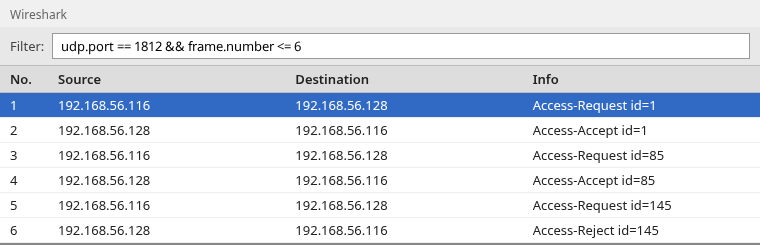
Frames 1 and 2 are jane. Frames 3 and 4 are john. Frames 5 and 6 are jane with a wrong password: Access-Request, then Access-Reject. radius.code == 2 shows only the accepts. radius.code == 3 shows only the reject.
Access-Request
Open frame 1. The user name is readable. The password is not.
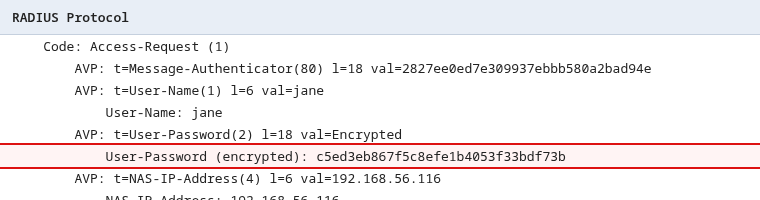
The line User-Password (encrypted) is the PAP password obfuscated with the shared secret. Wireshark can recover it only if you configure that same secret under Edit, Preferences, Protocols, RADIUS. Do not treat the shared secret as a substitute for TLS. The user name, NAS address, and later the privilege attribute are still visible without it.
Access-Accept
Frame 2 is the accept for jane. The Cisco vendor-specific attribute is the privilege.
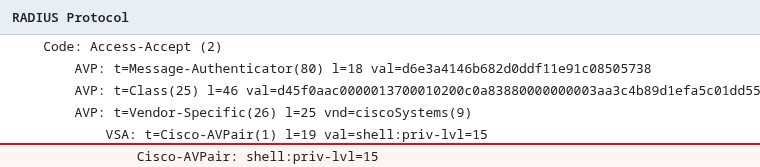
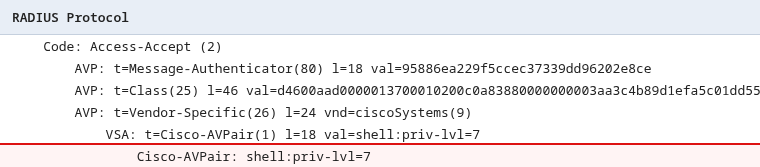
radius.Cisco_AVPair contains "priv-lvl=15" finds this packet. Frame 4 is the accept for john. It returns level 7, which is a different privilege value, not a built-in read-only role.
Access-Reject
Frame 6 is Access-Reject for the bad password. It has no Cisco-AVPair. The router must not start an authorized exec session from that reply. The reason is in the NPS Security log, not in a text field inside this short reject.
Verify authorization on the Cisco router
Access-Accept with shell:priv-lvl=15 is what NPS authorized. The router applies it when aaa authorization exec uses that RADIUS server. After jane logs in, run show privilege on the router. The level should be 15. After john logs in, it should be 7. Level 7 only includes commands assigned to level 7 or below.
If the accept contains the right attribute and show privilege does not, the router is not applying exec authorization. Check authorization exec on the VTY lines before you change the NPS policy.
Verify RADIUS accounting
Filter with udp.port == 1813. A login that is accounted produces a request and a response.
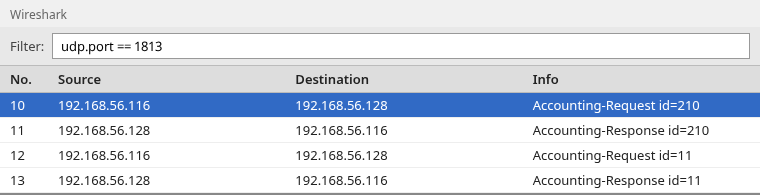
Frame 10 is the start record for jane. Frame 11 is the Accounting-Response. Frame 12 is the stop for the same session, and frame 13 is its response.
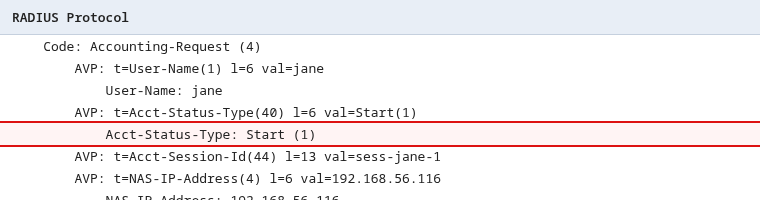
Acct-Session-Id ties the start and the stop together. In this capture that value is sess-jane-1. radius.Acct_Status_Type == 1 is Start. radius.Acct_Status_Type == 2 is Stop.
Troubleshoot common NPS failures
Read the packet and the NPS event together. In Event Viewer, open Custom Views, Server Roles, Network Policy and Access Services, and also the Security log for 6272 and 6273.
No request reaches NPS
If a capture on the NPS host shows no UDP 1812 packet, the router is not sending to this address, or something in the path is dropping it. Confirm ip radius source-interface and the NPS client address are the same address you see as the source in Wireshark.
Event 18, shared secret mismatch
A wrong shared secret in this test produced no RADIUS reply. NPS logged System event 18 from the NPS provider:
An Access-Request message was received from RADIUS client 192.168.56.116
with a Message-Authenticator attribute that is not valid.
The client computes Message-Authenticator with the shared secret. When the secret does not match, NPS discards the request. Wireshark then shows Access-Request packets with no Access-Accept and no Access-Reject. That is not the same as event 6273.
Event 6273 and the reason code
A wrong password does get a reply: Access-Reject. Security event 6273 records the failure. The important lines from the jane reject are:
Account Name: jane
Account Domain: LAB
Authentication Type: PAP
Network Policy Name: -
Reason Code: 16
Reason: Authentication failed due to a user credentials mismatch.
Either the user name provided does not map to an existing user account
or the password was incorrect.
Reason code 16 is the bad username or password. A different reason code means a different problem, such as no matching policy. Event 6272 is the grant that pairs with Access-Accept. Microsoft also documents 6274 for some authentication failures. This wrong-password test logged 6273, not 6274.
Access-Accept but wrong privilege
If frame 2 shows shell:priv-lvl=15 and the router still reports a lower level, NPS did its part. The router is not using that attribute for exec authorization. If the accept has no Cisco-AVPair, the Network Policy that matched did not include the vendor attribute, or an earlier policy matched a broader condition first.
Accounting missing
If UDP 1813 stays empty, the router is not sending accounting. Check aaa accounting exec and that the RADIUS server entry uses acct-port 1813. An Accounting-Request with no Accounting-Response means the request was sent but no reply is visible in the capture. Check the NPS logs and reachability to tell an NPS discard from a dropped reply or a capture that missed the response.
Summary
NPS authenticates the AD user and the Network Policy returns the Cisco privilege. In this capture, jane receives shell:priv-lvl=15 and john receives shell:priv-lvl=7. The User-Password attribute is obfuscated with the shared secret. It is not transported in the clear, and the shared secret is not TLS.
Access-Accept is not the last check. show privilege on the router has to agree with Cisco-AVPair. A wrong password is an Access-Reject plus Security event 6273 reason code 16. A wrong shared secret is silence in Wireshark plus NPS event 18 about an invalid Message-Authenticator. Accounting is a separate conversation on UDP 1813, with Start and Stop tied by the session id.
References
- Network Policy Server
- NPS connection request policies
- Troubleshoot Network Policy Server
- RFC 2865, Remote Authentication Dial In User Service (RADIUS)
- Wireshark RADIUS display filter reference
- Wireshark RADIUS wiki
Frequently Asked Questions
Does RADIUS PAP send the password in clear text?
No. RADIUS hides the User-Password value with the shared secret and the Request Authenticator. Wireshark labels that field encrypted until you give Wireshark the same secret. That hiding is not TLS. The user name is still readable.
Does Access-Accept mean the Cisco privilege is 15?
Only if the accept includes shell:priv-lvl=15 and the router is set to authorize exec from RADIUS. Confirm with show privilege after login. An accept without that attribute did not assign level 15.
Why is there no Access-Reject when the shared secret is wrong?
NPS discards the request when the Message-Authenticator does not match. Wireshark shows the Access-Request and no reply. System event 18 from NPS is the record of that discard. A wrong password is different: you get Access-Reject and Security event 6273.
