
| Tested on | RHEL 10.2 (Coughlan) |
|---|---|
| Package | Wireshark 4.4.2 |
| Applies to | Any host with Wireshark for a saved or live RDP capture |
| Privilege | Normal user to open and filter a saved capture |
| Scope | How to read the RDP negotiation, why TCP port 3389 then shows TLS, and what a TLS key log can and cannot reveal. Does not include a Frida or LSASS injection procedure, and does not walk through Group Policy. |
| Related guides | Wireshark tutorial Analyze TLS in Wireshark Troubleshoot TLS failures |
Open an RDP capture and read the negotiation before you try to decrypt anything. The first packets show which security protocols the client offered and which one the server selected. If the server selects TLS or CredSSP, Wireshark then shows the TLS handshake and encrypted TLS records on TCP port 3389. If it selects Standard RDP Security, the connection stays on the RDP path instead.
A key log can open that TLS layer. It does not automatically show a plaintext password. What appears next depends on whether the session uses CredSSP, Standard RDP Security, or another mechanism.
Key takeaways
To analyze RDP in Wireshark, start with the RDP Negotiation Request and Response. The request shows which security protocols the client supports, while selectedProtocol in the server response shows what was chosen. If the server selects TLS or CredSSP, the following packets appear as TLS on TCP port 3389; their RDP or CredSSP contents remain encrypted until Wireshark has matching TLS secrets.
- Modern RDP commonly uses TLS together with CredSSP and Network Level Authentication, rather than native RDP encryption alone.
- You can inspect the initial RDP negotiation in Wireshark before decrypting TLS and see which security protocols the client requests.
- When CredSSP is negotiated, TLS protects Kerberos or NTLM authentication before the normal RDP session begins.
- Wireshark can decrypt the TLS layer only when you provide matching session secrets or other supported key material.
- Windows Schannel does not behave like a browser with a simple universal
SSLKEYLOGFILEworkflow. Session-secret extraction belongs in a controlled lab, not in a general Wireshark workflow. - Do not assume that decrypting TLS exposes a user's plaintext password. What becomes visible depends on the security mechanism and the authentication flow.
RDP security flow in one diagram
Remote Desktop Protocol (RDP) is the protocol Windows uses for a graphical remote session. The default TCP port is 3389. Before the desktop is drawn, the client and server agree how to protect the connection.
RDP client sends a Negotiation Request
                  ↓
Server returns a Negotiation Response
                  ↓
   TLS handshake on TCP port 3389
                  ↓
    CredSSP runs Kerberos or NTLM
                  ↓
        The RDP session starts
CredSSP (Credential Security Support Provider) is the protocol RDP commonly uses to perform Network Level Authentication before the full desktop session starts. TLS comes up first. Kerberos or NTLM then runs inside that TLS channel. The RDP session starts only after that authentication succeeds.
With Standard RDP Security (PROTOCOL_RDP), the connection does not switch to TLS. RDP uses its own security mechanisms for the session instead. Current Windows installs generally prefer the TLS plus CredSSP path. Read the negotiation in the capture instead of assuming which path was used.
Wireshark filters for RDP and CredSSP
Enter these in the display filter bar and press Enter. Green means the filter is valid. Red means Wireshark could not parse it.
| Goal | Filter |
|---|---|
| RDP negotiation packets | rdp |
| Client offered TLS | rdp.negReq.requestedProtocols.ssl == 1 |
| Client offered CredSSP | rdp.negReq.requestedProtocols.hybrid == 1 |
| Client offered RDSTLS | rdp.negReq.requestedProtocols.rdstls == 1 |
| Client offered CredSSP early user authorization | rdp.negReq.requestedProtocols.hybrid_ex == 1 |
| Server selected CredSSP | rdp.negReq.selectedProtocol == 2 |
| Server selected Standard RDP Security | rdp.negReq.selectedProtocol == 0 |
| TLS on the RDP port | tcp.port == 3389 && tls |
| Still-encrypted application data | tcp.port == 3389 && tls.record.content_type == 23 |
== means equals, and && means both conditions must match. These names are the ones Wireshark 4.4.2 uses. hybrid is the filter name for CredSSP. hybrid_ex is CredSSP with an Early User Authorization Result. rdstls is a separate external security protocol the client can offer.
Identify the RDP security protocol before decrypting
The screenshots use client 192.168.70.20 and server 192.168.70.10 on TCP port 3389. The client offers TLS, CredSSP, RDSTLS, and CredSSP with early user authorization. The server selects CredSSP. Use the addresses and protocol flags from your own capture.
Filter with rdp or tls to see the negotiation and the TLS that follows it.
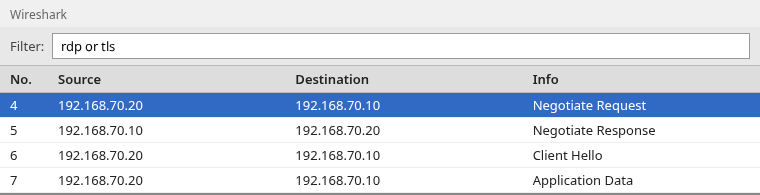
Frame 4 is the client's Negotiate Request. Frame 5 is the server's Negotiate Response. Frame 6 is the TLS Client Hello. Frame 7 is TLS application data, which stays encrypted until you load a matching key log.
Negotiation Request
Click the Negotiate Request and expand Remote Desktop Protocol. The requestedProtocols line is the list of security protocols the client is willing to use.
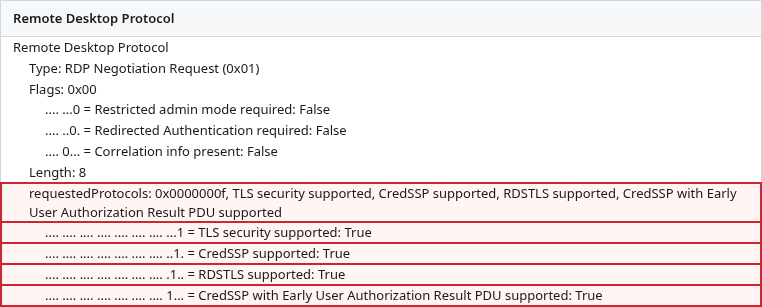
Each flag is independent. True means the client offered that protocol. It does not mean the server agreed. In this capture all four are true:
- TLS security supported (
rdp.negReq.requestedProtocols.ssl) - CredSSP supported (
rdp.negReq.requestedProtocols.hybrid) - RDSTLS supported (
rdp.negReq.requestedProtocols.rdstls) - CredSSP with Early User Authorization Result PDU supported (
rdp.negReq.requestedProtocols.hybrid_ex)
Newer RDP implementations can also negotiate other external security protocols, such as RDS-AAD authentication. Inspect the flags present in your own capture rather than assuming the four shown here are exhaustive.
A request with every flag false is the client asking for Standard RDP Security instead of an external protocol.
Negotiation Response
The server's answer is a Negotiation Response. selectedProtocol is the one protocol it picked, not the full list the client offered.
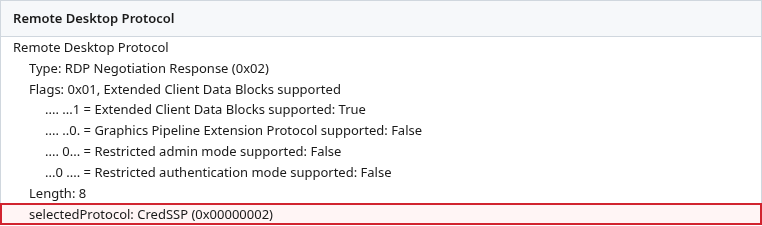
Here selectedProtocol is CredSSP (0x00000002). Filter rdp.negReq.selectedProtocol == 2 finds that choice. The same field is how Wireshark 4.4.2 names the selection on the response, even though the packet is a response.
If the server cannot accept the protocols the client offered, it can return an RDP Negotiation Failure. Wireshark exposes the reason as rdp.negFailure.failureCode. A negotiation failure normally ends that connection attempt. It is not the same as the server selecting native RDP security.
If the server selects PROTOCOL_RDP (0x00000000) instead, the session uses Standard RDP Security rather than TLS or CredSSP.
TLS, CredSSP, and Standard RDP Security
Read the response, then match it to the traffic that follows:
- CredSSP selected: a TLS handshake starts, and authentication runs inside it.
- TLS selected without CredSSP: the session is still inside TLS, but the CredSSP authentication step is not part of the negotiation you just read.
- No external protocol selected (
PROTOCOL_RDP): the connection stays on the Standard RDP Security path rather than switching to TLS. You may still see RDP and TPKT framing, but later RDP payload can be encrypted and may not be fully decoded by Wireshark.
Windows can be configured to negotiate or require a particular security layer. For a capture you already have, trust the Negotiation Request and Response. Policy on the server is only background. MS-RDPBCGR is the protocol specification for those packets.
Why Wireshark shows TLS on port 3389
Once the server selects TLS or CredSSP, the bytes after the negotiation are a TLS handshake. Wireshark stops calling them RDP and calls them TLS. That is expected. The RDP session is inside the TLS channel, so a filter of rdp goes quiet and tcp.port == 3389 && tls is the traffic that remains.
The Client Hello is metadata you can read without any key. It shows the TLS version and cipher suites the client offered. It does not show the username, the password, or the desktop.
Later records are application data. Without a key log they stay ciphertext.
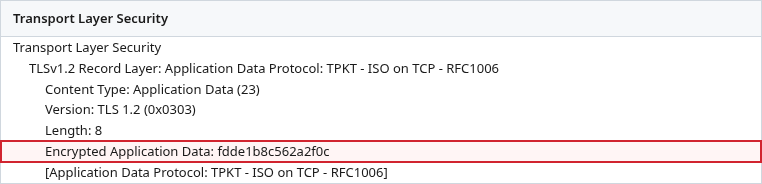
The line Encrypted Application Data is the part that matters. Wireshark may also label the record TPKT, because port 3389 is the RDP port. That label is Wireshark's protocol association for the encrypted payload. It does not mean the RDP contents have been decrypted. The hex on that line is still ciphertext.
What is required to decrypt modern RDP TLS
Wireshark decrypts this TLS when you give it secrets that match the session in the capture. The usual preference is the TLS key log file, (Pre)-Master-Secret log filename under Edit → Preferences → Protocols → TLS. The decrypt TLS in Wireshark guide shows that dialog for browsers and other clients that write SSLKEYLOGFILE.
Wireshark can also decrypt some older TLS sessions with the RDP server's RSA private key, but only when the handshake used RSA key exchange. It does not work for modern (EC)DHE sessions or TLS 1.3, so per-session secrets in a key log are the more general method.
Windows Remote Desktop does not use the browser key-log workflow. Its TLS stack is Schannel. Setting SSLKEYLOGFILE in the environment, which is enough for Firefox or Chrome, does not by itself make mstsc write a key log. Getting those secrets means a controlled lab against a Windows system you are allowed to instrument. It is not a step to take on a production session host.
Older guides used process instrumentation such as Frida to extract Schannel secrets. Those methods are Windows-build dependent and may be blocked by current platform protections, so this article does not use them. If you already have a key log from a lab you control, load that file in the TLS preference above and reopen the capture. When the secrets match, Wireshark replaces the encrypted application data with the protocols inside.
What becomes visible after decryption
A matching key log removes the TLS wrapper. It does not turn the whole session into a readable password and a picture of the desktop.
CredSSP
When the negotiation selected CredSSP, the first decrypted messages are CredSSP, not the remote desktop. Wireshark has a CredSSP dissector. Useful filters after decryption include:
credsspfor the CredSSP exchangecredssp.userNamefor the user name, when the dissector can see itcredssp.negoTokenfor the authentication tokens carried inside TLS
Those tokens are Kerberos or NTLM. A TLS key log removes the outer TLS encryption. CredSSP authentication tokens and delegated credentials can still be protected by SPNEGO, Kerberos, or NTLM, so TLS decryption alone does not guarantee that credssp.userName or credssp.password becomes readable.
Kerberos and NTLM
Inside the CredSSP tokens you may see Kerberos or NTLM messages. A Kerberos exchange is ticket traffic. An NTLM exchange is a challenge and a response. Neither one is the user's password written out as text. The Kerberos in Wireshark guide is the place to read a Kerberos exchange once it is visible.
RDP PDUs
After CredSSP finishes, further RDP PDUs can appear: the client and server telling each other their capabilities, and then the session data. How much of that Wireshark decodes depends on the negotiated security and on what the dissector implements. Seeing a few decoded RDP headers is normal. Seeing every virtual channel as clean text is not.
What Wireshark still cannot decode
The RDP dissector does not fully decode every virtual channel. Clipboard, drive redirection, and dynamic virtual channels often remain as data inside an RDP PDU even after TLS is removed. A successful key log answers "what is inside this TLS record?" It does not answer "show me the complete remote session."
If the server selected Standard RDP Security instead of TLS, a TLS key log does nothing. There is no TLS session to decrypt. Later RDP payload can still be encrypted after the Security Exchange PDU, and Wireshark may not fully decode it.
Summary
Start with rdp and read the Negotiation Request and Negotiation Response. The request lists what the client offered. The response names the one protocol the server selected. When that protocol is TLS or CredSSP, the rest of the connection is TLS on port 3389, and rdp goes quiet on purpose.
A TLS key log opens the outer TLS records. With CredSSP you should expect CredSSP and then Kerberos or NTLM, then some RDP PDUs. Delegated credentials can stay protected inside that authentication exchange, so a readable password is not guaranteed. Virtual channels are often still incomplete. An RSA server key only helps an older handshake that used RSA key exchange. Windows does not write a browser-style key log on its own.
References
- MS-RDPBCGR: Remote Desktop Protocol
- MS-CSSP: Credential Security Support Provider Protocol
- Wireshark Display Filter Reference: RDP
- Wireshark Display Filter Reference: CredSSP
- Wireshark RDP wiki
- Wireshark TLS wiki
Frequently Asked Questions
Why does Wireshark only show TLS on port 3389?
The RDP negotiation already finished, and the server selected TLS or CredSSP. Everything after that selection is TLS, so the rdp filter matches the negotiation and tcp.port == 3389 && tls matches the rest. That is the protected session, not a capture mistake.
Does decrypting RDP TLS show the password?
Not by itself. A TLS key log removes the outer TLS encryption. CredSSP can still protect the user name and delegated credentials with SPNEGO, Kerberos, or NTLM, so those fields are not guaranteed to be readable.
Does an RDP Negotiation Failure mean the session fell back to native RDP?
No. A Negotiation Failure normally ends that connection attempt. Standard RDP Security is a different outcome: the server selects PROTOCOL_RDP (0x00000000) in a Negotiation Response.
