
| Tested on | RHEL 10.2 (Coughlan) |
|---|---|
| Package | freeradius-3.2.8-2.el10.x86_64, freeradius-utils-3.2.8-2.el10.x86_64 |
| Applies to | Linux hosts running FreeRADIUS 3.2 |
| Privilege | root or sudo to edit /etc/raddb and run the packaged server in debug mode |
| Scope | How to test PAP and CHAP against the default FreeRADIUS server with radtest, what each method puts in the Access-Request, and why CHAP fails when the server has only a hashed password. Does not cover EAP, Cisco AAA, or storing users in LDAP or Active Directory. |
| Related guides | Wireshark tutorial FreeRADIUS LDAP authentication FreeRADIUS with Active Directory |
When a user signs in to a VPN, a Wi-Fi network, or a router, the device often does not check the password itself. It sends the username and password to a RADIUS server such as FreeRADIUS and waits for a yes or a no. PAP and CHAP are two ways to put that password check into the request.
PAP gives FreeRADIUS the user's password in the User-Password attribute. RADIUS protects that value on the wire with the client and server shared secret, so it is not sent as plain text. CHAP instead sends a challenge-response value in CHAP-Password. The user's password itself is not in that attribute.
The important server-side difference is password storage. PAP can verify several stored password formats, while CHAP needs FreeRADIUS to obtain the user's cleartext password. radtest stands in for the router. You can run it on the FreeRADIUS host, with no access point and no VPN.
Key takeaways
PAP and CHAP are two ways to ask FreeRADIUS to check a password. The difference shows up in the packet, and again in how the password is stored.
- PAP and CHAP create different Access-Requests. PAP uses
User-Password. CHAP usesCHAP-Password. - PAP does not send the password as visible plain text.
User-Passwordis protected with the shared secret and the Request Authenticator. - CHAP sends a challenge-response value, not the password. The challenge comes from
CHAP-Challenge, or from the Request Authenticator when that attribute is absent. - The server-side difference is password storage. PAP can verify several password-hash formats. CHAP requires FreeRADIUS to obtain the cleartext known-good password.
- If PAP works and CHAP fails, check the stored password format first. The log line is
Cleartext-Password is required. - Run the server in debug mode while you test. Access-Reject and a timeout can each have several causes. The debug log tells you which one it was.
RADIUS terms used in this guide
The rest of the page uses a handful of RADIUS words. Here is what each one means in plain terms:
- NAS (Network Access Server): the device that asks the question, such as a VPN server, a Wi-Fi controller, or a router. FreeRADIUS calls it a RADIUS client. In this guide, radtest plays that role.
- Access-Request: the packet the NAS sends to FreeRADIUS. It carries the username and the password information.
- Access-Accept and Access-Reject: the yes/no responses used in the tests on this page. RADIUS can also send Access-Challenge for authentication flows that need another step.
- Attribute: one named field inside a RADIUS packet, such as
User-NameorUser-Password. - Shared secret: a password configured on both the NAS and FreeRADIUS. It is not the user's password. RADIUS uses it to hide
User-Passwordand to prove the packet came from a known client. - Request Authenticator: a 16-byte unpredictable value placed in an Access-Request. RADIUS uses it when hiding
User-Password, and CHAP can use it as the challenge whenCHAP-Challengeis absent. - Known-good password: the copy of the user's password, or a hash of it, that FreeRADIUS has stored. FreeRADIUS compares the incoming request against it.
- radtest: the command that sends one login attempt and prints the reply. In this guide it plays the role of the router.
- Hash: a one-way value calculated from a password. It lets a server compare passwords without storing the original password in recoverable form. Password-storage hashes commonly include a salt, so the same password does not necessarily produce the same stored value.
- Message-Authenticator: a check value built with the shared secret. If it does not match, FreeRADIUS drops the request and sends no reply.
- UDP 1812: the port FreeRADIUS listens on for login requests. Accounting uses UDP 1813, which this guide does not test.
- Module: one job inside FreeRADIUS. The
papmodule checksUser-Password. Thechapmodule checksCHAP-Password.
PAP vs CHAP in FreeRADIUS
In FreeRADIUS, PAP usually means the Access-Request contains User-Password. CHAP means it contains CHAP-Password. A real NAS may collect those credentials through another login protocol, then build the RADIUS request. radtest skips that device and generates the Access-Request directly. FreeRADIUS answers either request with Access-Accept or Access-Reject.
The table shows the difference you can see in a packet and on the server:
| PAP | CHAP | |
|---|---|---|
| Attribute in the Access-Request | User-Password |
CHAP-Password |
| Is the password in the packet? | Yes, protected with the shared secret, not as plain text | No, only a hash response |
| Stored password FreeRADIUS can use | Cleartext, or a hash such as MD5, SHA, or crypt | Cleartext only |
| FreeRADIUS module that checks it | pap |
chap |
PAP carries the user's password in the User-Password attribute. Before transmission, RADIUS hides that value using the shared secret and the Request Authenticator. That is password hiding, not modern encryption, and it is only as strong as the shared secret. FreeRADIUS reverses the hiding with the same secret and compares the recovered password with the known-good value:
             NAS or radtest
                    ↓
    Access-Request with User-Password
                    ↓
FreeRADIUS checks the known-good password
                    ↓
     Access-Accept or Access-Reject
CHAP works differently. The client takes three inputs: a one-byte identifier, the user's password, and a challenge. It runs them through MD5 and sends the identifier plus the 16-byte result in CHAP-Password. The password is one of the inputs, but it is not in the packet. To check the result, FreeRADIUS repeats the same calculation with its own copy of the password and compares the two hashes. That is why it needs the cleartext known-good password:
                NAS or radtest
                       ↓
       Access-Request with CHAP-Password
                       ↓
    Challenge, or the Request Authenticator
                       ↓
FreeRADIUS rebuilds the response from cleartext
                       ↓
        Access-Accept or Access-Reject
On a real PPP login, such as some VPN or dial-up links, the router challenges the user first and then forwards the user's response to RADIUS. radtest skips the user and builds the Access-Request itself.
A one-way hash such as MD5, SHA, or crypt is not enough for CHAP. FreeRADIUS would need the original password to calculate the expected response, and a hash cannot be turned back into that password. PAP can still verify those formats. The password arrived inside User-Password, so FreeRADIUS hashes it and compares the two hashes.
Example setup used in this guide
The commands and screenshots use FreeRADIUS and radtest on the same RHEL host at 192.168.56.116. That is why Wireshark shows the same address as source and destination. A real NAS would normally have a different source address.
Confirm the server version before you change any files:
radiusd -vFreeRADIUS Version 3.2.8On Debian and Ubuntu the debug command is often freeradius -X, and the configuration directory is /etc/freeradius/3.0. The filenames below match this RHEL layout, under /etc/raddb.
A virtual server is the list of steps FreeRADIUS runs for each request. The default one, sites-enabled/default, already calls the files module to look up users, and the pap and chap modules to check passwords. Leave it in place. You only add a test user and a RADIUS client.
Configure a FreeRADIUS test user
The files module reads users from /etc/raddb/mods-config/files/authorize. On this system, /etc/raddb/users is a symlink to the same file, so either name opens it. Edit it with sudo and add two users at the end:
alice	Cleartext-Password := "correct-horse"
hashed	MD5-Password := "2eb62d171ba8491db496081a8b24738a"
Each line has four parts:
- The username, such as
alice, at the start of the line, followed by a tab - The attribute that names the stored password format, such as
Cleartext-PasswordorMD5-Password - The operator
:=, which sets the value for this user - The value in quotes
alice is the user that should succeed at both PAP and CHAP. hashed has the same password, but FreeRADIUS stores only its MD5, so you can watch CHAP fail while PAP still works. MD5 is used here only to show that storage difference. Unsalted MD5 is not an appropriate password-storage format for a real user database.
Known-good password
Cleartext-Password is the known-good password FreeRADIUS keeps for alice. It is a setting in the users file, not a field in the packet. The packet field for PAP is User-Password. Keep those two names apart, because both appear in the radtest output later.
To build the value for hashed, run the password through md5sum. printf '%s' prints the password without a trailing newline, so the newline does not become part of the hash:
printf '%s' correct-horse | md5sum2eb62d171ba8491db496081a8b24738a -That hex string is the value on the hashed line. The - at the end only means md5sum read from standard input.
Why CHAP needs cleartext access
CHAP gives the server a hash, not the password. FreeRADIUS has to obtain the user's cleartext known-good password at authentication time and calculate the same hash. A one-way hash such as MD5, SHA, or crypt cannot be turned back into the password, so the chap module has nothing to calculate with and stops.
In this file-based example, that cleartext value is Cleartext-Password on alice. PAP can still succeed for hashed, because PAP receives the password itself. FreeRADIUS hashes the received password and compares the result with the stored MD5.
Allow radtest as a RADIUS client
FreeRADIUS answers only clients listed in /etc/raddb/clients.conf. Each client block names one allowed source address and the shared secret for it. Add a new block and leave the existing client localhost block unchanged. radtest on this host sends from 192.168.56.116, so that address is both the client and the server in this example:
client radius_lab {
    ipaddr = 192.168.56.116
    secret = radius-lab-secret
}
radius_lab is only a label. ipaddr is the address allowed to send requests, and secret is the shared secret that client must use. The secret is not the user's password. It is the key between this RADIUS client and FreeRADIUS. Use a long random secret on a real server, and do not keep a default such as testing123 on a server other people can reach. When you add a real NAS later, give it its own client block with that device's address.
Test PAP authentication
Debug mode runs FreeRADIUS in the foreground and prints every decision it makes for each request. It reads the configuration once, when it starts. After any later change to the users file or clients.conf, press Ctrl+C and start it again.
If the radiusd service is already running, stop it first. Only one server can listen on UDP port 1812, so a second copy fails to start. Use the sudo command to edit /etc/raddb and to run the packaged server. Binding to port 1812 does not need root by itself. Start the server and leave this terminal open:
sudo radiusd -XWait until the log says the server is listening:
Ready to process requestsOpen a second terminal for the client side. radtest takes its arguments in a fixed order:
-t papchooses the methodaliceandcorrect-horseare the username and password to test192.168.56.116is the FreeRADIUS address. Port 1812 is the default0is the NAS port number radtest puts in the packet. It can stay0radius-lab-secretis the shared secret from theclientblock
Send a PAP request for alice:
radtest -t pap alice correct-horse 192.168.56.116 0 radius-lab-secretSent Access-Request Id 156 from 0.0.0.0:51433 to 192.168.56.116:1812 length 75
User-Name = "alice"
User-Password = "correct-horse"
NAS-IP-Address = 192.168.56.116
NAS-Port = 0
Message-Authenticator = 0x00
Cleartext-Password = "correct-horse"
Received Access-Accept Id 156 from 192.168.56.116:1812 to 192.168.56.116:51433 length 38
Message-Authenticator = 0x1a97497a631e679702da099e432a1e4fReceived Access-Accept means FreeRADIUS accepted the password. The indented lines under Sent Access-Request are the attributes radtest built. Two of them need a note, because they are not what goes on the wire as written:
Cleartext-Passwordis radtest's own note of the password it used. It is not sent as an attribute.Message-Authenticator = 0x00is a placeholder. radtest fills in the real value, a checksum signed with the shared secret, just before it sends the packet.
from 0.0.0.0 only means radtest did not bind to one address. The reply goes back to 192.168.56.116, which is the address you will see in Wireshark.
Access-Request
-t pap is what makes this a PAP request. radtest prints User-Password = "correct-horse". That is the attribute FreeRADIUS will check.
Access-Accept
The reply code is Access-Accept. The packet id matches the request (Id 156), which is how radtest pairs a reply with its request. A wrong password uses the same command with a different password and comes back as Access-Reject. That case is in the troubleshooting section below.
FreeRADIUS debug result
Switch back to the radiusd -X terminal. The lines that decided this request are:
(0) pap: Login attempt with password
(0) pap: Comparing with "known good" Cleartext-Password
(0) pap: User authenticated successfully
(0) Sent Access-Accept Id 156 from 192.168.56.116:1812 to 192.168.56.116:51433 length 38
The (0) at the start is the request number in this debug session. pap recovered the password from User-Password and compared it with the known-good Cleartext-Password for alice. They matched, so FreeRADIUS sent Access-Accept.
Test CHAP authentication
Leave the debug server running and send CHAP for the same user. Only -t chap changes.
radtest -t chap alice correct-horse 192.168.56.116 0 radius-lab-secretSent Access-Request Id 223 from 0.0.0.0:33714 to 192.168.56.116:1812 length 76
User-Name = "alice"
CHAP-Password = 0xb823602229f8e439cad82b76ff5c17a487
NAS-IP-Address = 192.168.56.116
NAS-Port = 0
Message-Authenticator = 0x00
Cleartext-Password = "correct-horse"
Received Access-Accept Id 223 from 192.168.56.116:1812 to 192.168.56.116:33714 length 38
Message-Authenticator = 0x4bd96e4e99dfc2407094a5e88f7619efThere is no User-Password in this request. CHAP-Password is the hash. Cleartext-Password is again radtest's local note of the password it hashed. It was not copied into the RADIUS packet.
CHAP-Password
The hex value has two parts. The first byte, here b8, is the identifier. The next 16 bytes are the MD5 result. Wireshark shows them as CHAP Ident and CHAP String.
CHAP-Challenge
CHAP needs a challenge, but radtest does not add a separate CHAP-Challenge attribute. When that attribute is missing, RADIUS uses the 16-byte Request Authenticator as the challenge. Many NAS devices do send CHAP-Challenge as its own attribute. FreeRADIUS uses CHAP-Challenge when it is present, and falls back to the Request Authenticator when it is not.
Access-Accept
The reply is Access-Accept, same as PAP, because alice has Cleartext-Password and the hash matches.
FreeRADIUS debug result
The debug log names the chap module this time:
(1) chap: Comparing with "known good" Cleartext-Password
(1) chap: CHAP user "alice" authenticated successfully
The server took the identifier, its stored Cleartext-Password, and the challenge, ran the same MD5 calculation, and got the same 16 bytes that radtest sent. Matching hashes mean the client knew the password.
Compare PAP and CHAP in Wireshark
Start a capture with the capture filter udp port 1812, run the two radtest commands, then stop the capture. On Linux, traffic from a host to its own address goes over the loopback interface, even when the address is 192.168.56.116. Capture on lo or any, not on the network card, or the capture stays empty. The Wireshark tutorial covers the three panes and the display filter bar if you have not used them. A green filter bar means the expression is valid.
The display filter radius shows the whole exchange. radius.code == 1 is Access-Request, radius.code == 2 is Access-Accept, and radius.code == 3 is Access-Reject.
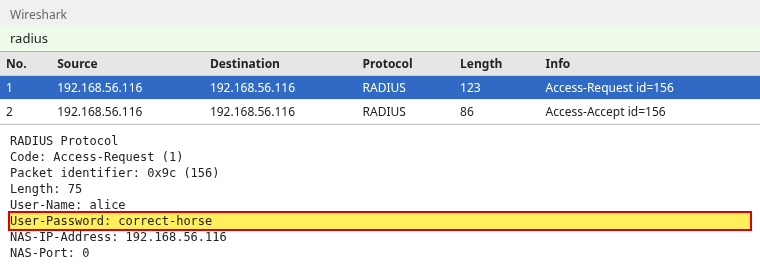
PAP is a request plus an accept. Source and destination are both 192.168.56.116. A CHAP exchange has the same two packet types. The difference is inside the request:

Select the PAP Access-Request. Without the shared secret, Wireshark cannot undo the hiding and shows User-Password as unreadable bytes. Open Edit, then Preferences, then Protocols, then RADIUS, and set the shared secret to radius-lab-secret. Wireshark then shows the recovered password. That value was not visible plain text in the captured packet. Wireshark decoded it because you gave it the secret:
The CHAP request has no User-Password. It has CHAP-Password, and the Authenticator line is the challenge radtest used, because the packet has no CHAP-Challenge attribute:
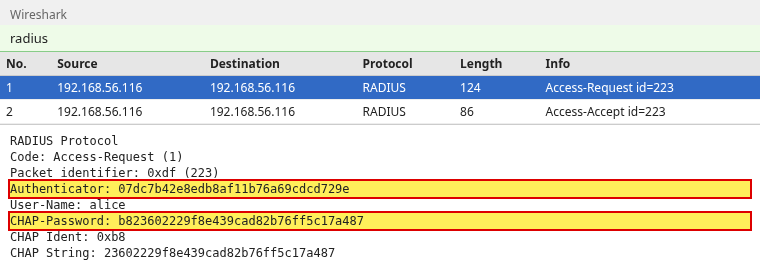
CHAP Ident 0xb8 is the first byte of CHAP-Password. CHAP String is the MD5 that follows it. The shared secret does not change what Wireshark shows here, because there is no hidden password to decode. The packet only carries the hash and the challenge.
Why PAP works but CHAP fails
Each test below changes one thing and keeps everything else the same, so the debug output points at that one change. Keep radiusd -X running for the first three tests. The last test edits clients.conf, so restart the server for it.
No cleartext password
hashed has the right password, stored only as MD5. PAP still accepts it:
radtest -t pap hashed correct-horse 192.168.56.116 0 radius-lab-secretSent Access-Request Id 182 from 0.0.0.0:39917 to 192.168.56.116:1812 length 76
User-Name = "hashed"
User-Password = "correct-horse"
NAS-IP-Address = 192.168.56.116
NAS-Port = 0
Message-Authenticator = 0x00
Cleartext-Password = "correct-horse"
Received Access-Accept Id 182 from 192.168.56.116:1812 to 192.168.56.116:39917 length 38
Message-Authenticator = 0xb547aff0be7b8455cb55700181b8bdd4The debug line for that accept is pap: Comparing with "known-good" MD5-Password. FreeRADIUS hashed the password from the request and compared that hash with the MD5 stored for hashed. The two matched, so PAP succeeded even though the users file does not contain correct-horse for that account.
CHAP against the same user is rejected:
radtest -t chap hashed correct-horse 192.168.56.116 0 radius-lab-secret(0) -: Expected Access-Accept got Access-Reject
Sent Access-Request Id 207 from 0.0.0.0:51711 to 192.168.56.116:1812 length 77
User-Name = "hashed"
CHAP-Password = 0x19d4677178f8e815eaa5c1d1fb102935d8
NAS-IP-Address = 192.168.56.116
NAS-Port = 0
Message-Authenticator = 0x00
Cleartext-Password = "correct-horse"
Received Access-Reject Id 207 from 192.168.56.116:1812 to 192.168.56.116:51711 length 38
Message-Authenticator = 0xbdc42bcbbcfa90d322868ad7b7517ad5radtest expected an accept, so it also prints Expected Access-Accept got Access-Reject. The reason is in the server log. &control is FreeRADIUS's name for a value it looked up for the user. It is not a field from the packet:
chap: ERROR: &control:Cleartext-Password is required for authenticationGive that user a Cleartext-Password in this file if the NAS must use CHAP. If the account can stay as a one-way hash, use PAP instead of CHAP.
Wrong password
PAP with the wrong password for alice is a normal reject, not a missing-password error:
radtest -t pap alice wrong-password 192.168.56.116 0 radius-lab-secret(0) -: Expected Access-Accept got Access-Reject
Received Access-Reject Id 162 from 192.168.56.116:1812 to 192.168.56.116:60886 length 38The matching debug line is pap: Cleartext password does not match "known good" password.
Wrong shared secret
Use the right password and the wrong secret:
radtest -t pap alice correct-horse 192.168.56.116 0 wrong-secret(0) No reply from server for ID 57 socket 5FreeRADIUS checks the Message-Authenticator with its own copy of the secret. When the two secrets differ, the check fails, and FreeRADIUS drops the packet without any answer. RADIUS treats a packet it cannot verify as untrusted, so it does not reply at all. The debug log names the client and the reason:
Dropping packet without response because of error: Received packet from 192.168.56.116 with invalid Message-Authenticator! (Shared secret is incorrect.) (from client radius_lab)A wrong shared secret can produce that timeout, because FreeRADIUS discards a request that fails verification. A timeout is not unique to the secret. An unknown client, a firewall, a wrong address, or a stopped server can look the same from radtest. A wrong user password normally produces Access-Reject, but Access-Reject does not by itself prove the password was wrong. Read radiusd -X for the reason.
Client not defined
radius_lab allows requests from 192.168.56.116. If that client is missing, or its ipaddr is some other address, the same radtest command gets no reply again. The debug line is different:
Ignoring request to auth address 192.168.56.116 port 1812 bound to server default from unknown client 192.168.56.116 port 48608 proto tcpThe request was sent with the default UDP transport. In this captured debug output the line ends with proto tcp. For this step, the important fields are unknown client and the source address 192.168.56.116. Add a client block for that source address, and configure the same shared secret on the NAS and FreeRADIUS.
When a test fails, match what radtest printed to the likely cause, then confirm it in radiusd -X:
| What radtest shows | Likely cause | What to check in radiusd -X |
|---|---|---|
| Access-Reject for CHAP, Access-Accept for PAP | No cleartext password for that user | Cleartext-Password is required for authentication |
| Access-Reject | Wrong user password, unknown user, or a policy decision | The pap or chap line, such as does not match "known good" password |
| No reply from server | Wrong shared secret | invalid Message-Authenticator |
| No reply from server | Source address not in clients.conf |
unknown client |
| No reply, and nothing at all in the debug log | Wrong address or port, a firewall, or the server is not running | Confirm the server printed Ready to process requests |
Is CHAP more secure than PAP?
No. CHAP keeps the password out of the RADIUS packet, and that is the comparison people usually stop at. On FreeRADIUS the tradeoff goes the other way. CHAP requires FreeRADIUS to obtain the user's cleartext password at authentication time. A one-way password hash is not enough, so a stolen user file is more serious than it is with PAP.
In the users file, that cleartext value is Cleartext-Password. Anyone who copies a database of those values has the passwords. PAP can verify a hash and still check User-Password, which is what the hashed user showed. The MD5 in that example is only a demonstration. A real PAP deployment should use a stronger stored hash.
CHAP also has a weakness on the network. Someone who captures a CHAP exchange has the challenge and the hash. On their own computer, they can try passwords from a list, hash each one the same way, and stop when a result matches. That is an offline guessing attack. It needs no more traffic to the server, so the server cannot rate-limit it.
User-Password receives the RADIUS password-hiding treatment based on the shared secret. CHAP-Password does not. Its protection is that it is a challenge-response value rather than the password itself. The FreeRADIUS CHAP documentation says not to enable CHAP for these reasons, and treats PAP as the stronger of the two when the password database might be stolen. PAP's protection on the wire still depends on the shared secret, so make that secret long and random.
Use CHAP when an existing NAS offers nothing else and FreeRADIUS can obtain the cleartext password. Do not turn PAP off because an older guide called CHAP the secure choice.
Which authentication method should you use today?
If the NAS only supports PAP and CHAP, PAP is generally the better choice when FreeRADIUS can verify a securely stored password hash. Use CHAP only when the device requires it and FreeRADIUS can obtain the cleartext password.
EAP is a later login method that can use a certificate instead of putting a password in the RADIUS packet. 802.1X is the Wi-Fi and switch login that usually carries EAP. EAP-TLS is the EAP type where the client proves its identity with a certificate. Prefer that when the NAS supports it and you can issue certificates. It is not a drop-in replacement for a device that can only send PAP or CHAP. Those two remain the methods to understand when the device still sends them.
Summary
PAP and CHAP are two ways to carry the same password check in a RADIUS Access-Request. PAP carries User-Password, protected with the shared secret rather than sent as plain text. CHAP carries a hash in CHAP-Password, and the challenge is either the CHAP-Challenge attribute or the Request Authenticator. You added one users-file entry and one client block, then sent both kinds of request with radtest -t pap and radtest -t chap. radiusd -X showed which module checked each one.
CHAP accepts alice only because FreeRADIUS can read Cleartext-Password for that account. The same password stored as MD5 still passes PAP and fails CHAP with Cleartext-Password is required for authentication. A wrong password normally returns Access-Reject. A wrong shared secret or an unknown client returns no reply, and so can a firewall or a stopped server. radiusd -X separates those cases.
CHAP is not the safer default. It requires cleartext access on the server, and a captured challenge plus CHAP-Password can be attacked offline. Keep PAP when the NAS allows it. Where the NAS supports EAP, especially 802.1X, a method such as EAP-TLS is the better next step.
References
- FreeRADIUS authentication protocols and password storage
- FreeRADIUS CHAP module
- RFC 2865: Remote Authentication Dial In User Service
- Wireshark RADIUS display filter reference
Frequently Asked Questions
Does the RADIUS server send the CHAP challenge to the user?
No. FreeRADIUS checks the hash it receives. It does not send a challenge to the user. A NAS may challenge the user first and then put the response in the Access-Request. radtest builds that request directly. If CHAP-Challenge is absent, the Request Authenticator is the challenge.
Why does CHAP fail when PAP works for the same password?
CHAP succeeds only when FreeRADIUS can obtain the user's cleartext known-good password. A one-way hash such as MD5, SHA, or crypt is enough for PAP and not enough for CHAP. In the users file that cleartext value is Cleartext-Password. The debug line is Cleartext-Password is required for authentication.
Why does radtest say there is no reply from the server?
A wrong shared secret can produce no reply, because FreeRADIUS discards a request that fails verification. An unknown client, a firewall, a wrong address, or a stopped server can look the same from radtest. A wrong user password normally returns Access-Reject. Access-Reject can also come from an unknown user or another policy decision, so read the server debug log for the reason.
Is the Cleartext-Password line in radtest output sent on the network?
No. radtest prints the password it used to build the request. Wireshark shows User-Password for PAP, or CHAP-Password for CHAP. It does not show a Cleartext-Password attribute.
